
SDD BGB1208 - Relieuse professionnelle CANON - Notice d'utilisation et mode d'emploi gratuit
Retrouvez gratuitement la notice de l'appareil SDD BGB1208 CANON au format PDF.


| Type d'appareil | Relieuse automatique |
| Capacité de reliure | Jusqu'à 350 feuilles |
| Type de reliure | Reliure à la colle en ligne |
| Compatibilité imprimantes | Intégration complète avec imprimantes Océ |
| Fonctionnement hors ligne | Oui, avec impression de documents hors ligne |
| Options disponibles | Rotation et pliage, découpe de tranche 3 lames |
| Vitesse d'opération | Rapide, ajustement automatique à la vitesse de l'imprimante |
| Type de documents | Livres et documents de différents formats et épaisseurs |
| Qualité de finition | Professionnelle, finition parfaite |
| Installation | Simple et rapide |
| Contrôle | Électronique et synchronisé avec l'imprimante |
| Maintenance | Intervention minimale requise |
| Utilisation | Conçu pour la production à la demande |
| Refroidissement | Refroidissement rapide par collage |
| Format de reliure | Reliure parfaite (perfect binding) |
FOIRE AUX QUESTIONS - SDD BGB1208 CANON
Questions des utilisateurs sur SDD BGB1208 CANON
0 question sur cet appareil. Repondez a celles que vous connaissez ou posez la votre.
Poser une nouvelle question sur cet appareil
Téléchargez la notice de votre Relieuse professionnelle au format PDF gratuitement ! Retrouvez votre notice SDD BGB1208 - CANON et reprennez votre appareil électronique en main. Sur cette page sont publiés tous les documents nécessaires à l'utilisation de votre appareil SDD BGB1208 de la marque CANON.
MODE D'EMPLOI SDD BGB1208 CANON

SDD BGB1208
Perfect Binder
Professional finishing

High quality perfect bound books
This powerful perfect binder is the ideal solution for productive binding and publishing on demand. With this online glue binder, time-consuming, labour-intensive offline binding is a thing of the past. The SDD BGB1208 binder is the basis of a totally automated online finishing system.
Professional looking, perfect binding
The SDD BGB1208 binder handles books and documents of varying thicknesses and media types. Publishing on demand means exactly that: you can print complete books whenever you need them, and you can bind them to professional standards with the SDD BGB1208 binder. With a binding capacity of up to 350 sheets, this binder can easily and automatically handle even the largest print runs. It produces a very strong bind by rapid cooling of the glue in conjunction with milling of the spine. The binder is technically and electronically synchronised with the printer's output and automatically adjusts to the printer's speed. All in all, the SDD BGB1208 is quick to set up and very simple to operate.
Full integration with Océ printers
The SDD BGB1208 binder can be seamlessly integrated with various Océ printer. Operating online with an Océ printer, the binder receives the output from the printer, collates the prints, binds the finished documents using glue, and delivers them neatly stacked. The printer and the SDD BGB1208 are linked together for perfect communication. The physical integration of printer and binder ensures a smooth, trouble-free process, reducing manual intervention to an absolute minimum. What's more, when operating online to the printer, the finished books are delivered close to the normal operating position.
Offline operation
The SDD BGB1208 binder can also be used offline if required. In this mode, print sets from different printers are fed into the SDD BGB1208 binder using the offline document input.
Options
Two options are available:
The SDD PRF1000 (perforate, rotate and fold) unit is required for A5 book production. It transforms A4 sheets into A5 signatures prior to binding.
The Challenge CMT 330 3-knife trimmer is designed to trim all 3 sides of the book. Just key in the starting and finished sizes and the trimmer automatically does the rest.
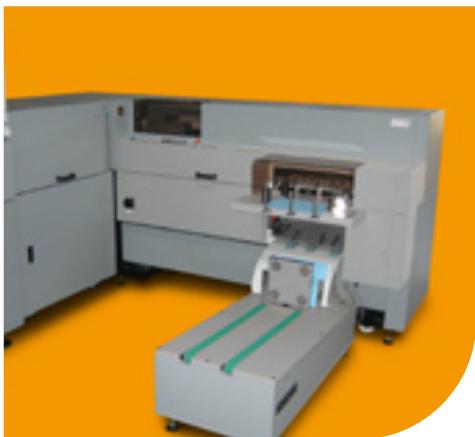
Perfect binder

Perfect binder with Challenge CMT 330 3-knife trimmer
Specifications
Compatibility
Océ VarioPrint 2100/2110
Océ VarioPrint 4110/4120
Océ VarioPrint 6160/6200/6250/6320 Ultra Line
Input
Paper size (length x width)
The SDD BGB1208 accepts only one paper size that is within the following specification:
Minimum: 210 × 203 ~mm (online to Océ Varioprint 6160/6200/6250/6320 Ultra Line)
Minimum: 210 x 208 mm (online to Océ Varioprint 2100/2110/4110/4120)
Minimum: 140 × 210 ~mm (hand fed)
Maximum: 305 × 356 ~mm (online)
Maximum: 320 × 356 ~mm (hand fed)
Paper weight
60 - 160g / m^2 (depending on media type) Cover weight
80 - 250g / m^2 (may require pre-scoring)
Cover stack
Maximum: 70~mm
Cover types
Coated paper, card with windows, with transparent front, etc.
Book thickness
Minimum (online): 20 sheets of 80g / m^2 paper
Minimum (hand fed): 5 sheets
Maximum 35mm (approximately 350 sheets of 80g / m^2 paper)

Printing for Professionals
Throughput
Productivity
Dependent upon on the printer
Offline maximum: 290 books per hour
Physical characteristics
Dimensions
Width: 2,600 mm
Depth: 1,490 mm
Height: 1,200mm
An extra 800mm should be added for service purposes
Weight
Approx. 760kg
Power supply requirements
38oV, 3 phase, 50 Hz, 20A, 3 kW or 208V, 3 phase, 60 Hz, 20A, 3 kW
Warm up time
45 minutes
Noise level at operator position 79 dB(A)

For information and services, visit us at www.oce.com