
SPOTLIGHT PRO - Webcam TRUST - Notice d'utilisation et mode d'emploi gratuit
Retrouvez gratuitement la notice de l'appareil SPOTLIGHT PRO TRUST au format PDF.


| Type de produit | Webcam HD |
| Marque | Trust |
| Modèle | Spotlight Pro |
| Résolution vidéo | HD 720p (1280 x 720 pixels) |
| Microphone intégré | Oui, microphone USB |
| Connexion | USB 2.0 (câble intégré) |
| Angle de vue | 70° (estimation) |
| Cadence d'images | 30 images par seconde |
| Mise au point | Fixé (estimation) |
| Dimensions | Environ 100 x 50 x 50 mm |
| Poids | Environ 100 g |
| Alimentation | Via port USB (5 V) |
| Systèmes d'exploitation compatibles | Windows 10, Windows 8 |
| Fixation | Clip pour écran ou support |
| Entretien et nettoyage | Essuyer avec un chiffon doux et sec |
| Sécurité | Ne pas exposer à l'humidité ou aux liquides |
| Pièces détachées | Aucune pièce détachable |
| Réparabilité | Non réparable par l'utilisateur |
| Informations générales | Fabriqué par Trust International B.V., Pays-Bas |
FOIRE AUX QUESTIONS - SPOTLIGHT PRO TRUST
Questions des utilisateurs sur SPOTLIGHT PRO TRUST
0 question sur cet appareil. Repondez a celles que vous connaissez ou posez la votre.
Poser une nouvelle question sur cet appareil
Téléchargez la notice de votre Webcam au format PDF gratuitement ! Retrouvez votre notice SPOTLIGHT PRO - TRUST et reprennez votre appareil électronique en main. Sur cette page sont publiés tous les documents nécessaires à l'utilisation de votre appareil SPOTLIGHT PRO de la marque TRUST.
MODE D'EMPLOI SPOTLIGHT PRO TRUST
text_image
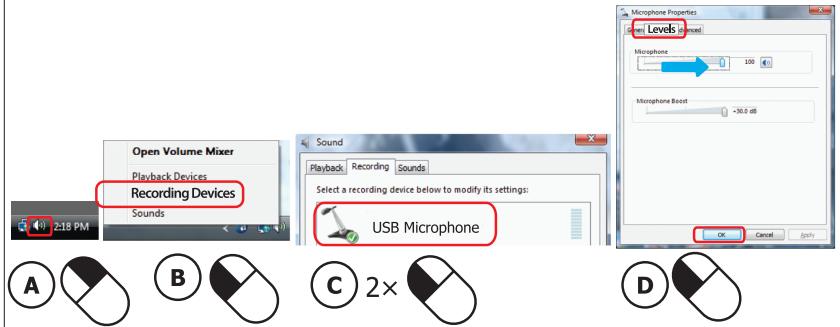
Open Volume Mixer Playback Devices Recording Devices 2:18 PM Sound Sound Playback Recording Sounds Select a recording device below to modify its settings: USB Microphone OK Cancel Levels Level 5 Level 4 Microphone 0 100 Microphone Boost -30.0 dB A B C 2× DPicture button
text_image
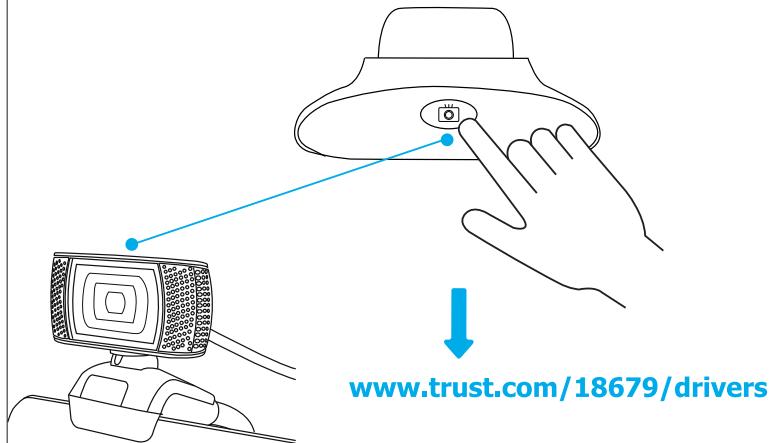
www.trust.com/18679/driversFrequently Asked Questions
http://www.trust.com/18679/faq
© 2016 Trust International B.V. - All rights reserved
Laan van Barcelona 600
3317DD, Dordrecht, NL
Trust
HD 720P
Webcam
TRINO
Quick Installation Guide

natural_image
Black MiTrust camera with coiled cord and head-mounted sensor (no visible text or symbols)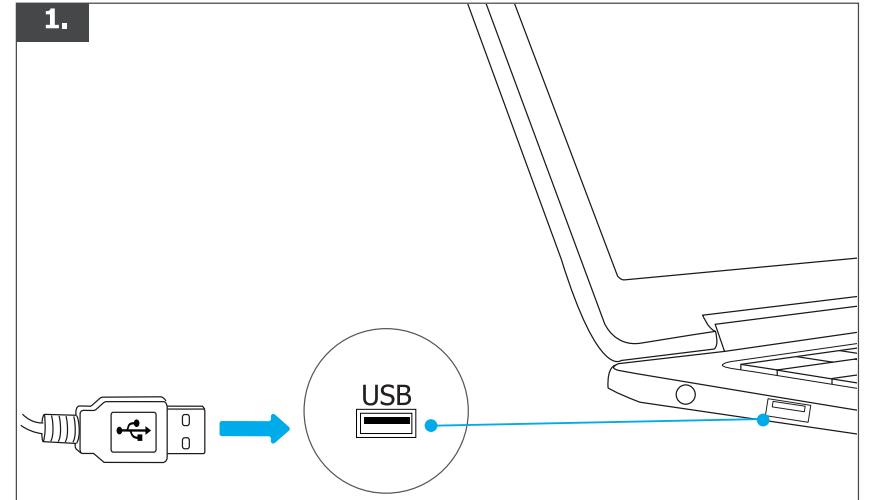
text_image
1. USB
natural_image
Illustration showing a device with a blue arrow indicating rotation, next to a computer monitor (no text or symbols present)
text_image
Windows 10 Recording Devices Sound Playback devices Open Volume Mixer 4/22/2015 Troubleshoot sound problems Volume control options 4/22/2015 Recording Select a recording device below to modify its settings Mie in at front panel (blacks) Backer High Definition Audio USB Microphone Configure Set Default Properties OK Cancel Apply Levels Microphone Properties General Level Measurements Advanced Microphone 100 Microphone Boost +10.0 dB OK Cancel Apply A B C 2× D