
RS900 - Chargeur de batterie LA CROSSE TECHNOLOGY - Notice d'utilisation et mode d'emploi gratuit
Retrouvez gratuitement la notice de l'appareil RS900 LA CROSSE TECHNOLOGY au format PDF.


| Type de produit | Chargeur de batterie intelligent |
| Marque | LA CROSSE TECHNOLOGY |
| Modèle | RS900 |
| Alimentation | Adaptateur secteur 100-240 VAC |
| Dimensions (L x l x H) | 75 x 129 x 37.2 mm |
| Poids (approximatif) | 200 g (sans piles) |
| Types de piles rechargeables | NiCd et NiMH (AA / AAA) |
| Courant de charge | 200, 500, 700 ou 1000 mA (jusqu'à 1800 mA pour 1-2 piles) |
| Modes de fonctionnement | Charge, Décharge, Test, Rafraîchissement |
| Affichage | LCD individuel par compartiment (courant, temps, tension, capacité) |
| Détection de fin de charge | Détection -dV et protection contre la surchauffe |
| Capacité maximale testable | 3000 mAh |
| Charge lente d'entretien | Oui (environ 5 % du courant sélectionné) |
| Nombre de compartiments | 4 (indépendants) |
| Accessoires inclus | Adaptateurs pour piles C et D (4 chacun), transformateur, sac de rangement, 4 piles AA et 4 piles AAA |
| Entretien | Nettoyer avec un chiffon doux et humide. Ne pas utiliser de solvants. Ne pas immerger. |
| Sécurité | Utiliser uniquement à l'intérieur, ne pas exposer à l'humidité. Débrancher lorsqu'il n'est pas utilisé. |
| Réparabilité | Ne pas ouvrir ni réparer soi-même. Retourner au point d'achat pour réparation. |
| Température de fonctionnement | Environ 0°C à 40°C |
FOIRE AUX QUESTIONS - RS900 LA CROSSE TECHNOLOGY
Questions des utilisateurs sur RS900 LA CROSSE TECHNOLOGY
0 question sur cet appareil. Repondez a celles que vous connaissez ou posez la votre.
Poser une nouvelle question sur cet appareil
Téléchargez la notice de votre Chargeur de batterie au format PDF gratuitement ! Retrouvez votre notice RS900 - LA CROSSE TECHNOLOGY et reprennez votre appareil électronique en main. Sur cette page sont publiés tous les documents nécessaires à l'utilisation de votre appareil RS900 de la marque LA CROSSE TECHNOLOGY.
MODE D'EMPLOI RS900 LA CROSSE TECHNOLOGY
BATTERY CHARGER RS-900
Instruction Manual
BEFORE USING OUR BATTERY CHARGER RS-900, READ IN DETAILS ALL INSTRUCTIONS CONTAINED IN THIS MANUAL. KEEP THIS MANUAL IN A SAFE PLACE AS YOU MAY NEED TO USE IT AT A LATER DATE.
We draw the attention of all users of this device: please follow the safety and maintenance instructions which are part of this manual. Also read the caution markings on the charger, the manual, and the gift box.


Verpackung

INTRODUCTION:
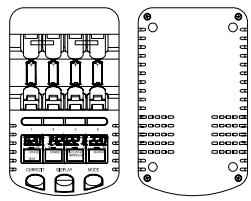
Congratulations on purchasing this intelligent charging unit which enables definitely quick and optimum charging to "AA" and "AAA" rechargeable batteries. With charging, discharging, refreshing and capacity test functions as well as individual LCD displays for charging compartments; this charging unit is reliable, user-friendly and ideal for use in the home, office or on journey.
The Charging unit
CAUTIONS:
- The charger is restricted to charging NiCd and NiMH rechargeable batteries only. Never adopt this charger to other types of batteries such as alkaline, lithium, carbon zinc or other types that are not specified.
- The charging unit shall only be used only at normal indoor room conditions.
- Always follow the charging instructions for the rechargeable battery. Observe the recommended charging current of the rechargeable batteries. Never adopt a charging current higher than recommended in the charging process.
- Never use any power cable and transformer other than those originally supplied with the charging unit.
- The rechargeable batteries may become hot during charging (especially when high charging current is chosen). User shall take extra care when taking out the batteries after charging.
- Unplug the charging unit from the power source when not in use.
FEATURES:
The Charging unit
- Charging rechargeable battery in various current (200, 500, 700 or 1000mA ). The
charging current can be set up to 1500 or 1800mAh when two batteries are charged.
Fast charging - 70 mins to charge up 2000 mAh batteries
Individual LCD display for compartments
- Charging both "AA" and "AAA" rechargeable batteries simultaneously
Overheat detection to protect rechargeable batteries from over-charging
- Minus delta voltage (-dV) detection for charge termination
- Damaged batteries detection
- Discharge mode (first discharging and then charging) to remove memory effect of rechargeable batteries
- Refreshing old rechargeable batteries by discharging/ charging cycles
Test function to check the capacities of rechargeable batteries
- Charging/ Discharging functions can be launched independently and simultaneously to each rechargeable battery in the compartments
- Various display modes during charging/discharging - the charging current (in mA), time elapsed (in hh:mm), the terminal voltage (in V) and accumulated capacities (in mAh or Ah)
INVENTORY OF CONTENTS
- Charging unit
-
Transformer
-
Size "C" battery adapter (4 nos.) & Size "D" battery adapter (4 nos.)
- Holding Bag
- "AA" rechargeable battery (4 nos.) & "AAA" rechargeable battery (4 nos.)
- Instruction Manual
FUNCTION KEYS:
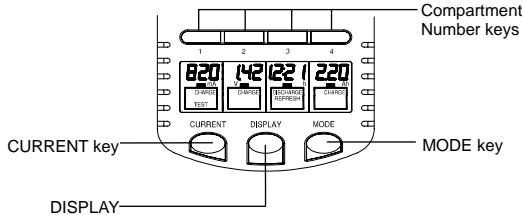
There are three easy-to-use function keys and four number keys in the charging unit:
Compartment Number key
Press and release the Number key to select a particular battery compartment for charge modes and/or display mode adjustment.
MODE key
The mode key shall first be pressed and held for 1 second to activate the mode change. The subsequent pressing of the mode key will enable to toggle between the "Charge", "Discharge", "Test" and "Refresh" mode. To change the operating mode for individual rechargeable battery, first press corresponding NUMBER key then press the MODE key.
DISPLAY key
Press and release to select the displays of the charging current (in mA), time elapsed (in hh:mm), the terminal voltage (in V) and accumulated capacities (in mAh or Ah) during the charging or discharging process.
To change the display content of a particular rechargeable battery, first press corresponding NUMBER key then press the DISPLAY KEY.
CURRENT key
Press to select the amount of current to be applied (within the first 8 seconds after batteries are inserted) in different operating modes (also see "Start charging the rechargeable batteries" below).
OPERATING MODES OF THE CHARGING UNIT
This powerful charging unit provides the following operating modes:
a. Charge up the rechargeable battery (CHARGE) – to charge up the rechargeable battery, automatically switch to trickle charge after rechargeable battery is full.
b. Discharge then charge up the rechargeable battery (DISCHARGE) - to discharge the rechargeable battery then charge it for minimizing the memory effect.
c. Refresh the rechargeable battery (REFRESH) – to refresh the rechargeable battery to its maximum capacity by charging and discharging the rechargeable battery repeatedly until no further increase in the capacity is estimated. For old rechargeable batteries or those have not been used for a long times, refreshing may bring the rechargeable battery back to the optimum condition.
d. Check the rechargeable battery capacity in mAh/ Ah (TEST)
CHARGE MODE
Charging at 200mA is the default-operating mode of the charging unit.
When only one or two numbers of rechargeable batteries are charged, provided that only compartment 1 and compartment 4 are used, a charging current up to 1500 or 1800mA may be set by the pressing the CURRENT key.
On the other hand, when charging three or four numbers of rechargeable batteries at the same time, user may select a charging current of 200, 500, 700 or 1000mA .
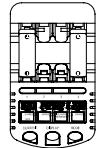
When charging two batteries at compartment 1 & 4-max. charging current: 1800mA
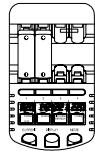
When charging two batteries at compartment 1 & 2 - max.
charging current: 1000 mA
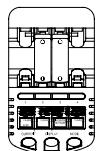
When charging two batteries at compartment 2 & 3 - max.
charging current: 1000 mA
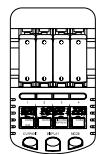
When charging four batteries max. charging current: 1000mA
The estimated time of charging by various charging current is tabulated in Table 1.
| Table 1. Charging Time with various charging current | |||
| Size of battery | Battery Capacity | Charging current selected (mA) | Estimated charging time |
| AA | 2300 mAh | 1800 | ~75 min |
| 1500 | ~90 min | ||
| 1000 | ~2 hr 15 min | ||
| 700 | ~3 hr 15 min | ||
| 500 | ~4 hr 30 min | ||
| 200 | ~11 hr 30 min | ||
| AA | 2000 mAh | 1800 | ~70 min |
| 1500 | ~80 min | ||
| 1000 | ~2 hr | ||
| 700 | ~3 hr | ||
| 500 | ~4 hr | ||
| 200 | ~10 hr | ||
| AAA | 700 mAh | 700 | ~60 min |
| 500 | ~84 min | ||
| 200 | ~3 hr 30 min | ||
Note:
- User shall always observe the recommended maximum charging current of the rechargeable batteries. In general, 200mA is a recommended charging current if rapid charging is not necessary. It is definitely safe and optimum to the rechargeable batteries.
- When the transformer has been plugged to the power source, the version number of the charger (for example "29") will be displayed first. Then all the segments will light up momentarily and the "null" sign will be shown before batteries are placed. If damaged batteries are placed to the charging unit, the charger will also show "null" on LCD.
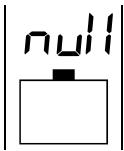
"null" displayed - No battery or damaged battery is placed to the charging unit
START CHARGING THE RECHARGEABLE BATTERIES
Once a rechargeable battery is inserted after the transformer has been plugged to the power source, the battery voltage (for example, "1.39V") will be displayed for 4 seconds. Then "200 mA Charge" (default mode) will be shown on LCD for another 4 seconds, indicating that charging with 200 mA is to be started if no alternation in setting is made.
Within this 8-second time from inserting the batteries the user may first select the operating mode by the MODE key. (The mode key shall first be pressed and held for 1 second to activate the mode change. The subsequent pressing of the mode key will enable to toggle between the "Charge", "Discharge", "Test" and "Refresh" mode.)
Then within 4 seconds from the last key pressing, user may select the charging/ discharging current by pressing the CURRENT key.
Note:
There is a 4-second time allowed for choosing further functions after each key pressing. If no more key is pressed, the LCD will blink one time to indicate the end of setting. Afterward, the current can no longer be changed during the process and the selected mode will be undergone.
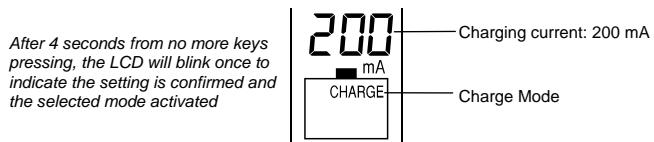
During charging, the different displays- Charging current (in mA), Time elapsed (in hh:mm), Terminal voltage (in V) and Accumulated capacities (in mAh or Ah) may be toggled and selected by pressing the DISPLAY key (refer Table 4). After the rechargeable battery is fully charged, "Full" sign will be shown on the display and the user may take out them at this time. Or if the rechargeable batteries are kept placing at the compartments, trickle charging will start. The trickle charging current is around 5% of the selected charging current to keep the rechargeable batteries being full.
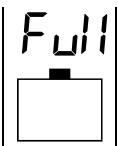
"Full" sign is shown -The battery is fully charged
Note :
- The current cannot be altered once the setting has been confirmed in the initial stage. This can avoid the user changing the current setting accidentally while doing setting on other rechargeable batteries. If one wants to change the applied current afterward, the rechargeable batteries must be taken out and inserted again.
- The maximum charging current of other rechargeable batteries are restricted by the current setting of the first inserted rechargeable battery. For instance, if the first inserted rechargeable battery is set to charge at 700mA , then the second, third and fourth rechargeable batteries can be only set to charging at a maximum current of 700mA .
Therefore, user is recommend to place the battery with the highest expected charging current at Compartment 1 first. To release the restriction of setting charging current, user shall take out all four rechargeable batteries from the charging unit.
To change the operating mode during charging, one can press the MODE key (for selecting all rechargeable batteries) or NUMBER key then MODE key (for selecting individual rechargeable battery). 4 seconds after the last key press the LCD will blink one time to indicate the end of changing.
- When overheating condition occurs (over about 53^ , usually due to too high a charging current selected), the charging will be stopped immediately and the display will show "000 mA", the charging process will only resume once the temperature of the rechargeable batteries drops to a safe level. If overheat conditions continue to occur, the rechargeable batteries shall be taken out to cool down and then charged at a lower current.
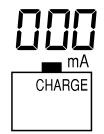
When the battery is overheated the charging will ceases automatically. "000 mA" will be displayed.
- For new rechargeable battery it is recommended to charge it with 200mA current for re-conditioning it from the long storage status.
DISCHARGE MODE
Discharge mode will first discharge the rechargeable battery then charge it. It is for removing the memory effects of rechargeable batteries.
By pressing the MODE key within 8 seconds after inserting the rechargeable batteries, the Discharge mode can be selected. (The mode key shall first be pressed and held for 1 second to activate the mode change. The subsequent pressing of the mode key will enable to toggle between the "Charge", "Discharge", "Test" and "Refresh" mode.)
Then user may also select different discharging current (see Table 2) by pressing the CURRENT key, within 8 seconds after inserting the batteries. (The display will blink once to indicate the setting has been confirmed and the current cannot be changed afterward.)
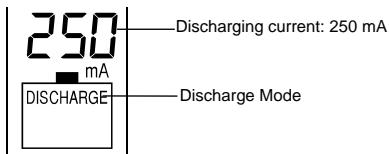
Note: The discharging current is always set to be half of the coming charging current whose upper limit is 1000mA (see Table 2). Therefore user is recommended to carefully select the discharging current so that the charging current afterward will not be too high.
| Table 2. DISCHARGE MODE Current | ||||
| User-selected Discharging current | 100 mA | 250 mA | 350 mA | 500 mA |
| Thereafter Charging current | 200 mA | 500 mA | 700 mA | 1000 mA |
Finally batteries will be fully charged in discharge mode and "Full" will be displayed. If user presses DISPLAY key at this time, "charge" icon instead of "discharge" icon will be displayed.
REFRESH MODE
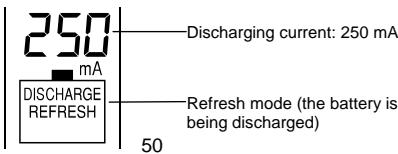
Old rechargeable batteries and those have not been used for a long time require refreshing. This process will recover the optimum capacity of the rechargeable batteries. By pressing the MODE key within 8 seconds after inserting the rechargeable batteries, the Refresh mode can be selected.
Refresh mode will start with discharging the rechargeable battery, then charging it. The repeated discharging and charging cycles will be launched until no further increase in the measured capacities is estimated.
Note:
- By pressing the MODE key within 8 seconds after inserting the rechargeable batteries, the Refresh mode can be selected. (The mode key shall first be pressed and held for 1 second to activate the mode change. The subsequent pressing of the mode key will enable to toggle between the "Charge", "Discharge", "Test" and "Refresh" mode.) Then user may also select different discharging current by pressing the CURRENT key (see "Note" in Discharge mode and Table 2), within 8 seconds after inserting the batteries. (Or the display will blink once to indicate the end of setting and the current cannot be changed afterward.)
It may take up to several days to finish the refreshing process, depending on the selected discharging current.
The maximum refresh current is 1000mA and not affected by the number of rechargeable batteries inserted.
TEST MODE
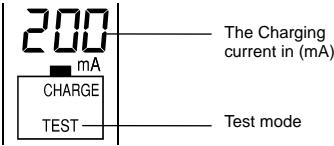
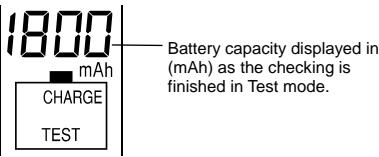
In Test mode the rechargeable batteries will first be fully charged and then discharged to determine the capacities. Finally, the rechargeable batteries are charged up again and the capacity in (mAh) of (Ah) will be estimated and shown after the discharging ends.
By pressing the MODE key within 8 seconds after inserting the rechargeable batteries, the Test mode can be selected. (The mode key shall first be pressed and held for 1 second to activate the mode change. The subsequent pressing of the mode key will enable to toggle between the "Charge", "Discharge", "Test" and "Refresh" mode.)
Note:
After selecting the Test mode, user may select different charging current in the Test mode by pressing the CURRENT key, within 8 seconds after the batteries are inserted. The afterward-discharging current will be half of the selected charging current (see Table 3).
| Table 3. TEST MODE Current | ||||
| User-selected Charging current | 200 mA | 500 mA | 700 mA | 1000 mA |
| Thereafter Discharging current | 100 mA | 250 mA | 350 mA | 500 mA |
The maximum charging current is 1000mA and not affected by the number of rechargeable batteries inserted.
After the test mode is finished, the display will shift between the "Full" sign and the battery capacity (in mAh or Ah) automatically in 3-second intervals until the rechargeable batteries are removed. User can switch to other displays by pressing the DISPLAY key.
TRICKLE CHARGING
After the rechargeable battery is fully charged in any of the operating modes, the charger will give a small amount of current to the rechargeable batteries to maintain the fully charged level. This mode is automatically launched after rechargeable batteries are fully charged and kept at the charging unit. The signal "Full" will be displayed on the LCD.
DISPLAY MODE INFORMATION
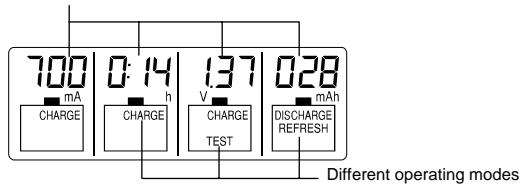
User can use different display modes to monitor the rechargeable battery condition during the different operations (see below figure and Table 4 to 7).
Different display modes are
exhibited: Charging current, Time,
Voltage and Capacity
| Table 4. Various displays in Charge Mode | ||||
| Stage in Charge mode | Various displays (toggled by pressing DISPLAY key) | |||
| Voltage (V) | Current (mA) | *Time (hh:mm) | Capacity (mAh/ Ah) | |
| During charging | Instantaneous Battery voltage | Charging current | Charging time elapsed | Accumulated capacity |
| Full stage | Trickle charging current | |||
| Table 5. Various displays in Discharge Mode | ||||
| Stage in Discharge mode | Various displays (toggled by pressing DISPLAY key) | |||
| Voltage (V) | Current (mA) | *Time (hh:mm) | Capacity (mAh/ Ah) | |
| During discharging | Instantaneous Battery voltage | Discharging current | Discharging time elapsed | Capacity during discharging |
| During charging | Charging current | Charging time elapsed | Accumulated capacity | |
| Full stage | Trickle charging current | |||
| Table 6. Various displays in Refresh Mode | ||||
| Stage in Refresh mode | Various displays (toggled by pressing DISPLAY key) | |||
| Voltage (V) | Current (mA) | *Time (hh:mm) | Capacity (mAh/Ah) | |
| During discharging processes | Instantaneous Battery voltage | Discharging current | Discharging time elapsed | Capacity during discharging |
| During charging processes | Instantaneous Battery voltage | Charging current | Charging time elapsed | Capacity determined in last time discharging |
| Full stage | Instantaneous Battery voltage | Trickle charging current | Elapsed time of last discharging | Maximum battery capacity determined in discharging |
| Table 7. Various displays in Test Mode | ||||
| Stage in Test mode | Various displays (toggled by pressing DISPLAY key) | |||
| Voltage (V) | Current (mA) | *Time (hh:mm) | Capacity (mAh/ Ah) | |
| During charging | Instantaneous Battery voltage | Charging current | Charging time elapsed | “--- mAh” |
| During discharging | Discharging current | Discharging time elapsed | “--- mAh” | |
| During 2nd charging | Charging current | 2nd charging time elapsed | Capacity of the battery determined in discharging | |
| Full stage | Trickle charging current | Discharging time elapsed | Capacity of the battery determined in discharging | |
*The timer will be resumed and counted from 00:00 again after the time elapsed is longer than 20 hours. (For example, 1:45 will be shown after the battery has been refreshed for 21 hr and 45 min.)
THE SIZE C AND SIZE D BATTERY ADAPTERS (FREE ACCESSORY)
The battery adapters are used for connecting the AA battery to the electric devices requiring Size C or D batteries. To apply the adapter:
- Install the AA battery to Size C or Size D adapter as below.
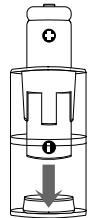
The AA battery used with the Size C adapter
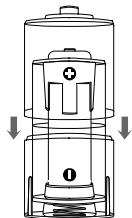
The AA battery used with the Size D adapter (it is required to place the battery into the "C" adapter first and then the "D" adapter)
- Ensure the polarity is correct and the assembling condition is good.
Note:
- User shall stopping using the adaptor when there are any cracks or damages observed in the adaptor, and in case undesired smell comes out while applying the adapter in certain kinds of electric device.
CARE AND MAINTENANCE:
- Extreme temperatures, vibration and shock should be avoided as these may cause damage to the unit
- When cleaning the displays and casings, use a soft damp cloth only. Do not wet the exposed metal part of the charging unit. Do not use solvents or scouring agents as they may mark the LCD and casing.
Do not spill water to the charging unit. - Do not make any repair attempts to the units. Return it to its original point of purchase for repair by a qualified engineer. Opening and tampering with the units may invalidate its guarantee.
- Do not expose the unit to extreme and sudden temperature changes, this may lead to damage to the electronic parts in the unit.
SPECIFICATIONS:
| Input voltage for AC/DC adapter | 100-240 VAC |
| Charging current range | 200 mA - 1800 mA |
| Max charging capacity (capacity of rechargeable batteries) | 3000 mAh |
| Dimensions (L x H x W) of | |
| Charging unit | 75 x 129 x 37.2 mm |
LIABILITY DISCLAIMER:
The manufacturer and supplier cannot accept any responsibility for any improper or incorrect use and any consequences occur.
Any performance of repairs or alternations by someone other than the original supplier will invalidate the warranty.
This product is only designed to be used by people who have read and understood this instruction manual.
The specifications of this product may change without prior notice.
This product is not a toy. Keep out of the reach of children.
No part of this manual may be reproduced without written consent of the manufacturer.
CAUTION - SAFETY INSTRUCTIONS :
Attention of users is drawn to the following important safety instructions:
As stated in the manual above », only use NiCd or NiMH rechargeable batteries.
- Indoor use only, do not expose to humidity. Do not place in water or submit to rain and/or snow. Do not store or use near by an extreme heat. Keep batteries away from the fire.
- Do not use any accessories not supplied with the charger, unless recommended by La Crosse Technology. Especially, never use any power cable and transformer other than those originally supplied with the charging unit.
Disconnect the AC/DC when not in use
- Do not operate the charger if it has received a blow or has been subject to any damage.
- Do not use the Battery charger for other purposes than the Only one originally forecast
- Do not open or/and disassemble the charger: such handling may result in a risk of electric shock or fire.
- BATTERY CHARGER RS-900
- INTRODUCTION:
- CAUTIONS:
- FEATURES:
- The Charging unit
- INVENTORY OF CONTENTS
- FUNCTION KEYS:
- Compartment Number key
- MODE key
- DISPLAY key
- CURRENT key
- OPERATING MODES OF THE CHARGING UNIT
- CHARGE MODE
- Note:
- START CHARGING THE RECHARGEABLE BATTERIES
- Note :
- DISCHARGE MODE
- REFRESH MODE
- TEST MODE
- TRICKLE CHARGING
- DISPLAY MODE INFORMATION
- THE SIZE C AND SIZE D BATTERY ADAPTERS (FREE ACCESSORY)
- CARE AND MAINTENANCE:
- SPECIFICATIONS:
- LIABILITY DISCLAIMER:
- CAUTION - SAFETY INSTRUCTIONS :
Marque : LA CROSSE TECHNOLOGY
Modèle : RS900
Catégorie : Chargeur de batterie