KMC 3 - Haut-parleur KLIPSCH - Notice d'utilisation et mode d'emploi gratuit
Retrouvez gratuitement la notice de l'appareil KMC 3 KLIPSCH au format PDF.


Questions des utilisateurs sur KMC 3 KLIPSCH
0 question sur cet appareil. Repondez a celles que vous connaissez ou posez la votre.
Poser une nouvelle question sur cet appareil
Téléchargez la notice de votre Haut-parleur au format PDF gratuitement ! Retrouvez votre notice KMC 3 - KLIPSCH et reprennez votre appareil électronique en main. Sur cette page sont publiés tous les documents nécessaires à l'utilisation de votre appareil KMC 3 de la marque KLIPSCH.
MODE D'EMPLOI KMC 3 KLIPSCH
Klipsch®
music center

text_image
kmc3
text_image
KEPech ENGLISH
text_image
LIPSCH K HOPE ARENGLISH
THANK YOU
Thank you for your purchase of the Klipsch® Music Center KMC 3! The KMC 3 combines legendary Klipsch technology with Bluetooth®, aptX™, and AAC technology for truly hi-fidelity music playback from your favorite music device. Its contemporary styling compliments any décor and you can take it almost anywhere with both AC and battery-power options.
AC POWER
To operate on AC power plug AC adapter into back of the KMC 3 marked DC IN, then plug AC adaptor into a functioning wall socket. On AC power, if no streaming or connected audio is detected for one hour the KMC 3 will automatically go into standby mode.

text_image
AUX IN DC IN USBBATTERY POWER
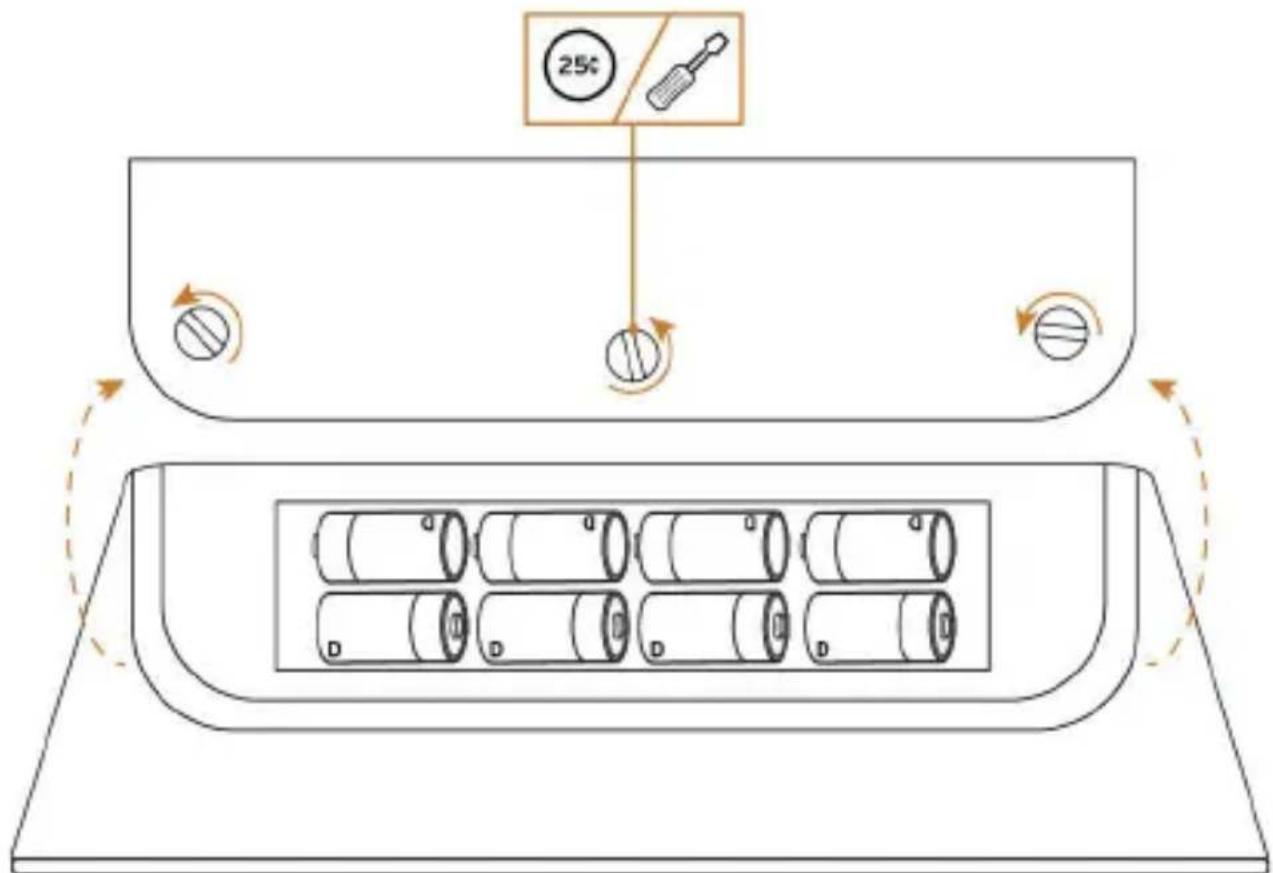
To operate on battery power, install 8 D Cell (LR20) alkaline batteries as shown. If batteries are installed, the KMC 3 operates on battery power unless AC power is utilized. On battery power, if no streaming or connected audio is detected for five minutes, the KMC 3 will automatically power off.
text_image
25°ILLUMINATED CONTROL FUNCTIONS

flowchart
graph TD
    A["1"] --> B["ω"]
    C["2"] --> D["∞"]
    E["3"] --> F["-"]
    G["4"] --> H["+"]
    I["5"] --> J["+"]
-
POWER ON / OFF - Tap to turn on. Hold to turn off. Solid Red indicates Power On, flashes if batteries are weak
-
BLUETOOTH
 | No Connection |  | Hold to Pair Tap to Exit |  |
 | Connected |  | Hold to Disconnect |  |
- VOLUME DOWN
- VOLUME LEVEL INDICATOR
- VOLUME UP
- SOURCE SELECT - Pressing + and - together toggles between Bluetooth mode and AUX (3.5mm input) for playback
REMOTE CONTROL FUNCTIONS

text_image
Klipsch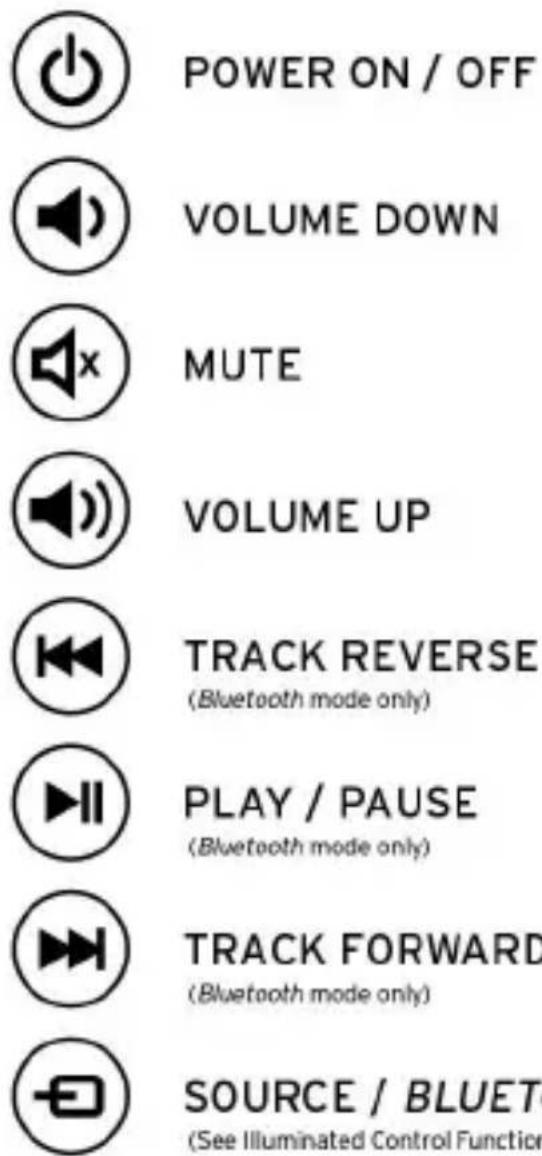
POWER ON / OFF
VOLUME DOWN
MUTE
VOLUME UP
TRACK REVERSE
(Bluetooth mode only)
PLAY / PAUSE
(Bluetooth mode only)
TRACK FORWARD
(Bluetooth mode only)
SOURCE / BLUETOOTH
(See Illuminated Control Functions #2)
MUSIC SOURCES
Any paired Bluetooth device within a 30 foot (9.1 m) range of the KMC 3 can wirelessly stream music.
Any device with a standard 3.5mm headphone output can be connected to the AUX input (on back) with a mini-to-mini connecting cable (included). Once connected, make sure volume on KMC 3 is just above minimum, adjust volume on your device to maximum and play music. Use SOURCE SELECT to switch to AUX input if necessary. Adjust volume up to desired level.
PAIRING BLUETOOTH DEVICES
Touch the Bluetooth button on unit down until it begins to flash (approximately 3 seconds). Do not touch any other buttons on the KMC 3 or its remote during this process. While the Bluetooth button flashes blue, activate the Bluetooth feature on your music device or phone, setting it up to pair with "Klipsch KMC 3". Once paired, the KMC 3 will automatically select Bluetooth as the source. First, adjust the volume of the KMC 3 to the below illustrated range for optimum performance. Then, while streaming music from your device, adjust the device volume to desired level.

text_image
- +The next time the KMC 3 is powered on it will automatically search for the last paired Bluetooth device and, if available, will automatically connect and go to Bluetooth as the source. If the last paired Bluetooth device is not available or not playing it will automatically choose the AUX (3.5mm input) as the source. The KMC 3 can store up to 8 paired Bluetooth devices.
USB CHARGING
NOTE: The USB input is only for CHARGING most music players, phones, and tablets. Using the USB connection end of the charging cable for your device (not included), connect to the USB input on rear of the KMC 3 to charge your device. You can charge your device using either AC or battery power for the KMC 3.
NOTE: Using the USB input to charge your device while the KMC 3 is on battery power will reduce battery life. If batteries in the KMC 3 are too weak, the USB connection will not charge your device.
CARE AND CLEANING
Your KMC 3 music center has a durable finish that should only require dry dusting or cleaning with a dry cloth. Avoid the use of abrasive or solvent-based cleaners and harsh detergents. Adhesive tape will clean up the rubber device area when it has dust and particles on it. Do not rub hard. Window cleaner and a paper towel will clean the surface well.
TROUBLESHOOTING
KMC 3 will not power on
• Make sure AC adapter is plugged tightly into DC input
• Make sure AC adapter is plugged into a live outlet
- If no AC connection make sure all 8 batteries are inserted into battery compartment correctly
• Install fresh batteries if not plugged into DC input
Device will not pair with Bluetooth mode
• Make sure KMC 3 is in pairing mode (∞ flashing blue)
• Make sure you are within 30 feet (9.1 m) of KMC 3 while pairing; move closer/make sure you are in the same room
• Make sure your volume settings are correct
Device does not play in Bluetooth mode or AUX input
• Make sure volume on device is up to maximum/KMC 3 volume is up at least half way and not MUTED
• If using AUX input, make sure connections are tight
- Touch + and - buttons together to select correct input
- If solid blue touch and hold + and - together to switch inputs
The Bluetooth® word mark is a registered trademark owned by Bluetooth SIG, Inc. and any use of such mark by Klipsch Group, Inc. is under license.
The "aptX™ software is copyright CSR plc or its group companies. All rights reserved. The aptX™ mark and the aptX logo are trade marks of CSR plc or one of its group companies and may be registered in one or more jurisdictions.
Klipsch is a trademark of Klipsch Group, Inc., registered in the U.S. and other countries. All other trademarks are property of their respective owners. Klipsch is a wholly-owned subsidiary of Voxx International Corporation. ©2012, Klipsch Group, Inc.