
WV-QJB502-W - Overvåkingskamera i-PRO - Gratis bruksanvisning og manual
Finn enhetens veiledning gratis WV-QJB502-W i-PRO i PDF-format.


Brukerspørsmål om WV-QJB502-W i-PRO
0 spørsmål om dette apparatet. Svar på dem du kjenner, eller still ditt eget.
Still et nytt spørsmål om dette apparatet
Last ned instruksjonene for din Overvåkingskamera i PDF-format gratis! Finn veiledningen din WV-QJB502-W - i-PRO og ta den elektroniske enheten tilbake i hendene. På denne siden er alle dokumenter som er nødvendige for bruken av enheten din publisert. WV-QJB502-W av merket i-PRO.
BRUKSANVISNING WV-QJB502-W i-PRO
Operating Instructions
Included Installation Instructions
Base Bracket
Model No. WV-QJB502-W WV-QJB502-G
- Before attempting to connect or install this product, please read these instructions carefully and save this manual for future use.
- The external appearance and other parts shown in this manual may differ from the actual product within the scope that will not interfere with normal use due to improvement of the product.
i-PRO Co., Ltd. assumes no responsibility for injuries or property damage resulting from failures arising out of improper installation or operation inconsistent with this documentation.
For U.S. and Canada:
i-PRO Americas Inc.
For Europe and other countries:
i-PRO EMEA B.V.
https://www.i-pro.com/
© i-PRO Co., Ltd. 2022 Printed in China

Ns1020-2042
Caution:
- Before attempting to connect or operate this product, please read these instructions carefully.
Notice:
- This product is not suitable for use in locations where children are likely to be present.
- Do not install this product in locations
where ordinary persons can easily reach. - For information about screws and other parts required for installation, refer to the corresponding section of this document.
Precautions
- Do not use this bracket except with suitable cameras.
Failure to observe this may cause a drop resulting in injury or accidents.
- Do not install this product on a place that is greatly influenced by wind.
Installation on a place where the wind speed is 60 m/s {approx. 134 mph} or more may cause a fall of the product resulting in injury or accidents.
■ Refer installation work to the dealer.
Installation work requires technique and experience. Failure to observe this may cause fire, electric shock, injury, or damage to the product. Be sure to consult the dealer.
- Do not rub the edges of metal parts with your hand.
Failure to observe this may cause injury.
When using this product, also read the “Precautions” described in the operating instructions for the camera to be attached.
Preface
Mount the camera onto the ceiling or wall using this bracket.
Use this bracket when conduits are used for wiring, or when there is no space available for wiring in the ceiling or wall.
For the latest information about the supported cameras, refer to our support website (https://i-pro.com/global/en/surveillance/training_support/support/technical_information

Specifications
Ambient operating temperature: -50°C to +60°C -58°F to +140°F
Dimensions: 127\ mm × 56.5\ mm (H) { 5\ inches × 2-7/32\ inches(H) }
Mass: Approx. 470 g {1.04 lbs}
Finish: Aluminum die cast
i-PRO white
Light gray
Precautions for installation
In order to prevent injury, the product must be securely mounted to the wall or ceiling according to the Installation Guide of the camera.
■ Make sure to remove this product if it will no longer be used.
Standard accessories
Operating Instructions (this manual) ...... 1 pc.
The following parts are used during installation procedures.
Attachment plate ....1 pc.
Fixing screw for camera
(M4×10 mm {13/32inches}) 4 pcs.
(of them, 1 for spare)
Fixing screw for attachment plate
(M3×10 mm {13/32 inches}) 5 pcs.
(of them, 1 for spare)
Cover 1 pc.
Other items that are needed (not included)
- Fixing screw Recommended screw M4/4 or 2 pcs.
Minimum pull-out strength 196 N {44 lbf} (per 1 pc.)
Note:
- Select screws according to the material of the location that the camera will be mounted to. In this case, wood screws and nails should not be used.
- For information about the minimum pull-out strength, refer to our support website (https://i-pro.com/global/en/surveillance/training_support/support/technical_information
)
Preparations
[1] Remove the enclosure from the camera.
Refer to the Installation Guide of the corresponding camera for how to remove the enclosure from the camera.
[2] Check the installation direction of the conduit and the image capturing direction of the camera
Check the connection direction of the conduit (direction of the cable access hole for conduit on this bracket) and the image capturing direction of the camera and then determine the fixing position of the attachment plate. The fixing position of the attachment plate can be changed with steps of 90° . The following is an example of the camera direction and the fixing position of the attachment plate when connecting the conduit from the upper side.
- Align the direction of the attachment plate so that the “ TOP” mark of the attachment plate comes to the upper side.

- Align the direction of the attachment plate so that the “ TOP” mark of the attachment plate comes to the right side.
Note:
- The connection cable is omitted in the illustration.

Parts and functions

Installations
Step1 Make a hole on the installation surface.
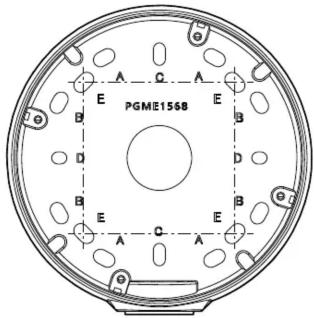
[1] Make screw holes or anchor holes in the ceiling or wall, and also cable access hole if necessary.
No cable access hole is needed when using conduit.

83.5 mm × 46 mm
{3-9/32 inches × 1-13/16 inches}/
82.5 mm × 47.6 mm
{3-1/4 inches × 1-7/8 inches}


83.5 mm {3-9/32 inches}/
83.3 mm {3-9/32 inches}

Cable access hole
ø25.4 mm {ø1 inch}

63 mm {2-15/32 inches}/
63 mm {2-15/32 inches}
Note:
- When mounting to a single-gang junction box, fix it with screws (2 pcs.) (M4: locally procured).
- The direction of the attachment plate
(installation direction of the camera) can
be changed with steps of 90° even after
the base bracket is fixed.
[2] Remove the cap for the female thread for the conduit using a 5 mm {3/16 inches} hexagon wrench and attach the conduit.
The female thread for conduit is compliant with ANSI NPSM (parallel pipe threads) 3/4 or ISO 228-1 (parallel pipe threads) G3/4.
![Base bracket the cap for the female thread for the using a 5 mm [3/16 inches] hexagon and attach the conduit. thread for conduit is compliant NPSM (parallel pipe threads) 3/4 or 1 (parallel pipe threads) G3/4. Cap for the female thread for the conduit](/content/2026/06/1167731/images/997be91b729fd5219fefd737f97a981853b0b14cad5fffb92e687e852e32f4cf.jpg)
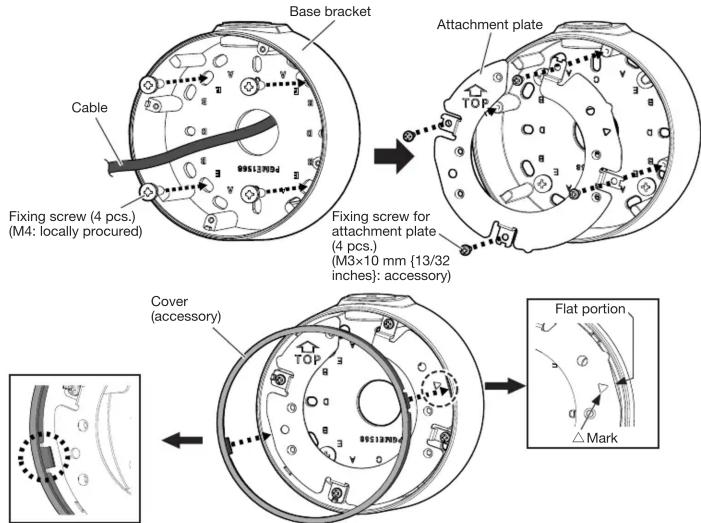
Step2 Fix the base bracket and install the attachment plate and cover in the direction described in [2] of “Preparations”.
[1] Install the base bracket on the installation surface. Fixing screws (4 pcs.) (M4: locally procured)
Minimum pull-out strength: 196 N {44 lbf} (per 1 pc.)
[2] Install the attachment plate onto the base bracket and then attach the cover to the attachment plate. The following is an example when this bracket is installed on the wall. (Recommended tightening torque: 0.69 N·m {0.51 lbf·ft})
Note:
- When installing this bracket outdoors, be sure to apply waterproofing to the cable access hole and fixing screw holes.
Step3 Connect the cables to the camera.
Connect an Ethernet cable to the RJ45 network cable from the camera.
Refer to the Installation Guide of the camera for how to install the waterproof connector.
Step4 Fix the camera body to this bracket.
(Recommended tightening torque: 1.37 N·m {1.01 lbf·ft})


Note:
- When fixing the camera on this bracket, be careful not to pinch the cable with this bracket and damage the cable sheath.
Step5 Adjust the angle of view of the camera.
Turn on the power of the camera and adjust the angular field of view of the camera.
Refer to the Installation Guide of the corresponding camera for how to connect to a network and for how to adjust the angle of view of the camera.
Step6 Attach the enclosure.
After finishing the adjustment, attach the enclosure by following the instructions in the Installation Guide of the corresponding camera.
Refer to the Installation Guide of the corresponding camera for the recommended tightening torque to be applied when fixing the enclosure of the camera.
- OPERATING INSTRUCTIONS
- BASE BRACKET
- CAUTION
- NOTICE
- PRECAUTIONS
- PREFACE
- SPECIFICATIONS
- PRECAUTIONS FOR INSTALLATION
- STANDARD ACCESSORIES
- OTHER ITEMS THAT ARE NEEDED (NOT INCLUDED)
- NOTE
- PREPARATIONS
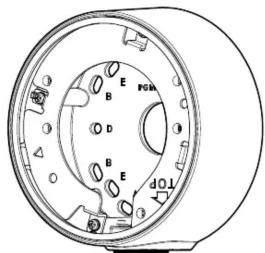
- PARTS AND FUNCTIONS
- INSTALLATIONS
- STEP1 MAKE A HOLE ON THE INSTALLATION SURFACE
- STEP2 FIX THE BASE BRACKET AND INSTALL THE ATTACHMENT PLATE AND COVER IN THE DIRECTION DESCRIBED IN [2] OF “PREPARATIONS
- STEP3 CONNECT THE CABLES TO THE CAMERA
- STEP4 FIX THE CAMERA BODY TO THIS BRACKET
- STEP5 ADJUST THE ANGLE OF VIEW OF THE CAMERA
- STEP6 ATTACH THE ENCLOSURE
Merke : i-PRO
Modell : WV-QJB502-W
Kategori : Overvåkingskamera