OMX-HDMI-CAT6 - Mottaker Ocean Matrix - Gratis bruksanvisning og manual
Finn enhetens veiledning gratis OMX-HDMI-CAT6 Ocean Matrix i PDF-format.


Brukerspørsmål om OMX-HDMI-CAT6 Ocean Matrix
0 spørsmål om dette apparatet. Svar på dem du kjenner, eller still ditt eget.
Still et nytt spørsmål om dette apparatet
Last ned instruksjonene for din Mottaker i PDF-format gratis! Finn veiledningen din OMX-HDMI-CAT6 - Ocean Matrix og ta den elektroniske enheten tilbake i hendene. På denne siden er alle dokumenter som er nødvendige for bruken av enheten din publisert. OMX-HDMI-CAT6 av merket Ocean Matrix.
BRUKSANVISNING OMX-HDMI-CAT6 Ocean Matrix
OCEAN MATRIX®
USER MANUAL
OMX-HDMI-CAT6
HDMI over Single Cat6 Transmission System with Looping Input
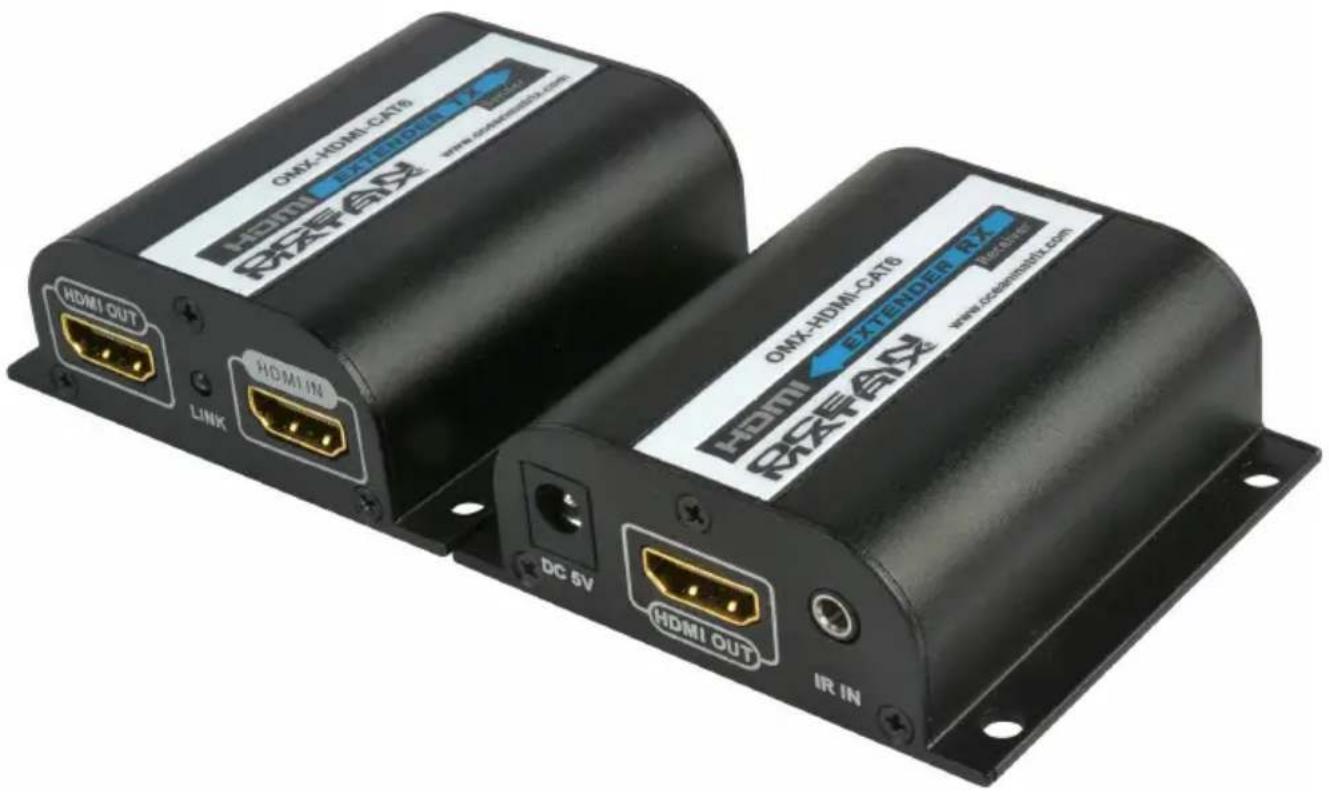
OMX-HDMI-CAT6
HDMI Extender
The Ocean Matrix OMX-HDMI-CAT6 extends high definition audio/video transmission beyond the standard distances of HDMI cable and its inherent limitations. Consisting of a transmitter and a receiver, this system delivers a full 1080P HDMI signal up to 197 feet over a single CAT6 network cable.
The transmitter features a built-in looping HDMI output for local display and monitoring. IR signal transmission allows for remote control of the source at a secondary location via included IR extension cables.
Includes
• One transmitter
- One receiver
- Two 5VDC power adapters
• One IR blaster extension cable- 3.28 ft (1m)
• One IR receiver extension cable - 3.28 ft (1m)
| Specifications | |
| Supported Resolutions | 480i@60Hz, 480p@60Hz, 576i@50Hz, 576p@50Hz, 720p@50/60Hz, 1080i@50/60Hz, 1080p@50/60Hz |
| Network Cable Low resistance and consumption oxygen-free copper core UTP or STP | |
| Transmission Range | 1080p resolution up to 197 feet (60m) |
| IR Remote Control | Supports 20~60KHz standard IR remote controls |
| Power Supply 5VDC/1A | |
| Power Consumption Transmitter 3W, Receiver 2W | |
| Working Temperature | 32°F - 140°F (0°C- 60°C) |
| Dimensions (LxWxH) 2.82x2.62x0.97in (71.6x66.6x24.8mm) per unit | |
| Weight Transmitter 2.93 lb., Receiver 2.84 lb. (83g/80.6g) | |
OMX-HDMI-CAT6
Installation Requirements
- HDMI source device such as a video camera, media player, monitoring equipment or computer.
- HDMI display device such as an SDTV, HDTV, or projector with HDMI port.
- UTP/STP Cat6/6A/7 cable, in accordance with the IEEE-568B wiring standard.
OMX-HDMI-CAT6 Installation Safety
- Identify the receiver and the transmitter in order to make proper connections during installation.
- Do not hot plug/swap when in operation.
- Use 5VDC power supply only.
OMX-HDMI-CAT6
HDMI to RJ45 Transmitter
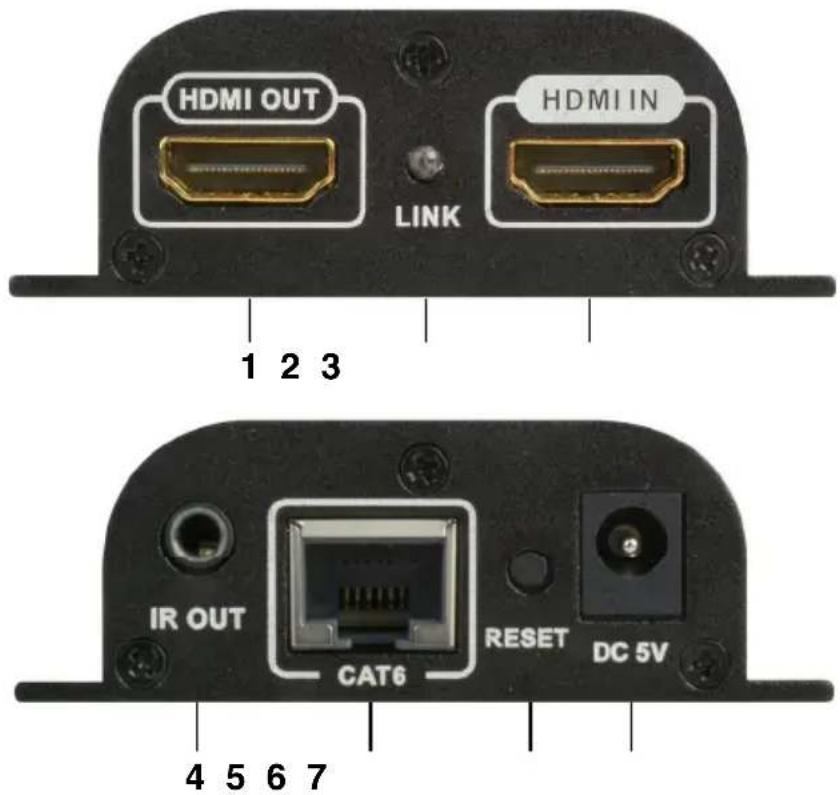
1 HDMI Signal Output
2 HDMI Signal Indicator LED
- HDMI signal input—on
- No signal—flashes
3 HDMI Signal Input
4 IR Signal Output
- Connect IR blaster extension cable
5 RJ45 Signal Output
6 Reset Button
7 5VDC Power Input
OMX-HDMI-CAT6
RJ45 to HDMI Receiver
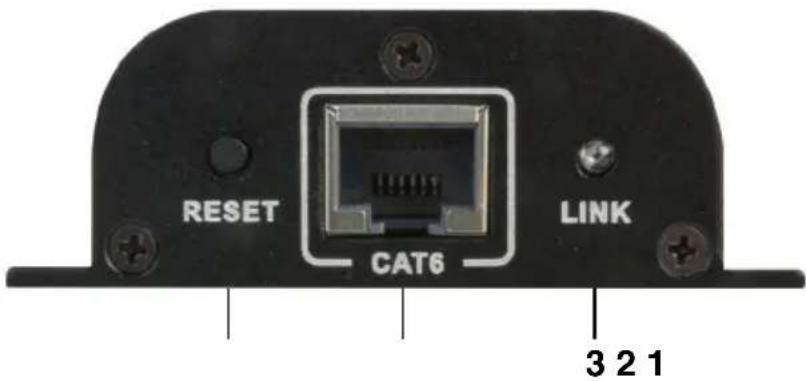
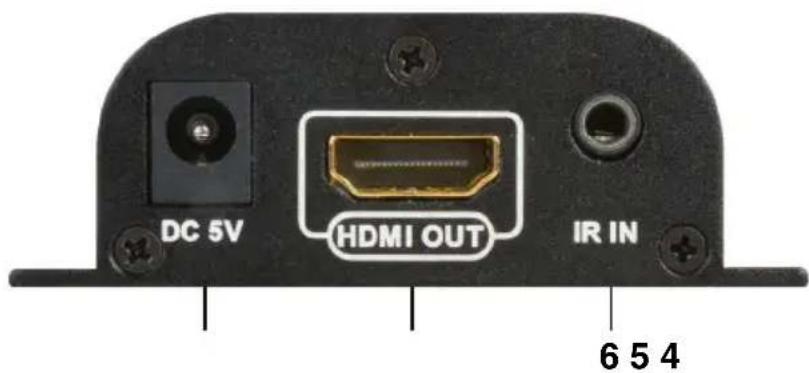
1 Reset Button
2 RJ45 Signal Input
3 RJ45 Indicator LED
- HDMI signal transmission—on
- No signal—flashes
4 5VDC Power Input
5 HDMI Signal Output
6 IR Signal Input
- Connect IR receiver extension cable
OMX-HDMI-CAT6
Installation Procedures
Cat6 Network Cable—follow the IEEE-568B wiring standard:
- Orange/White
- Orange
- Green/White
- Blue
- Blue/White
- Green
- Brown/White
- Brown
Connection
- Connect TX HDMI input to source device HDMI output
- Connect TX HDMI output to HDTV HDMI input
- Connect TX CAT6 to RX CAT6
- Connect RX HDMI output to HDTV HDMI input
- Turn the power ON
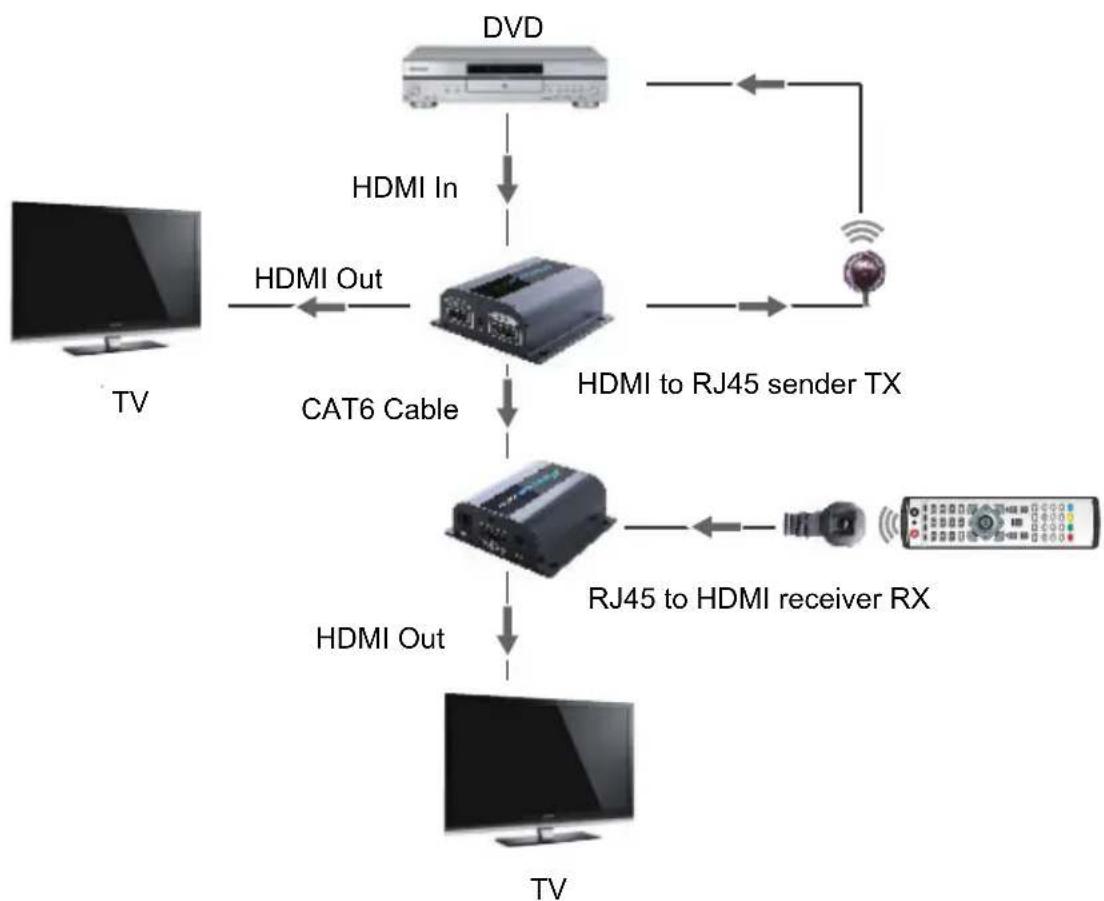
flowchart
graph TD
    TV["TV"] -->|HDMI In| A["CAT6 Cable"]
    TV -->|HDMI Out| A
    A -->|HDMI to RJ45 sender TX| B["Radio System"]
    A -->|HDMI Out| C["RT"]
    B -->|RJ45 to HDMI receiver RX| D["MT"]
    C -->|HDMI Out| E["MT"]
    D -->|HDMI In| F["DVD"]
    F -->|HDMI In| A
    F -->|HDMI Out| G["Satellite"]
OMX-HDMI-CAT6
IR User Guide
- Plug the IR blaster extension cable into the IR-OUT port of the Transmitter TX.
- Plug the the IR receiver extension cable into the IR-IN port of the Receiver RX.
- Place the emitter of the IR blaster as close as possible to the IR receiver of the signal source device.
- Direct the IR remote controller of the signal source device towards the IR receiver (connected to the RX of HDMI extender), to remote control source media playback.
Troubleshooting
No image/audio output or degraded signal
- Press RX RESET button to reset the device.
• Use a shorter network cable.
RX LINK LED is flashing consistently
- Ensure the network cable connection follows IEEE-568B wiring standard.
- Ensure TX has an HDMI signal input.
- Reset TX & RX and reconnect.
RX LINK LED is on but there is no image output
- Press RX RESET button to reset the device.
- Ensure the HDMI cable is correctly connected.
- Ensure you are using a CAT6 network cable.

SAFETY PRECAUTIONS

-
To prevent fire or shock hazard, do not expose this equipment to high humidity and/or dust. Do not use in an unprotected outdoor installation nor any area classified as overly damp or wet.
-
The temperature for installation should be kept between 32^ F to 140^ F ( 0^ C to 60^ C). Avoid direct sunlight exposure or extreme changes of temperature over a short period of time.
-
Do not disassemble the unit or place it on an unstable base.
-
Do not drop the unit and avoid heavy impact.
-
This unit should not be permanently installed unless proper ventilation is provided. Any enclosure openings must not be blocked or covered as they protect the unit from overheating.
-
Before cleaning, turn off the power and unplug the unit from all connections. Use a damp cloth. Do not use liquid cleaners nor aerosol cleaners.
-
Do not overload outlets and extension cords as this may result in a risk of fire or electric shock.
-
Enclosure entry is dangerous. Never push objects of any kind, including liquids, into this unit through openings as they may touch dangerous voltage points or short-out parts that could result in a fire or electric shock.
-
Do not attempt to open or service this unit yourself as opening or removing covers may expose you to dangerous voltage and other hazards.
-
There are no user-serviceable parts inside the unit. If the unit requires service contact your authorized dealer, or an authorized repair service company.
Ocean Matrix
812 Kings Highway
Saugerties NY 12477