Black VC Clock - Synthesizer Erica Synths - Gratis bruksanvisning og manual
Finn enhetens veiledning gratis Black VC Clock Erica Synths i PDF-format.


Brukerspørsmål om Black VC Clock Erica Synths
0 spørsmål om dette apparatet. Svar på dem du kjenner, eller still ditt eget.
Still et nytt spørsmål om dette apparatet
Last ned instruksjonene for din Synthesizer i PDF-format gratis! Finn veiledningen din Black VC Clock - Erica Synths og ta den elektroniske enheten tilbake i hendene. På denne siden er alle dokumenter som er nødvendige for bruken av enheten din publisert. Black VC Clock av merket Erica Synths.
BRUKSANVISNING Black VC Clock Erica Synths
THANK YOU FOR PURCHASING ERICA SYNTHS MODULE!
Erica Black Series include high-end, unique functionality and superior quality modules. Only the best, highest quality components are used, all inputs and outputs are protected against undesired overvoltage. Erica Black series consist of range of modules that are needed to put together entire synth. Enjoy!
Erica Black VC Clock is a beating heart of your modular system. The module generates several clock signals simultaneously and has advanced features (tap tempo, shuffle, divide) both for controlled, rhythmic music production and for experiments with high level of uncertainty. You may find interesting adjustable and even random duty circle of shuffling and random clock outputs. Bonus feature – the module can be used as a performance time stopwatch.
FEATURES:
Manually and CV adjustable BPM Clock division and multiplication External clock input 3 digit BPM indicator Manually and CV controllable shuffle amount Manual and programmable sequencer reset output Sequencer reset output Adjustable duty circle of shuffling and random clock Performance time stopwatch
TECHNICAL SPECIFICATIONS:
Max input level ....-10V - +10V Clock signal level ....0 - +5V Clock rate ....30 - 400BPM CV input level (full sweep) ....-5V - +5V Power consumption ....40mA@+12V, 5mA@-12V Module width ....10HP Module depth ....25mm 7 segment LED indicators show BPM of Clock Out
Use Tap tempo button to set BPM. Push and hold TAP button and rotate SHFL/RND potentiometer to set clock output probability on RND OUT
Use encoder to set BPM manually! Click the encoder to access the configuration menu. Refer to the table below for configuration settings. Rotate the encoder to select desired setting. Push the encoder to confirm it, and return to the main menu, when all settings are completed push RST button to exit CONFIG menu OR module will exit it automatically in 3*. Click and hold the encoder and save your default device setting!
You also may want to alter an external clock. When external clock is applied, LED indicators show external clock rate
Clock rate is CV controlled – apply any CV here to alter clock rate! LED indicators will show BPM set by encoder and will not follow clock changes
This is output of the regular clock. BPM is indicated on LED indicators
Here you get divided or multiplied clock
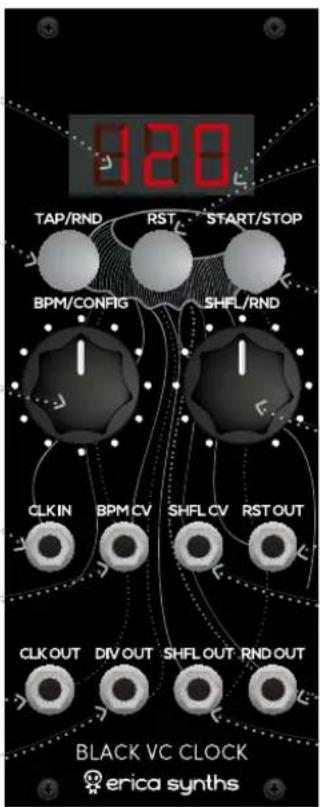
Small dot next to the last digit gives visual indication of clock rate
Pushing RST button sends high pulse on RST output. Use it to reset your sequencer!
You can Start and Stop the clock on the output buy pressing this button. Stopping the clock will not send RST signal. Push and hold this knob to activate the Performance Time Stopwatch. See it's functionality description below!
Adjust shuffle level from 0 CCW to extreme 90% CW
This is sequencer reset output. Each time the RST button is pushed, high signal appears here to reset the sequencer
This is shuffle CV input
Random clock generates random clock pulses, relative frequency of which is set by BPM. You also can adjust output pulse duty circle
Here's shuffling clock output. Use it for more human feel of rhythm. Shuffling clock can be multiplied by rate set by the encoder. You also can adjust output pulse duty circle
Indicator Setting/configuration screen
DIV Select clock division or multiplication rate for DIV OUT. Available values are /2, /3, /4, /8, x2, x4, x8 SHD Select clock multiplication rate for SHFL OUT. Available values are x2, x4, x8
RND Select clock division or multiplication rate for RND OUT. Available values are /2, /3, /4, /8, x2, x4, x8
RST Configure RESET feature. The module send reset signal to the sequencer, and it can be sent manually (push RST button any time you wish to reset the sequencer) or it can send reset signals after certain amount of clock pulses. Available settings are MAN (manual only reset), 16, 32, 48, 64
SHG Adjust clock duty circle for SHFL OUT output pulse. Available settings are from 10 - 90% and random. Default setting is 50% RNG Adjust clock duty circle for RND OUT output pulse. Available settings are from 10 - 90% and random. Default setting is 50%
PTS Activate or deactivate Performance Time Stopwatch. Performance Time Stopwatch (PTS) allows you to monitor timing of your modular performances. If PTS is activated, after 5 seconds BPM indicator will change to timer screen that indicates minutes (two digits) passed from the moment START/STOP button is pushed and module starts to output a clock signal. Pushing START/STOP button will pause the stopwatch, pushing RST button will reset it.
SAFETY INSTRUCTIONS
Please follow the instructions for use of this Erica Synths module below, 'cause only this will guarantee proper operation of the module and ensure warranty from Erica Synths.
Water is lethal for most of the electric devices, unless they are made waterproof. Erica Synths module is NOT intended for use in a humid or wet environment. No liquids or other conducting substances must get into the module. Should this happen, the module should be disconnected from mains power immediately, dried, examined and cleaned by a qualified technician.

Do not expose the module to temperatures above +50°C or below -20°C.

Transport the instrument with modules installed carefully, never let it drop or fall over. Warranty does not apply to modules with visual damages.

The module has to be shipped in the original packaging only. Any module shipped to us for return, exchange and/or warranty repair has to be in its original packaging. All other deliveries will be rejected and returned to you. Make sure you keep the original packaging and technical documentation.
You will find Erica Synths terms of warranty at http://ericasynths.lv/en/terms/
Items for return, exchange and/or warranty repair have to be sent to: Erica Synths, Andrejostas Str.12, Riga, Latvia, LV-1045
DISPOSAL
This device complies to the EU guidelines and is manufactured RoHS conforming without use of led, mercury, cadmium and chrome. Nevertheless, this device is special waste and disposal in household waste is not recommended.
Designed and made in Latvia. User manual by Girts Ozolins@Erica Synths. Design by Baiba Stelle. Copying, distribution or any commercial use in any way is prohibited and needs the written permission by Erica Synths. Specifications are subject to change without notice. In case of any questions feel free to contact us via e-mail info@ericasynths.lv
Check out other Erica Synths modules & devices at www.ericasynths.lv