ePod Battery FBN12C33A1 - Belysning Furrion - Gratis bruksanvisning og manual
Finn enhetens veiledning gratis ePod Battery FBN12C33A1 Furrion i PDF-format.


Brukerspørsmål om ePod Battery FBN12C33A1 Furrion
0 spørsmål om dette apparatet. Svar på dem du kjenner, eller still ditt eget.
Still et nytt spørsmål om dette apparatet
Last ned instruksjonene for din Belysning i PDF-format gratis! Finn veiledningen din ePod Battery FBN12C33A1 - Furrion og ta den elektroniske enheten tilbake i hendene. På denne siden er alle dokumenter som er nødvendige for bruken av enheten din publisert. ePod Battery FBN12C33A1 av merket Furrion.
BRUKSANVISNING ePod Battery FBN12C33A1 Furrion
FURRION ePOD
Furrion ePod™ Battery
Model: FBN12C33A1
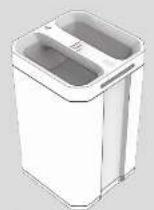
• Picture shown for reference only
Quick Start Guide
GENERAL SAFETY INSTRUCTIONS
! WARNING
indicates a hazardous situation which is not avoided, could result in death or serious injury.
WARNING
RISK OF FIRE ELECTRIC SHOCK, OR PERSONAL INJURY
WARNING: When using this product, basic process one should always be informed, including the following.
■ Head of instructions and safety precautions before using the product.
- Keep out of reach of children. To reduce the risk of injury, class supervision is necessary when the product is used near children.
- Failing to operate the battery or power station, in accordance to this manual may damage internal components and will void the waterway.
- Damage to internal components may result in electric call shock, chemical burn, purgazing, fire, an explosion caused no personal injury or damage to other devices.
- Do not allow internal battery materials to come in contract with skin or eyes. It exposed to internal battery materials seek medical attention immediately and flush areas with clear lukewarm water without interruption or an instructor by medical professionals.
- Do not modify or disassemble the battery or the power station there are no user-surable parts inside.
- Do not use power sources or attachments that are not approved by Turion®.
- To reduce risk of damage to the acceptor cables and charging ports, pull cables by the plug end when disconnecting the power station. Do not operate the power station with damaged adaptor cables.
- Do not wrap or subject the product in strong mechanical snack
- Do not expose the product to moisture, water, rain, snow or spray
- Keep the product clean and dry. Drop up the product before cleaning. Use a clear dry cloth to clean battery or power station terminals if they become dirty.
- Do not allow the product or conductive materials such as keys or fingers to come in contact with the positive end negative terminals on the battery or power station. Doing so may cause a short circuit
- Always unplug charging cables from power station prior to removing batteries.
- Ensure that battery is fully inserted or power station and charging cards are connected properly before attempting to charge or discharge.
- Do not expose the product to excessive heat or "re above 153°F (75°C) and avoid alonge in direct sunlight.
- The product may become warm, up to 34^ F ( 40^ C), during extended high-power operation. During operation we can the product away for materials that may be affected by these temperatures.
- Disconnect the end from power source after more than 48 hours when not in use.
- Do not allow the e-Fod or any other connected devices exceed the rated current voltage, or power indicated in the manual and at the AC/DC parts.
- Disperse of battery in accordance with local regulation. Contact your local waste management office for information on proper battery recycling or disposal.
- The product must be stored indoors and protected from the elements.
- Do not block the air vents of the product. Keep a clearance or at least 1" (2.5cm) on the left and right sides
CORRECT DISPOSAL OF THIS PRODUCT
To prevent possible harm to the environment or human health from uncontrolled waste disposal, recycle the battery responsibly to promote the sustainable reuse of material resources. To
Return your used product, please use the first 1st collection systems or contact the retailer where the product was purchased. They will help ensure the best way to deal with the product in an environmentally safe way.
Do not dispose of used batteries with your household waste. Take them to an appropriate disposal/collection site.
STORAGE
[Non-Text]
- Store the effect in a pool ory location, not accessible to children and men.
- Share the ePod indicators at temperature of 4 in ^120 F (20°C) with low humidity and non-corporative atmospheric
- Ensure that no heavy objects are placed on top of the cPad or could otherwise be taken on the cPad.
- After extended periods of storage, up to 6 months it is recommended as fully discharge and charge. Here ePod several times to optimize performance.
BEFORE USE
- Remove all packaging materials
- Please keep this instruction manual in a safe place for future references. Make sure to pass the instruction manual on to any new owners of the product.
- The manufacturer does not accept responsibility for any damages that may occur due to not observing; these instructions.
• If you have any further questions regarding our products, please
- Check the battery for transport damages.
PRODUCT OVERVIEW
Make sure you have all the following items included in the packaging. If any item is damaged or missing, can aid your dealer on Furtion® customer service.
• FunION e 'od" Battery (HBN12CSSA) x
- Click Start Guide x 1
- Warranty/Map x 1
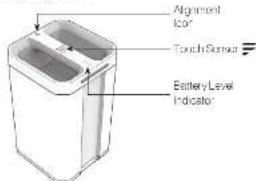
The battery is compatible with the following components: - Furion a 'Pod' Power Station (IFVSP®04-BL sold separately) - Furion a 'low' (CIMAS.CAPA-CL sold separately)
(1) 2017年1月1日,公司召开2017年第二次临时股东大会,并于2017年3月15日召开2017年第三次临时股东大会。

CHECKING THE BATTERY LEVEL WHILE DISCHARGING
Touch the logo on the handle to check the battery level. The battery percentage and corresponding LED indicators are shown below:
| Indicator on Display | Indicator on Battery | Battery Level |
| 76~100% | ||
| 81~76% | ||
| 23~25% | ||
| 11 25% | ||
| Red Link | 0~10% |
NOTE: Indicaton is shown for 10 seconds.
CHECKING THE BATTERY LEVEL WHILE CHARGING
During the charging process, the battery percentage and corresponding IEL indicators are shown below:
| Indicator on Display | Indicator on Battery | Battery Level |
| 91~100% | ||
| 76~90% | ||
| 61~75% | ||
| 28~32% | ||
| < 25% |
INSERTING AND CHARGING THE ePod™ BATTERY
NOTE: Before installing removing the battery, switch off the opelence and disconnect it from any power supply. NOTE: During the charging process, the battery indicator on the handle flashes slowly.
Charge with Furrion ePod™ Power Station
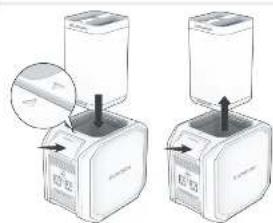
• Fully insert the battery into the power station until the PRESS
AND RELEASE button slatched into position.
- To remove, press the PRESS AND RELEASE button and pull upwards.
NOTE: For detailed instructions, refer to the Furion ePod® Power Station user manual.
natural_image
Two identical illustrations of a coffee maker with a lid, showing mechanical components and a magnified inset (no text or symbols)Charge with Furrion eRove™
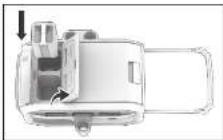
Insert the battery into the e-love battery compartment. NOTE: For detailed instructions, refer to the Furian-eRoos® user manual.
SPECIFICATION
| Water (0.6 lb 14 kg) | |
| Dimensions | 0.5" × 0.4" × 2.5" (4.5 × 1410 × 24 mm) |
| Operating Temperature ± 10^4 F (10°C = 40°C) | |
| Storage Temperature ± 10^3 F (10°C = 20°C) - 90°C | |
| Cell Chemistry Lithium-oxil | |
| Pilk Capacity A 2 kW | |
| Battery Voltage 14.4Voc | |
| Life Cycle | 500-6HT 77°~28°C, charge & discharge rate 0.25 |