Titanium HPK-1530 - Hodetelefoner Califone - Gratis bruksanvisning og manual
Finn enhetens veiledning gratis Titanium HPK-1530 Califone i PDF-format.


Brukerspørsmål om Titanium HPK-1530 Califone
0 spørsmål om dette apparatet. Svar på dem du kjenner, eller still ditt eget.
Still et nytt spørsmål om dette apparatet
Last ned instruksjonene for din Hodetelefoner i PDF-format gratis! Finn veiledningen din Titanium HPK-1530 - Califone og ta den elektroniske enheten tilbake i hendene. På denne siden er alle dokumenter som er nødvendige for bruken av enheten din publisert. Titanium HPK-1530 av merket Califone.
BRUKSANVISNING Titanium HPK-1530 Califone
- TROUBLESHOOTING
| No Sound / Low Volume | • Ensure cords are connected securely to the headphone/ headset and the audio source/computer.• Ensure the audio source is not muted and volume is up.• For the headphones/headsets with a recharging jack, ensure the battery is fully charged. |
- SPECIFICATIONS & FEATURES
| Standard Kits • HPK-1002: Includes HP-1002 & HPC-1000• HPK-1010: Includes HPE-1010 & HPC-1010• HPK-1020: Includes HPE-1020 & HPC-1020• HPK-1030: Includes HPE-1030 & HPC-1030• HPK-1040: Includes HPE-1000 & HPC-1020• HPK-1050: Includes HPE-1010 & HPC-1030 | |
| Features • 40mm Neodymium transducers• Adjustable Headband• Adjustable uni-directional microphone (HPE-1010 & HPE-1030)• Excellent isolation / Ambient Noise Reduction• In-line volume control• Straight, replaceable cords.• "Dishwasher Sats" (HPE-1000 & HPE-1010 only) | |
| Plug Types | HPC 1000 & HPC 1010: USB plugHPC-1020: Stereo 3.5mm plug with 6.5mm adapterHPC-1030: Stereo 3.5mm plug + 3.5mm plug for mic |
| Frequency Response 20 Hz - 20 kHz | |
| THD % < 2 % (60Hz - 20kHz) | |
| Headphone Input Impedance 50 ohms | |
| Limiter Level: 85 +/- 3 dB (No weighing) | **Speed: < 20 ms**Depends on signal and ear/head-coupling. |
| Microphone (HPC-1010 & HPC-1030) | Uni-directional electrol (requires blue voltage between 2 to 10 V) |
| Battery Usage Time (HPE-1020 & HPE-1030 only) | > 8 hours (depends on usage) |
| Battery Recharge Time (HPE-1020 & HPE-1030 only) | < 2 hours |
| Product Construction Earoups: A8S plastic Earpads: PVC Cords: Polyurethane | |
callfone.com
| Product Dimensions | Headphones: 8.25^ x 6.3^ x 3^ HPC 1000 & HPC 1010: 7.5^ total cord lengthHPC-1020 & HPC-1030: 6.25^ total cord length |
| Product Weight (incl. accessories) | HPC series < 3 ozHPE-series < 10 oz |
8. WARRANTY
Califone warrants this product to be free from defective material and workmanship for one year from the purchase date. Our "Project Intercept" Customer Satisfaction program will replace defective parts and repair malfunctioning equipment under this warranty when the defect occurs under normal use.
All Damage Claims Must Be Made With the Freight Carrier
Notify the freight carrier immediately if you observe any damage to the shipping carton or product. Repack the unit in the carton and await inspection by the carrier's claim agent. Notify your dealer of the pending freight claim.
Returning Your Unit for Service or Repairs
Should your unit require service, contact our Customer Service Department online at califone.com/techsupport or via email warranty@califone.com or by phone at 800-722-0500 / 818-407-2400 to first obtain an RA (Return Authorization) number before returning it to Califone. The unit must be returned to our factory via prepaid transportation only after the factory issues an RA number, which must be clearly written on the outside of the box.
Califone® International, Inc.
1145 Arroyo Avenue, #A
San Fernando, CA 91340 USA
Toll Free 800.722.0500 | Toll Free Fax 877.402.2248
International Customers call 818.407.2400 or Fax 818.407.2405
califone.com
Callifone HPK-series Rev 01 0710

Model HPK-series Headphones/Headsets
User Manual

Model HPK-series Headphones/Headsets
Thank you for purchasing the Califone® HPK-series Headphones/Headsets.
We encourage you to visit our website www.califone.com to register your product for its warranty coverage, sign up to receive our newsletter, download our catalog, and learn more about the complete line of Califone ^5 audio visual products, including portable and installed wireless PA systems, multimedia players and recorders, headphones and headsets, computer peripheral equipment, visual presentation products and language learning materials.
1. IMPORTANT SAFETY INSTRUCTIONS
Before using this product, read the instruction manual for important safety information. Please retain this manual for future reference and warranty information.
Troubleshooting & Servicing
Do not attempt to service or repair the device yourself. Refer all servicing to qualified service personnel. Do not attempt to modify the device in any way. Doing so could invalidate your warranty.
Moisture and heat sources
The HPE-1000 and HPE-1010 headphones/headsets are washable. All other headphones/headsets are not. Follow the Maintenance & Cleaning instructions in Section 5 of this manual carefully. At all other times, do not use this apparatus near water (for example, sinks, baths, pools) or expose it to rain, moisture, dripping or splashing liquids. Unless otherwise specified, do not expose the unit to high temperatures, high humidity or direct sunlight.
Location
Place the device in stable location, so it will not fall causing damage to the device or bodily harm.
Intended use
The product may only be used with the original parts intended for it. The product may only be used in closed and dry rooms. The intended use includes adherence to the specified installation instructions. The manufacturer accepts no liability for damage arising due to improper use.
2. PACKAGE CONTENTS
• HPE-series Headphone
• HPC-series Detachable Cord
+ User Manual
• HPC-1020 also includes 3.5mm to 6.5mm adapter
- PART NAMES AND FUNCTIONS
HPE-1020 & HPE-1030 Headphone
-
Right Earcup Bottom View
-
Volume Control
-
Power LED
-
Limiter ON/OFF Switch & LED
HPE-1020 & HPE-1030
Headphone - Left Earcup
Rear View
-
Mute Button
-
Mic Off Button & LED
-
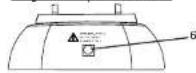
Recharging Connector for
WS-CH Charger
4. SETUP AND INSTALLATION
-
If not already assembled, carefully plug the HPC-series cord into the bottom of the HPE-series headphone/headset left earcup.
-
Use the WS-CH charger to recharge up to 4 sets of headphones with internal batteries (HPE-1020 and HPE-1030). The WS-CH will indicate when charging is complete. Refer to the WS-series User Manual for details.
NOTICE: Do not connect any other type of power supply to the
headphones. Doing so may result in damage to the headphones.
(请注明此无填列)
5. BASIC OPERATION
CAUTION: Avoid listening to the headphones at loud volume settings for long periods of time as this can result in hearing damage. Using the 85dB Limiter function may help reduce the risk of hearing damage, but is in no way a guarantee.
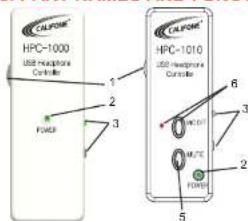
HPC-1000 & HPC-1010 Operation
-
Adjust the headphone volume to minimum.
-
Connect the USB plug to the computer. The computer should automatically detect and install the device. Wait until installation is complete. If using Windows 98, an additional driver may be required to install the device. Visit www.callifone.com to download the driver. The Power LED should light green.
-
On the computer, use the Audio Settings Control Panel/Preferences to select the device to output audio.
-
Begin playing audio on the computer.
-
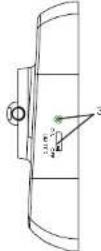
To help reduce peaks in the audio and reduce the risk of hearing damage due to loud sounds in the headphones, enable the 85dB Limiter by moving the Limiter switch to the ON position. The Limiter LED should light green.
-
Increase the volume to the desired level.
-
The HPC-1010 also includes a Mic Off (to mute the microphone) and MUTE button (to mute the audio output to the headphones). Momentarily press the buttons to enable/disable these functions.
HPE-1020 & HPE-1030 Operation
- The HPE-1020 and HPE-1030 Headphones include an internal 85 dB Limiter that can be switched on or off.
NOTE: The HPE-1020 and HPE-1030 will operate without a charged battery, however, the limiter will not function.
Maintenance & Cleaning
NOTICE: Only the HPE-1000 and HPE-1010 Headphones are
washable. Other headphones/headsets and cords cannot be washed.
Washable Models:
-
Before washing, remove the cord and foam from the microphone.
-
To remove/replace the cord, push a small screwdriver or paper clip into the hole where the cord connects to the earcup and pull down on the cord.
-
Wash by hand with soap and water.

CAUTION: Allow headphones to dry thoroughly before use.
Non-Washable Models:
- When cleaning the device, please use a soft, dry cloth. (Never use benzene, paint-thinner, or other chemicals on the device.)
callifone.com