MVi-DRCADAPT - Fjernkontroll JL Audio - Gratis bruksanvisning og manual
Finn enhetens veiledning gratis MVi-DRCADAPT JL Audio i PDF-format.


Brukerspørsmål om MVi-DRCADAPT JL Audio
0 spørsmål om dette apparatet. Svar på dem du kjenner, eller still ditt eget.
Still et nytt spørsmål om dette apparatet
Last ned instruksjonene for din Fjernkontroll i PDF-format gratis! Finn veiledningen din MVi-DRCADAPT - JL Audio og ta den elektroniske enheten tilbake i hendene. På denne siden er alle dokumenter som er nødvendige for bruken av enheten din publisert. MVi-DRCADAPT av merket JL Audio.
BRUKSANVISNING MVi-DRCADAPT JL Audio
Limited Warranty – Electronics (USA)
JL Audio warrants this product to be free of defects in materials and workmanship for a period of two (2) years from the original date of purchase. This warranty is not transferable and applies only to the original purchaser from an authorized JL Audio dealer. Should service be necessary under this warranty for any reason due to manufacturing defect or malfunction, JL Audio will (at its discretion), repair or replace the defective product with new or remanufactured product at no charge. Damage caused by the following is not covered under warranty: accident, misuse, abuse, product modification or neglect, failure to follow installation instructions, unauthorized repair attempts, misrepresentations by the seller. This warranty does not cover incidental or consequential damages and does not cover the cost of removing or reinstalling the unit(s). Cosmetic damage due to accident or normal wear and tear is not covered under warranty. Products installed as original equipment by boat manufacturers are covered by the boat manufacturer's warranty, not JL Audio, Inc.
Warranty is void if the product's serial number has been removed or defaced.
Any applicable implied warranties are limited in duration to the period of the express warranty as provided herein beginning with the date of the original purchase at retail, and no warranties, whether express or implied, shall apply to this product thereafter. Some states do not allow limitations on implied warranties, therefore these exclusions may not apply to you. This warranty gives you specific legal rights, and you may also have other rights, which vary from state to state.
If you need service on your JL AUDIO product:
All warranty returns should be sent to JL Audio's Electronics Service Facility freight-prepaid through an authorized JL Audio dealer and must be accompanied by proof of purchase (a copy of the original sales receipt). Direct returns from consumers or non-authorized dealers will be refused unless specifically authorized by JL Audio with a valid return authorization number. Warranty expiration on products returned without proof of purchase will be determined from the manufacturing date code. Coverage may be invalidated as this date is previous to purchase date. Non-defective items received will be returned freight-collect. Customer is responsible for shipping charges and insurance in sending the product to JL Audio. Freight damage on returns is not covered under warranty.
For Service Information in the U.S.A. please call
JL Audio Customer Service:
(954) 443-1100 9:00 AM - 5:30 PM (Eastern Time Zone)
JL Audio, Inc.
10369 North Commerce Pkwy. Miramar, FL 33025
(Do not send product for repair to this address)
International Warranties:
Products purchased outside the United States of America are covered only by that country's distributor and not by JL Audio, Inc.
JL Audio® and the JL Audio logo are registered trademarks of JL Audio, Inc. ©2019 JL Audio, Inc. For more detailed information please visit us online at www.laudio.com. Due to our policy of continuous product development, all specifications are subject to change without notice.
MVi_DRCADAPT_MAN_081419
Product Description:
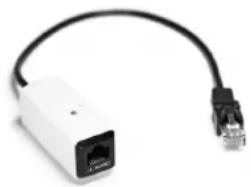
The MVi-DRCADAPT permits the direct connection of a JL Audio rotary-style Digital Remote Controller (DRC) to a MVi amplifier via its JLid-COMM Port.
Notes: This product is not compatible with mono MV amplifiers or the MVi-HUB.
This product is not needed for connection of M-DRC-50 push-button controller.
What is Included:
(1) MVi-DRCADAPT
(1) Mounting Clip
(2) Mounting Screws
Placement Considerations:
The MVI-DRCADAPT should be installed near the connected MVI amplifier, where its JLid status LED can be viewed.
Installation:
- Plug the cable end of the MVi-DRCADAPT into the JLid-COMM port of the MVi amplifier.
- Install a compatible DRC controller (sold separately) per its instructions and connect its cable end to the RJ45 jack of the MVi-DRCADAPT.
Mounting Clip Installation:
A mounting clip is included to secure the MVi-DRCADAPT module. Use the supplied screws to fasten the mounting clip to a flat surface. Once the mounting clip is installed, attach the MVi-DRCADAPT module by pressing one side of its notched center section against the inside of one of the arms of the mounting clip. Continue pressing inward until both arms of the mounting clip snap around the notched center section of the MVi-DRCADAPT module. Ensure that the JLid Status LLD is facing outward and visible. To remove, grasp the module's body and pull while rotating away from the mounting clip.
JLid Status LED:
The MVI-DRCADAPT module is equipped with a multi-color status LED. Refer to the table below for detailed info:
| MVI-DRCADAPT LED Color Status | |
| Green JLid | * detection in progress |
| Blue Successful connection of a compatiole DRC | |
| Yellow | Unrecognized JLid® device(retry attempts result in flashing Yellow) |
| Yellow-Green (a-ternating) Faulty JLid | "device |
| None (JLid-COMM Port LED of the connected MVI amoliber flashes Red) | Short circuit condition of JLid® connection(MVI-DRCADAPT turns OFF) |

natural_image
White USB router with black cable, no visible text or symbolsMVi-DRCADAPT
Rotary DRC Adaptor for MVi Amplifiers
(Use with rotary style Digital Remote Controllers only.)

Connects to the JLid™ COMM Port on MVi amplifiers
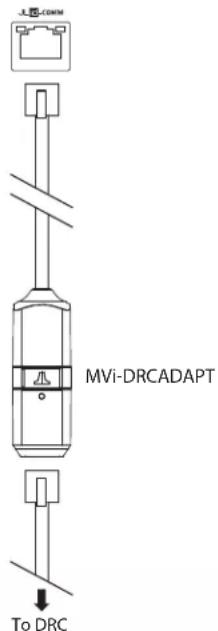
Note: Components pictured may not be to scale. DRC sold separately.