
CASIO

Collection LA670WEAD-1EF - Montre-bracelet CASIO - Gratis bruksanvisning og manual

Finn enhetens veiledning gratis Collection LA670WEAD-1EF CASIO i PDF-format.

📄 1 sider Norsk NO Last ned 💬 AI-spørsmål
Notice CASIO Collection LA670WEAD-1EF - page 1
Pick your language and provide your email: we'll send you a specifically translated version.

Brukerspørsmål om Collection LA670WEAD-1EF CASIO

0 spørsmål om dette apparatet. Svar på dem du kjenner, eller still ditt eget.

Still et nytt spørsmål om dette apparatet

E-posten forblir privat: den brukes kun til å varsle deg hvis noen svarer på spørsmålet ditt.

Ingen spørsmål ennå. Vær den første til å stille et.

Last ned instruksjonene for din Montre-bracelet i PDF-format gratis! Finn veiledningen din Collection LA670WEAD-1EF - CASIO og ta den elektroniske enheten tilbake i hendene. På denne siden er alle dokumenter som er nødvendige for bruken av enheten din publisert. Collection LA670WEAD-1EF av merket CASIO.

BRUKSANVISNING Collection LA670WEAD-1EF CASIO

Operation Guide 3191

CASIO ^®

Reading the display
CASIO Collection LA670WEAD-1EF - Operation Guide 3191 - 1

flowchart
graph TD
    A["Regular timekeeping Time"] --> B["P.M. Hour"]
    B --> C["10:58 So"]
    C --> D["Minute"]
    D --> E["Second"]
    E --> F["Clock"]
    F --> G["6:30 TH"]
    G --> H["Day"]
    H --> I["10:58 So"]
    I --> J["Clock"]
    J --> K["Release"]
    K --> L["Clock"]
    L --> M["Reversion to regular timekeeping"]
    M --> N["Reverting to regular timekeeping when the second 1/10 second"]
    N --> O["Reverting to regular timekeeping when the second 10:58 So"]
    O --> P["Reverting to regular timekeeping when the second 1/10 second"]
    P --> Q["Reverting to regular timekeeping when the second 10:58 So"]
    Q --> R["Reverting to regular timekeeping when the second 1/10 second"]
    R --> S["Reverting to regular timekeeping when the second 10:58 So"]
    S --> T["Reverting to regular timekeeping when the second 1/10 second"]
    T --> U["Reverting to regular timekeeping when the second 10:58 So"]
    U --> V["Reverting to regular timekeeping when the second 1/10 second"]
    V --> W["Reverting to regular timekeeping when the second 10:58 So"]
    W --> X["Reverting to regular timekeeping when the second 1/10 second"]
    X --> Y["Reverting to regular timekeeping when the second 10:58 So"]
    Y --> Z["Reverting to regular timekeeping when the second 1/10 second"]
    Z --> AA["Reverting to regular timekeeping when the second 10:58 So"]
    AA --> AB["Reverting to regular timekeeping when the second 1/10 second"]
    AB --> AC["Reverting to regular timekeeping when the second 10:58 So"]
    AC --> AD["Reverting to regular timekeeping when the second 1/10 second"]
    AD --> AE["Reverting to regular timekeeping when the second 10:58 So"]
    AE --> AF["Reverting to regular timekeeping when the second 1/10 second"]
    AF --> AG["Reverting to regular timekeeping when the second 10:58 So"]
    AG --> AH["Reverting to regular timekeeping when the second 1/10 second"]
    AH --> AI["Reverting to regular timekeeping when the second 10:58 So"]
    AI --> AJ["Reverting to regular timekeeping when the second 1/10 second"]
    AJ --> AK["Reverting to regular timekeeping when the second 10:58 So"]
    AK --> AL["Reverting to regular timekeeping when the second 1/10 second"]
    AL --> AM["Reverting to regular timekeeping when the second 10:58 So"]
    AM --> AN["Reverting to regular timekeeping when the second 1/10 second"]
    AN --> AO["Reverting to regular timekeeping when the second 10:58 So"]
    AO --> AP["Reverting to regular timekeeping when the second 1/10 second"]
    AP --> AQ["Reverting to regular timekeeping when the second 10:58 So"]
    AQ --> AR["Reverting to regular timekeeping when the second 1/10 second"]
    AR --> AS["Reverting to regular timekeeping when the second 10:58 So"]
    AS --> AT["Reverting to regular timekeeping when the second 1/10 second"]
    AT --> AU["Reverting to regular timekeeping when the second 10:58 So"]
    AU --> AV["Reverting to regular timekeeping when the second 1/10 second"]
    AV --> AW["Reverting to regular timekeeping when the second 10:58 So"]
    AW --> AX["Reverting to regular timekeeping when the second 1/10 second"]
    AX --> AY["Reverting to regular timekeeping when the second 10:58 So"]
    AY --> AZ["Reverting to regular timekeeping when the second 1/10 second"]
    AZ --> BA["Reverting to regular timekeeping when the second 10:58 So"]
    BA --> BB["Reverting to regular timekeeping when the second 1/10 second"]
    BB --> BC["Reverting to regular timekeeping when the second 10:58 So"]
    BC --> BD["Reverting to regular timekeeping when the second 1/10 second"]
    BD --> BE["Reverting to regular timekeeping when the second 10:58 So"]
    BE --> BF["Reverting to regular timekeeping when the second 1/10 second"]
    BF --> BG["Reverting to regular timekeeping when the second 10:58 So"]
    BG --> BH["Reverting to regular timekeeping when the second 1/10 second"]
    BH --> BI["Reverting to regular timekeeping when the second 10:58 So"]
    BI --> BJ["Reverting to regular timekeeping when the second 1/10 second"]
    BJ --> BK["Reverting to regular timekeeping when the second 10:58 So"]
    BK --> BL["Reverting to regular timekeeping when the second 1/10 second"]
    BL --> BM["Reverting to regular timekeeping when the second 10:58 So"]
    BM --> BN["Reverting to regular timekeeping when the second 1/10 Second"]
    BN --> BO["Reverting to regular timekeeping when the second 10:58 So"]
    BO --> BP["Reverting to regular timekeeping when the second 1/10 Second"]
    BP --> BQ["Reverting to regular timekeeping when the second 10:58 So"]
    BQ --> BR["Reverting to regular timekeeping when the second 1/10 Second"]
    BR --> BS["Reverting to regular timekeeping when the second 10:58 So"]
    BS --> BT["Reverting to regular timekeeping when the second 1/10 Second"]
    BT --> BU["Reverting to regular timekeeping when the second 10:58 So"]
    BU --> BV["Reverting to regular timekeeping when the second 1/10 Second"]
    BV --> BW["Reverting to regular timekeeping when the second 10:58 So"]
    BW --> BX["Reverting to regular timekeeping when the second 1/10 Second"]
    BX --> BY["Reverting to regular timekeeping when the second 10:58 So"]
    BY --> BZ["Reverting to regular timekeeping when the second 1/10 Second"]
    BZ --> CA["Reverting to regular timekeeping when the second 10:58 So"]
    CA --> CB["Reverting to regular timekeeping when the second 1/10 Second"]
    CB --> CC["Reverting to regular timekeeping when the second 10:58 So"]
    CC --> CD["Reverting to regular timekeeping when the second 1/10 Second"]
    CD --> CE["Reverting to regular timekeeping when the second 10:58 So"]
    CE --> CF["Reverting to regular timekeeping when the second 1/10 Second"]
    CF --> CG["Reverting to regular timekeeping when the second 10:58 So"]
    CG --> CH["Reverting to regular timekeeping when the second 1/10 Second"]
    CH --> CI["Reverting to regular timekeeping when the second 10:58 So"]
    CI --> CJ["Reverting to regular timekeeping when the second 1/10 Second"]
    CJ --> CK["Reverting to regular timekeeping when the second 10:58 So"]
    CK --> CL["Reverting to regular timekeeping when the second 1/10 Second"]
    CL --> CM["Reverting to regular timekeeping when the second 10:58 So"]
    CM --> CN["Reverting to regular timekeeping when the second 1/10 Second"]
    CN --> CO["Reverting to regular timekeeping when the second 10:58 So"]
    CO --> CP["Reverting to regular timekeeping when the second 1/10 Second"]
    CP --> CQ["Reverting to regular timekeeping when the second 10:58 So"]

Countdown alarm operation
CASIO Collection LA670WEAD-1EF - Operation Guide 3191 - 2

flowchart
graph TD
    A["1 MIN."] --> B["3 MIN. 5 MIN. >0 MIN."]
    B --> C[" "]
    D["30 MIN. 20 MIN. 15 MIN."] --> E[" "]
    F["Press"] --> G["1 MIN."]
    H["Reset"] --> I["30 MIN. 20 MIN. 15 MIN."]
    J["Setting countdown period"] --> K["Each press of the B button shifts the countdown period."]
    L["Countdown period Indicator"] --> M["10-5850"]
    M --> N["10-5850"]
    N --> O["10-5850"]
    O --> P["10-5850"]
    P --> Q["10-5850"]
    Q --> R["10-5850"]
    R --> S["10-5850"]

Countdown starts when the Ⓑ button is released. When the countdown reaches zero, the alarm will sound for 10 seconds. Pressing any button stops the alarm.

Setting daily alarm

If the daily alarm is set, the beeper sounds for 20 seconds at the preset time every day until cleared. To stop the beeper, press any button. If the time signal is set, the watch sounds every hour on the hour with a "Be-o-op" signal. (Sound demonstration) Press and hold the Ⓐ button in alarm mode to sound the beeper.

CASIO Collection LA670WEAD-1EF - Setting daily alarm - 1

flowchart
graph LR
    A["Press B. Hour setting (830Ω) C"] --> B["Press B. Minute setting (835Ω)"]
    B --> C["Press B. exit setting screen."]
    D["Press B in the daily alarm mode to set hours and minutes. Each press of A advances the alarm setting by 1 hour."] --> E["Press B to set minute digits. Each press of A advances the alarm setting by 1 minute."]

* If the Ⓐ button is pressed, the watch reverts to the regular timekeeping mode. (Quick digit advance) When the Ⓐ button is pressed for more than 2 seconds, the digit advances quickly. When released, digit advance will stop.

[ON or OFF setting of daily alarm and time signal]
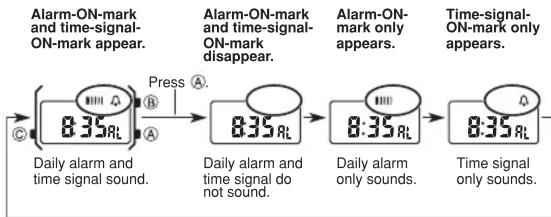
CASIO Collection LA670WEAD-1EF - Setting daily alarm - 2

flowchart
graph LR
    A["8:35 RL"] -->|Press A| B["8:35 RL"]
    B -->|Press B| C["8:35 RL"]
    C -->|Press C| D["Time signal only sounds."]
    style A fill:#f9f,stroke:#333
    style B fill:#f9f,stroke:#333
    style C fill:#f9f,stroke:#333
    style D fill:#f9f,stroke:#333

Stopwatch operation
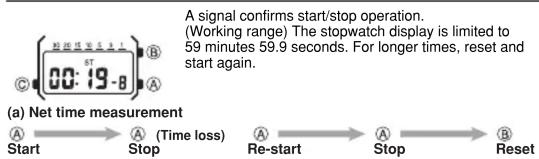
CASIO Collection LA670WEAD-1EF - Setting daily alarm - 3

flowchart
graph LR
    A["Start"] --> B["Stop"]
    B --> C["Re-start"]
    C --> D["Stop"]
    D --> E["Reset"]

Setting time and calendar

  1. In the time setting mode, first press Ⓐ on a time signal to correct seconds.
  2. Press Ⓑ to shift flashing position. The digit(s) to be changed will flash.

CASIO Collection LA670WEAD-1EF - Setting time and calendar - 1

flowchart
graph TD
    A["SECOND"] --> B["HOUR"]
    B --> C["MINUTE"]
    C --> D["MONTH"]
    D --> E["DATE"]
    E --> F["DAY"]
    F --> G["SECOND"]
    H["Press Ⓐ."] --> B
  1. Each press of (A) advances the setting by one. Keep pressed for quick advance.
  2. Press © to complete setting.

Specifications

Accuracy at normal temperature: ± 30 seconds per month

Display capacity:

• Regular timekeeping mode
Hour, minute, second, am/pm, month, date, day (double display) Calendar system: Auto-calendar (set at 28 days for February)
- Countdown alarm mode
Input range: 1 to 30 minutes
• Daily alarm
• Hourly time signal
- Stopwatch mode Measuring capacity: 59 minutes 59.9 seconds Measuring unit: 1/10th of a second Measuring modes: Net time

Battery: Battery type Battery life*

CR1216 Approx. 2 years

* Includes an average of 20-second alarm per day.

Innholdsfortegnelse Klikk på en tittel for å få tilgang til den
Veiledningsassistent
Drevet av Anthropic
Venter på meldingen din
Produktinformasjon

Merke : CASIO

Modell : Collection LA670WEAD-1EF

Kategori : Montre-bracelet