8117 - Lyd/video konverter MONOPRICE - Gratis bruksanvisning og manual
Finn enhetens veiledning gratis 8117 MONOPRICE i PDF-format.


Brukerspørsmål om 8117 MONOPRICE
0 spørsmål om dette apparatet. Svar på dem du kjenner, eller still ditt eget.
Still et nytt spørsmål om dette apparatet
Last ned instruksjonene for din Lyd/video konverter i PDF-format gratis! Finn veiledningen din 8117 - MONOPRICE og ta den elektroniske enheten tilbake i hendene. På denne siden er alle dokumenter som er nødvendige for bruken av enheten din publisert. 8117 av merket MONOPRICE.
BRUKSANVISNING 8117 MONOPRICE
User Manual
Table of Contents
1.0 Introduction....1
2.0 Specifications....1
3.0 Package Contents....2
4.0 Panel Descriptions....2
5.0 Connection and Operation....3
Mini DisplayPort to HDMIx2 Converter with Audio
DEAR CUSTOMER
Thank you for purchasing this product. For optimum performance and safety, please read these instructions carefully before connecting, operating or adjusting this product. Please keep this manual for future reference.
1.0 INTRODUCTION
The Mini DisplayPort to HDMIx2 converter with Audio seamlessly connect next generation DisplayPort based MacBook, MacBook Pro, or MacBook Air with a Mini DisplayPort to high definition displays. It can support two HDMI output simultaneously.
It offers solutions for digital entertainment center, HDTV retail and show site, HDTV, STB, DVD and Projector factory, noise space and security concerns, data center control, information distribution, conference room presentation, school and corporate training environments.
1.1 FEATURES
● Support Mini DisplayPort 1.1a input and two HDMI output.
● Support HDMI highest video resolution 1080p.
- Support HDMI 225MHz/2.25Gbps per channel (6.75Gbps all channel) bandwidth.
● Support HDMI 12bit per channel (36bit all channel) deep color.
● Supports uncompressed audio such as LPCM.
2.0 SPECIFICATIONS
| Signal Inputs/Output | |
| Input Video Signal | 5 Volts p-p (TTL) |
| Maximum Single Link Range | 1920x1080P |
| Output Video | HDMI |
| Input/Output Connector | Input: Mini DisplayPort Female 20pinOutput: HDMI Female Type A 19pin |
| Operating Frequency | |
| Vertical Frequency Range | 50/60Hz |
| Video Amplifier Bandwidth | 2.25Gbps/225MHz |
| Resolutions(HDTV) | |
| Interlaced(50&60Hz) | 480i,576i,1080i |
| Progressive(50&60Hz) | 480p,576p,720p,1080p |
| Warranty | |
| Limited Warranty | 1 Year Parts and Labor |
| Environmental | |
| Operating Temperature | 0 °C to +70°C |
| Operating Humidity | 10% to 85 % RH (no condensation) |
| Storage Temperature | -10°C to +80°C |
| Storage Humidity | 5% to 90 % RH (no condensation) |
| Power Requirement | |
| External Power Supply | 5V DC@2A |
| Power consumption (Max) | 5W(max) |
| Regulatory Approvals | |
| Converter Unit | FCC,CE,UL |
| Power Supply | UL,CE,FCC |
| Accessories Adapter | |
| User Manual |
Note: Specifications are subject to change without notice.
3.0 Package Contents
Before attempting to use this unit, please check the packaging and make sure the following items are contained in the shipping carton:
- Main unit
5V DC@2A Power Supply - 1x Mini DisplayPort cabel male to male(3 feet)
User's Manual
4.0 PANEL DESCRIPTIONS
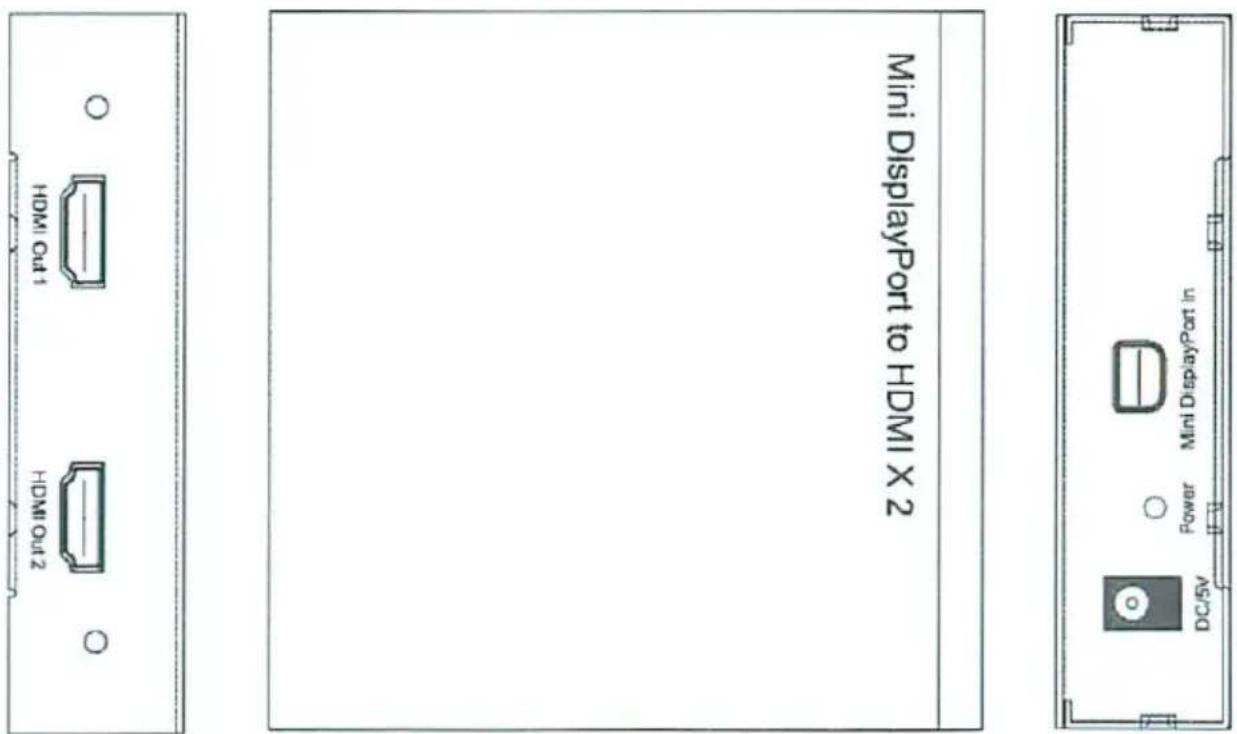
5.0 CONNECTION AND OPERATION
1) Connect Mini DisplayPort source device to the input of product using provided cable.
2) Connect the HDMI female to display by HDMI M/M cable.
3) Insert the DC side of 5v power supply into it and then connect the AC side of the power supply into the wall outlet.
Attention: Insert / Extract cable gently.
5.1 CONNECTION DIAGRAM
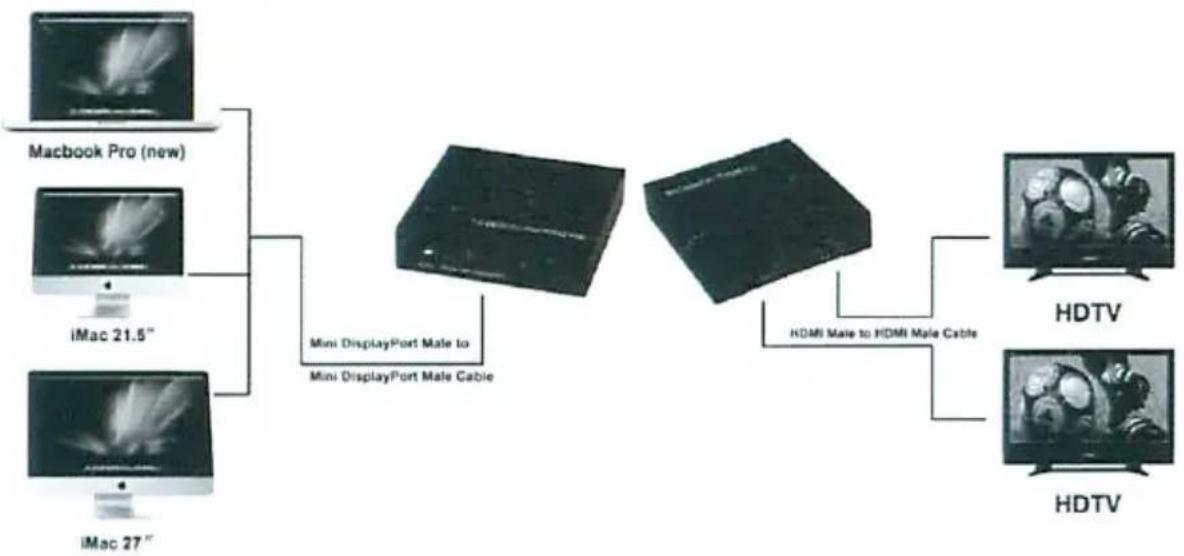
flowchart
graph TD
    A["Macbook Pro (new)"] --> C["Mini DisplayPort Male to Mini DisplayPort Male Cable"]
    B["iMac 21.5""] --> C
    D["iMac 27""] --> C
    C --> E["HDMI Male to HDMI Male Cable"]
    E --> F["HDTV"]
    E --> G["HDTV"]
P/N1016