B1 - Hodetelefoner Outlimits - Gratis bruksanvisning og manual
Finn enhetens veiledning gratis B1 Outlimits i PDF-format.


Brukerspørsmål om B1 Outlimits
0 spørsmål om dette apparatet. Svar på dem du kjenner, eller still ditt eget.
Still et nytt spørsmål om dette apparatet
Last ned instruksjonene for din Hodetelefoner i PDF-format gratis! Finn veiledningen din B1 - Outlimits og ta den elektroniske enheten tilbake i hendene. På denne siden er alle dokumenter som er nødvendige for bruken av enheten din publisert. B1 av merket Outlimits.
BRUKSANVISNING B1 Outlimits
Water-proof Sporting Bluetooth Headset Outlimits B1 User Manual - English
1. Caution
- Do not attempt to service the unit yourself. Opening or removing covers may expose you to dangerous voltages or other hazards. Please contact your local reseller before you send the unit for repair.
- Follow local regulations in the country or region you are in, while you are driving with headset.
- Storage at high temperatures (above 50^ / 122^ ), such as in a running vehicle or under direct sunlight, may affect performance and effective battery life of the headset.
- Design of this headset can effectively prevent the accumulation of harmful dust and spilled liquids from any direction. But please do NOT put the headset or any components from it into water.
- The headset, especially the embedded battery must be properly disposed or may be recycled, contact your local recycling centers for disposal methods.
2. Headset Overview
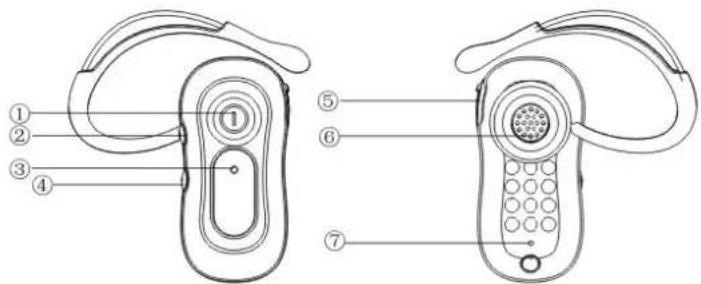
-
Multi-function button
-
Charging Port
-
Volume +
-
SPK
-
Indicator
-
Microphone
-
Volume -
3. Specifications
| Item Specifications and description | |
| Bluetooth version 2.1+EDR | |
| Support profile Headset Profile, Hands-Free Profile | |
| Operating range Up to 30 feet (10 meters) | |
| Standby time Up to 100 hours | |
| Talking time Up to 5 hours | |
| Charging time Approximately 2.5 hours | |
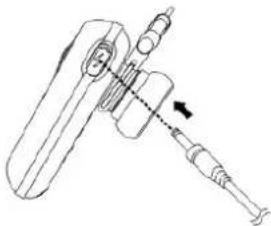
4. Charging
Insert the charging cable into the jack on the headset and the USB port on your PC or USB adapter.
Charge the headset until the red indicator light turns off and the blue indicator light turns on.
natural_image
Technical line drawing of a mechanical tool with a dial indicator (no text or symbols)5. Turning on/off
Turn the headset on: hold the Multi-function button for 3 seconds until the blue indicator light flashes 4 times.
Turn the headset off: hold the Multi-function button for 3 seconds until blue and red indicator lights flash alternately.
6. Indicator Instruction
- Standby mode: In standby mode, the blue indicator light flashes every 3 seconds.
- Talking mode: When the headset is receiving a call, the blue indicator light flashes every 8 seconds.
- Pairing mode: The blue indicator light keeps lit when the headset is waiting to be discovered and paired.
- Low battery mode: In case that there is less than 10% of battery power left, the red indicator light flashes. Please then recharge the battery.
7. Pairing
1) Enter into pairing mode.
- Hold the Multi-function button when the headset is off for 6 seconds until the blue indicator light remains lit after blinking.
• The headset will switch itself into pairing mode immediately after initial turning on.
2) Search for and pair the headset to your phone according to operation instruction of the phone. (Bluetooth PIN: 0000)
• After pairing, the blue indicator light will flash 10 times rapidly before the headset entering into Standby mode.
- If the blue indicator light remains lit, retry pairing.
3) Multi-pairing:
• After successfully paired with one mobile phone (named Phone 1), turn off the Bluetooth function of Phone 1 and pair the headset with another mobile phone(named Phone 2) according to normal pairing steps.
• After pairing with Phone 2, turn on the Bluetooth function of Phone 1, and the headset will pair with Phone 1 automatically.
Note: Once the headset and the phone were successfully paired, the headset attempts to reconnect the last connected phone automatically each time it turns on. Otherwise, press the Multi-function button to reconnect.
8. Call Management
Some functions may not be supported by some phones.
In Standby mode
Press the Multi-function once button to:
• Answer an incoming call
• Redial the last called number
Press and hold multi-function button for at least 1 second to:
• Make a voice-activated call
- Reject an incoming call
In Active mode
Press the Multi-function button to:
• End a call
• Transfer a call from the phone to the headset
Press and hold Multi-function button for at least 1 second to:
- Place a call on hold
• Answer a new call
- Retrieve a call on hold
Press [+] or [-] to adjust the volume.
Press and hold [+] or [-] to turn the microphone off or on.
9. Maintenance
Outlimits B1 is a well-designed communication device, careful maintenance and proper use will extend the product life and ensure its excellent performance. Following maintenance procedures may be helpful to you:
• Always turn off and keep your headset in a safe place when it is not in use.
- Work in a high humidity condition: In order to keeping better performance, we suggest keep the device dry, away from water, precipitation, humidity, moisture, and various liquids that may corrode electronic circuits. If your device gets wet, turn it off immediately and wait until the device gets dry completely before using it.
- Do not store the device in high temperatures. Extremely high temperature could affect performance of the headset, reduce battery life, and even damage the mechanical parts of the headset.
- Do not store the device in extremely low temperature. The possible moisture that forms after you taking the device to a warm place could damage the internal electronic circuits.
- Avoid using chemical and any other detergent to clean the device. A clean and soft cloth might be acceptable.
- Though the headset is designed to be shockproof, please avoid directly or intentionally knock on any parts of the headset. Otherwise, will degrade product performance, cause damages, and terminate warranty.
DECLARATION OF CONFORMITY
We ITT s.a.r.l.
of 20, Blvd Princesse Charlotte - MC 98000 Monaco
declare under sole responsibility that the product
Mod. Outlimits B1
Description Bluetooth Headset
is in conformity with the essential requirements of the following specifications:
SAR EN50371: 2002
RADIO EN 300328: 2006
EMC EN 301489-1: 2008
EN 301489-17: 2009
The conformity is in accordance with Annex IV of Council Directive 1999/5/EC on radio equipment and telecommunication equipment.
The product is marked with CE marking and Notify Body number CE 2200


This product complies with the European Directive for the Restriction of Hazardous Substances (RoHS) 2002/95/EC