RV179 - Ukategorisert Arkon - Gratis bruksanvisning og manual
Finn enhetens veiledning gratis RV179 Arkon i PDF-format.


Brukerspørsmål om RV179 Arkon
0 spørsmål om dette apparatet. Svar på dem du kjenner, eller still ditt eget.
Still et nytt spørsmål om dette apparatet
Last ned instruksjonene for din Ukategorisert i PDF-format gratis! Finn veiledningen din RV179 - Arkon og ta den elektroniske enheten tilbake i hendene. På denne siden er alle dokumenter som er nødvendige for bruken av enheten din publisert. RV179 av merket Arkon.
BRUKSANVISNING RV179 Arkon
natural_image
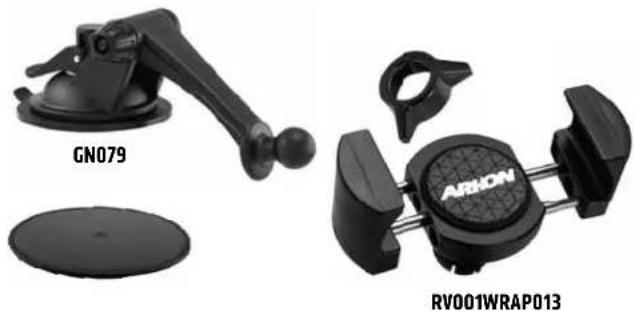
Product photo of two ARHON sensors (GN079 and RV001WRAP013) with no visible text or symbols on the devices themselves.If the sticky suction base becomes dirty or loses stickiness, rinse under warm water with mild liquid soap and let air dry.
Package Contents:
RV001WR - RoadVise™ Premium Universal Smartphone Holder with Ring
GN079 - Sticky Suction Mounting Pedestal
AP013 - 80mm Adhesive Disk
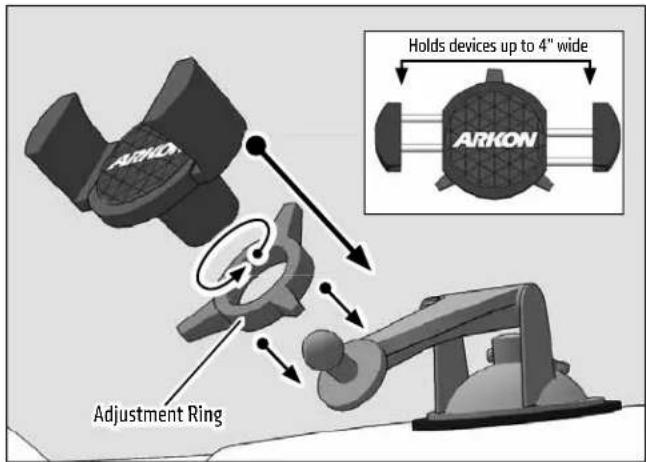
IMPORTANT: Do not overtighten ring. Overtightening ring may damage threads on holder and also make it diffi cult to adjust holder.
Compatibility:
Fits smartphones with cases weighing up to 2 pounds and measuring up to 4" wide.
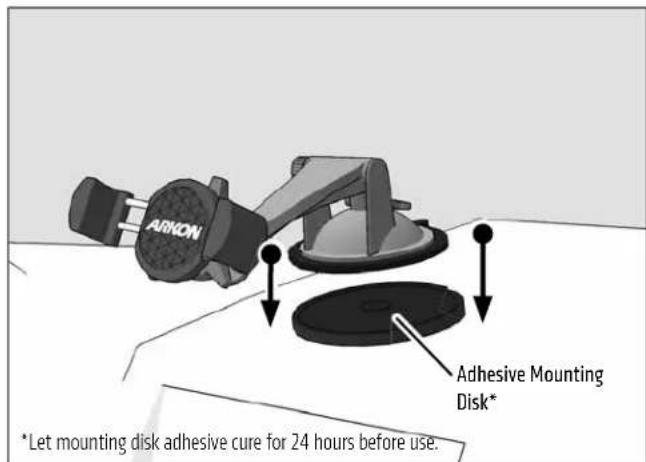
DASHBOARD MOUNTING WARNING: THE STICKY SUCTION PEDESTAL SHOULD NOT BE USED ON SOME TYPES OF DASHBOARD. IT MAY LEAVE A PERMANENT INDENTATION ON DASHBOARD SURFACES MADE OF SOFT VINYL, LEATHER, OR SIMILAR MATERIALS, TO PREVENT PERMANENT INDENTATION MARKS. USE THE INCLUDED ADHESIVE MOUNTING DISK WHEN MOUNTING ON SOFT DASHBOARD SURFACES.
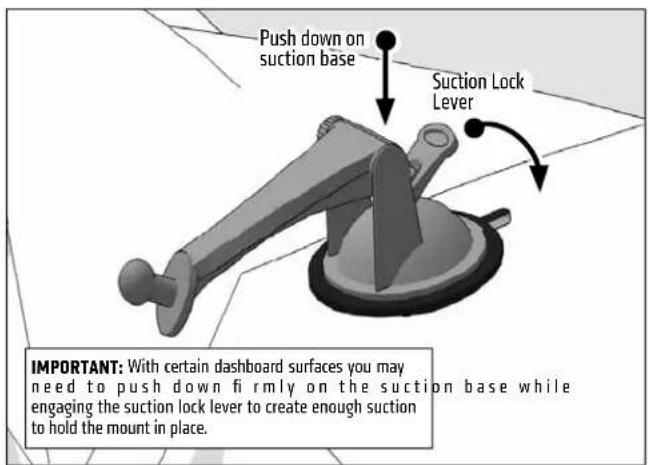
① Attach pedestal to dash or windshield, engage suction lock.
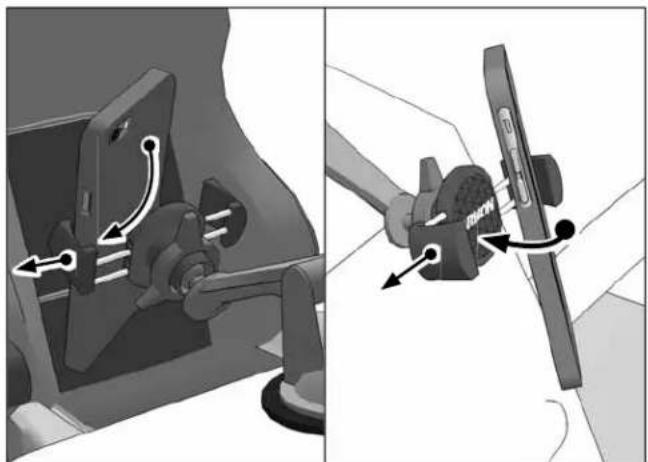
3 Using two hands, insert the phone into the holder by pushing the device into one of the spring-loaded legs. Expand the other leg and fully insert device until it lays fl at against the blue rubber pad.
natural_image
Mechanical assembly diagram showing a valve mechanism with directional arrows (no text or labels)2 Place adjustment ring over the pedestal ball and snap the RoadVise Holder onto the pedestal.
OPTIONAL: For use on soft vinyl or leather dashboards, use the included adhesive mounting disk.

Safety Precautions
Do not install Arkon products over an air bag cover or within the air bag deployment zone. Arkon Resources, Inc. assumes no responsibility of liability for injury or death as a result of car crashes and / or air bag deployment.
Arkon is not responsible for any damages caused to your vehicle, your device, or yourself due to the installation or use of this mount.
ARKON
RESOURCES INC.
The Mobile Mounting Specialists™
Consumer Hotline:
www.arkon.com
USA (800) 841-0884
Arcadia, CA 91006 USA
INT'L (626) 254-9005
Designed in USA | Made in USA & China
Monday - Friday 9am - 5pm, PST
© Copyright 2015 Arkon Resources, Inc.