AC1035A-R2 - Câbles pour ordinateurs et autres Black Box - Gratis bruksanvisning og manual
Finn enhetens veiledning gratis AC1035A-R2 Black Box i PDF-format.


Brukerspørsmål om AC1035A-R2 Black Box
0 spørsmål om dette apparatet. Svar på dem du kjenner, eller still ditt eget.
Still et nytt spørsmål om dette apparatet
Last ned instruksjonene for din Câbles pour ordinateurs et autres i PDF-format gratis! Finn veiledningen din AC1035A-R2 - Black Box og ta den elektroniske enheten tilbake i hendene. På denne siden er alle dokumenter som er nødvendige for bruken av enheten din publisert. AC1035A-R2 av merket Black Box.
BRUKSANVISNING AC1035A-R2 Black Box
DVI Extender Kit
Extends a single-link DVI-D video signal up to 130 feet (40.6 m).
Supports resolutions of 1280 x1024 (HDTV 1080i, 720), 1024 x 768, or 480p.
natural_image
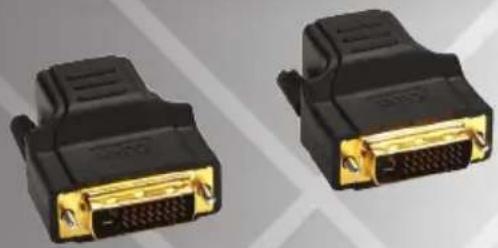
Two black DVI connectors with gold contacts, shown side by side (no text or symbols visible)Overview
Using CAT5e/6 cable, the DVI Extender Kit extends a single-link DVI-D video signal. It also:
- Provides a maximum resolution of 1280 x 1024 (HDTV 1080i, 720p) at distances up to 100 feet (30.4 m) or 1024 x 768 (480p) at up to 130 ft. (39.6 m).
- Requires no external power.
- Complies with RoHS, FCC, and CE standards.
What's Included
Your package should include the following items. If anything is missing or damaged, contact Black Box Technical Support at 724-746-5500 or info@blackbox.com.
• DVI-D/RJ-45 transmitter
- RJ-45/DVI-D receiver
- This user's manual
Installation
- Power off the DVI-D output device and DVI-D display.
- Plug the transmitter into the DVI output port of the DVI device. Use CAT5e/6 cable that's wired straight-through. Plug the cable into the transmitter and receiver. Connect the receiver to the DVI display.
- Power on the DVI display and the DVI output device.
- The green LED on the transmitter indicates an active DVI-D video signal and the orange LED indicates power on.
Trademarks Used in this Manual
Black Box and the Double Diamond logo are registered trademarks of BB Technologies, Inc. Any other trademarks mentioned in this manual are acknowledged to be the property of the trademark owners.
© Copyright 2010. All rights reserved.