P41 - Chargeur pour appareils mobiles Goodram - Gratis bruksanvisning og manual
Finn enhetens veiledning gratis P41 Goodram i PDF-format.


Pick your language and provide your email: we'll send you a specifically translated version.
Brukerspørsmål om P41 Goodram
0 spørsmål om dette apparatet. Svar på dem du kjenner, eller still ditt eget.
Still et nytt spørsmål om dette apparatet
Ingen spørsmål ennå. Vær den første til å stille et.
Last ned instruksjonene for din Chargeur pour appareils mobiles i PDF-format gratis! Finn veiledningen din P41 - Goodram og ta den elektroniske enheten tilbake i hendene. På denne siden er alle dokumenter som er nødvendige for bruken av enheten din publisert. P41 av merket Goodram.
BRUKSANVISNING P41 Goodram
 Power BankUser manual Power BankUser manual | [DSGT]Features:Over-charge protection and 1ms short circuit protection.Lightweight, portable and compact design.Built-in advanced power management IC to control and regulate temperature, voltage and current to ensure full operational safety for your digital devices.Suitable for mobile phones, smartphones and other 5V input digital devices.Lifetime (cycles): More than 500 times. | Overview: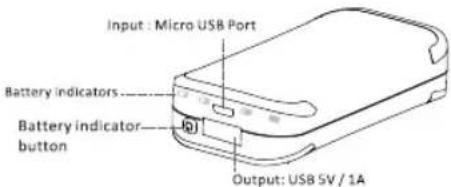 Micro USB Port (Input) Self-chargingUSB port (Output) DC 5V-A for charging digital devicesCharging indicator Red - ChargingBlue-Charging completeBattery indicators 4 LED indicators displaying the battery statusBattery indicator buttonPress to check the battery level Micro USB Port (Input) Self-chargingUSB port (Output) DC 5V-A for charging digital devicesCharging indicator Red - ChargingBlue-Charging completeBattery indicators 4 LED indicators displaying the battery statusBattery indicator buttonPress to check the battery level |
Specification:InputDC 5V-1AOutputDC 5V-1ADimension85*40*21mmWeight110gCapacity4400mAhOperation Guide:Charging power bank:Please follow the illustration below for your reference.When power bank is charged, the LED indicator will turn red and blue when its fully charged. Please remove the power adapter safely after power bank is fully charged.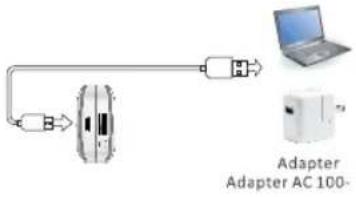 | Charging digital devices:When you connect the power bank to the digital devices, the devices are charged.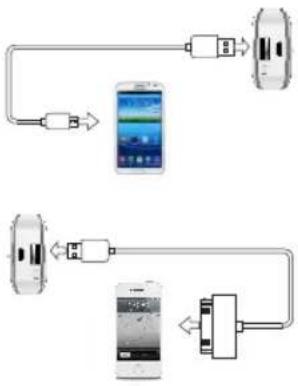 Accessories:Micro USB charging cable.User manual. Accessories:Micro USB charging cable.User manual. | Notes:1. Please use a compatible power adapter (5V output) to charge the power bank. We recommend the adapter with at least 5V-1A or computer USB port.2. Make sure the input voltage of your digital products fits the output voltage of the power bank.3. Please remove the adapter after power bank is fully charged.4. Do not drop, disassemble, open, crush, bend, deform, puncture, shred, microwave, incinerate, paint, or insert foreign objects into this power bank.5. Do not put this product into liquid, fire or high temperature environment |
Overview:
| Micro USB Port (Input) Self-charging | |
| USB port (Output) DC 5V-1A for charging digital devices | |
| Charging indicator Red-ChargingBlue-Charging complete | |
| Battery indicators 4 LED indicators displaying the battery status | |
| Battery indicator button | Press to check the battery level |
Specification:
| Input | DC 5V-1A |
| Output | DC 5V-1A |
| Dimension | 85*40*21mm |
| Weight | 110g |
| Capacity | 4400mAh |
Operation Guide:
Charging power bank:
Accessories:
Notes:
- Please use a compatible power adapter (5V output) to charge the power bank. We recommend the adapter with at least 5V-1A or computer USB port.
- Make sure the input voltage of your digital products fits the output voltage of the power bank.
- Please remove the adapter after power bank is fully charged.
- Do not drop, disassemble, open, crush, bend, deform, puncture, shred, microwave, incinerate, paint, or insert foreign objects into this power bank.
- Do not put this product into liquid, fire or high temperature environment