MS-3 - Mus Fractal Design - Gratis bruksanvisning og manual
Finn enhetens veiledning gratis MS-3 Fractal Design i PDF-format.


Brukerspørsmål om MS-3 Fractal Design
0 spørsmål om dette apparatet. Svar på dem du kjenner, eller still ditt eget.
Still et nytt spørsmål om dette apparatet
Last ned instruksjonene for din Mus i PDF-format gratis! Finn veiledningen din MS-3 - Fractal Design og ta den elektroniske enheten tilbake i hendene. På denne siden er alle dokumenter som er nødvendige for bruken av enheten din publisert. MS-3 av merket Fractal Design.
BRUKSANVISNING MS-3 Fractal Design

Functionality. Perfected.
Product manual Func MS-3 Gaming Mouse
Content
3 Func MS-3 Gaming Mouse
4 Installation
5-6 Product overview
7 Button Placement
8 Settings software
9-12 Functions - Customize and adjust settings
13-15 Trouble-shooting and Support
Func MS-3 Gaming Mouse
Thank you for choosing Func as your supplier of gaming peripherals!
Many hours of gaming lie ahead of you and we hope that you will be satisfied with your new product!
Product Registration
Register your Func MS-3 Gaming Mouse at www.func.net. It only takes a couple of minutes and gives you the following benefits:
Registering your product only takes a couple of minutes and give you the benefits of:
- Extended warranty for up to 3 years
- Faster and more accurate technical support
- Confirmation of ownership
- Latest software & firmware updates and downloads
Your product is available for registration in a period of three (3) months after the purchase date. If you have any questions, feel free to contact us and we help you out as soon as possible.
Func Insider
Welcome to Func Insider!
Here our fans can come and learn about all the latest Func happenings. What's more, we've created a place where players can help one another improve their gaming experience. Func Insider is meant for everyone, regardless if you play several hours a day or just a couple of times a week.
The best part?
It's both free and easy to become a member. All you have to do is create an account at www.func.net. Then, we'll keep you in the loop about: upcoming products, becoming a BETA tester, interesting news/articles about gaming and competitions for great prizes.
See you on the inside.
Installation
The Func MS-3 Gaming Mouse is a plug-n-play device.
By plugging it into a free USB port on your computer, the mouse will light up and become ready-for-use in a few seconds.
We recommend you to connect your MS-3 to a USB port directly on the computer; connecting it to an external USB hub could affect mouse functionality.
If you want to customize your mouse settings, you will need to install the MS-3 Settings software. For more details, see Section 4 – Settings Software.
If you have any problems, contact our Technical Support for help.
Product Overview
3.1 Technical specifications
MCU/Processor: WT6573
Switches: OMRON
Sensor: Avago UGS 9500
Memory: Onboard, 512 KB
Resolution: 90-5670 DPI
Frames per second: 12 000
Tracking speed: 5.1 m/sec (150 ips)
Max Acceleration: 30 g
Image processing: 10.6 megapixels/sec
Report rate: Adjustable, up to 1000Hz
Lift-off distance: Adjustable
Upgradable firmware: Yes
Connection: USB. Goldplated (2 m braided cord)
3.2 Package contents
Func MS-3 Gaming Mouse
Settings software CD
Manual
3.3 System requirements
Windows® 2000 / XP / Vista / 7
Available USB port
10 MB free space on hard drive
3.4 Product dimensions & weight
126.92x100.69x42.38 mm / 4.99x3.97x1.69 in
Net weight: 127 g (w/o cord)
Product Overview
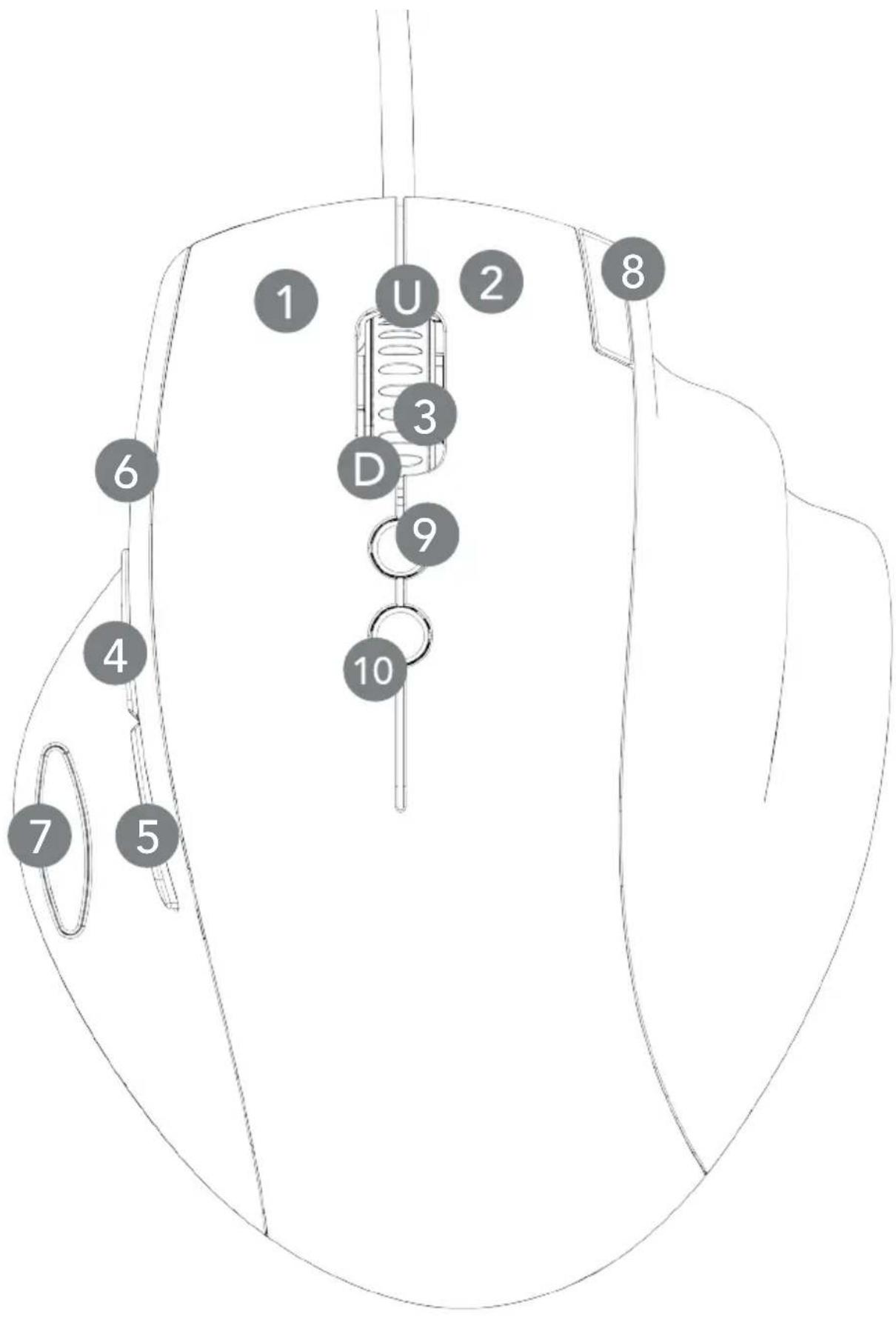
3.5 Buttons
1 Left click
2 Right click
3 Scroll click
4 Forward
5 Back
6 Instant aim
7 Mute sound
8 Profile switch
9 Dpi +
10 Dpi -
U Scroll up
D Scroll down
3.6 Indicators
Three (3) small lights (LEDs) above the split line indicate the active profile (white) or the DPI step (orange).
By default, the indicators display DPI step. By depressing the cycle profile button, profile mode is activated and the LEDs will turn white to indicate which profile is in use.
For more information, see Section 5 – Functions.
4. Settings software
4.1 Installation – get started
- Insert the included CD, or download the installer from www.func.net
- Run the installer.exe program
- Follow the onscreen instructions
- When installation is complete, close the window and launch the settings software
5. Functions – Customize and adjust settings
5.1 Profiles
Func MS-3 Gaming Mouse is equipped with internal memory that can hold a total of three (3) profiles. Switching between profiles can be done in-game with a single mouse click.
It is not necessary to run the settings software to change profiles; the software is only needed to setup and customize profiles. Once set, profiles are stored in the internal memory and will remain saved until the mouse is restored to its default settings.
Profiles can also be saved to an external device, such as a USB stick. This allows you take your settings with you when you are not playing using your own system and/or mouse, or wish to share your favorite settings with a friend.
NOTE: Do not forget to back up your profiles to a local storage device before restoring the mouse to its default settings.
5. Functions – Customize and adjust settings
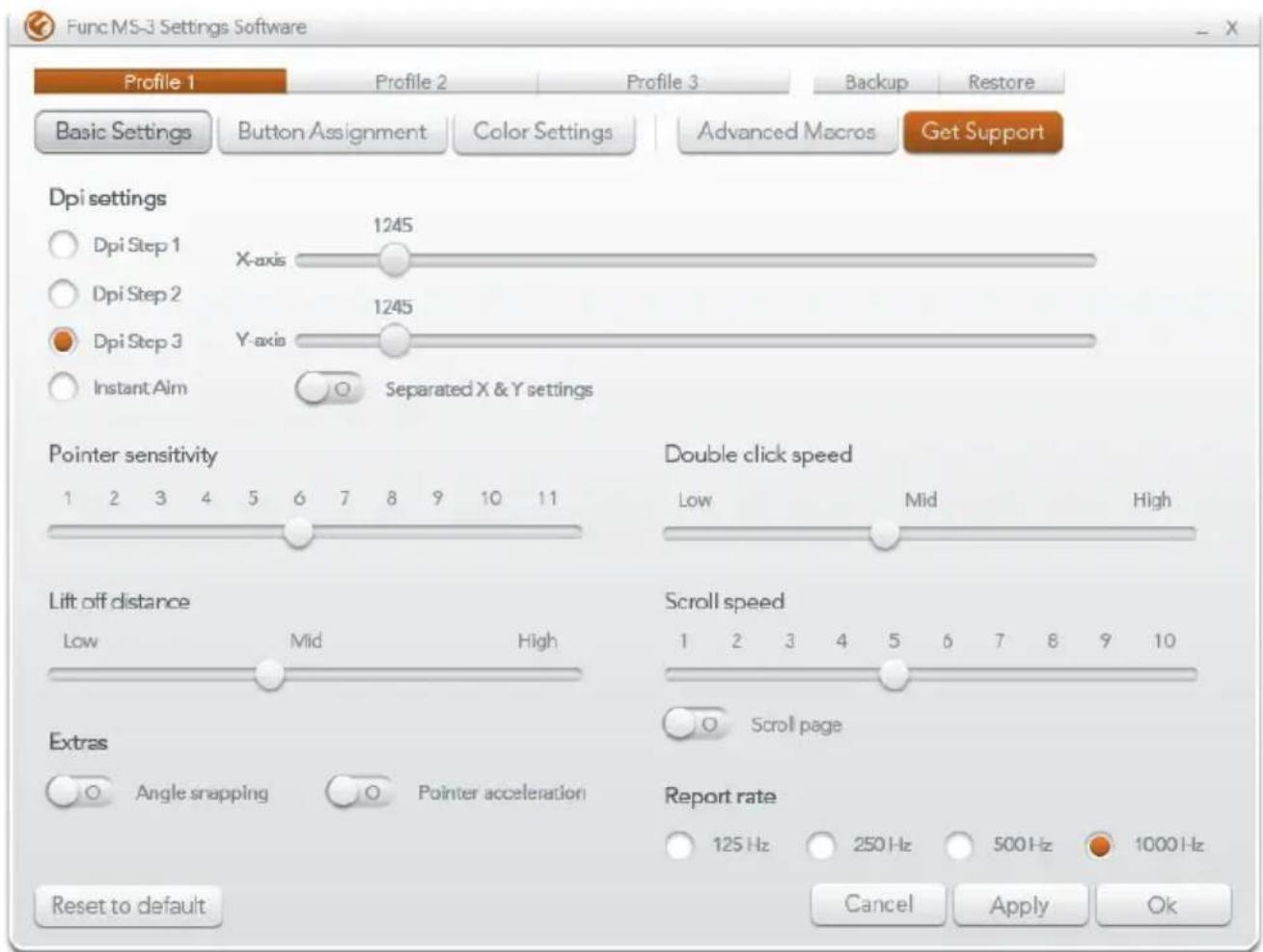
5.2 Basic Settings
5.2.1 Dpi settings
Dots per inch (DPI) settings determines the sensitivity of mouse movements.
Adjust the DPI until you find a sensitivity that suits your game style. Each profile can save three (3) DPI levels and the Instant aim mode.
Select Separate X & Y settings in the settings software to enable individual sensitivity levels in the horizontal and vertical planes.
5.2.2 Pointer sensitivity
This is the operating system (OS) pointer speed.
We strongly encourage leaving this at six (6). Six is the direct translation of data from the mouse to the OS – anything below or above 6 gets resampled by the OS, which could affect mouse functionality.
For more information, read the Func Insider article How to setup your mouse properly.
5.2.3 Lift off distance
Lift-off distance determines the height at which the mouse stops tracking when lifted from a surface. If the lift-off distance is too low, tracking loss may result even if the mouse is still in contact with a surface.
Increase or decrease the lift-off distance height to compensate for the texture and/or pattern of your mousepad.
For more information, read the Func Insider article How to setup your mouse properly.
5. Functions – Customize and adjust settings
5.2 Basic Settings
5.2.4 Extras
Angle snapping is a tool that corrects deviations when tracking in a straight line. We recommend disabling angle snapping while gaming, otherwise the mouse may perform less accurate movements.
Pointer acceleration increases the cursor moving distance based on the speed you move your mouse. This is a very handy function while working in OS environment, especially with a track pad. However, we recommend disabling acceleration while playing games, otherwise the distance will vary depending how fast you move your mouse, which can cause inaccurate movements.
For more information, read the Func Insider article How to setup your mouse properly.
5.2.5 Double click speed
Set this to your personal liking, this function only affects the double-click command in your OS.
5.2.6 Scroll speed
This is a system setting deciding the incremental movement of the scrolling device function.
5.2.7 Report rate
The report rate represents how often the mouse communicates with the computer.
For more information, read the Func Insider article How to setup your mouse properly.
5. Functions – Customize and adjust settings
5.3 Button Assignment
Every button on the MS-3 Gaming Mouse is fully customizable.
To reconfigure a button, click on it in the settings software. A menu will display all the available commands for that button. Buttons can be also be disabled to avoid miss-clicks when not being used.
As a safety precaution, the settings software will not allow you save without having left-click functionality assigned.
When you are happy with your changes, press the apply button, and the new commands are saved.
5.4 Color Settings
The scroll wheel and side button on the MS-3 Gaming Mouse each have an LED that is customizable in 16 million different colors. Both LEDs can be turned off, or configured to pulsate.
5.5 Advanced Macros
An advanced macro editor allows you to record a string of commands live or with a given delay between each of them. To use a macro, simply bind it to the button you want using the Button assignment menu in the settings software. The internal memory can hold up to 60 macros of 10 commands each.
6 Trouble-shooting and Support
If you are in need of technical support, go to the Func's support section at www.func.net. In order to contact support, a Func Insider account is needed. Please log in or create an account. Once logged in, fill in the support form with relevant details. A support ticket number will be issued. Use this number for future correspondence.
6.1 warranty terms
All our products have a 2-year warranty from the date of purchase. If your product is registered using your Func Insider account, an additional year of warranty is provided (3 years total from purchase date).
Proof of purchase, with date of purchase and the buyer's name, are required for warranty claims.
The extra warranty is not valid for refurbished or second-hand purchases.
6.2 Func limited hardware warranty
Func warrants to the original purchaser that Func hardware product is free from defects in material and workmanship for the length of time from the date of purchase – specified on the product package and/or contained in the user documentation.
Except where prohibited by applicable law, this warranty is nontransferable and is limited to the original purchaser. This warranty grants specific legal rights; other rights may apply under other variable local laws.
6 Trouble-shooting and Support
Remedies
Func's entire liability and exclusive remedy for any breach of warranty shall be at Func's discretion: (1) to repair or replace the hardware, or (2) to refund the price paid, provided that the hardware is returned to the point of purchase or such other place as Func may direct with a copy of the sales receipt or dated itemized receipt. Shipping and handling charges may apply except where prohibited by applicable law. Func may, at its option, use new or refurbished or used parts in good working condition to repair or replace any hardware product. Any replacement hardware product will be warranted for the remainder of the original warranty period or thirty (30) days, whichever is longer or for any additional period of time that may be applicable in your jurisdiction.
This warranty does not cover problems or damage resulting from: (1) accident, abuse, misapplication, or any unauthorized repair, modification or disassembly; (2) improper operation or maintenance, usage not in accordance with product instructions or connection to improper voltage supply; or (3) use of consumables, such as replacement batteries, not supplied by Func except where such restriction is prohibited by applicable law.
Obtaining warranty support
Before submitting a warranty claim, visit the support section at www.func.net for technical assistance. Valid warranty claims are generally processed through the point of purchase during the first thirty (30) days following purchase; however, this period of time may vary depending on where you purchased your product – please check with Func or the retailer where you purchased your product for details.
Warranty claims that cannot be processed through the point of purchase and any other product related questions should be addressed directly to Func. The addresses and customer service contact information for Func can be found in the documentation accompanying your product and on the web at www.func.net.
6 Trouble-shooting and Support
Limitation of liability
FUNC SHALL NOT BE LIABLE FOR ANY SPECIAL, INDIRECT, INCIDENTAL OR CONSEQUENTIAL DAMAGES WHATSOEVER, INCLUDING BUT NOT LIMITED TO LOSS OF PROFITS, REVENUE OR DATA (WHETHER DIRECT OR INDIRECT) OR COMMERCIAL LOSS FOR BREACH OF ANY EXPRESS OR IMPLIED WARRANTY ON YOUR PRODUCT EVEN IF FUNC HAS BEEN ADVISED OF THE POSSIBILITY OF SUCH DAMAGES. Some jurisdictions do not allow the exclusion or limitation of special, indirect, incidental or consequential damages, so the above limitation or exclusion may not apply.
Duration of implied warranties
EXCEPT TO THE EXTENT PROHIBITED BY APPLICABLE LAW, ANY IMPLIED WARRANTY OR CONDITION OF MERCHANTABILITY OR FITNESS FOR A PARTICULAR PURPOSE ON THIS HARDWARE PRODUCT IS LIMITED IN DURATION TO THE DURATION OF THE APPLICABLE LIMITED WARRANTY PERIOD FOR YOUR PRODUCT. Some jurisdictions do not allow limitations on implied warranty length, so the above limitation may not apply.
National statutory rights
Consumers have legal rights under applicable national legislation governing the sale of consumer goods. Such rights are not affected by the warranties in this Limited Warranty.
No other warranties
No Func dealer, agent, or employee is authorized to make any modification, extension, or addition to this warranty.
Warranty periods
In the European Union, all warranty period less than two years shall be increased to two years.