
50GB Vertex LE - Datautstyr OCZ - Gratis bruksanvisning og manual
Finn enhetens veiledning gratis 50GB Vertex LE OCZ i PDF-format.


Brukerspørsmål om 50GB Vertex LE OCZ
0 spørsmål om dette apparatet. Svar på dem du kjenner, eller still ditt eget.
Still et nytt spørsmål om dette apparatet
Last ned instruksjonene for din Datautstyr i PDF-format gratis! Finn veiledningen din 50GB Vertex LE - OCZ og ta den elektroniske enheten tilbake i hendene. På denne siden er alle dokumenter som er nødvendige for bruken av enheten din publisert. 50GB Vertex LE av merket OCZ.
BRUKSANVISNING 50GB Vertex LE OCZ

SSDs are more Reliable and Durable

natural_image
Green printed circuit board with multiple integrated circuits and a small display (no readable text or symbols)
natural_image
Internal view of a hard disk drive showing internal components like gears and casing (no text or symbols visible)Solid State Drives feature NAND flash mounted on a circuit boards unlike hard drives which have moving parts making HDDs more susceptible to damage in portable devices.

SSDs are faster
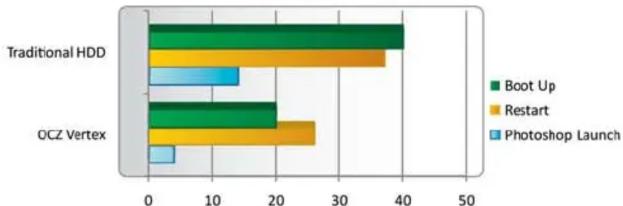
Because they have up to 100x more throughput than 15K RPM spinning hard drive disks, SSDs allow more to get done in less time for a state-of-the-art computing experience. Boot up quicker, open applications in half the time, and transfer files faster than you thought possible.
Time in Seconds (Lower is Better)
bar
| Category | Boot Up | Restart | Photoshop Launch | | :--- | :--- | :--- | :--- | | Traditional HDD | 40 | 37 | 13 | | OCZ Vertex | 20 | 26 | 5 |
SSDs are more responsive
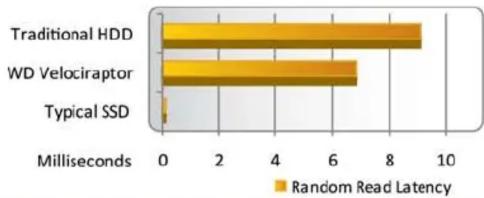
Random Read Latency
bar
| Storage Type | Latency (Milliseconds) | | :--- | :--- | | Traditional HDD | 9.0 | | WD Velociraptor | 6.8 | | Typical SSD | 0.1 |Systems with SSDs feel snappier and more responsive thanks to their incredibly fast access latencies. While HDDs are fastest when the data you want is in the vicinity of the read/write heads, all parts of a SSD are accessed the same way...fast.

SSDs require less power
A good SSD delivers an order of magnitude better performance per watt than even a very efficient hard drive
- Longer battery life
• Less power strain on system - Cooler computing environment
- Leads to a quieter notebook or desktop
Power requirements are exceedingly higher for HDDs versus SSDs
Desktops

bar
| Device | Load | Idle | | ------------ | ---- | ---- | | Desktop HDD | 6.5 | 4.5 | | SSD | 1.8 | 0.5 |
SSDs are quieter, cooler, and lighter
With no moving parts, SSDs are able to stay cooler and quieter and because of their architecture weigh much less than hard drives

SSDs can save businesses money in the long run
Significantly more HDDs are required to complete the same amount of Input/Outputs
Merke : OCZ
Modell : 50GB Vertex LE
Kategori : Datautstyr