KALED24EH7520SVA - Televizorius Kogan - Nemokama naudojimo instrukcija
Raskite įrenginio instrukciją nemokamai KALED24EH7520SVA Kogan PDF formatu.


Naudotojų klausimai apie KALED24EH7520SVA Kogan
0 klausimas apie šį prietaisą. Atsakykite į tas, kurias žinote, arba užduokite savo.
Užduokite naują klausimą apie šį prietaisą
Atsisiųskite instrukciją savo Televizorius PDF formatu nemokamai! Raskite savo instrukciją KALED24EH7520SVA - Kogan ir vėl perimkite savo elektroninį įrenginį. Šiame puslapyje skelbiami visi dokumentai, reikalingi jūsų įrenginio naudojimui. KALED24EH7520SVA prekės ženklo Kogan.
NAUDOJIMO INSTRUKCIJA KALED24EH7520SVA Kogan
text_image
kogan.com24" SMART LED TV
SERIES 7 EH7520
(KALED24EH7520SVA)
COMPONENTS

A Kogan 24" Smart LED TV
B Remote control
C Stand (x2)
D AAA battery (x2)
E Quick-start guide
F Warranty card
NOT INCLUDED
Phillips head screwdriver, antenna cable, broadband internet connection.
REMOTE CONTROL OVERVIEW

text_image
Diagram of a remote control with numbered keys and function buttons, highlighting key functions like EPG, V, P, and OK.1 : Turn on the TV or enter standby mode
2 : Turn off the sound and turn on when press again
3 0\~9 : Figures 0-9 are used to directly input channel number
4 EPG : Press to display Electronic Program Guide and select the favorite channel
5 : Press to enter Teletext when play the program
6 : Input source selection button
7 : Press to enter the Home Page
8 V+ : Increase the volume
9 V- : Decrease the volume
10 P^ : Increase the program
11 Pv : Decrease the program
12 ⚙ : Start system menu
13 i : Press to display the source and channels display
14 : To confirm the choice with the highlighted menu item
REMOTE CONTROL OVERVIEW
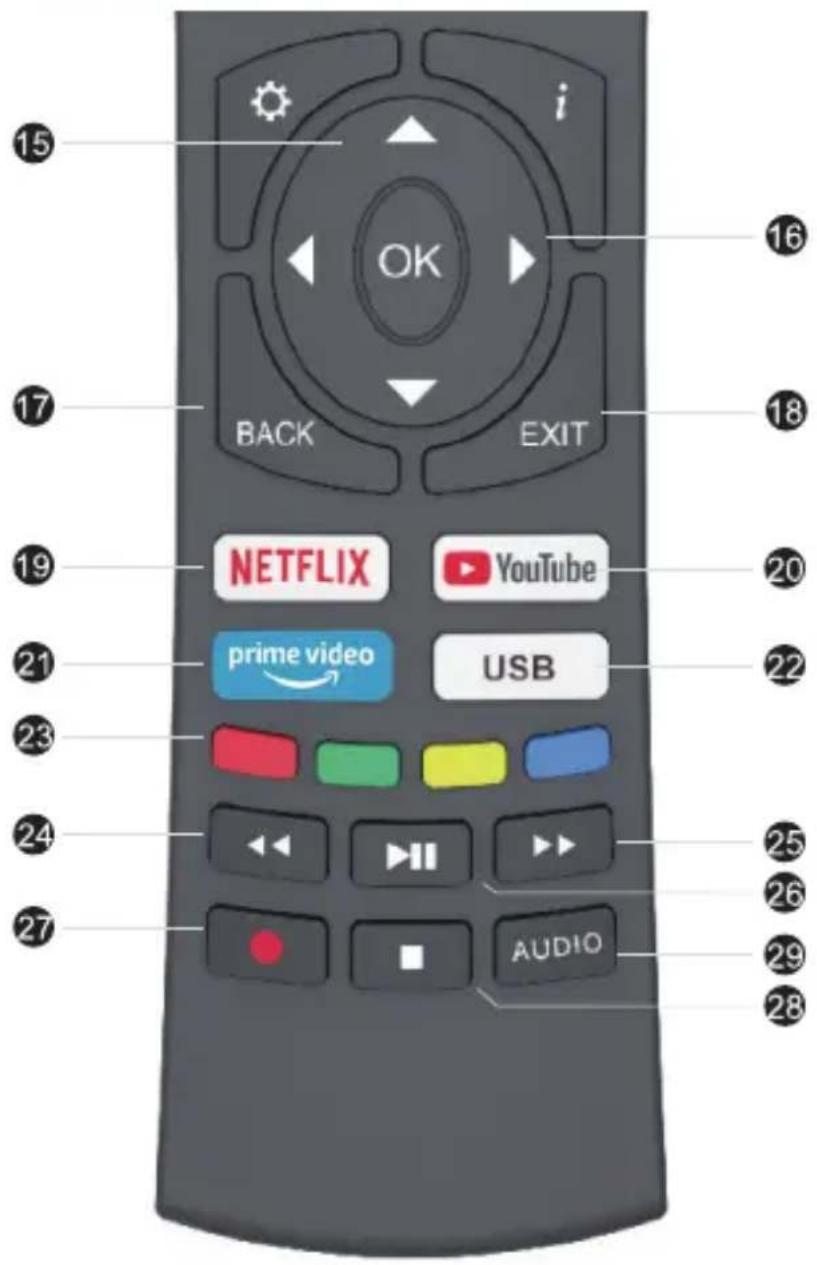
text_image
15 i OK BACK EXIT 16 17 18 19 NETFLIX YouTube 20 21 prime video USB 22 23 24 25 26 27 AUDIO 2815 ☑ : Press these buttons to select items
16 : Press these buttons to select and adjust items
17 BACK : Go back to the previous step
18 EXIT : Press to exit the OSD menu
19 NETFLIX : Press to launch the Netflix
20 YouTube : Press to launch the YouTube
21 prime video: Press to launch prime video app
22 USB : Press to enter USB mode
23 Colour Buttons : Press these buttons according to different prompts
24 : Press to fast reverse in USB mode
25 : Press to fast forward in USB mode
26 : Press to play the video and press again to pause the video
27 : Press to start recording the program
28 : Hold on or off for current page display
29 AUDIO : Press to change the language when palying the stream which contains multi-language
ASSEMBLY AND INSTALLATION
BEFORE YOU GET STARTED
Spread cushioning flat to lay the TV on. This will help to prevent damage.
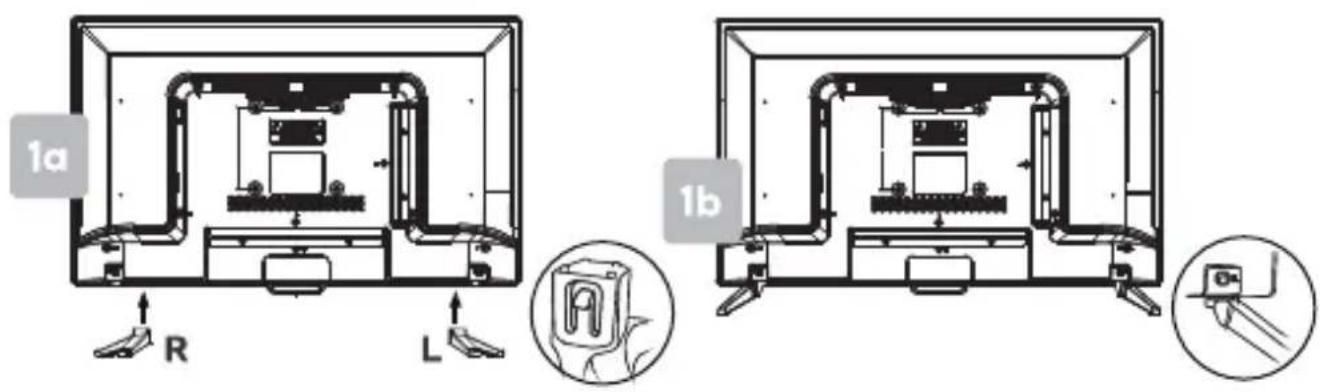
1. Stand assembly
a. Align the stand to the corresponding openings on the TV body, ensuring L and R letters match.
b. Insert each stand into the hole until the buckle locks into place. You will hear a 'click' to confirm it is secure.
text_image
1a R L 1b2. Remote control assembly
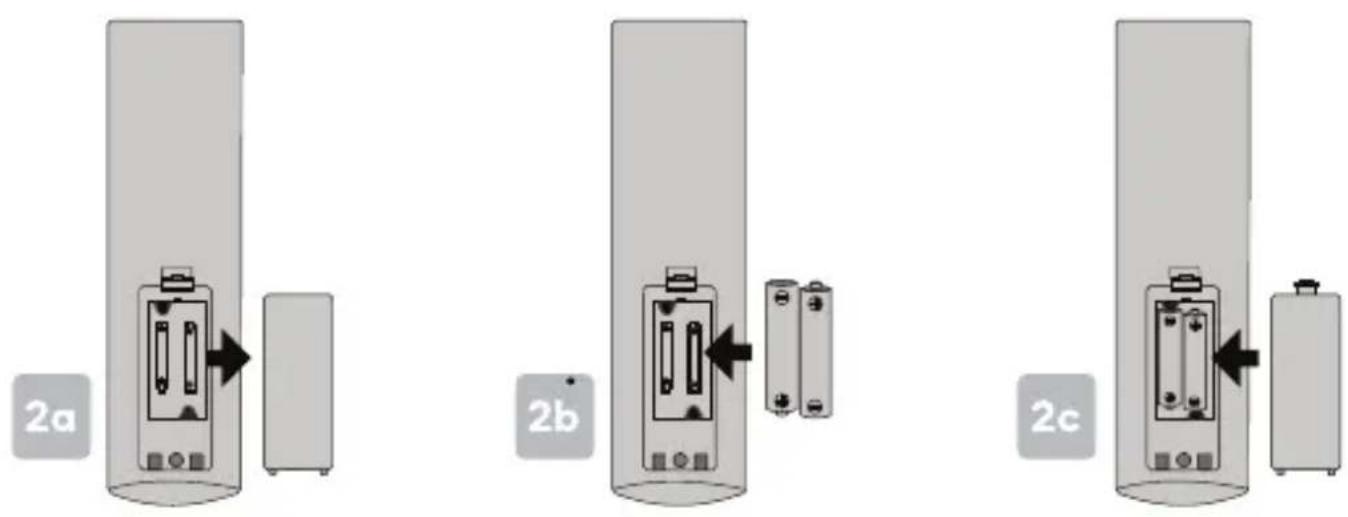
a. Open the battery compartment cover on the back side.
b. Insert two 1.5V AAA size batteries, making sure to match the polarity markings (+ / -) of the batteries with the diagram inside the compartment.
c. Replace battery compartment cover.
text_image
2a 2b 2cASSEMBLY AND INSTALLATION
3. Connect to antenna
a. Connect an antenna cable (not supplied) via the 'ANT' input port at the back of the TV.
b. Ensure the antenna cable is also connected to a working antenna, either via an antenna wall socket in your home, or directly.
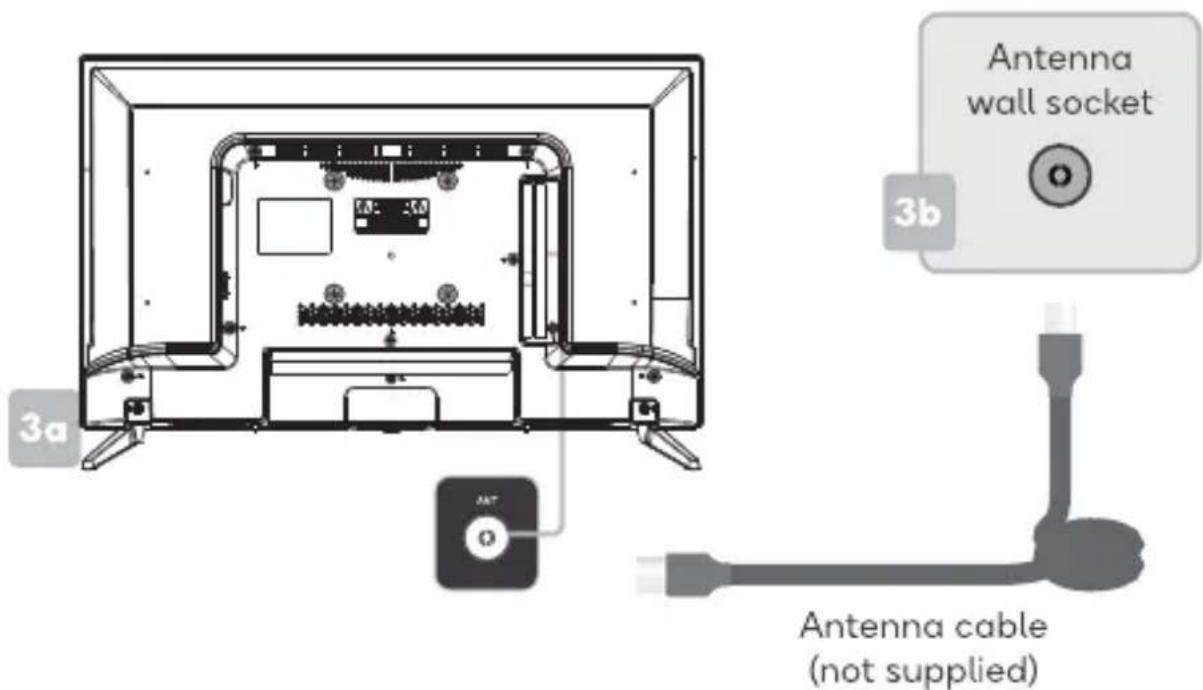
text_image
Antenna wall socket 3b 3a Ant O Antenna cable (not supplied)4. Turning TV on
Connect the power supply, enter the standby mode (red light), press the power button of the TV or the power button on the remote control to turn on the TV.
TURNING TV OFF
Press the POWER (☐) button on the remote control to enter standby mode. To power down the TV completely, unplug the power cord from the power outlet.
Do not leave your set in standby mode for long periods of time. If you will not use the TV for a long time, it is recommended to unplug the set from both the power outlet and aerial.
FIRST TIME SETUP
The first time you switch your TV on, it will automatically be in the initial setup mode. This will guide you through the whole setup process of selecting your desired language, connecting to the internet, signing in to your account and tuning in TV channels.
Choosing Your OSD Language
1). Press▲▼the buttons to highlight your desired OSD language then press the OK button.
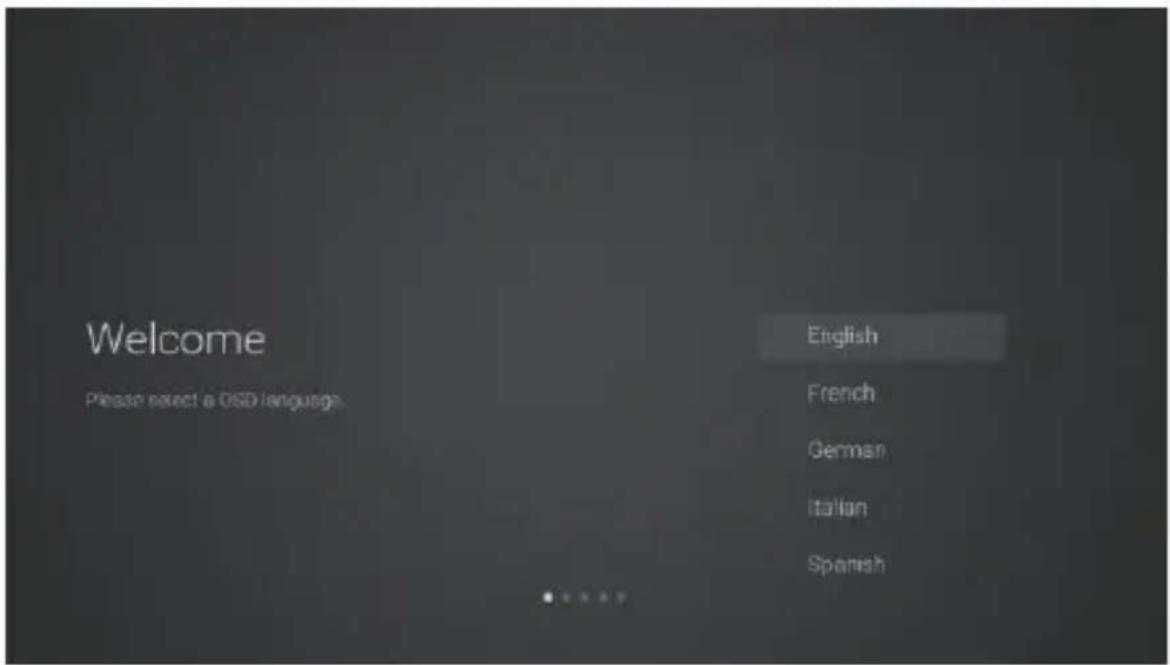
text_image
Welcome Please select a OSD language. English French German Italian Spanish2). Data Collection and Firmware Updates Notice page will appear. Press the▲▼buttons to select the menu option.

text_image
DATA COLLECTION AND FIRMWARE UPDATES NOTICE When this television is connected to the internet, it will collect limited, non-personally identifiable information which will be sent to MStar Semiconductor Inc. ("MSStar", including its successor) and its service provider. Certain of this information may be aggregated and shared with third party partners for business and product analysis purposes only. By clicking "Accept" you acknowledge and agree to the collection and sharing of this information as described in more detail in the "View Additional Details" section, as well as the automatic download of essential firmware/software updates. Please note if this Notice is translated in a language other than English, version in English language shall always prevail as the sole basis for the interpretation of the terms described herein. [NEW ADDITIONAL DETAILS] [ACCEPT]FIRST TIME SETUP
VIEW ADDITIONAL DETAILS
Go to view more detailed firmware/software network download update instructions.
ACCEPT
Accept all agreements and agree to the firmware/software network to automatically download updates
3). If you select VIEW ADDITIONAL DETAILS, the detailed firmware/software network download update instructions will display. Initially, the default focus will be on the text description section. Press ▲▼the buttons will drop the text to the bottom. Press the ▼buttons, ACCEPT ALL will highlight. Press the ▲▼buttons then the OK button to confirm the selection.
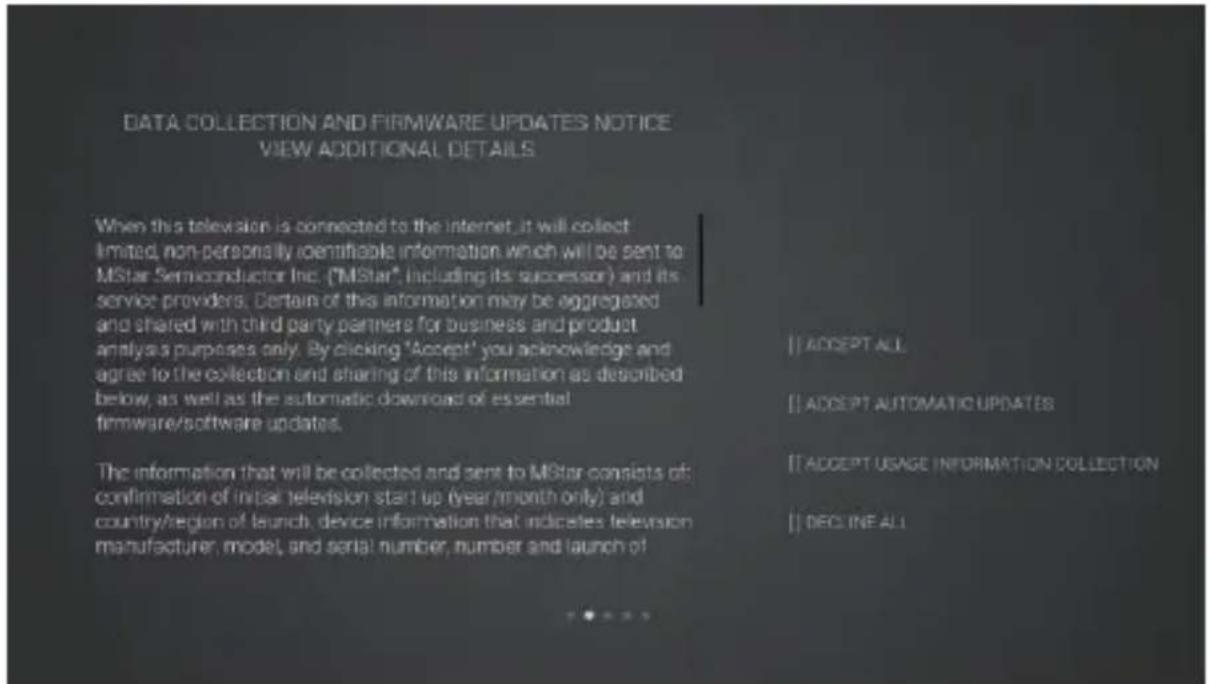
text_image
DATA COLLECTION AND FIRMWARE UPDATES NOTICE VIEW ADDITIONAL DETAILS When this television is connected to the internet, it will collect limited, non-personally identifiable information which will be sent to MStar Semiconductor Inc. ("MStar", including its successor) and its service providers. Certain of this information may be aggregated and shared with third party partners for business and product analysis purposes only. By clicking 'Accept' you acknowledge and agree to the collection and sharing of this information as described below, as well as the automatic download of essential firmware/software updates. The information that will be collected and sent to MStar consists of: confirmation of initial television start up (year/month only) and country/region of launch device information that indicates television manufacturer, model, and serial number, number and launch of [1] ACCEPT ALL [2] ACCEPT AUTOMATIC UPDATES [3] ACCEPT USAGE INFORMATION COLLECTION [4] DECLINE ALLACCEPT ALL
Accept all protocol sections and agree to the firmware/software network to automatically download updates.
ACCEPT AUTOMATIC UPDATES
Accept all protocol parts and manually select whether to agree to the firmware/software network download update if there is a firmware/software update.
FIRST TIME SETUP
ACCEPT USAGE INFORMATION COLLECTION
Suppliers accepting the agreement section collect some non-personal user information.
DECLINE ALL
Reject all protocols to disable firmware/software network updates.
4). Press ▲▼the buttons to select your country where you will operate the TV. Press the OK button to confirm.
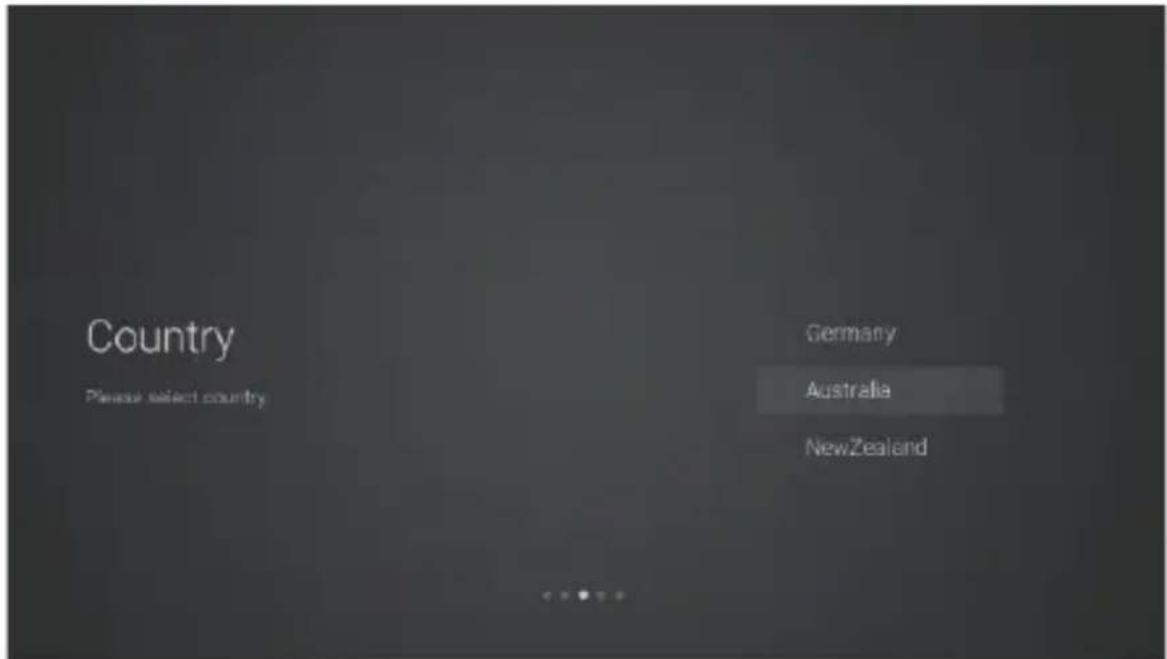
text_image
Country Please select country Germany Australia NewZealandCONNECTING TO THE INTERNET
You have 2 options when connecting your TV to the internet. You can connect wirelessly via Wi-Fi or connect your TV to your router directly by connecting a LAN cable (wired connection). Choose your connection method and follow these instructions.
Wi-Fi Network
1). Press the ▲▼buttons to highlight Wi-Fi Network then press the OK button. Your TV will automatically scan for your wireless network, then show you a list of networks that its found. Highlight your network and press the OK button.
2). Use the ◀▲▼▶ buttons to navigate the keypad in the screen to entry your Wi-Fi password, then press the OK button to select the characters. Finally select the and press the OK button. In a second or two your TV will show Success after connection successful.
WIRED Connection
If you have connected your ethernet cable to the LAN socket on the back of your TV, select Wired Network and the press the OK button. Then select Connect to start connect to the internet.
SKIP Connection
1). If you do not need to connect to the network, select Skip and press the OK button to confirm.

text_image
Are you sure? After connecting your TV to the internet, you'll be able to use great services like Netflix to stream TV shows and movies. Set up network Skip2). A pop up menu will be display. If you want to go back the network setting page, select Set up Network. If you want to confirm to skip the network setting, select Skip. Then will enter to Input Source menu and start TV Tuning.
SIGNING IN TO YOUR NETFLIX ACCOUNT
Press the ▲▼buttons to select Start Netflix then press the OK button. You will now be asked to sign in to your Netflix account. If you don't already have an account you can set one up on your TV go to the 'Join Now' section.

text_image
NETFLIX Watch TV shows and movies anytime, anywhere. Join now Sign In Questions? Visit us at https://help.netflix.com/contactusIf you want to temporary skip the Netflix setting, select Skip to enter to Input Source menu and start TV Tuning.
If you complete Netflix setting, press the EXIT button to leave and press the button and select Programme, then select Auto Tuning for TV tuning.
TUNING
If you select Skip option in Netflix setting page, then you now need to tuning in your TV so you can watch LIVE TV (broadcast TV). If you watch TV via a Set Top Box you can skip this section by selecting the correct HDMI input source.
DVB-T
1). Input Source page shown on the TV, use the ▲▼buttons to select TV. then press the OK button.

text_image
Input Source Please select input source TV AV HDMI 1 HDMI 2 HDMI 32). In DVB Tuning Type page, use the ▲▼buttons to select DVBT.

text_image
DVB Tuning Type Please select Turn type DVBT DVBC ATVTUNING
3). Your TV will now start scanning for all the available TV channels. This operation may take a few minutes. The display will show the progress of the tuning and the number of channels found.

text_image
Channel Tuning Skip CH 29 UHF DTV 25% ATV 0 DTV 0 Radio 0 Data 04). If you want to skip the DTV tuning, press the OK button to interrupt the tuning half way. A pop-up screen will be displayed, press the ◀button to select YES to confirm.
e. Your TV is now setup and ready to watch.
DVB-C
1). Input Source page shown on the TV, use the ▲▼buttons to select TV, then press the OK button.
2). In DVB Tuning Type page, use the▲▼ buttons to select DVBC.

text_image
DVB Tuning Type Please select Turn type. DVBT DVBC ATVTUNING
3). Your TV will now start scanning for all the available TV channels. This operation may take a few minutes. The display will show the progress of the tuning and the number of channels found.

text_image
Channel Tuning Skip 125MHz DTV 2% ATV 0 DTV 0 Radio 0 Delta 04). If you want to skip the tuning, press the OK button to interrupt the tuning half way. A pop-up screen will be displayed, press the ◀button to select YES to confirm.
5). Your TV is now setup and ready to watch.
HOME Menu
1). Press the 📝 button to display the home menu.

text_image
Apps NETFLIX YouTube f Twitter Smart TV Apps ADBE NETFLIX NETFLIX Input2). Use the ▲▼buttons to switch between the Apps, NETFLIX, Input, and Settings sections of the Home page.
3). Use the ◀▶buttos to select the desired App, input source or setting, then press the OK button to confirm.
BASIC TROUBLESHOOTING
Poor picture and sound quality
• Try a different channel
- Adjust the antenna
- Check all connections
No picture or sound in TV status
- Try another channel
- Press the TV/AV button
• Make sure TV is plugged in - Check the antenna connection
No sound or sound is too low at maximum volume
- Check the volume settings on any external speakers connected to your television
- Adjust the TV volume accordingly
- Check another channel or input
- Check that MUTE hasn't been turned on
No colour, wrong colour or tints
• Make sure the program itself is broadcast in colour
- Select the picture menu, then adjust the colour and tint submenus
Picture rolls vertically
- Check all connections
Blurred or snowy picture, distorted sound
- Check direction, location and connections to your antenna
- Issues may be caused by the use of an indoor antenna (poor signal)
Remote control malfunctions
- Replace remote control batteries
- Check battery terminals
- Remote is out of range, move closer to TV
- Remove any obstructions between remote and IR sensor of TV
• Make sure the power cord to your TV is plugged in and turned on
Image is not centred on the screen
- Adjust the horizontal and vertical position
"No Signal" on HDMI source
- Test the device with a different HDMI cable
- Plug the device into another HDMI port
- Try a different device connected to the same cable and port
• Perform a factory reset on your TV
For our full TV troubleshooting guide and extended User Manual for this TV, head online to help.kogan.com
NOTES
Need more information?
This is a Quick Start Guide, and while we hope that this has given you the assistance needed for a simple set-up, a full user guide outlining all of this product's instructions and features can be found online at help.kogan.com
kogan.com