VT-7810 - Sodo baldai V-TAC - Nemokama naudojimo instrukcija
Raskite įrenginio instrukciją nemokamai VT-7810 V-TAC PDF formatu.


Naudotojų klausimai apie VT-7810 V-TAC
0 klausimas apie šį prietaisą. Atsakykite į tas, kurias žinote, arba užduokite savo.
Užduokite naują klausimą apie šį prietaisą
Atsisiųskite instrukciją savo Sodo baldai PDF formatu nemokamai! Raskite savo instrukciją VT-7810 - V-TAC ir vėl perimkite savo elektroninį įrenginį. Šiame puslapyje skelbiami visi dokumentai, reikalingi jūsų įrenginio naudojimui. VT-7810 prekės ženklo V-TAC.
NAUDOJIMO INSTRUKCIJA VT-7810 V-TAC
REMOTE CONTROL
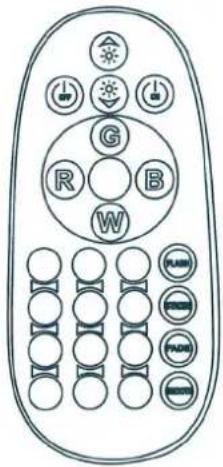
You can also use the buttons on the remote control to operate the Lamp.
ON: Turning on the light on.
OFF: Turning the light off.
Flash: Flash colour changing.
Smooth: Smooth colour changing.
Strobe: Strobe colour changing.
Fade: Fade colour changing.
Bright±: Change single colour brightness.
Colour buttons: Select the desired colour from 16 colours.
text_image
Diagram of a remote control with labeled buttons and icons for function keys or settingsSPECIFICATIONS
Power Adapter Input: 100-240V / AC, 50/60Hz
Power Adapter Output: 5V / DC, 1000mA
CLEANING
Clean the Lamp with a dampened cloth. Do not use chemical solvents or strong detergents as these may damage the cosmetic finish.
Do not expose the power supply charging unit to water.
THE ENVIRONMENT
When this product reaches the end of its useful life, hand it in at a collection point for the recycling of electric and electronic equipment. Please refer to the symbol son the product, the users instructions or the packaging. Contact your municipality for the address of the appropriate collection point in your neighbourhood.
WARRANTY
Warranty with 2 years.
IMPORTANT SAFETY INSTRUCTIONS
WARNING:
- This appliance is not intended for use by persons (including children) with reduced physical, sensory or mental capabilities, or lack of experience and knowledge, unless they have been given supervision or instruction concerning use of the appliance by a person responsible for their safety.
• Children should be supervised to ensure that they do not play with the appliance.
USING THE CHARGER:
- The charger is for indoor use only and must not be used outdoors or exposed to wet conditions. Check that the voltage marked on the rating label located on the power adapter is the same as your mains supply.
• The manufacturer will not accept responsibility for damage or injury caused by connecting to the wrong voltage.
• If the charger is damaged, it should be replaced with a charger of the same type and rating to avoid ahazard.
BATTERY HANDLING AND USAGE:
- Internal battery:
- The product is supplied with a rechargeable lithium-ion battery incorporated in the article which is not accessible and cannot be replaced. Therefore, when the product reaches the end of its useful life it must be disposed of at a recycling center.
CHANGING THE BATTERY ON THE REMOTE CONTROL:
• Only adults should handle the battery. Do not allow a child to use the remote control unless the battery holder is inserted.
• Install batteries as indicated by the(+/-)polarity signs.
- Remove empty batteries and/or batteries which have not been used for an extended period.
• The battery used in the remote control is a 2x3AAA battery.
• Never recharge non-rechargeable batteries.
• Never dispose of batteries in a fire.
• These actions may cause the batteries to explode.
• Do not throw away batteries; dispose of as small chemical waste.
CHARGING THE PRODUCT FOR THE FIRST TIME:
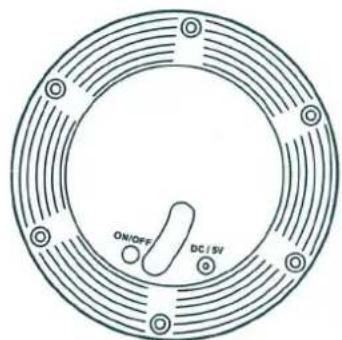
• Turn the ON/OFF button on the base of the Lamp to the OFF position before charging.
- Remove the cover of the DC jack input socket and connect the charger cable to the DC jack input socket on the Lamp and plug the charger into the mains supply.
• The Lamp should be charged for at least 8 hours for the first time. After the initial charging, the Lamp will take about 6 hours to recharge.
• After the lamp is charged, place the cover on the DC jack input socket on the Lamp
OPERATION
The Lamp is waterproof and is designed for outdoor and indoor use.
Operating the Lamp:
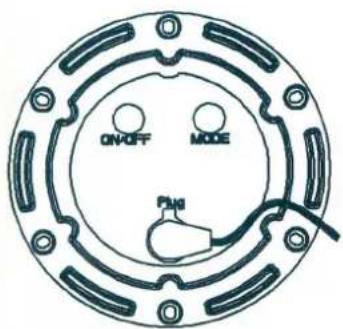
The Lamp is operated by repeatedly pressing MODE button on the base of the product to select the desired colour change and mode.
• Smooth colour changing.
• Flash colour changing.
• Strobe colour changing.
- Fade colour changing.
• Lighting turn off.
• 16 fix colour changing.
• ON / OFF switch button.
text_image
ON-OFF MODE PMI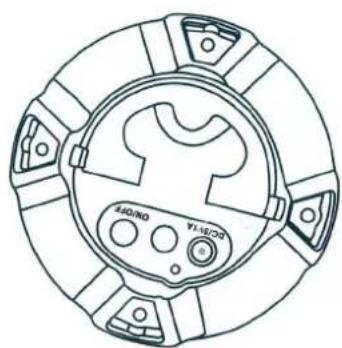
natural_image
Technical line drawing of a circular mechanical component with no visible text or symbols