
VTCP842SD - Siurblys LG - Nemokama naudojimo instrukcija
Raskite įrenginio instrukciją nemokamai VTCP842SD LG PDF formatu.


Naudotojų klausimai apie VTCP842SD LG
0 klausimas apie šį prietaisą. Atsakykite į tas, kurias žinote, arba užduokite savo.
Užduokite naują klausimą apie šį prietaisą
Atsisiųskite instrukciją savo Siurblys PDF formatu nemokamai! Raskite savo instrukciją VTCP842SD - LG ir vėl perimkite savo elektroninį įrenginį. Šiame puslapyje skelbiami visi dokumentai, reikalingi jūsų įrenginio naudojimui. VTCP842SD prekės ženklo LG.
NAUDOJIMO INSTRUKCIJA VTCP842SD LG

natural_image
Solid gray circular shape with no text, symbols, or patternsLG
natural_image
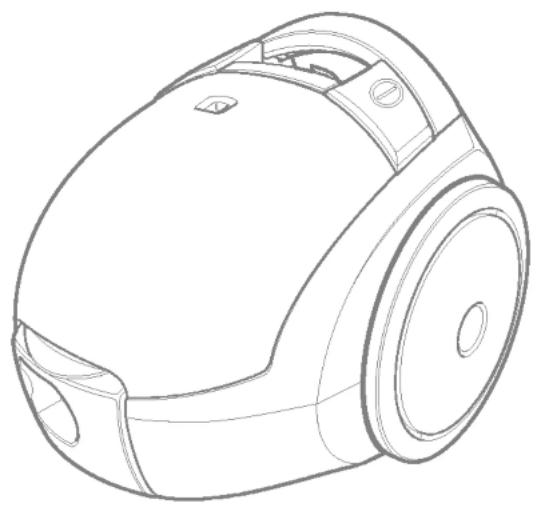
Line drawing of a vacuum cleaner device (no text or symbols)V-CP862SDV
V-CP842SD




natural_image
Illustration of a hand holding a handheld device with an arrow indicating motion, and a close-up of the device's handle (no text or symbols present)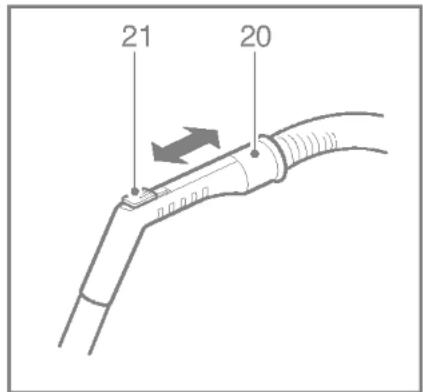

natural_image
Technical line drawings of a vacuum cleaner (no text or symbols present)

natural_image
Mechanical assembly diagram showing a motor or gear mechanism with labeled component '27' (no text or symbols beyond label)
natural_image
Diagram showing a mechanical assembly before and after transformation, with no visible text or symbols.
natural_image
Illustration showing two steps of a device being processed, with no visible text or symbols.
Information for your safety
Please read all the following information, which contains important instructions for the safety, the use and the maintenance of the appliance.
This appliance complies with the following EC Directives: -73/23/EEC, 93/68/EEC-Low Voltage Directive-89/336EEC -EMC Directive.
■ The appliance is not intended for use by young children or infirm persons without supervision. Young children should be supervised to ensure that they do not play with the appliance.
■ Do not use the appliance If the mains lead is damaged or faulty.
■ If the mains lead is damaged, it must be replaced by an approved LG Electronics Service Agent in order to avoid a hazard.
■ Always switch the vaccum cleaner off before :
- changing the dust bag
- changing or cleaning the filters.
■ If no dustbag is inserted, the cover cannot be closed. Please do not use force!
■ Do not vacuum flammable or explosive substances (liquids or gases).
■ Do not vacuum hot ash, embers etc. nor sharp objects.
■ Do not vacuum water or other liquids.
■ When you vacuum with an attachment appliance that has a rotating brush roller:
- do not reach into the running brush roller.
WARNING! Should it become necessary to replace the moulded on plug then the detective plug should be destroyed to avoid any possible shock hazard that could occur should such a plug be inserted into a 13 amp socket else where in the house.
How to Use
Connecting the flexible hose
Push the end of the head (1) on the flexible hose (2) into the attachment point on the vacuum cleaner.
To remove the flexible hose from the vacuum cleaner, press on the button (3) situated on the head, then pull upwards.
Assembling the tubes
(depending on model)
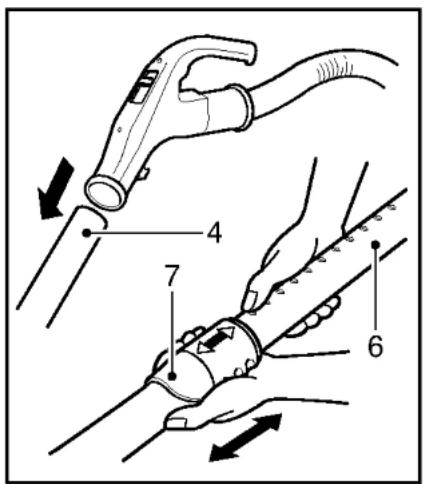
- Metal tube (4,5)
- Fit together the two tubes by twisting slightly.
- Telescopic tube (6)
- Push spring latch (7).
- Pull out tube to required length.
- Release spring latch to lock.
Using the cleaning head and Accessory Nozzles (depending on model)
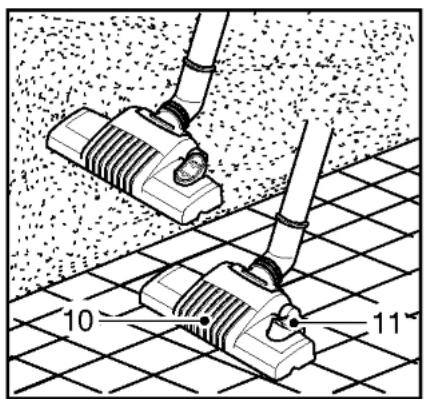
Fit the large cleaning head onto the end of the tube.
- The 2 position head (10) is equipped with a pedal (11) which allows you to alter its position according to the type of floor to be cleaned. Hard floor position (tiles, parquet floors...): Press on the pedal to lower the brush. Carpet or rug position: Press on the pedal to lift the brush up.
- Crevice Tool (14)
For vacuuming in those normally inaccessible places i.e. reaching cobwebs, or down the side of a sofa!
• Upholstery Nozzle (15)
For vacuuming upholstery, mattresses, etc. The thread collectors help to pick up the threads and fluff.
- Dusting brush (16)
For vacuuming picture frames furniture outlines, books and other uneven objects.
How to plug in and use
Pull out the mains lead to the desired length and plug into the socket.
Press button (17) to start the vacuum cleaner.
To stop it press the button (17) again.
Adjusting the power level
(depending on model)
- Suction capacity increases steplessly up to MAX.(19)
- The flexible hose handle (20) has a manual air flow regulator (21) which allows you to briefly reduce the suction level.
Carrying and storage
When you have switched off and unplugged the appliance, press on the button (18) to automatically rewind the cord.
- Use stowage clip as shown when storing the cleaner (22).
Changing the dust bag
The dustbag needs changing when the cleaner is set to maximum power and the cleaner head is off the floor but the "bag full" indicator window (23) is completely coloured red. Even if the dustbag does not appear to be full at this stage, it should be changed. It could be that a great deal of very fine dust has clogged up the pores of the dust bag.
- Turn off the appliance and unplug it.
- Remove hose.
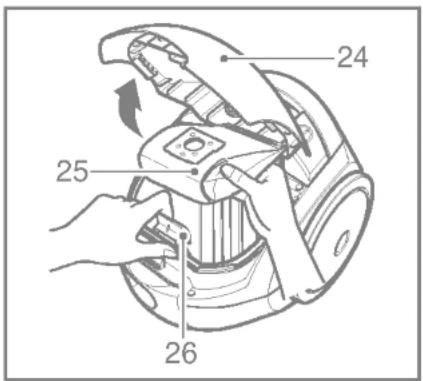
- Open the cover (24)
Your appliance is equipped with either a paper dust bag or a fabric dust bag (28) (depending on model)
- Push the lever forwards in the direction of the arrow (26), and pull off the full paper filter bag towards the rear. Remove the bag and throw it away.
- Insert the new paper filter bag into the unit with the arrow pointing downwards (27).
If your appliance is fitted with a fabric dust bag follow the same instructions as above.
Empty it and reuse it (28). Do not wash it.
Note: as the appliance is fitted with a safety device which checks that the bag is in place you cannot close the lid if the bag is not fitted correctly.
Cleaning the motor filter
The motor filter is situated inside the appliance between the dust bag and the motor. Each time that you change the air outlet filter we advise you to remove the motor filter (29) and to clean it by tapping to remover the dirt and then replacing it in the vacuum cleaner.
What to do if your appliance does not work
Check that the appliance is correctly plugged in and that the electrical socket is working.
What to do when the suction performance reduces?
- Stop the appliance and unplug it.
- Check that the tubes, flexible hose and cleaning tool are not blocked.
- Check that the dust bag is not full. Replace if necessary.

LG Electronics Inc.
http://www.lge.com/



- LG
- Information for your safety
- How to Use
- Connecting the flexible hose
- Assembling the tubes
- Using the cleaning head and Accessory Nozzles (depending on model)
- How to plug in and use
- Adjusting the power level
- Carrying and storage
- Changing the dust bag
- If your appliance is fitted with a fabric dust bag follow the same instructions as above.
- Cleaning the motor filter
- What to do if your appliance does not work
- What to do when the suction performance reduces?
- LG Electronics Inc.
Prekės ženklas : LG
Modelis : VTCP842SD
Kategorija : Siurblys