iB24 - Ausinės IHOME - Nemokama naudojimo instrukcija
Raskite įrenginio instrukciją nemokamai iB24 IHOME PDF formatu.


Naudotojų klausimai apie iB24 IHOME
0 klausimas apie šį prietaisą. Atsakykite į tas, kurias žinote, arba užduokite savo.
Užduokite naują klausimą apie šį prietaisą
Atsisiųskite instrukciją savo Ausinės PDF formatu nemokamai! Raskite savo instrukciją iB24 - IHOME ir vėl perimkite savo elektroninį įrenginį. Šiame puslapyje skelbiami visi dokumentai, reikalingi jūsų įrenginio naudojimui. iB24 prekės ženklo IHOME.
NAUDOJIMO INSTRUKCIJA iB24 IHOME
iHome®
Model: iB24
Noise-Isolation, In-Ear Stereo Headphones with iPod/iPhone Volume Control
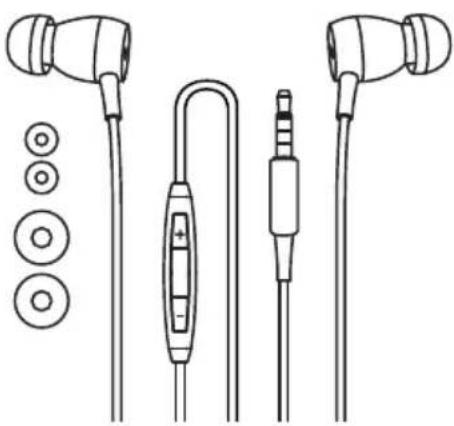
natural_image
Line drawing of an earless audio jack with external components and a connector (no text or symbols)Using Your iHome Headphones
The earpieces are marked "L" and "R". Place the "L" earpiece in your left ear and the "R" earpiece in your right ear for proper fit
and best sound. If the earpieces are inserted incorrectly they will not fit properly in your ears and the sound quality will not be satisfactory. When worn properly the iPod/iPhone controller will be positioned on your right side, closer to the right ear bud.
NOTE: Your iB24 headphones are supplied with three different size silicon tips (S-M-L) for maximum comfort and to seal out unwanted noise. The "M" (medium) size tips were installed at our factory. If you find that the installed tips are too small or too large for your ears, you may remove them and replace them with the larger or smaller size accessory tips. To replace the tips simply pull them off the earpieces. To install different size tips, push them on to the earpieces and make sure they are fully seated on each earpiece so that they do not come off when you remove the earpiece from your ear. If one of the tips remains in your ear when you remove the headphones, remove the tip carefully and avoid pushing it further into your ear canal. Seek medical assistance if one of the tips becomes lodged in your ear and you are unable to remove it.
Connect the headphone plug to the headphone jack of your music player. Be sure that the plug is fully inserted into the jack. If the plug is not fully inserted you may only hear sound from one earpiece.
To protect your hearing, always start listening with the In-Line Volume Control set to a low level and gradually increase the volume to a comfortable listening level.
Note: The iPod/iPhone controller on the cable performs the same functions as the controls on your iPod or iPhone. It is not necessary to make separate volume adjustments on your iPod/iPhone and on the controller.
Using the iPod/iPhone Controller
Note: This controller is designed specifically for use with Apple iPod and iPhone models. The controller will not work with other MP3 players, CD players, or other audio products that include a headphone jack.
The iPod/iPhone controller with microphone is compatible with the following iPod and iPhone models: iPhone 3GS - 16GB, 32GB
iPod touch, 2 ^nd generation – 8GB, 16GB, 32GB
iPod nano, 5 ^th generation, video camera - 8GB, 16GB
iPod shuffle, 3^rd generation - 2GB, 4GB
iPod classic - 120GB, 160GB (2009)
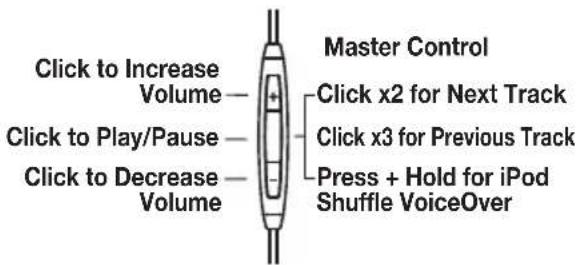
| To Do This Action Required | |
| Activate voice control* Depress the Master Control for 2 secondsAnswer or end a call Press the Master Control once to answer callPress the Master Control again to end call | |
| Ignore an incoming call Depress the Master Control for 2 secondsAnswer a second incoming call Press the Master Control once to answer second calland place original call on hold Press the Master Control again to return to first call | |
| Answer a second incoming call, Depress the Master Control for 2 secondsand end original call 2 low tones will confirm end of original call. | |
| Switch between two calls Press the Master Control once to switch between calls | |
| Play or Pause Press Master Control once to Play, again to Pause | |
| Skip Track or Chapter Forward | Press Master Control 2 times quickly |
| Skip Track or Chapter Back | Press Master Control 3 times quickly |
| Increase VolumeDecrease Volume | Press the "+" buttonPress the "-" button |
| Activate VoiceOver** Press and hold the Master Control to hear title andartist of currently playing song | |
| Navigate Playlists using VoiceOver** then release. When the name of the desired playlist isheard, press the Master Control once to select it. | Press and hold the Master Control until tone is heard, |
* Voice control feature is only available on iPhone 3GS.
** VoiceOver feature is only available on the iPod shuffle 3 ^rd generation.
IMPORTANT! Listening at high volume for long periods of time can result in long-term hearing damage. For your safety, do not use headphones if they would prevent you from hearing warning sounds, such as while driving a car or motorcycle, riding a bike, etc. Remember that noise isolation type earphones such as the iB15 are very effective in blocking outside noise, including warning sounds. Always be aware of your surroundings and do not use these earphones in situations that require you to hear warning sounds.
NOTE: In extremely cold or dry air conditions you may notice a slight ‘tingling’ feeling in your ears when using in-ear headphones. This is the result of the build-up of static electricity in your body. This is normal and not an indication of any problem with your headphones..