LDC6081 - Stebėjimo kamera Lorex - Nemokama naudojimo instrukcija
Raskite įrenginio instrukciją nemokamai LDC6081 Lorex PDF formatu.


Naudotojų klausimai apie LDC6081 Lorex
0 klausimas apie šį prietaisą. Atsakykite į tas, kurias žinote, arba užduokite savo.
Užduokite naują klausimą apie šį prietaisą
Atsisiųskite instrukciją savo Stebėjimo kamera PDF formatu nemokamai! Raskite savo instrukciją LDC6081 - Lorex ir vėl perimkite savo elektroninį įrenginį. Šiame puslapyje skelbiami visi dokumentai, reikalingi jūsų įrenginio naudojimui. LDC6081 prekės ženklo Lorex.
NAUDOJIMO INSTRUKCIJA LDC6081 Lorex
Contents
• Weatherproof IR dome camera
- Mounting screws x 4
- 60ft. BNC / power extension cable
• BNC female / RCA male adapter
- Power adapter
WARNING - A REGULATED UL / CSA APPROVED power supply is REQUIRED for use with this camera. Use of a non-regulated, non-conforming power supply can damage this product and voids the warranty.
Features
• Advanced Sony Super HAD™ II image sensor
• Video image processor produces sharp and clear video at 600 TV lines of resolution
- 4–9mm manual zoom lens for flexible viewing angle (39–93° diagonal)
- ClearNight imaging technology ensures clear night vision and improves recording efficiency up to 30%
- Night vision up to 75ft. (23m) away in total darkness*
- Split glass design minimizes IR reflection
- IP66 rated aluminum housing for indoor / outdoor installations**
Disclaimers:
* Infrared illumination range under ideal conditions. Actual range and clarity may vary depending on scene / object reflection and camera application.
** Not intended for submersion in water. Installation in a sheltered location recommended.
Warning/Caution
- Read this guide carefully and keep it for future reference
- Follow all instructions for safe use of the product
- Use the camera within given temperature, humidity and voltage levels noted in Camera Specifications
- Do not disassemble the camera
- Do not point the camera directly towards the sun or a source of intense light
- Use only the supplied regulated power supply. Use of a non-regulated, non-conforming power supply can damage this product and voids the warranty
- The supplied extension cable is rated for surface mounting only
- Cables for in-wall / floor-to-floor installations are sold separately
Installation Tips
- Point the camera where there is the least amount of obstructions (i.e. tree branches)
• Install the camera in a location that is difficult for vandals to reach - Secure cabling so that it is not exposed or easily cut
- Camera rated for outdoor use. Installation in a sheltered location recommended
Camera Specifications
| Image Sensor 1/3" Sony Super HADTM II | |
| Video Format NTSC | |
| Effective Pixels H: 768 V: 494 | |
| Resolution 600 TV Lines | |
| Scan System 2:1 Interlace | |
| Sync System Internal | |
| S / N Ratio 50dB (AGC Off) | |
| Iris AES | |
| AES Shutter Speed 1/60 - 1/100,000 sec. | |
| Min. Illumination 0.2 Lux without IR LEDO Lux with IR LED | |
| Video Output Composite 1.0Vpp @ 75ohm | |
| Lens / Lens Type | 4-9mm F1.4 / Varifocal |
| FOV (Diagonal) | 39-93° |
| Termination | BNC Type |
| IR LED Qty. / Type | 28 pieces / 850nm |
| Night Vision Range* | 75ft / 23m |
| Power Requirement | 12V DC ±10% |
| Power Consumption | Max. 400mA (w / IR) |
| Operating Temp. Range | 14° ~ 122°F / -10° ~ 50°C |
| Operating Humidity Range | < 90% RH |
| Environmental Rating** | IP66 |
| Weight [including stand] | 1.6lbs. / 0.7kg |
* R Illumination Range under ideal conditions. Objects at or beyond this range may be partially or completely obscured, depending on the common application
** Not intended for submersion in water. Installation in a sheltered location recommended.
Dimensions
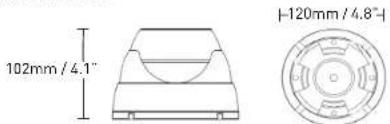
FOR SUPPORT AND INFORMATION, VISIT WWW.LOREXTECHNOLOGY.COM
Product Information
User Manuals
Quick Start Guides
Specification Sheets
Software Upgrades
Firmware Upgrades
Copyright © 2011 Linear Technologies Inc
As our products are subject to continuous improvement, Lanes reserves the right to modify product design, specifications and prices, without notice and without incurring any obligation. E&OE

LOREX®
VIEW YOUR WORLD
SUPER RESOLUTION WEATHERPROOF
VARIFOCAL NIGHT VISION DOME CAMERA
QUICK START GUIDE
English Version 1.0
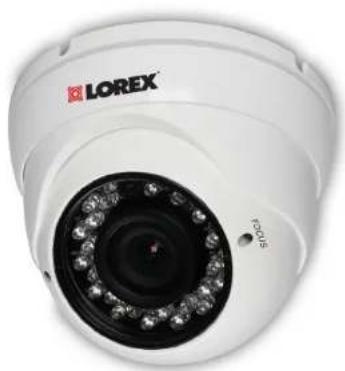
natural_image
Close-up of a white LOREX surveillance camera with visible lens and control buttons (no text or symbols on the device itself)VANTAGE
LDC6081
Installing The Camera
ATTENTION - Test all connections and ensure the camera is working correctly prior to permanent installation by temporarily connecting the camera(s) and cable(s) to the viewing / recording solution.
Before installing the camera:
- Decide whether to run the cables through the wall / ceiling (drilling required), or along the wall / ceiling.
- If you run the cables along the wall / ceiling, you must run the cable through the cable notch on the base. This will keep the camera base flush to the wall / ceiling when mounted.
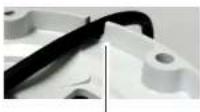
Cable notch
To install the camera:
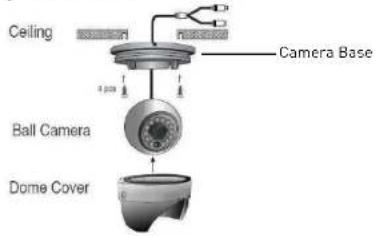
- Rotate the camera base counterclockwise to separate it from the ball camera and dome cover.
- Feed the BNC / power cable through the camera base. If you are running the cables against a wall or ceiling, make sure to pass the cable through the cable notch as shown above.
- Connect the video and power cable as shown in the next section 'Connecting The Camera'.
- Mount the camera base to the wall or ceiling using the included screws.
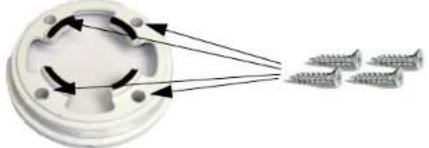
natural_image
Diagram showing a circular component with arrows indicating rotation and three screws aligned on the right (no text or symbols)- Position the dome cover over the camera and screw it clockwise halfway onto the camera base.
- Move the ball camera to the desired position. While holding the ball camera firmly in place, screw the dome cover the rest of the way to secure it to the camera base. Holding the camera prevents it from moving while installing the dome cover.
Connecting The Camera
To Camera:
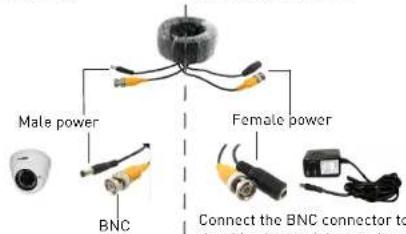
Connect the BNC and power connectors to the camera.
the base input of the connector, DVR, and connect the included power connector to a power adapter. See Setup Diagram below for details.
To Monitor / DVR:
Lens Adjustment
Use a flathead screwdriver to adjust the Focus and Zoom control screws on the camera if necessary.
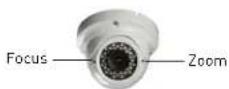
Note: Have a second person verify the camera image when you adjust the focus and zoom.
BNC to RCA Adapter
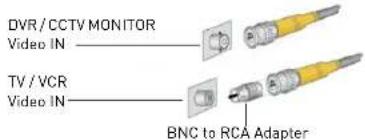
Attach the included BNC to RCA adapter to connect the extension cable to RCA inputs (i.e. for a TV connection).
Setup Diagram
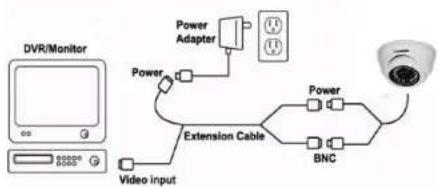
flowchart
graph TD
    A["DVR/Monitor"] -->|Power| B["Extension Cable"]
    B --> C["BNC"]
    C --> D["Camera"]
    D -->|Power| E["Power Adapter"]
    E -->|Power Input| F["Video Input"]
    F -->|Power Input| G["External Display"]
Cable Extension Options
Extend the cable run for your camera up to 300ft. or more depending on the cable type used. See table below:
| Option Cable Type | Max Cable Run Distance | Max. # of Extensions | |
| 1 Regular | BNC (supplied with camera) | 180ft. / 55m 3 | |
| 2 'RG59' | or 'Coax' or 'Coaxial' BNC (sold separately) | 300ft. / 92m 5 | |
| 3 Lorex Universal Cable (sold separately) | 300ft. / 92m 3 | ||
Notes:
- For optimal performance, consider using option 2 or 3. It is best to use the same cable type for the entire distance.
- Cable run recommendation based on typical camera power consumption (up to 500mA). For specialty cameras with higher current consumption, maximum cable run may be reduced. Consider providing power to the camera at the camera side, rather than at the end of the extension cable.
- Indicators that your cable run may be too long:
- Video is permanently black & white (even during day time) - Video is distorted
Troubleshooting
| Problem Solution | |
| No Picture / Signal • | Ensure your TV is on the correct input channel.Common terms of an input channel: INPUT, AV CHANNEL, LINE 1, LINE2, AUX.If your camera is connected to a VCR / DVR, ensure it is properly connected to your TV / Monitor.Ensure connections are properly connected.Ensure the camera power supply is plugged in. |
| Picture is too bright • | Ensure your camera isn't pointed directly at a source of light (e.g. sun or spot light).Slide the sunshade (bullet cameras only) forward to block excess light.Move your camera to a different location. |
| Picture is too dark • If | using during the day, the camera may not be getting enough light. Slide the sunshade (bullet cameras only) backwards to let in more light.Check the brightness and contrast settings of the device your camera connects to (TV / Monitor / DVR). |
| Night vision is not working | The night vision activates when light levels drop. The area may have too much light. |
| Picture is not clear • Check the camera lens for dirt, dust, and spiderwebs. Clean the lens with a soft, clean cloth.Make sure that the cable run is within the limitations specified in the section ' Cable Extension Options'. | |
| Bright spot in video when viewing camera at night | Night vision reflects when pointing a camera to a window. Move the camera to a different location. |
| BNC connection does not connect to my TV | Use a BNC to RCA adapter at the end of the extension cable. |