ICUSBAUDIOB - Garsinė plokštė StarTech.com - Nemokama naudojimo instrukcija
Raskite įrenginio instrukciją nemokamai ICUSBAUDIOB StarTech.com PDF formatu.


Naudotojų klausimai apie ICUSBAUDIOB StarTech.com
0 klausimas apie šį prietaisą. Atsakykite į tas, kurias žinote, arba užduokite savo.
Užduokite naują klausimą apie šį prietaisą
Atsisiųskite instrukciją savo Garsinė plokštė PDF formatu nemokamai! Raskite savo instrukciją ICUSBAUDIOB - StarTech.com ir vėl perimkite savo elektroninį įrenginį. Šiame puslapyje skelbiami visi dokumentai, reikalingi jūsų įrenginio naudojimui. ICUSBAUDIOB prekės ženklo StarTech.com.
NAUDOJIMO INSTRUKCIJA ICUSBAUDIOB StarTech.com
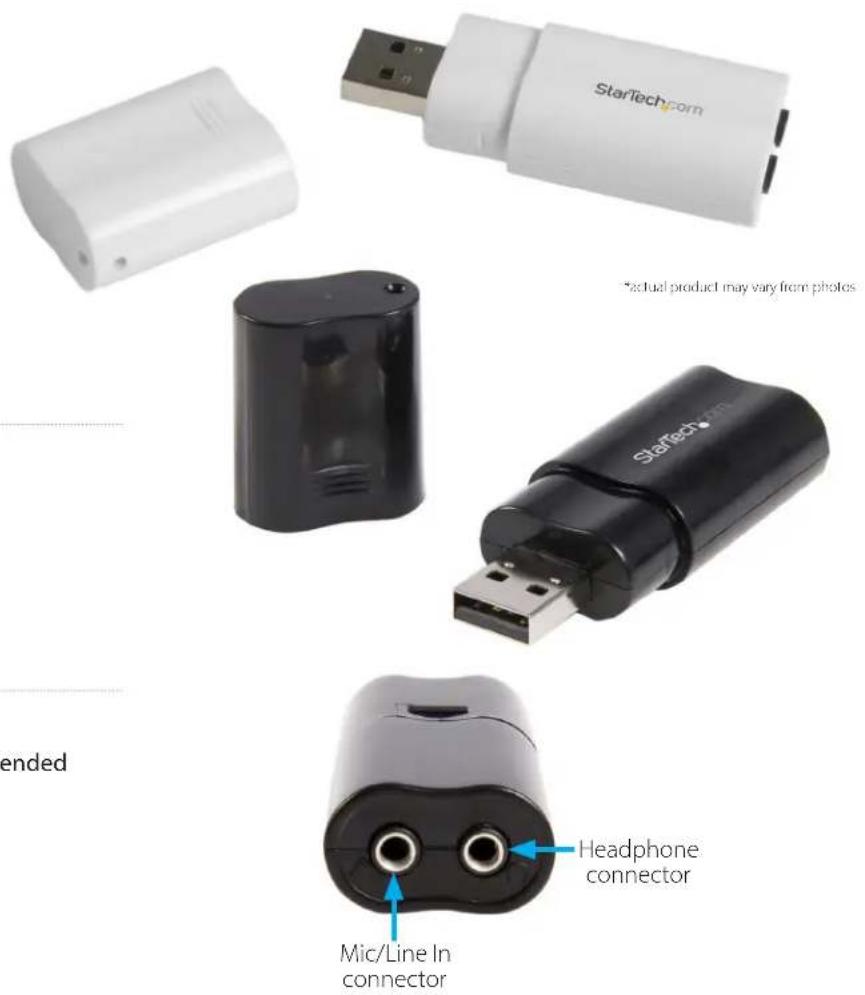
USB External Stereo Audio Adapter
ICUSBAUDIO / ICUSBAUDIOB
DE: Bedienungsanleitung - de.startech.com
FR: Guide de l'utilisateur - fr.startech.com
ES: Guía del usuario - es.startech.com
IT: Guida per l'uso - it.startech.com
NL: Gebruiksaanwijzing - nl.startech.com
PT: Guia do usuário - pt.startech.com
Packaging Contents
- 1 x USB Audio adapter
- 1 x USB extension cable
- 1 x Driver CD
• 1 x Instruction Manual
System Requirements
• A computer with one available USB port
• Headphones/Speakers/Microphone (depending on intended usage)
Installation
- Connect the USB audio adapter to an available USB port on the computer system.
- No driver installation should be required. The operating system should automatically load the drivers for the adapter.
- Once installed, the operating system should set the adapter as the default audio device. If not, change it to the default device. This should be done in the Audio properties for the operating system.
- Connect stereo speakers or headphones into the 'headphone' connector on the adapter. The adapter should be ready to use.
Specifications
| Bus Interface | USB 2.0 |
| Connectors | 1 x 3.5mm mini-jack (output)1 x 3.5mm mini-jack (input)1 x USB type A male |
| Audio Channels | Output: 2Input: 1 |
| Dimensions | 80mm x 40mm x 15mm |
| Weight | 53.5g |
FCC Compliance Statement
This equipment has been tested and found to comply with the limits for a Class B digital device, pursuant to part 15 of the FCC Rules. These limits are designed to provide reasonable protection against harmful interference in a residential installation. This equipment generates, uses and can radiate radio frequency energy and, if not installed and used in accordance with the instructions, may cause harmful interference to radio communications. However, there is no guarantee that interference will not occur in a particular installation. If this equipment does cause harmful interference to radio or television reception, which can be determined by turning the equipment off and on, the user is encouraged to try to correct the interference by one or more of the following measures:
• Reorient or relocate the receiving antenna.
- Increase the separation between the equipment and receivers.
- Connect the equipment into an outlet on a circuit different from that to which the receiver is connected.
Consult the dealer or an experienced radio/TV technician for help.
Use of Trademarks, Registered Trademarks, and other Protected Names & Symbols
This manual may make reference to trademarks, registered trademarks, and other protected names and/or symbols of third-party companies not related in any way to
StarTech.com. Where they occur these references are for illustrative purposes only and do not represent an endorsement of a product or service by StarTech.com, or an endorsement of the product(s) to which this manual applies by the third-party company in question. Regardless of any direct acknowledgement, elsewhere in the body of this document, StarTech.com hereby acknowledges that all trademarks, registered trademarks, service marks, and other protected names and/or symbols contained in this manual and related documents are the property of their respective holders.
Technical Support
StarTech.com's lifetime technical support is an integral part of our commitment to provide industry-leading solutions. If you ever need help with your product, visit www.startech.com/support and access our comprehensive selection of online tools, documentation, and downloads.
Warranty Information
This product is backed by a two-year warranty.
In addition, StarTech.com warrants its products against defects in materials and workmanship for the periods noted, following the initial date of purchase. During this period, the products may be returned for repair, or replacement with equivalent products at our discretion. The warranty covers parts and labor costs only. StarTech.com does not warrant its products from defects or damages arising from misuse, abuse, alteration, or normal wear and tear.
Limitation of Liability
In no even, shall the liability of StarTech.com Ltd. and StarTech.com USA LLP (or their officers, directors, employees or agents) for any damages (whether direct or indirect, special, punitive, incidental, consequential, or otherwise), loss of profits, loss of business, or any pecuniary loss, arising out of or related to the use of the product exceed the actual price paid for the product. Some states do not allow the exclusion or limitation of incidental or consequential damages. If such laws apply, the limitations or exclusions contained in this statement may not apply to you.