M-DAC Mini - 17756 Audiolab - Panduan pengguna gratis
Temukan panduan perangkat secara gratis M-DAC Mini Audiolab dalam format PDF.


Pertanyaan pengguna tentang M-DAC Mini Audiolab
0 pertanyaan tentang perangkat ini. Jawab yang Anda tahu atau ajukan milik Anda sendiri.
Ajukan pertanyaan baru tentang perangkat ini
Unduh instruksi untuk 17756 dalam format PDF gratis! Temukan panduan Anda M-DAC Mini - Audiolab dan ambil kembali perangkat elektronik Anda. Di halaman ini diterbitkan semua dokumen yang diperlukan untuk penggunaan perangkat Anda. M-DAC Mini merek Audiolab.
PANDUAN PENGGUNA M-DAC Mini Audiolab

M-DAC MINI PRODUCT GUIDE
Front panel description
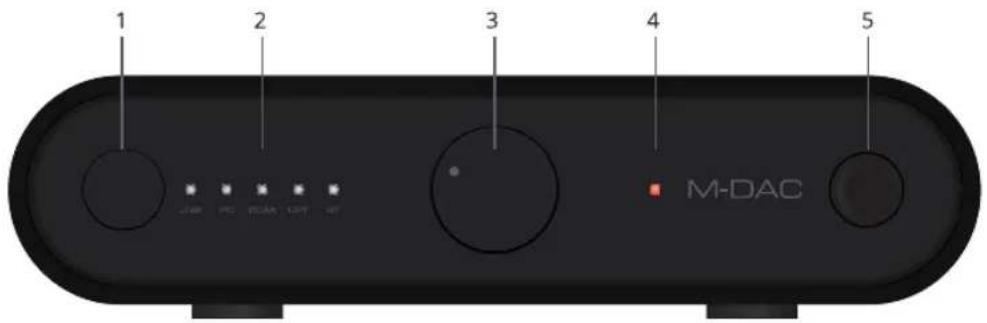
-
Input Select
-
Power Indicator
-
Source LED (flashes when there is no signal)
-
¼" stereo headphone socket
-
Power / Volume knob
Note: Power indicator light -- Red - On/ Red blink - < 20%/ Orange - Charging
Note: Input Select - Long Press: 3 seconds for battery indication / 8 seconds to enable/disable PC USB charging
Rear panel description
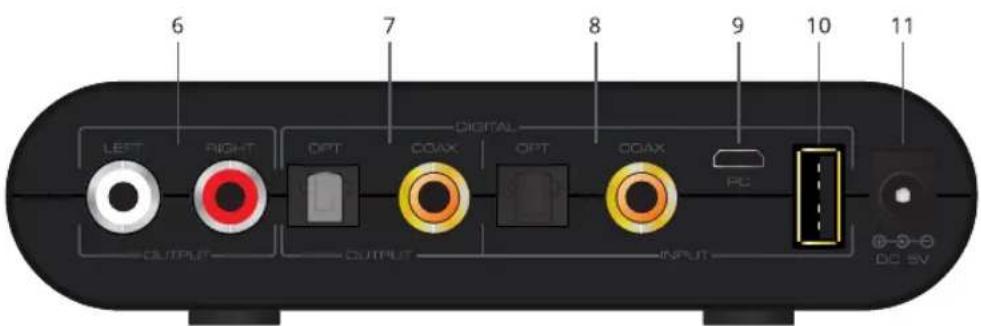
-
RCA analog audio output
-
USB micro-B (PC/MAC/Android OTG)
-
Digital Output
-
USB-A (iOS)
-
Digital Input
-
DC 5V input
Connection
- iPad/ iPhone connection - Connect iOS device using a lightning cable to the USB-A input
- PC/MAC - Use the USB cable to connect from the USB-A of your PC/MAC to the PC (USB micro-B) input
- Android Device (OTG) – Use supplied USB-micro B to USB-A (female) adapter to connect an android device to the PC (USB micro-B) input
- Bluetooth playback - Turn "ON" bluetooth, search and connect to "M-DAC mini". The "BT" LED indicator will display solid once a connection is made.
Note : Do not use any other power adapter than the included one.
Note: Windows does not support 192kHz sampling frequency. Please install included audio driver.








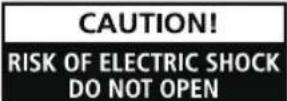

AVIS: RISQUE DE CHOC ELECTRIQUE-NE PAS OUVRIR WARNING: SHOCK HAZARD-DO NOT OPEN
This lightning flash with arrowhead symbol within an equilateral triangle is intended to alert the user to the presence of non-insulated "dangerous voltage" within the product's enclosure that may be of sufficient magnitude to constitute a risk of electric shock.
WARNING: to reduce the risk of electric shock, do not remove the cover (or back) as there are no user-serviceable parts inside. Refer servicing to qualified personnel, the exclamation point within an equilateral triangle is intended to alert the user to the presence of important operating and maintenance instructions in the literature accompanying the appliance.
Important safety information
- Read these instructions.
- Keep these instructions.
- Heed all warnings.
- Follow all instructions.
- Do not use this apparatus near water.
- Clean only with a dry cloth.
- Do not install near any heat sources such as radiators, heat registers, stoves, or other apparatus (including amplifiers) that produce heat.
- This equipment is a Class II or double insulated electrical appliance. It has been designed in such a way that it does not require a safety connection to electrical earth.
- Protect the power cord from being walked on or pinched particularly at the plugs, convenience receptacles, and the point where they exit from the apparatus.
- Do not defeat the safety purpose of the polarised plug. A polarised plug has two blades with one wider than the
other; the wide blade is provided for your safety. If the provided plug does not fit into your outlet, consult an electrician for replacement of the obsolete outlet.
- Unplug the apparatus during lightning storms or when unused for long periods of time.
- Refer all servicing to qualified service personnel. Servicing is required when the apparatus has been damaged in any way, such as where the power supply cord or plug is damaged, liquid has been spilled or objects have fallen into the apparatus, the apparatus has been exposed to rain or moisture, does not operate normally, or has been dropped.
- CAUTION: These servicing instructions are for use by qualified service personnel only. To reduce the risk of electric shock, do not perform any servicing other than that contained in the operating instructions unless you are qualified to do so.
- Do not install this equipment in a confined or built-in space such as a book case or similar unit, and remain well ventilation conditions. The ventilation should not be impeded by covering the ventilation openings with items such as newspaper, table-cloths, curtains etc.
- WARNING: Only use attachments/accessories specified or provided by the manufacturer (such as the exclusive supply adapter, battery etc).
- WARNING: To reduce the risk of fire or electric shock, do not expose this apparatus to rain or moisture. The apparatus shall not be exposed to dripping or splashing and objects filled with liquids, such as vases, shall not be placed on apparatus.
- WARNING: The mains plug/appliance coupler/direct plug-in adapter is used as a disconnect device, the disconnect device shall remain readily operable.
- Correct disposal of this product. This marking indicates that this product should not be disposed with other household wastes throughout the EU. To prevent possible harm to the environment or human health from uncontrolled waste disposal, recycle it responsibly to promote the sustainable reuse of
material resources. To return your used device, please use the return and collection systems or contact the retailer where the product was purchased. They can take this product for environmentally safe recycling.


audiolab
IAG House, 13/14 Glebe Road, Huntingdon, Cambridgeshire, PE29 7DL, UK
Tel: +44 (0)1480 452561 Fax: +44 (0)1480 413403 http://www.audiolab.co.uk
IAG reserves the right to alter the design and specifications without notice. All rights reserved © IAG Group Ltd.
Audiolab is a member of the International Audio Group. CODE: AH12-MNL013a