INSMAN 200V - 2966 INSTAAL - Panduan pengguna gratis
Temukan panduan perangkat secara gratis INSMAN 200V INSTAAL dalam format PDF.


Pertanyaan pengguna tentang INSMAN 200V INSTAAL
0 pertanyaan tentang perangkat ini. Jawab yang Anda tahu atau ajukan milik Anda sendiri.
Ajukan pertanyaan baru tentang perangkat ini
Unduh instruksi untuk 2966 dalam format PDF gratis! Temukan panduan Anda INSMAN 200V - INSTAAL dan ambil kembali perangkat elektronik Anda. Di halaman ini diterbitkan semua dokumen yang diperlukan untuk penggunaan perangkat Anda. INSMAN 200V merek INSTAAL.
PANDUAN PENGGUNA INSMAN 200V INSTAAL
INSTAAL ACCESSORIES & CO
OPERATION MANUAL
WALL-MOUNTED MANUAL SCREEN
Thank you for choosing our projection screen. Please read the manual carefully before using.
WALL-MOUNTED MANUAL SCREEN
1. STRUCTURE
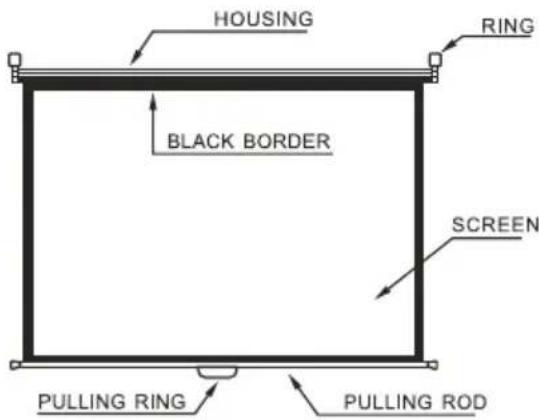
2.INSTALLING
Moving Parts of the drive must be installed higher than 2.5 mm above above the floor or other level that could provide access to it. Choose a suitable place for installing it is best to install two screws on the wall, the distance of the screws must be equal to that of the two rings and they should be at the same level, the rings must be strong enough to loading more than 25kg weights.
3 USEFUL INSRTUCTIONS
Hold the pulling ring tightly and pull down the screen slowly, then stop when the black border comes out (or stop pulling where you want to stop), the screen can be auto-fixed, if it can not be fixed, please operate it once again according to the same method. After using release the screen and it will go up and back to the housing.
4.WARNINGS
a The screen can not be folded. Do not use fingers or hard objects to touch the screen surface. Do not splash the milk, fruit juice or other chemical doses to the screen surface. Keep the screen far away from the high temperature objects or fire.
b If the screen is dirty wash the screen gently by a broom or a cotton ball do not use the organic solvents to clean the screen surface.
c When pulling the screen down, must be slowly and vertical. Do not pull it roughly, please stop pulling as soon as the black border is out or the screen is jammed or injured, then send the screen to the maintenance center.
d After using, put the screen back to the housing in order to avoid being polluted. If not using it for a long time, please take the screen from the wall and pack it in a carton.
TECHNICAL DATA
a.Matte White Screen
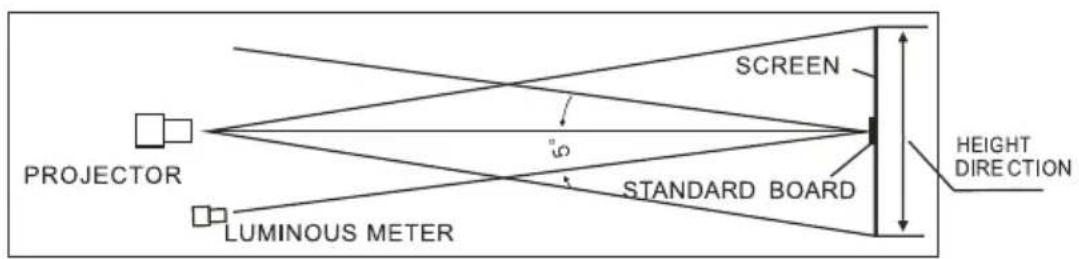
Gain: 1.1
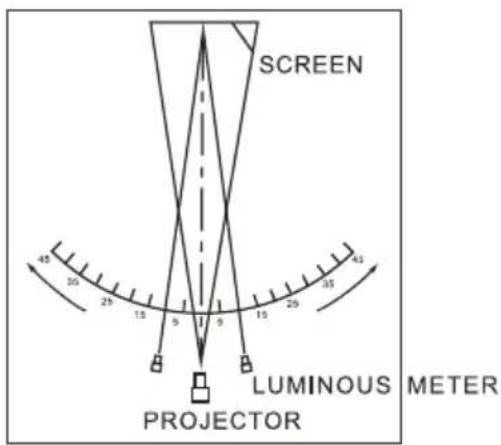
Viewing Angle: 160°
High color rendering, high resolution.
b.Glass Beaded Screen
Gain: 2.5
Viewing Angle: 60°
High color rendering, high resolution.
c. High quality synchronous or tubular motor is equipped in the left end of the screen housing.
d. Gain Measurement: refer the fig below
Standard: JB/T8389 issued by Ministry of Machinery Industry
e.Viewing Angle Measurement: refer the fig below
Standard: JB/T8389 issue by Ministry of Machinery Industry
For your retention.
| Customer Copy | ||
| Customer Name: Mr. □Miss □Mrs □ | ||
| Address:Tel. No.: | ||
| Tool Model: | Serial No, or Date Code: | |
| Date of Purchase: | Invoice/Receipt No.**: | |
| Dealer's Name(Dealer's Chop):Tel. No.: | ||
This product is warranted for one year from the date of purchase.
If the tool becomes defective due to faulty materials or workmanship within the warranty period.
Please return the complete unit to your local service center with the invoice prepaid transportation charge by yourself.
This warranty DOES NOT apply to:
- break down due to usage of ingenuine spare parts not we spare parts.
- normal wear and tear parts, cord, plug, chuck, charger, switch, bearing housing, gear.
- attachments and accessories;
- unauthorized repair, alteration, modification;
- damage caused by foreign objects, substances, accidents, obvious misuse, abuse, neglect and improper applications.
Details may vary from country to country. Please consult the local service center for more details, we reserves the right to change the terms of warranty without prior notice.