MKV 700 - 624 Pure Acoustics - Panduan pengguna gratis
Temukan panduan perangkat secara gratis MKV 700 Pure Acoustics dalam format PDF.


Pertanyaan pengguna tentang MKV 700 Pure Acoustics
0 pertanyaan tentang perangkat ini. Jawab yang Anda tahu atau ajukan milik Anda sendiri.
Ajukan pertanyaan baru tentang perangkat ini
Unduh instruksi untuk 624 dalam format PDF gratis! Temukan panduan Anda MKV 700 - Pure Acoustics dan ambil kembali perangkat elektronik Anda. Di halaman ini diterbitkan semua dokumen yang diperlukan untuk penggunaan perangkat Anda. MKV 700 merek Pure Acoustics.
PANDUAN PENGGUNA MKV 700 Pure Acoustics
pure acoustics®
MKV-700
Professional Dynamic Vocal Microphone
User & Safety Precauon Guide
PROFESSIONAL DYNAMIC VOCAL MICROPHONE
1. SAFETY PRECAUTIONS
Detailed safety precautions:
Please read all the safety precautions and operang instrucons before you aempt to operate this microphone. Keep all safety precautions and operang instrucons in a safe place for future reference.
DAMAGE:
Take care not to drop your microphone as this may cause severe damage to the unit; take care not to place the microphone on speaker units, podiums, mixers, amplifiers as the unit may roll o and get damaged.
PURE ACOUSTICS assumes no liability for any damage caused by the user.
Maintenance and care:
When the microphone is not in use, please take care to clean it with a so cloth, and then place it in its protective case. Store your microphone in its protective case in dry ventilated area to prevent damage. Keep away from water or other moistures'.
KEEP OUT OF REACH OF CHILDREN.
Cauon:
Never dismount the screen holding the capsule as this may cause severe damage to the microphone, any such aempt will avoid the warranty.
2. INTRODUCTION
Thank you for expressing your condence in PURE ACOUSTICS by purchasing the Professional Dynamic Vocal Microphone. This unit combines the highest quality standards at an aordable price. It delivers excellent results for both vocal & instrumental performances.
3. AUDIO CONNECTION
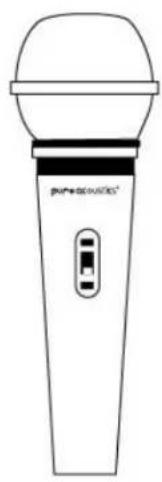
Beginning to use your new dynamic vocal microphone is as easy as plugging it in and turning it on. Simply connect the included XLR cable into the base of the microphone & then connect the 6.3mm gold conductor plug into the MIC input port of any mixer, amplifier, speaker or speaker system and slide the switch to the on posion.
4. USING THE MICROPHONE EFFECTIVELY
Adjust the volume level on your speaker, amplifier and or mixer to the desired level before beginning to use the microphone. This will help achieve a more exact sound reproducon.
*TIP: keeping a fair distance (5-10FT) away from the speaker will reduce unwanted feedback & distoron.
5. TECHNICAL SPECIFICATIONS
Height: 60mm
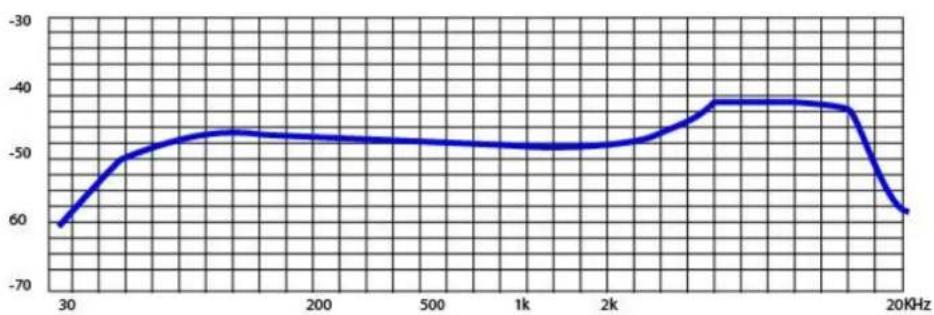
Sensitivity: -49 + 3dB
Frequency Response: 50Hz – 13 kHz
Gross weight: 200g
Cable Diameter: 6.5mm Cable Length: 5m
Conductor: Gold
natural_image
Line drawing of a handheld microphone with a control panel (no text or symbols)
radar
| Angle | Value | |-------|-------| | 0 | 0 | | 30 | 30 | | 60 | 60 | | 90 | 90 | | 120 | 120 | | 150 | 150 | | 180 | 180 | | 210 | 210 | | 240 | 240 | | 270 | 270 | | 300 | 300 | | 330 | 330 | | 360 | 360 |![Groove Key Tab [1]](/content/2026/05/1108315/images/efa6aa491ca902670b26ffb95bc8e391d9aeebcd5474d319538a75abfc8d92ed.jpg)