PT-TOOL-100 - 17756 PureTools - Panduan pengguna gratis
Temukan panduan perangkat secara gratis PT-TOOL-100 PureTools dalam format PDF.


Pertanyaan pengguna tentang PT-TOOL-100 PureTools
0 pertanyaan tentang perangkat ini. Jawab yang Anda tahu atau ajukan milik Anda sendiri.
Ajukan pertanyaan baru tentang perangkat ini
Unduh instruksi untuk 17756 dalam format PDF gratis! Temukan panduan Anda PT-TOOL-100 - PureTools dan ambil kembali perangkat elektronik Anda. Di halaman ini diterbitkan semua dokumen yang diperlukan untuk penggunaan perangkat Anda. PT-TOOL-100 merek PureTools.
PANDUAN PENGGUNA PT-TOOL-100 PureTools
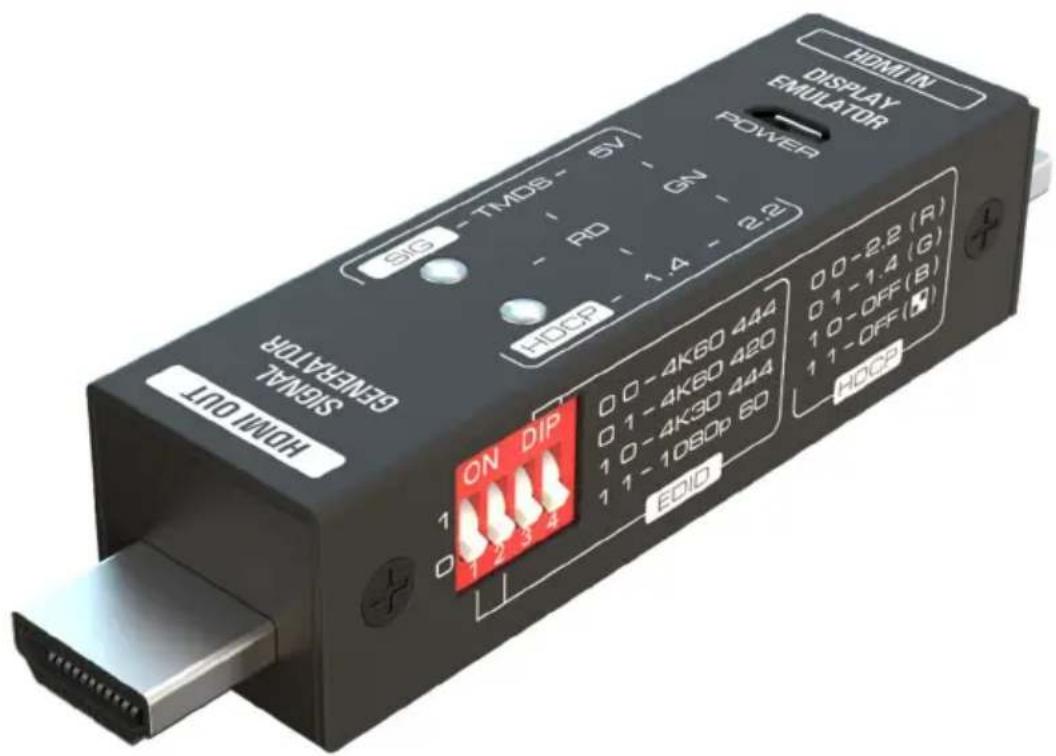
User Manual
Mini HDMI Signal Generator and Display Emulator
Model PT-TOOL-100
Designed in Germany
Preface
Read this user manual carefully before using this product. Pictures shown in this manual are for reference only. Different model layouts and specifications are subject to the physical product.
This manual is for operation instructions only, not for any maintenance usage.
In the constant effort to improve our product, we reserve the right to make changes in functions or parameters without prior notice or obligation.
Trademarks
Product model and logo are trademarks. Any other trademarks mentioned in this manual are acknowledged as the properties of the trademark owner. No part of this publication may be copied or reproduced without the prior written consent.
FCC Statement
This equipment generates, uses and can radiate radio frequency energy and, if not installed and used in accordance with the instructions, may cause harmful interference to radio communications. It has been tested and found to comply with the limits for a Class B digital device, pursuant to part 15 of the FCC Rules. These limits are designed to provide reasonable protection against harmful interference in a commercial installation.
Operation of this equipment in a residential area is likely to cause interference, in which case the user at their own expense will be required to take whatever measures may be necessary to correct the interference.
Any changes or modifications not expressly approved by the manufacture would void the user's authority to operate the equipment.
REACH | 1907/2006/EU
ROHS | 2011/65/EU
PureLink hereby declares that this product PureTools PT-TOOL-100 complies with Directives 1907/2006/EU und 2011/65/EU.
EMC / LVD (Electro Magnetic Compatibility / Low Voltage Directive)
PureLink GmbH hereby declares that this product PureTools PT-TOOL-100 complies with Directives 2014/30/EU and 2014/35/EU. The full text of the EU Declaration of Conformity is available at the following Internet address:
http://www.purelink.de/ce/4251364727232_CE.pdf
CE

SAFETY PRECAUTIONS
To ensure the best from the product, please read all instructions carefully before using the device. Save this manual for further reference.
- Unpack the equipment carefully and save the original box and packing material for possible future shipment
- Follow basic safety precautions to reduce the risk of fire, electrical shock and injury to persons.
- Do not dismantle the housing or modify the module. It may result in electrical shock or burn.
- Using supplies or parts not meeting the products' specifications may cause damage, deterioration or malfunction.
• Refer all servicing to qualified service personnel.
- To prevent fire or shock hazard, do not expose the unit to rain, moisture or install this product near water.
- Do not put any heavy items on the extension cable in case of protrusion.
- Do not remove the housing of the device as opening or removing the housing may expose you to dangerous voltage or other hazards.
- Install the device in a place with sufficient ventilation to avoid damage caused by overheat.
- Keep the module away from liquids.
- Spillage into the housing may result in fire, electrical shock, or equipment damage. If an object or liquid falls or spills on to the housing, unplug the module immediately.
- Do not twist or pull by force ends of the optical cable. It can cause malfunction.
- Do not use liquid or aerosol cleaners to clean this unit. Always unplug the power to the device before cleaning.
- Unplug the power cord when left unused for a long period of time.
- Information on disposal for scrapped devices: do not burn or mix with general household waste, please treat them as normal electrical wastes.
1. Product Introduction
The GEN-1 is a portable mini HDMI signal generator and display emulator (signal analyzer), two functions combine into a compact size chassis. This is very useful for AV installers or testers; When in signal generator mode, it can generate up to 4 signals ranging from 1080p up to 4K@60Hz (4:4:4) with variable HDCP content, all selectable by a simple DIP switch. When in emulator mode, it can indicate the presence of a good 5V signal, HDCP 1.4 or 2.2 or no HDCP and TMDS high, through an array of simple LED's.
1.1 Features
- Used as HDMI signal generator or display emulator (signal analyzer).
- Provides 4-pin DIP switch for setting video resolution and HDCP content.
■ Supports 4K@60Hz 4:4:4, 4K@60Hz 4:2:0, 4K@30Hz 4:4:4, or 1080p@60Hz video signal output.
■ Supports HDCP OFF, HDCP 1.4 or HDCP 2.2 output.
■ Supports four different test patterns for HDCP version.
■ LEDs show signal and HDCP status.
1.2 Package List
■ 1x GEN-1 Mini HDMI Signal Generator
■ 1x USB Power Cord
■ 1x Brown Cloth Bag
■ 1x User Manual
Note: Please contact your distributor immediately if any damage or defect in the components is found.
2. Specification
| Connectors | |
| Input | (1) HDMI IN |
| Input Connector | (1) 19-pin type-A male HDMI |
| Output | (1) HDMI OUT |
| Output Connector | (1) 19-pin type-A male HDMI |
| Power Connector | (1) Micro-USB |
| Control | (1) 4-pin DIP switch |
| General | |
| Input Video Resolution | Up to 4K@60Hz 4:4:4 8bit |
| Output Video Resolution | Supports 4K@60Hz 4:4:4, 4K@60Hz 4:2:0, 4K@30Hz 4:4:4, and 1080p@60Hz to be selected. |
| HDMI Input Audio Format | Supports LPCM 7.1 audio, Dolby Atmos®, Dolby® TrueHD, Dolby Digital® Plus, DTS:X ^TM , and DTS-HD® Master Audio ^TM pass-through. |
| HDMI Output Audio Format | PCM 2CH - No audible signal, EDID only! |
| HDMI Version | 2.0 |
| HDCP Content | 2.2, 1.4 |
| Power Supply | 5VDC 1A (USB power cord) |
| Power Consumption | 2W (Max) |
| Operation Temperature | -5 to +55°C (+23° to +131°F) |
| Storage Temperature | -25 to +70°C (-13° to +158°F) |
| Relative Humidity | 10% to 90%, Non-condensing |
| Dimensions (W*H*D) | 75mm x 22mm x 19mm |
| Net Weight | 65g |
3. Panel Description
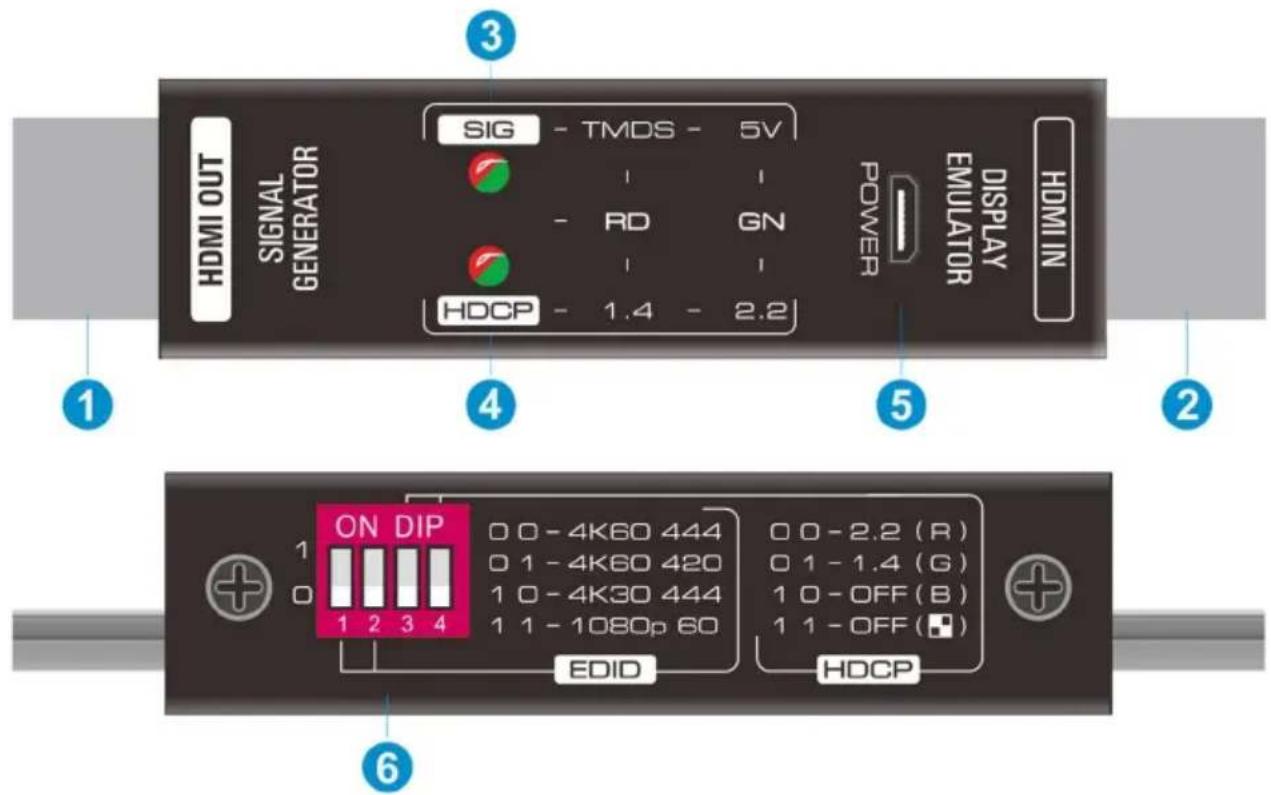
① HDMI OUT: Connects to HDMI display device. The GEN-1 is used as a HDMI signal generator to output HDMI signal.
② HDMI IN: Connects to HDMI source device. The GEN-1 is used as a display emulator to detect the HDCP content and signal status (5V, TMDS) of HDMI source.
③ SIG LED:
- When the GEN-1 is used as a HDMI signal generator, the LED turns red when there is HDMI signal output.
- When the GEN-1 is used as a display emulator, the LED turns green when only 5V signal is detected, or turns red when 5V and TMDS signals are detected simultaneously, or off when no HDMI signal input.
④ HDCP LED:
- When the GEN-1 is used as a HDMI signal generator, the HDCP content can be selected by 4-pin DIP switch. The LED turns green when HDCP 2.2 is selected, or red when HDCP 1.4 is selected, off when no HDCP.
- When the GEN-1 is used as a display emulator, The LED turns green when the HDCP content of HDMI source is HDCP 2.2, or red when it is HDCP 1.4, or off when no HDCP.
⑤ POWER: Micro USB port for power cord connection. The GEN-1 must be powered on when it is used as a signal generator. When the GEN-1 is used as a display emulator, it can be powered by HDMI source, so the power cord connection is not required, if the HDMI source has not enough power, both of the SIG LED and HDCP LED will blink.
⑥ DIP SWITCH: When the GEN-1 is used as a HDMI signal generator, switch 1 & 2 are used for built-in EDID (video & audio) selection, and switch 3 & 4 are used for HDCP content selection.
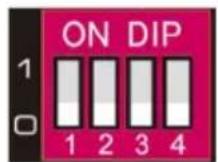
There are four switches (1\~4). The switch represents "0" when in the lower position, and it represents "1" while putting the switch in the upper position.
| Switch Status (1 & 2) | EDID | |
| 00 | 4K@60Hz 4:4:4, 2CH PCM | |
| 01 | 4K@60Hz 4:2:0, 2CH PCM | |
| 10 | 4K@30Hz 4:4:4, 2CH PCM | |
| 11 | 1080p@60Hz/3D, 2CH PCM | |
| Switch Status (3 & 4) | HDCP | Test Pattern |
| 00 | HDCP 2.2 | Red Screen |
| 01 | HDCP 1.4 | Green Screen |
| 10 | HDCP OFF | Blue Screen |
| 11 | HDCP OFF | AlternateWB |
4. System Diagram
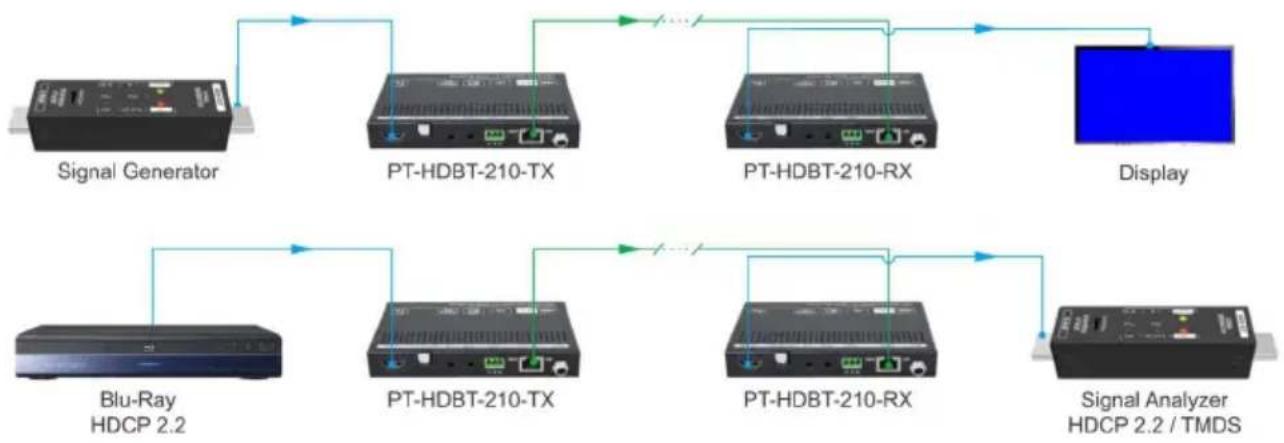
flowchart
graph TD
    A["Signal Generator"] --> B["PT-HDBT-210-TX"]
    B --> C["PT-HDBT-210-RX"]
    C --> D["Display"]
    E["Blu-Ray HDCP 2.2"] --> F["PT-HDBT-210-TX"]
    F --> G["PT-HDBT-210-RX"]
    G --> H["Signal Analyzer HDCP 2.2 / TMDS"]
5. After-Sales Service
If problems appear when using the product, please deal with the problems referring to this user manual. During the warranty period, any transport costs are borne by the customer.
1) Product Limited Warranty: The product will be free from defects in materials and workmanship for two years (The purchase invoice shall prevail).
Proof of purchase in the form of a bill of sale or receipted invoice which is evidence that the unit is within the Warranty period must be presented to obtain warranty service.
2) What the warranty does not cover (servicing available for a fee):
- Warranty expiration.
- Factory applied serial number has been altered or removed from the product.
- Damage, deterioration or malfunction caused by:
• Normal wear and tear.
- Use of supplies or parts not meeting our specifications.
- No certificate or invoice as the proof of warranty.
- The product model shown on the warranty card does not match with the model of the product for repairing or had been altered.
• Damage caused by force majeure.
• Servicing not authorized by distributor.
- Any other causes which does not relate to a product defect.
- Delivery, installation or labor charges for installation or setup of the product.
3) Technical Support: For any questions or problems, contact your distributor or reseller and tell them the respective product name and version, the detailed failure situation as well as the formation of the cases.
Asking for Assistance
Technical Support:
Phone: +49 5971 800299 - 0
Fax: +49 5971 800299 - 99
Technical Support Hours:
8:30 AM to 5:00 PM Monday thru Thursday
8:30 AM to 4:00 PM Friday
Write to:
PureLink GmbH
Von-Liebig-Straße 10
D - 48432 Rheine
www.purelink.de
info@purelink.de