WT-5210U-IT - Rádiós ébresztőóra LA CROSSE TECHNOLOGY - Ingyenes használati útmutató
Találja meg az eszköz kézikönyvét ingyenesen WT-5210U-IT LA CROSSE TECHNOLOGY PDF formátumban.


Felhasználói kérdések a következőről WT-5210U-IT LA CROSSE TECHNOLOGY
0 kérdés erről a készülékről. Válaszolj azokra, amiket ismersz, vagy tedd fel a sajátod.
Tegyél fel egy új kérdést erről a készülékről
Töltse le az útmutatót a következőhöz Rádiós ébresztőóra PDF formátumban ingyenesen! Találja meg kézikönyvét WT-5210U-IT - LA CROSSE TECHNOLOGY és vegye vissza elektronikus eszközét a kezébe. Ezen az oldalon közzé van téve az eszköze használatához szükséges összes dokumentum. WT-5210U-IT márka LA CROSSE TECHNOLOGY.
HASZNÁLATI ÚTMUTATÓ WT-5210U-IT LA CROSSE TECHNOLOGY
Contents
| L | a | n | g | u | a | g | e |
| E | n | g | l | i | s | h | |
| F | r | e | n | c | h | ||
| S | p | a | n | i | s | h |
| Mounting | 22 |
| Maintenance & Care | 23 |
| Specifications | 24 |
| Warranty Information | 25 |
| FAQ | 29 |
This product offers:

INSTANT TRANSMISSION is the state-of-the-art new wireless transmission technology, exclusively designed and developed by LA CROSSE TECHNOLOGY. INSTANT TRANSMISSION offers you an immediate update (every 4 seconds!) of all your outdoor data measured from the sensors: follow your climatic variations in real-time!
INVENTORY OF CONTENTS
1) WT-5210 Projection Alarm Clock
2) TX37U-IT Remote temperature transmitter
3) AC adapter/transformer
4) Instruction manual and warranty card.
TABLE OF CONTENTS
| Topic r1Page | ||
| Inventory of Contents D3 | P | a |
| Battery Installation D5 | ||
| Setting up r8 | ||
| Projection (temperature/time) D10 | 1 | |
| Display (temperatures, seconds, alarm time, date) D11 | ||
| About WWVB D12 | 4 | 2 |
| Function Buttons | 13 | |
| Manual settings | 8 | 3 |
| Time Zone Setting D15 | ||
| Time Setting | 16 | |
| Date Setting | 17 | |
| 12/24-Hour Setting | 18 | |
| Selecting °F or °C | 18 | |
| DST (Daylight Saving Time) Setting | 19 | |
| Setting the alarm | 19 | |
| Activating/de-activating the alarm | 20 | |
| 915 MHz Reception | 21 | |
PROJECTION ALARM CLOCK
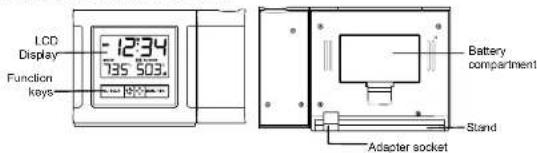
text_image
LCD Display Function keys 12:34 735 503 Battery compartment Stand Adapter socketFEATURES
• WWVB Radio controlled time with manual setting option
• 12/24 hours time display (hour, minutes, seconds)
• Time projection (hour and minute)
• DST ON/OFF (daylight saving time)
• Projection with adjustable brightness and projection orientation possible
- Calendar display
• Alarm setting with snooze function
• Time zone setting ±12hours
• Temperature display in °C/°F
- Indoor and outdoor temperature display
• E.L. back-light
• Wireless transmission at 915 MHz
• Signal reception intervals at 4 seconds - Low battery indicator
TEMPERATURE TRANSMITTER:

- Remote transmission of outdoor temperature to weather station by 915 MHz signal
• Wall mounting case
• Mounting at a sheltered place. Avoid direct rain and sunshine
TO INSTALL AND REPLACE BATTERIES IN THE TEMPERATURE TRANSMITTER
The Temperature Transmitter uses 2 x AA, IEC, LR6, 1.5V batteries. To install and replace the batteries, please follow the steps below:
5
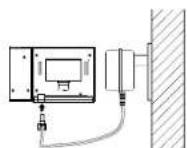
In addition or instead of inserting batteries, the AC adapter can be used:
-
DConnect the power adapter to a wall socket
-
Dinsert the adapter into the
jack at the bottom of the
clock
- DThe Projection clock will now
start receiving the WWVB
time signal. After
approximately 3 to 5 minutes.
the 00WVB time will be
displayed (Also see
displayed (Also see "SETTING UP" hold
SETTING OF BELOW).
Important!
Use only the adapter provided with the projection clock and make sure that your household voltage is appropriate to the working voltage of the transformer. Otherwise your Projection clock may be damaged.
POWER SUPPLIED BY BATTERIES AND AC/DC ADAPTER
If the Projection clock is first powered by batteries and the power adapter is subsequently used for extended period of time, the main power source of the Projection clock will switch to AC/DC power. The batteries will then act as a backup power source in case of power failure.
7
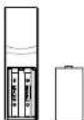
- DRemove the cover
- Dinsert the batteries, observing the correct polarity (see marking)
- DReplace the battery cover on the unit.
Note:
In the event of changing batteries in any of the units, all units need to be reset by following the setting up procedures. This is because a random security code is assigned by the transmitter at start-up and this code must be received and stored by the Projection alarm clock in the first three minutes of power being supplied to it.
TO INSTALL AND REPLACE BATTERIES INTO THE PROJECTION ALARM
The Projection Alarm uses 2 x AA, IEC LR6, 1.5V batteries. To install and replace the


- DI
- DInserf finger or other solid object in
at the bottom center of the battery
at the outlet section of the utility compartment and lift up to remove the cover. - Dinsert batteries observing the correct polarity (see marking).
- DReplace compartment cover.
6
SETTING UP
The Projection clock can be batteries operated or powered by the provided AC/DC adapter.
- DFirst, insert 2 x AA, IEC LR6, 1.5V batteries into the transmitter.
- DWithin 1 minute of activating the Projection clock, insert 2 x AA, IEC LR6, 1.5V batteries into the projection clock (or use the A/C adapter to power up). Once the batteries are in place, all segments of the LCD will light up briefly. Then the indoor temperature, the time as 0:00, will be displayed. If the indoor temperature is not displayed after a few seconds, remove the batteries and wait for at least 30 seconds before reinserting them. Once the indoor data is displayed proceed to step 2
- After a few seconds of inserting the batteries into the transmitter, the projection clock will start receiving data from the transmitter. The remote temperature will then be displayed on the clock. If this does not happen after 2 minutes, the batteries will need to be removed from both units and reset from step 1.
- When the transmitter is set up, there is a testing period. Then WWVB time code reception is automatically started just after the clock is activated. This takes typically between 3-5 minutes in good conditions. This time period is an excellent opportunity to locate the transmitter in suitable location outdoors. In order to ensure sufficient 915 MHz transmission however, the distance between the Projection clock and the transmitter should not be more than 330 feet (100 meters) (see notes on "Positioning" and "915 MHz Reception").
8
- Dif after 10 minutes the WWVB time has not been received, use the MODE/MIN key to manually enter a time (and date) initially. The clock will automatically attempt each day at 02:00am to receive the WWVB time. When this is successful, the received time will override the manually set time.
Note:
Should the total time of inserting the batteries into the transmitter take longer than 1-1/2 minutes from the time of inserting the batteries into the projection clock then temperature reception problems may occur. If the temperature is not being received, then see "915MHZ RECEPTION", before resetting the units.
In the event of changing batteries to the transmitter, the projection clock needs to be reset. (See RESETTING THE PROJECTION CLOCK)
RESETTING THE PROJECTION CLOCK
To reset the Projection clock to the factory default setting or in case of a malfunction or changing batteries to transmitter, please remove all batteries from the unit and unplug the AC/DC adapter from any power source. With power disconnected, press any button 20 times. Wait at least for 3 minutes before powering up the Projection clock again.
BATTERY CHANGE:
It is recommended to replace the batteries in all units regularly to ensure optimum accuracy of these units (Battery life See Specifications below).
9
brightness level afterwards. And the brightness of the projection can be change accordingly to enhance the clarity of the projected time by pressing the key. Press and release the D key slowly to also turn off.
If the Projection clock is battery operated, the projection will be ON at the highest brightness level only when the SNOOZE key is pressed. The intensity of the brightness level of the projection cannot be changed. If the SNOOZE is released, the projection will be turned OFF.
TOGGLE BETWEEN THE DISPLAY OF TEMPERATURES, SECONDS, PRESET ALARM TIME AND CALENDAR
By pressing shortly the MODE/MIN key, you will toggle between the following displays:
-
D indoor and outdoor temperature
-
DSeconds
-
DPreset alarm time
-
Day and Month

text_image
12:34 7:35 503.1 12:34 SEC 05 12:34 6:00 12:34 23. 511

Please participate in the preservation of the environment. Return used batteries to an authorized depot.
PROJECTION OF TIME / OUTDOOR TEMPERATURE
Note:
The projection is a red light, not harmful under normal usage, yet care should be taken to avoid looking directly into the light.
-
DWhen plugged into an AC outlet, the projection alarm can continuously project the time and the outdoor temperature
-
DWhen operating on batteries alone, the projection alarm will only project when the SNOOZE button is pressed or the alarm is sounding.
-
DThe projection will auto-focus for display from about 5.5 to 6.5 feet (1.7 to 2.0 meters) away. A dark surrounding will be necessary to clearly see the projection.
The direction of the display can also be rotated 360° in 90° increments by pressing the
Projection Direction * button. The projector case can be rotated 180° to further help orient the projected display.
Note:
If the Projection clock is powered through the adapter, the projection will be constantly ON at the highest brightness level unless the brightness level is manually changed to a lower
10
WWVB RADIO CONTROLLED TIME
The NIST (National Institute of Standards and Technology—Time and Frequency Division) WWVB radio station is located in Ft. Collins. Colorado, and transmits the exact time signal continuously throughout the United States at 60 kHz. The signal can be received up to 2,000 miles away through the internal antenna in the Projection alarm. However, due to the nature of the Earth's Ionosphere, reception is very limited during daylight hours. The Projection alarm will search for a signal every night when reception is best.
The WWVB radio station receives the time data from the NIST Atomic clock in Boulder, Colorado. A team of atomic physicists is continually measuring every second, of every day, to an accuracy of ten billions of a second per day. These physicists have created an international standard, measuring a second as 9,192,631,770 vibrations of a Cesium-133 atom in a vacuum. For more detail, visit http://www.boulder.nist.gov/timefrq.htm. To listen to the NIST time, call (303)499-7111. This number will connect you to an automated time, announced at the top of the minute in "Coordinated Universal Time", which is also known as Greenwich Mean Time (GMT). This time does not follow Daylight Saving Time changes. After the top of the minute, a tone will sound for every second. It is possible that your Projection Alarm may not be exactly on the second due to the variance in the quartz. However, the clock will adjust the quartz timing over the course of several days to be very accurate; under 0.10 seconds per day.
12
FUNCTION KEYS
There are 4 function keys located on the front of the projection alarm and one on the top. The function keys are: AL/HOUR, MODE/MIN, Projection Direction, Brightness, and SNOOZE.
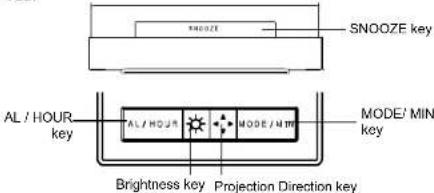
text_image
SNOOZE AL / HOUR key SNOOZE key MODE' MIN key AL / HOUR MODE/MIN Brightness key Projection Direction keySNOOZE key:
- Activate snooze function
- Activate the projection brightness at the highest level when battery operated or projection is turned off
- Exit the setting modes
13
r ^+ Projection Direction key
- Press to rotate the time/ outdoor temperature projection image in 90^st increments - Press to activate the EL back-light
MANUAL SETTINGS:
The following manual settings can be changed when pressing the MODE/MIN key for:
• Time zone setting
- Manual time setting
- Calendar setting
• 12/24-Hour setting
- °C/F setting
• DST ON/OFF (daylight saving time
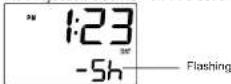
TIME ZONE SETTING
The time zone default of the Projection clock is "-5h". To set a different time zone:
15
• E.L.Back-light-On
AL/HR key:
- Enter alarm setting mode
- Activate or deactivate alarm
- Stop alarm and snooze function
- Set the hours and day
• E.L.Back-light-On
MODE/MIN key:
- Enter time zone, manual time, year, day, month, 12/24 hour time display, °C / °F temperature format, DST ON/OFF setting modes
- Set the minutes, year, month. 12/24 hour time format, °C / °F temperature format, DST ON/OFF
- Toggle between temperatures, seconds, alarm time, and date display
- Stop alarm and snooze function
• E.L.Back-light-On
Brightness key r
- Set the brightness level of the projection (in A/C power mode):4 levels: High, Medium, Low, OFF
E.L.Back-light On
14
- DPress and hold the MODE/MIN key for about 3 seconds. The current time zone value at the bottom of the LCD display starts flashing.
- DPress and release MODE/MIN key to adjust the time zone. The range runs from 0h to 12h, then -12h to 0h, in consecutive 1-hour intervals.
- Confirm with the SNOOZE key and enter the Manual time setting
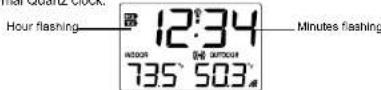
MANUAL TIME SETTING
If the projection alarm clock cannot detect the WWVB-signal (for example due to disturbances, transmitting distance, etc.), the time can be manually set. The clock will then work as a normal Quartz clock.
-
DThe hour and the minute digits will start flashing.
-
DUse the AL/HOUR key to set the hour: MODE/MIN key to set the minute.
-
Confirm with the SNOOZE key and enter the Calendar setting.
Note:
The unit will still try and receive the signal at 2:00 am despite it being manually set. When it does receive the signal, it will change the manually set time into the received time.
16
CALENDAR SETTING
The date default of the Projection clock is 1. 1. in the year 2006. Once the radio-controlled time signals are received, the date is automatically updated. However, if the signals are not received, the date can also be set manually.

text_image
12:34 20 07 12:34 DATE 23 5 Flashing-
DThe year starts flashing.
-
DUse the MODE/MIN key to set the year (between year 2001 to 2029).
-
DPress the SNOOZE key to confirm and to enter the month and day setting. The month and day digits will start flashing.
-
DUse the AL/HOUR key to set the day (or month) and MODE/MIN key to set the month (or day).
-
Confirm with the SNOOZE key and enter the 12/24 hour time display setting.
Note:
If 12hr time format is selected, month and date will be display.
If 24hr time format is selected, date and month will be display.
17
DST ON/OFF SETTING (DAYLIGHT SAVING TIME):
Note:
The DST default is "On", meaning that the WWVB will automatically change the time according to Daylight Saving Time in the spring and fall. For areas that do not recognize DST changes (Arizona and parts of Indiana) turn the DST 'OFF'.
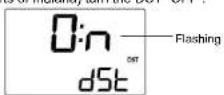
- DThe DST "ON" will be flashing.
- DUse the MODE/MIN key to toggle between "ON" and "OFF".
- DPress the SNOOZE key again to confirm and return to the normal display.
ALARM
SETTING THE ALARM

Alarm-ON icon
19
12/24 HOUR TIME DISPLAY SETTING
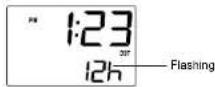
- D"12h" or "24h" flashes in the LCD.
- DPress the MODE/MIN key to select the "12h" or "24h" display mode.
- Confirm with the SNOOZE key and enter the °C/°F temperature setting
°C/°F TEMPERATURE SETTING:
The default temperature reading is set to °F (degree Celsius). To select °C (degree
Fahrenheit):
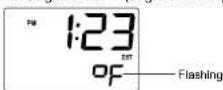
- DThe "F" will be flashing.
- DUse the MODE/MIN key to toggle between "C" and "F".
- Confirm with the SNOOZE key and enter the DST ON/OFF setting
18
- DPress and hold "AL/HOUR" button for about three seconds until the alarm time is flashing.
- DPress and release "AL/HOUR" to advance the hour, and "MODE/MIN" to advance the minute.
- Press the SNOOZE key to confirm. The alarm is now set and activated.
ACTIVATING / DEACTIVATING THE ALARM
- DAfter entering the alarm setting mode, the alarm is activated.
- To toggle between activating and deactivating the alarm, press the "AL/HOUR" button briefly. Alarm-on icon, "((•)))" will be displayed next to the time display when the alarm is activated.
TURNING ALARM OFF (WHILE SOUNDING)
- DWhile the alarm is sounding, press and release the SNOOZE bar to disable the alarm for 6 minutes. (After the SNOOZE bar is pressed, the alarm icon will keep flashing. After 6 min, the alarm will sound again.)
- DTo disable the alarm, press and release the AL/HOUR or MODE/MIN button.
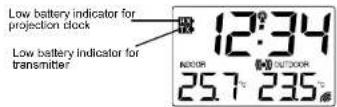
LOW BATTERY INDICATOR
Low battery indicator is displayed on the LCD when the batteries require changing.
20
TEMPERATURE TRANSMITTER
The outdoor temperature is measured and transmitted every 4 seconds.
The range of the Temperature transmitter may be affected by the temperature. At cold
temperatures the transmitting distance may be decreased. Please bear this in mind when placing the transmitter.
915MHz RECEPTION
If the outdoor temperature data is not being received within three minutes after setting up (or outdoor display always show “- - -” in the outdoor section of the Weather station during normal operation), please check the following points:
-
DThe distance of the Projection alarm clock or transmitter should be at least 6 feet away from any interfering sources such as computer monitors or TV sets.
-
DAvoid placing the transmitter onto or in the immediate proximity of metal window frames.
21

To wall mount:
-
DSecure the bracket onto a desired wall using the screws and plastic anchors.
-
DClip the sensor onto the bracket
Note:
Before permanently fixing the transmitter wall base, place all units in the desired locations to check that the outdoor temperature and humidity readings are receivable. In event that the signal is not received, relocate the transmitter(s) or move them slightly as this may help the signal reception.
The mounting surface can, however, affect the transmission range. If for example the unit is attached to a piece of metal, it may then either reduce or increase the transmitting range. For this reason, we recommend not placing the unit on any metal surfaces or in any position where a large metal or highly polished surface is in the immediate proximity (garage doors, double-glazing, etc.). Please ensure that the Projection alarm clock Station can receive the 915 MHz signal from the outdoor transmitter at the positions that you wish to situate them.
CARE AND MAINTENANCE:
- Extreme temperatures, vibration and shock should be avoided as these may cause damage to the unit and give inaccurate forecasts and readings.
23
- DUsing other electrical products such as headphones or speakers operating on the 915MHz-signal frequency may prevent correct signal transmission or reception. Neighbors using electrical devices operating on the 915MHz-signal frequency can also cause interferences.
Note:
When the 915MHz signal is received correctly, do not re-open the battery cover of either the transmitter or Projection alarm clock, as the batteries may spring free from the contacts and force a false reset. Should this happen accidentally then reset all units (see "Setting up" above) otherwise transmission problems may occur.
The transmission range is around 330 feet (100 meters) from the Temperature transmitter to the projection alarm clock (in open space). However, this depends on the surrounding environment and interference levels. If no reception is possible despite the observation of these factors, all system units have to be reset (see "Setting up" above).
POSITIONING THE OUTDOOR TEMPERATURE TRANSMITTER

The sensor is supplied with a holder that may be attached to a wall with the two screws supplied. The sensor can also be position on a flat surface by securing the stand to the bottom to the transmitter.
22
- Precautions shall be taken when handling the batteries. Injuries, burns, or property damage may be resulted if the batteries are in contact with conducting materials, heat, corrosive materials or explosives. The batteries shall be taken out from the unit before the product is to be stored for a long period of time.
- Immediately remove all low powered batteries to avoid leakage and damage. Replace only with new batteries of the recommended type.
- When cleaning the display and casings, use a soft damp cloth only. Do not use solvents or scouring agents as they may mark the LCD and casings.
• Do not submerge the unit in water. - Special care shall be taken when handling a damaged LCD display. The liquid crystals can be harmful to user's health.
- Do not make any repair attempts to the unit. Return them to their original point of purchase for repair by a qualified engineer. Opening and tampering with the unit may invalidate their guarantee.
- Never touch the exposed electronic circuit of the device as there is a danger of electric shock should it become exposed.
- Do not expose the units to extreme and sudden temperature changes, this may lead to rapid changes in forecasts and readings and thereby reduce their accuracy.
SPECIFICATIONS:
Temperature measuring range:
Indoor D: 14.2°F to 99.9°F with 0.2°F resolution
24
D D D-9.9°C to +37.7°C with 0.1°C resolution
D D D("OF.L" displayed if outside this range)
Outdoor D: -39.8°F to +139.8°F with 0.2°F resolution
D D D-39.9°C to 59.9°C with 0.1°C resolution
D D D("OF.L" displayed if outside this range)
Indoor temperature checking intervals D: every 15 seconds
Outdoor Temperature reception
lost and display *--")
Transmission range D: up to 330 feet/100 meters (open space)
Power consumption:
Projection alarm clock : 2 x AA, IEC LR6, 1.5V or use the provided 3.4 AC/DC adapter
Outdoor transmitter D: 2 x AA, IEC LR6, 1.5V
Battery life cycle D: approximately 24 months (Alkaline batteries recommended)
Dimensions (L x W x H):
Projection alarm clock D: 140.3 x 48.5 x 90.6 mm
Outdoor transmitter : 38.2 x 21.2 x 128.3 mm (wall bracket excluded)
WARRANTY INFORMATION
La Crosse Technology, Ltd provides a 1-year limited warranty on this product against
manufacturing defects in materials and workmanship.
This limited warranty begins on the original date of purchase, is valid only on products purchased and used in North America and only to the original purchaser of this product. To
25
receive warranty service, the purchaser must contact La Crosse Technology. Ltd for problem
determination and service procedures. Warranty service can only be performed by a La
Crosse Technology, Ltd authorized service center. The original dated bill of sale must be
presented upon request as proof of purchase to La Crosse Technology, Ltd or La Crosse
Technology, Ltd's authorized service
La Crosse Technology, Ltd will repair or replace this product, at our option and at no charge
as stipulated herein, with new or reconditioned parts of products if found to be defective
during the limited warranty period specified above. All replaced parts and products become
the property of La Crosse Technology, Ltd and must be returned to La Crosse Technology,
Ltd.
Replacement parts and products assume the remaining original warranty, or ninety (90)
days, whichever is longer. La Crosse Technology, Ltd will pay all expenses for labor and
materials for all repairs covered by this warranty. If necessary repairs are not covered by
this warranty, or if a product is examined which is not in need or repair, you will be charged
for the repairs or examination.
The owner must pay any shipping charges incurred in getting your La Crosse Technology,
Ltd product to a La Crosse Technology, Ltd authorized service center.
Your La Crosse Technology, Ltd warranty covers all defects in material and workmanship
with the following specified exceptions: (1) damage caused by accident, unreasonable use or neglect (including the lack of reasonable and necessary maintenance); (2) damage occurring
26
during shipment (claims must be presented to the carrier); (3) damage to, or deterioration of, any accessory or decorative surface; (4) damage resulting from failure to follow instructions contained in your owner's manual; (5) damage resulting from the performance of repairs or alterations by someone other than an authorized La Crosse Technology, Ltd authorized service center; (6) units used for other than home use (7) applications and uses that this product was not intended or (8) the products inability to receive a signal due to any source of interference.
This warranty covers only actual defects within the product itself, and does not cover the cost of installation or removal from a fixed installation, normal set-up or adjustments, claims based on misrepresentation by the seller or performance variations resulting from installation-related circumstances.
LA CROSSE TECHNOLOGY, LTD WILL NOT ASSUME LIABILITY FOR INCIDENTAL, CONSEQUENTIAL, PUNITIVE, OR OTHER SIMILAR DAMAGES ASSOCIATED WITH THE OPERATION OR MALFUNCTION OF THIS PRODUCT. THIS PRODUCT IS NOT TO BE USED FOR MEDICAL PURPOSES OR FOR PUBLIC INFORMATION. THIS PRODUCT IS NOT A TOY. KEEP OUT OF CHILDREN'S REACH.
This warranty gives you specific legal rights. You may also have other rights specific to your State. Some States do no allow the exclusion of consequential or incidental damages therefore the above exclusion of limitation may not apply to you. For warranty work, technical support, or information contact;
27
La Crosse Technology, Ltd
2809 Losey Blvd. S
La Crosse. WI 5460
Phone: 608,782,1610
Fax: 608.796.1020
e-mail: support@lacrossetechnology.com
(warranty work)
sales@lacrossetechnology.com
(information on other products)
web: www.lacrossetechnology.com
Question? Instructions? Please visit: www.lacrossetechnology.com/5210
28
FAQ WT-5210 TX37U-IT
Congratulations on purchasing this state-of-the-art Projection Alarm Clock Weather Station.
Remember, for your Weather Station to work properly, it must be started correctly, using good quality alkaline batteries, and the time must be set manually.
Before calling for technical support, 1-888-211-1923, you may be able to correct the problem by first performing a Proper Restart, an Initial Setup, and problem-solving with the trouble-shooting guide.
- Proper Restart (Quick Set-up Guide)
- Outdoor Readings
- Indoor Readings
– Time and Date Information - Weather Station Beeps Periodically
- Projection Information
- Display Information
- Power Source
- Sensor
29
Do not press any buttons for at least 15 minutes after installing the batteries. This is because the sensor at start-up assigns a random security code and this code must be received and stored by the temperature station in the first few minutes of power being supplied.
A temperature reading should be showing on your display in the "outdoor" portion of your display. Because the sensor detects the temperature at the location it is placed, and because the setup generally takes place indoors, your indoor and outdoor temperature should match within a couple of degrees.
After you have completed this setup and placed your sensor outside, the temperature reading will adjust to the outdoor temperature. The temperature will be displayed on your indoor unit. Continue with the Initial Set-up.
How to Set Your Alarm(s):
To Enter the Alarm Programming Mode for Alarm :
Press and hold the AL/HOUR button for five seconds. The alarm time will begin to flash. Release the AL/HOUR button; the alarm time will continue to flash.
To set the desired alarm time for Alarm, press and release the AL/HOUR button to adjust the hour (watch for am or pm). Press and release the MODE/MIN button to adjust the minutes.
Press SNOOZE to return to normal display.
31
- Proper Restart (Quick Set-up Guide)
In the event of installing or changing batteries in any of the units, all units need to be reset by following the setup procedures.
Have both the indoor display unit and the outdoor transmitter (sensor) inside at least five feet apart with nothing between them.
Remove all power from both units.
Press any one of the buttons on the display unit at least 20 times to clear all memory and residual electrical charge. Verify that the display is blank before proceeding. Let the units sit for five minutes before powering up.
Batteries: Use good quality alkaline batteries with an expiration date of at least six years into the future or newer. If you are using questionable batteries, be sure they measure at least 1.48 on a voltmeter. Generic or store brand batteries, and batteries labeled super, ultra, max, heavy duty, lithium and rechargeable should be avoided.
Place the batteries into the remote sensor first, making sure they are installed according to the diagram in the battery compartment. Next, taking care not to press any buttons, install the batteries or a/c cord in the display unit, according to the diagram in the battery compartment.
30
When the alarm is active, if you look in the below the time you should see an alarm icon {{}}). The alarm icon signifies that an alarm is activated. To deactivate the alarm, press and release the corresponding AL/HOUR button. To activate the alarm press and release the AL/HOUR button again and the icon will reappear.
TROUBLE-SHOOTING GUIDE
If you continue to experience problems with your Weather Station, please see if your problem is described in this Trouble-Shooting Guide and follow the suggestions to try to correct the problem before contacting technical support.
Please familiarize yourself with the function buttons. These are located on the front and top of the clock. They are: AL/HOUR, a sunshine icon C, a directional icon ✦, MODE/MIN button, and the SNOOZE bar. These buttons will be used in the trouble-shooting guide.
Outdoor Readings
Temperature displays as ---(dashes)
Restart: Remove batteries from all units and follow the directions in the Proper Restart section above. If this does not correct the problem, continue to the next step.
Placement of Sensor: In order to get an accurate reading and to prolong the life of your sensor, we recommend that you place the sensor in a sheltered area out of the sun and direct rain. Fog and mist will not affect the sensor, but a soaking in water may.
32
Sensor is wet: If your sensor becomes soaked, bring the unit inside, remove the batteries and allow the unit to dry overnight; then restart the station using the Proper Restart instructions. You can mount the sensor outside under an eave of your house or any other suitable place that will keep it out of the sun and rain. Do not wrap the sensor in plastic or seal it in a plastic bag.
Transmission Range: The maximum transmission range is 330 feet in a straight line (line of sight). Trees, walls, windows, and obstructions will reduce transmission range by as much as half, while interior walls and similar obstructions will reduce transmission range by as much as another quarter. (An obstruction would include anything that is in the line of sight like a roof, walls, floors, ceilings, trees, etc.)
For best signal reception, the transmission range should be greater than the line of sight distance between the transmitter and receiver. Certain building materials as well as electrical interference may also affect signal reception.
Outdoor Temperature is Inaccurate or Missing
Placement: The sensor will measure the temperature in the location where it is placed. Therefore, the unit must be placed outdoors to register the outdoor temperature.
Reading a Neighbor's Sensor: Because of the popularity of our Weather Stations, it is possible for your unit to pick up a signal from a neighbor's sensor.
33
Outdoor Temperature Displays as OFL
If the display shows OFL, your batteries may be weak or dead. Follow the "Proper Restart" instructions using fresh batteries. If you continue to have problems, please call for technical support.
Outdoor Temperature Area is Totally Blank
If only the Outdoor Readings portions of the indoor unit are totally blank (not showing dashes or OFL), this may a problem with the indoor unit or the batteries. Remove all batteries from all units and follow the directions in the Proper Restart section above, using fresh batteries. If the problem continues, contact Customer Support for further instructions.
Indoor Readings
Indoor Temperature Displays as -- (dashes) or is Missing
Remove batteries from all units and follow the directions in the Proper Restart section above, using fresh batteries.
Indoor Temperature is Blank
If only the Indoor Readings portion of the indoor unit is totally blank (not showing dashes or OFL), this may indicate a problem with the indoor unit or the batteries. Remove all batteries from all units and follow the directions in the Proper Restart section above, using fresh batteries. If the problem continues, contact Customer Support for further instructions.
35
To confirm that your sensor is the primary sensor after the Proper Restart, you may place your sensor in a refrigerator or freezer and recheck the display to see if the temperature has fallen accordingly.
After you determine that your clock is picking up the signal from your sensor, if you believe the temperature is still inaccurate, bring the transmitter indoors and let it sit for a couple hours to reach room temperature. Compare this 'outdoor' reading with the indoor reading on your display. A temperature difference of +/- two degrees is considered normal. Therefore, if your sensor is reading two degrees high and your display is reading two degrees low, you may experience a 4-degree difference between La Crosse Technology units. All electronics have similar tolerances within their products.
Batteries: If you are receiving no signal, your batteries may be weak or dead. Follow the "Proper Restart" instructions with fresh batteries.
Distance: It may also be that the distance between the transmitter and the receiver is too great or has too many obstacles between the units to allow the signal to reach the transmitter. Please refer to Temperature Reading Problem 1 regarding sensor placement.
Sensor is Defective or Worn Out: Also, your transmitter may be defective or worn out due to age or weather conditions. If you continue to have problems after trying the above suggestions, please call for technical support.
34
Indoor Temperature Displays as OFL
If the display shows OFL, your batteries may be weak or dead. Follow the "Proper Restart" instructions. If you continue to have problems, please call for technical support.
Time and Date Information - WWBV Tower Icon
Time is Not Accurate
If you have not yet installed the batteries or plugged in the weather station and it shows a time, remove the scratch-guard from the LCD panel.
This weather station receives a signal from Ft. Collins, Colorado (WW/VB) to set it to atomic time. Sometimes, due to adverse weather or atmospheric conditions, you will not be able to receive a signal immediately and may have to wait overnight for the signal. The best way to get a signal is to put your weather station in a window with the front or back facing Colorado until you see the tower icon appear. Under certain weather conditions, the unit may lose contact with the radio signal and the lower icon will no longer appear. However, the clock will continue to function as a quartz clock until the signal is reconnected.
Hour is Incorrect/Minutes are Correct. Unit "Jumps" Time
Time Zone setting may be incorrect. Please note North American Time Zones are negative numbers. -4 Atlantic, -5 Eastern, -6 Central, -7 Mountain, -8 Pacific, -9 Alaskan, -10
36
Hawaiian. The dash preceding the number must be showing to properly display the US times. Use the programming mode to select the proper Time Zone.
If your time is still off by an increment of one hour, check the Daylight Savings Time setting. Use the programming mode to select DST.
The Date Does Not Appear
Press the MODE/MIN button and observe the changes in the display in the center segment of the unit. Press and release MODE/MIN to move through:
• month/date
- Indoor and outdoor temperatures
- seconds
- Alarm Time
The alarm will not ring unless the alarm is turned on and ((()) is displayed below the time.
The Date Changes at Noon (not Midnight)
When in the 12-hour Time Mode in the original setup, you may have overlooked the PM indicator, which appears to the left of the time. There is no AM indicator. If "PM" does not appear, the time you are looking at is AM (morning) time. If the PM is showing, the time you are looking at is PM (afternoon). If the clock is set so that PM shows in the morning, the date will change at noon rather than at midnight. Proceed to "Setting the Hour" in the setup instructions and advance by 12 hours.
37
Projection Shows Incorrect Temperature
See Sensor section for guidance.
Projection is Displaying Upside Down or Sideways – Directional Icon ✦
If the projection is displaying incorrectly (upside down or sideways), press and release the button that looks like four arrows pointing up, down, left, and right. Each press of this button will change the direction of the numbers projecting onto the wall or ceiling by a quarter tum.
Projection is "Fuzzy" or Unreadable
If the time and temperature displayed on the ceiling has a "basketball" appearance, and if the numbers are not clear, you may be using an incorrect adapter. Verify that the correct AC adapter is plugged in and properly connected to the clock. You may have to use a pointed object (push pin) to press this securely into place.
Projection is Too Bright or Too Faint - Intensity Icon.
The intensity of the projection can be adjusted by pressing the intensity icon. This can best be tested in a darkened room. Intensity can be adjusted when using a/c power and cannot be adjusted when using batteries only.
Using the OFF setting allows the projection to come on only when a button is pressed.
39
Weather Station Beeps Periodically
If you look in the below the time you should see an alarm icon (())). The alarm icon signifies that an alarm is activated. To deactivate the alarm, press and release the corresponding AL/HOUR button. To activate the alarm press and release the AL/HOUR button again and the icon will reappear.
Projection
Time and Temperature does not display continuously
The projection will be continuously displayed if the clock is plugged in with the AC adapter. If the projection is not displayed, first verify that the AC adapter is plugged in and properly connected to the clock. You may have to use a pointed object (push pin) to press this securely into place.
After the connections are confirmed, presses the ⚙ button and place your hand about 2 inches from the projection lens. A red dot should appear on your hand.
NOTE: The projection will only appear on the wall or ceiling when the room is quite dark.
Projection Shows Incorrect Time
Confirm that your clock has been set to the correct time. See Initial Setup section to set the time.
38
Display Information
Entire Display is Blank
If operating on batteries only, the batteries may be dead. If operating on a/c power only, the adapter pin may not be properly seated.
Remove all power (batteries and a/c power) from the base unit, and remove the batteries from the outdoor sensor. Press any button on the indoor unit at least 20 times. This discharges any residual power from the unit.
Do a Proper Restart with fresh batteries, making sure they are installed according to the diagram in the battery compartment. Plug in the a/c adapter and verify that it is securely connected to the clock. You may have to use a pointed object (push pin) to press this into place. Plug the adapter into a live electrical outlet.
If these steps do not correct the problem, contact our technical support department for assistance.
Segmented Numbers
If the numbers appear incomplete or segmented, the batteries may be dead.
Do a Proper Restart with fresh batteries, making sure they are installed according to the diagram in the battery compartment. If this does not correct the problem, contact our technical support department for assistance.
40
Backlight Does Not Stay Lighted
Pressing the any button activates the backlight. The backlight automatically turns off after a few seconds. The backlight is not designed to be continually lighted.
Power Source
Your Projection Clock will operate on batteries or on a/c power through a provided transformer. If batteries power your unit only, the time and temperature will project only when a button is pressed. This is to preserve battery power. The time and temperature will display continuously when the transmitter is properly attached to the unit.
All rights reserved. This handbook must not be reproduced in any form, even in excerpts, or duplicated or processed using electronic, mechanical or chemical procedures without written permission of the publisher. This handbook may contain mistakes and printing errors. The information in this handbook is regularly checked and corrections made in the next issue. We accept no liability for technical mistakes or printing errors, or their consequences. All trademarks and patents are acknowledged.