
BigShot SW2 - Kitarriefektide pedaal Radial Engineering - Tasuta kasutusjuhend
Leidke seadme juhend tasuta BigShot SW2 Radial Engineering PDF-formaadis.


Kasutajate küsimused teemal BigShot SW2 Radial Engineering
0 küsimus selle seadme kohta. Vastake nendele, mida teate, või esitage oma.
Esita uus küsimus selle seadme kohta
Laadige alla juhend oma Kitarriefektide pedaal PDF-formaadis tasuta! Leidke oma juhend BigShot SW2 - Radial Engineering ja võtke oma elektrooniline seade uuesti kätte. Sellel lehel on avaldatud kõik teie seadme kasutamiseks vajalikud dokumendid. BigShot SW2 kaubamärgi Radial Engineering.
KASUTUSJUHEND BigShot SW2 Radial Engineering
FEATURES AND FUNCTIONS
① REMOTE-1 - This 14 " jack outputs the switching signal when switch R-1 is depressed.
② 9VDC - connection jack for standard 9 volt power adaptors (center tip negative).
③ REMOTE-2 - 14 " jack outputs switching signals when R-2 switch is depressed.
④ LATCH/PULSE - Selects the type of switching signal between latching contact type and electronic pulse.
⑤ OPEN/CLOSED - Selects between two switch states; normally open, or normally

Radial Engineering Ltd.
BigShot SW2 User Guide
closed for compatibility with different switching schemes
⑥ R-1 - heavy-duty footswitch with LED status indicator. Triggers switching signal at REMOTE-1 output when depressed.
⑦ LINK - Three position switch allows either footswitch to act as a master and control both outputs. This enables the SW2 to toggle two different devices simultaneously by depressing a single switch.
⑧ R-2 - heavy-duty footswitch with LED status indicator. Triggers switching signal at REMOTE-2 output when depressed.

True to the Music
BIGSHOT SW2 SPECIFICATIONS
| Connections: ...... 2 x 1⁄4" phone outputs |
| Switching: ...... Active relays with latching & pulse modes |
| Power requirement ...... 9 Volt DC, center negative |
| Current draw: ...... 40mA max with both LEDs on |
| Size: ...... 3" x 3" x 2" |
LIMITED THREE YEAR TRANSFERABLE WARRANTY
Radial Engineering Ltd. ("Radial") warrants this product to be free from defects in material and workmanship and will remedy any such defects free of charge according to the terms of this warranty. Radial Engineering will repair or replace at its option any defective component(s) of this product, excluding the finish, the footswitch (footswitch is warranted for 90 days) and wear and tear from normal use, for a period of three (3) years from the original date of purchase. In the event that a particular product is no longer available, Radial Engineering reserves the right to replace the product with a similar product of equal or greater value. To make a request or claim under this limited warranty, the product must be returned prepaid in the original shipping container (or equivalent) to Radial Engineering or to an authorized repair centre and/or otherwise. The following service showing date of purchase and the dealer name must accompany any request for work to be performed under this limited warranty. This limited warranty shall not apply if the product has been damaged due to abuse, misuse, misapplication, accident or as a result of service or modification by any other than an authorized repair centre.
THERE ARE NO EXPRESSED WARRANTIES OTHER THAN THOSE ON THE FACE HEREOF AND DESCRIBED ABOVE. NO WARRANTIES, WHETHER EXPRESSED OR IMPLIED, INCLUDING BUT NOT LIMITED TO, ANY IMPLIED WARRANTIES OF MERCHANTABILITY OR FITNESS FOR A PARTICULAR PURPOSE, SHALL EXTEND BEYOND THE RESPECTIVE WARRANTY PERIOD DESCRIBED ABOVE OF THREE YEARS.
RADIAL ENGINEERING SHALL NOT BE RESPONSIBLE OR LIABLE FOR ANY SPECIAL, INCIDENTAL OR CONSEQUENTIAL DAMAGES OR LOSS ARISING FROM THE USE OF THIS PRODUCT. THIS WARRANTY GIVES YOU SPECIFIC LEGAL RIGHTS, AND YOU MAY ALSO HAVE OTHER RIGHTS, WHICH MAY VARY DEPENDING ON WHERE YOU LIVE.
Radial Engineering Ltd.
BigShot SW2 User Guide
Radial
True to the Music
BigShot SW2
Owner's Manual

Radial Engineering Ltd.
1638 Kebet Way, Port Coquitlam BC V3C 5W9 Tel: 604-942-1001 Fax: 604-942-1010
email: info@radialeng.com
Radial BigShot SW2 users guide v1.0 - Part #: R870 1165 00 Subject to change without notice
INTRODUCTION
Congratulations on your purchase of the Radial Bigshot SW2 Slingshot remote control. Radial products are easy to use and this short manual contains all the information you need to start using your Bigshot SW2 right away. For more information on the SW2 and other Radial products, visit our website, www.radialeng.com.
OVERVIEW
The BigShot SW2 is a two channel universal remote footswitch that can be used with amplifiers, rackmount effects or any device that has a footswitch input. The BigShot SW2 may also be used to remotely control Radial Tonebone switchers that feature a Slingshot input like the Headbone and Cabbone.
The SW2 can switch amp channels, turn on/off reverb or bypass a rackmount effect. Both latching and pulse signals are supported, thus enabling the SW2 to control older amplifiers with contact closure type switching and newer electronic pulse sensing amplifiers. The SW2 is powered by a standard 9 volt adaptor (not included).
CONNECTING THE BIGSHOT SW2
Although the BigShot SW2 may be used with virtually any device with a footswitch input, we will focus on guitar amplifiers.
If your amp uses a stereo 14 " TRS jack to control two functions, like channel switching and reverb bypass, you can buy an "insert" type cable to connect the SW2 or make one yourself. You can also use a balanced 14 " cable with a TRS footswitch jack, but only one function will switch and which function will depend on how the amp manufacturer has wired the TRS jack.
If your amp has one or two mono 14 " footswitch jacks then standard guitar cable(s) are all you need to connect the SW2 to your amp.
Should your amp employ some other kind of multi-pin connection for the footswitch, you may have to build a break-out adaptor cable to allow the SW2 to work with your system. To be safe, we suggest you discuss your specific needs with a qualified tech to ensure you get the right adaptor for your amp.

Insert cable used with 1/4"
TRS footswitch jack.

Guitar cables used with
separate footswitch jacks.
Radial Engineering Ltd.
BigShot SW2 User Guide
USING THE BIGSHOT SW2
To assist in understanding the SW2 follow the block diagram from the left to the right as each function is described.
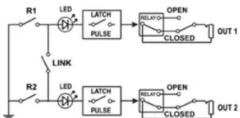
There are two footswitches (R1 & R2) that work independently or may be linked together. The LINK switch lets you assign either of the two footswitches as a master switch that controls both outputs.
The LATCH-PULSE switch lets you select the type of control signal going to your amp. Older amps generally use a latch type control circuit, while newer amps with electronic switching sense a momentary pulse. Your SW2 Slingshot can produce both types of switching signals. Try the switch in both positions to determine which works best with your amp.
The OPEN-CLOSED switch lets you toggle the relay switching between a 'normally open' or 'normally closed' status to match the way your amp has been designed. Try the switch in both positions to determine the best setting for your amp.
Because the BigShot SW2 features two outputs it can control more than one device. You could, for example, connect the SW2 to a stereo setup with two amplifiers and use the SW2 to control channel switching or effect bypass on both amps. The LINK switch would be useful in this type of setup.
Another use would be controlling an amp and another device such as a rackmount effect. One footswitch on the SW2 can connect to the amp for channel switching and the other to the effect for bypass control. Independent switching might be best in this type of setup. The best part is that the BigShot SW2 allows you to customize how your setup to works.
SLINGSHOT
Remote switching is integrated into the Tonebone pedals, like the Headbone and Cabbage, through a feature we call Slingshot. By connecting the SW2 to a Slingshot input you may remotely switch amplifi er heads (Headbone) and/or speaker cabinets (Cabbage). A system may even be confi gured so that two functions switch simultaneously with a single foot stomp on the BigShot SW2. For instance, when the SW2 is paired up with a Cabbage it is possible to have the amp head switch channels at the same time the Cabbage switches speaker cabinets. That's synergy!
Radial Engineering Ltd.
BigShot SW2 User Guide
TYPICAL SETUPS

Single amp. The BigShot SW2 controls channel switching and effect bypass.

Amp and rack effect. The BigShot SW2 controls channel switching and effect bypass.

Stereo amp setup. The BigShot SW2 controls channels switching on both amps.

Two amp setup. The BigShot SW2 controls channels switching on both amps.

Speaker cabinet and channel switching with Radial Cabbage.
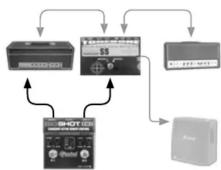
Amplifi er head and cabinet switching with Radial Headbone.
Radial Engineering Ltd.
BigShot SW2 User Guide
Kaubamärk : Radial Engineering
Mudel : BigShot SW2
Kategooria : Kitarriefektide pedaal