SB0802AD-DE-W50 - Pikendusjuhe CyberPower - Tasuta kasutusjuhend
Leidke seadme juhend tasuta SB0802AD-DE-W50 CyberPower PDF-formaadis.


Kasutajate küsimused teemal SB0802AD-DE-W50 CyberPower
0 küsimus selle seadme kohta. Vastake nendele, mida teate, või esitage oma.
Esita uus küsimus selle seadme kohta
Laadige alla juhend oma Pikendusjuhe PDF-formaadis tasuta! Leidke oma juhend SB0802AD-DE-W50 - CyberPower ja võtke oma elektrooniline seade uuesti kätte. Sellel lehel on avaldatud kõik teie seadme kasutamiseks vajalikud dokumendid. SB0802AD-DE-W50 kaubamärgi CyberPower.
KASUTUSJUHEND SB0802AD-DE-W50 CyberPower
CyberPower®
Reliability. Quality. Value.

User's Manual
Surge Buster
Model Numbers:
SB0502BA-DE SB0602BA-DE SB0702AD-DE SB0802AD-DE
Cord Management Installation:
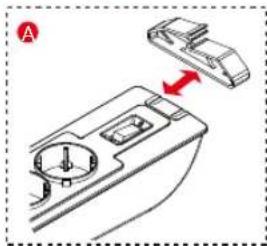
natural_image
Diagram of a car intake manifold with a red arrow indicating direction (no text or symbols)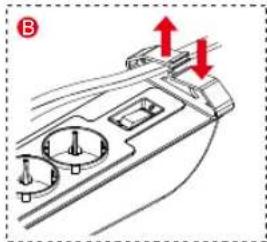
natural_image
Technical diagram of a mechanical component with two red arrows indicating upward and downward motion (no text or symbols)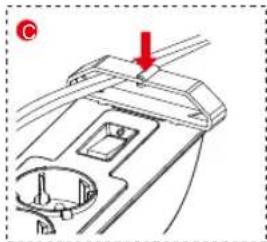
natural_image
Technical diagram of a mechanical component with a red arrow indicating direction (no text or symbols present)K09-0000142-01
Installation:
A. Power Connections
- The surge protector must be plugged into a properly grounded outlet.
- Plug all connected equipment directly into the surge protector.
Note:
DO NOT connect to an ungrounded outlet. DO NOT use with 2-wire extension cords or adapters. This surge protector is designed for indoor use only. Install the surge protector away from heat emitting appliances such as radiators or heat generators. Do not install where excessive moisture is present.
Never install electrical or telephone wiring during a lightning storm.
DO NOT USE FOR MEDICAL, LIFE SUPPORT EQUIPMENT OR OTHER HIGH RISK ACTIVITIES.
B. Phone/Fax/Modem Connections (Select Models) To prevent surge damage to telephone equipment, connect the Phone/Fax/Modem through the surge protector.
If your surge protector has phone jacks:
- Connect the Phone/Fax/Modem line from your wall outlet to the IN jack of the surge protector.
- Connect the phone cord, (not included in this product), into the OUT jack on the surge protector.
- Connect the other end of the phone cord to the Phone/Fax/Modem jack of the device you want to protect.
C. Coax Cable Connections (Select Models)
To protect a TV or DVR from surge damage, connect the coax cable through the surge protector.
If you are using a coax cable and your surge protector is equipped with coax jacks:
- Connect the Cable/Antenna line from your source to the IN jack on the surge protector.
- Connect a coax cable from the OUT jack of the surge protector to the device you want to protect.
D. Mounting the Surge Protector
You can mount the surge protector to a vertical surface with just two screws, (not included), using the eye loops provided at the backside of the Protector.

Caution:
RISK OF ELECTRIC SHOCK - USE ONLY IN DRY LOCATIONS AND ONLY INDOORS.
"DO NOT PLUG INTO ANOTHER SURGE PROTECTOR, POWER STRIP, EXTENSION CORD OR OTHER RELOCATABLE POWER TAP."
This device features an internal protection that will disconnect the surge protective component at the end of its useful life but will maintain power to the load now unprotected.
Power Switch/Indicator
Used as the master on/off switch for outlets. The indicator light is on when power on. When power off, the indicator light is off as well.
Warranty
CyberPower warrants this product to be free from defect in electrical parts or manufacture for two (2) years. If a defect results in product failure during its normal use within the warranty period, please contact your local dealers and/or distributors for warranty services.
CyberPower®
Reliability. Quality. Value.
CyberPower Systems
www.cyberpower.ru
© 2013 CyberPower Systems, Inc.
All rights reserved. All other
trademarks are the property of their respective owners
CyberPower®
Reliability. Quality. Value.

Руководство Пользователя! Surge Buster
Model Numbers:
SB0502BA-DE SB0602BA-DE SB0702AD-DE SB0802AD-DE
Шнур управления установки:
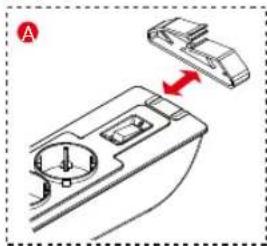
natural_image
Diagram of a car dashboard with a handle and control panel, showing no text or symbols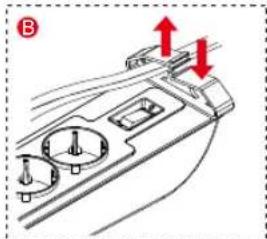
natural_image
Technical diagram of a mechanical component with two red arrows indicating upward and downward motion (no text or symbols)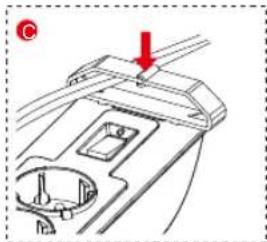
natural_image
Technical diagram of a mechanical component with a red arrow indicating a specific feature (no text or symbols present)Установка:
A. Соединения
- Сетевой фильтр должен быть подключен к тщательно заземленной розетке.
- Подключите оборудование в розетки сетевого фильтра.
Предупреждение:
НЕ ПОДКЛЮЧАЙТЕ сетевой фильтр в розетку без заземления. НЕ ИСПОЛЬЗУЙТЕ сетевые удлинителя или адаптеры. Это сетевой фильтр разработан для использования в помещении только. Располагайте сетевой фильтр на расстоянии от нагревательных приборов как радиаторы отопления или генераторы тепла. Никогда не подключайте оборудование во время грозы.
НЕ ИСПОЛЬЗУЙТЕ СЕТЕВОЙ ФИЛЬТР С МЕДИЦИНСКИМ ОБОРУДОВАНИЕМ, ОБОРУДОВАНИЕМ ЖИЗНЕОБЕСПЕЧЕНИЯ ИЛИ ДРУГИМ ВЫСОКОКРИТИЧНЫМ ОБОРУДОВАНИЕМ.
В. Подключение коммуникационных линий Телефон/Факс/Модем (Некоторые модели)
Для защиты коммуникационного оборудования, подключите Телефон/Факс/Модем через сетевой фильтр. Если ваш сетевой фильтр имеет коммуникационные розетки:
- Подсоедините ваши коммуникационные линии к разъему "IN" сетевого фильтра.
- Подсоедините телефонный кабель (не входит в комплект поставки) в разъем "OUT" сетевого фильтра.
- Подсоедините другой конец телефонного кабеля к оборудованию, которое вы хотите защитить.
С. Подключение коаксиального кабеля (Некоторые модели)
Для защиты телевизионного оборудования подключите коаксиальный кабель через сетевой фильтр. Если вы используете коаксиальный кабель, и ваш сетевой фильтр имеет коаксиальный разъем:
- Подсоедините Кабель/Антенну в разъем "IN" сетевого фильтра.
- Подсоедините коаксиальный кабель из разъема "OUT" сетевого фильтра к оборудованию, которое вы хотите защитить.
D. Установка Сетевого Фильтра
Вы можете установить ваш сетевой фильтр как на полу, так и вертикально с помощью двух винтов (не входят в комплект поставки)
ВНИМАНИЕ:
ОПАСНОСТЬ ПОРАЖЕНИЕ ЭЛЕКТРИЧЕСКИМ ТОКОМ – ИСПОЛЬЗУЙТЕ ТОЛЬКО В СУХИХ МЕСТАХ И ТОЛЬКО ВНУТРИ ПОМЕЩЕНИЙ. "НЕ ПОДКЛЮЧАЙТЕ К ДРУГОМУ СЕТЕВОМУ ФИЛЬТРУ ИЛИ СЕТЕВОМУ УДЛИНИТЕЛЮ"
Это устройство имеет внутреннюю защиту, которая отключит функцию защиты по мере использования сетевого фильтра. После этого сетевой фильтр не будет защищать подключенное оборудование
Индикатор выключателя
Применяется как мастер вкл/выкл для розеток. Индикатор светится когда подключена нагрузка.
Гарантия
Гарантийный срок составляет 2 года с момента приобретения устройства.
CyberPower® Reliability. Quality. Value.
CyberPower Systems
www.cyberpower.ru © 2011 CyberPower Systems, Inc. All rights reserved. All other
trademarks are the property of their respective owners