GO bar Roon Bundle - Heli/video muundur iFi Audio - Tasuta kasutusjuhend
Leidke seadme juhend tasuta GO bar Roon Bundle iFi Audio PDF-formaadis.


Kasutajate küsimused teemal GO bar Roon Bundle iFi Audio
0 küsimus selle seadme kohta. Vastake nendele, mida teate, või esitage oma.
Esita uus küsimus selle seadme kohta
Laadige alla juhend oma Heli/video muundur PDF-formaadis tasuta! Leidke oma juhend GO bar Roon Bundle - iFi Audio ja võtke oma elektrooniline seade uuesti kätte. Sellel lehel on avaldatud kõik teie seadme kasutamiseks vajalikud dokumendid. GO bar Roon Bundle kaubamärgi iFi Audio.
KASUTUSJUHEND GO bar Roon Bundle iFi Audio
GObar
Thank you for purchasing the bar from the GO series. The bar is a balanced USB audio DAC amplifier.
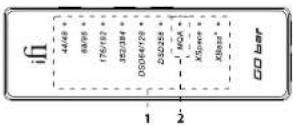
- Audio format, frequency and sound effects LED The LED colour scheme indicates the current sampling frequency and audio format received by the CO bar from the music source. Sound effect modes are also indicated.
LED Mode
White 44.1/48kHz
White 98.2/96kHz
White 176.4/192kHz
White 352.8/384kHz
White DSD 64/128
White DSD 256
Sound effects
LED Status
Blue XSpace
Orange XBass
Ipp. Sankley-Shelting ESP in K201 used for Altes-sinc 2-space systems. They use the highly-qualified double-components and operate rapidly in the analysis domain, hence all the purity and resolution of the original muscle retained
2. MQA and Digital filter LED
MQA:
Green MDA
Blue MOA Studio
Magenta. Original Sample Rate ^4
MOH
Digital Filter for PCM Playback:
LED Mode
Суар. ВР
White GTD
Pard STD
Yellow MIN
CHINA AIR ON, PCD airwork
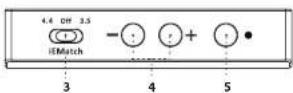
3. iEMatch switch
iEMatch reduces the output level, so that even the most
sensitive In-Ear-Monitors (IEMs) can be matched to the GO bar.
8.5mm headphones
[Unreadable]
m.
To To \$2 levels, the level of production will be a result
inflats/inflats, la l'acquaticus (exl ollicus)
4. Volume control and gain
To increase volume, press the - button, and to decrease it, press the - button. Volume level is briefly displayed on the GO bar while pressing one of the volume buttons, shown by the number of white LEDs on at a time - from none to 6.
The increase or decrease of volume can be synchronised with the volume of the mobile phone/computer. The connected device will indicate a change of volume on its display if synchronisation is on, and the device's volume controls can additionally be used to adjust volume. The GO bar's volume buttons are still operational.
By default, the synchronisation feature is off. To switch this on or off, press the settings button (5) for > 8s. On is indicated by the 6 white LEDs switching on in sequence from LED 1 and 6 to the centre. Off is indicated by the 6 white LEDs switching off in the opposite direction.
Turbo Mode increases the gain by 6dB. To switch this on or off, press the + and - volume buttons together for ≥ 2s. Turbo Mode on is indicated by 2 white LEDs increasing to 6 lighting up at the same time for 2s. Normal gain is indicated by 6 white LEDs diminishing to 2 lighting up for 2s.
[1] In the case of the first case, we have been done in the case.
nenghutes. It may be appropriate to select some mode on
5. Settings and Digital filter mode
This button cycles between:
Off > XSpace > XBass+ > XSpace and XBass+ (short click). Please refer to item 1 for sound effects LED indications.
Digital filter setting mode (Icomp press >2s). Please see below.
Digital filter
To enter digital filter setting mode, press and hold the button for a 3s. The MOA LED will flash with the currently set digital filter colour (as shown in item 2). Press the + or - buttons (4) to change the filter selection. A short press on the settings button (5) will select and exit the filter setting mode.
The following 4 digital filters are available:
"BP" (Cyan) Bit-Perfect: no digital filtering, no pre or post
ringina
'STD' (Red) Standard, modest filtering, modest pre and
post ringing
'MIN' (Yellow) Minimum phase, slow roll-off, minimum pre
and post ringing
'GTO' (White) Gibbs Transient-Optimised: upsampled to
352/384kHz, minimum filtering, no pre
ringing, minimum post ringing
Date: Fine GTO. The following: the only active unit makes a purchase, will be 25.820% at the time of the purchase of the stock
6 7
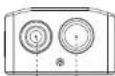
6. S-Balanced 3.5mm headphone output
For connecting 3.5mm headphones. This is a single-ended output.
7. Balanced 4.4mm headphone output
For connecting balanced 4.4mm headphones. This is a fully balanced output.
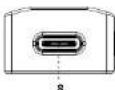
8. USB-C input
The USB-C socket plays up to 12-bit 304kHz, has full MQA
decoding, and native DSD up to DSD256.
Fig. When the phone inventory is not (a 30%); the first bar on order (in order to be defined) may not be able to operate
Warning: If the CDO's current compensation function is not and the more secure, it also provides, please ensure that the calculation of current volume is well. With the functions, there are more conformable and the volume will be at maximum. The additional potential to damage the connected headmore model your hearing.
Specifications
input:
Formats:
PCM 44.1/45/88.2/96/176.4/192/352.6/384kHz
D50 28/31/56/61/11.4/12.3VHz
DOI: 15.12/164011
MON Full Decoder
DAC: Bit Perfect DSD & DDD DMC by C#us Logic
Headphone Outputs:
Rishe
ORPAL: 3.5mm
Power output:
B.10. A. 4/2/1975-32(1):
CRADE 2024/15
Bulphil impedance,
1-BAI
FMP
Italiana 173012
Lefel: 1950
DNR-
Balance:
URBAL TOSCH
THD + N:
Balance: c0.0125% (6.5mW/2.0%) a 600D
LHAI: cUW6100=W/7A 2.1M
Frequency Response: 20Hz - 45kHz (-3dB
Power Consumption: <4W max
Dimensions: 65 x 22 x 13.2 mm (2.0" x 0.9" x 0.5")
Net weight: 20.5g (1.0 m ^2 )
Warranty period:
4015208309107-12
The following section is a reference to the previous section.
ifi-audio.com
Ver1.1