ATH-CKR100 - Kõrvaklapid Audio-Technica - Tasuta kasutusjuhend
Leidke seadme juhend tasuta ATH-CKR100 Audio-Technica PDF-formaadis.


Kasutajate küsimused teemal ATH-CKR100 Audio-Technica
0 küsimus selle seadme kohta. Vastake nendele, mida teate, või esitage oma.
Esita uus küsimus selle seadme kohta
Laadige alla juhend oma Kõrvaklapid PDF-formaadis tasuta! Leidke oma juhend ATH-CKR100 - Audio-Technica ja võtke oma elektrooniline seade uuesti kätte. Sellel lehel on avaldatud kõik teie seadme kasutamiseks vajalikud dokumendid. ATH-CKR100 kaubamärgi Audio-Technica.
KASUTUSJUHEND ATH-CKR100 Audio-Technica
お買い上げありがとうございます。
ご使用の前にこの取扱説明書を必ずお読みのうえ、正しくご使用ください。
また、いつでもすぐ読める場所に保管しておいてください。
■ 安全上の注意
本製品は安全性に充分な配慮をして設計していますが、使いかたを誤ると事故が起こることがあります。事故を未然に防ぐために下記の内容を必ずお守りください。
警告
この表示は「取り扱いを誤った場合、使用者が死亡または重傷を負う可能性があります」を意味しています。
注意
この表示は「取り扱いを誤った場合、使用者が傷害を負う、または物的損害が発生する可能性ります」を意味しています。
があ
警告
●自動車、バイク、自転車など、乗り物の運転中は絶対に使用しないでください。交通事故の原因となります。
●周囲の音が聞こえないと危険な場所(踏切、駅のホーム、工事現場、車や白転車の通る道など)では使用しないでください。
●本製品は密閉度が高く、外部の音が聞こえにくくなります。周囲の音が聞こえる音量で、安全を確かめながらご使用ください。
- イャビースは幼児の手の届かない場所に保管してください。
注意
●本製品を使用中に気分が悪くなった場合は、すぐにご使用を中止してください。
●耳をあまり刺激しない適度な音量でご使用ください。大音量で長時間聞くと聴力に悪影響を与えることがあります。
●肌に異常を感じた場合は、すぐにご使用を中止してください。
●分解や改造はしないでください。
● ヘッドホンを耳から外したときは、必ずイヤピースが本体に付いているかご確認ください。イヤピースが耳の中に残り取り出せない場合は、すぐに医師の診察を受けてください。
■ 使用上の注意
●交通機関や公共の場所では、他の人の迷惑にならないよう、音量にご注意ください。
●接続する際は、必ず機器の音量を最小にしてください。
●乾燥した場所では耳にビリビリと刺激を感じることがあります。これは人体や接続した機器に首稿された静電気によるものでヘッドホンの故障ではありません。
●強い衝撃を与えないでください。
- 直射日光の当たる場所、暖房器具の近く、高温多湿やほこりの多い場所に置かないでください。また水がからないようにしてください。
●ご使用の際は、接続する機器の取扱説明書も必●本製品は長い間使用すると、紫外線(特に直射日光)や摩擦により変色することがあります。
●本製品を使用時に万一メモリーなどが消失して●本製品をそのままバッグやポケットなどに入れるも、当社では一切責任を負いません。とコードが引っ掛かり、断線の原因になります。
●本製品は長い間使用すると、紫外線(特に直射日光)や摩擦により変色することがあります。
● 本製品をそのままバッグやポケットなどに入れるとコードが引っ掛かり、断線の原因になります。必ず付属のケースに収納してください。
●コードは必ずプラグを持って抜き差ししてください。コードを引っ張ると断線や事故の原因になります。
●着脱コードは、本製品の専用着脱コード以外使用しないでください
- φ3.5mmステレオミニジャック以外のヘッドホン端子の機器と接続する場合は、適切な変換プラグアダプターをお買い求めください。
●コードを延長する場合は、別売のヘッドホン延長コードをお買い求めください。
■ お手入れのしかた
長くご使用いただくために各部のお手入れをお顔(い)たします。お手入れの際は、アルコール、ナーなど溶剤類は使用しないでください。
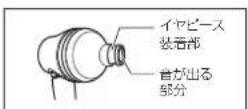
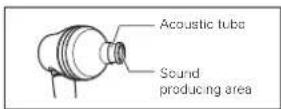
●乾いた布で本体の汚れを拭いてください。特にイヤビース装着部は、イヤビースを通して皮脂などの汚れが付若します。汚れが付若したまま使用すると、イヤビースが外れやすくなります。こまめに汚れを拭いてください。なお、音が出る部分は繊細なため、触らないようにしてください。故障の原因になります。
●付属の着脱コードが干などで汚れた場合は、使用後すぐに乾いた布で拭いてください。汚れたまま使用すると、コードが劣化して同くなり、故障の原因になります。
■ テクニカルデータ
●型式:ダイナミック型
●ドライバー:φ13mm×2
●出力音圧レベル:110dB/mW
●再生周波数带域:5\~45.000Hz
●最大入力:200mW
●インビーダンス:120
●入力端子:A2DCコネクタージャック
(改良などのため予告なく変更することがあります。)
● 付属の店舗コードのプラグが汚れた場合は、乾い衣あで拭いてください。プラグが汚れたまま使用すると、音とびや雑音が入る場合があります。
●長い間ご使用にならない場合は、高温多湿を避け、風通しの良い場所に保管してください。
- イヤピースのお手入れは、「イヤピースについて」・「お手入れのしかた」を参照ください。
アフターサービスについて
本製品をご家庭用として、取扱説明や接続・注意書きに従ったご使用において故障した場合、保証書記載の期間・規定により無料修理をさせていただきます。 修理ができない製品の場合は、交換させていただきます。お言い上げの際の須収書またはレシートなどは、保证開始日の確認のために保証書と共に大切に保管し、修理などの際は提示をお願いします。
お問い合わせ先(電話受付/平日9:00\~17:30)
製品の仕様・使いかたや修理・部品のご相談は、お買い上げのお店または当社窓口およびホームページのサポートまでお願いします。
●お客様相談窓口(製品の仕様・使いかた) 00.0120-773-417 (携帯電話: PHSなどのご利用は 03-8746-0211)
FAX: 042-739-9120, Eメール: support@audio-technica.co.jp
●サービスセンター(修理・部品) FAX:042-739-9120 Eメール:servicecenter@audio-technica.co.jp (美丰電話・FHSなどのご利用は 03-6746-0212)
●ホームページ(サポート)www.audio-technica.co.jp/atj /support/
A
B
natural_image
Line drawing of a ear with a medical device inserted (no text or symbols)©
■ 各部の名称
A
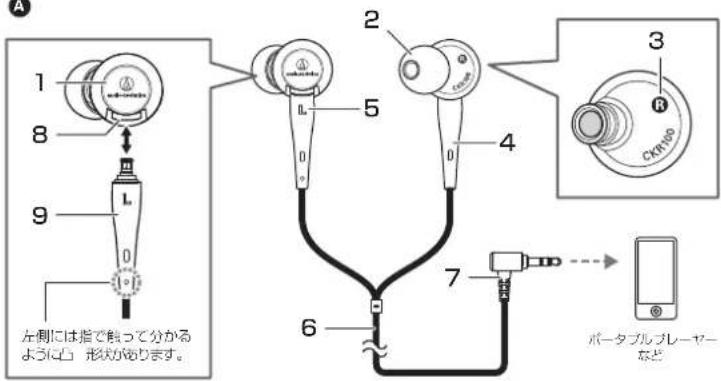
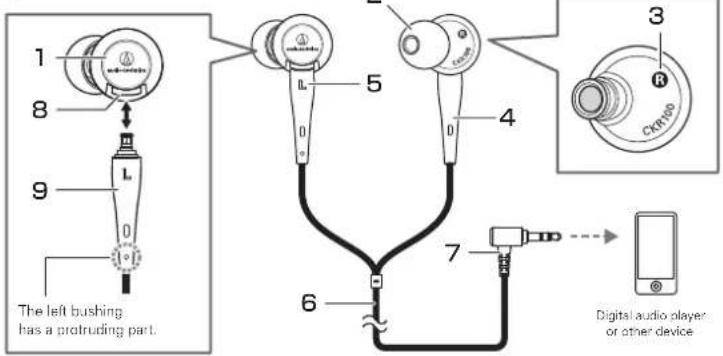
ご使用になる前に、図を参考にヘッド ホンの各部をご確認ください。
1 ハウジング
2 イャピース
3 本体側左右 (L/R) 表示位置
4 ブッシュ
5 左右(L/R)表示位置
6 1.2m着脱コード
7 インプットプラグ
(φ3.5mm 金メッキステレオミニプラグ/L型)
8 A2DCコネクタージャック
9 A2DCコネクタープラグ
■ 使いかた

■ イャビースについて
C
※お買い上げ時は付属の専用着脱コードが接続されています。本製品の専用着脱コード以外使用しないでください。
- 接続する機器の音量を最小にして、接続する機器のヘッドホン端子に、コードのインブックプラグを接続します。
-
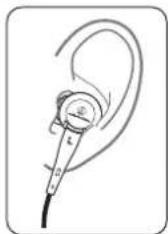
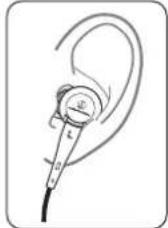
本製品の“L(左)”の表示側を左耳に、「R(右)」の表示側を右耳に装着し、イヤピースを調整します。
-
接続している機器を再生し、音量を調整してください。 ※接続する継器の取扱説明書も併せてお読みください。
■ イャピースのサイズ
本製品は、4サイズのシリコンイヤピースXS、S、M、Lを付属しており、お買い上げ時はMサイズが装着されています。より良い音質で楽しんでいただくために、イヤピースのサイズを換えて、イヤピースを耳の収まりの良い位置に調整してください。イヤピースが耳にうまく装着されていないと低音が聞こえにくいことがあります。
お手入れのしかた
ヘッドホンからイヤピースを外し、うすめた中性洗剤で手洗いしてください。 洗浄後は乾いてからご使用ください。
■ 交換のしかた
■ 着脱コードについて

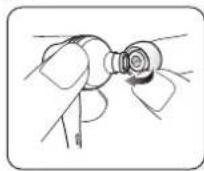
消耗したイヤピースを外し、新しいイヤピースを斜めから押し当てます(図参照)。
本製品は、ヘッドホン部分とコード部分が着脱可能内側を広げるように強く押し込み、奥までしっかりになっております。コードに劣化が見られた場合取り付けてください。
は、新しい専用着脱コード(別売)に交換してください。
イヤビースが外れにくい設計にしているため、取り付けがきつくなっています。
※コードの取り外しは、新しいコードに交換するとき以外は行わないでください。
■ 若脱コードの交換のしかた
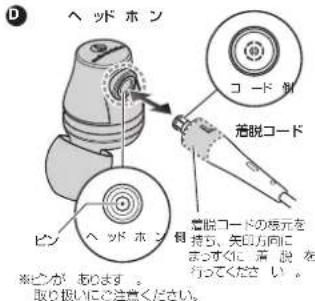
着脱部分には、繊細なピンがあります。斜めに引っ張ったり、取り付けるとピンが曲がり、故障原因になります。着脱の際は必ずまっすぐ取り外し・取り付けを行ってください。
●コードの取り外しかた
ヘッドホンとコードの着脱部分を持ちながら、を参考にしてまっすぐ引っ張り、取り外してください。
●コードの取り付けかた
ヘッドホンとコードのLEFT/RIGHT(L/R)を確認し、図を参考にしてカチッと音がするまで押しちんでください。
注意
- イャビースは汚れが付きやすいため、定期的に取り外しお手入れをしてください。汚れが付いたまま使用すると、イヤビースを通して本体の音が出る部分が汚れ、音質が悪くなる恐れがあります。
- イャビースは消耗品のため、保存や使用により劣化します。嵌合が緩くなるなどの劣化が見られた場合は交換イヤビースを販売店でお買い求めください。
●一度外したイヤビースを本体に付ける際は、確実に取り付けられているかを確認してください。イヤビースが耳の中に残ったまま放置すると、けがや病気の原因になります。
Thank you for purchasing this product. Before using the product, read through the user manual to ensure that you will use the product correctly. Please keep this manual for future reference.
■ Safety precautions
Although this product was designed to be used safely, failing to use it correctly may result in an accident. To ensure safety, observe all warnings and cautions while using the product.
Warnings
●Follow applicable laws regarding mobile phone and headphone use if using the product while driving.
- Do not use the product in places where the inability to hear ambient sound presents a serious risk (such as at railroad crossings, train stations, and construction sites).
●The product effectively shields external sound, so you may not hear sound around you clearly while wearing the product. Adjust the volume to a level where you can still hear background sound and monitor the area around you while listening to music.
●Store the eartips out of the reach of small children.
Cautions
●To ensure compatibility and correct usage, always consult the user manual of any device before connecting the product to it.
●Audio-Technica will not be liable in any way for any loss of data in the unlikely event that such losses should occur while using the product.
●On public transport systems or in other public places, keep the volume low so as not to disturbo other people.
●Minimize the volume on your audio device before connecting the product in order to avoid hearing damage from sudden exposure to excessive volume.
- When using the product in a dry environment, you may feel a tingling sensation in your ears. This is caused by static electricity accumulated on your body, not by product malfunction.
●Do not subject the product to strong impact.
- Do not store the product under direct sunlight, near heating devices or in a hot, humid or dusty place. Do not allow the product to get wet.
- If you begin to feel unwell while using the product, discontinue use immediately.
● To prevent damage to your hearing, do not raise the volume too high. Listening to loud sound for an extended period may cause temporary or permanent hearing loss.
●Discontinue use if skin irritation results from direct contact with the product. - Do not disassemble, modify or attempt to repair the product.
-
When removing the product from your ears, check to make sure the eartips are still attached to the main unit. If the eartips become lodged in your ears and you are unable to remove them, consult a physician at once.
-
When the product is used for a long time, the product may become discolored due to ultraviolet light (especially direct sunlight) or wear.
●The included cable may become caught or severed if the product is placed in a bag or pocket without adequate protection. Always store the product in the included case. - Connect/disconnect the included cable by holding the plug. Pulling directly on the included cable can result in a broken wire and the risk of electric shock.
● Do not use a cable other than the included detachable cable.
- Be sure to purchase the appropriate conversion plug adaptor when connecting the product to equipment with other than a 3.5 mm (1/8") stereo headphone jack.
● Lengthening the headphone cable requires a separate extension cable available from your dealer.
Care
Get into the habit of regularly cleaning the product to ensure that it will last for a long time. Do not use alcohol, paint thinners or other solvents for cleaning purposes.
- Use a dry cloth to clean the headphones. Do not allow the cloth to touch the area from the sound producing area because it is more susceptible to damage.
- Use a dry cloth to clean the detachable cable of any sweat or dirt. Failure to clean the cable may cause it to deteriorate and harden over time, resulting in malfunction.
● Wipe the plugs on included detachable cable with a dry cloth if dirty. Using the plugs without cleaning them can cause sound interruption or distortion.
● For long-time storage, keep the product in a well-ventilated place without high temperatures and humidity.
- Refer to "Clearing the eartips" in "About the eartips" to learn how to clean the eartips.
Specifications
Type
Driver
Sensitivity
Frequency response
Maximum input power
Impedance
Input jack
Plug
Weight (without cable)
Included accessories
Sold separately
: Dynamic
: 13 mm × 2
: 110 dB/mW
: 5 to 45,000 Hz
: 200 mW
: 12 ohms
: A2DC connector jack
: 3.5 mm (1/8" gold-plated stereo mini-plug (L-shaped))
: Approx. 14 a (0,5 oz)
: Detachable cable (1.2 m (3.9') / 3.5 mm (1/8') gold-plated stereo min plug (L shaped)), Case, Eartips (XS,S,M,L)
: Eartips (ER-CKM55XS.S.M.L)
Detachable cable for CKR100
(For product improvement, this product is subject to modification without notice.)
A
B
C
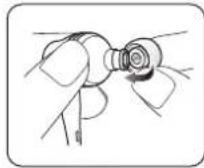
D
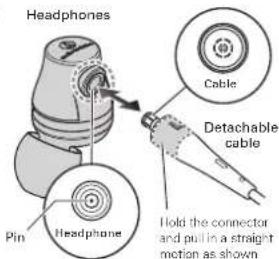
*Take care not to damage the pin in the headphone.
A
Name of each parts
Confirm each part before using the product.
1 Housing
2 Eartip
3 LEFT/RIGHT (L/R) indicator on the headphone
4 Bushing
5 LEFT/RIGHT (L/R) indicator on the connector plug
■ Using headphones
* Included detachable cable is connected to the product at the time of purchase. Use only the included detachable cable designed exclusively for this model.
- Lower the volume on the device you intend to use, then connect the "Input plug" to the device's headphone jack.
- Make sure to place each cartip (LEFT/RIGHT) in the correct ear.
- Tum on your audio device, and adjust volume as necessary.
*Also read instruction manual of your audio device.
6 1.2m (3.9') detachable cable
7 Input plug (3.5 mm (1/8") gold-plated stereo mini-plug (L-shaped))
8 A2DC connector jack
9 A2DC connector plug
■ About the eartips
Sizes
The product comes with silicon eartips in four sizes IXS, S, M and LI. At the time of purchase, the M size silicon eartips are attached and positioned in standard position. To ensure that you will enjoy the best sound quality, it may be necessary to change the size and/or position to what is best suited for you, and adjust the eartips inside your ears for a snug fit.
Cleaning the eartips
Remove eartips from the product and clean them with a diluted detergent. After cleaning, dry before use.
Replacing the eartips
Remove each old eartip, and mount the new eartip over the stem up to the base of the stem.
*The eartips are designed to fit tightly to the product so that they will not come loose unintentionally.
■ About the detachable cable
The cable on the product is detachable. If there are signs of deterioration, replace the cable (sold separately).
* Do not detach the cable except when replacing it with a new cable.
How to replace the detachable cable
The detachable connector is very delicate. Only pull or attach in a straight motion to prevent malfunction.
●How to detach the cable
Hold the connector and pull straight out in the direction shown in the illustration.
●How to attach the cable
Plug the left or right connector in as shown in the illustration until it clicks.

audio-technica
Audio-Technica Corp.
2-46-1 Nishi-naruso, Machida, Tokyo 194-8666, Japan
©2016 Audio-Technica Corp.