
ECVCONB - Mõõtmine Fantini Cosmi - Tasuta kasutusjuhend
Leidke seadme juhend tasuta ECVCONB Fantini Cosmi PDF-formaadis.


Kasutajate küsimused teemal ECVCONB Fantini Cosmi
0 küsimus selle seadme kohta. Vastake nendele, mida teate, või esitage oma.
Esita uus küsimus selle seadme kohta
Laadige alla juhend oma Mõõtmine PDF-formaadis tasuta! Leidke oma juhend ECVCONB - Fantini Cosmi ja võtke oma elektrooniline seade uuesti kätte. Sellel lehel on avaldatud kõik teie seadme kasutamiseks vajalikud dokumendid. ECVCONB kaubamärgi Fantini Cosmi.
KASUTUSJUHEND ECVCONB Fantini Cosmi
1. OVERVIEW
- Datalogger with webserver interface
- Manages up to 500 meters of which a max of 250 wired
- Manages up to 23 ECVRBB repeaters
- Archived data over the last 10 years
- Wired meters data acquisition interval from 15' to 1 month
- Wireless meters data acquisition through ECVRBB repeater
- Meters reading, report sending, system
remote management - 24Vdc +/- 10%, 24Vac [min 20Vac, max 40Vac] power Supply or PoE
- DIN rail mounting (4 modules)
- Graphic display and digital I/O
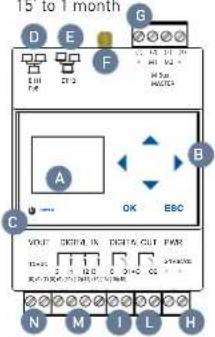
A. Graphic display
B. Navigation keys
C. Led power supply
D. Ethernet Port 1 (PoE)
E. Ethernet Port 2
F. SMA antenna connector
G. M-Bus connector (max 20 meters)
H. Power supply connector
I. Relay 1 connector
L. Relay 2 connector
M. Digital input connector
N. Auxiliary output voltage connector
2. CONNECTIONS
DIGITAL INPUTS:
(7) - Common for digital inputs
(8) - Digital input 1 [Vin 12-24Vdc]
(9) - Digital input 2 [Vin12-24Vdc]
(10) - Digital input 3 (Vin12-24Vdc)
RELAY OUTPUT:
(11) - Common Relay 1
(12) - NO Relay 1 Contact
(13) - Common Relay 2
(14) - NO Relay 2 Contact
CONNECTION TO THE FIELDBUS
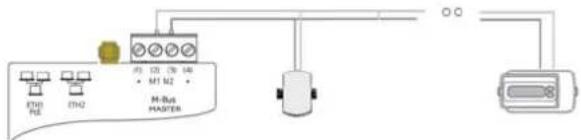
(1) - Not connected
(2) - Pole 1 for connection to M-BUS meters
(3) - Pole 2 for connection to M-BUS meters
(4) - Not connected
DIRECT CONNECTION TO M-BUS DEVICES
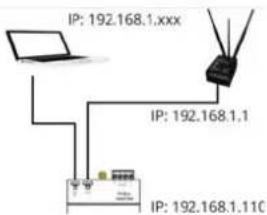
LAN CONNECTION
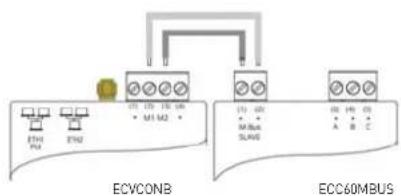
CONNECTION TO M-BUS REPEATER ECC60MBUS
ATTENTION!: In order to avoid damaging the device, apply a voltage equal to 24Vdc +/- 10%, 24Vac (min 20 Vac, max 40 Vac) power supply to the terminals [15] and [16].
Before making any connections, turn off the power, remove the terminals, complete the wiring and the plug terminals with the correct position.
FREE VOLTAGE INPUT CONNECTION
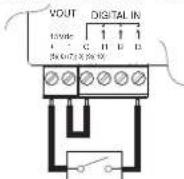
NEGATIVE VOLTAGE INPUT CONNECTION
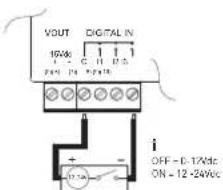
RELAY OUTPUT CONNECTION
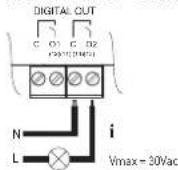
POSITIVE VOLTAGE INPUT CONNECTION
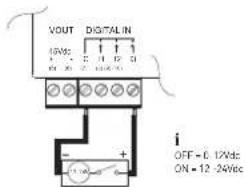
3. FIRST SETUP VIA DISPLAY
On first use of the device:
- Connect the M-Bus devices to ECVCONB to terminals M1(2) and M2 (3) as indicated in the manufacturer's guide
- Enter the default password 000000 to access the menu.
- Press OK at the menu "Search" and follow the instructions given below.
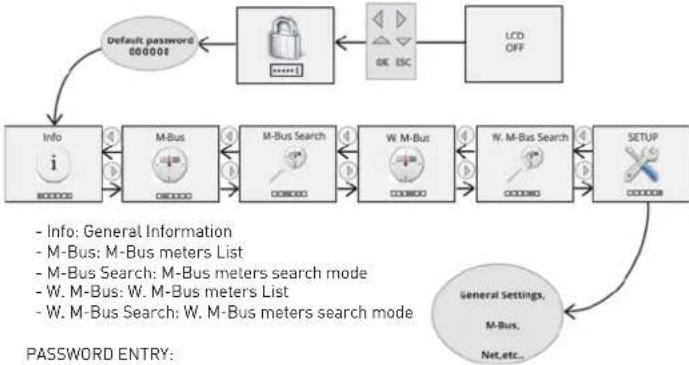
flowchart
graph TD
    A["Default password 000000"] --> B["Info"]
    B --> C["M-Bus"]
    C --> D["M-Bus Search"]
    D --> E["W-M-Bus"]
    E --> F["W-M-Bus Search"]
    F --> G["SETUP"]
    G --> H["General Settings, M-Bus, Net, etc."]
    H --> I["Password ENTRY:"]
    style A fill:#f9f,stroke:#333
    style B fill:#ccf,stroke:#333
    style C fill:#cfc,stroke:#333
    style D fill:#fcc,stroke:#333
    style E fill:#cff,stroke:#333
    style F fill:#ffc,stroke:#333
    style G fill:#cfc,stroke:#333
    style H fill:#fcc,stroke:#333
The blinking cursor indicates which of the six-digit of the password you are entering:
- Use▲ key to increase the current number
- Use▼ key to decrease the current number
- UseOK key to confirm the current value and move to the next or confirm
- Use keys to change the language
4. FIRST ACCESS TO THE VEBSERVER
- Connect one of the two Ethernet ports to your PC
- Make sure that your PC has an IP address of 192.168.1.xxx type where xxx is a number between 1 and 254 and different from 110
- Open an internet browser (Chrome, Firefox or Safari)
- On the address bar type192.168.1.110
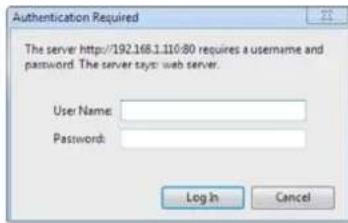
- At autenthication request enter the default credentials (User Name: Admin Password: Admin)
- Click on the upper right "help" icon to display the user manual and follow the instructions given for the use of web part
5. TECHNICAL DATA
- Temperature range: operative: -20° ... +55°C.
$$ \text { storage }: - 2 5 ^ {\circ} \dots + 6 5 ^ {\circ} \mathrm{C} $$
- Protection degree: IP 20 (EN60529).
- Mounting: 35mm DIN Rail [EN60715]
- Dimensions: 4 DIN modules [90x72x64.5].
- Power supply: 24Vdc +/- 10%, 24Vac (min 20Vac, max 40 Vac) or PoE
- Consumption: 7.5W
- Max load relays: 5A@30Vdc (Resistive Load)
2A@30Vdc (Inductive Load cosfi=0.4; L/R=7ms)
-20°C

6. TROUBLESHOOTING
THE DATALOGGER DOES NOT TURN ON:
- Check with the aid of a multimeter that the voltage between the terminals [15] and (16) is 24Vdc +/- 10%, 24Vac [min 20Vac, max 40 Vac] In case of power supply from the LAN [Power Over Ethernet] verify that the LAN cable is connected to the PoE switch
THE DISPLAY IS OFF:
- After 10 minutes of inactivity, the display turns off. To turn it on again, press any key.
NOT ALL THE METERS ARE DETECTED:
- Verify that not detected meters support 2400 bps default communication speed and addressing for primary and secondary address
- Verify that the maximum number of allowed wired meters hasn't been already configured
- Make sure that the antenna position provides a good radio signal for all devices
- Check that the maximum number of allowed radio meters hasn't been already configured
NONE OF THE METERS IS DETECTED:
- Check that the meters are correctly connected to the terminals (2) and (3) of the ECVCONB
- Check with a multimeter the connection between ECVCONB and the devices
- Check for short circuit on M-Bus wiring
- Make sure that the antenna is enclosed in a shielded location
Check that the meters that were not revealed are not too distant from ECVRRB or that the
signal is not disturbed by thick concrete or metal walls
Check that the devices are on the list loaded in ECVRRB or that the W. M-Bus devices list receivable from ECVRRB is not blocked - Attenzione: alcuni dispositivi WMBUS trasmettono con periodicità anche di diverse ore
- Check that the MESH network is not interrupted using ECVCONB web interface.
UNABLE TO ACCESS THE WEBSERVER:
- Verify that your PC has an address in the same network as the datalogger. The datalogger default IP address is 192.168.1.110, then the PC must have a 192.168.1.xxx address different from 192.168.1.110
- Verify that there is no firewall blocking the port TCP / IP 80
- WIRED AND WIRELESS METERS CONNECTION
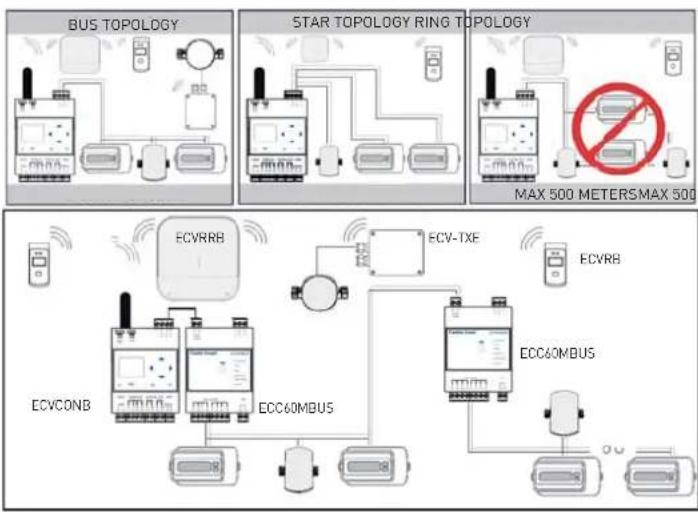
flowchart
graph TD
    subgraph BUS_TOPOLOGY
        A["Bus Topology"] --> B["Star Topology Ring Topology"]
        B --> C["MAX 500 METERS MAX 500"]
    end
    subgraph ECV_RRB
        D["ECV RRB"] --> E["ECV-1XE"]
        F["ECVCONB"] --> G["ECC60MBUS"]
        H["ECV-TXE"] --> I["ECC60MBUS"]
        J["ECV-RB"] --> K["ECC60MBUS"]
    end
    subgraph ECC_0MBUS
        L["ECV-1XE"] --> M["ECC60MBUS"]
        N["ECV-RB"] --> O["ECC60MBUS"]
        P["ECV-1XE"] --> Q["ECC60MBUS"]
        R["ECV-RB"] --> S["ECC60MBUS"]
    end
- M-BUS SETUP

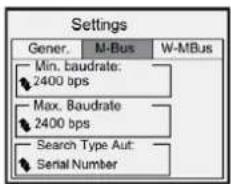
- Min. Baudrate: Minimum baudrate value for the detection of devices on wired M-Bus network - Max. Baudrate: Maximum baudrate value for the detection of devices on wired M-Bus network - Search Type Aut: Search by serial number or Primary Address EN13757-3 (Application Layer)
The M-Bus interface complies with EN13757-2 (Physical Layer)
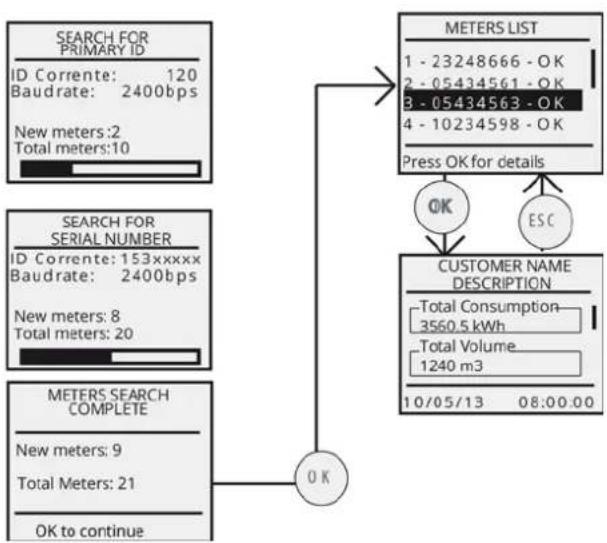
8. M-BUS SEARCH PROCESS
- start the search
- check the progress of the search
- control the detected M-Bus devices
- select a device
- reading of the current values of the meters
flowchart
graph TD
    A["SEARCH FOR PRIMARY ID\nID Corrente: 120\nBaudrate: 2400bps\nNew meters: 2\nTotal meters: 10"] --> B["METERS LIST\n1 - 23248666 - OK\n2 - 05434561 - OK\n3 - 05434563 - OK\n4 - 10234598 - OK\nPress OK for details"]
    C["SEARCH FOR SERIAL NUMBER\nID Corrente: 153xxxxx\nBaudrate: 2400bps\nNew meters: 8\nTotal meters: 20"] --> B
    D["METERS SEARCH COMPLETE\nNew meters: 9\nTotal Meters: 21\nOK to continue"] --> E["CUSTOMER NAME DESCRIPTION\n- Total Consumption\n- 3560.5 kWh\n- Total Volume\n- 1240 m3\n10/05/13 08:00:00"]
    B --> F["OK"]
    E --> G["ESC"]
    F --> H["OK"]
    G --> H
    H --> I["OK to continue"]
Wait until the process is complete
9. ANTENNA INSTALLATION
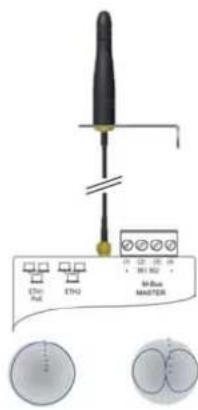
FEATURES
Dimensions: 100x80x30 mm
Connection: SMA Male
Cable: RG174 1.5 m
Operating Temperature range: -40°/+80°C
Polarization: Linear
Radiation: Omnidirectional
Gain: 2.1 dBi
Antenna constituens: thermoplastic Elastomer
METERS MAX 500 METERS Material of METERING element: stainless steel, brass
Antenna stand: stainless steel
ATTENTION
For a correct installation of the product,
mount the antenna in vertical position and at
5 cm away from any metallic surface,
which it is not closed in a metal box.
Please always use the removable antenna provided.
- W. M-BUS CONFIGURATION

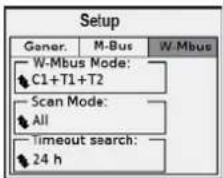
W. M-Bus Mode: select the transmission mode EN13757-3:2004 C1 + T1 + T2 S1 + T1 and layer dedicated ETSI EN 300 220 v2.3.1 T1 + T2 T1
Scan Mode select ALL if you want to acquire all of the present devices. All SND_IR Select SND_IR to acquire only the devices that send the package Installation_Request.
Timeout search: defines the timeout for devices search in a range from a minimum of 1 hour to a maximum of 24h 1-24h
11. W. M-BUS SEARCH PROCESS
- start the search
- check the progress of the search
- control the detected W. M-Bus devices
- select a device
- reading of the current values of the meters
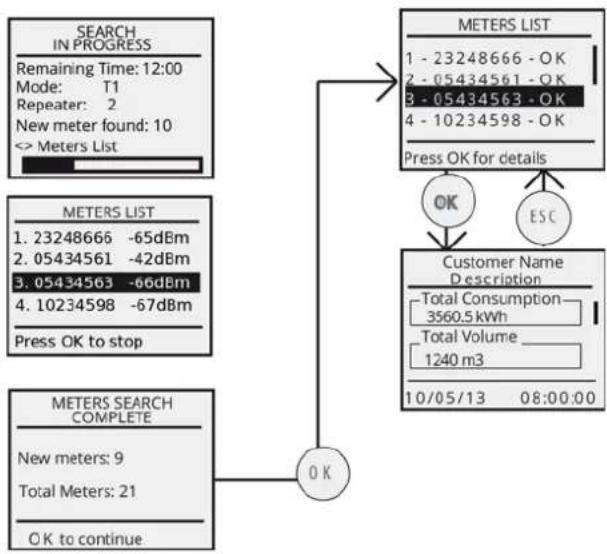
flowchart
graph TD
    A["SEARCH IN PROGRESS"] --> B["Remaining Time: 12:00"]
    B --> C["Mode: T1"]
    C --> D["Repeater: 2"]
    D --> E["New meter found: 10"]
    E --> F["<< Meters List"]
    G["METERS LIST"] --> H["1 - 23248666 - OK"]
    G --> I["2 - 05434561 - OK"]
    G --> J["3 - 05434563 - OK"]
    G --> K["4 - 10234598 - OK"]
    G --> L["Press OK for details"]
    M["METERS SEARCH COMPLETE"] --> N["New meters: 9"]
    M --> O["Total Meters: 21"]
    M --> P["OK to continue"]
    Q["OK"] --> R["Customer Name Description"]
    R --> S["Total Consumption: 3560.5 kWh"]
    R --> T["Total Volume: 1240 m3"]
    R --> U["10/05/13 08:00:00"]
    V["ESC"] --> R
Wait until the value Time Remaining is "0:00"
FANTINI COSMI S.p.A.
Via dell'Osio, 6 20090 Caleppio di Settala, Milano, ITALY
Ph. +39 02 956821 - Fax +39 02 95307006 - info@fantinicosmi.it
EXPORT DEPARTMENT
Ph. +39 02 95682229 - export@fantinicosmi.it
- OVERVIEW
- CONNECTIONS
- FIRST SETUP VIA DISPLAY
- FIRST ACCESS TO THE VEBSERVER
- TECHNICAL DATA
- TROUBLESHOOTING
- THE DATALOGGER DOES NOT TURN ON:
- THE DISPLAY IS OFF:
- NOT ALL THE METERS ARE DETECTED:
- NONE OF THE METERS IS DETECTED:
- UNABLE TO ACCESS THE WEBSERVER:
- M-BUS SEARCH PROCESS
- ANTENNA INSTALLATION
- W. M-BUS SEARCH PROCESS
Kaubamärk : Fantini Cosmi
Mudel : ECVCONB
Kategooria : Mõõtmine