
Collection A158WEAD-1EF - Randkell CASIO - Tasuta kasutusjuhend
Leidke seadme juhend tasuta Collection A158WEAD-1EF CASIO PDF-formaadis.


Kasutajate küsimused teemal Collection A158WEAD-1EF CASIO
0 küsimus selle seadme kohta. Vastake nendele, mida teate, või esitage oma.
Esita uus küsimus selle seadme kohta
Laadige alla juhend oma Randkell PDF-formaadis tasuta! Leidke oma juhend Collection A158WEAD-1EF - CASIO ja võtke oma elektrooniline seade uuesti kätte. Sellel lehel on avaldatud kõik teie seadme kasutamiseks vajalikud dokumendid. Collection A158WEAD-1EF kaubamärgi CASIO.
KASUTUSJUHEND Collection A158WEAD-1EF CASIO
Operation Guide 10B+7L(Ver.C) CASIO®
Reading the display
![[Regular timekeeping mode] (Daily alarm mode) [Stopwatch mode] [Time/calendar setting mode] (Light) Day Date 10:5850 Hour PM Minute PM Second Press C. 8:35 Press C. 00:00:00 Press C. 1/100 second PM Hour PM Second Press C.](/content/2026/05/1092588/images/80c8bab32f281b71f22bec9a0a74dfc39723b8e96418a06dcfafd18dcd7cf489.jpg)
SU: Sunday, MO: Monday, TU: Tuesday, WE: Wednesday, TH: Thursday, FR: Friday, SA: Saturday (Changeover between 12-hour and 24-hour formats) In regular timekeeping mode, with every push of Ⓐ, the display is switched between 12-hour and 24-hour formats.
Setting daily alarm
If the daily alarm is set, the buzzer sounds for 20 seconds at the preset time every day until cleared. To stop the buzzer, press the ⏻ button. If the time signal is set, the watch sounds every hour on the hour.
(Sound demonstration) Press and hold the Ⓐ button in alarm mode to sound the buzzer.
![[Hour setting] [Minute setting] R1 8:30 R1 8:35 Press ① to set minute d: One minute advances w: push of A. Press ② to cc](/content/2026/05/1092588/images/26a5ae8431ee626a98710637fbb91982a99654550ba1b575a8d8b7d2e4fdf58e.jpg)
If the Ⓐ button is pressed, the watch reverts to the regular timekeeping mode. (Quick digit advance) When the ⚗ button is pressed for more than 2 seconds, the digit advances quickly. When released, the digit advance will stop.
[On or off setting of daily alarm and time signal]
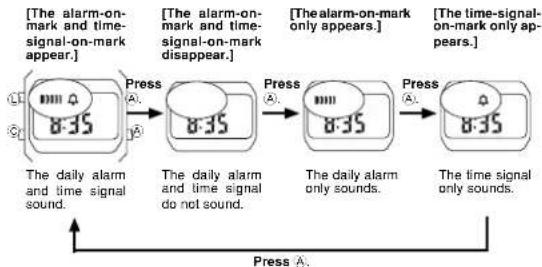
flowchart
graph LR
    A["The alarm-on-mark on-mark appear."] --> B["Press"]
    B --> C["The alarm-on-mark on-mark disappear."]
    C --> D["Press"]
    D --> E["The alarm-on-mark only appears."]
    E --> F["Press"]
    F --> G["The time-signal-on-mark only appears."]
    G --> H["Press"]
    H --> I["The daily alarm and time signal do not sound."]
    I --> J["Press"]
    J --> K["The daily alarm and time signal only sounds."]
    K --> L["Press"]
    L --> M["The time signal only sounds."]
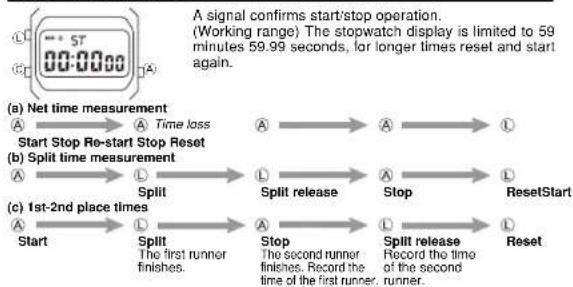
Stopwatch operation
flowchart
graph LR
    A["Start"] --> B["Split"]
    B --> C["Stop"]
    C --> D["ResetStart"]
    D --> E["Split release"]
    E --> F["Stop"]
    F --> G["Reset"]
    G --> H["Stop"]
    H --> I["Stop"]
    I --> J["Stop"]
    J --> K["Stop"]
    K --> L["Stop"]
    L --> M["Stop"]
    M --> N["Stop"]
    N --> O["Stop"]
    O --> P["Stop"]
    P --> Q["Stop"]
    Q --> R["Stop"]
    R --> S["Stop"]
    S --> T["Stop"]
    T --> U["Stop"]
    U --> V["Stop"]
    V --> W["Stop"]
    W --> X["Stop"]
    X --> Y["Stop"]
    Y --> Z["Stop"]
    Z --> A
Setting time and calendar

flowchart
graph LR
    A["Regular timekeeping"] --> B["Press three times to change regular timekeeping mode to time/calendar"]
    B --> C["Press to adjust seconds.*"]
    C --> D["Press to move to the hour setting. Press to increase the number."]
    D --> E["Press to move to the minute setting. Press to increase the number."]
    E --> F["7:30:15"]
    F --> G["Month setting"]
    G --> H["Press to move to the month setting. Press to increase the number."]
    H --> I["8"]
    I --> J["Date setting"]
    J --> K["Press to move to the date setting. Press to increase the number."]
    K --> L["28"]
    L --> M["Press to move to the day setting. Pressing advances to the next day. And press to complete."]
*Precise time can be maintained by correcting the seconds once a month on a time signal from a radio, TV, telephone, etc.
(Quick digit advance) When the Ⓐ button is pressed for more than 2 seconds, the digit advances quickly. When released, the digit advance will stop.
Specifications
Accuracy at normal temperature: ±30 seconds a month
Display capacity
•Regular timekeeping mode
Hour minute second am/pm date and day
Calendar system: Auto-calendar set at 28 days for February
Daily alarm mode
•Hourly time signal function
• Hourly time signal • Slowelsh mode
-Stopwatch mode Moasuring capacity: 50 minutes, 50-25 seconds
Measuring capacity: 59 minutes 59.5
Measuring unit: 1/100th of a second
Measuring modes: Normal time, net time, split time and 1st-2nd place times
Battery:
One lithium battery (type: CR-2016 — except Module 1271/BR-2020 — Module 1271 only). Approx. 7 years operation on type CR-2016 (except Module 1271) /10 years on type BR-2020 (Module 1271 only). [assuming alarm operation for 20 sec./day and one light operation for 1 sec./day]
NOTE: THERE IS NO WAY unit components can be damaged or malfunction, due to misoperation of buttons. If confusing information appears on the display it means entry sequence was incorrect. Please read the manual and try again.
IMPORTANT: Setting sequence MUST BE FOLLOWED when making any new setting.
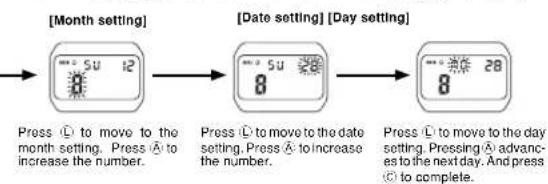
flowchart
graph LR
    A["Press ① to move to the month setting. Press ⬆ to increase the number."] --> B["Press ② to move to the date setting. Press ⬆ to increase the number."] --> C["Press ③ to move to the day setting. Pressing ⬆ advance to the next day. And press ⬆ to complete."]
- Correction of any digit, if not required, can be skipped by pressing the Ⓛ button repeatedly.
- If you do not operate any button for a few minutes while a selection is flashing, the flashing stops and the watch goes back to the regular timekeeping mode automatically.


Kaubamärk : CASIO
Mudel : Collection A158WEAD-1EF
Kategooria : Randkell