Icon-201 - Kell Nite - Tasuta kasutusjuhend
Leidke seadme juhend tasuta Icon-201 Nite PDF-formaadis.


Kasutajate küsimused teemal Icon-201 Nite
0 küsimus selle seadme kohta. Vastake nendele, mida teate, või esitage oma.
Esita uus küsimus selle seadme kohta
Laadige alla juhend oma Kell PDF-formaadis tasuta! Leidke oma juhend Icon-201 - Nite ja võtke oma elektrooniline seade uuesti kätte. Sellel lehel on avaldatud kõik teie seadme kasutamiseks vajalikud dokumendid. Icon-201 kaubamärgi Nite.
KASUTUSJUHEND Icon-201 Nite
Icon Series Handbook
| Technical Specifications | |
| GTLS RATING | T25 or T100 |
| CASE MATERIAL | 316 stainless steel |
| CASE FINISH | Black PVD or brushed stainless steel |
| STRAP TYPE | Leather strap or stainless steel bracelet |
| CRYSTAL | Sapphire with triple anti-reflective coating |
| MOVEMENT TYPE | Quartz |
| MOVEMENT | Swiss made Ronda 715Li |
| CROWN TYPE | Screw down |
| DIAL DIAMETER | 38mm |
| CASE DIAMETER | 44mm |
| CASE DEPTH | 12.1mm |
| LUG WIDTH | 22mm |
| FIXING TYPE | 2 x 22mm spring bars(https://www.nitewatches.com/store/gb/screws-pins/pack-of-two-22mm-spring-bars/) |
| WEIGHT | 80g Fitted on leather strap180g Fitted on steel bracelet |
| WATER RESISTANCE | 100m |
| BATTERY LIFE | 10 Years |
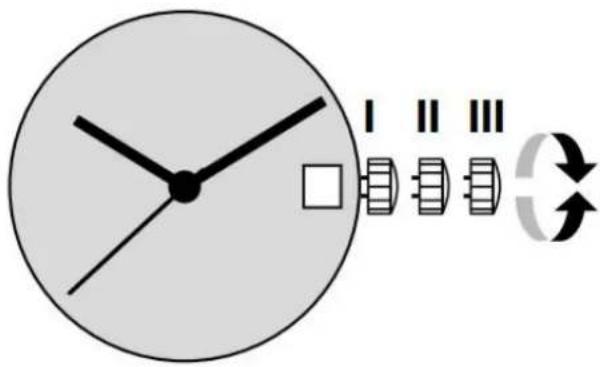
Setting the time and date
Pos. I Position of rest (watch running)
Pos. II Quick-change correction for date
Blocking time for the quick-change day correction is from approx. 9.30 pm and midnight.
- Unscrew the crown by turning anti-clockwise (watch still running).
- Pull the crown out to position II (watch still running).
- Turn the crown until the current date appears.
- Push the crown back into position I.
- Gently push and screw the crown clockwise to secure it into the case.
Pos. III Setting the time
- Unscrew the crown by turning anti-clockwise (watch still running).
- Pull the crown out to position III (watch stopped).
- Turn the crown, until the current time is displayed
(remember the 24-hour cycle).
- Push the crown back into position I.
- Gently push and screw the crown clockwise to secure it into the case.
Strap fitting/options
The Icon models can be fitted with a leather strap, polymer strap, one-piece webbing or a stainless steel bracelet
With a 22mm lug width and 22mm spring bar fixing, straps are easily interchangeable using a forked spring bar tool. Many 22mm aftermarket straps are also compatible*
The Icon straps exclusively available through nitewatches.com can be found here:
https://www.nitewatches.com/store/gb/straps/icon
The stainless-steel bracelet can be adjusted in length by adding or removing links and by also using the 3-micro adjustment on the buckle part of the strap.
*Nite Watches accept no responsibility with the sizing and fitting of any aftermarket straps.
If you have any questions about the Icon series then please email us on sales@nitewatches.com.