Digital - Hääle salvesti Nexium - Tasuta kasutusjuhend
Leidke seadme juhend tasuta Digital Nexium PDF-formaadis.


Kasutajate küsimused teemal Digital Nexium
0 küsimus selle seadme kohta. Vastake nendele, mida teate, või esitage oma.
Esita uus küsimus selle seadme kohta
Laadige alla juhend oma Hääle salvesti PDF-formaadis tasuta! Leidke oma juhend Digital - Nexium ja võtke oma elektrooniline seade uuesti kätte. Sellel lehel on avaldatud kõik teie seadme kasutamiseks vajalikud dokumendid. Digital kaubamärgi Nexium.
KASUTUSJUHEND Digital Nexium
Digital Voice Recorder Model
Instruction

Thank you for trying the Nexium. Please read this manual Carefully before use.
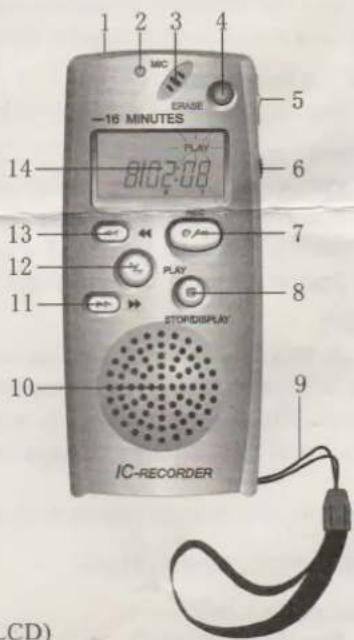
PARTS IDENTIFICATIONS
1 Earphone jack
2 REC indicator
3 Built-in microphone
4 ERASE button
5 HOLD button
6 VOL control
7 REC button
8 STOP/DISPLAY button
9 Hand strap
10 Speaker
11 ▶ button
12 PLAY button
13 ◀ button
14 Liquid crystal display panel(LCD)
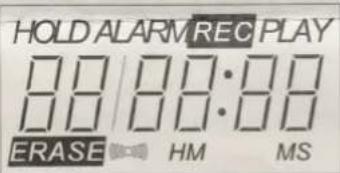
Liquid Crystal Display (LCD)
Installing the Battery
Slide the battery cover in the direction of arrow. Insert 2 AAA(LR03 or R03) batteries according to the polarity(+,-) indications and close the battery cover.
Replacing the Battery
When the IC recorder does not record messages or appear something wrong when play back. Replace the battery with new ones.
BASIC OPERATIONS
Recording
This IC recorder automatically records messages after the last recorded message so that you can start recording quickly without searching for the end of the last recording.
You can record up to 8 messages and record for 16 minutes. Each recorded message has an index number, and a newly recorded message will have the index number.
-
Press REC and speak into the microphone. The LED indicator lights red, recording starts and counts.
-
Press STOP/DISPLAY to stop recording. The LCD shows current message number, total number of messages.
When pressing REC to record again, the total message numbers will be accumulated automatically.
Additional recording is not possible in the folder when 8 messages are recorded and shown on the LCD. When memory capacity has run out, [FULL] blinks on LCD. Recording is no longer possible. To continue recording, first erase unnecessary messages. (See ERASE)
Playing (PLAY)
- After stopping recording, press PLAY, the current recorded message will be played.
- For special message to be played, press ▶ or ◀ so that the LCD shows the desired message number to be played. Then, press the PLAY button. LCD displays the time of the message being played. [PLAY] is indicated on LCD.
Press STOP/DISPLAY to stop playing and enter the Stop mode. The Stop mode is automatically engaged at the next of this message.
Adjust the volume
Adjust the volume to a suitable level by turn VOL.
Play-Pause
- Press PLAY once during playing to enter the Play-Pause mode, [PLAY] is flashed on LCD with the current message time. The Stop mode is automatically engaged if STOP is pressed during Play-Pause mode.
- Press PLAY again to resume playing.
Hold
Slide HOLD to the arrow direction when recording, [HOLD] is displayed on LCD and the buttons do not respond when pressed.
Slide HOLD to the opposite to unlock the buttons before attempting operations. [HOLD] is not displayed on LCD.
To Hold other function buttons, do as same as above.
ADVANCED OPERATIONS
Setting the Clock
- Press STOP/DISPLAY repeatedly until the time display appears.
- Keep pressing STOP/DISPLAY to [00:00] on LCD.
- Press ▶▶ or ◀◀ to set the time.
Setting the Alarm
- Press STOP/DISPLAY repeatedly until [ALARM] on LCD.
- Keep pressing STOP/DISPLAY to [00:00] on LCD.
- Press ▶ or ◀ to set the alarm time.
- Press STOP/DISPLAY again, [ALARM] and the alarm time and [[000]] on LCD.
Press ▶▶ or ◀◀ to change ALARM mode ON or OFF.
Erasing (ERASE)
- Press ▶ or ◀ to select the message number to be erased.
- Press ERASE for more than 1 second during stop mode.
Before erasing:
| Message1 | Message2 | Message3 | Message4 | Message5 | Blank space |
| After erasing: Erase Message5 ↓ | |||||
| Message1 | Message2 | Message3 | Message4 | Blank space | |
| Before erasing: | |||||
| Message1 | Message2 | Message3 | Message4 | Message5 | Blank space |
| After erasing: Erase Message 3-5 ↓ | |||||
| Message1 | Message2 | Blank space | |||
SPECIFICATION:
Recording time media: Built-in flash memory
Speaker: 28mm diameter Dynamic internal speaker
Earphone jack: 3.5mm diameter, impedance 32 OHM
Power source: Two AAA(LR03 or R03) batteries
Dimension (H.W.D): 39(W) X 86(H) X 19.5(D) mm
Remarks: Specifications and design are subject to change without notice for improvement of performance.