Freelance XD5100 - Telefon BT - Tasuta kasutusjuhend
Leidke seadme juhend tasuta Freelance XD5100 BT PDF-formaadis.


Kasutajate küsimused teemal Freelance XD5100 BT
0 küsimus selle seadme kohta. Vastake nendele, mida teate, või esitage oma.
Esita uus küsimus selle seadme kohta
Laadige alla juhend oma Telefon PDF-formaadis tasuta! Leidke oma juhend Freelance XD5100 - BT ja võtke oma elektrooniline seade uuesti kätte. Sellel lehel on avaldatud kõik teie seadme kasutamiseks vajalikud dokumendid. Freelance XD5100 kaubamärgi BT.
KASUTUSJUHEND Freelance XD5100 BT
Welcome
This Quick Start Guide provides all the information you need to get your product up and running. Please fully unfold this guide and follow the numbered steps below. If you need more detailed instructions, a full user guide is available to download in PDF format from www.bt.com/help/userguides
We haven't printed a full user guide as we're working to make our products greener, so please consider the environment before printing.
If you cannot find the answer to your problem in the full online user guide, then please call the Helpline on 0871 594 1200* or email bt.helpdesk@suncorptech.com
BT is a sustainability leader
To find out how we're making our products greener visit bt.com/betterworld/products
* Calls cost 5 pence plus 10 pence per minute from a BT residential landline. See www.ht.com/pricing for details. Mobile and other providers' costs may vary.

Getting started
Place your BT Freelance XD5100 close enough to a mains power and telephone socket so that the cables will reach.
The handset range is up to 300 metres outdoors and 50 metres indoors (in ideal conditions). The icon in the handset display indicates when you are in range. It flashes and you will hear a warning beep when you go out of range, in which case you will need to move closer to the base.
Try to position the phone at least 1 metre away from other electrical appliances to avoid interference and help maximise the handset range.
Setting up
-
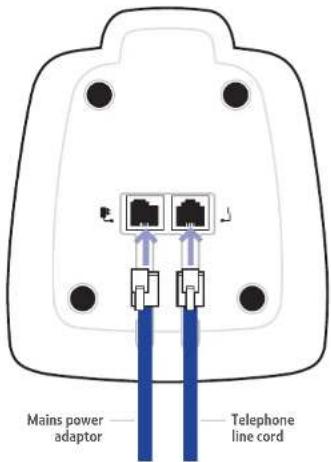
Plug the mains power adaptor into the socket marked on the back of the base and plug the other end into the mains power socket and switch the power on. The green Power/In Use light will come on.
-
Plug the telephone line cord into the socket marked ⚠. Only use the cables provided with the product.
-
Insert the 2 x AAA rechargeable batteries supplied into the handset, taking note of the + and - markings inside the battery compartment, and slide the battery compartment shut.
-
Place the handset in the base to charge. The red Charging light will come on. Charge the handset for at least 24 hours before first use.
-
When the handset is fully charged the icon will be displayed. Now you can plug the telephone line cord into the telephone wall socket.
Set up your additional handsets (2, 3 and 4-Pack owners only)
For each additional handset and charger:
-
Plug the power adaptor into the socket on the underside of the charger and plug the other end into the wall socket and switch the power on.
-
Insert the batteries into the handset and charge the handset batteries for at least 24 hours as detailed in points 3 and 4 above.
Additional handsets supplied as part of a multipack are pre-registered to the base so, once charged, are ready for use. Each handset will display its handset number: 1, 2, 3 etc.
Your BT Freelance XD5100 is now ready for use.

Navigating the menus
All your phone's functions and settings can be accessed through the main menu. The menu map below shows all options you can choose from.
-
Press ✅ to open the main menu.
-
Use the 📁 and buttons to scroll to the menu or option you want and press to confirm, or press ✗ to go back to the previous menu.

Exit a menu
To exit a menu or cancel an operation at any time you can press and hold 📂 return to the standby screen.
Menu map
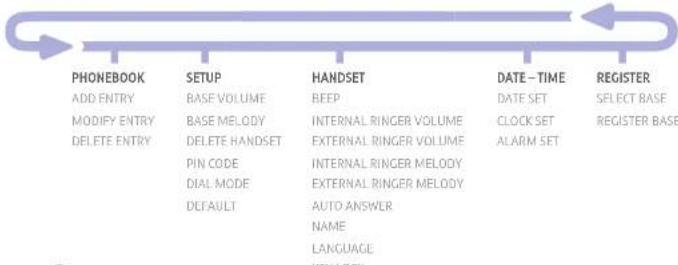
flowchart
graph LR
    A["PHONEBOOK"] --> B["SETUP"]
    B --> C["HANDSET"]
    C --> D["DATE-TIME"]
    D --> E["REGISTER"]

    A --> A1["ADD ENTRY"]
    A --> A2["MODIFY ENTRY"]
    A --> A3["DELETE ENTRY"]

    B --> B1["BASE VOLUME"]
    B --> B2["BASE MELODY"]
    B --> B3["DELETE HANDSET"]
    B --> B4["PIN CODE"]
    B --> B5["DIAL MODE"]
    B --> B6["DEFAULT"]

    C --> C1["BEEP"]
    C --> C2["INTERNAL RINGER VOLUME"]
    C --> C3["EXTERNAL RINGER VOLUME"]
    C --> C4["INTERNAL RINGER MELODY"]
    C --> C5["EXTERNAL RINGER MELODY"]
    C --> C6["AUTO ANSWER"]
    C --> C7["NAME"]
    C --> C8["LANGUAGE"]
    C --> C9["TITLE"]

    D --> D1["DATE SET"]
    D --> D2["CLOCK SET"]
    D --> D3["ALARM SET"]

    E --> E1["SELECT BASE"]
    E --> E2["REGISTER BASE"]
Press 📄 to open the phonebook.
Press to open the redial list.
Press to open the calls list.

Making and receiving calls
Make/end a call
- Press listen for the dialling tone, then dial the number. To end the call, press again.
Preparatory dialling
-
Enter the number first. If you make a mistake, press 📄 to delete the last digit.
-
Press 📞 to dial.
Secrecy
You can mute the handset microphone and talk without your caller hearing you.
- During a call, press Security ROUTE is displayed and you can talk without your caller hearing you. Press Security again to switch secrecy off and resume your call.
Receiving calls
- When the phone rings, press the answer the call. Or if the handset is on the base or charger, simply lift the handset to answer the call. (If you would rather press it after lifting the handset to receive a call, you will need to switch Auto-answer off, see page 29 of the main online user guide.)
Handsfree
Handsfree switches on the handset loudspeaker so you can talk to your caller without holding the handset. It also enables other people in the room listen to both sides of your conversation.
- During a call, press 📄 to switch the call between the earpiece and the handset speaker. Use the 📄 button to adjust the earpiece or speaker volume during the call.

Special features
Your BT Freelance XD5100 has some special features including a 10 number redial list, 50 number phonebook and Caller Display with calls list.
Redial
Your BT Freelance XD5100 stores the last 10 numbers you have dialled. You can then select any of the numbers to redial, delete or copy to the phonebook.
Redial a number from the redial list
- Press 📄, the most recently dialled number is displayed. If the number matches an entry stored in the handset phonebook, the name is displayed.
- Press 🔒 and 🕒 scroll through the list and press to dial the number displayed.
Delete numbers from the redial list
-
Press 📄 then scroll 🔍 to the entry you want to delete.
-
Either press once to delete the individual entry displayed, or press and hold to delete the entire redial list. Then press to confirm deletion or cancel.
Copy a redial number to the phonebook
- In the redial list, scroll to the entry you want to copy and press. The displays shows 400. Press ✅ again.
- Use the keypad to enter the name (see 'Phonebook' section overleaf for help entering names), then press ✅. Edit the number if necessary, then press ✅
- Use ⚫ and ⚪ select a ringtone and press to confirm. The entry is stored.
Phonebook
You can store up to 50 names and numbers in the phonebook to make dialling quick and easy. You can also assign different ringtones to particular numbers, eg, family or work numbers (requires Caller Display, see below).
Add a new phonebook entry
-
Press ✅️, scroll ✅️ PHONE BOOK and press ✅️
-
The displays shows AOD ENTRY. Press
-
The displays shows NAME P. Using the letters on the keypad, enter the name then press you may need to press the same button a few times until the letter you want is displayed. For example, press 2 once for 8, or twice for 8. If the next letter you want to enter is on the same button, wait a moment then press the button. If you make a mistake, press
-
The displays shows NUMBER 2. Use the keypad to enter the full phone number and press
-
Press 🔒 to select the ringtone you want to assign to the entry and press to confirm. ADD ENTRY is displayed. Continue adding entries or press and hold return to standby.
Dial a phonebook entry
-
Press 📄. Entries are displayed alphabetically. Press 📄 to alternate the display between the name and phone number.
-
Scroll 🔒 or through the phonebook, or search alphabetically by entering the first letter of the name using the keypad. Press 🔒 to dial the selected number.
Caller Display and the calls list
You must subscribe to a Caller Display service for this feature to work. Your network provider may charge you for this service.
Caller Display allows you to see the number of the person calling you before you answer the phone. The calls list holds details of your last 40 callers, including the phone number and date and time of the call. If a number matches a stored phonebook entry, the caller's name will alternate with the number.
The calls list also alerts you to unanswered calls. When you have unanswered or 'new calls', the 📞 on will flash in the display.
View the calls list
-
Press 📋 to open the calls list. If there are no calls in the list, the display shows EMPTY.
-
Press 📄 or 🌐 scroll through the list. If the icon is displayed, the call was unanswered; if the 📄 icon is displayed, the call was answered.
-
Press ✅ to see the caller's number, press ✅ again to see the time and date of the call, press ✅ again if you want to add the number to your phonebook.
Dial a number in the calls list
- Press 📋, scroll 📋 through the list to the entry you want to dial and press .
Multi-handset functions
If you have bought a multiple pack and therefore have more than one handset registered to the base, you can: make internal calls, transfer an external call from one handset to another, hold a conference call and make an internal call between two handsets while a third is on an external call.
For a full explanation of features and instructions, please see the main user guide online at www.bt.com/help/userguides
BT is a sustainability leader

Offices worldwide
The services described in this publication are subject to availability and may be modified from time to time. Services and equipment are supplied subject to British Telecommunication's plc's respective standard conditions of contract. Nothing in this publication forms any part of a contract.
© British Telecommunications plc 2007. Registered Office: 81 Newgate Street, London EC1A 7A1. Registered in England No. 19CIDG00.
Designed and produced by The Art & Design Partnership Ltd.
Printed in China / Issue 1 / ADP12-07
Troubleshooting
Most problems are caused by something very simple and can be fixed with a few simple checks:
- Make sure both the mains power adaptor cable and telephone line cord are plugged into the correct sockets and plugged in at the wall.
- Make sure you use all the cables and batteries that came in the box, not those from a previous product.
- If you experience poor speech quality or interference, make sure the product is not located too close to other electrical appliances. This can also help improve the handset range from the base.
- Make sure you charge the batteries for at least 24 hours before first use to ensure maximum battery performance. The charge capacity of the batteries will decrease over time.
Using your BT Freelance XD5100 on a broadband Internet enabled line?
Remember to plug the phone into the wall socket via an ADSL microfilter if you have broadband Internet on your phone line, otherwise you may have problems with this product and your broadband service. Additional BT ADSL microfilters can be purchased from www.shop.bt.com
General information
For information on safety instructions, cleaning, technical information or connecting to a switchboard, please refer to the 'General Information' section in the full user guide at www.bt.com/help/userguides
Guarantee
Your BT Freelance XD5100 is guaranteed for a period of 12 months from the date of purchase.
Subject to the terms listed below, the guarantee will provide for the repair of, or at BT's or its agent's discretion the option to replace the BT Freelance XD5100, or any component thereof, (other than batteries), which is identified as faulty or below standard, or as a result of inferior workmanship or materials. Products over 28 days old from the date of purchase may be replaced with a refurbished or repaired product.
The conditions of this guarantee are:
• The guarantee shall only apply to defects that occur within the 12 month guarantee period.
• Proof of purchase is required.
• The equipment is returned to BT or its agent as instructed.
This guarantee does not cover any faults or defects caused by accidents, misuse, fair wear and tear, neglect, tampering with the equipment, or any attempt at adjustment or repair other than through approved agents.
This guarantee does not affect your statutory rights.
For further information within and outside the 12 month guarantee, please refer to the full user guide at www.bt.com/help/userguides
Product disposal instructions

The symbol shown here and on the product means that the product is classed as Electrical or Electronic Equipment and should not be disposed with other household or commercial waste at the end of its working life.
The Waste of Electrical and Electronic Equipment (WEEE) Directive (2002/96/EC) has been put in place to recycle products using best available recovery and recycling techniques to minimise the impact on the environment, treat any hazardous substances and avoid the increasing landfill.
Product disposal instructions for residential users When you have no further use for it, please remove any batteries and dispose of them and the product as per your local authority's recycling processes. For more information please contact your local authority or the retailer where the product was purchased.
Product disposal instructions for business users Business users should contact their suppliers and check the terms and conditions of the purchase contract and ensure that this product is not mixed with other commercial waste for disposal,
R&TTE Directive & Declaration of Conformity
This product is intended for use within the UK for connection to the public telephone network and compatible switchboards.
This equipment complies with the essential requirements for the Radio Equipment and Telecommunications Terminal Equipment Directive (1999/5/EC).
The Declaration of Conformity is published on the website http://www.suncorptech.com/bt
BT Freelance XD5100
Quick Start Guide
BT

Bringing it all together
natural_image
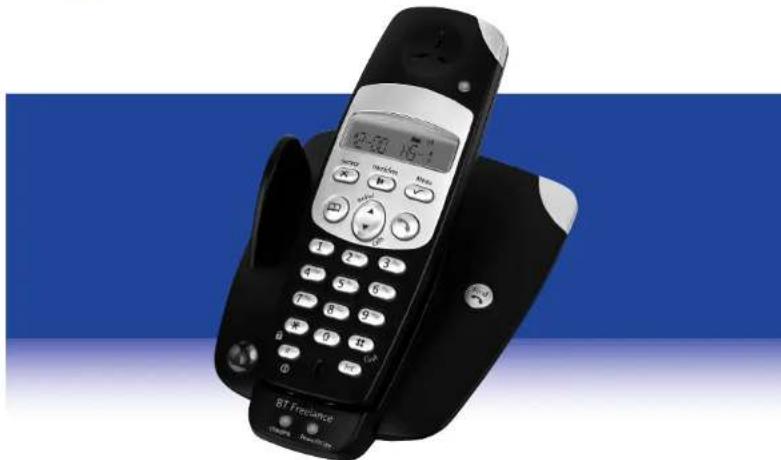
Black and white portable RT Frequencer phone with digital keypad and control buttons, set against a blue background (no visible text or symbols on device body)A full user guide can be downloaded in PDF format from www.bt.com/help/userguides
Please consider the environment before printing.

This guide can be recycled.