Pick your language and provide your email: we'll send you a specifically translated version.
This manual is not available in your language
Kasutajate küsimused teemal Versatis P170 ALCATEL
0 küsimus selle seadme kohta. Vastake nendele, mida teate, või esitage oma.
Esita uus küsimus selle seadme kohta
Veel pole küsimusi. Olge esimene, kes küsib.
Laadige alla juhend oma Telefon PDF-formaadis tasuta! Leidke oma juhend Versatis P170 -
ALCATEL ja võtke oma elektrooniline seade uuesti kätte. Sellel lehel on avaldatud kõik teie seadme kasutamiseks vajalikud dokumendid. Versatis P170 kaubamärgi ALCATEL.
KASUTUSJUHEND Versatis P170 ALCATEL
ALCATEL
Versadus P120 / Versadus P120 Duo / Trio
Versadus P170 / Versadus P170 Duo / Trio
natural_image
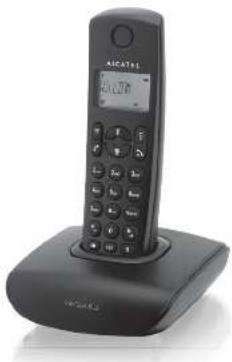
Black foldable phone with LCD display and base (no visible text or symbols)
USER MANUAL
ATLINKS
ATL NKS Europe, 22 quai Call and 92150 Suisse Korea - France
Alcanet logo and Alcanet names are trademarks of Alcanet and used under license by Infinis.
IMPORTANT SAFETY INSTRUCTIONS
When using your telephone equipment, basic safety precautions would always be followed to reduce the risk of fire, electric shock and injury, including the following:
1) Read and understand all the instructors.
For low all warnings and instructions marked on the product.
In this material from the above section,
3) Uping this product from the wall outlet before cleaning. Do not use liquid dropers or parent diapers. Use a large cloth for opening
Do not use the product near water (not asempal, near a cath tube, kitchen
zirk, swimming pool)
61 Do not overload wall outlets and extension cords as this can result in the
risk of fire or electric shock.
c) Avoid using a telephone (other than a cord mask type) during an electronic storm. These may be a remote task of electric shock from inhibiting
Do not use the 30+ phones to report a gas leak in the vicinity of the leak.
8) Use only the supplied NMH batteries
9) The use of other history types or non-rechargeable territories/primary
oils can be dangerous. These may cause interference and/or unit
damages. The manufacturer
10) Do not use third party changing jobs. The barbers may be damaged.
11) Please note the correct polarity while inserting the batteries.
12) Do not immerse batteries in water, do not place in fire.
Package contents
The package contains the following items:
- 1 Handset [2. handsets for a twin system, 3 handsets for a triple system]
• Date n/a or
• Charger paste for multi-handset system
• NC power adapter for basic
• Power adapter to other
• Telephone line rod
• 2 rechneropole batteries for each handset
• User Mercado
2. INSTALLING YOUR PHONE
2.1 Connecting the base station
2.1.1.1.
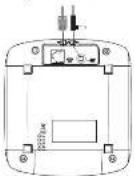
1) Plug the power supply — A and cond ▲ into the base station (as described on line drawing.
Plug the power supply & line cord into the wall socket
3) Always use the cables provided in the box.
2.7. Connecting the charger (in case of multi-system)
Plug the power supply into the wall socket
Always use the cables provided in the box
2.3. Instating and charging the batteries
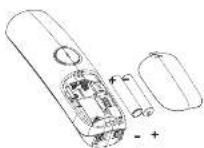
Side open the battery compartment cover
21 Place the 2 batteries as indicated. Respect security.
2] Side the battery compartment cover back.
4) Put the handset on the base and charge for 14 hours first time. A beep indicator that the handset is good enough on the box in charge.
indicates that the mislose is properly placed on the
Use only the power pack provided for the base station,
Use only NMH rechargesable batteries with the same characteristics as the one supplied with the product.
3. GETTING TO KNOW YOUR PHONE
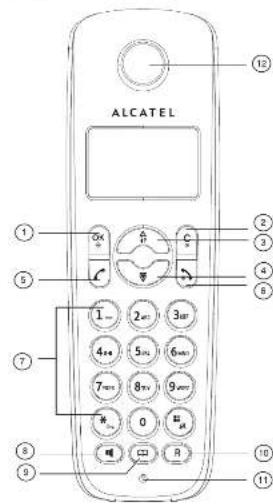
3.1. Overview of VERSATIS P170
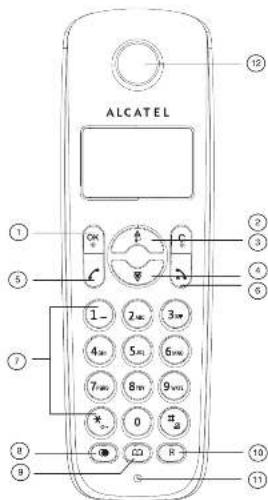
LEFT SOFT KEY (MENU/DK)
n idle mode: Press to access the main menu
n sub-Menu mode: Press to confirm the selection
During a call Press to access Intercom/Phonebook/Reda List/Ca
RIGHT SOFT KEY ICLEARBACK(MUTEINTERCOM)
n main menu mode: Press to go back to idly as seen
in sub-menu mode: Press to go back to previous level
n sub-menu mode: Press and hold to go back to idle screen
n editing / probable mode: Press to clear a character / digit
It is doing a preparation mode. From and how to decide at the
Characteristics: Single
During a call Point
in idle movie. Press to spleen another tourner.
108
n Idle mode: Press to access the call list
n menu mode: Press to scroll up the menu items
n Pronbook list / Racial list / Call List. Press to scroll up the list
During a call press to increase the volume
n ringlin
DOWN
a job proxy. Ups to account low-rated list
n menu mode: Press to scroll down the menu items
n Printbook list / Redzi list / Call List: Press to send down the list
During a call Press to decrease the volume
n ringing: Press to decrease the ring volume
TALKON
in idle / producing mode : Press to make a call
n Fictal Hall / Call Line / Phonoblock array: Prawa to move a call to the
Darlan, Shaying: Ruys to
TALK OFF
1.25%
Lerving a cat: "Meas to eat a cat. And go back to eat screen in menu/letting mode: Plass in me back to previous menu
n menu / editing mode: Press and hold to go back to idle screen
nicle mode. Press and hold to power off the handset
n idle mode (when the handset is powered off): Press and hold to power
on
ALPHANUMERIC KEYPAD, * (STAR), # (HASH)
Mus to insert a cage / character?
* Key during a call-in Pulse model: Press to switch to tone mode.
Bars in Lake made. Upsa and told to 3am on 1 off 15 min
0 key in idle / predating / number editing mode Press and hold to in
a purpose
* soy in Call List mode: Press to review caller's number if
Purdon minor Press to answer a call with passengers
PHONEBOOK
nicle mode. Pass to access the phonebook list.
FLASH (R key)
n lolo / predating mode: Press to insert a flash
During a call Press to dial a flash
MICROPHONE
12 Overview of VERSATIS P120
LEFT SOFT KEY (MENU/OK)
n idle mode: Press to access the main menu.
n sub-menu mode: Press to confirm the selection
During a call Press to access Intercom' Phonbook' Reda| List Call
DICH
RIGHT SOFF KEY (CLEARBACKMUTENTERCOM)
In train motor mode, Press to go back to idle screen.
in sub-Hans. Hoda. Press to go back to previous level in your menu mode: Press and hold in no back to idle access
in editing / predicting mode: Press to clear a character / digit
n editing / proclaring mode: Press and hold to delete all the
chencken / diga
During a call Press to mine / unmade the microphone
n k
UP
It is a mode. Please to access the call for:
a menu mode. Pass to scroll up the may
in Phonobooks list / Social list / Call List. Press to scroll up the list
During a call Press to increase the volume
n ringing Press to increase theinger volume
DOWN
nicle mode. Press to access the redial list
n Handu Modul: "Less to scroll down the hand can be
n. Pronbook Int / Redal Art / Call List Press to go
During a call, Pass to decrease the volume.
Olling a car. Press to decrease the volume.
In place it, Press to decrease the more years
TALK ON
n Info / predicting mode : Press to make a call
in Redall List / Call List / Phonebook entry: Press to make a call to the
So hence angry in the lit
During opening: Pass to
TALK OFF
During a call: Press to end a call and go back to idle screen
n menu / editing mode: Press to go back to previous menu
n menu / posting mode: Press and hold to go back to idle-screen in idle mode. Press and holds no room all the headset.
In the mode, Press and Horn is power of the handset.
a file marks after the border is pressed off; Press and Horn
05.12
ALPHANUMERIC KEYPAD. * (STABL # (HASH)
Press to insert a digit / character!\~?
* Key in idle mode: "team and hold to wralt on double the keypad lock
Key during a call in Pu se model: Press to switch to tone
A ray in role mode. Press and radio turn-on / on the finger
Oles in life / appearance / number of lines, move. Pass and
A. PIRIANO
1 key in Call List mode: Press to review caller's number
appi
REDIAL LIST
n Info mode: Press to access the redis list
PHONESOOK
In the mode: Press to access the phonebook list
FLASH (R key)
In idle/precoding mode, Press to insert a flash
During a call. Press to draw a finish
MICROPHONE
EARPIECE
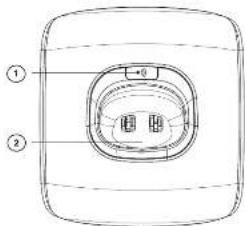
3.3 Base Station Overview
If you're looking for your handset, press the Page key on the base
station to page your handset. It will ring for approximately 60 seconds
Long press open registration mode
CHARGING CRADLE
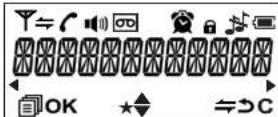
3.4 Display Icons and Symbols
The LCD display gives you information on the current status of the
talaphone
A
- 2014年,公司实现营业收入同比增长10%;
Steady when the handset is in range of the base. Push when out of
range of the base or not registered to the base
Steady when an interroom is in progress. Flash when there is an
incoming internal call.
e
indicates a cost in progress.
indicate that handsbee is being used. (for VERSATIS P170 only)
•
indicate that the ring is switched off
•
Steady when an alarm is set. Flash when the alarm time set before
A
indicate that the invoted is locked
2
0.0 indicate you've received voice message(s)
[Non-Text]
Indicate when the battery is fully charged
Whole can washes when the battery performs into charging
Internal block con flashes when the battery is in final charging stage.
-
Flash when low battery power level is detected
-
indicate when more characters are existed before the text currently
displayed.
(二)
▶
1
Plans to select menu menu options if applicable
(OPEN)
OK Please confirm the current selection if applicable.
•
表 1-2017年1月1日
[Unreadable]
24
Press to go back to previous menu level or cancel the current action it
24.00
(二)本说明仅供参考。
C
3.5 Test editing
In editing mode, a cursor is displayed to indicate the current text entry.
position. It is positioned at the right of the set character entered
Writing Tips:
1. Once a character is selected, the cursor will move to the next position
after a short day
2. You can move the cursor within the list by to amend the list entry.
1. Pass of
4. Press and hold eGs to create the entire text strings
2017 and 2018 were to acquire the drive fuel engine
4. USING YOUR PHONE
4.1. Make a Call
4.1.1. Preparatory Dialing
Enter the phone number and press or
(Various P170 only) to dial the number. Press to clear the entry
4.1.2 Direct Dialing
Press or (Versaris P170 only) to take free
inc and enter the phone number
4.1.3 Call from the chonebooks
Press to access the phonebook and press to
select the desired phonebook entry. Press or
(Versais P170 only) to dia) out to the selected
phonetic entry, Asymmetric, pre
a. 2014. 10:30
4.1.4. Call from the Call List
Press SIPS is based on Call Ltd and the chip-downs is needed for desired Call at entry. Press «TALKON» or «BREAKERPHONE» (Novate
P175 order to die out in the selected Cell Line entry. Slematoide, press
Sisukord
Klõpsake pealkirjal, et sellele juurde pääseda
💬 Tere! Olen teie juhendi assistent.Ma tean teie ALCATEL Versatis P170.
Kuidas saan teid aidata? (kasutamine, seaded, veakoodid, hooldus, sammu selgitus jne)💡 Näited :
• Kuidas seda kasutada ?
• Veakood E3 ?
• Kuidas seda puhastada ?