FT10WJ1900W4G64GCAP - Lauaarvuti Faytech - Tasuta kasutusjuhend
Leidke seadme juhend tasuta FT10WJ1900W4G64GCAP Faytech PDF-formaadis.


Kasutajate küsimused teemal FT10WJ1900W4G64GCAP Faytech
0 küsimus selle seadme kohta. Vastake nendele, mida teate, või esitage oma.
Esita uus küsimus selle seadme kohta
Laadige alla juhend oma Lauaarvuti PDF-formaadis tasuta! Leidke oma juhend FT10WJ1900W4G64GCAP - Faytech ja võtke oma elektrooniline seade uuesti kätte. Sellel lehel on avaldatud kõik teie seadme kasutamiseks vajalikud dokumendid. FT10WJ1900W4G64GCAP kaubamärgi Faytech.
KASUTUSJUHEND FT10WJ1900W4G64GCAP Faytech

GEBRAUCHSANWEISUNG
USER'S GUIDE
faytech CAPACITIVE TOUCHSCREEN-PC SERIES
Deutsch
www.faytech.com
Garantie
Das Gerät wurde nach den modernsten Produktionsverfahren hergestellt und geprüft. Ausgesuchte Komponenten und eine sorgfältige Produktion sorgen für eine einwandfreie Funktion und lange Lebensdauer. Sollte Ihr Gerät dennoch einen Defekt innerhalb der Garantiezeit aufweisen, wenden Sie sich bitte direkt an faytech. Die Garantiezeit beträgt 24 Monate, gerechnet von dem Tag des Kaufes, zu nachfolgenden Bedingungen:
- Der Garantieanspruch erlischt bei Eingriffen durch den Käufer oder durch Dritte. Schäden, die durch unsachgemäße Behandlung oder Bedienung, durch falsches Aufstellen oder Aufbewahren, durch unsachgemäßen Anschluss, sowie höhere Gewalt oder sonstige äußere Einflüsse entstehen, fallen nicht unter die Garantieleistung.
- Wir behalten uns vor, bei Reklamationen die defekten Komponenten zu ersetzen oder das Gerät auszutauschen.
- Ausgetauschte Komponenten oder ausgetauschte Geräte gehen in unser Eigentum über.
- Schadensersatzansprüche sind ausgeschlossen, soweit Sie nicht auf Vorsatz oder grober Fahrlässigkeit des Herstellers beruhen.
Im Garantiefall nach diesen Bestimmungen wenden Sie sich bitte an faytech. Kontaktdaten gibt es am Ende der Bedienungsanleitung oder aktuell unter www.faytech.com.
Nach Ablauf der Garantiezeit können keine Garantieansprüche mehr geltend gemacht werden. Der Nachweis des Garantieanspruches ist durch eine ordnungsgemäße Kaufbestätigung (Quittung oder Rechnung) zu erbringen.
An die Nutzer dieses Produktes
Herzlichen Dank für den Kauf unseres faytech Touchscreen-PCs. Sie haben ein kleines und leistungsstarkes PC-System erworben, dass auch für den Einsatz in rauen Arbeitsumgebungen geeignet ist. Es zeichnet sich gegenüber Standard-PC-Systemen durch einen geräuschlosen Betrieb und eine erhöhte Stabilität, insbesondere durch das robuste Aluminiumgehäuse und durch den Verzicht auf bewegliche Teile, aus.
Hinweise zur elektrischen Sicherheit
Das Gerät sollte ausschließlich von technischem Servicepersonal geöffnet werden. Unsachgemäßes öffnen kann zum Garantieverlust führen. Bitte trennen Sie den Touch-PC vor dem Öffnen stets von der Stromzufuhr.
Betriebssicherheit
- Bitte überprüfen Sie vor der ersten Inbetriebnahme, ob alle externen Adapter & Kabel richtig angeschlossen worden sind.
- Im PC dürfen auf keinen Fall lockere Gegenstände, vor allem keine frei liegenden, leitenden Gegenstände sein. Sonst besteht die Gefahr eines Kurzschlusses und der dauerhaften Beschädigung des Touch-PCs.
- Staub, Feuchtigkeit und drastische Temperatursprünge verkürzen die Lebensdauer des Touch-PCs. Bitte vermeiden Sie nach Möglichkeit diese äußeren, negativen Einflüsse.
- Obwohl der Touch-PC mit einem Anti-Vibrationsmechanismus ausgestattet ist lassen Sie den PC nicht fallen und vermeiden Sie starke, rüttelnde Bewegungen.
- Bitte säubern Sie Ihren faytech Touch-PC nicht mit chemischen Mitteln sondern nutzen Sie ein trockenes Tuch für die Reinigung.
Aktualitäts-Hinweis:
faytech fertigt seine Produkte in China mit deutschem Entwicklungs-Know-how und deutschem Qualitätsmanagement vor Ort. Ihr Feedback fließt direkt mit ein in die Weiterentwicklung unserer Produkte. Die stetige Produktions- und Produktverbesserung ist unser oberstes Ziel. Aus diesem Grund kann es in unseren Produkten bereits Verbesserungen geben, die noch nicht in den jeweiligen Bedienungsanleitungen enthalten sind. Abweichungen Ihres Produktes zu dieser Bedienungsanleitung bedeuten in der Regel Spezifikations- und Produktverbesserungen. Wenden Sie sich bei Fragen bezgl. Abweichungen bitte an unseren Support oder besuchen Sie unsere Internetseite unter www.faytech.com.
Lieferumfang und Anschlüsse 10.1" - 21.5" Touch PC
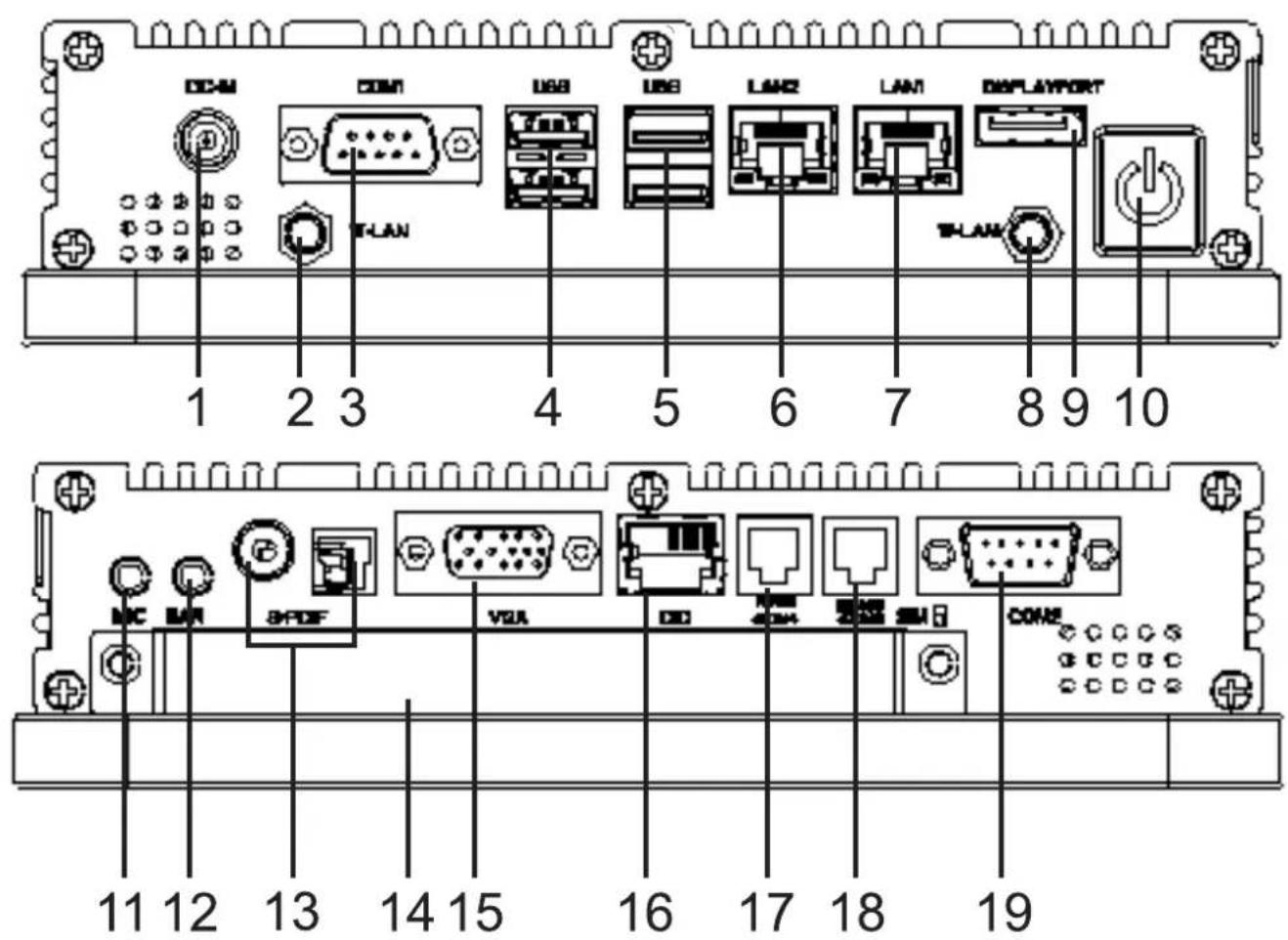
1 Schraubbarer Stromanschluss
2 Schraubbarer W-LAN Stecker
3 COM1
4 1x USB 2.0; 1x USB 3.0
5 2x USB 2.0
6 10/100/1000MBit Lan Stecker
7 10/100/1000MBit Lan Stecker
8 Schraubbarer W-LAN Stecker
9 DisplayPort (HDMI mittels Adapter)
10 An-/Aus-Knopf
11 Mikrofon Eingang
12 Sound Output
13 S/PDIF
14 VGA
15 1x 2,5" Modulslot, wechselbare SSD integriert
16 DIO
17 RS485/COM4
18 RS485/COM3
19 COM2
Zus. im Lieferumfang enthalten: 100-240V Schaltnetzteil, Touchstift, Bedienungsanleitung und Treiber-CD für Windows, Linux oder Mac Betriebssysteme.
Optional:
Inbetriebnahme und Installation
faytech stellt Ihnen eine ausgereifte, qualitativ hochwertige PC-Hardware zur Verfügung. Für die Softwareinstallation, -Nutzung und –Pflege ist der jeweilige Anwender verantwortlich.
Auf der beigelegten Treiber-CD sind Windows- und Linuxtreiber für unsere faytech Touch-PCs enthalten. Gerne prüfen Sie unter www.faytech.com, ob bereits aktualisierte Treiber vorliegen.
Sofern Sie das System mit einer SSD erworben haben, ist auf dieser bereits ein aktuelles Ubuntu Image installiert mit dem Sie sich mit der Hardware und der Touch-Nutzung vertraut machen können. Das Image ist auch unter www.faytech.com erhältlich.
Die Bedienungsanleitung zur Touch-Software-Nutzung steht ebenfalls auf unserer Internetseite zum download für Sie bereit.
Zur Inbetriebnahme verbinden Sie Ihren faytech-Touch-PC einfach mit dem im Lieferumfang enthaltenen Netzteil oder einer entsprechenden 12V DC-Stromquelle die mindestens 5A Gleichstrom liefert. Zum Start des Systems drücken Sie auf den An/Aus-Knopf.
Sofern Sie ein Gerät ohne Festplatte bezogen haben befolgen Sie bitte die folgenden Hinweise:
- Der nachträgliche Speicher- oder Festplatteneinbau ist sehr einfach: Öffnen Sie die Schutzklappe, öffnen Sie das SSD-Fach (1) und setzen Sie die gewünschte 2.5" SSD oder Harddisk mit 9mm Bauhöhe ein.
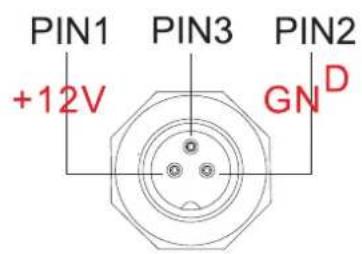
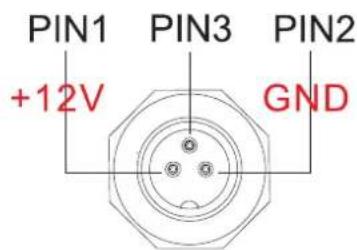
- Zusätzlicher verschraubbarer Stromanschluss: Die Touch-PC-Serie wird mit einem zusätzlichen verschraubbaren Stromanschluss ausgeliefert. Bitte beachten Sie folgende PIN-Belegung: PIN 1: +12V DC PIN 2: GND PIN3: nicht belegt. Achten Sie auf die richtige Polung, sonst zerstören Sie unwiderruflich den Touch-PC.
Optionale Erweiterungen
Da die faytech Touch-PC-Serie häufig in der Industrie eingesetzt wird bieten wir zahlreiche Erweiterungen an, die Sie bei unseren Vertriebspartnern bestellen können. Eine Auswahl im Folgende:
- Massiver VESA-100 Standfuß, Gehäuseanpassungen, Integration von z.B. Card-Readern, Scannern, Druckern
- Erweiterung der möglichen Betriebsspannung von 8 - 36V DC
- Interne Nutzung des Mini-PCI-E-Slots, der COM- und USB-Ports für den Verbau weiterer Geräte, z.B. GPS, GPRS, UMTS
- IP-Schutzklassen, Integration anderer Touchtechnologien
- Bedienknöpfe und Anschlüsse in der Front
Im Projektgeschäft sind weitere Anpassungen nach Ihren Anforderungen möglich.
Fehlerbehebung
1. Kein Bild:
- überprüfen Sie zunächst, ob die Stromversorgung korrekt angeschlossen ist und funktioniert (grüne LED am Netzteil).
- bei Installation neuer Grafikkartentreiber wird unter Umständen das BIOS verstellt und es ist kein Bootscreen zu sehen. Warten Sie eine bis zwei Minuten, bis Windows geladen ist.
- schließen Sie eine externe Tastatur per USB an und überprüfen Sie, ob die Num-Lock LED der Tastatur leuchtet (drücken Sie Num-Lock). Leuchtet diese, liegt in der Regel nur ein verstelltes BIOS vor. Machen Sie den Rechner noch mal aus, starten Ihn neu und drücken Sie so lange Entf bis Sie sicher sind, dass Sie im BIOS sind. Stellen Sie die Grafikoptionen im BIOS gem. Kapitel BIOS-Einstellungen neu ein.
- führt keiner der oben genannten Punkte zum Erfolg kontaktieren Sie bitte unseren direkten Hersteller-Service unter unten angegebenen Kontaktdaten.
BIOS-Einstellungen
Im Folgenden werden die für Sie wichtigsten BIOS-Einstellungen erklärt. Bitte beachten Sie, dass das BIOS ein Spezial-BIOS für integrierte Monitor-PC-Lösung ist. Entsprechend kann es nach Verstellungen im BIOS vorkommen, dass Sie kein Bild mehr auf Ihrem Touch-PC-Bildschirm sehen. Aus diesem Grund sollten nur erfahrene Anwender Veränderungen am BIOS vornehmen. Ist das System verstellt, gehen Sie wie folgt vor: Drücken Sie (auch wenn Sie kein Bild sehen) auf einer angeschlossenen Tastatur „Entf“, bis Sie sich sicher sind, dass sie im BIOS sind. Dann drücken Sie F5, Enter, F10, Enter. Das System startet neu und Sie sollten auf Ihrem Internen Monitor wieder ein Bild haben.
Die wichtigen Grafikeinstellungen für die Nutzung des intern verbauten Monitors im Folgenden:
Advanced -> North Bridge LVDS Config Select
●LVDS Panel Config Select: Physikalische Auflösung des Panels (siehe Spezifikation Seite 8)
●EDID Panel Option = [Enabled]
Vorinstallierte Linux-Software (Optional)
Sofern auf Ihrem Touch-PC mit integrierter SSD ein aktuelles Ubuntu vorinstalliert ist lautet der Username „User“, Passwort „user123“.
Wenn Sie das Passwort ändern wollen öffnen Sie ein Terminal. Tippen Sie „sudo su“, „enter“. Das Passwort ist noch „user123“. Dann „passwd user“ und geben dann das neue Passwort ein.
2. Touchfunktion ist nicht genau:
bitte laden Sie sich von unserer Internetseite www.faytech.com die aktuelle Bedienungsanleitung für die Touch-Nutzung herunter. Führen Sie eine Neukalibrierung durch um den Touchscreen neu zu kalibrieren.
Anschlussbelegungen
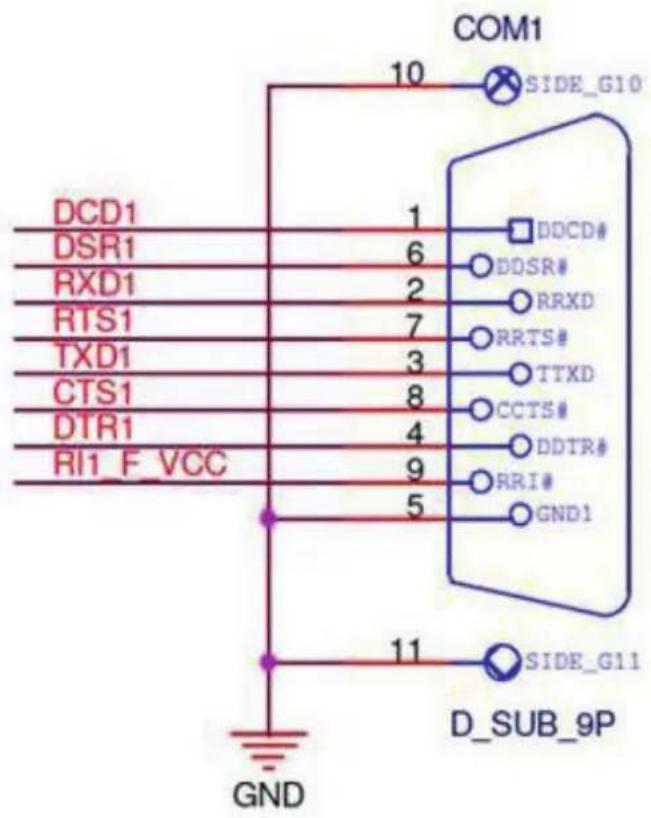
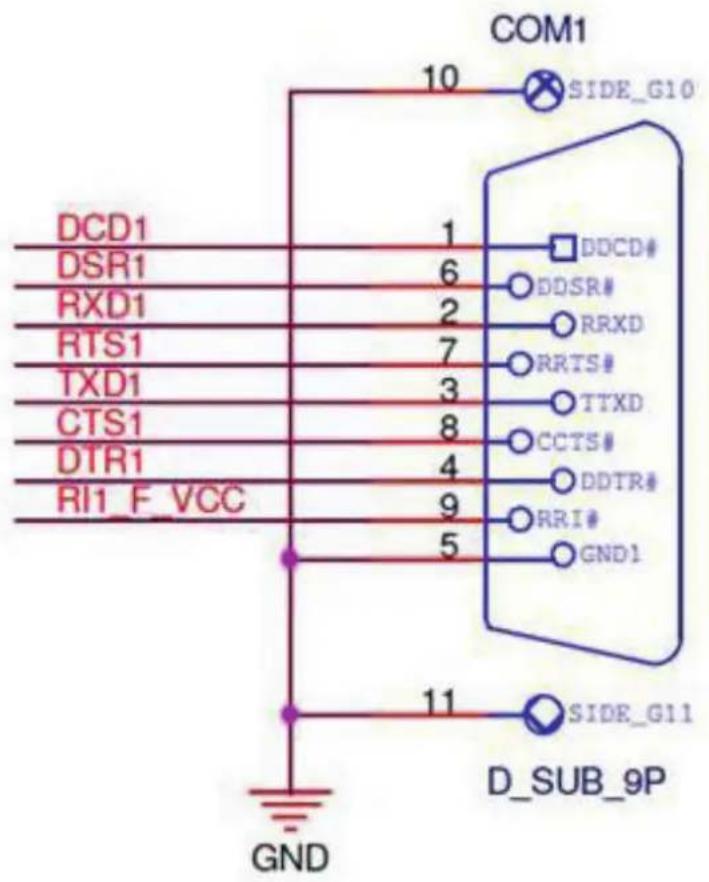
| Pin | Signal | Pin | Signal |
| 1 | DCD (422TXD-/485DATA-) | 2 | RXD (422RXD+) |
| 3 | TXD (422TXD+/485DATA+) | 4 | DTR (422RXD-) |
| 5 | GND | 6 | DSR |
| 7 | RTS | 8 | CTS |
| 9 | RI/+12V/+5V | 10 | N.C. |
Technische Daten Touch PCs
| CPU | Intel® Celeron QuadCore Prozessor J1900 |
| Front Side Bus | 2000/2400MHz |
| Chipsätze | Intel® E3800 |
| BIOS | 64Mb Flash ROM, UEFI AMI BIOS, PnP, DMI 2.0, Wfm 2.0, SM BIOS, ACPI 3.06 |
| Arbeitsspeicher | 1x 4GB DDR3L SODimm (Expandable to 8GB) |
| Grafik | Intel® HD Graphics |
| Audio | Realtek 887 8channel high definition audio codec, Audio Amplifier EUA 2012A |
| Netzwerk | 2 x Realtek PCIe Gb LAN 8111G |
| Externe Anschlüsse | 1x Display port; 1x VGA-out (from internal header)1x USB 3.0, 3x USB 2.0 ports2x COM port Full-PIN (RS232/485; 5V/12V)2x COM port 3-PIN (RX, TX, GND; RS232/485 switchable)2× 10/100/1000Mbit RJ45 PortsS/PDIF-Out (1x Cinch, 1x Torx); MIC-In, EAR-Out8x In/Out GPIO as RJ451x 12V DC-In (screwable)1x On/Off-button; 1x Button-Line with On/Off + 4 GPIO-buttons on front panel2x W-LAN connector1x 2.5" module slot, changeable SSD included |
| Interne I/O Anschlüsse | 1x SO-DIMM Slot, max. 8GB, DDR3L-1333 Single channel memory1x 12V DC power connector (2-pin); 1x 4-pin SATA power connector2x S-ATA 3GB/s ports; 1x VGA pin header; 1x DP-Pin-Header1x LVDS connector; 1x 5-pin LCD power connector1x S/PDIF output pin header; 1x Line-Out / Mic-In audio pin header1x 4-pin (2x2W) audio amplifier connector1x PS/2 keyboard/mouse connector (6-pin)1x USB 2.0 header supports additional 4x USB 2.0 ports3x RS232/RS485 COM connectors, switchable between RS232/RS485 in BIOS1x 8-bit Digital I/O interface; 1x Chassis Fan connector |
| Eingangsspannung | 12V DC-IN |
| Betriebstemperatur | -10°C ~ +60°C |
| Treiber | Win7, Win8; Win10, Linux; 32Bit/64Bit |
Monitor und Touch-Panel-Spezifikation
| Touch-Panel: | Kapazitiv 10-punkte Multitouch | |||
| Touch-Anschluss: | USB | |||
| Touch-Panel-Treiber: | Windows, Linux, Mac, Android | |||
| Lebensdauer Touch-Panel (Berührungen): | Unlimitiert | |||
| Reaktionszeit Touch-Panel (ms): | < 10 | |||
| Oberflächenhärtegrad: | 7H | |||
| Druckstärke (g): | 20 ~ 150 | |||
| Befestigung: | VESA- 100 Halterung zur Montage | |||
| 10.1" PC | 15" PC | 17" PC | 21.5" PC | |
| Seitenverhältnis: | 16:10 | 4:3 | 4:3 | 16:9 |
| Helligkeit (cd/m2): | 400 | 300 | 250 | 250 |
| Kontrast: | 800:1 | 700:1 | 800:1 | 1000:1 |
| Betrachtungswinkel horizontal; vertical (°): | 178;178 | 160;160 | 160;160 | 170;160 |
| Physikalische Auflösung: | 1280x800 | 1024x768 | 1280x1024 | 1920x1080 |
English
www.faytech.com
Warranty:
faytech touch PCs are produced following the most modern production and test processes. Carefully selected components and accurate production ensure reliable operation and long life. faytech warrants to the original purchaser that each faytech touch PC delivered shall be free from defects in material or workmanship at time of shipment, and that each such module delivered will meet the published specifications for a period of 24 months as measured from the date of original shipment. faytech's obligation under the Warranty contained herein is limited to the repair or replacement of any faytech touch PC that does not meet the specifications, provided that said product is returned to faytech, transportation charges pre-paid, and provided that upon faytech's examination, the product, when tested within the specified ratings and in accordance with good engineering practice, does not meet the specifications as defined. THIS WARRANTY IS IN LIEU OF ALL OTHER WARRANTIES, EXPRESSED OR IMPLIED, INCLUDING WITHOUT LIMITATION THE WARRANTY OF MERCHANTABILITY AND THE WARRANTY OF FITNESS FOR A PARTICULAR PURPOSE.
All claims under warranty must be made promptly after occurrence of circumstances giving rise thereto and must be received within the applicable warranty period by faytech or its authorized representative. Such claims should include the Product type and serial numbers and a full description of the circumstances giving rise to the claim. Before any Products are returned for repair and/or adjustment, written authorization from faytech or its authorized representative for the return and instructions as to how and where these Products should be shipped must be obtained. Any product returned to faytech for examination shall be sent prepaid via the means of transportation indicated as acceptable by faytech. faytech reserves the right to reject any warranty claim not promptly reported and any warranty claim on any item that has been altered or has been shipped by non-acceptable means of transportation. When any Product is returned for examination and inspection, or for any other reason, Customer will be responsible for all damage resulting from improper packing or handling and for loss in transit, notwithstanding any defect or nonconformity in the Product. In all cases faytech has sole responsibility for determining the cause and nature of failure, and faytech's determination with regard thereto shall be final. If it is found that faytech's Product has been returned without cause and is still serviceable, Customer will be notified and the Product returned at Customer's expense. In addition, a charge for testing and examination may, in faytech's sole discretion, be made on Products so returned.
SELLER'S LIABILITY FOR DAMAGES SHALL NOT EXCEED THE PAYMENT, IF ANY, RECEIVED BY SELLER FOR THE UNIT OF PRODUCT OR SERVICE FURNISHED OR TO BE FURNISHED AS THE CASE MAY BE WHICH IS THE SUBJECT OF CLAIM OR DISPUTE. IN NO EVENT SHALL SELLER BE LIABLE FOR INCIDENTAL, CONSEQUENTIAL OR SPECIAL DAMAGES. LIABILITY TO THIRD PARTIES, FOR BODILY INJURY INCLUDING DEATH, RESULTING FROM SELLER'S PERFORMANCE
support or sustain life and whose failure to perform when properly used in accordance with instructions for use provided in the labeling can be reasonably expected to result in a significant injury to the user. A “Critical Component” is any component in a life support device or system whose failure to perform can be reasonably expected to cause the failure of the life support device or system or to affect its safety or effectiveness.
If your device does have a defect within the warranty period, please contact faytech directly. The warranty period is 24 months from the date of purchase under the following conditions:
- All warranties are void if the unit has been opened or disassembled without faytech's prior approval.
●Damage caused by improper handling or operation, by incorrect installation or storage, through improper connections, as well as due to force majeure or other external influences are not covered by the warranty. - For warranty claim, we reserve the right to replace the defective components or to exchange the device.
●Exchanged components or devices become the property of faytech. - Claims for damages are excluded in so far as they are not based on intent or gross negligence of the manufacturer.
●After expiration of the warranty period, warranty claims can no longer be pursued.
●Any warranty claim must be accompanied by proof of purchase (receipt or invoice).
To the buyer of this product:
Thank you for purchasing our faytech touch-screen PC. You have purchased a small and powerful desktop system that is suitable for use in harsh work environments. It is distinguished from standard PC systems through silent operation and an increased stability, especially through the robust aluminum housing and by the lack of moving part.
Not to mention the high quality and attractive design (the housing is made out of refined aluminum) the faytech touch-screen PCs are made for the use in industry, in machine control, in the Home automation, in the digital signage field, and many other application fields.
To avoid mistakes and for the optimal use of the touch-screen computers, please read this manual in detail before first use.
Electrical Safety Tips:
The device should only be opened by technical service personnel. Improper opening can result in loss of warranty. Please separate the touch PC from the power supply before opening.
Operating Safety:
- Please check before first use if all the external adapter and cables are properly connected.
●The PC must not have in any case loose objects, especially any exposed, conductive objects. Otherwise there is the risk of a short circuit and the permanent damage to the touch PC. - Dust, moisture and temperature jumps drastically shorten the life of the touch screen PC. Please avoid, if possible, these external negative factors.
- Although the touch PC is provided with an anti-vibration mechanism please do not drop the PC and try to avoid strong and jarring movements.
- Please clean your faytech touch PC not with chemical supplies but use a dry cloth for cleaning.
Ongoing changes:
faytech produces its displays in China with German know-how and quality management. Your feedback is the most valuable information for the improvement of our products. Continuous production and product improvement is our primary goal. For this reason, there may be improvements in our products which are not yet included in this user's guide. Differences between your product and this user's guide are generally related to specification changes and product improvements. If you have any questions or suggestions, please contact our support team or visit our website at www.faytech.com
Delivery and accessories 10.1" - 21.5" Capacitive Touch PC
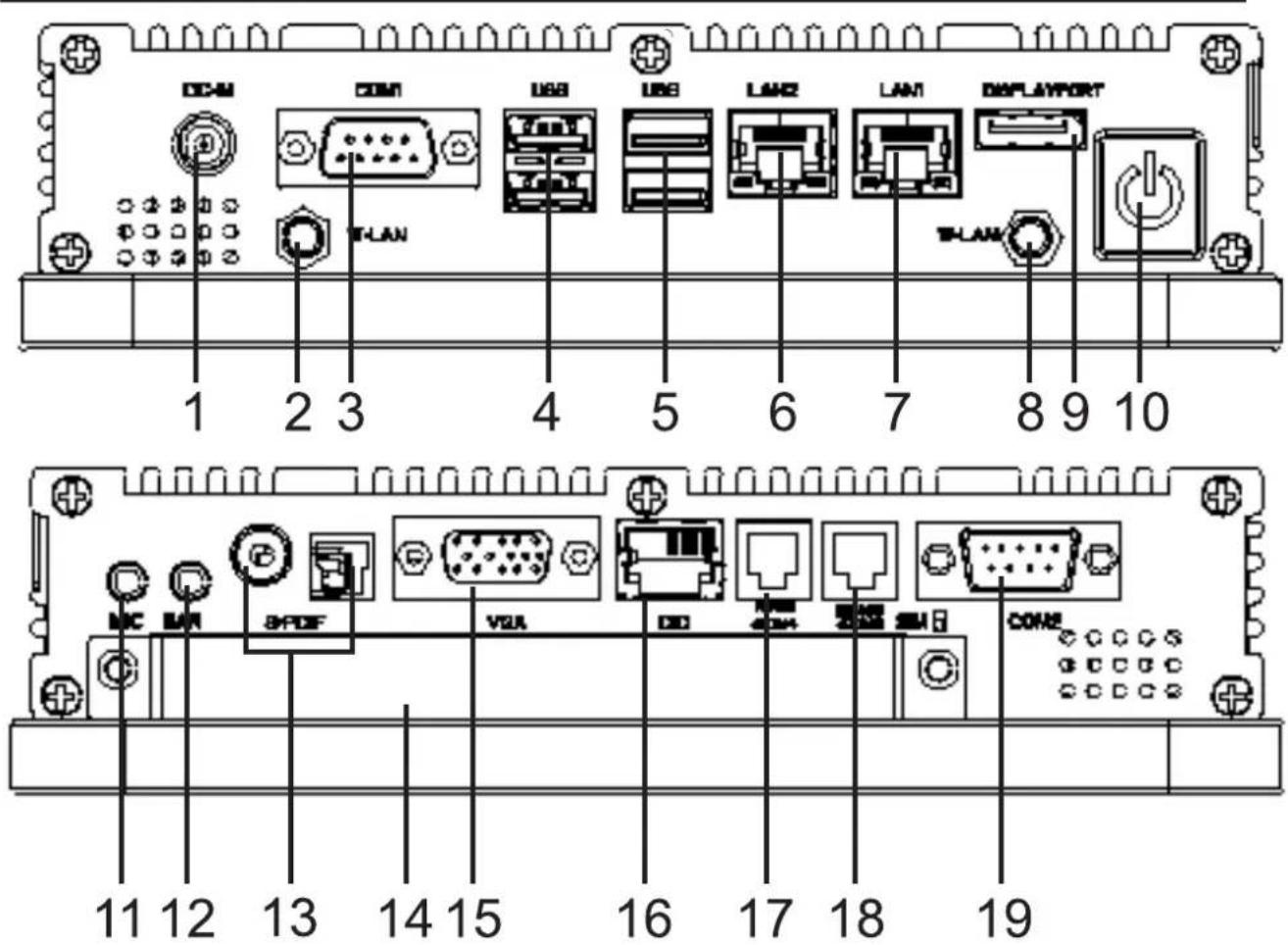
1 Screwable Power Connector
2 Screwable W-LAN Connector
3 COM1
4 1x USB 2.0; 1x USB 3.0
5 2x USB 2.0
6 10/100/1000MBit Lan Connector
7 10/100/1000MBit Lan Connector
8 Screwable W-LAN Connector
9 DisplayPort (HDMI via adapter)
10 ON/OFF button
11 MIC-IN
12 EAR-OUT
13 S/PDIF
14 VGA
15 1x 2.5" module slot, changeable SSD included
16 DIO
17 RS485/COM4
18 RS485/COM3
19 COM2
Additional included in delivery 100-240V switching power supply, Touch pen, manual and driver CD for Windows, Linux and Mac OS.
Optional:
Initial Set-up Information
faytech offers you a well-engineered, high-quality PC hardware. For the software installation, use and maintenance the respective user is responsible.
On the bundled driver CD are Windows and Linux drivers for our faytech Touch PCs included. Feel free to check www.faytech.com to see whether there are updated drivers.
If you purchased the system with a SSD, a current Ubuntu image is already installed with which you can become familiar with the hardware and the use of the touch-panel. The image is also available under www.faytech.com
The touch software manual is also downloadable on our website.
To start, connect your faytech-touch PC simply with the in delivery included AC adapter or use an equivalent 12V DC power source with at least 5A DC. To start the system, press the On / Off button.
If you have bought a faytech touch PC without hard disk, please follow the following instructions.
- The installation of an external Device is really simple. Just open the SSD Shelf to insert a fitting 2.5" SSD/harddisk with 9m in height.
- Additional screwable DC-connector: The touch PC-series has an additional screwable power connector. The PIN assignments are: PIN1: +12V DC PIN 2: GND PIN 3: not used Please take care of the right polarity, otherwise your PC is irrevocably destroyed. Please see paragraph "Components".
BIOS-settings
In the following, the most important BIOS settings are explained. Please note that the BIOS is a special BIOS for PC's with built-in display solutions.
Accordingly, it can occur after adjustments to the BIOS that you see no image on your monitor. For this reason, only experienced users should make changes to the BIOS. If the system is wrongly adjusted, proceed as described in the following: press (even if you see no image) on a connected keyboard the Delete key until you are sure you are in the BIOS. Then press F5 Enter F10 Enter. The system will reboot and you should have on internal monitor again a picture.
The major graphic settings to use the touch PCs internal built in monitor:
Advanced -> North Bridge LVDS Config Select
- LVDS Panel Config Select: Physical resolution of the panel(Please see specification on page17)
- EDID Panel Option = [Enabled]
Pre-installation Linux-Software (Optional)
When an actual Ubuntu has been preinstalled in the Touch-PC with SSD the User Name is “user” and the password is “user123”.
If you want to change the password, please open a terminal. Type "sudo su", then press "Enter". The password is "user123". Please chose "passwd user" and give your new password.
Since the faytech Touch PC series is widely used in industry applications, we offer a number of extensions that you can order from our distribution partners. See a selection below:
● Solid VESA-100 Stand, Housing adaptations, integration of e.g. Card readers, scanners, printers
● Expansion of the possible operating voltage to 8 - 36V DC
- Internal use of the Mini-PCI-E slot, the COM and USB ports for additional devices such as GPS, GPRS, UMTS
• IP protection classes, other touch technologies
- Buttons and ports in the front
In project business, further adjustments are possible to meet your requirements.
Troubleshooting
1.No picture
- First, check whether the power supply is properly connected and working (green LED on the power supply).
- when you install new video card drivers, the BIOS is under certain circumstances adjusted and there is no boot screen to see. Wait a minute or two until Windows is loaded.
- connect an external keyboard via USB and check whether the Num Lock LED illuminates (press Num Lock on the keyboard). When it lits, there is usually only a misaligned BIOS. Turn off the PC, reboot and then press DELETE so often until you are sure that you are in the BIOS. Set the graphics options in the BIOS following the Chapter BIOS settings.
- leads none of the above suggestions to success, please contact our direct manufacturer service under the below shown contact information.
2.Touch function is not exact
please download from our website www.faytech.com the actual manual for the use of the touch-function. Please do a recalibration to improve the exactness of the touch panel.
Pin Description
| Pin | Signal | Pin | Signal |
| 1 | DCD (422TXD-/485DATA-) | 2 | RXD (422RXD+) |
| 3 | TXD (422TXD+/485DATA+) | 4 | DTR (422RXD-) |
| 5 | GND | 6 | DSR |
| 7 | RTS | 8 | CTS |
| 9 | RI/+12V/+5V | 10 | N.C. |
PC-specification
| CPU | Intel® Celeron QuadCore Prozessor J1900 |
| Front Side Bus | 2000/2400MHz |
| Chipsets | Intel® E3800 |
| BIOS | 64Mb Flash ROM, UEFI AMI BIOS, PnP, DMI 2.0, Wfm 2.0, SM BIOS, ACPI 3.06 |
| Memory | 1x 4GB DDR3L SODimm (Expandable to 8GB) |
| Graphic | Intel® HD Graphics |
| Audio | Realtek 887 8channel high definition audio codec, Audio Amplifier EUA 2012A |
| Network | 2 x Realtek PCIe Gb LAN 8111G |
| External Connectors | 1x Display port; 1x VGA-out (from internal header)1x USB 3.0, 3x USB 2.0 ports2x COM port Full-PIN (RS232/485; 5V/12V)2x COM port 3-PIN (RX, TX, GND; RS232/485 switchable)2× 10/100/1000Mbit RJ45 PortsS/PDIF-Out (1x Cinch, 1x Torx); MIC-In, EAR-Out8x In/Out GPIO as RJ451x 12V DC-In (screwable)1x On/Off-button; 1x Button-Line with On/Off + 4 GPIO-buttons on front panel2x W-LAN connector1x 2.5" module slot, changeable SSD included |
| Internal I/O Connectors | 1x SO-DIMM Slot, max. 8GB, DDR3L-1333 Single channel memory1x 12V DC power connector (2-pin); 1x 4-pin SATA power connector2x S-ATA 3GB/s ports; 1x VGA pin header; 1x DP-Pin-Header1x LVDS connector; 1x 5-pin LCD power connector1x S/PDIF output pin header; 1x Line-Out / Mic-In audio pin header1x 4-pin (2x2W) audio amplifier connector1x PS/2 keyboard/mouse connector (6-pin)1x USB 2.0 header supports additional 4x USB 2.0 ports3x RS232/RS485 COM connectors, switchable between RS232/RS485 in BIOS1x 8-bit Digital I/O interface; 1x Chassis Fan connector |
| Input voltage | 12V DC-IN |
| Operating temperature | -10°C ~ +60°C |
| Driver | Win7, Win8; Win10, Linux; 32Bit/64Bit |
Monitor and Touch-Panel Specification
| Touch-panel: | Capacitive 10-finger Multitouch | |||
| Touch-connector: | USB | |||
| Touch-panel-driver: | Windows, Linux, Mac, Android | |||
| Touch life (contacts): | Unlimited | |||
| Response time touch-panel (ms): | < 10 | |||
| Surface hardness: | 7H | |||
| Input force (g): | 20 ~ 150 | |||
| Mounting: | VESA-100 holes | |||
| 10.1" PC | 15" PC | 17" PC | 21.5" PC | |
| Aspect ratio: | 16:10 | 4:3 | 4:3 | 16:9 |
| Brightness (cd/m2): | 400 | 300 | 250 | 250 |
| Contrast: | 800:1 | 700:1 | 800:1 | 1000:1 |
| Visual Angle horizontal, vertical (°): | 178;178 | 160;160 | 160;160 | 170;160 |
| Physical resolution | ||||
| 1280x800 | 1024x768 | 1280x1024 | 1920x1080 | |
Kontaktdaten, RMA-Bearbeitung
Support-Nummer:+49 (0) 551 82098660
Global-Support: +86 755 89580612
Support-E-Mail: support@faytech.de
Hersteller-Internetseite: www.faytech.com Internetseite RMA: http://rma.faytech.de
Euroische Support- und Versandlager:
faytech Service GmbH
Karl-Grüneklee-Str. 23-27, 37077 Göttingen, Deutschland
RMA-Bearbeitung
Wenden Sie sich bei einem mutmaßlichen Defekt bitte immer zunächst an uns. Unsere ausgebildeten Fachkräfte helfen Ihnen gerne weiter. Liegt tatsächlich ein Defekt vor erhalten Sie über support@faytech.de eine RMA-Nr. (Return Merchandise Authorization). Senden Sie das defekte Teil mit deutlicher Anbringung der RMA-Nr. an obige Adresse ein. Zubehörteile wie Kabel, Adapter oder Netzteile tauschen wir in der Regel unkompliziert vorab aus.
Bitte senden Sie die Ware immer frei an uns. Unfreie Ware (Kosten zahlt der Empfänger) nehmen wir nicht an. In den ersten 30 Tagen nach Erstkauf übernehmen wir sämtliche Transportkosten für Sie. Dafür senden wir ihnen per E-Mail mit der RMA- Nr. Einen Rücksendeschein zu. In der restlichen Garantiezeit tragen wir die Rücksendegebühren.
Für die Service-Fall-Bearbeitung außerhalb Chinas arbeiten wir mit lokalen Bevollmächtigten/ lokalen Servicepartnern zusammen die je nach Vertragsgestaltung in unserem Namen auftreten. Weitere Informationen diesbezüglich erhalten Sie auf Anfrage unter den genannten Kontaktdaten.
Contact, RMA service (in English):
Support Number: +1 720 251 4158
Global Support: +86 755 89580612
Support E-Mail: support@faytech.com
Homepage: www.faytech.com Webpage of RMA: http://rma.faytech.com
RMA service:
If you think your faytech product has a defect please always contact us directly. Our trained after sales service specialists can help you resolve your problems. Please check the manual and our frequently asked questions before contacting us you will usually find an answer to your question. If there is a defect you can request an RMA number (Return Merchandise Authorization) at support@faytech.com or via fax at +86-755-89580613 (Chinese fax-number). Please attach in the contact e-mail/fax your invoice and what problems you are experiencing. In reply, you will receive an e-mail/fax with your RMA number and additional information. For accessories like cables, adapters or power supplies which are not working, we can usually send you a replacement before receiving the damaged goods. For a defective product, we try to check and solve the problem within 3 days after receipt. Make sure that shipping has been paid before sending goods back to us. We do not accept postage due packages at our service centers. Anything received with postage due will be returned to you without any testing or resolution. Within the first 30 days after you buy a new faytech product, we will refund your shipping costs for returned products. For the rest of the warranty period, we will pay the shipping costs for any repaired or replaced items that we ship back to you.
For support outside of China, we work with local representatives / local service partners together who may work on our behalf in our name. On request, more information can be obtained at the above contact information.