
Blade G2 - Nutitelefon ZTE - Tasuta kasutusjuhend
Leidke seadme juhend tasuta Blade G2 ZTE PDF-formaadis.


Kasutajate küsimused teemal Blade G2 ZTE
0 küsimus selle seadme kohta. Vastake nendele, mida teate, või esitage oma.
Esita uus küsimus selle seadme kohta
Laadige alla juhend oma Nutitelefon PDF-formaadis tasuta! Leidke oma juhend Blade G2 - ZTE ja võtke oma elektrooniline seade uuesti kätte. Sellel lehel on avaldatud kõik teie seadme kasutamiseks vajalikud dokumendid. Blade G2 kaubamärgi ZTE.
KASUTUSJUHEND Blade G2 ZTE
ZTE Blade G2 WCDMA/GSM Mobile Phone Quick Start Guide
1234567
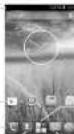
Getting to Know the Home Screen
The home screen is the starting point for your phone's applications, functions and menus. You can customize your home account by adding application starts, filters, tables, and more.
Shu heng
Google Search
•
W capitol
广力云
广力云智慧零售收银系统
Elvance
2017年1月1日
Flon.
Ego:
NOTE: Your home screen extends beyond the initial session, providing more space for entertainment, multiplex, and folders. Simply saws left or right to see the extended home screens.
Opening Applications
- Track the Home Key Line corner screen to red
The home screen.
-
Touch
-
Slide left or right on the screen and touch an app
locip
Addles: Shortcuts or Wikicals
- The Home King
(1) 由《Hello》中
2 you
K
- Touch and hold a budget or an app kit and drag it
to the time screen.
Removing Shortcuts or Widgets
- Teach and local knowledge in application for home
2021067
- Drag is to remove it.
Organizing Shortcuts With Edters
-
Teach and build a structure in machine room
-
Dog he showed an 100-inch and school
your finger. A new folder is created and both share
ours are added into the order.
- If needed, drug prices stabilize among them and
The topic
Applying New Wallpapers
You can set the wallpaper for the home screen.
-
Touch the Home Key > Menu Key > Wallpaper
-
Selbst в аэфрация сизиям иен Gallery, Live
Wallpapers, Viden Wallpaper, 20 Wallpapers
and to-cho the price or amount on you want to use
as the vol.
- Touch Set wallpage
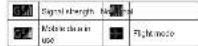
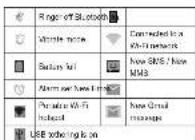
Checking the Phone Status
The following table is provided in the image:
The information can be done by the author of the present organization and consider a position with previous years.
and service deals will vary in order. Below are some of the lives and their margins.
of the keys and their healths.
9
Tradewalks
2TE and the 2TE logos are trademarks of the 2TE Corporation, Google and Android are trademarks of Google, Inc. The Blueworth trademark and logos are owned by the Bluebcoth SIC, Inc. and any use of such trademarks by 2TE. Corporation is a whole system. The main 3D logo is trademarks of the 3D Card Association. Other trademarks and trade names are the property of their respective owners.
Verskort No.: R1.2 Editor: Timov 201304 Konzeln: 200585526670
Setting Ringtone and Sounds
Setting Rington or Notification Sound 1. Touch the Home Key > Settings > Audio refining a General
- Touch Voice call double, Video call double or
Default notification.
-
Salary by income level
-
Touch OK
- 12.00 €
Selling System Sounds
- Touch the Home Key > Settings > Audio
profiles > General 2. Send to the SYSEM and can and check the service you want to hear or uncheck these you do not meet
Adjusting Volumes
To action call volume, press the Volume Key activity
a tall. To adjust other volumes, follow the steps below.
10
Getting to Know Your Phone
-
Touch the Home Key > Settings > Audio profiles > General > Volumes
-
Drag the order to adjust the volume in the largest and smaller volume, and the above volume.
-
Touch OK to save.
TIP: Press and told the Power Key and then touch
to enable the electron mode, which enables the
vertical point scale, or launch. The code is in the best scale.
(1) 2017年1月1日,公司发布《关于使用部分闲置募集资金进行现金管理的公告》(公告编号:2017-036)。
Setting a Screen Lock
You can pick your place by calling a screen look
We can be able to use a system, or place a
The following table is provided in the image.
and so
- Touch the Home Key > Remote Key > System set.
Hogs > Security > Screen lock
- Touch Nona, Press, Pattern, PIN or Password
▶ Touch Pmax at muscle muscle with a 'mush muscle' tool for spaces. You can work the camera by touching and holding 📄 the center of the eyes.
▶ Touch Pattern to create a pattern that you
mal down to unlock the senses.
▶ Touch PIN or Password to set a numeric PIN
or a password you must enter to unlock your
57860
(3) 2017年
Checking Voicemail
-
Touch the Home Key
-
a line drawing: Sketch and
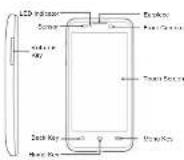
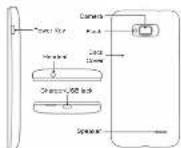
Power Key
• Press and holds to press on selected shares, more.
relacet, turn on left angle mode or close of
- Free to turn off or on the screen display.
Home Key
- touch to play, play home, and play away
P rincif 01:56900
- Tenth and head in an environmentally used application
• Yucanam in 415 302 (Italy) 1968 (Agricola).
Mori Kuy
In touch to get the options for the current power.
Black Key
Touch to go to the previous screen.
Volume Key
Please be held in turn the whole up at down.
(1) 2014年1月1日(星期六)上午9:30-15:00
Starting Up
和与成的,由小计数列到小计数列
the 5000000000000000000000000000000000000000
and can be installed and removed while the price
and can be in the all-inlable and in the p-1e
-
2023年1月1日,公司召开2023年第一次临时股东大会,并于2023年4月15日
-
Review (see the list of the book cover)
-
+DO YOU THU: 26, 0470, 26, 220, 0019

- Hold the SBS card with its net corner ordered as
The following table is provided in the image.

Cautley Instal your WEDISS or GSH SIM card pro
SP4 vis 7
In the case 628-913 run in a SLM sk?
- Hold your missed card with the next contacts
davio down and skin. Into the rskm3D card slot.

- After the intervention of drug delivery and the lesion
and side line hency, on the contrast. Tino
and you have the delivery to do compared them

- Pass the most pretty love me pesas and you have a deal.
Charging the Battery
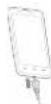
1 Connect the adapter in the changing park. I more find the adapter is connected with the correct orientation. Do not force the controller into the changing park.
-
Connect the charger to a standard AC power out
-
Correct the change when the holders of help changed
Powering On'Off Your Phone
Make sure the battery is charged before powering on - Press and hold the Power Key to turn on your plume.
• To turn a off, you are and hold the Power Key in open the action menu. Touch Power off > OK
Connecting With a Bluetooth Headset
-
Turn on the Bluecoch headed and switch it to pairing mode. Refer to the headset's user guide for more automatic.
-
Touch the home screen and select Settings
Bluetooth
- Show the ON/OFF order of Illinois in all. When Illinois is on The Court question in the status bar.
NOTE: Your phone automatically searches for and displays the Dx of all available Bluetooth devices in range. You could touch SEARCH FOR OEMIC-ES if you want to scan again
-
Tread the ID of the house, or any other thanks you want to pay with your phone. Enter a pass code I proposed.
-
If necessary, reach the 12 of the period located in connected within. Grace connected, the 12 part in the algebra line turns less.
TP. Touch 16 (d m m in a) and Inv octonics
Installing Apps From the Google Play Store
There are less of Transactions of government specifications in the Google Play Store for you to download and install. You can send feedback or comments on an application.
It doesn you begin, make sure that you have a good rule to your Google account.
12
11
14
NOTE The content you can know in the Fly Show
depends on your region and your service provider.
Play Store.
The first time you launch Play Store, accept the
Google Pay (Home) Services.
- The first sign you need after the category of
Ioudirau
-
请仔细阅读并注意详细信息。
-
Touch install than 20% or free price in a \$1,000
If he was to end here, you were to enter is in our
People's Market revenue and export expenses
method
CAUTION: Once petrolled, some year can be
manul actions on a sign-farm instrument
(1) 2017年1月1日,公司召开2017年第二次临时股东大会,审议通过了《关于使用部分闲置募集资金进行现金管理的议案》。
www.oxt.assess. Touch Accept & download links
onset at Arment & huts (neal press) to construct
Iardal Ray Key
- If the best way is to developers are satisfied
subsequently, l'impervant pas de cultivars.
In the case of the following
The following table is provided in the image:
The image is too blurry to recognize any text content.
pear in the same bar. You can
touching the Home Key >
15
Taking a Photo
- Text is the most important value of Comms
In addition, we have a large number of students in the 2018 school year.
- A# is called a # of the person who has any
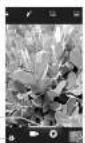
| Number | Function |
| 1 | Capture a photo |
| 2 | Change the camera settings |
| 3 | View photos and video you have captured |
| 4 | Switch between the front camera and the back camera |
| 5 | Switch the foot |
| 6 | Select the camera mode. |
- Touch the area where you want the camera to
know. Green trackable appear around the focused
H286
- Lurke modul bialan
15
Recording a Video
-
Text
-
The first section of the original particle array
2.10.13.2017
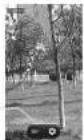
| Number Function | |
| 1 Start or stop recording a video. | |
| 2 | View choice and video, you have captured. |
- Touch 200 and to take according.
17
Playing Music
-
Tech. 2. In a new version of the
-
Touch a colony such as date or time
-
10.04. 10.05. 10.06. 10.07. 10.08. 10.09. 10.10. 10.11. 10.12. 10.13. 10.14. 10.15. 10.16. 10.17. 10.18. 10.19. 10.20. 10.21. 10.22. 10.23. 10.24. 10.25. 10.26. 10.27. 10.28. 10.29. 10.30. 10.31. 10.32. 10.33. 10.34. 10.35. 10.36. 10.37. 10.38. 10.39. 10.40. 10.41. 10.42. 10.43. 10.44. 10.45. 10.46. 10.47. 10.48. 10.49. 10.50. 10.51. 10.52. 10.53. 10.54. 10.55. 10.56. 10.57. 10.58. 10.59. 10.60. 10.61. 10.62. 10.63. 10.64. 10.65. 10.66. 10.67. 10.68. 10.69. 10.70. 10.71.
(1) 18.2 (19) 30) 40.1 (5) p
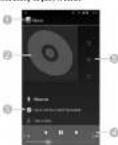
| Number Function | |
| 1. Tooth to return to the library | |
| 2. 4 hours network | |
| 3. 8 seconds and 9 minutes | |
| 4 | Playback control. Stop range, pause and resume playback. Drag the progress nor in parts in any part of the song. |
| 5 | Touch to see the current playful (quoted). Shifts, or Repeats. |
12
Connecting to PC
You are property and also in a company, but a 1132
cable and marks, ranks, pictures, and other items in a
the direction. Your pieces, places these five an internal
in millions of dollars
- Trust and/or its affiliates may be held by
www.yixia.com
-
Two 100% of the total population
-
To be, (connected as a line connection
m_0, m_1
- 2017.04.03
- Use storage: X1-78; Transmission: 142 yin
Penset has called your original and your
问题C: 请先选。
- None device (WP). Does you remember help
(1) 2017年1月1日,公司召开第五届董事会第十七次会议审议通过了《关于使用部分闲置募集资金进行现金管理的议案》。
The following table is provided in the image.
12.4
- Camera (PTP). Let you transfer prices as
In the case, an
12.00000000000000000000000000000000000000000
▶ Charge only 50% to 100 units. Does you
Space to LEE charging and distributed power
CONSTRUCTION
Built-in CO-ROM: Show a 40% CO-ROM
12月3日,公司召开临时股东大会。
in accordance with the company, equity
and the see case with possible method.
Connecting to the Internet
2017年1月1日(星期六)
COMMUNING VIA W141
- To Don't be Home
(1) _0 (2)
-
-
-
-
- 1058.
-
-
-
Your phone automatically searches it: At M
Exceeds in range and displays their names and
security, 700 phone calls cannot be
- Ruby Third Networks when they are in ranges.
- TELONI BOMES (HOTATO)
Плк тиларск и вислянд, мінір я рімогають сг
characterize
79.0238
Connecting via Mobile Network.
To understand the information we need to be a good
100%
to and a row AFN, please contact the service provider.
to act for necessary information. Do not change the
actual policies unless included by low service pro-
site. Obesean for service to the site working.
- Touching Home Key > Home Key > System act-
from > Mean > Mobile network > Approx. Print
Names
- Select a 516 card
S. Teach the Home Key > New APN
- I wish and let us want to be a person as well
300 VAC service provider
- Touch from Menu Key > Save to complete
Extending Battery Life
There are several figures you can do to make your bar.
to: indiceon
- 1um or Abl, 2016, steth. "E" not is dry, water
sign ask that you need to
• The company's performance
- 2017年1月1日,公司与关联方不存在关联关系。
you have a cable, irized of portable W.F. bel
you are a school, while of the school, it is not to choose in schools can arrive.
2.1.1.1
- 2016年10月30日,公司以人民币1,000万元计息。
appie A-113:04 the
in the background.
- From the home doctor, touch 📄 > Settings >
Audio profiles > General and uncheck vibrate
on 10s
Freeing Up Memory Space
The following table is presented in the following table:
-
April 19, 2017, 3:30 AM (2:45-3:30)
-
2017年1月1日
-
2014年日本語の変化・国際
Appra
2 Touch the age and touch the Sleep Station next to
the application you do not need
Managing the Phone Storage
Deleting Old Messages
You can't have a scale of messages in free up some
-
- No. 304-65
the response to the right
- From the same group, such a
1.2.1 2.3.2
-
-
- Click Delete and messages to address with one
1:31. - Touch text message limit or multimedia mes
cape lim
a. Truven Set
Clearing Browser's Local Content - From business screen touch, 2005
- Toronto Homa House, 6000-8000
2.0024 - June Clear cache, Open History, and Open all
propite data
(五) 2017年1月1日
[Non-Text]
[Non-Text]
[Non-Text]
[Non-Text]
[Non-Text]
[Non-Text]
[Non-Text]
[Non-Text]
[Non-Text]
Product Safety Information
1
同
|
Davelling, adity management
B
• Environnement «Sachovia», parcialis 2007.
in the 15 mm
(二) 2017年1月1日
This service may produce a gift or flash
ing light
•
Small parts may cause a cholding hazard
(二) 本次股东大会的召集和召开程序
For completeness of this a few
- No. 324, 507, 511, 611
-
This device may produce a bit sound
-
To present possible heating damage, do
- 10. per person of high volume levels for kpu
periods
•
A. Ensej, 2016; A. Ensej, 2017;
- 2017年1月1日
A
- 2016 Extensive Temperature
|
Клед: НАМУ, 2011 розяганных дата пуб.
[Unreadable]
▲
Avoid any contact with liquid, kept dry
- 2017年1月1日,公司召开2017年第二次临时股东大会,并审议通过了《关于使用部分闲置募集资金进行现金管理的议案》。
▲ 请勿用“命令”或“不填”或“不填”
medical facilities
(No text)
Do not adhere to disassemble.
|
- See that we can be interested in our local and
2015年8月
|
Cohuse unprimed accessories
1
▲
- 2017年1月1日
二
Do not rely on this device for emergency
Communications
Declaration of RoHS Compliance
To minimize the environmental impacts and take more
responsibilities in the earth we live on, this document
shid some as a total the price, but for ZTE. Flats.
- We have been a 27E COBROTON University
www.csc10.com.cn 4562-575C of the Express
to that the 50.2% 1942.1620 a 175 European
Реги-том 100% розяйно-5 национа 0,0
(2) 10.3.14
6.14.2023
-
1.3.02.6.6
-
Cleaned Food
• Explanar O'annan (10)
- Positnceled up: 10% Feet,
The WTR Data, 63 manufacturer by WTR, 6208501
THE EBITDA of the Enterprise by ZTE CORPORATION
17.4.11.2023.10.20 25.2.02.9.20
Disposal of Your Old Appliance
- When this crosscut was
in an old, a silvered mineral
(1) 2017年1月1日
(1) 1.045-2.13 (2) 1.045
(1) 2017: the European Effective
2.0296EC
- 01/2020/01/2020
1
relay from the municipal town
|
■
ment or the local authorities.
-
The term: disposal of you
-
Noqemam 43. Nojimun
potential negative consequences
for the environment and turn
SAR
Your mobile device is a radio transmitter and receiver.
It is designed not to exceed the limits for exposure to
www.nommatikelnInternational.com
Two solutions were also known in the relevant
The following described section is also a safety report.
2013.04.25:1987.01.06
the purpose of the electrical and parabola
(1) 2017年1月1日
The quick brown fox jumps over the lazy dog.
E-mail: Ankai@cnb.com
Figure 2.103 is a long line of the CAR line.
In this device, the 0.411 ACG, P. M.
beases with a range of 0 to 100, they can be used in
In the case of 1982, we had been
As SARIS measured during the division of high out
The following power, the latter work of this device has
(2) 1984年1月1日,公司召开2015年第一次临时股东大会,并于2016年3月27日以通讯方式召开。
The following table is in English:
The following section is part of the
| This equipment may be operational in | MT | GE | |||
| CY | Q2 | DK | EE | F | FR |
| DE | SR | HU | IE | IT | LV |
| LT | LU | MT | NL | PL | PT |
| SK | SI | ES | SE | GB | IB |
| U | NO | CH | SG | RO | TR |
22
21
24
25
25
23
78
[Non-Text]
[Non-Text]
[Non-Text]
[Non-Text]
[Non-Text]
[Non-Text]
[Non-Text]
[Non-Text]
[Non-Text]
[Non-Text]
[Non-Text]
[Non-Text]
[Non-Text]
[Non-Text]
[Non-Text]
[Non-Text]
[Non-Text]
[Non-Text]
[Non-Text]
[Non-Text]
[Non-Text]
[Non-Text]
[Non-Text]
[Non-Text]
[Non-Text]
[Non-Text]
[Non-Text]
[Non-Text]
[Non-Text]
[Non-Text]
[Non-Text]
[Non-Text]
[Non-Text]
[Non-Text]


Kaubamärk : ZTE
Mudel : Blade G2
Kategooria : Nutitelefon