DisplayPort - Câbles pour ordinateurs et périphériques StarTech.com - Tasuta kasutusjuhend
Leidke seadme juhend tasuta DisplayPort StarTech.com PDF-formaadis.


Kasutajate küsimused teemal DisplayPort StarTech.com
0 küsimus selle seadme kohta. Vastake nendele, mida teate, või esitage oma.
Esita uus küsimus selle seadme kohta
Laadige alla juhend oma Câbles pour ordinateurs et périphériques PDF-formaadis tasuta! Leidke oma juhend DisplayPort - StarTech.com ja võtke oma elektrooniline seade uuesti kätte. Sellel lehel on avaldatud kõik teie seadme kasutamiseks vajalikud dokumendid. DisplayPort kaubamärgi StarTech.com.
KASUTUSJUHEND DisplayPort StarTech.com
DP2HDMIUSBA
DisplayPort to HDMI Adapter with USB Audio
Installation Guide
Packaging Contents
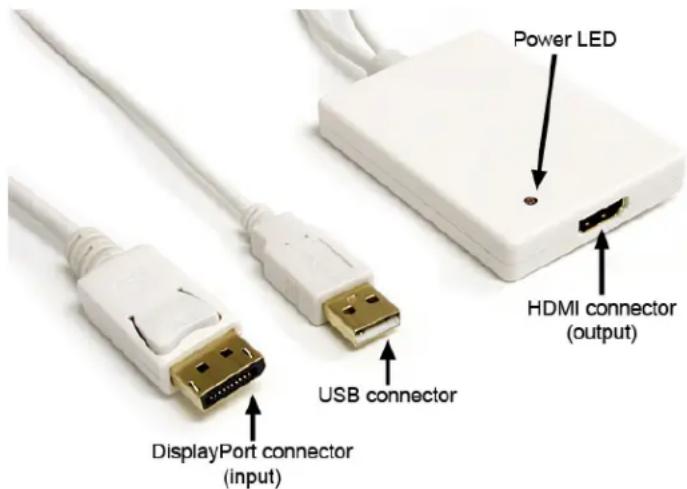
• 1 x DisplayPort to HDMI adapter
System Requirements
- Multi-mode DisplayPort (DP++) enabled computer system with available DisplayPort port
• USB enabled computer system with available port
• HDMI enabled display device
Specifications
| Bus Interface | DisplayPort 1.1aUSB 2.0 |
| Video Signal | High Speed HDMI (1.3b) |
| Connectors | 1 x DisplayPort male1 x HDMI female1 x USB type A male |
| LEDs | 1 x Power |
| Integrated Cable Length | 61cm / 2ft |
| Maximum Video Resolution | 1920x1200 / 1080p |
| Audio Support | Yes - 2 channel LPCM |
| HDCP Support | Yes |
| Operating Temperature | 0°C ~ 70°C (32°F ~ 158°F) |
| Storage Temperature | -10°C ~ 80°C (14°F ~ 176°F) |
| Humidity | 10% ~ 85% RH |
| Dimensions | 80mm x 56mm x 12mm |
| Weight | 103g |
Manual Revision:11/18/2010
For the most up-to-date information, please visit www.startech.com
Warranty Information
This product is backed by a one year warranty.
In addition, StarTech.com warrants its products against defects in materials
and workmanship for the periods noted, following the initial date of purchase. During this period, the products may be returned for repair, or replacement with equivalent products at our discretion. The warranty covers parts and labor costs only. StarTech.com does not warrant its products from defects or damages arising from misuse, abuse, alteration, or normal wear and tear.
Limitation of Liability
In no event shall the liability of StarTech.com Ltd. and StarTech.com USA LLP (or their officers, directors, employees or agents) for any damages (whether direct or indirect, special, punitive, incidental, consequential, or otherwise), loss of profits, loss of business, or any pecuniary loss, arising out of or related to the use of the product exceed the actual price paid for the product. Some states do not allow the exclusion or limitation of incidental or consequential damages. If such laws apply, the limitations or exclusions contained in this statement may not apply to you.
StarTech.com
Hard-to-find made easy
Installation
- Make sure the computer system and display device are turned off.
- Connect the DisplayPort connector into the host computer system's video card.
- Connect the USB connector on the adapter into an available USB port on the host computer system.
- Connect a standard male/male HDMI cable (not included) from the adapter to an available HDMI connector on the display device.
- Power on the display device.
- Power on the computer system. The Power LED on the adapter should light up.
- The computer system should automatically detect the display device. Driver installation or special setup requirements depend on the connected display device. Consult any documentation included with your display device.
- The operating system should also automatically detect and install a new audio output device.
- If you wish to send audio over HDMI, check the audio properties for the operating system, to make sure the USB adapter is set as the default audio device.
NOTE: This will disable audio output from any speakers/headphones currently connected to the computer system. - If you do not wish to use audio over HDMI, set the default audio device back to the original audio output device (e.g. sound card) for your system.