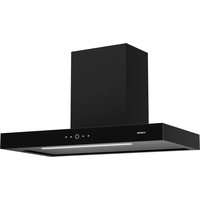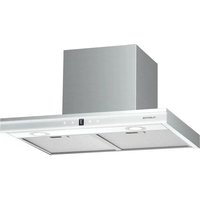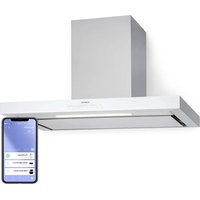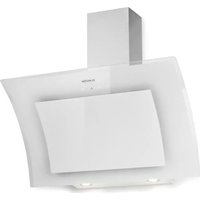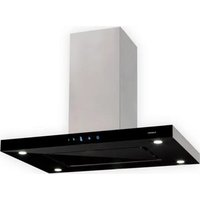
Valeria - Basket Klarstein - Free user manual and instructions
Find the device manual for free Valeria Klarstein in PDF.


User questions about Valeria Klarstein
0 question about this device. Answer the ones you know or ask your own.
Ask a new question about this device
Download the instructions for your Basket in PDF format for free! Find your manual Valeria - Klarstein and take your electronic device back in hand. On this page are published all the documents necessary for the use of your device. Valeria by Klarstein.
USER MANUAL Valeria Klarstein
area
| Category | Value | |---|---| | 1 | 100 | | 2 | 100 | | 3 | 100 | | 4 | 100 | | 5 | 100 | | 6 | 100 | | 7 | 100 | | 8 | 100 | | 9 | 100 | | 10 | 100 | | 11 | 100 | | 12 | 100 | | 13 | 100 | | 14 | 100 | | 15 | 100 | | 16 | 100 | | 17 | 100 | | 18 | 100 | | 19 | 100 | | 20 | 100 | | 21 | 100 | | 22 | 100 | | 23 | 100 | | 24 | 100 | | 25 | 100 | | 26 | 100 | | 27 | 100 | | 28 | 100 | | 29 | 100 | | 30 | 100 | | 31 | 100 | | 32 | 100 | | 33 | 100 | | 34 | 100 | | 35 | 100 | | 36 | 100 | | 37 | 100 | | 38 | 100 | | 39 | 100 | | 40 | 100 | | 41 | 100 | | 42 | 100 | | 43 | 100 | | 44 | 100 | | 45 | 100 | | 46 | 100 | | 47 | 100 | | 48 | 100 | | 49 | 100 | | 50 | 100 | | 51 | 100 | | 52 | 100 | | 53 | 100 | | 54 | 100 | | 55 | 100 | | 56 | 100 | | 57 | 100 | | 58 | 100 | | 59 | 100 | | 60 | 100 | | 61 | 100 | | 62 | 100 | | 63 | 100 | | 64 | 100 | | 65 | 100 | | 66 | 100 | | 67 | 100 | | 68 | 100 | | 69 | 100 | | 70 | 100 | | 71 | 100 | | 72 | 100 | | 73 | 100 | | 74 | 100 | | 75 | 100 | | 76 | 100 | | 77 | 100 | | 78 | 100 | | 79 | 100 | | 80 | 100 | | 81 | 100 | | 82 | 100 | | 83 | 100 | | 84 | 100 | | 85 | 100 | | 86 | 100 | | 87 | 100 | | 88 | 100 | | 89 | 100 | | 90 | 100 | | 91 | 100 | | 92 | 100 | | 93 | 100 | | 94 | 100 | | 95 | 100 | | 96 | 100 | | 97 | 100 | | 98 | 100 | | 99 | 100 | | Note: The actual values in the 'Value' column are not provided in the code. I have used the label 'The Region' to represent the region of interest based on the visual scale. The 'Index' column is not included in the chart. I have used the label 'The Region' to represent the region of interest based on the visual scale. I have used the label 'The Region' to represent the region of interest based on the visual scale. I have used the label 'The Region' to represent the region of interest based on the visual scale. I have used the label 'The Region' to represent the region of interest based on the visual scale. I have used the label 'The Region' to represent the region of interest based on the visual scale. I have used the label 'The Region' to represent the region of Interest. I have used the label 'The Region' to represent the Region of Interest based on the visual scale. I have used the label 'The Region' to represent the Region of Interest based on the visual scale. I have used the label 'The Region' to represent the Region of Interest based on the visual scale. I have used the label 'The Region' to represent the Region of Interest based on the visual scale. I have used the label 'The Region' to represent the Region of Interest based on the visual scale. I have used the label 'The Region' to represent the Region of Investment. I have used the label 'The Region' to represent the Region of Investment based on the visual scale. I have used the label 'The Region' to represent the Region of Investment based on the visual scale. I have used the label 'The Region' to represent the Region of Investment based on the visual scale. I have used the label 'The Region' to represent the Region of Investment based on the visual scale. I have used the label 'The Region' to represent the Region of Investment based on the visual scale. I have used the label 'The Region' to represent the Region of Interest. I have used the label 'The Region' to represent the Region of Interest based on the visual scale. I have used the label 'The Region' to represent the Region of Interest based on the visual scale. I have used the label 'The Region' to represent the Region of Interest based on the visual scale. I have used the label 'The Region' to represent the Region of Interest based on the visual scale. I have used the label 'The Region' to represent the Regional Information Data Center for each region. I have used the label 'The Region' to represent the Regional Information Data Center for each region. I have used the label 'The Region' to represent the Regional Information Data Center for each region. I have used the label 'The Region' to represent the Regional Information Data Center for each region. I have used the label 'The Region' to represent the Regional Information Data Center for each region. I have used the label 'The Region' to represent the Regional Information Data Center for each regional data center. I have used the label 'The Region' to represent the Regional Information Data Center for each regional data center. I have used the label 'The Region' to represent the Regional Information Data Center for each regional data center. I have used the label 'The Region' to represent the Regional Information Data Center for each regional data center. I have used the label 'The Region' to represent the Regional Information Data Center for each regional data center. I have used the label 'The Region' to represents the Regional Information Data Center for each regional data center. I have used the label 'The Region' to represent the Regional Information Data Center for each regional data center. I have used the label 'The Region' to represent the Regional Information Data Center for each regional data center. I have used the label 'The Region' to represent the Regional Information Data Center for each regional data center. I have used the label 'The Region' to represent the Regional Information Data Center for each regional data center. If you need to use this information, you should note that this information is not available for this information in this case. If you need to use it, you should note that it is available for this information in this case. If you need to use it, you should note that it is available for this information in this case. If you need to use it, you should note that it is available for this information in this case. If you need to use it, you should note that it is available for this information in this case. If you need to use it, you should note that it is available for this information in this case. If you need to use it, your data point is not available for this information in this case. If you need to use it, you should note that this information is not available for this information in this case. If you need to use it, you should note that this information is not available for this information in this case. If you need to use it, you should note that this information is not available for this information in this case. If you need to use it, you should note that this information is not available for this information in this case. If you need to use it, you should note that this information is not available for this information in its case and reference value (e.g., $ \frac{2}{3} \times \frac{2}{3} \times \frac{2}{3} \times \frac{2}{3} \times \frac{2}{3} \times \frac{2}{3} \times \frac{2}{3} \times \frac{2}{3} \times \frac{2}{3} \times \frac{2}{3} \times \frac{2}{3} \times \frac{2}{3} \times\frac{2}{3} \times\frac{2}{3} \times\frac{2}{3} \times\frac{2}{3} \times\frac{2}{3} \times\frac{2}{3} \times\frac{2}{3} \times\frac{2}{3} \times\frac{2}{3} \times\frac{2}{3} \times\frac{2}{3} \times\textit{value*} I have used the label "the Region" but also uses "the other" as a variable (e.g., percentage or index). The labels above are "the Region" and "the other". The labels below are "the other" and "the other" respectively.text_image
QR code image containing encoded data, no visible human-readable textINHALTSVERZEICHNIS
text_image
Technical diagram of a mechanical device with numbered components and directional arrows indicating motion or assembly.Installation
text_image
Technical diagram showing a mounted air duct with labeled components and a close-up of the internal structure.natural_image
Two-step diagram showing hand positioning of a flat surface with an arrow indicating direction (no text or symbols)natural_image
Diagram showing a device being processed into a larger portion, with no visible text or symbols.natural_image
Technical diagram showing a 3D rectangular block mounted on a base plate and a 2D schematic with arrows indicating force or movement (no text or symbols)natural_image
Symbol of a trash bin crossed with a diagonal line, no text or numbers presentBerlin Brands Group UK Limited
PO Box 42
272 Kensington High Street
London, W8 6ND
United Kingdom
Dear Customer,
Congratulations on purchasing this device. Please read the following instructions carefully and follow them to prevent possible damages. We assume no liability for damage caused by disregard of the instructions and improper use. Scan the QR code to get access to the latest user manual and more product information.

text_image
QR code image containing encoded data, no visible human-readable textCONTENTS
Safety Instructions 20
Installation (External Ventilation) 22
Instructions for Installing
the Exhaust Pipe 24
Control Panel and Functions 25
Cleaning and Care 26
Troubleshooting 29
Product Data Sheet 30
Notes on Environmental Protection 32
Disposal Considerations 32
Manufacturer & Importer (UK) 32
TECHNICAL DATA
| Item number 10032902, 10034974 | |
| Power supply 220-240 V ~ 50/60 Hz |
SAFETY INSTRUCTIONS
- Thank you for purchasing this cooker hood. Please read the instruction manual carefully before you use the cooker hood, and keep it in a safe place.
- The installation work must be carried out by a qualified electrician or competent person. Before you use the cooker hood, make sure that the voltage (V) and the frequency (Hz) indicated on the cooker hood are exactly the same as the voltage and the frequency in your home.
- The manufacturer and the agent will not bear any responsibility for the damage caused by inappropriate installation and usage.
• Children under the age of 8 must not use the cooker hood. - The appliance is not intended for commercial use, but only for household and similar environments.
- The cooker hood and its filter mesh should be cleaned regularly in order to keep it in good working order.
• Before cleaning, switch the power off at the main supply. - Clean the cooker hood according to the instruction manual and keep the cooker hood from the danger of burning.
• Prohibit putting the cooker hood by fire. - If the appliance does not function normally, contact the manufacturer or a specialist company.
- This device may be only used by children 8 years old or older and persons with limited physical, sensory and mental capabilities and / or lack of experience and knowledge, provided that they have been instructed in use of the device by a responsible person who understands the associated risks.
- If the supply cord is damaged, it must be replaced by the manufacturer, its service agent or similarly qualified persons in order to avoid a hazard.
- If the range hood is used at the same time as appliances burning gas or other fuels, the room must be adequately ventilated.
- Do not flambé under the range hood. Accessible parts may become hot when used with cooking appliances.
Important hints on installation
- The air must not be discharged into a flue that is used for exhausting fumes from appliances burning gas or other fuels (not applicable to appliances that only discharge the air back into the room).
• Regulations concerning the discharge of air have to be fulfilled.
Important notes about the extraction mode

WARNING
Risk of poisoning from exhaust gases sucked back. Never operate the device in extraction mode simultaneously with an open flue appliance when there is not adequate airflow guaranteed.
Open fl ue combustion equipment (for example, gas, oil, wood or coal-fi red heaters, tankless water heaters, water heaters) pulls combustion air from the room and runs it through an exhaust pipe or chimney to the outside. In the extraction mode, indoor air is removed from the kitchen and the adjacent rooms - without sufficient air intake this creates a vacuum. Toxic gases from the chimney or extraction fl ue can thereby be sucked back into the living spaces.
- Always ensure that a sufficient supply of fresh air is guaranteed and that the air can circulate.
- An air supply / extractor box alone does not ensure compliance with the limit value.
Safe operation is only possible when the negative pressure in the room where the appliance is located does not exceed 4 Pa (0.04 mbar). This can be achieved when the air required for combustion can flow through openings that are not closable, for example in doors, windows, in conjunction with an air supply / extractor box or through other technical measures. In any case, consult a qualified chimney sweep who can assess the entire ventilation of your house and propose appropriate measures for adequate ventilation.
If the hood is used exclusively in the recirculation mode, unrestricted operation is possible.
Important note on disassembly of the device
- Disassembly is similar to installation/assembly in reverse order.
• Take a second person to help you during disassembly to avoid injuries.
INSTALLATION (EXTERNAL VENTILATION)
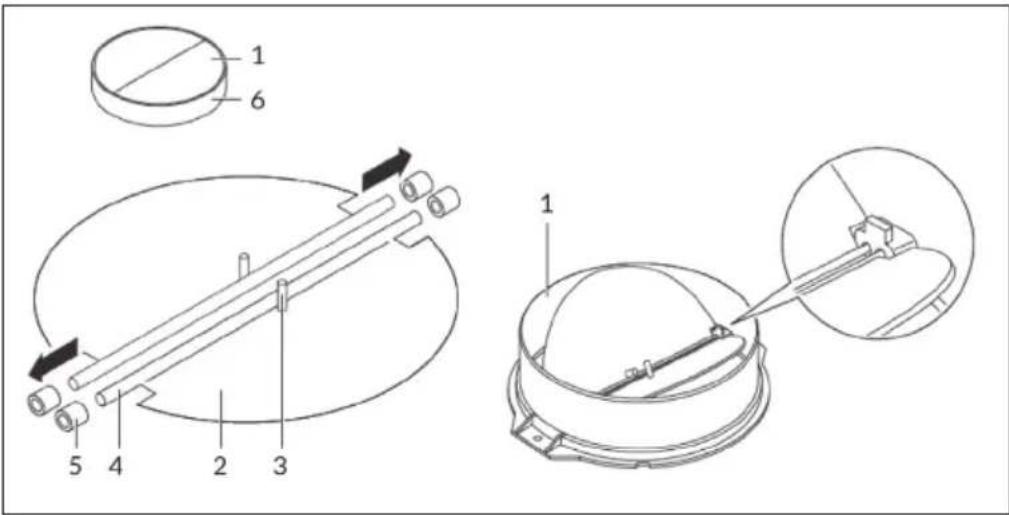
Assembly of the V-flap
If the cooker hood does not have a pre-assembled V-flap, install the parts as follows:
- Install the first half (2) in the housing (6).
- The pin (3) should be facing upwards.
- Insert the axle (4) into the holes (5) on the housing.
- Repeat all steps for the second half of the flap.
Installation
text_image
Technical diagram showing mechanical assembly with labeled parts and directional arrows| If you have an outside air outlet, the hood can be connected via a suction duct (enamel, aluminum, flexible tube or non-flammable material with an inside diameter of 150 mm) as shown on the right. |
| 1 | Remove the plug from the socket before installation. | ||
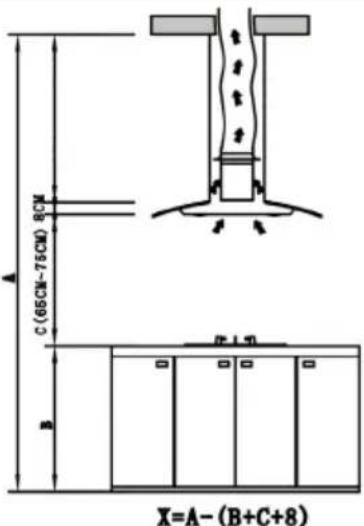
| 2 | The cooker hood should be placed at a distance of 65-75 cm above the cooking surface for the best possible effect. | ||
| 3 | The ceiling must be capable of supporting at least 120 kg and the thickness of the ceiling must be at least 30 mm. | ||
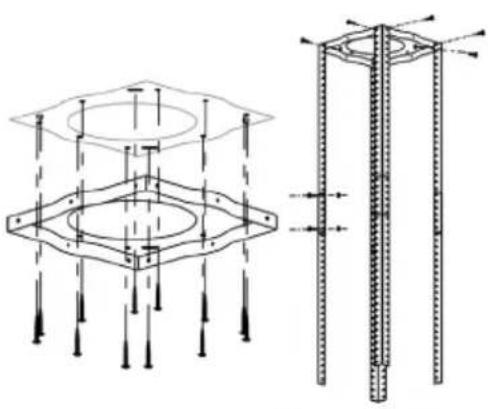
| 4 | According to the hanging board, drill 12 holes in the ceiling, see pic 2.12 ST6*40 mm big flat screws will be used to fix the hanging board on theceiling, and then 8 M4*10 screws and a M4 nut with gasket will be used toconnect the angle iron into the hanging board, see pic 1. After calculating thelength of the angle iron, 16 M4*10 big flat screws and a M4 nut with gasketshould be used to connect the angle iron and another angle iron (the overlaplength of angle iron can not be less 100 mm). | ||
  1 2 1 2 | |||
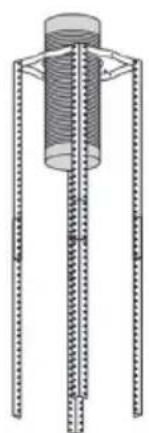
| 5 | Let one side of the extensible pipe go outside through the hole of 170 mm, seepic 3. | ||
   3 4 5 3 4 5 | |||
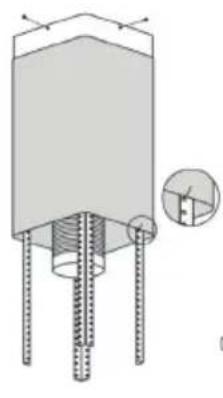
| 6 | 4 ST4*8 big flat screws will be used to connect the internal chimney into thehanging board. Then put up the external chimney, two hooks will be used to put upthe external chimney in order to the next installation, see pic 4. | ||
| 7 | 4 ST4*8 big flat screws will be used to install the outlet, see pic 5. | ||
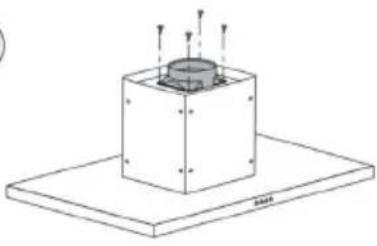
| 8 | Hold up the hood, 16 M4*10 big flat screws will be used to connect the hood body into angle iron, see pic 6. | ||
| 9 | Put the extendable pipe on the outlet,see pic.7. After ensuring everything is ok, put down the hook and the external chimney, then the installation is complete, see pic 8. | ||
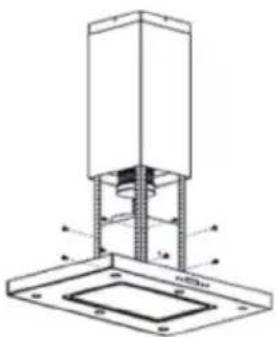 | 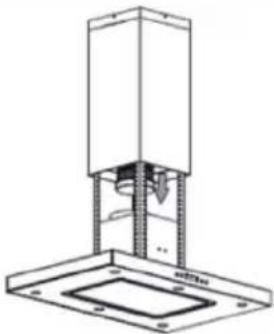 | 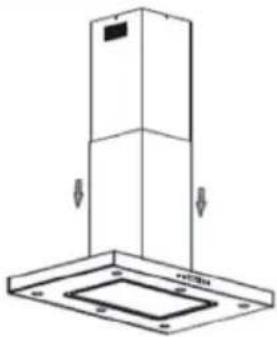 | |
| 6 | 7 | 8 | |
INSTRUCTIONS FOR INSTALLING THE EXHAUST PIPE
The following rules must be strictly adhered to in order to achieve optimal air extraction:
• Make sure that the exhaust pipe is as short and straight as possible.
- Do not reduce the size and do not restrict the exhaust pipe. When using exhaust pipes, the pipe must always be laid tightly in order to minimize the pressure loss.
- Failure to follow these basic instructions will reduce performance and increase the noise level of the cooker hood.
- All installation work must be carried out by a qualified electrician or other qualified person.
- Do not connect the exhaust pipe of the hood to an existing ventilation system that is used for another unit, such as a ventilation system, such as a flue, gas pipes or hot air pipes.
- If the exhaust pipe makes a bend, the angle of the exhaust pipe should not be less than 120°. Never align the exhaust pipe downwards, but always align it horizontally or guide the pipe from the starting point upwards to the air outlet on the outer wall.
- After installation, make sure that the cooker hood is horizontal so that no grease can accumulate.
- Make sure that the exhaust pipe selected for the installation complies with the relevant standards and is fire resistant.

CAUTION
Risk of injury. For safety reasons, use only the size of fixing or mounting screws recommended in this manual. Failure to follow these instructions may result in injury or electric shock.
CONTROL PANEL AND FUNCTIONS

4

3
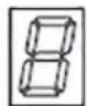

2

1
| 1 POWER | Press this button to turn the extractor hood on or off. |
| 2 FAN | Press this button several times to set one of the following speed levels: 1 low, 2 medium, 3 high.Each press of the button switches to a different speed in turn: "low / medium / high / low / medium /...". The respective speed level is shown in the LED display: "1-2-3-1-2-..." |
| 3 LIGHT | Press this button to turn on the light. Press the button again to switch the light off.Note: The light is not controlled by the POWER button. |
| 4 TIMER | When the hood is in operation and this button is pressed, the hood goes into sleep mode (the sleep time is 9 minutes). The LED display shows the timer decreasing by 1: "9-8-7-6...". When the timer expires, the hood will automatically turn off and the light will go out. Pressing the TIMER button turns the cooker hood's timer function on or off. |
Temperature control protection
The cooker hood automatically measures its surface temperature. If the surface temperature of the cooker hood is ≤ 61^ , the fan does not run automatically. If the surface temperature of the cooker hood is >61^ , the fan runs automatically at high speed. When the FAN button fl ashes, the surface temperature is < 52^ and the hood returns to its initial state.
CLEANING AND CARE
Before servicing or cleaning, the cooker hood should always be disconnected from the power supply. Make sure the cooker hood is off and the plug has been removed. External surfaces are prone to scratches and dents, so follow the cleaning instructions to get the best results without damage.
General
Allow the unit to cool completely before cleaning and caring for the device, and do not use alkaline or acidic substances such as lemon juice or vinegar to clean the surface.
Stainless steel
The stainless steel must be cleaned regularly (weekly) to ensure a long service life. For this, a special stainless steel cleaning fluid may be used.
Control panel
The control panel may be cleaned with warm soapy water. Make sure the cloth is clean and well wrung out before cleaning the control panel. Use a dry, soft cloth to remove excess moisture after cleaning.
Important: Use neutral detergents and avoid the use of harsh cleaning chemicals, strong household cleaners, or products containing scouring agents as these may affect the appearance of the device and possibly remove the printed symbols on the control panel.
Grease filter
The fabric filters may be cleaned by hand. Soak them in water together with a degreasing detergent for about 3 minutes, then gently brush them with a soft brush. Do not apply too much pressure to avoid damaging the filter. Then allow the filter to air dry, but do not place it directly in the sun. Filters should always be washed separately from dishes and kitchen utensils.
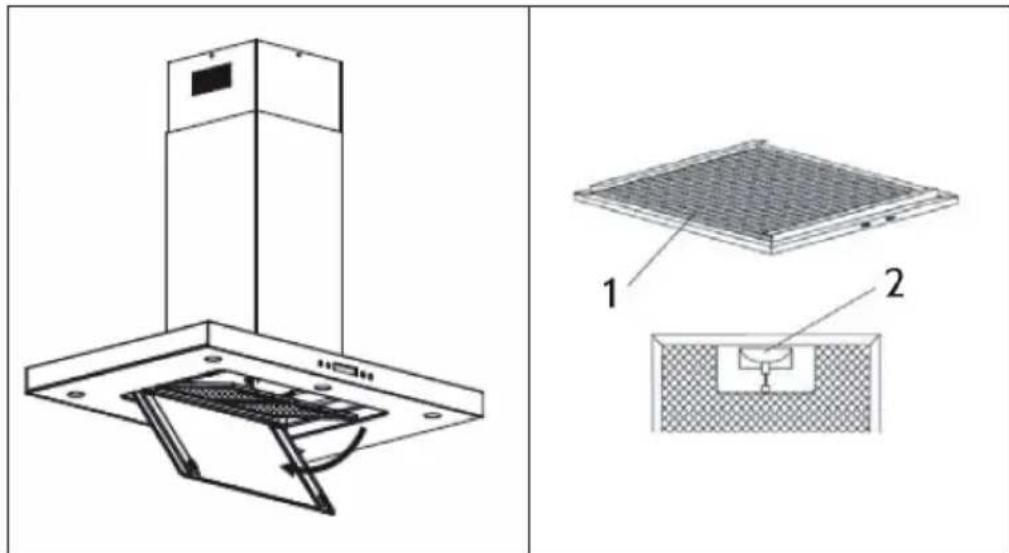
text_image
Technical diagram showing a mounted device with labeled components and a close-up view of its internal structure.Remove the filter as shown in the picture and then insert it again in reverse order.
Activated carbon filter
1 Before installing the activated carbon filter, first remove the grease filter. Press the lock and remove the grease filter.
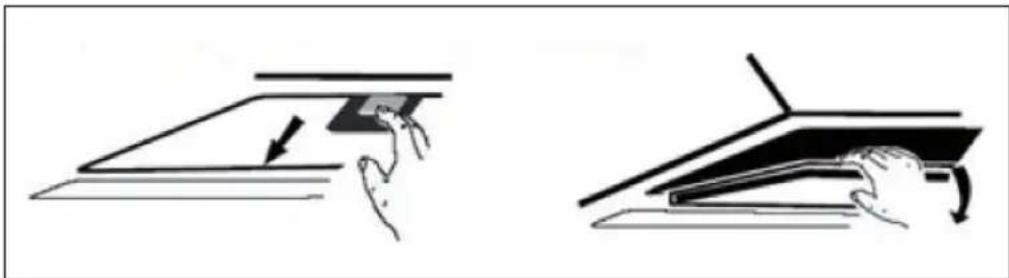
natural_image
Two-step diagram showing hand positioning of a flat object on a flat surface, with no text or symbols present.2 Slide the activated carbon filter into the rectangular hole below the engine until it clicks into place at the rear of the rectangular hole. Raise the two fixing rails until they are horizontally above the carbon filter.
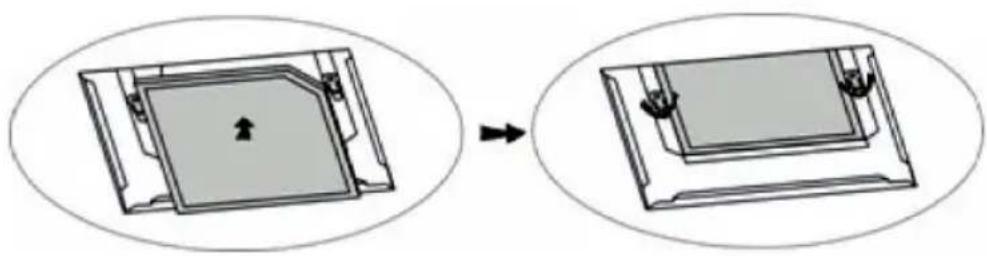
natural_image
Diagram showing a device being processed into a larger portion, with no visible text or symbols.3 Then reinsert the grease filter.
4 To remove the activated carbon filter, proceed in reverse order.
Replacing the bulb
| How to replace the bulb:1 Switch the unit off and pull out the plug first.2 Wait until the light bulb is cooled down before replacement.3 Take out the baffle filter and use the screw driver to take out the frame (see pic).4 Replace with same type of bulb. | 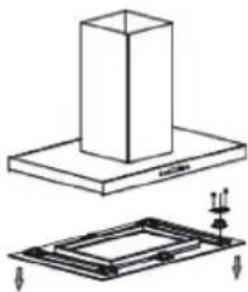 |
TROUBLESHOOTING
| Problem Possible cause Solution | ||
| The light goes on but the motor does not run. | The motor is switched off. Switch on the motor with the SPEED button. | |
| The motor switch is broken. Contact a specialist. | ||
| The motor is broken. Contact a specialist. | ||
| The light and the motor are not working. | Your house fuse is flipped or broken. | Replace the fuse switch or replace the fuse. |
| The power cord is loose or not connected. | Connect the power cord properly. | |
| The light does not work. The | light is broken. Replace the bulb. | |
| Unsatisfactory exhaust performance. | The distance between the stove and cooker hood is too great. | Reduce the distance. |
| The hood is hanging awry. | One of the fixing screws is not tightened properly. | Tighten the screw properly. |
PRODUCT DATA SHEET
Information according to Regulation (EU) No. 65/2014
Measurement and calculation methods according to EN 61591:1997+A1:2006+A2:2011+A11:2014+A12:2015
| Item number | 10032902, 10034974 | ||
| Description Symbol Value Unit | |||
| Annual Energy Consumption AEC | hood | 19.3 kWh/Year | |
| Energy Efficiency class A | |||
| Fluid Dynamic Efficiency FDE | hood | 28.1 | |
| Fluid Dynamic Efficiency class A | |||
| Lighting Efficiency LE | hood | 22.4 Lux/W | |
| Lighting Efficiency class | B | ||
| Grease Filtering Efficiency | GFBhood | 62.9 % | |
| Grease Filtering Efficiency class | E | ||
| Air flow at minimum and maximum speed in normal use, intensive or boost excluded | 199 / 558 | m^3/h | |
| Air flow at intensive or boost setting | - | m^3/h | |
| Airborne acoustical A-weighted sound power emissions at minimum and maximum speed available in normal use | 43 / 65 | dB | |
| Airborne acoustical A-weighted sound power emissions at intensive or boost setting | - | dB | |
| Power consumption in off mode | Po | - | W |
| Power consumption in standby mode | Ps | 0.48 | W |
| Contact details | Chal-Tec GmbH, Wallstraße 16, 10179, Berlin, Germany | ||
Information according to Regulation (EU) No. 66/2014
Measurement and calculation methods according to EN 61591:1997+A1:2006+A2:2011+A11:2014+A12:2015
| Item number | 10032902, 10034974 | ||
| Description Symbol Value Unit | |||
| Annual Energy Consumption AEC | hood | 19.3 kWh/Year | |
| Time increase factor f 1.0 | |||
| Fluid Dynamic Efficiency FDE | hood | 28.1 | |
| Energy Efficiency Index EEI | hood | 48.1 | |
| Measured air flow rate at best efficiency point | QBEP | 191.8 m^3/h | |
| Measured air pressure at best efficiency point | PBEP | 197 | Pa |
| Maximum air flow Q | max | 558 | m^3/h |
| Measured electric power input at best efficiency point | WBEP | 37.3 | W |
| Nominal power of the lighting system | WL | 7.8 | W |
| Average illumination of the lighting system on the cooking surface | Emiddle | 174.6 Lux | |
| Measured power consumption in standby mode | Ps | 0.48 | W |
| Measured power consumption off mode | Po | - | W |
| Sound power level | LWA | 65 | dB |
| Contact details | Chal-Tec GmbH, Wallstraße 16, 10179, Berlin, Germany | ||
NOTES ON ENVIRONMENTAL PROTECTION
- During cooking, make sure that there is sufficient air supply so that the cooker hood can operate efficiently and with low operating noise.
- Adjust the fan speed to the amount of steam produced during cooking. Use the intensive mode only when necessary. The lower the fan speed, the less energy is consumed.
- If large amounts of steam are produced during cooking, select a higher fan speed in good time. If the cooking steam has already dispersed in the kitchen, the cooker hood must be operated longer.
- Switch off the cooker hood when you no longer need it.
- Switch off the lighting when you no longer need it.
- Clean the filter at regular intervals and replace it if necessary to increase the effectiveness of the ventilation system and prevent fire hazards.
• Always put the lid on when cooking to reduce cooking steam and condensation.
DISPOSAL CONSIDERATIONS
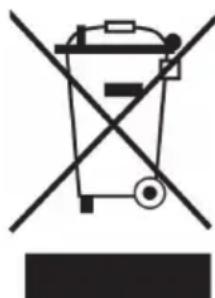
natural_image
Symbol of a trash bin crossed with a diagonal line, no text or numbers presentIf there is a legal regulation for the disposal of electrical and electronic devices in your country, this symbol on the product or on the packaging indicates that this product must not be disposed of with household waste. Instead, it must be taken to a collection point for the recycling of electrical and electronic equipment. By disposing of it in accordance with the rules, you are protecting the environment and the health of your fellow human beings from negative consequences. For information about the recycling and disposal of this product, please contact your local authority or your household waste disposal service.
MANUFACTURER & IMPORTER (UK)
Manufacturer:
Chal-Tec GmbH, Wallstrasse 16, 10179 Berlin, Germany.
Importer for Great Britain:
Berlin Brands Group UK Limited
PO Box 42
272 Kensington High Street
London, W8 6ND
United Kingdom
Estimado cliente:
text_image
QR code image containing encoded data, no visible human-readable textÍNDICE
text_image
Technical diagram of a mechanical device with numbered components and directional arrows indicating motion or assembly.Instalación
text_image
Technical diagram showing a mounted device with two views labeled 1 and 2, illustrating internal components and assembly.natural_image
Two-step diagram showing hand positioning of a flat object on a surface, with no text or symbols present.natural_image
Diagram showing a square component being processed into a larger rectangular device, with no visible text or symbols.natural_image
Symbol of a trash bin crossed with a diagonal line, no text or numbers presentBerlin Brands Group UK Limited
PO Box 42
272 Kensington High Street
London, W8 6ND
United Kingdom
Chère cliente, cher client,
text_image
QR code image containing encoded data, no visible human-readable textSOMMAIRE
text_image
Technical diagram of a mechanical device with numbered components and directional arrows indicating motion or assembly.text_image
Technical diagram showing a mounted device with labeled components and a close-up view of its internal structure.natural_image
Two-step diagram showing hand positioning of a flat surface with a curved arrow indicating direction (no text or symbols)natural_image
Diagram showing a square component being processed into a larger rectangular device, with no visible text or symbols.FICHE DE DONNÉES PRODUIT
natural_image
Symbol of a trash bin crossed with a diagonal line, no text or numbers presentBerlin Brands Group UK Limited
PO Box 42
272 Kensington High Street
London, W8 6ND
United Kingdom
Gentile cliente,
text_image
QR code image containing encoded data, no visible human-readable textINDICE
text_image
Technical diagram showing mechanical assembly with labeled parts and directional arrows indicating motion or movement.Installazione
text_image
Technical diagram showing a mounted device with two labeled components, one with internal structure and the other with a meshed base.natural_image
Two-step diagram showing hand positioning of a flat object on a flat surface, with no text or symbols present.natural_image
Diagram showing a device being processed into a larger portion, with no visible text or symbols.natural_image
Symbol of a trash bin crossed with a diagonal line, no text or numbers presentPRODUTTORE E IMPORTATORE (UK)
Produttore:
Chal-Tec GmbH, Wallstraße 16, 10179 Berlino, Germania.
Berlin Brands Group UK Limited
PO Box 42
272 Kensington High Street
London, W8 6ND
United Kingdom

area
| Category | Value | |---|---| | 1 | 100 | | 2 | 100 | | 3 | 100 | | 4 | 100 | | 5 | 100 | | 6 | 100 | | 7 | 100 | | 8 | 100 | | 9 | 100 | | 10 | 100 | | 11 | 100 | | 12 | 100 | | 13 | 100 | | 14 | 100 | | 15 | 100 | | 16 | 100 | | 17 | 100 | | 18 | 100 | | 19 | 100 | | 20 | 100 | | 21 | 100 | | 22 | 100 | | 23 | 100 | | 24 | 100 | | 25 | 100 | | 26 | 100 | | 27 | 100 | | 28 | 100 | | 29 | 100 | | 30 | 100 | | 31 | 100 | | 32 | 100 | | 33 | 100 | | 34 | 100 | | 35 | 100 | | 36 | 100 | | 37 | 100 | | 38 | 100 | | 39 | 100 | | 40 | 100 | | 41 | 100 | | 42 | 100 | | 43 | 100 | | 44 | 100 | | 45 | 100 | | 46 | 100 | | 47 | 100 | | 48 | 100 | | 49 | 100 | | 50 | 100 | | 51 | 100 | | 52 | 100 | | 53 | 100 | | 54 | 100 | | 55 | 100 | | 56 | 100 | | 57 | 100 | | 58 | 100 | | 59 | 100 | | 60 | 100 | | 61 | 100 | | 62 | 100 | | 63 | 100 | | 64 | 100 | | 65 | 100 | | 66 | 100 | | 67 | 100 | | 68 | 100 | | 69 | 100 | | 70 | 100 | | 71 | 100 | | 72 | 100 | | 73 | 100 | | 74 | 100 | | 75 | 100 | | 76 | 100 | | 77 | 100 | | 78 | 100 | | 79 | 100 | | 80 | 100 | | 81 | 100 | | 82 | 100 | | 83 | 100 | | 84 | 100 | | 85 | 100 | | 86 | 100 | | 87 | 100 | | 88 | 100 | | 89 | 100 | | 90 | 100 | | 91 | 100 | | 92 | 100 | | 93 | 100 | | 94 | 100 | | 95 | 100 | | 96 | 100 | | 97 | 100 | | 98 | 100 | | 99 | 100 | | Note: The actual values in the 'Value' column are not provided in the code. I have used the label 'The Region' to represent the 'Region'. The values are estimated based on the provided code.