
Aventho 300 - Earphones BEYERDYNAMIC - Free user manual and instructions
Find the device manual for free Aventho 300 BEYERDYNAMIC in PDF.


User questions about Aventho 300 BEYERDYNAMIC
0 question about this device. Answer the ones you know or ask your own.
Ask a new question about this device
Download the instructions for your Earphones in PDF format for free! Find your manual Aventho 300 - BEYERDYNAMIC and take your electronic device back in hand. On this page are published all the documents necessary for the use of your device. Aventho 300 by BEYERDYNAMIC.
USER MANUAL Aventho 300 BEYERDYNAMIC
NO SV ● ● ● PLI JW KO ZH
CONTENTS
SAFETY INSTRUCTIONS 3
Intended use....3
Adjusting the volume....3
General maintenance instructions ....3
Risk of swallowing....3
Power and connecting cable....3
Using the batteries....3
Environmental conditions ....3
ABOUT THIS MANUAL 4
BOX CONTENTS 4
OPERATING ELEMENTS 4
CHARGING THE BATTERY 4
Remarks on the life of Li-ion batteries 4
Displaying the battery charge level 4
DOWNLOAD BEYERDYNAMIC APP 5
COMPATIBILITY WITH PLAYBACK DEVICES....5
SUPPORTED AUDIO CODECS 5
OPERATION 5
Connect to a device via Bluetooth ^® ....5
Pairing 5
Multi-point operation 6
Setting up multi-point....6
Using multi-point....6
Delete pairing list 6
Switching the headphone on and off 6
Playing media....7
Adjusting the volume....7
Telephone....7
Activate / deactivate voice prompts ....8
Reset to factory settings 8
Overview of the operating functions 8
Overview of the LED displays on the headphone 9
Audio cable connection....9
Cleaning 9
Changing the ear pads 9
Changing the headband pad....10
TROUBLESHOOTING ....10
HELP WITH PROBLEMS / FAQ....10
PRODUCT REGISTRATION ....10
DISPOSAL....10
Battery disposal....10
EU DECLARATION OF CONFORMITY....10
TECHNICAL SPECIFICATIONS 11
WARRANTY CONDITIONS ....11
TRADEMARKS 11
Thank you for purchasing the AVENTHO 300 Wireless Over-Ear headphones from beyerdynamic. Please take some time to read this information carefully before using the AVENTHO 300.
SAFETY INSTRUCTIONS
Read these safety instructions carefully before using the AVENTHO 300.
▶ Heed all instructions given, especially those regarding the safe use of the AVENTHO 300.
Do not use the AVENTHO 300 when it is damaged.
Intended use
▶ Only use the AVENTHO 300 as described in this manual.
The company beyerdynamic GmbH & Co. KG accepts no liability for damage to the AVENTHO 300 or injury to persons caused by careless, improper or incorrect use of the AVENTHO 300, or by use for purposes not specified by the manufacturer.
The company beyerdynamic GmbH & Co. KG is not liable for damage to USB devices that do not comply with the USB specifications.
The company beyerdynamic GmbH & Co. KG is not liable for damage resulting from connection interruptions due to batteries being empty or too old, or due to exceeding the Bluetooth® transmission range.
▶ Please also observe the relevant country-specific regulations before using the product.
Adjusting the volume

High volume levels over longer listening periods can permanently damage your hearing.
Before using the AVENTHO 300, set the volume to minimum.
▶ Only increase the volume after putting on the AVENTHO 300.
▶ Do not use the AVENTHO 300 at high volume over a long period of time.
When listening and speaking normally using AVENTHO 300, your own voice should still be perceptible.
In case of tinnitus, reduce the volume. If necessary, consult a doctor.
We would like to point out that consistent high volume levels and longer listening periods can damage your hearing. Damage to hearing is irreversible. Always ensure an adequate volume level. It is advisable to keep listening periods as short as possible at high volume levels.
Reducing perception of ambient noise
The AVENTHO 300 headphones drastically reduce the perception of ambient noise. Using the AVENTHO 300 in road traffic can be potentially dangerous. The user's hearing must not be impaired to the extent that it causes road safety risks.
Do not use the AVENTHO 300 within the action area of potentially dangerous machines and tools.
Avoid using the AVENTHO 300 in situations where hearing must not be impaired — particularly in road traffic, when crossing a level crossing or on a construction site.
General maintenance instructions
Clean all parts of the AVENTHO 300 with a soft cloth moistened with water. Make sure that no liquid gets into the housing or the transducer.
▶ Do not use cleaning agents containing solvents, as these can damage the surface.
Risk of swallowing
Keep small parts, such as product, packaging and accessories, away from children and pets. They constitute a choking hazard if swallowed!
Power and connecting cable
▶ Only use the cable supplied by us for both charging and connecting to a laptop.
Using the batteries
Danger from heat, water and mechanical stress
Excessive heat, water and mechanical stress, may cause explosion, heat, fire, smoke or fumes. Injuries and irreversible damage to the battery may result.
Do not expose the battery to excessive heat, fires or extremely low air pressure. There is a risk of explosion, fire, smoke or gas.
Do not subject the battery to mechanical stress such as crushing. This may lead to an irreversible damage to the battery, explosion or injuries.
▶ Do not open the housing or disassemble/replace the battery.
▶ Only use a USB 2.0/3.0 standard-compliant 5 V power adapter to charge the battery via the integrated USB type C socket.
Environmental conditions
▶ Do not expose the AVENTHO 300 to rain, snow, liquids or moisture.
ABOUT THIS MANUAL
These instructions describe the most important functions of the product.
The information in these instructions refers to the standard settings of the software. A newer version may be available.
Information on the software update can be found in the "beyerdynamic App" chapter.
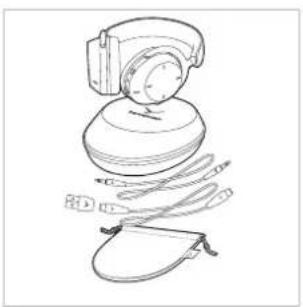
BOX CONTENTS
▶ AVENTHO 300 headphone
USB-C to USB-C charging cable
USB-A to USB-C adapter
Mini jack cable
Drawstring bag
▶ Hard case
▶ Quick start guide and compliance booklet
natural_image
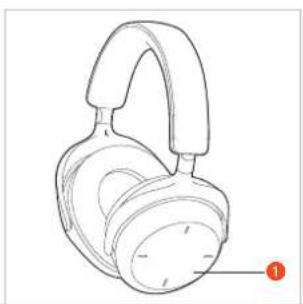
Line drawing of a mechanical device with a top component and attached parts (no text or symbols)OPERATING ELEMENTS
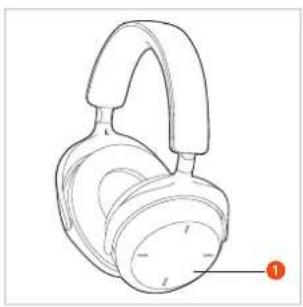
1 Touch pad
② Microphone (L + R)
③ Microphone
4 Jack connection, 3.5 mm
5 USB-C port
6 Status LED
7 On/off button
8 ANC button
natural_image
Line drawing of a pair of headphones with a black clip and orange label (no text or symbols on the device itself)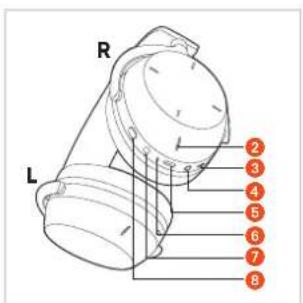
text_image
R L 2 3 4 5 6 7 8CHARGING THE BATTERY
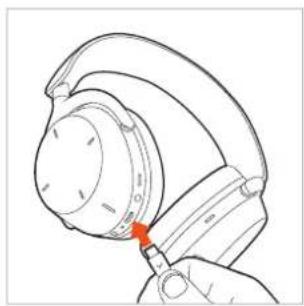
Before using the AVENTHO 300 for the first time, we recommend that you fully charge the batteries integrated in the headphone. Please only use the USB cable supplied for charging.
Connect the AVENTHO 300 with the USB charging cable to a USB-compliant voltage carrying USB connection (e.g. USB power supply unit).
The status LED indicates the charging status.
natural_image
Line drawing of a hand holding a hard hat with a red arrow pointing to the handle (no text or symbols)Remarks on the life of Li-ion batteries
When fully charged, disconnect the USB cable from the charger and the product.
▶ CAUTION! High temperatures, especially with a high charge level, can cause irreversible damage.
If the battery is not used or is stored for extended periods of time, it is recommended to charge it to approx. 50% and store it at no more than 20 °C.
▶ Switch off the AVENTHO 300 after use.
Displaying the battery charge level
The charge level of the AVENTHO 300 is displayed by the status LED.
| Charge level Display status | LED |
| 0 to 30 % Flashes red | |
| 31 to 70 % Flashes yellow | |
| 71 to 99 % Flashes green | |
| 100 %(battery fully charged) | Illuminates green |
DOWNLOAD BEYERDYNAMIC APP
The beyerdynamic app gives you a more customised control of your AVENTHO 300.
Before using your AVENTHO 300 for the first time:
▶ Download the beyerdynamic app from the App Store (for iOS devices) or Google Play (for Android devices).
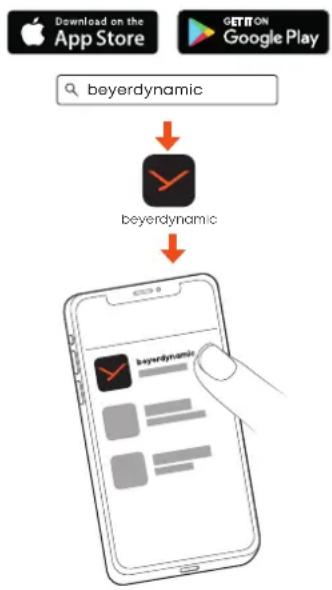
flowchart
graph TD
    A["Download on the App Store"] --> B["beyerdynamic"]
    C["GETON Google Play"] --> D["beyerdynamic"]
    B --> E["App Selection"]
    D --> E
With the beyerdynamic app you can carry out customised operation settings and software updates.
These settings are saved to your AVENTHO 300, so you can enjoy with any playback device connected to your AVENTHO 300.
▶ Please note that additional functions such as Dolby Atmos ^® , Dolby Head Tracking ^™ are only available via the beyerdynamic app.
COMPATIBILITY WITH PLAYBACK DEVICES
AVENTHO 300 is compatible with Bluetooth ^® devices that support the following profiles:
• A2DP (for audio transmission)
• HFP/HSP (for phone operation and voice assistant)
• AVRCP (for control signal transmission)
SUPPORTED AUDIO CODECS
Within the A2DP profile, AVENTHO 300 supports the audio codecs SBC, AAC, aptX Adaptive, aptX Lossless and LC3. Only codecs that are available in the playback device can be used for audio transmission.
The playback device and AVENTHO 300 automatically agree on the best available codec in the following order:
- SBC
- AAC
- aptX Adaptive
- aptX Lossless
- LC3
Most playback devices do not indicate which codec is actively in use.
OPERATION
You can operate the AVENTHO 300 via the control surface by lightly tapping and swiping with your finger. We recommend that you only ever operate the control surface with one finger to avoid malfunctions.
Connect to a device via Bluetooth®
Before you can use the AVENTHO 300, you must connect it to a mobile phone or other Bluetooth ^® -enabled device. The connection procedure may differ between the various devices.
▶ Please refer to the operating instructions of the device to which you wish to connect the AVENTHO 300.
Pairing
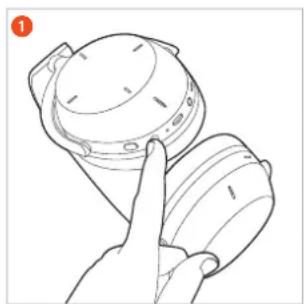
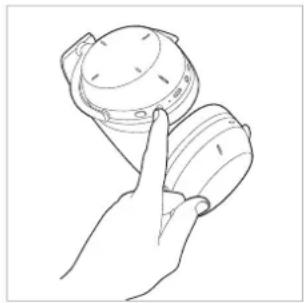
① With the AVENTHO 300 switched off, press and hold the on/off button for 6 seconds (—) until the status LED flashes blue and red alternately.
natural_image
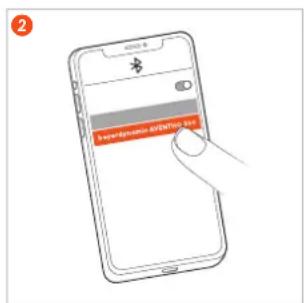
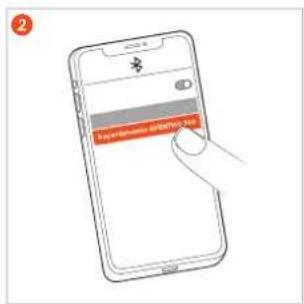
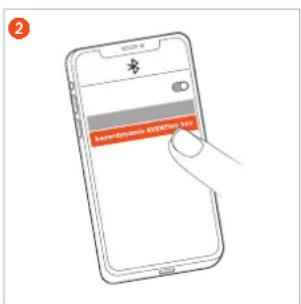
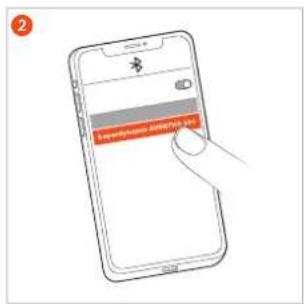
Line drawing of a hand holding a mechanical component, no text or symbols present2 Select "beyerdynamic AVENTHO 300" from the pairing list of the playback device.
text_image
www.ghm.com www.ghm.comMulti-point operation
The AVENTHO 300 can be paired with up to eight devices via Bluetooth ^® . An active connection is possible with a maximum of two devices at the same time.
Music playback and phone operation is only possible with one device at a time. Phone operation has priority over music playback, i.e. music playback is interrupted when a call is received.
The following priority list applies to the use of playback devices (PD):
| Priority Profile Playback devices (PD) | ||
| 1 HFP (phone operation) PD 1 (device used first) | ||
| 2 HFP (phone operation) PD 2 (device used second) | ||
| 3 A2DP | ( playback of music) | PD 1 (device used first) |
| 4 A2DP | ( playback of music) | PD 2 (device used second) |
Setting up multi-point
Connect the AVENTHO 300 to the first device (see "Pairing").
▶ Deactivate the Bluetooth® connection on the first device.
▶ Switch off the AVENTHO 300.
▶ Press the on/off button ⑦ for 6 seconds to start the connection mode (status LED ⑥ flashes slowly alternately blue and red).
Connect the AVENTHO 300 to the second device (see "Pairing").
▶ Reactivate the Bluetooth® connection of the first device, which automatically connects to the AVENTHO 300.
When both devices are paired with the AVENTHO 300, the AVENTHO 300 automatically connects to both devices each time it is switched on.
Using multi-point
| Media playback active / accept call | Briefly tap the touch pad twice (●●) |
| Hang up / start media playback again | Briefly tap the touch pad twice (●●) |
Delete pairing list
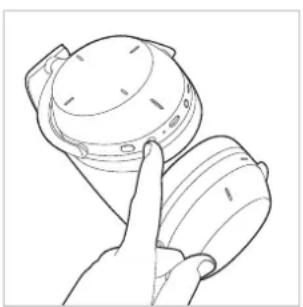
▶ Press and hold the on/off button of the switched off AVENTHO 300 for approx. 8 seconds, until the status LED flashes yellow.
natural_image
Line drawing of a hand holding a device with a circular component (no text or symbols)Switching the headphone on and off
Switching on
After you have paired the AVENTHO 300 or use it with a cable, press and hold the on/off button for approx. 2 seconds (☐).
The status LED lights up once and then goes out. It displays the respective charge level.
natural_image
Line drawing of a hand holding a small object, possibly a device or container (no text or symbols visible)▶ Switching off
Press and hold the on/off button for approx. 6 seconds (☐).
If you are using the AVENTHO 300 with cable, you must also switch it on to be able to use all available functions.
Switch between noise cancellation (ANC) and transparency mode
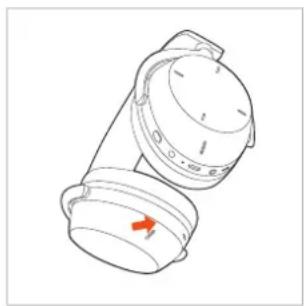
You can use the ANC button to switch between noise cancellation (ANC), transparency mode and OFF mode. The AVENTHO 300 is supplied in OFF mode.
▶ If you press the ANC button once each time, the transparency mode, the ANC mode and then the OFF mode again is activated one after the other.
▶ If you press the ANC button twice each time, the ANC mode, the transparency mode and then the OFF mode is activated again.
natural_image
Line drawing of a mechanical device with a red arrow indicating direction (no text or symbols)You can make settings for noise cancellation (ANC) and transparency mode in the beyerdynamic app.
If the transparency mode is only to be activated temporarily when wearing the AVENTHO 300, place the palm of your hand on the right side of the touch pad.
Playing media
Please note that the functions described below depend on the player and player software and may not be available. Please operate the touch pad with one finger only to avoid malfunctions.
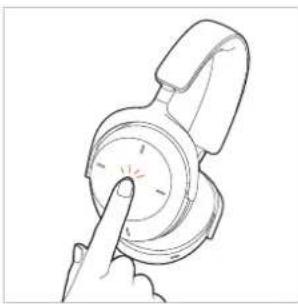
Start / pause playback
Tap the touch pad twice (●) to start or stop playback.
natural_image
Line drawing of a hand pointing at a circular object with a pointer (no text or symbols)Thanks to a sensor integrated in the housing, playback stops automatically when you put the AVENTHO 300 down and starts automatically when you put it back on.
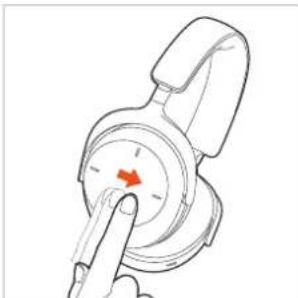
Next track / fast forward
▶ Swipe forwards → to play the next track. Swipe forwards and hold for at least 1 second → | to fast forward.*
natural_image
Illustration of a finger pointing at a circular dial with a red arrow indicating direction (no text or symbols)Previous track / rewind
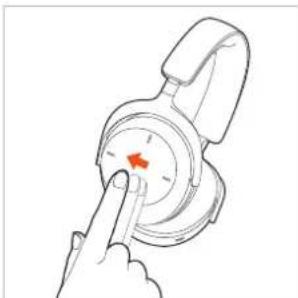
Swipe backwards ← to return to play the previous track. Swipe backwards and hold for at least 1 second | ← to rewind.*
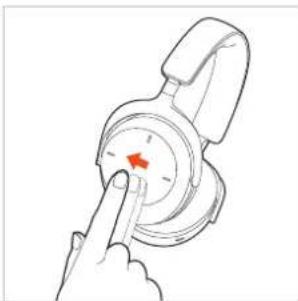
natural_image
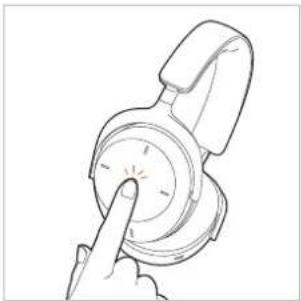
Illustration of a hand pointing at a dial with a red arrow indicating the pointer (no text or symbols present)Switch on the voice assistant
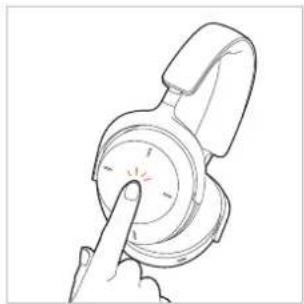
Tap and hold once ( ) to activate the voice assistant installed on the smartphone.
natural_image
Line drawing of a hand pressing a button on a circular device (no text or symbols)Adjusting the volume
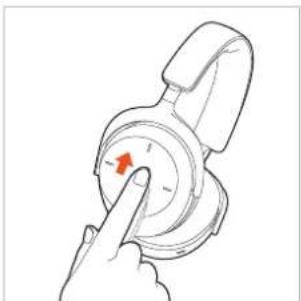
Increase the volume
▶ Swipe upwards to increase the volume. If you swipe upwards and hold, the volume is gradually increased to the maximum.
natural_image
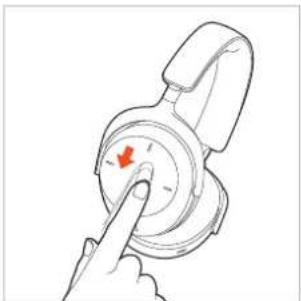
Hand pressing a button on a mechanical component (no text or symbols visible)Decrease the volume
▶ Swipe downwards to decrease the volume. If you swipe down and hold, the volume is gradually reduced to the minimum.
natural_image
Hand pointing at a circular dial with a red arrow indicating the pointer (no text or symbols present)Telephone
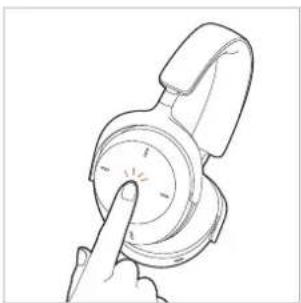
Accept / end call
Tap twice (●) to accept the incoming or end the active call.
natural_image
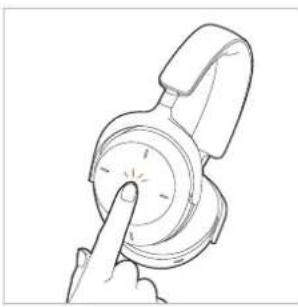
Line drawing of a hand pressing a button on a circular device (no text or symbols)Reject call
Tap and hold once () to reject the incoming call.
natural_image
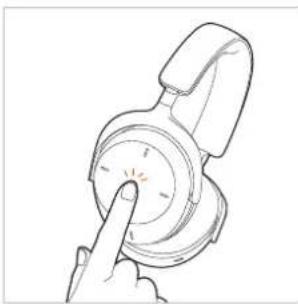
Line drawing of a hand pressing a button on a circular device (no text or symbols)Switch between two callers
Tap and hold once () to switch between two callers.
natural_image
Line drawing of a hand pressing a button on a circular device (no text or symbols)| No call active Operation | |
| Accept incoming call | Tap twice (●●) |
| Reject incoming call | Tap and hold once (○) |
| End active call | Tap twice (●●) |
| Call already active Operation | |
| Accept second incoming call and hold active call | Tap and hold once (○) |
| Reject second incoming call | Tap twice (●●) |
| Switch between two calls | Tap and hold once (○) |
| End active call and switch to held call | Tap twice (●●) |
Activate / deactivate voice prompts
Switch on the AVENTHO 300. Then carry out the following steps within two seconds:
▶ Press and hold the on/off button.
Tap the touch pad twice (●).
▶ Release the on/off button.
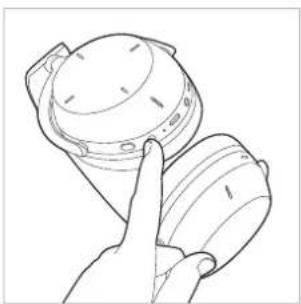
Reset to factory settings
When resetting to factory settings, all personal data is deleted!
▶ Press and hold the on/off button of the switched-off AVENTHO 300 for approx. 20 seconds (____) until the status LED flashes yellow.
natural_image
Line drawing of a hand holding a helmet and a tray (no text or symbols)Overview of the operating functions
If not stated otherwise, the functions listed apply to a switched-on headphone.
Function Operation on headphone
Switch on (the function is only available if AVENTHO 300 has already been paired or is being used with the USB or jack cable)
▶ Press and hold the on/off button for approx. 2 seconds ( ).
Switch off (the function is only available if AVENTHO 300 has already been paired or is being used with the USB or jack cable)
▶ Press and hold the on/off button for approx. 6 seconds (☐).
Pairing mode
▶ Switch off the head-phone and press and hold the on/off button for approx. 6 seconds ( ).
Delete pairing list
▶ Switch off the head-phone and press and hold the on/off button for approx. 8 seconds (____).
Restoring the factory settings
▶ Switch off the head-phone and press and hold the on/off button for approx. 20 seconds (____).
Check battery status
▶ Press the on/off button once (●).
Activate the transparency mode
▶ Depending on the mode, press the ANC button once (●) or twice (●).
Activate the ANC mode
▶ Depending on the mode, press the ANC button once (●) or twice (●).
Start / pause
Tap the touch pad twice (●).
Increase volume
Swipe upwards on the touch pad.
| Decrease volume | ► Swipe downwards on the touch pad. |
| Next track | ► Swipe forwards on the touch pad. |
| Previous track | ► Swipe backwards on the touch pad. |
| Fast forward | ► Swipe forwards on the touch pad and hold for at least 1 second. |
| Rewind | ► Swipe backwards on the touch pad and hold for at least 1 second. |
| Accept / end call | ► Briefly tap the touch pad twice (●). |
| Reject call | ► Tap and hold the touch pad once (○). |
| Switch between two callers | ► Tap and hold the touch pad once (○). |
| Activate voice assistant | ► Tap and hold the touch pad once (○). |
| Activate transparency mode temporarily | ► Place the palm of your hand on the right touch pad. |
Overview of the LED displays on the headphone
| Action LED display | |
| Low battery warning | ► LED flashes red rapidly |
| Charging via USB 0 – 30 % | ► LED flashes red |
| Charging via USB 31 – 70% | ► LED flashes yellow |
| Charging via USB 71 – 99% | ► LED flashes green |
| Charging via USB 100% | ► LED illuminates green |
| Switch on with battery status 5 – 30 % | ► LED lights up red once |
| Switch on with battery status 31 – 70 % | ► LED lights up yellow once |
| Switch on with battery status 71 – 100 % | ► LED lights up green once |
| Bluetooth® pairing recognisable | ► LED flashes blue and red |
| Bluetooth® connection active | ► LED flashes blue slowly with pauses of 7 seconds |
| Bluetooth® connection lost | ► LED flashes blue slowly with pauses of 3 seconds |
| Media playback active | ► LED flashes slowly blue with pauses of 7 seconds |
| Incoming call | ► LED flashes rapidly blue with pauses of 1 second |
| Delete pairing list | ► LED flashes yellow three times |
| Restore factory settings | ► LED flashes yellow three times |
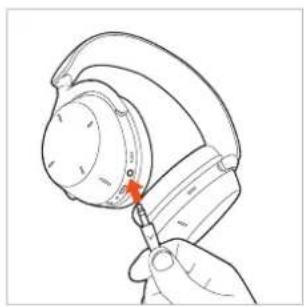
natural_image
Line drawing of a hand holding a small electronic device with a red arrow pointing to the component (no text or symbols)Audio cable connection
The delivery includes an audio cable with a mini jack plug (3.5 mm) at both ends.
Connect one end of the audio cable to the jack socket of the headphone housing, if you would like to use the AVENTHO 300 without Bluetooth ^4 .
Alternatively, you can use the USB cable as an audio cable.
Switch on the AVENTHO 300. Please note that with this type of application power is consumed via the battery.
▶ Control the media playback and volume via the playback device.
Cleaning
For reasons of hygiene, you should occasionally clean the ear and headband pads with a soft cloth moistened with water. Make sure that no water gets into the ear cups or transducers.
Do not use cleaning agents containing solvents.
▶ Never use a vacuum cleaner for cleaning the head-phone, as this may cause irreparable damage.
As ear and headband pads are subject to natural wear and tear, it will be necessary to replace them from time to time. You can easily do this yourself.
▶ If other components have to be replaced, please contact your local beyerdynamic representative.
Changing the ear pads
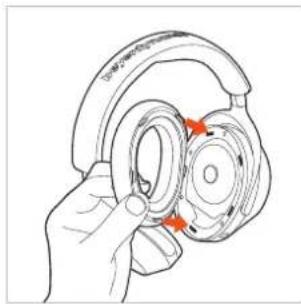
Remove the ear pad from the housing by grabbing it at the lower end from the inside under the ear pad and pulling it downwards from the fastening ring of the housing.
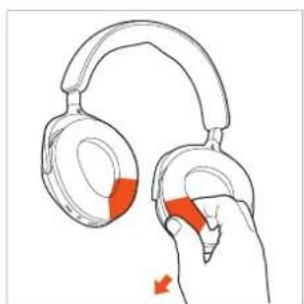
natural_image
Illustration of a hand holding two headsets with red accent arrows indicating adjustment (no text or symbols)▶ Attach the new ear pad to the housing. The five fastening noses on the fastening ring of the ear pad must be inserted into the recesses of the housing and click into place.
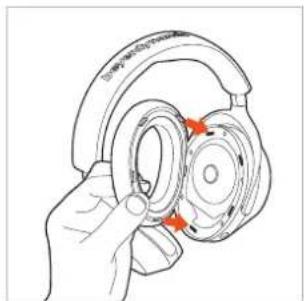
natural_image
Hand holding a hardcover with red arrows indicating rotation or adjustment (no text or symbols)Changing the headband pad
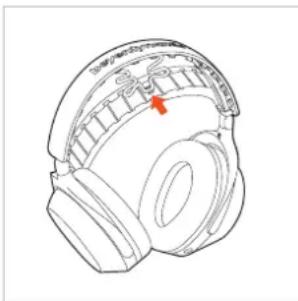
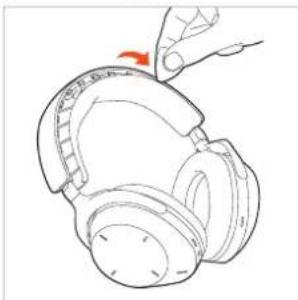
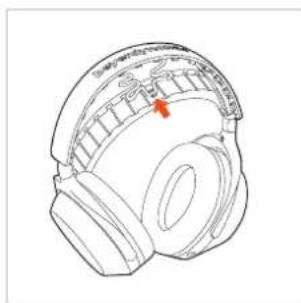
▶ Insert a plectrum or similar tool at one end of the headband between the pad and the headband and lift the pad off the headband. When you remove the headband pad, please note that the cable to the ear cups is attached in the centre of the headband pad.
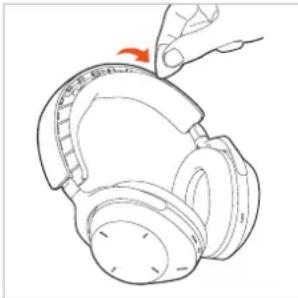
natural_image
Line drawing of a hand holding a microphone with an orange arrow indicating the tip (no text or symbols present)▶ Attach the cable to the centre of the headband pad before attaching the new pad to the headband. The fastening noses of the headband pad must fully click into place on the headband.
natural_image
Line drawing of a headboard with a red arrow pointing to the front wheel (no text or symbols)TROUBLESHOOTING
| Problem Cause Solution | |
| AVENTHO 300 cannot be switched on | ▸ Battery is or almost |
| No audio output | ▸ No Bluetooth connection |
| AVENTHO 300 does not appear among the available Bluetooth ^ devices on the playback device | ▸ AVENTHO turned of▸ AVENTHO not in the mode.▸ There exists Bluetooth connection to other play device all |
| Playback volume is too low, despite the volume of AVENTHO 300 is set to maximum | ▸ The receive audio signal too low. |
| The sound is sharp and the bass response is too low | ▸ The sealing the ear point suffic |
| The wireless range is too low or the connection is disrupted | ▸ There are rences wide devices. |
HELP WITH PROBLEMS / FAQ
Answers to more most common problems and questions can be found on the internet at:
https://www.beyerdynamic.com/aventho300 or
https://www.beyerdynamic.com/faq
PRODUCT REGISTRATION
Using the serial number, you can register your AVENTHO 300 on the internet at:
https://www.beyerdynamic.com/service
DISPOSAL
This symbol on the product, in the operating instructions or on the packaging means that electrical and electronic devices must be disposed of separately from household waste at the end of their life cycle.
▶ Always dispose of used equipment in accordance with applicable regulations.

For sale within the EU only:
For the return of old equipment, there are free collection points or a free return to beyerdynamic, as well as other acceptance points for reuse. The addresses are available at the local city or municipal administration.
▶ Dealers for electronic equipment are generally obliged to take back waste electrical/electronic equipment free of charge. This obligation also applies to sales via remote communication.
For further information, please contact the local authorities or the dealer from whom the product was purchased.
Battery disposal
▶ Dispose of batteries separately from the product after use in accordance with the applicable regulations. They must not be disposed of with household waste. Returning batteries is free of charge.
▶ Discharge the batteries before disposal.
Non-destructive removal of the battery by the end user is not possible with this product. Please contact beyerdynamic or consult independent specialists.
EU DECLARATION OF CONFORMITY
The company beyerdynamic GmbH & Co. KG hereby declares that this radio transmission device complies with the EU Directive 2014/53/EU.
▶ You will find the full text of the EU declaration of conformity on the internet at:
https://www.beyerdynamic.com/cod
TECHNICAL SPECIFICATIONS
| Bluetooth® frequency range 2,400 – 2,483.5 MHz | |
| Transmitting power (Bluetooth®) | ≤10 dBm |
| Charging temperature range +10 to +40 °C | |
| Operating temperature range -10 to +50 °C | |
| Battery type: Lithium-ion rechargeable battery | 3.7 Vdc, 1110 mAh |
▶ More detailed information on the technical specifications can be found on the internet at: https://www.beyerdynamic.com
WARRANTY CONDITIONS
The company beyerdynamic GmbH & Co. KG provides a limited warranty for the original beyerdynamic product you have purchased.
▶ You can find detailed information about beyerdynamic's warranty conditions on the internet at:
https://www.beyerdynamic.com/service/warranty
TRADEMARKS
The Bluetooth ^® word mark and logos are registered trademarks of the Bluetooth ^® SIG, Inc. and any use of such marks by beyerdynamic is under license. Other trademarks and trade names are the property of the respective owners.
USB Type-A, USB Type-B and USB Type-C are trademarks of USB Implementers.
Dolby Atmos ^® and Dolby Head Tracking ^™ are registered trademarks of Dolby Laboratories Licensing Corporation.
INHALT
natural_image
Line drawing of a mechanical device with a top component and attached parts (no text or symbols)BEDIENELEMENTE
natural_image
Line drawing of a pair of headphones with a black headband and a white circular dial (no text or symbols)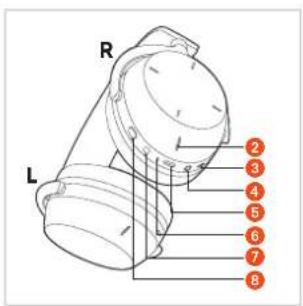
text_image
R L 2 3 4 5 6 7 8AKKUS AUFLADEN
natural_image
Line drawing of a hand holding a hard hat with a red arrow pointing to the handle (no text or symbols)- SBC
- AAC
- aptX Adaptive
- aptX Lossless
- LC3
natural_image
Line drawing of a hand holding a mechanical component, no text or symbols presenttext_image
2 Benedness of BandednessMulti-Point-Betrieb
natural_image
Line drawing of a hand holding a small object with a lid, no text or symbols presentnatural_image
Line drawing of a hand holding a small cylindrical object (no text or symbols)▶ Ausschalten
natural_image
Line drawing of a mechanical component with a red arrow indicating a specific part (no text or symbols present)natural_image
Line drawing of a hand pointing at a circular dial with a pointer (no text or symbols)natural_image
Illustration of a finger pressing a circular button with a red arrow (no text or symbols)natural_image
Line drawing of a hand pointing at a circular device with a red arrow on the dial (no text or symbols)natural_image
Line drawing of a hand pointing at a circular device with a pointer (no text or symbols)natural_image
Hand pressing a button on a circular device with a red arrow indicating the action (no text or symbols present)natural_image
Hand pressing a button on a mechanical component (no text or symbols visible)Telefonieren
natural_image
Line drawing of a hand pressing a button on a device (no text or symbols)Anruf ablehnen
natural_image
Line drawing of a hand pressing a button on a circular device (no text or symbols)natural_image
Line drawing of a hand pressing a circular button on a device (no text or symbols)natural_image
Line drawing of a hand holding a helmet with a finger pointing to it (no text or symbols)natural_image
Line drawing of a hand inserting a small red object into a mechanical component (no text or symbols)Reinigung
natural_image
Illustration of a hand holding two headphones with red adjustment arrows indicating change (no text or symbols)natural_image
Line drawing of a hand holding a hardcover with red arrows indicating rotation or adjustment (no text or symbols)natural_image
Line drawing of a hand holding a microphone with an orange arrow indicating the tip (no text or symbols present)natural_image
Technical line drawing of a helmet with a red arrow pointing to the head area (no text or symbols present)PROBLEMLÖSUNG
https://www.beyerdynamic.com/faq
https://www.beyerdynamic.com/service
DÉCLARATION DE CONFORMITÉ UE ....31
DONNÉES TECHNIQUES ....31
CONDITIONS DE GARANTIE....31
MARQUES....31
natural_image
Line drawing of a mechanical device with a curved base and attached components (no text or symbols)ÉLÉMENTS DE COMMANDE
natural_image
Line drawing of a pair of headphones with a black headband and orange label (no text or symbols on the device itself)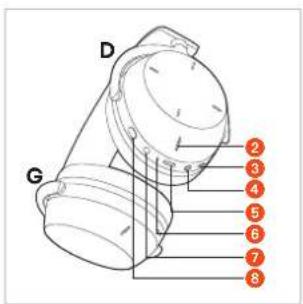
text_image
D G 2 3 4 5 6 7 8CHARGER LES BATTERIES
natural_image
Line drawing of a hand holding a mechanical component with a red arrow pointing to a detail (no text or symbols)- SBC
- AAC
- aptX Adaptive
- aptX Lossless
- LC3
natural_image
Line drawing of a hand holding a mechanical component, no text or symbols present2 Sélectionnez
natural_image
Line drawing of a hand holding a device with a dome-shaped component (no text or symbols)natural_image
Line drawing of a hand holding a small object, possibly a device or container, with no visible text or symbols.Éteindre
natural_image
Technical line drawing of a mechanical component with no visible text or symbolsnatural_image
Line drawing of a hand pointing at a circular dial with a pointer (no text or symbols)natural_image
Illustration of a finger pointing at a circular device with a red arrow indicating the pointer (no text or symbols present)natural_image
Line drawing of a hand pointing at a circular device with a red arrow on the dial (no text or symbols)natural_image
Line drawing of a hand pressing a button on a device (no text or symbols)Régler le volume sonore
Augmenter le volume sonore
natural_image
Hand pressing a button on a circular device with a red arrow indicating the action (no text or symbols present)natural_image
Hand pointing at a circular dial with a red arrow indicating rotation (no text or symbols)Téléphoner
natural_image
Line drawing of a hand pressing a circular dial on a device (no text or symbols)Refuser un appel
natural_image
Line drawing of a hand pressing a button on a circular device (no text or symbols)natural_image
Line drawing of a hand pressing a button on a circular device (no text or symbols)natural_image
Line drawing of a hand holding a cylindrical device with a lid, no text or symbols presentnatural_image
Line drawing of a hand holding a small electronic device with a red indicator arrow (no text or symbols)Nettoyage
natural_image
Illustration of a hand holding two headphones with red adjustment arrows indicating change (no text or symbols)natural_image
Line drawing of a hand holding a hardcover with red arrows indicating rotation or adjustment (no text or symbols)natural_image
Line drawing of a hand holding a microphone with a red arrow indicating the tip (no text or symbols present)natural_image
Line drawing of a headboard with a red arrow pointing to the front wheel (no text or symbols present)RÉSOLUTION DES PROBLÈMES
DÉCLARATION DE CONFORMITÉ UE
CONDITIONS DE GARANTIE
natural_image
Line drawing of a mechanical device with a top component and attached parts (no text or symbols)ELEMENTOS DE MANDO
natural_image
Line drawing of a pair of headphones with a black headband and a white circular dial (no text or symbols)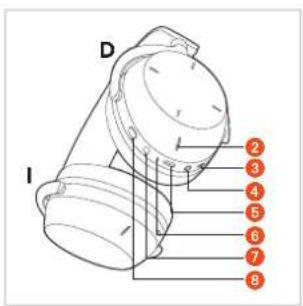
text_image
D I 2 3 4 5 6 7 8CARGAR LAS BATERÍAS
natural_image
Line drawing of a mechanical component with a red arrow indicating a specific part (no text or symbols present)- SBC
- AAC
- aptX Adaptive
- aptX Lossless
- LC3
natural_image
Line drawing of a hand holding a small mechanical component (no text or symbols)natural_image
Line drawing of a hand holding a device with a dome-shaped top (no text or symbols)natural_image
Line drawing of a hand holding a small object, possibly a device or container (no text or symbols visible)Apagado
natural_image
Line drawing of a mechanical device with a handle and circular base, no text or symbols presentnatural_image
Line drawing of a hand pointing at a circular object with a pointer (no text or symbols)natural_image
Illustration of a finger pressing a circular button with a red arrow (no text or symbols)natural_image
Line drawing of a hand pointing at a circular device with a red arrow on the dial (no text or symbols)natural_image
Line drawing of a hand pointing at a circular dial with a pointer (no text or symbols)Ajuste del volumen
Subir el volumen
natural_image
Hand pressing a button on a circular device with a red arrow indicating the action (no text or symbols present)Bajar el volumen
natural_image
Hand pointing at a circular dial with an arrow indicating rotation (no text or symbols)Llamar por teléfono
natural_image
Line drawing of a hand pressing a button on a circular device (no text or symbols)natural_image
Line drawing of a hand pressing a button on a circular device (no text or symbols)natural_image
Line drawing of a hand pressing a button on a circular device (no text or symbols)natural_image
Line drawing of a hand holding a mechanical component, no text or symbols presentnatural_image
Line drawing of a hand holding a hard hat with a red arrow pointing to the cap (no text or symbols)Limpieza
natural_image
Illustration of a hand holding two headsets with red adjustment arrows indicating adjustment (no text or symbols)natural_image
Hand holding a hardcover with red arrows indicating rotation or adjustment (no text or symbols)natural_image
Line drawing of a hand holding a microphone with an orange arrow indicating the tip (no text or symbols present)natural_image
Technical line drawing of a helmet with a red arrow pointing to the head area (no text or symbols present)https://www.beyerdynamic.com/service/warranty
MARCAS REGISTRADAS
GUIDA AL RICICLAGGIO....51
natural_image
Line drawing of a mechanical device with a top component and internal components (no text or symbols)ELEMENTI DEI COMANDI
natural_image
Line drawing of a pair of headphones with a black headband and orange label (no text or symbols on the device itself)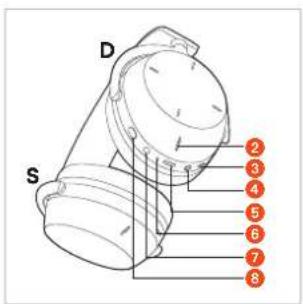
text_image
D S 2 3 4 5 6 7 8MESSA IN CARICA DELLE BATTERIE
natural_image
Line drawing of a mechanical component with a red arrow indicating a specific part (no text or symbols present)- SBC
- AAC
- aptX Adaptive
- aptX Lossless
- LC3
natural_image
Line drawing of a hand holding a small mechanical component (no text or symbols)natural_image
Line drawing of a hand holding a small object with a dome-like structure, possibly a device or component (no text or symbols present)natural_image
Line drawing of a hand holding a small cylindrical object (no text or symbols)▶ Spegnere
natural_image
Line drawing of a mechanical device with a circular top and threaded base (no text or symbols)natural_image
Line drawing of a hand pointing at a circular dial with a pointer (no text or symbols)natural_image
Illustration of a finger pointing at a circular device with a red arrow indicating the pointer (no text or symbols present)natural_image
Line drawing of a hand pointing at a circular device with a red arrow on the dial (no text or symbols)natural_image
Line drawing of a hand pressing a button on a device (no text or symbols)natural_image
Hand pressing a button on a circular device with an orange arrow (no text or symbols visible)Abbassare il volume
natural_image
Hand pointing at a circular dial with an arrow, no text or symbols presentTelefonate
natural_image
Line drawing of a hand pressing a button on a circular device (no text or symbols)natural_image
Line drawing of a hand pressing a button on a circular device (no text or symbols)natural_image
Line drawing of a hand pressing a button on a circular device (no text or symbols)natural_image
Line drawing of a hand holding a dome-shaped object with a handle, no text or symbols presentnatural_image
Line drawing of a hand holding a headset with a red arrow pointing to the head (no text or symbols)Pulizia
natural_image
Illustration of a hand holding two headphones with red adjustment arrows indicating adjustment (no text or symbols)natural_image
Illustration of a hand holding a hardcover with red arrows indicating rotation or adjustment (no text or symbols)natural_image
Line drawing of a hand holding a microphone with an orange arrow indicating the tip (no text or symbols present)natural_image
Technical line drawing of a helmet with a red arrow pointing to the head area (no text or symbols present)TERMOS DA GARANTIA....61
MARCAS REGISTADAS ....61
natural_image
Line drawing of a mechanical device with a dome-shaped top and internal components (no text or symbols)COMANDOS
natural_image
Line drawing of a pair of headphones with a black headband and orange label (no text or symbols on the device itself)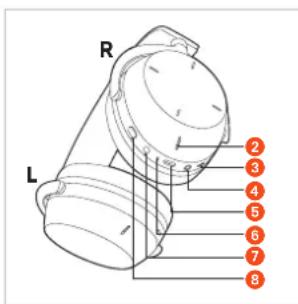
text_image
R L 2 3 4 5 6 7 8CARREGAR A BATERIA
natural_image
Line drawing of a hand holding a mechanical component with a red arrow pointing to a section (no text or symbols)- SBC
- AAC
- aptX Adaptive
- aptX Lossless
- LC3
natural_image
Line drawing of a hand holding a small mechanical component (no text or symbols)natural_image
Line drawing of a hand holding a cylindrical device with a lid (no text or symbols)Ligar e desligar os auscultadores
Ligar
natural_image
Line drawing of a hand holding a small cylindrical device (no text or symbols)▶ Desligar
natural_image
Line drawing of a mechanical component with a red arrow indicating a specific part (no text or symbols present)natural_image
Line drawing of a hand pointing at a circular device with a pointer (no text or symbols)natural_image
Illustration of a finger pointing at a circular dial with a red arrow indicating direction (no text or symbols)natural_image
Illustration of a hand pointing at a circular device with a red arrow on the dial (no text or symbols)natural_image
Line drawing of a hand pressing a button on a circular device (no text or symbols)Ajustar o volume
Aumentar o volume
natural_image
Line drawing of a hand pressing a button on a circular device (no text or symbols)Reduzir o volume
natural_image
Hand pointing at a circular dial with a red arrow indicating the pointer (no text or symbols present)Telefonar
Atender / Terminar a chamada
natural_image
Line drawing of a hand pressing a button on a circular device (no text or symbols)Rejeitar a chamada
natural_image
Line drawing of a hand pressing a button on a circular device (no text or symbols)natural_image
Line drawing of a hand pressing a circular button on a device (no text or symbols)natural_image
Line drawing of a hand pointing at a mechanical component (no text or symbols)natural_image
Line drawing of a hand holding a headset with a red arrow pointing to the head (no text or symbols)Limpeza
natural_image
Illustration of a hand holding two headsets with red accent highlights, no text or symbols presentnatural_image
Line drawing of a hand holding a hardcover with red arrows indicating rotation or adjustment (no text or symbols)natural_image
Line drawing of a hand holding a microphone with a red arrow indicating the cable (no text or symbols present)natural_image
Line drawing of a head with a red arrow pointing to the ear area (no text or symbols present)LEVERINGSOMVANG....64
BEDIENINGSELEMENTEN 64
ACCU'S OPLADEN 64
PROBLEEMOPLOSSING....70
HULP BIJ PROBLEMEN / FAQ 70
PRODUKTREGISTRATIE 70
VERWIJDERING....71
natural_image
Line drawing of a mechanical device with a top component and internal components (no text or symbols)BEDIENINGSELEMENTEN
natural_image
Line drawing of a pair of headphones with a handle and ear (no text or symbols)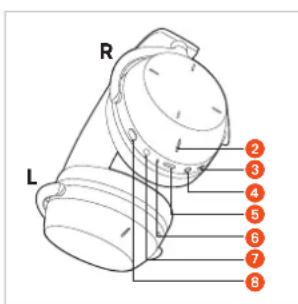
text_image
R L 2 3 4 5 6 7 8ACCU'S OPLADEN
natural_image
Line drawing of a hand holding a mechanical component with a red arrow pointing to a detail (no text or symbols)- SBC
- AAC
- aptX Adaptive
- aptX Lossless
- LC3
natural_image
Line drawing of a hand holding a mechanical component, no text or symbols presenttext_image
Illustration of a smartphone screen displaying a red text input field with Chinese characters, likely indicating a mobile app interface.Multi-Point-werking
natural_image
Line drawing of a hand holding a helmet and a hard hat (no text or symbols)natural_image
Line drawing of a hand holding a small object, possibly a device or container (no text or symbols visible)Uitschakelen
natural_image
Line drawing of a cylindrical device with a handle and spout, no text or symbols presentnatural_image
Line drawing of a hand pointing at a circular dial with a pointer (no text or symbols)natural_image
Illustration of a finger pressing a circular button with a red arrow (no text or symbols)natural_image
Line drawing of a hand pointing at a compass with a red arrow on the dial (no text or symbols)Sprakassistent inschakelen
natural_image
Line drawing of a hand pressing a button on a circular device (no text or symbols)Volume instellen
Volume verhogen
natural_image
Hand pressing a button on a circular device with a red arrow indicating the action (no text or symbols present)Volume verlagen
natural_image
Hand pointing at a circular mechanical component with a red arrow indicating rotation (no text or symbols)Telefoneren
natural_image
Line drawing of a hand pressing a button on a circular device (no text or symbols)Oproep weigeren
natural_image
Line drawing of a hand pointing at a circular button or dial (no text or symbols)natural_image
Line drawing of a hand pressing a button on a circular device (no text or symbols)natural_image
Line drawing of a hand holding a helmet and a ring (no text or symbols)natural_image
Line drawing of a hand holding a small object with a red arrow pointing to it, no text or symbols presentReiniging
natural_image
Illustration of a hand holding two headsets with red accent highlights, no text or symbols presentnatural_image
Hand holding a hardcover with orange arrows indicating rotation or adjustment (no text or symbols)natural_image
Line drawing of a hand holding a microphone, showing ear and head components (no text or symbols)natural_image
Technical line drawing of a helmet with a red arrow pointing to the side (no text or symbols present)PROBLEEMOPLOSSING
natural_image
Line drawing of a mechanical device with a top component and attached parts (no text or symbols)BETJENINGSELEMENTER
natural_image
Line drawing of a pair of headphones with a black headband and a white circular button labeled '1' (no text or symbols on the devices themselves)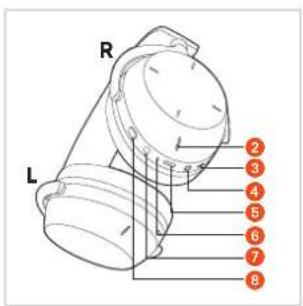
text_image
R L 2 3 4 5 6 7 8OPLAD BATTERIERNE
natural_image
Line drawing of a hand holding a hard hat with a red arrow pointing to the handle (no text or symbols)- SBC
- AAC
- aptX Adaptive
- aptX Lossless
- LC3
natural_image
Line drawing of a hand holding a mechanical component, no text or symbols presentEtabler Multi-Point forbindelse
natural_image
Line drawing of a hand holding a helmet and a hard hat (no text or symbols)natural_image
Line drawing of a hand holding a cylindrical object with a handle (no text or symbols)Sluk
natural_image
Line drawing of a mechanical device with a handle and spout (no text or symbols)natural_image
Line drawing of a hand pressing a button on a circular device (no text or symbols)natural_image
Line drawing of a finger pressing a circular button with a red arrow (no text or symbols)natural_image
Illustration of a hand pointing at a dial indicator with a red star marking the center (no text or symbols present)natural_image
Line drawing of a hand pressing a button on a circular device (no text or symbols)Indstil lydstyrken
Forhøj lydstyrken
natural_image
Hand pressing a button on a mechanical component (no text or symbols visible)Reducer lydstyrken
natural_image
Hand pointing at a circular mechanical component with a red arrow indicating rotation (no text or symbols)Telefonering
Besvare / slutte samtale
natural_image
Line drawing of a hand pointing at a circular device with a pointer (no text or symbols)Afvis opkald
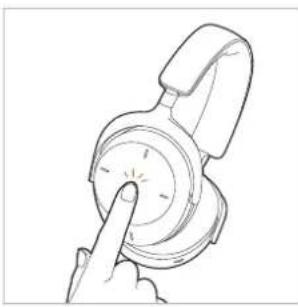
▶ Tast 1 x i lang tid (), for at afvise opkaldet.
natural_image
Line drawing of a hand pressing a button on a circular device (no text or symbols)natural_image
Line drawing of a hand pressing a button on a circular device (no text or symbols)natural_image
Line drawing of a hand holding a small object, possibly a device or component (no text or symbols visible)Genetabler LED lyser 3 x gult
natural_image
Line drawing of a hand holding a microphone with a red arrow pointing to the ear (no text or symbols)Rengøring
natural_image
Illustration of a hand holding two headsets with red accent highlights, no text or symbols presentnatural_image
Hand holding a hardcover with orange arrows indicating rotation or adjustment (no text or symbols)Skift hovedpolstrene
natural_image
Line drawing of a pair of headphones with a hand adjusting the head (no text or symbols)natural_image
Line drawing of a helmet with a red arrow pointing to the head area (no text or symbols)PROBLEML∅SNING
https://www.beyerdynamic.com/cod
TEKNISKE DATA
| Bluetooth®-Frekvensområde 2.400 – 2.483,5 MHz | |
| Sendeydelse | ≤10 dBm (Bluetooth®) |
| Opladningstemperaturområde | +10 - +40 °C |
natural_image
Line drawing of a mechanical device with a top component and a base, showing internal components (no text or symbols)KÄYTTÖPAINIKKEET
natural_image
Line drawing of a pair of headphones with a black headband and orange number 1 label (no text or symbols on the devices themselves)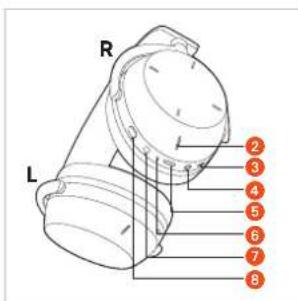
text_image
R L 2 3 4 5 6 7 8AKKUJEN LATAAMINEN
natural_image
Line drawing of a hand holding a hard hat with a red arrow pointing to the ring (no text or symbols)- SBC
- AAC
- aptX Adaptive
- aptX Lossless
- LC3
natural_image
Line drawing of a hand pressing down on a mechanical component (no text or symbols)natural_image
Line drawing of a hand holding a helmet and a wristband (no text or symbols)natural_image
Line drawing of a hand holding a cylindrical device with a knob (no text or symbols)natural_image
Technical line drawing of a mechanical component with no visible text or symbolsnatural_image
Line drawing of a hand pressing a button on a circular device (no text or symbols)natural_image
Illustration of a finger pointing at a circular device with a red arrow indicating the pointer (no text or symbols present)natural_image
Illustration of a hand pointing at a circular dial with a red arrow indicating the pointer (no text or symbols present)natural_image
Line drawing of a hand pressing a button on a circular device (no text or symbols)natural_image
Hand pressing a button on a mechanical component (no text or symbols visible)natural_image
Hand pointing at a circular dial with a red arrow indicating the pointer (no text or symbols present)Puhelintoiminnot
natural_image
Line drawing of a hand pressing a button on a circular device (no text or symbols)Puhelun hylkääminen
natural_image
Line drawing of a hand pressing a button on a circular device (no text or symbols)natural_image
Line drawing of a hand pressing a button on a circular device (no text or symbols)natural_image
Line drawing of a hand holding a mechanical component, no text or symbols presentOhjaustoiminnot
natural_image
Line drawing of a hand holding a small object with a red arrow pointing to it, no text or symbols presentPuhdistus
natural_image
Illustration of a hand holding two headphones with red adjustment arrows indicating change (no text or symbols)natural_image
Line drawing of a hand holding a headboard with orange arrows indicating rotation or adjustment (no text or symbols)natural_image
Line drawing of a hand holding a microphone with a red arrow indicating the tip (no text or symbols present)natural_image
Line drawing of a head with a red arrow pointing to the ear area (no text or symbols present)ONGELMAN MÄÄRITYS
https://www.beyerdynamic.com/faq
TUOTTEEN REKISTERÖINTI
https://www.beyerdynamic.com/service
HÄVITTÄMINEN
https://www.beyerdynamic.com/cod
TEKNISET TIEDOT
Bluetooth®-taajuusalue 2 400-2 483,5 MHz
Lähetysteho ≤ 10 dBm (Bluetooth®)
https://www.beyerdynamic.com/service/warranty
TAVARAMERKIT
Fare for svelging 93
natural_image
Line drawing of a mechanical device with exploded view and internal components (no text or symbols)BETJENINGSELEMENTER
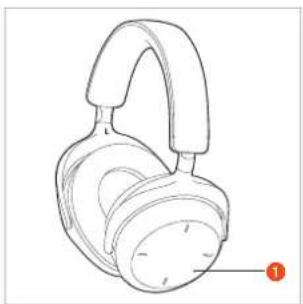
1 Betjeningsflate
② Mikrofon (L + R)
3 Mikrofon
4 Jakktilkobling, 3,5 mm
5 USB-C-tilkobling
6 Status-LED
7 Av/på-tast
8 ANC-tast
natural_image
Line drawing of a pair of headphones with a black headband and white buttons, no text or symbols present.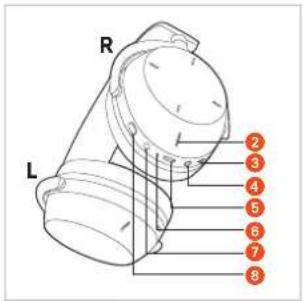
text_image
R L 2 3 4 5 6 7 8SLIK LADER DU BATTERIENE
natural_image
Line drawing of a hand holding a mechanical component with a red arrow pointing to a detail (no text or symbols)- SBC
- AAC
- aptX Adaptive
- aptX Lossless
- LC3
natural_image
Line drawing of a hand holding a mechanical component, no text or symbols present2 Velg «AVENTHO 300» fra tilkoblingslisten på avspillingsenheten.
text_image
2 Ratiosimana 670851309Flerpunktsmodus
natural_image
Line drawing of a hand holding a device with a dome-shaped component (no text or symbols)natural_image
Line drawing of a hand holding a small object with a dome-like top (no text or symbols)Slik slår du av
natural_image
Line drawing of a mechanical device with two cylindrical components and a handle (no text or symbols)natural_image
Line drawing of a hand pressing a circular dial on a device (no text or symbols)natural_image
Illustration of a finger pressing a circular button with a red arrow on the dial (no text or symbols)Slik velger du forrige spor / spoler du bakover
natural_image
Illustration of a hand pointing at a small compass face with a red star marking on the dial (no text or symbols present)natural_image
Line drawing of a hand pressing a button on a device (no text or symbols)Slik justerer du volumet
natural_image
Hand pressing a button on a mechanical component (no text or symbols visible)Slik senker du volumet
natural_image
Hand pointing at a circular dial with a red arrow indicating rotation (no text or symbols)Telefonsamtaler
natural_image
Line drawing of a hand pressing a button on a circular device (no text or symbols)natural_image
Line drawing of a hand pressing a button on a circular device (no text or symbols)Slik bytter du mellom to samtaler
natural_image
Line drawing of a hand pressing a button on a circular device (no text or symbols)natural_image
Line drawing of a hand holding a cylindrical object with a lid, no text or symbols presentnatural_image
Line drawing of a hand holding a tool interacting with a mechanical component (no text or symbols)Rengjøring
natural_image
Illustration of a hand holding two headsets with orange accent highlights, no text or symbols present▶ Fest den nye ørepolstringen. De fem festetappene på festeringen til ørepolstringen må gå i inngrep i utsparingene på huset.
natural_image
Line drawing of a hand holding an earbell with red arrows indicating the ear area (no text or symbols present)Slik bytter du ut hodepolstringen
Før et plekter eller et lignende verktøy inn mellom hodepolstringen og hodebøylen på den ene enden av hodebøylen, og vipp hodepolstringen av hodebøylen. Vær oppmerksom på at kabelen til ørekoppene er festet i midten av hodepolstringen, når du tar av polstringen.
natural_image
Line drawing of a pair of headphones with a red arrow indicating the adjustment (no text or symbols present)▶ Fest kabelen i midten av hodepolstringen før du fester den nye hodepolstringen til hodebøylen. Festetappene på hodepolstringen må gå helt i inngrep på hodebøylen.
natural_image
Technical line drawing of a helmet with a red arrow pointing to the center (no text or symbols present)PROBLEML∅SNING
https://www.beyerdynamic.com/cod
TEKNISKE DATA
Bluetooth®-frekvensområde 2400–2483,5 MHz
Sendeeffekt
≤ 10 dBm (Bluetooth®)
Temperaturområde for lading +10 til +40 °C
https://www.beyerdynamic.com/service/garantie
VAREMERKER
natural_image
Line drawing of a mechanical device with a top component and attached parts (no text or symbols)REGLAGE
1 Kontrollyta
② Mikrofon (V + H)
3 Mikrofon
4 Jackanslutning, 3,5 mm
5 USB-C-anslutning
6 LED-status
7 På/av-knapp
8 ANC-knapp
natural_image
Line drawing of a pair of headphones with a black clip and orange number label (no text or symbols on the devices themselves)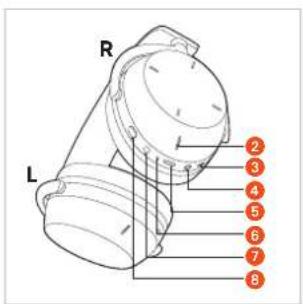
text_image
R L 2 3 4 5 6 7 8LADDA BATTERIERNA
natural_image
Line drawing of a hand holding a hard hat with a red arrow pointing to the ring (no text or symbols)- SBC
- AAC
- aptX Adaptive
- aptX Lossless
- LC3
natural_image
Line drawing of a hand holding a small mechanical component (no text or symbols)natural_image
Line drawing of a hand holding a cylindrical device with a lid (no text or symbols)natural_image
Line drawing of a hand holding a small cylindrical device (no text or symbols)Stänga av
natural_image
Line drawing of a mechanical device with a red arrow indicating rotation (no text or symbols)natural_image
Line drawing of a hand pointing at a circular dial with a pointer (no text or symbols)natural_image
Illustration of a finger pressing a circular button with a red arrow (no text or symbols)natural_image
Line drawing of a hand pointing at a circular dial with a red star mark (no text or symbols)natural_image
Line drawing of a hand pressing a button on a circular device (no text or symbols)natural_image
Hand pressing a button on a mechanical device (no text or symbols visible)Sänka ljudvolymen
natural_image
Hand pointing at a circular mechanical component with a red arrow indicating rotation (no text or symbols)Ringa
Ta emot/avsluta samtal
natural_image
Line drawing of a hand pressing a button on a circular device (no text or symbols)Avvisa samtal
natural_image
Line drawing of a hand pressing a button on a circular device (no text or symbols)natural_image
Line drawing of a hand pressing a button on a circular device (no text or symbols)natural_image
Line drawing of a hand holding a device with a dome-shaped lid (no text or symbols)natural_image
Line drawing of a hand holding a device with a red arrow pointing to the component (no text or symbols)natural_image
Illustration of a hand holding two headphones with red adjustment arrows indicating change (no text or symbols)natural_image
Line drawing of a hand holding a headboard with orange arrows indicating rotation or adjustment (no text or symbols)natural_image
Line drawing of a hand holding a microphone with a red arrow indicating the tip (no text or symbols present)natural_image
Line drawing of a head with a red arrow pointing to the ear area (no text or symbols present)PROBLEMLÖSNING
≤ 10 dBm (Bluetooth®)
SELLEST JUHENDIST....114
TARNEKOMPLEKT....114
JUHTELEMENDID 114
AKUDE LAADIMINE 114
JÄÄTMEKÄITLUS....121
Üldised hooldusjuhised
natural_image
Line drawing of a mechanical device with a top component and base, showing internal components and motion lines (no text or symbols)JUHTELEMENDID
natural_image
Line drawing of a pair of headphones with a strap, showing front and side views (no text or symbols)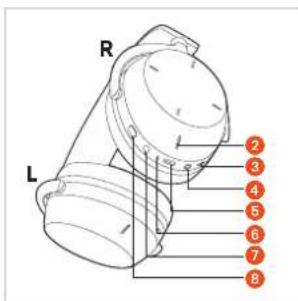
text_image
R L 2 3 4 5 6 7 8AKUDE LAADIMINE
natural_image
Line drawing of a hand holding a headset with a red arrow pointing to the component (no text or symbols present)- SBC
- AAC
- aptX Adaptive
- aptX Lossless
- LC3
natural_image
Line drawing of a hand pointing at a mechanical component (no text or symbols)2 Valige „AVENTHO 300“ esitusseadme sidestusloendist.
text_image
kawaldmaa 600000 321Multi-Point-režiim
natural_image
Line drawing of a hand holding a small object, possibly a device or container, with no visible text or symbols.natural_image
Line drawing of a hand holding a small object, possibly a device or container (no text or symbols visible)Väljalülitamine
natural_image
Line drawing of a mechanical device with a highlighted component and arrow indicator (no text or symbols)natural_image
Line drawing of a hand pointing at a circular dial with a pointer (no text or symbols)natural_image
Illustration of a finger pointing at a circular device with a red arrow indicating the pointer (no text or symbols present)Eelmine lugu / tagasikerimine
natural_image
Line drawing of a hand pointing at a small compass face with a red star marking on the dial (no text or symbols)natural_image
Line drawing of a hand pressing a button on a circular device (no text or symbols)natural_image
Hand pressing a button on a mechanical component (no text or symbols visible)natural_image
Hand pointing at a circular dial with a red arrow indicating the pointer (no text or symbols present)Helistamine
natural_image
Line drawing of a hand pressing a button on a circular device (no text or symbols)Kõnest keeldumine
natural_image
Line drawing of a hand pressing a button on a circular device (no text or symbols)natural_image
Line drawing of a hand pressing a button on a circular device (no text or symbols)natural_image
Line drawing of a hand holding a small object with a dome-like structure (no text or symbols)natural_image
Line drawing of a hand holding a device with a red arrow pointing to the component (no text or symbols)Puhastamine
natural_image
Illustration of a hand holding two headsets with red accent highlights, no text or symbols presentnatural_image
Line drawing of a hand holding a hardcover with red arrows indicating rotation or adjustment (no text or symbols)natural_image
Line drawing of a pair of headphones with a red arrow indicating the adjustment (no text or symbols present)natural_image
Technical line drawing of a helmet with a red arrow pointing to the center (no text or symbols present)PROBLEEMIDE LAHENDAMINE
https://www.beyerdynamic.com/service/warranty
KAUBAMÄRGID
natural_image
Line drawing of a mechanical device with a dome-shaped top and attached cable (no text or symbols)VALDYMO ELEMENTAI
natural_image
Line drawing of a pair of headphones with a black headband and a white body, no text or symbols present.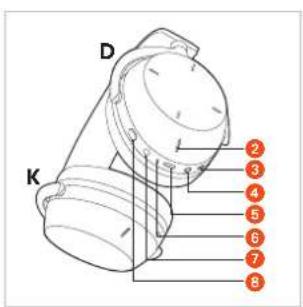
text_image
D K 2 3 4 5 6 7 8BATERIJU İKROVIMAS
natural_image
Line drawing of a hand holding a helmet with a red arrow pointing to the seat area (no text or symbols)- SBC
- AAC
- aptX Adaptive
- aptX Lossless
- LC3
natural_image
Line drawing of a hand holding a small mechanical component (no text or symbols)natural_image
Line drawing of a hand holding a device with a circular component (no text or symbols)natural_image
Line drawing of a hand holding a cylindrical object (no text or symbols)Išjungimas
natural_image
Line drawing of a mechanical device with a handle and internal components (no text or symbols)natural_image
Line drawing of a hand pointing at a circular object with a pointer (no text or symbols)natural_image
Illustration of a finger pressing a circular button with an arrow indicator (no text or symbols present)natural_image
Illustration of a hand pointing at a small compass face with a red star marking (no text or symbols)natural_image
Line drawing of a hand pressing a button on a circular device (no text or symbols)natural_image
Hand pressing a button on a mechanical component (no text or symbols visible)Garsumo sumažinimas
natural_image
Hand pointing at a circular mechanical component with a red arrow indicating rotation (no text or symbols)Skambinimas telefonu
natural_image
Line drawing of a hand pressing a button on a circular device (no text or symbols)Skambučio atmetimas
natural_image
Line drawing of a hand pressing a button on a circular device (no text or symbols)natural_image
Line drawing of a hand pressing a button on a circular device (no text or symbols)natural_image
Line drawing of a hand holding a small electronic device with a dome-shaped top (no text or symbols)Valdymo funkciju apžvalga
natural_image
Line drawing of a hand holding a tool interacting with a mechanical component (no text or symbols)Valymas
natural_image
Illustration of a hand holding two headphones with red adjustment arrows indicating change (no text or symbols)natural_image
Line drawing of a hand holding a headboard with orange arrows indicating rotation or adjustment (no text or symbols)natural_image
Line drawing of a hand holding a microphone and ear (no text or symbols)natural_image
Technical line drawing of a helmet with a red arrow pointing to the head area (no text or symbols present)PROBLEMŲ SPRENDIMAS
https://www.beyerdynamic.com/service
ATBALSTITIE AUDIO KODEKSI ....135
LIETOŠANA....135
natural_image
Line drawing of a mechanical device with attached components (no text or symbols)VADİBAS ELEMENTI
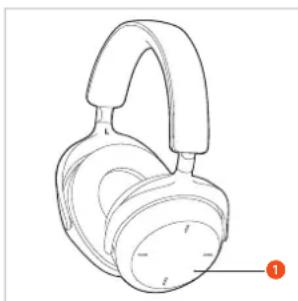
① Vadības virsma
2 Mikrofons (L + R)
3 Mikrofons
4 TRS savienotājs, 3,5 mm
5 USB-C pieslēgligzda
6 Statusa gaismas diode
7 IESL./IZSL. taustiņš
8 ANC taustiņš
natural_image
Line drawing of a pair of headphones with a handle and ear (no text or symbols)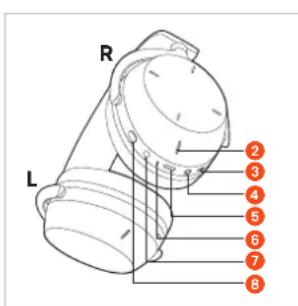
text_image
R L 2 3 4 5 6 7 8AKUMULATORU UZLÄDE
natural_image
Line drawing of a hand holding a headset with a red arrow pointing to the head (no text or symbols)- SBC
- AAC
- aptX Adaptive
- aptX Lossless
- LC3
natural_image
Line drawing of a hand pressing down on a mechanical component (no text or symbols)natural_image
Line drawing of a hand holding a device with a circular component (no text or symbols)natural_image
Line drawing of a hand holding a cylindrical object with a lid (no text or symbols)Izslēgšana
Turiet IESL./IZSL.taustinu nospiestu aptuveni 6 sekundes ( ).
natural_image
Line drawing of a mechanical component with a red arrow indicating direction (no text or symbols)natural_image
Line drawing of a hand pointing at a circular object with a pointer (no text or symbols)natural_image
Illustration of a finger pressing a circular button with a red arrow indicating the pointer (no text or symbols present)natural_image
Illustration of a hand pointing at a wristwatch with a red arrow on the dial (no text or symbols)natural_image
Line drawing of a hand pressing a button on a circular device (no text or symbols)Skaluma regulēšana
natural_image
Hand pointing at a circular mechanical component with a red arrow indicating rotation (no text or symbols)natural_image
Hand pointing at a circular mechanical component with a red arrow indicating rotation (no text or symbols)Zvanīšana
natural_image
Line drawing of a hand pressing a button on a circular device (no text or symbols)Zvana noraidišana
natural_image
Line drawing of a hand pressing a button on a circular device (no text or symbols)natural_image
Line drawing of a hand pressing a button on a circular device (no text or symbols)natural_image
Line drawing of a hand holding a mechanical component, no text or symbols presentnatural_image
Line drawing of a hand holding a hard hat with a red arrow pointing to the cap (no text or symbols)Tīrīšana
natural_image
Illustration of a hand holding two headsets with red accent highlights, no text or symbols presentnatural_image
Hand holding a hardcover with orange arrows indicating rotation or adjustment (no text or symbols)natural_image
Line drawing of a pair of headphones with a red arrow indicating the adjustment (no text or symbols present)natural_image
Technical line drawing of a helmet with a red arrow pointing to the side panel (no text or symbols present)PROBLÉMU NOVĚRŠANA
natural_image
Line drawing of a mechanical device with a top component and internal components (no text or symbols)ELEMENTY OBSŁUGI
natural_image
Line drawing of a pair of headphones with a handle and ear (no text or symbols)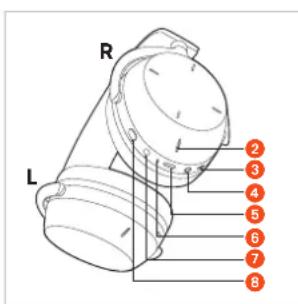
text_image
R L 2 3 4 5 6 7 8ŁADOWANIE BATERII
natural_image
Line drawing of a hand holding a mechanical component with a red arrow pointing to a detail (no text or symbols)- SBC
- AAC
- aptX Adaptive
- aptX Lossless
- LC3
natural_image
Line drawing of a hand holding a small mechanical component (no text or symbols)text_image
2 Access to the InternetTryb wielopunktowy
natural_image
Line drawing of a hand holding a device with a dome-shaped component (no text or symbols)natural_image
Line drawing of a hand holding a cylindrical object with a lid (no text or symbols)Wyłączanie
natural_image
Line drawing of a cylindrical device with a handle and control knob (no text or symbols)natural_image
Line drawing of a hand pointing at a circular dial with a pointer (no text or symbols)natural_image
Illustration of a finger pressing a circular button with a red arrow (no text or symbols)natural_image
Line drawing of a hand pointing at a circular device with a red arrow on the dial (no text or symbols)natural_image
Line drawing of a hand pressing a button on a circular device (no text or symbols)natural_image
Hand pointing at a circular device with a red arrow indicating the pointer (no text or symbols present)natural_image
Hand pressing a button on a mechanical component (no text or symbols visible)Telefonowanie
natural_image
Line drawing of a hand pressing a button on a circular device (no text or symbols)natural_image
Line drawing of a hand pressing a button on a circular device (no text or symbols)natural_image
Line drawing of a hand pressing a button on a circular device (no text or symbols)natural_image
Line drawing of a hand holding a mechanical component (no text or symbols)natural_image
Line drawing of a hand holding a hard hat with a red arrow pointing to the cap (no text or symbols)Czyszczenie
natural_image
Illustration of a hand holding two headphones with red adjustment arrows indicating change (no text or symbols)natural_image
Line drawing of a hand holding a headboard with orange arrows indicating rotation or adjustment (no text or symbols)natural_image
Line drawing of an Apple headphones with a hand adjusting the head (no text or symbols)natural_image
Line drawing of a head with a red arrow pointing to the ear area (no text or symbols present)ROZWIAZANIE PROBLEMU
DEKLARACJA ZGODNOŚCI WE
natural_image
Line drawing of a mechanical device with a dome-shaped top and attached cable (no text or symbols)操作要素
natural_image
Line drawing of a pair of headphones with a handle and ear (no text or symbols)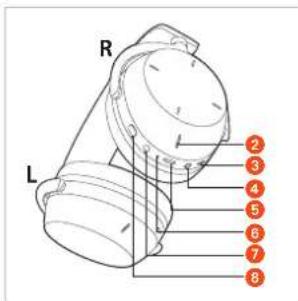
text_image
R L 2 3 4 5 6 7 8バッテリーの充電
natural_image
Line drawing of a hand holding a hard hat with a red arrow pointing to the handle (no text or symbols)- SBC
- AAC
- aptX Adaptive
- aptX Lossless
- LC3
natural_image
Line drawing of a hand holding a mechanical component, no text or symbols present② 再生デバイスのカップリ
ングリストから
「AVENTHO 300」
を選択します。
text_image
Bayering the Internet Userマル チ ポ イント機能
natural_image
Line drawing of a hand holding a helmet and a hard hat (no text or symbols)ヘッドホンのオン/オフ
natural_image
Line drawing of a hand holding a cylindrical device with a lid (no text or symbols)natural_image
Line drawing of a mechanical component with a red arrow indicating a specific part (no text or symbols present)natural_image
Line drawing of a hand pointing at a circular device with a pointer (no text or symbols)natural_image
Illustration of a finger pressing a circular button with a red arrow indicating the pointer (no text or symbols present)前のトラック / 巻き戻し
▶ 後ろ方向 ←
にスワイプすると前
のトラックが再生されます。
後ろ方向にスワイプし
1秒|←以上長押しすると
巻き戻しされます。*
natural_image
Illustration of a hand pointing at a small compass face with a red star marking on the dial (no text or symbols present)言語アシスタントをオンにする
▶ 1回長く()タップすると、
スマートフォンに設定
されている音声
アシスタントが起動します。
natural_image
Line drawing of a hand pressing a button on a circular device (no text or symbols)音量設定
音量を上げる
natural_image
Hand pressing a button on a mechanical device with a red arrow indicating the action (no text or symbols present)音量を下げる
natural_image
Hand pressing a button on a circular device with a red arrow indicating the action (no text or symbols present)電話
電話に応答 / 終了
natural_image
Line drawing of a hand pressing a button on a circular device (no text or symbols)通話を拒否
natural_image
Line drawing of a hand pressing a button on a circular device (no text or symbols)natural_image
Line drawing of a hand pressing a circular dial on a device (no text or symbols)natural_image
Line drawing of a hand holding a mechanical component (no text or symbols)操作機能一覧
natural_image
Line drawing of a hand holding a tool interacting with a mechanical component (no text or symbols)オーディオケーブルの接続
natural_image
Illustration of a hand holding two headsets with red accent highlights, no text or symbols presentnatural_image
Hand holding a hardcover with red arrows indicating rotation or adjustment (no text or symbols)ヘッド バンドクッション の 交換
natural_image
Line drawing of a hand holding a microphone and ear (no text or symbols)natural_image
Technical line drawing of a helmet with a red arrow pointing to the center (no text or symbols present)トラブルシューティング
natural_image
Line drawing of a mechanical device with no visible text or symbols조작 요소
natural_image
Line drawing of a pair of headphones with a black headband and orange label (no text or symbols on the device itself)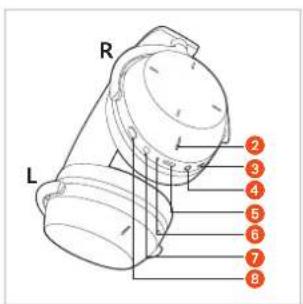
text_image
R L 2 3 4 5 6 7 8배터리 충전
natural_image
Line drawing of a hand holding a hard hat with a red arrow pointing to the handle (no text or symbols)- SBC
- AAC
- aptX Adaptive
- aptX Lossless
- LC3
natural_image
Line drawing of a hand holding a small object with a circular component, no text or symbols presenttext_image
Illustration of a smartphone screen displaying a red text input field with Chinese characters, likely indicating a payment or app interface.다중점 작동
natural_image
Line drawing of a hand holding a device with a circular component (no text or symbols)헤드폰 켜고 끄기
▶ 커기
natural_image
Line drawing of a hand holding a mechanical component (no text or symbols)natural_image
Line drawing of a mechanical component with a red arrow indicating a specific part (no text or symbols present)natural_image
Line drawing of a hand pointing at a circular dial (no text or symbols)natural_image
Illustration of a finger pressing a circular button with a red arrow on the dial (no text or symbols)이전 트랙/뒤로 감기
natural_image
Illustration of a hand pressing a circular dial with a red arrow (no text or symbols)음성 도우미 켜기
natural_image
Line drawing of a hand pressing a button on a circular device (no text or symbols)볼륨 조절
볼륨 높임
natural_image
Hand pressing a button on a mechanical device (no text or symbols visible)볼륨 낮춤
natural_image
Hand pressing a button on a mechanical device (no text or symbols visible)통화
전화 수락 / 종료
natural_image
Line drawing of a hand pressing a button on a device (no text or symbols)전화 거절
natural_image
Line drawing of a hand pressing a button on a circular device (no text or symbols)중개(두 명의 발신자 간 전환)
natural_image
Line drawing of a hand pressing a button on a circular device (no text or symbols)natural_image
Line drawing of a hand holding a helmet and a camera (no text or symbols)조작 기능 개요
natural_image
Line drawing of a hand holding a tool interacting with a device (no text or symbols visible)오디오 케이블 연결
natural_image
Illustration of a hand holding two headphones with red adjustment arrows indicating change (no text or symbols)natural_image
Illustration of a hand holding a hardcover with red arrows indicating rotation or adjustment (no text or symbols)헤드밴드 패드 교체하기
natural_image
Line drawing of a hand holding a pair of headphones, showing the head and neck (no text or symbols)natural_image
Line drawing of a helmet with a red arrow pointing to the center (no text or symbols)문제 해결
https://www.beyerdynamic.com/service/warranty
등록 상표
natural_image
Line drawing of a mechanical device with a dome-shaped top and coiled spring (no text or symbols)操作元件
natural_image
Line drawing of a pair of headphones with a black headband and orange label (no text or symbols on the device itself)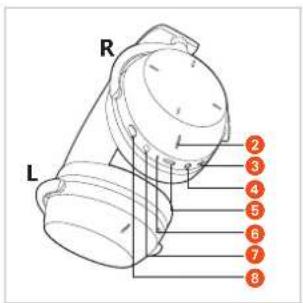
text_image
R L 2 3 4 5 6 7 8为电池充电
natural_image
Line drawing of a hand holding a headset with a red arrow pointing to the component (no text or symbols)锂电池使用寿命提示
- SBC
- AAC
- aptX Adaptive
- aptX Lossless
- LC3
natural_image
Line drawing of a hand holding a cylindrical object with a circular base (no text or symbols)natural_image
Line drawing of a hand holding a device with a circular component (no text or symbols)启动和关闭耳机
natural_image
Line drawing of a hand holding a cylindrical object with a lid (no text or symbols)natural_image
Line drawing of a mechanical component with a red arrow indicating a specific part (no text or symbols present)natural_image
Line drawing of a hand pointing at a circular dial with a pointer (no text or symbols)natural_image
Illustration of a finger pressing a circular button with a red arrow (no text or symbols)上一曲/快退
natural_image
Line drawing of a hand pointing at a dial with a red star marking the center (no text or symbols)打开语音助手
natural_image
Line drawing of a hand pointing at a circular device with a red mark on the dial (no text or symbols)音量调节
提高音量
natural_image
Hand pressing a button on a mechanical device (no text or symbols visible)降低音量
natural_image
Hand pointing at a circular dial with a red arrow indicating the pointer (no text or symbols present)通话
接受/结束呼叫
natural_image
Line drawing of a hand pressing a button on a circular device (no text or symbols)拒接来电
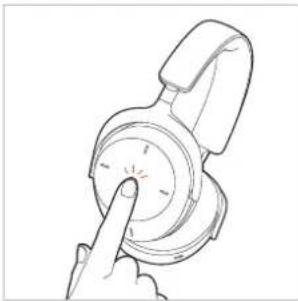
▶ 长按1次(),以拒接来电。
natural_image
Line drawing of a hand pressing a button on a circular device (no text or symbols)切换(在两名来电者之间切换)
natural_image
Line drawing of a hand pressing a circular dial on a device (no text or symbols)natural_image
Line drawing of a hand holding a mechanical component (no text or symbols)操作功能概览
natural_image
Line drawing of a hand holding a headset with a red arrow pointing to the head area (no text or symbols)清洁
natural_image
Illustration of a hand holding two headphones with orange buttons, no text or symbols presentnatural_image
Hand holding a hardcover with red arrows indicating rotation or adjustment (no text or symbols)更换头箍垫
natural_image
Line drawing of a hand holding a microphone, showing ear and head components (no text or symbols)natural_image
Technical line drawing of a helmet component with no visible text or symbols问题解决
natural_image
Line drawing of a mechanical device with springs and a base plate (no text or symbols)操作元件
natural_image
Line drawing of a pair of headphones with a black headband and orange label (no text or symbols on the device itself)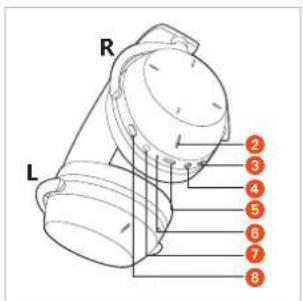
text_image
R L 2 3 4 5 6 7 8為電池充電
natural_image
Line drawing of a hand holding a helmet with a red arrow pointing to the seat area (no text or symbols)鋰電池使用壽命說明
- SBC
- AAC
- aptX Adaptive
- aptX Lossless
- LC3
natural_image
Line drawing of a hand holding a small mechanical component (no text or symbols)natural_image
Line drawing of a hand pointing at a mechanical component (no text or symbols)啟動和關閉耳機
開啟
將 AVENTHO 300
配對後或使用電纜連接後,
長按開/關按鍵
約 2 秒鐘( )。
LED 狀態指示燈
亮一次燈,然後熄滅。
其顯示當前充電狀態。
關閉
關閉長按開/關按鍵
約6秒( )。
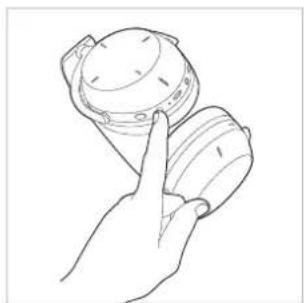
natural_image
Line drawing of a hand holding a cylindrical object with a lid (no text or symbols)natural_image
Technical line drawing of a mechanical component with a red arrow indicating a specific part (no text or symbols present)natural_image
Line drawing of a hand pointing at a circular dial with a red star on the dial (no text or symbols)natural_image
Line drawing of a mechanical component with a finger pointing to a circular feature, no text or symbols present上一曲/快退
natural_image
Illustration of a hand pointing at a circular device with a red star on the dial (no text or symbols)natural_image
Line drawing of a hand pointing at a circular dial with a red starburst (no text or symbols)音量調整
提高音量
natural_image
Line drawing of a hand pressing a button on a mechanical component (no text or symbols)降低音量
natural_image
Hand pointing at a circular dial with a red arrow indicating the pointer (no text or symbols present)通話
接聽/結束來電
natural_image
Line drawing of a hand pressing a button on a circular device (no text or symbols)拒接來電
▶ 長按 1 次 (—), 拒接來電。
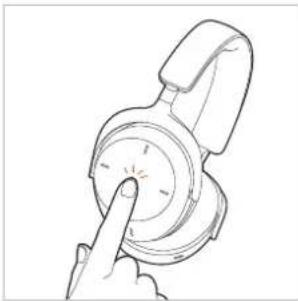
natural_image
Line drawing of a hand pressing a button on a circular dial (no text or symbols)來電等待(在兩名來電者之間進行切換)
natural_image
Line drawing of a hand pressing a circular dial on a device (no text or symbols)natural_image
Line drawing of a hand holding a mechanical component (no text or symbols)操作功能概覽
natural_image
Line drawing of a hand holding a small tool interacting with a helmet-like device (no text or symbols visible)清潔
natural_image
Illustration of a hand holding two headphones with red buttons, no text or symbols presentnatural_image
Line drawing of a hand holding a hardcover with red arrows indicating rotation or adjustment (no text or symbols)更換頭箍墊
natural_image
Line drawing of a hand holding a hard hat with a red arrow indicating rotation (no text or symbols)natural_image
Technical line drawing of a helmet component with a red arrow pointing to the center (no text or symbols present)問題解決方案
For further distributors worldwide, please go to www.beyerdynamic.com
Non-contractual illustrations. Subject to change without notice.