Elite T9 - Treadmills Horizon Fitness - Free user manual and instructions
Find the device manual for free Elite T9 Horizon Fitness in PDF.


| Brand | Horizon Fitness |
| Model | Elite T9 |
| Product type | Electric treadmill |
| Dimensions (L x W x H) | Approximately 200 x 85 x 140 cm |
| Device weight | Approximately 120 kg |
| Maximum user weight | 150 kg |
| Power supply | 220-240 V, 50/60 Hz |
| Motor power | 3.0 CH (continuous) |
| Maximum speed | 20 km/h (12 mph) |
| Maximum incline | 15% |
| Running surface | 152 x 51 cm |
| Display type | LCD screen (liquid crystal display) |
| Training programs | Manual, Distance, Calories, Intervals (speed, peaks, endurance), Performance (run/walk, mountain, sprint), Steps, Target heart rate, Custom (2 profiles), Connectivity (ViaFit, Passport) |
| Connectivity | Wi-Fi, Bluetooth (T9), Passport (Virtual Active), USB port (updates, charging <1 A), 3.5 mm audio jack, headphone output |
| Comfort features | Adjustable fan, built-in speakers, reading stand, bottle holder, heart rate grips |
| Safety | Safety key with clip, emergency stop button, energy-saving mode |
| Maintenance | Belt tension and tracking, leveling, cleaning with damp cloth |
| Deck | Yes, with lock |
| Transport wheels | Yes |
| Warranty | Refer to the provided information sheet |
| Country of manufacture | Not specified |
Frequently Asked Questions - Elite T9 Horizon Fitness
User questions about Elite T9 Horizon Fitness
0 question about this device. Answer the ones you know or ask your own.
Ask a new question about this device
Download the instructions for your Treadmills in PDF format for free! Find your manual Elite T9 - Horizon Fitness and take your electronic device back in hand. On this page are published all the documents necessary for the use of your device. Elite T9 by Horizon Fitness.
USER MANUAL Elite T9 Horizon Fitness
natural_image
Silhouette of a vehicle's front bumper with no text or symbolsELITE T5
T7
T9

OPERATION GUIDE
GUIDE D'UTILISATION
This section explains how to use your treadmill's console and programming.
The BASIC OPERATION section in the TREADMILL GUIDE has instructions for the following:
• LOCATION OF THE TREADMILL
• USING THE SAFETY KEY
• FOLDING THE TREADMILL
• MOVING THE TREADMILL
• LEVELING THE TREADMILL
• TENSIONING THE RUNNING BELT
• CENTERING THE RUNNING BELT
• USING THE HEART RATE FUNCTION


text_image
A H I O T K 1324 05 128 104 479 T L L J P D N C B G M QSNote: There is a thin protective sheet of clear plastic on the overlay of the console that should be removed before use.
A) LCD DISPLAY WINDOW: time, distance, speed, calories, incline, laps, and heart rate.
B) (START/PAUSE KEY): press to start workout and pause workout.
C) (STOP KEY): press to stop workout. Hold to reset console.
D) (ENTER KEY): press to confirm selection during programming setup. Hold to reset console.
E) (FAN KEY): press to turn fan on and off.
F) INCLINE - △ + KEYS: press to adjust incline level.
G) SPEED - 4 + KEYS: press to adjust speed level.
H) QUICK ADJUST KEYPAD: quickly access any incline or speed level by typing the number and pressing SET INCLINE (I) or SET SPEED (J) keys. Examples:
• To change the incline to 4.0%, press 4-0-SET INCLINE.
• To change the speed level to 12, press 1-2-0-SET SPEED.
I) SET INCLINE KEY: press to change incline to level entered into keypad.
J) SET SPEED KEY: press to change resistance to level entered into keypad.
K) FAN: personal workout fan.
L) SPEAKERS: plays music through speakers when connected to your media player.
M) READING RACK: holds reading material.
N) SAFETY KEY: enables treadmill when safety key is inserted.
O) WI-FI CONNECT & SYNC: press to reset and connect your wireless internet connection. See Page 12 for more info.
P) PASSPORT CONNECT & SYNC: press to reset and connect your Passport box for Virtual Active programming.
Q) AUDIO IN JACK: plug your media player into the console using the included audio adaptor cable.
R) AUDIO OUT/HEADPHONE JACK: plug your headphones into the console to use them instead of the console speakers.
S) ENERGY SAVER LIGHT: indicates if machine is in Energy Saver mode.
T) WATER BOTTLE POCKETS: holds personal workout equipment.


text_image
A H I O U K 136 342 100 97 10 167 U J P D L L N C G M R Q S FNote: There is a thin protective sheet of clear plastic on the overlay of the console that should be removed before use.
A) LCD DISPLAY WINDOW: time, distance, speed, calories, incline, laps, and heart rate.
B) ▶II (START/PAUSE KEY): press to start workout and pause workout.
C) (STOP KEY): press to stop workout. Hold to reset console.
D) ☑ (ENTER KEY): press to confirm selection during programming setup. Hold to reset console.
E) ✿ (FAN KEY): press to turn fan on and off.
F) INCLINE -+ KEYS: press to adjust incline level.
G) SPEED - + KEYS: press to adjust speed level.
H) QUICK ADJUST KEYPAD: quickly access any incline or speed level by typing the number and pressing SET INCLINE (I) or SET SPEED (J) keys. Examples:
• To change the incline to 4.0%, press 4-0-SET INCLINE.
- To change the speed level to 12, press 1-2-0-SET SPEED.
I) SET INCLINE KEY: press to change incline to level entered into keypad.
J) SET SPEED KEY: press to change resistance to level entered into keypad.
K) FAN: personal workout fan.
L) SPEAKERS: plays music through speakers when connected to your media player.
M) READING RACK: holds reading material.
N) SAFETY KEY: enables treadmill when safety key is inserted.
O) WI-FI CONNECT & SYNC: press to reset and connect your wireless internet connection. See Page 12 for more info.
P) PASSPORT CONNECT & SYNC: press to reset and connect your Passport box for Virtual Active programming.
Q) AUDIO IN JACK: plug your media player into the console using the included audio adaptor cable.
R) AUDIO OUT/HEADPHONE JACK: plug your headphones into the console to use them instead of the console speakers.
S) ENERGY SAVER LIGHT: indicates if machine is in Energy Saver mode.
T) USB PORT: used for software updates or to charge devices less than 1 amp.
U) WATER BOTTLE POCKETS: holds personal workout equipment.

text_image
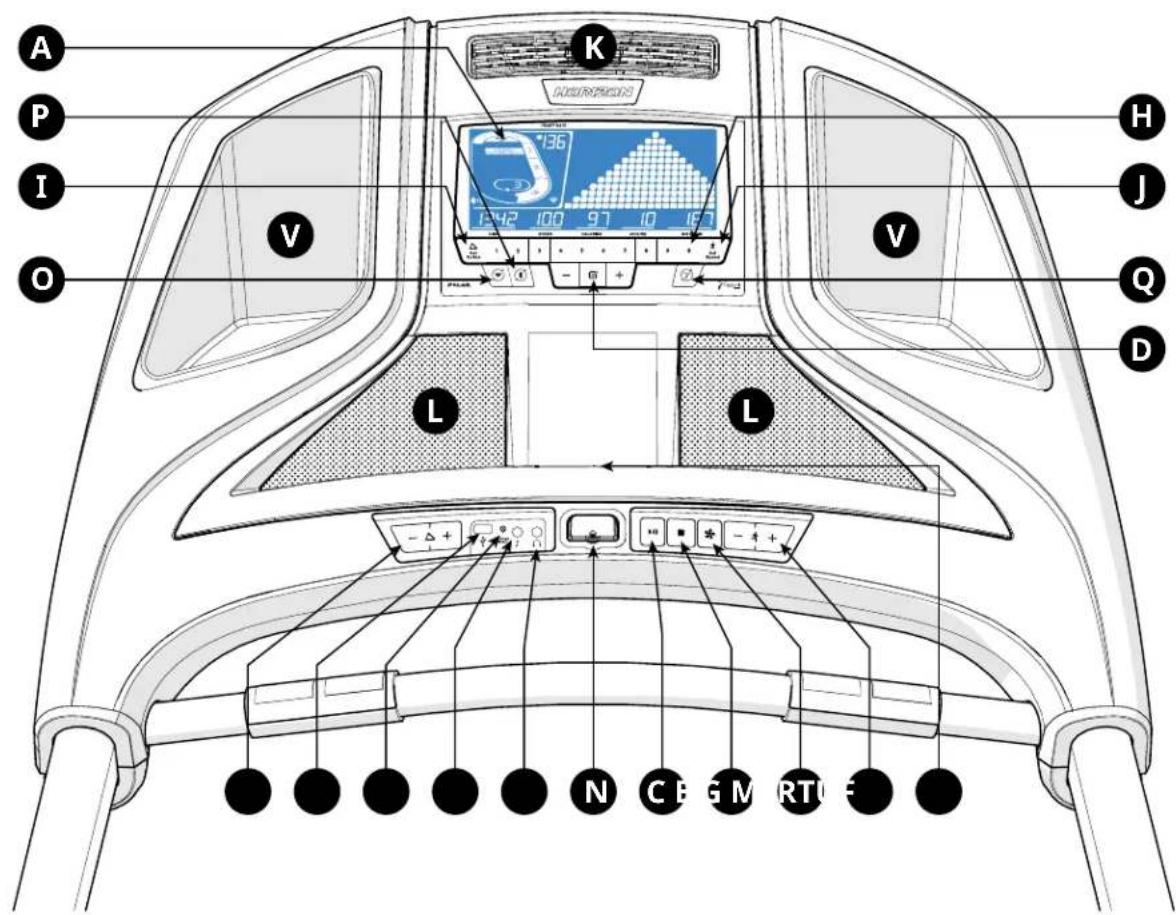
A P I O V K 136 142 100 97 10 167 H J Q D L L - + + N C B G M R T U FNote: There is a thin protective sheet of clear plastic on the overlay of the console that should be removed before use.
A) LCD DISPLAY WINDOW: time, distance, speed, calories, incline, laps, and heart rate.
B) ▶II (START/PAUSE KEY): press to start workout and pause workout.
C) ■ (STOP KEY): press to stop workout. Hold to reset console.
D) ☑ (ENTER KEY): press to confirm selection during programming setup. Hold to reset console.
E) (FAN KEY): press to turn fan on and off.
F) INCLINE -Δ+ KEYS: press to adjust incline level.
G) SPEED - 4 + KEYS: press to adjust speed level.
H) QUICK ADJUST KEYPAD: quickly access any incline or speed level by typing the number and pressing SET INCLINE (I) or SET SPEED (J) keys. Examples:
• To change the incline to 4.0%, press 4-0-SET INCLINE.
- To change the speed level to 12, press 1–2–0-SET SPEED.
I) SET INCLINE KEY: press to change incline to level entered into keypad.
J) SET SPEED KEY: press to change resistance to level entered into keypad.
K) FAN: personal workout fan.
L) SPEAKERS: plays music through speakers when connected to your media player.
M) READING RACK: holds reading material.
N) SAFETY KEY: enables treadmill when safety key is inserted.
O) WI-FI CONNECT & SYNC: press to reset and connect your wireless internet connection. See Page 12 for more info.
P) BLUETOOTH PAIRING: press and hold to pair Bluetooth device. See Page 19 for more info.
Q) PASSPORT CONNECT & SYNC: press to reset and connect your Passport box for Virtual Active programming.
R) AUDIO IN JACK: plug your media player into the console using the included audio adaptor cable.
S) AUDIO OUT/HEADPHONE JACK: plug your headphones into the console to use them instead of the console speakers.
T) ENERGY SAVER LIGHT: indicates if machine is in Energy Saver mode.
U) USB PORT: used for software updates or to charge devices less than 1 amp.
V) WATER BOTTLE POCKETS: holds personal workout equipment.


bar
HEART RATE | Category | Heart Rate (per 100ml) | | :--- | :--- | | TIME | 1324 | | INCLINE | 05 | | CALORIES | 128 | | SPEED | 104 | | DISTANCE | 479 | | F | (not labeled but visually present as 'F') | | D | (not labeled as 'D') | | G | (not labeled as 'G') | | E | (not labeled as 'E') | | A | (not labeled as 'A') | | C | (not labeled as 'C') | | B | (not labeled as 'B') | | HEAT RATING: IMPROVE PERFORMANCE. Values: 136, 100, 50.0. Time axis: 0 to 136 seconds.
bar
HEART RATE | Category | Heart Rate (per 1000) | Speed (m/s) | Calories (g) | Incline (min) | Distance (sec) | | :--- | :--- | :--- | :--- | :--- | :--- | | A | 136 | 250 | 97 | 1.0 | 16.7 | | B | 3 | 150 | 97 | 1.0 | 16.7 | | C | 3 | 100 | 97 | 1.0 | 16.7 | | D | 3 | 50 | 97 | 1.0 | 16.7 | | E | 3 | 50 | 97 | 1.0 | 16.7 | TIME: 1342, SPEED: 100, CALORIES: 97, INCLINE: 1.0, DISTANCE: 16.7DISPLAY WINDOW
• TIME: Shown as minutes : seconds. View the time remaining or the time elapsed in your workout.
- SPEED: Shown as MPH. Indicates how fast the foot pads is moving.
• CALORIES: Total calories burned or remaining for your workout.
• DISTANCE: Shown as miles. Indicates distance traveled or distance remaining during your workout.
• INCLINE: Shown as percent.
- HEART RATE: Shown as BPM (beats per minute). Used to monitor your heart rate (displayed when contact is made with both pulse grips).
A) TRACK: Follows progress around a simulated track. Segments light up with every 50 meters completed.
B) LAPS: Shows how many laps have been completed. One lap is 400 meters (¼ mile).
C) HEART RATE ZONE: Displays what activity zone you are in during your workout (displayed when contact is made with both pulse grips or when using a wireless heart rate strap).
• WARM UP: 0-60% of maximum heart rate
- WEIGHT LOSS: 60-70% of maximum heart rate
- IMPROVE FITNESS: 70-80% of maximum heart rate
- IMPROVE PERFORMANCE: 80-90% of maximum heart rate
• MAXIMUM PERFORMANCE: 90-100% of maximum heart rate
D) PROGRAM PROFILE: Represents the profile of the program being used (speed during speed based programs and incline during incline based programs).
E) FAN: Indicates fan setting (low, medium, high).
F) PASSPORT: Indicates Passport box connection is present.
G) WI-FI: Indicates wireless connection is present and the strength (low, medium, high).
SET UP XID ACCOUNT FOR VIA FIT CONNECTIVITY
Creating an xID account will allow you to save and share workout data online at www.ViaFitness.com
Up to four users can be saved on a machine. This process is the first step in connecting your equipment. It must be done from a computer, tablet, or mobile device that is connected to the internet.
1) Visit the web site: www.ViaFitness.com
2) Once at the web site, select the CONNECT YOUR EQUIPMENT option on the top menu bar.
3) The first step in connecting your equipment will to be creating your xID account. This will be your login to Via Fit.
4) Enter your phone number or another easy-to-remember 10-14 digit number. This will be your account number.
5) Fill in your profile information to finish the xID account set up process. You will be asked to provide an email address not associated with any other xID account. Check your email after the set-up process for a link to validate your account.
CONNECT WI-FI
Once you have created your xID account, you will be able to move on to activating the Wi-Fi on your equipment. Reminder, this requires you to use your computer, tablet, or mobile device that is connected to the internet.
1) Press and hold 📤 for 3-5 seconds until you see the message ACTIVATED on your screen.
2) On your computer or other device, go to your Wi-Fi settings. You should select the network with your model name. Doing this enables you to connect your equipment to your wireless network.
3) A new window will pop up with the list of wireless networks your equipment can see. Select your home Wi-Fi network and connect.
4) The remaining step is to reconnect your computer or other device back to your Wi-Fi network. Go to your settings again and connect as you normally would.
Congratulations! You are now connected and ready to get started.
GETTING STARTED
1) Check to make sure no objects are placed on the belt that will hinder the movement of the treadmill.
2) Plug in the power cord and turn the treadmill ON.
3) Stand on the side rails of the treadmill.
4) Attach the safety key clip to part of your clothing making sure that it is secure and will not become detached during operation. Insert the safety key into the safety keyhole in the console.
5) Select your xID account, User, Guest, or Edit a User using - + and press
6) When you log in for the first time as User 1-4, you will be prompted to enter your xID information.
a) Enter your xID account number using KEYPAD. After the final input, press ✅
b) Enter your passcode using KEYPAD to select the numbers. After the final input, press ✅
c) If you key the incorrect number at any point while entering your xID or passcode, press and hold for 3-5 seconds to clear the selection and begin again.
A) QUICK START
Simply press 📄 begin working out. Time will count up from 0:00.
The speed will default to 0.5 MPH. Incline will default to 0%.
B) SELECT A PROGRAM
1) Select a PROGRAM using - + and press √
2) Set workout program information using -+ and press after each selection.
3) Press 10 begin workout.
NOTE: You can adjust the resistance and incline levels during your workout.
When your workout is complete, the console will display "workout complete" and beep. Your workout information will stay displayed on the console for 30 seconds and then reset.
TO CLEAR CURRENT SELECTION
To clear the current program selection or screen, press and hold for 3 seconds.
PROGRAM INFORMATION

MANUAL: Adjust your speed and incline manually during your workout. User sets time, starting speed and incline.

DISTANCE: Push yourself and go further during your workout with 13 distance workouts. Choose from 1 mile, 2 miles, 5k, 5 miles, 10k, 8 miles, 15k, 10 miles, 20k, half marathon, 15 miles, 20 miles, and marathon goals. User sets starting speed and incline.

CALORIES: Set goals for burning calories with nine workouts. Choose from 100, 200, 300, 400, 500, 600, 700, 800, and 900 calorie burn workouts. User inputs weight and sets starting speed and incline. Calories burned are calculated using weight input with the speed and incline of the workout.

INTERVALS: An effective fat-burning workout that helps you get improve your fitness level. Choose from Speed Intervals, Peak Intervals, and Endurance Intervals workouts. User sets time and starting level.

PERFORMANCE: Challenge yourself with targeted performance workouts intent on helping you improve specific training elements. Choose from Run/Walk, Hill Training, and Sprint workout programs.

STEPS: Promotes healthy activity with 10 step-based workouts calculated using average stride length. Choose from 1000, 2000, 3000, 4000, 5000, 6000, 7000, 8000, 9000, and 10,000 step workouts. User sets starting speed and incline.

CUSTOM (T7/T9)
1) Select CUSTOM 1 or CUSTOM 2 using - + and press √
2) Set the workout time using - + and press √
3) Use - + to set the SPEED level for each segment. Press ☑ confirm.
4) Use - + to set the INCLINE for each segment. Press ☑ to confirm.
5) Press ▶ to begin workout.

TARGET HEART RATE (HEART RATE STRAP IS RECOMMENDED)
Incline: Automatically adjusts incline to bring you within 5 beats of your set % of maximum heart rate.
Speed: Automatically adjusts speed to bring you within 5 beats of your set % of maximum heart rate.
PROGRAM CHARTS
| SPEED INTERVALS - SPEED ONLY | |||||
| Segment War | m Up 1 2 Cool Down | ||||
| Time | 4 MIN | 90 SEC | 30 SEC | 4 MIN | |
| Level 1 | 1.0 1.5 2.0 4.0 1 | 5 1.0 | |||
| Level 2 | 1.0 1.5 2.0 4.5 1 | 5 1.0 | |||
| Level 3 | 1.3 1.9 2.5 5.0 1 | 9 1.3 | |||
| Level 4 | 1.3 1.9 2.5 5.5 1 | 9 1.3 | |||
| Level 5 | 1.5 2.3 3.0 | 6 | 2.3 1.5 | ||
| Level 6 | 1.5 2.3 3.0 6.5 2 | 3 1.5 | |||
| Level 7 | 1.8 2.6 3.5 7.0 2 | 6 1.8 | |||
| Level 8 | 1.8 2.6 3.5 7.5 2 | 6 1.8 | |||
| Level 9 | 2.0 3.0 4.0 8.0 3 | 0 2.0 | |||
| Level 10 | 2.0 3.0 4.0 8.5 3 | 0 2.0 | |||
| PEAK INTERVALS - SPEED AND INCLINE CHANGES | |||||||
| Segment Warm Up 1 2 Cool Down | |||||||
| Time | 4 MIN90 SEC30 SEC4 MIN | ||||||
| Level 1 | Speed | 1.0 | 1.5 | 2.0 | 4.0 | 1.5 | 1.0 |
| Incline | 1.0 | 1.5 | 0.5 | 1.5 | 1.5 | 0.0 | |
| Level 2 | Speed | 1.0 | 1.5 | 2.0 | 4.5 | 1.5 | 1.0 |
| Incline | 1.5 | 2.5 | 3.0 | 6.5 | 2.5 | 1.5 | |
| Level 3 | Speed | 1.3 | 1.9 | 2.5 | 5.0 | 1.9 | 1.3 |
| Incline | 2.0 | 3.0 | 4.0 | 7.5 | 3.0 | 2.0 | |
| Level 4 | Speed | 1.3 | 1.9 | 2.5 | 5.5 | 1.9 | 1.3 |
| Incline | 2.0 | 3.0 | 4.0 | 8.5 | 3.0 | 2.0 | |
| Level 5 | Speed | 1.5 | 2.3 | 3.0 | 6.0 | 2.3 | 1.5 |
| Incline | 2.5 | 3.5 | 4.5 | 9.0 | 3.5 | 2.5 | |
| Level 6 | Speed | 1.5 | 2.3 | 3.0 | 6.5 | 2.3 | 1.5 |
| Incline | 2.5 | 3.5 | 4.5 | 10.0 | 3.5 | 2.5 | |
| Level 7 | Speed | 1.8 | 2.6 | 3.5 | 7.0 | 2.6 | 1.8 |
| Incline | 2.5 | 4.0 | 5.5 | 10.5 | 4.0 | 3.0 | |
| Level 8 | Speed | 1.8 | 2.6 | 3.5 | 7.5 | 2.6 | 1.8 |
| Incline | 3.0 | 4.0 | 5.5 | 11.5 | 4.0 | 3.0 | |
| Level 9 | Speed | 2.0 | 3.0 | 4.0 | 8.0 | 3.0 | 2.0 |
| Incline | 3.0 | 4.5 | 6.0 | 12.0 | 5.0 | 3.0 | |
| Level 10 | Speed | 2.0 | 3.0 | 4.0 | 8.5 | 3.0 | 2.0 |
| Incline | 3.0 | 4.5 | 6.0 | 12.0 | 5.0 | 3.0 | |
| ENDURANCE INTERVALS - SPEED ONLY | |||||||||||
| Segment Warm Up 1 2 3 4 5 6 7 8 Cool Down | |||||||||||
| Time | 4 MIN | 30 SEC | 30 SEC | 30 SEC | 30 SEC | 30 SEC | 30 SEC | 30 SEC | 30 SEC | 4 MIN | |
| Level 1 1.0 | 1.5 2.0 2.5 3.0 3.5 4 | 0.3 5 3.0 | 2.5 2.3 1.5 | ||||||||
| Level 2 1.3 | 1.9 2.5 3.0 3.5 4.0 4 | 5 4.0 3.5 | 3.0 2.6 1.8 | ||||||||
| Level 3 1.5 | 2.3 3.0 3.5 4.0 4.5 5 | 0.4 5 4.0 | 3.5 3.0 2.0 | ||||||||
| Level 4 1.8 | 2.6 3.5 4.0 4.5 5.0 5 | 5 5.0 4.5 | 4.0 3.4 2.3 | ||||||||
| Level 5 2.0 | 3.0 4.0 4.5 5.0 5.5 6 | 0.5 5 5.0 | 4.5 3.8 2.5 | ||||||||
| Level 6 2.3 | 3.4 4.5 5.0 5.5 6.0 6 | 5.6 0 5.5 | 5.0 4.1 2.8 | ||||||||
| Level 7 2.5 | 3.8 5.0 5.5 6.0 6.5 7 | 0.6 5 6.0 | 5.5 4.5 3.0 | ||||||||
| Level 8 2.8 | 4.1 5.5 6.0 6.5 7.0 7 | 5.7 0 6.5 | 6.0 4.9 3.3 | ||||||||
| Level 9 3.0 | 4.5 6.0 6.5 7.0 7.5 8 | 0.7 5.0 7.0 | 6.5 5.3 3.5 | ||||||||
| Level 10 3.3 | 4.9 6.5 7.0 7.5 8.0 | 8.5 8.0 7.5 | 7.0 5.6 3.8 | ||||||||
| Level 11 3.0 | 4.5 7.0 7.5 8.0 8.5 | 9.0 8.5 8.0 | 7.5 5.3 3.5 | ||||||||
| Level 12 3.3 | 4.9 7.5 8.0 8.5 9.0 | 9.5 9.0 8.5 | 8.0 5.6 3.8 | ||||||||


PROGRAM CHARTS
| SPRINTS | ||||||||||||||
| 100M | Sprints | Recovery | 200M | Sprints | Recovery | 400M | Sprints | Recovery | 800M | Sprints | Recovery | 1600M | Sprints | Recovery |
| Beginner | 6.5 | 2 | Beginner | 6.5 | 2 | Beginner | 6.5 | 2 | Beginner | 6.5 | 2 | Beginner | 6.5 | 2 |
| Intermediate | 8 | 3 | Intermediate | 8 | 3 | Intermediate | 8 | 3 | Intermediate | 7.5 | 3 | Intermediate | 7.5 | 3 |
| Advanced | 9.5 | 4 | Advanced | 9.5 | 4 | Advanced | 9.5 | 4 | Advanced | 9 | 4 | Advanced | 9 | 4 |
| RUN / WALK | |||||
| Level | WARM UP | RUN | WALK | COOL DOWN | |
| Beginner | Time 2 | MIN | 2 MIN | 2 MIN | 2 MIN |
| Speed | 2 MPH | 5.5 MPH | 3 MPH | 2 MPH | |
| Intermediate | Time 2 | MIN | 5 MIN | 1 MIN | 2 MIN |
| Speed | 2 MPH | 6.5 MPH | 3.5 MPH | 2 MPH | |
| Advanced | Time | 2 MIN | 8 MIN | 1 MIN | 2 MIN |
| Speed | 2 MPH | 7.5 MPH | 4 MPH | 2 MPH | |
| HILL TRAINING | |||||||||||||||||
| Level WARM UP WORKOUT COOL DOWN | |||||||||||||||||
| Beginner | Time 2 | MIN | 2 MIN | 2 MIN | 2 MIN | 2 MIN | 2 MIN | 2 MIN | 2 MIN | ||||||||
| Speed | 2 MPH | 0% | 4 MPH | 0% | 4 MPH | 0.5% | 4 MPH | 1.0% | 4 MPH | 1.5% | 4 MPH | 2.0% | ...... | 4 MPH | 6.0% | 2 MPH | |
| Intermediate | Time | 2 MIN | 2 MIN | 2 MIN | 2 MIN | 2 MIN | 2 MIN | 2 MIN | 2 MIN | ||||||||
| Speed | 2 MPH | 0% | 5 MPH | 0% | 5 MPH | 0.5% | 5 MPH | 1.0% | 5 MPH | 1.5% | 5 MPH | 2.0% | ...... | 5 MPH | 8.0% | 2 MPH | |
| Advanced | Time | 2 MIN | 2 MIN | 2 MIN | 2 MIN | 2 MIN | 2 MIN | 2 MIN | 2 MIN | ||||||||
| Speed | 2 MPH | 0% | 6 MPH | 0% | 6 MPH | 0.5% | 6 MPH | 1.0% | 6 MPH | 1.5% | 6 MPH | 2.0% | ...... | 6 MPH | 10.0% | 2 MPH | |
USING YOUR MEDIA PLAYER

1) Connect the included AUDIO ADAPTOR CABLE to the AUDIO IN JACK on the left of the console and the headphone jack on your media player.
2) Use your media player buttons to adjust song settings.
3) Remove the AUDIO ADAPTOR CABLE when not in use.
ADJUSTING THE VOLUME
To enter the engineering menu, press and hold the INCLINE + key and SPEED - key for 3-5 seconds. Use - + to navigate to ENG6 and press Use - + to set Volume. Press and hold for 3-5 seconds to exit ENG6 and hold again for 3-5 seconds to exit engineering mode.
ENERGY SAVER (STANDBY MODE)

This machine has a special feature called Energy Saver ^™ mode. This mode is NOT automatically activated. When Energy Saver mode is activated, the display will automatically enter standby mode (Energy Saver mode) after 15 minutes of inactivity. This feature saves energy by disabling most power to the machine until a key is pressed on the console. This feature can be turned on or off in the engineering menu.
To enter the engineering menu, press and hold the INCLINE + key and SPEED - key for 3-5 seconds. Use - + to navigate to SWITCH FUNCTION and press to select Energy Saver mode, use - + to select ENERGY SAVE ON or OFF. Press and hold for 3-5 seconds to exit SWITCH FUNCTION. Press and hold again for 3-5 seconds to exit the engineering menu.

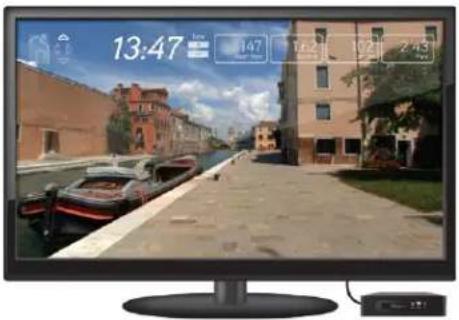
PASSPORT™ MEDIA PLAYER
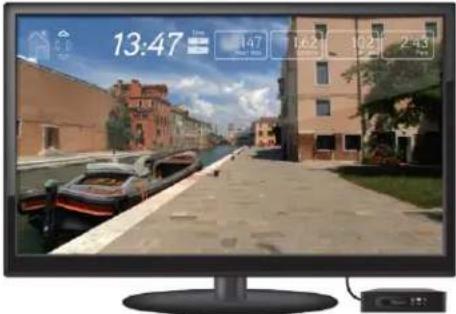
The Passport player, featuring Virtual Active ^™ technology, is a high-definition experience that uses real destination footage and matching ambient sounds from stunning destinations around the world. The ultimate in workout entertainment, Passport lets you escape the confines of a regular workout routine while enjoying a dynamic experience.
A Passport player is available for purchase separately from your Horizon Fitness® retailer.
For more information, go to: www.passportplayer.com www.horizonfitness.com
text_image
13:47 147 162 192 2:43SYNCING CONSOLE WITH PASSPORT
1) Use the arrow keys on the Passport remote to scroll to the setup icon and press select.
2) Follow the on-screen prompts to press (on the equipment console.
3) The message displayed on screen will notify you if the sync was a success or failure.
NOTE: See PASSPORT OWNER'S MANUAL for more information.
BLUETOOTH (T9)\*
The T9 console can connect via Bluetooth to:
• Media Players (Phones, Tablet and MP3 players)
• Heart Rate Monitors
TO CONNECT MEDIA PLAYERS:
1) Enable Bluetooth on your media player.
2) In your media player's Bluetooth settings, locate and select the T9-BT-000 to pair your media player with the T9 console.
3) Any audio played on your media player will now play through the T9 speakers.
TO CONNECT HEART RATE MONITORS:
1) Turn on your heart rate monitor so it is Bluetooth discoverable.
2) On the T9 console, press and hold the BLUETOOTH PAIRING button for 3 seconds.
* Not all Bluetooth protocols are compatible.

FRANÇAIS
FONCTIONNEMENT DU TAPIS ROULANT
text_image
A H I O U K 136 342 100 97 10 167 U J P D L L N C G M R Q S FFONCTIONNEMENT DE LA CONSOLE DU T7
text_image
A P I O V K 136 142 100 97 10 167 H J Q D L L - + + N C B G M R T U FFONCTIONNEMENT DE LA CONSOLE DU T7
bar
HEART RATE | Category | Heart Rate (per 100ml) | | :--- | :--- | | TIME | 1324 | | INCLINE | 05 | | CALORIES | 128 | | SPEED | 104 | | DISTANCE | 479 | | F | (not labeled but visually present as 'F') | | D | (not labeled as 'D') | | G | (not labeled as 'G') | | E | (not labeled as 'E') | | A | (not labeled as 'A') | | C | (not labeled as 'C') | | B | (not labeled as 'B') | | HEAT RATE (implied by visual scale) is annotated on the screen.
bar
HEART RATE | Category | Heart Rate (per 1000) | Speed (m/s) | Calories (g) | Incline (min) | Distance (sec) | | :--- | :--- | :--- | :--- | :--- | :--- | | A | 136 | 250 | 97 | 1.0 | 16.7 | | B | 3 | 150 | 97 | 1.0 | 16.7 | | C | 3 | 100 | 97 | 1.0 | 16.7 | | D | 3 | 50 | 97 | 1.0 | 16.7 | | E | 3 | 100 | 97 | 1.0 | 16.7 | TIME: 1342, SPEED: 100, CALORIES: 97, INCLINE: 1.0, DISTANCE: 16.7FENÊTRE D'AFFICHAGE
SE CONNECTER AU RÉSEAU WI-FI
text_image
A H I O U K 136 342 100 97 10 167 U J P D L L N C G M R Q S Ftext_image
A P I O V K 136° 142 100 97 10 167 H J Q D L L - + + N C B G M R T U Fbar
HEART RATE | Category | Heart Rate (per 100ml) | | :--- | :--- | | TIME | 1324 | | INCLINE | 05 | | CALORIES | 128 | | SPEED | 104 | | DISTANCE | 479 | | F | (not labeled but visually present as 'F') | | D | (not labeled as 'D') | | G | (not labeled as 'G') | | E | (not labeled as 'E') | | A | (not labeled as 'A') | | C | (not labeled as 'C') | | B | (not labeled as 'B') | | HEAT RATE (implied by visual scale) is annotated on the screen.
bar
HEART RATE | Category | Heart Rate (per 1000) | Speed (m/s) | Calories (g) | Incline (min) | Distance (sec) | | :--- | :--- | :--- | :--- | :--- | :--- | | A | 136 | 250 | 97 | 1.0 | 16.7 | | B | 3 | 150 | 97 | 1.0 | 16.7 | | C | 3 | 100 | 97 | 1.0 | 16.7 | | D | 3 | 50 | 97 | 1.0 | 16.7 | | E | 3 | 100 | 97 | 1.0 | 16.7 | TIME: 1342, SPEED: 100, CALORIES: 97, INCLINE: 1.0, DISTANCE: 16.7www.horizonfitness.com