
LX835 - Robot mower LANDXCAPE - Free user manual and instructions
Find the device manual for free LX835 LANDXCAPE in PDF.


User questions about LX835 LANDXCAPE
0 question about this device. Answer the ones you know or ask your own.
Ask a new question about this device
Download the instructions for your Robot mower in PDF format for free! Find your manual LX835 - LANDXCAPE and take your electronic device back in hand. On this page are published all the documents necessary for the use of your device. LX835 by LANDXCAPE.
USER MANUAL LX835 LANDXCAPE
natural_image
Top-down architectural layout diagram showing furniture and pathways (no text or symbols)A
natural_image
Close-up of a black electronic device with control panel and display, showing a close-up of its internal component (no text or symbols visible)B
natural_image
Illustration of a robotic car with sensor waves, positioned on a grid-like surface (no text or symbols)C

natural_image
Solid dark gray rectangular shape with a diagonal light edge on the right (no text or symbols)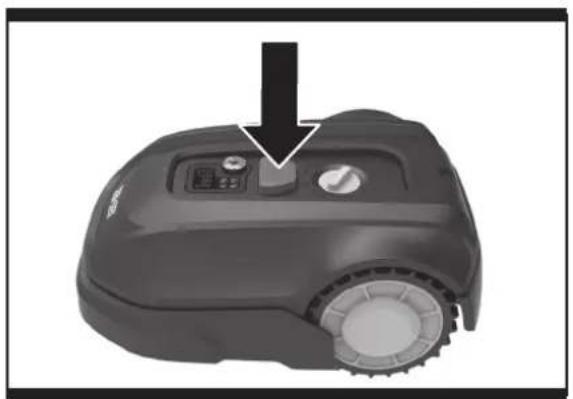
natural_image
Close-up of a black robotic vacuum cleaner with control knob and dial (no visible text or symbols)D
text_image
IDLE START OK HOME - 3 DAYS 1 240 S AUTOE1
text_image
IDLE START + HOME - 3 DAYS 6 4 2 1 0 0 0 0 0 0 0 0 0 0 0 0 0 0 0 0 0 0 0 0 0 0 0 0 0 0 0 0 0 0 0 0 0 0 0 0 0 0 0 0 0 0 0 0 0 0 0 0 0 0 AUTOE2F
natural_image
Close-up of a black robotic vacuum cleaner with a circular dial indicator (no text or symbols visible)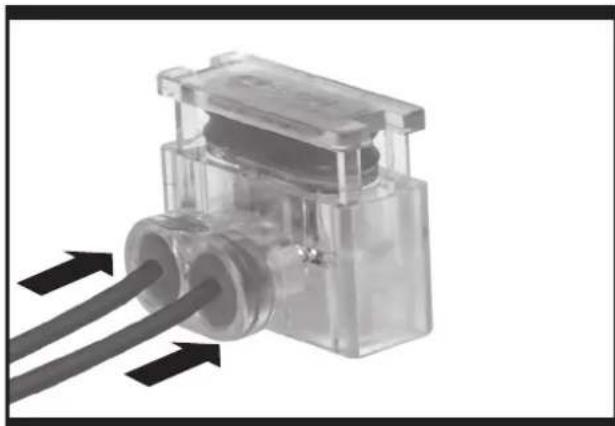
natural_image
Close-up of a transparent plastic mechanical component with two black arrows pointing to its side (no text or symbols visible)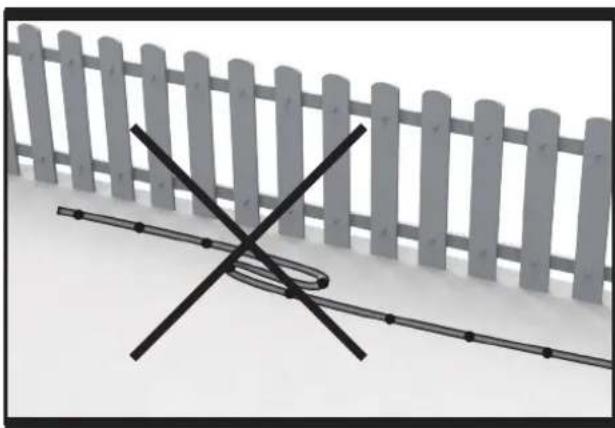
natural_image
Diagram showing a fence with a horizontal line intersecting it, no text or symbols presentG
H
natural_image
Close-up of a mechanical clamp or tool with a black arrow pointing to a component (no visible text or symbols)11
natural_image
Close-up of a transparent plastic electrical connector with two black cables inserted (no visible text or symbols)12
natural_image
Top-down view of a robotic vehicle showing internal components like wheels, sensors, and a central device (no text or symbols visible)J1
text_image
USB START + OK HOME - 16 2 PAYS 3 DAY 4 DAY 5 DAY 6 DAY 7 DAY AUTOJ2
text_image
0 START + OK HOME - 3 DAYS 3 TIME 6 24V0 S 5 S AUTO ClockJ3
natural_image
Simple diagram showing a white circle inside a rectangular frame with two labeled sections (1 and 2), no text or symbols present.K
natural_image
Top-down view of a military vehicle's internal mechanical assembly (no visible text or symbols)L
natural_image
Black-and-white photo of a cleaning brush and spray kit on a robotic vacuum cleaner (no text or symbols visible)M
natural_image
Top-down view of a mechanical tank with visible internal components and a cross symbol (no text or labels)N1
natural_image
Cross-sectional diagram of a tank showing internal components and a checkmark (no text or symbols present)N2
natural_image
Close-up of a black industrial machine with a close-up inset showing internal components (no visible text or symbols)0
natural_image
Mechanical assembly diagram showing a motor and gear assembly with a screwdriver (no text or symbols visible)P1

natural_image
Solid dark gray rectangular shape with no text, symbols, or discernible features.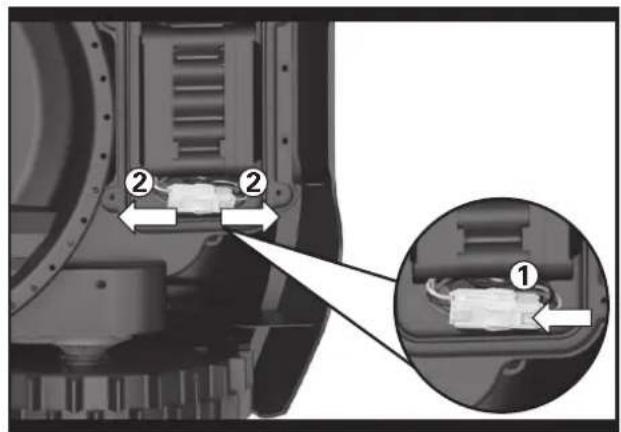
text_image
Technical diagram showing mechanical components with numbered annotations and magnified detail viewP2
natural_image
Interior view of a vehicle engine bay with internal components and a magnified inset showing internal wiring (no text or symbols visible)P3
natural_image
Mechanical component with internal wiring and a magnified inset showing internal components (no text or symbols visible)[Non-Text]
natural_image
Top-down view of a mechanical assembly with internal components and mounting holes (no visible text or symbols)P5P4
1. Product Safety
1.1 General & Additional Safety Instruction

WARNING: Read all safety warnings and all instructions. Failure to follow the warnings
and instructions may result in electric shock, fire and/or serious injury.
Carefully read the instructions for the safe operation of the machine.
Save all warnings and instructions for future reference.
- This appliance is not intended for use by persons (including children) with reduced physical, sensory or mental capabilities, or lack of experience and knowledge, unless they have been given supervision or instruction concerning use of the appliance by a person responsible for their safety.
- Children should be supervised to ensure that they do not play with the appliance.
- This appliance contains batteries that are only replaceable by skilled persons.
WARNING: For the purposes of recharging the battery, only use the detachable supply unit provided with this appliance.
IMPORTANT
READ CAREFULLY BEFORE USE KEEP FOR FUTURE REFERENCE
SAFE OPERATION PRACTICES
Training
a) Read the instructions carefully. Make sure you understand the instructions and be familiar with the controls and the proper use of the appliance;
b) Never allow people unfamiliar with these instructions or children to use the appliance. Local regulations can restrict the age of the operator;
c) The operator or user is responsible for accidents or hazards occurring to other people or their property.
Preparation
a) Ensure the correct installation of the boundary wire as instructed.
b) Periodically inspect the area where the appliance is to be used and remove all stones, sticks, wires, bones, and other foreign objects.
c) Periodically visually inspect to see that the blades, blade bolts and cutter assembly are not worn or
damaged. Replace worn or damaged blades and bolts in sets to preserve balance.
d) On multi-spindle appliances, take care as rotating one blade can cause other blades to rotate.
e) WARNING! The lawnmower shall not be operated without the guard in place.
OPERATION
1. GENERAL
a) Never operate the appliance with defective guards, or without safety devices, for example deflectors, in place.
b) Do not put hands or feet near or under rotating parts. Keep clear of the discharge opening at all times.
c) Never pick up or carry an appliance while the motor is running.
d) Operate the disabling device from the appliance.
- Before clearing a blockage;
- Before checking, cleaning or working on the appliance.
e) It is not permitted to modify the original design of robotic lawnmower. All modifications are made at your own risk.
f) Start robotic lawnmower according to the instructions. When the power key is switched on, make sure you keep your hands and feet away from the rotating blades. Never put your hands and feet under the mower.
g) Never lift up robotic lawnmower or carry it when the power key is switched on.
h) Do not let persons who do not know how robotic lawnmower works and behaves use the mower.
i) Do not put anything on top of robotic lawnmower or its charging station.
j) Do not allow robotic lawnmower to be used with a defective blade disc or body. Neither should it be used with defective blades, screws, nuts or cables.
k) Always switch off robotic lawnmower when you do not intend to use the mower. Robotic lawnmower can only start when the power key is switched on and the correct PIN code has been entered.
I) Keep your hands and feet away from the rotating blades. Never place your hands or feet close to or under the body when robotic lawnmower is in operation.
m) To avoid using the machine and its peripherals in
bad weather conditions especially when there is a risk of lightning.
n) Not to touch moving hazardous parts before these have come to a complete stop.
o) For machines used in public areas, that warning signs shall be placed around the working area of the machine. They shall show the substance of the following text:

WARNING! Automatic lawnmower! Keep away from the machine! Supervise children!
2. ADDITIONALLY WHEN THE APPLIANCE IS OPERATING AUTOMATICALLY
a) Do not leave the machine to operate unattended if you know that there are pets, children or people in the vicinity.
MAINTENANCE AND STORAGE
When the mower is turned upside down the power key must always be switched off. The power key should be switched off during all work on the mower's underframe, such as cleaning or replacing the blades.
a) Keep all nuts, bolts and screws tight to be sure the appliance is in safe working condition.
b) Inspect the robotic lawnmower each week and replace worn or damaged parts for safety.
c) Check especially that the blades and blade disc are not damaged. Replace all blades and screws at the same time if necessary so that the rotating parts are balanced.
d) Ensure that only replacement cutting means of the right type are used.
e) Ensure that batteries are charged using the correct charger recommended by the manufacturer. Incorrect use may result in electric shock, overheating or leakage of corrosive liquid from the battery.
f) In the event of leakage of electrolyte flush with water/neutralizing agent, seek medical help if it comes into contact with the eyes etc.
g) Servicing of the appliance should be according to manufacturers' instructions.
Recommendation
To connect the machine and/or its peripherals only to a supply circuit protected by a residual current device (RCD) with a tripping current of not more than 30 mA.
Residual risks
To avoid injuries, wear protective gloves when replacing the blades.
Transport
The original packaging should be used when transporting robotic lawnmower over long distances.
To safely move from or within the working area:
a) Press the STOP button to stop the mower.
You select the four digit PIN code when you start the mower for the first time.
b) Always switch off robotic lawnmower if you intend to carry the mower.
c) Carry the mower by the handle at the front under the mower. Carry the mower with the blade disc away from the body.
RF exposure requirements
To satisfy RF exposure requirements, a separation distance of 200mm or more should be maintained between this device and persons during device operation.
To ensure compliance, operations at closer than this distance is not recommended. The antenna used for this transmitter must not be co-located in conjunction with any other antenna or transmitter.
Safety Warnings for battery pack inside the tool a) Do not dismantle, open or shred battery pack.
b) Do not short-circuit a battery pack. Do not store battery packs haphazardly in a box or drawer where they may short-circuit each other or be short-circuited by conductive materials. When battery pack is not in use, keep it away from other metal objects, like paper clips, coins, keys, nails, screws or other small metal objects, that can make a connection from one terminal to another. Shorting the battery terminals together may cause burns or a fire.
c) Do not expose battery pack to heat or fire. Avoid storage in direct sunlight.
d) Do not subject battery pack to mechanical shock.
e) In the event of battery leaking, do not allow the liquid to come into contact with the skin or eyes. If contact has been made, wash the affected area with copious amounts of water and seek medical advice.
f) Seek medical advice immediately if a cell or battery pack has been swallowed.
g) Keep battery pack clean and dry.
h) Recharge only with the charger specified by Landscape™. Do not use any charger other than that specifically provided for use with the equipment.
i) Do not use any battery pack which is not designed for use with the equipment.
j) Keep battery pack out of the reach of children.
k) Retain the original product literature for future reference.
I) Dispose of properly.
m) Do not mix cells of different manufacture, capacity, size or type within a device.
2. Information on the Landxcape™

WARNING - Robotic lawnmower can be dangerous if incorrectly used.
Read through the Operator's manual carefully and understand the content before using your robotic lawnmower.
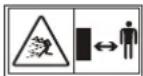
WARNING - Keep a safe distance from the machine when operating.

WARNING – Operate the disabling device before working on or lifting the machine.

WARNING - Do not ride on the machine.

Do not burn

Batteries may enter water cycle if disposed improperly, which can be hazardous for ecosystem. Do not dispose of waste batteries as unsorted municipal waste.

Li-Ion battery. This product has been marked with a symbol relating to ‘separate collection’ for all battery packs and battery pack. It will then be recycled or dismantled in order to reduce the impact on the environment. Battery packs can be hazardous for the environment and for human health since they contain hazardous substances.

Do not wash the machine with a high pressure washer

Class III appliance

Waste electrical products must not be disposed of with household waste. Please recycle where facilities exist. Check with your local authorities or retailer for recycling advice.
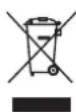
Read operator's manual

Detachable supply unit
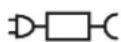
2. Component List
- CHARGING STRIPS
- STOP BUTTON
- CUTTING HEIGHT ADJUSTMENT HANDLE
- RAIN SENSOR
- REAR DRIVING WHEEL
- CUTTING BLADE
- FRONT WHEEL
- USB PORT
- BATTERY PACK *
- BLADE TURNING DISC
- HANDLE
- ON/OFF KEY
- HOME BUTTON
- KNOB
- START KEY
- DISPLAY
- CHARGING PILE
- CHARGING BASE
- CONTACT PINS
- POWER ADAPTER
- WIRE PEGS
- BOUNDARY WIRE
- CHARGING BASE FIXING NAILS
- BOUNDARY WIRE DISTANCE GAUGE
- HEX KEY
- CONNECTOR
*Not all the accessories illustrated or described are included in standard delivery.
Intended Use
The garden product is intended for domestic lawn mowing. It is designed to mow often, maintaining a healthier and better looking lawn than ever before. Depending on the size of your lawn, your Landscape ^™ may be programmed to operate at any time or frequency. It is impossible for digging, sweeping or snow cleaning.
3. Control panel
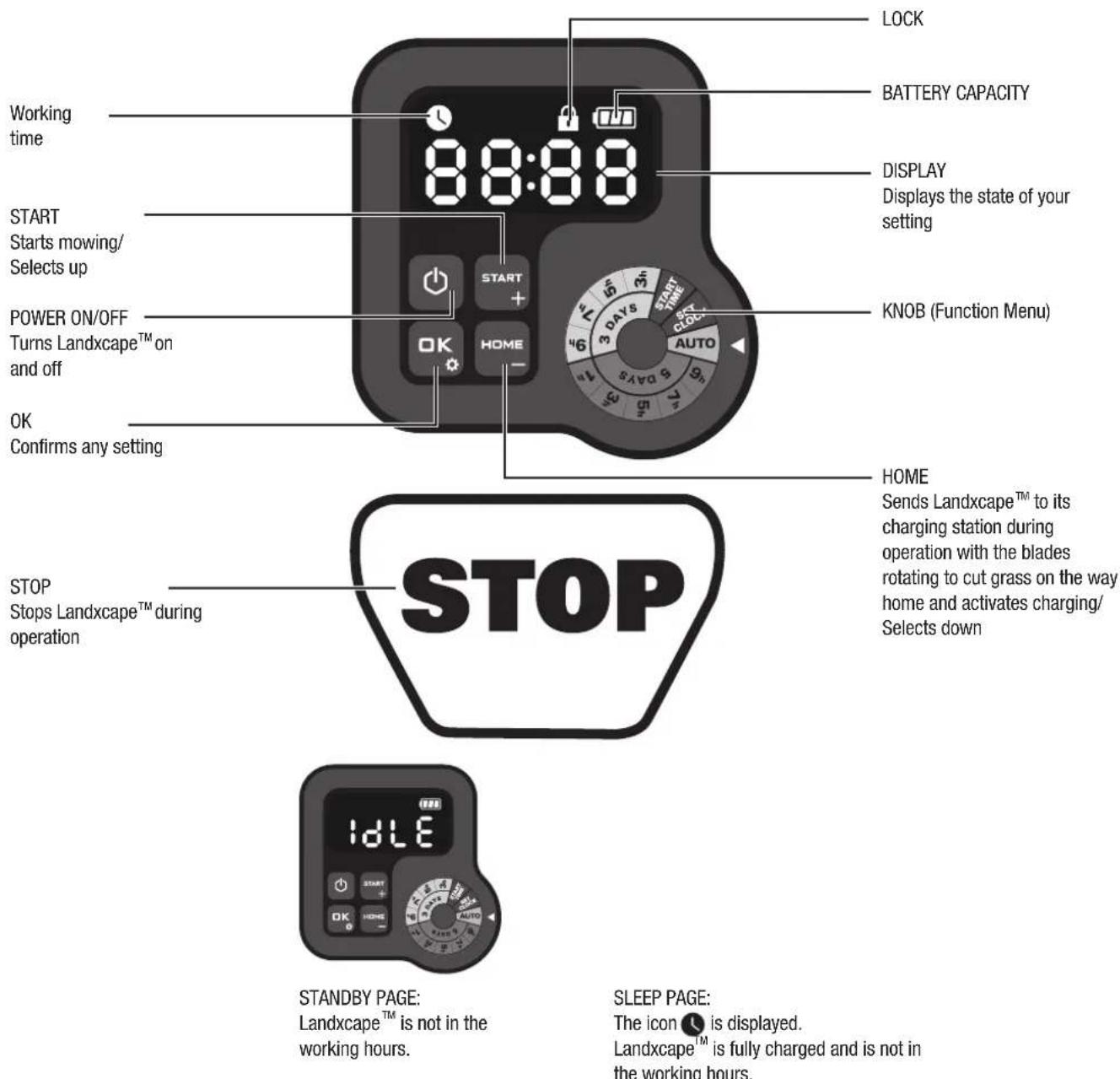
text_image
WORKING time 8:00:00 LOCK BATTERY CAPACITY DISPLAY Displays the state of your setting START Starts mowing/ Selects up POWER ON/OFF Turns Landxcape™ on and off OK Confirms any setting KNOB (Function Menu) HOME Sends Landxcape™ to its charging station during operation with the blades rotating to cut grass on the way home and activates charging/ Selects down STOP Stops Landxcape™ during operation IDLE STANDBY PAGE: Landxcape™ is not in the working hours. SLEEP PAGE: The icon 📁 is displayed. Landxcape™ is fully charged and is not in the working hours.Start
1) After the boundary wire installation, you can start using Landscape ™ (Please refer to Installation Guide for boundary wire installation).
2) Press until Landscape™ turns on. For the first use, input the default PIN code 0000 by pressing four times when the number 0 is blinking. (The PIN code can be changed, please refer to "4.3 Setting").
NOTE: Landxcape™ will turn off if it does not receive any input within 30 seconds after it is turned on. If you enter wrong PIN code three times, Landxcape™ will raise the alarm "di-di" and then turn off.
3) Press START, then press OR start mowing.
4) Press home then Ctr, make Landxcape ^TM go to the charging station, with the blades rotating to cut grass on the way home. Landxcape ^TM will work continuously until reaching low battery power level and then it will return to the charging station. Once charging is complete, Landxcape ^TM will automatically resume mowing or it stay in the charging station according to the mowing schedule.
NOTE: When Landxcape™ turns on, all lights on the display will be illuminated and then turn off. Check if there is any light damaged. It is recommended to shield the display with your hand when the outdoor light gets too strong.
4. Understanding Your Landxcape™
Congratulations on your new purchase of Landscape™ and welcome to the care-free life of automatic mowing. In the following, we want to help you to better understand how your Landscape™ thinks.
natural_image
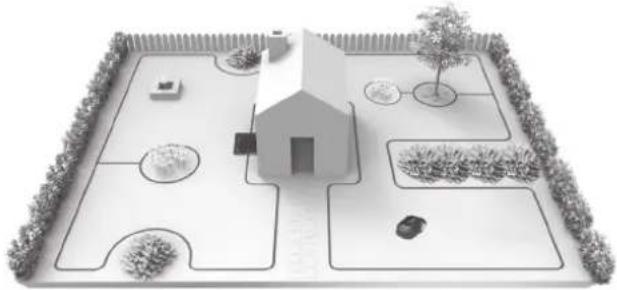
Architectural layout diagram of a garden with a central house, surrounding pathways, and surrounding greenery (no text or symbols)4.1 How does my Landxcape™ know what to mow?
Landxcape™ chooses its direction at random. It will make sure your entire lawn is evenly mowed without leaving unattractive mowing paths (See Fig. A).
4.2 How does my Landxcape™ know where to go?
Your Landxcape™ is made to work on its own. Landxcape™ knows when it needs to go to its charging station to charge, can sense when it is raining, can stop itself if it senses a problem, and knows to stop, draw back, and turn around when it bumps into something blocking its path. Landxcape™ will also automatically stop its blade turning disc from rotating if it is lifted off the ground to prevent an accident.
A. Finding the Charging station
When your Landscape ^™ needs to recharge, it will stop mowing and follow the boundary wire in an anti-clockwise direction back to its charging station.
B. Rain sensors
Landxcape ^™ is equipped with a rain sensor which detects rain and tells Landxcape ^™ to stop mowing and follow the boundary wire back to its charging station (See Fig. B).
Landxcape ^™ will resume mowing after passing the delay time. The default delay time is 180mins.
When the rain sensors are wet, Landxcape ^™ returns to its charging base. When the rain sensors are dry, Landxcape ^™ will begin the delay time countdown. If you want to exit from the rain delay, dry the sensor area, and perform a power cycle by operating the on/off key. After the power cycle has been performed, you can operate again.
C. Sensing the boundary wire
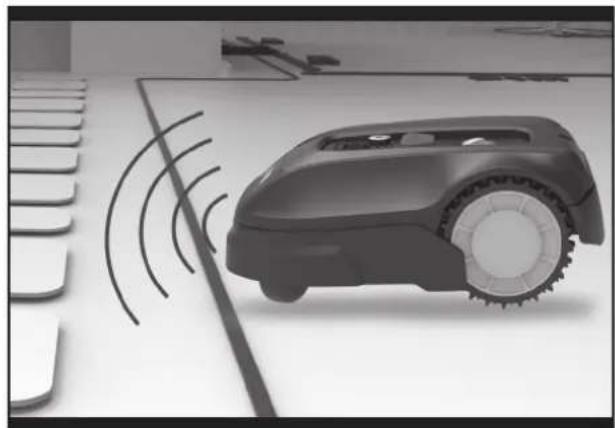
Landxcape™ always obeys the border set by the boundary wire and uses sensors at its front to detect it. (See Fig. C)
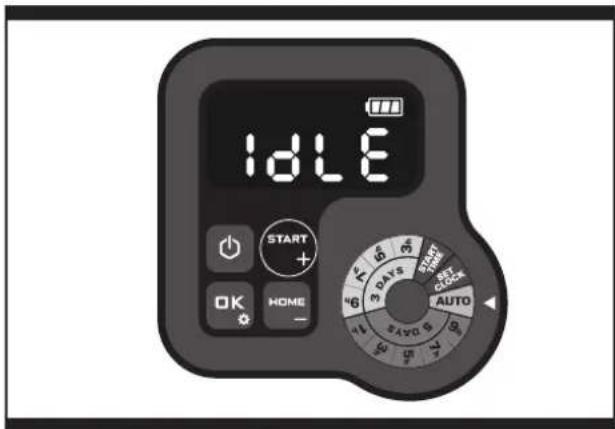
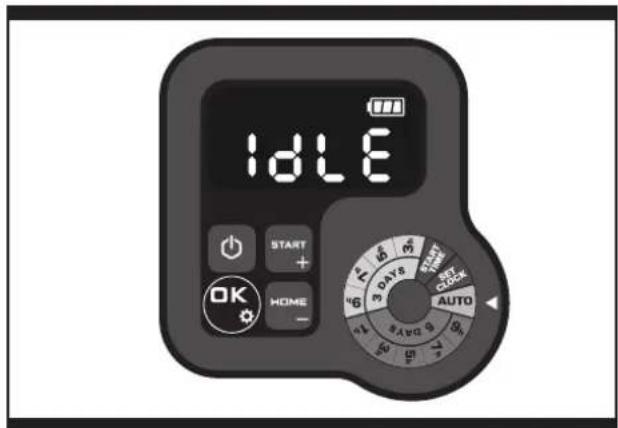
D. Starting and stopping while mowing (See Fig. D, E1, E2)
To start mowing, press the on/off key and input the PIN code. Press START , then press OK . If you would like Landxcape™ to stop mowing, simply press the STOP button on top of the mower.
If Landscape ^TM senses something is wrong, it will display a fault message on the display. For information on these messages, refer to "9.Error
Messages". Landscape™ will turn off if it does not receive any input from the user within 20 minutes.
To resume:
- Press START, then press OK
• Now Landxcape ™will begin to mow!
4.3 Setting
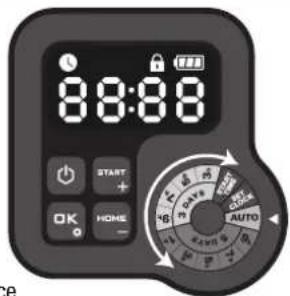
Before starting your Landxcape™ for the first time, you should cut the grass to the height 6 cm or lower with your ordinary lawn mower or trimmer. Then, set the cutting height of your Landxcape™ to its maximum setting (6 cm) for its first time mowing. And you can do the program setting manually by rotating the knob.
NOTE: When doing the program setting manually, Landxcape™ will enter the standby page if it does not receive any input from the user within several seconds.
text_image
8:8:88 START + OK HOME - AUTOOnly for reference
As the picture shown above, you can clockwise and anticlockwiserotate the knob.
Please be attention to the arrow on the right of the knob which points to the function you have chosen.
(1) Change PIN code
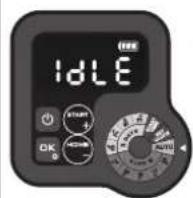
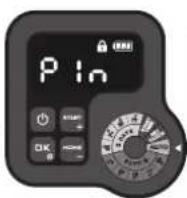
To change the PIN code, keep pressing both blnds at the same time for 5 seconds. The icon will be blinking, and "Old P in be rolling flashing. After that, the first number will be blinking, use to input the old PIN code and press to confirm. The next number will be blinking. Use the same method to complete other numbers. Then, "P in" will be rolling flashing, the first number will be blinking and use to select the number you want and press to confirm. The next number will be blinking. Use the same method to complete other numbers. For example, the new PIN code is set to be 0326. After that, "P in2" will be rolling flashing and the first number will be blinking again. Use the same method to input the new PIN code you set just now (in this example, 0326). Then "P in0326" will be rolling flashing on the display. Your PIN code has been changed successfully.
Only for reference
[2] Set year, date and time
Set year, date and time are compulsory setting items. If you don't set these items, it will influence the schedule time in the following setting. These items should be set in the order of year, date and time. For the year setting, rotate knob to SET CLOCK. The icon 3, d a number are blinking on the display, for example, 20 21. Use 📋 to select the year you want. Then press OK to confirm to finish the year setting.
![LANDXCAPE LX835 - [2] Set year, date and time - 1](/content/2026/04/694602/images/8c3553c60e097a88362d40d3cf9db5804b4a02dae5b9359c5ff1c5ec8f45a316.jpg)
text_image
1DLE 2021 Only for referenceMeanwhile, the icon will be flashing again and a number will be displayed to indicate the date, for example, 09.29, meaning September 29. When 09 is flashing, use to select the number and press to confirm. Then 2 will be flashing. Use the same method to select the number and press to confirm to finish the date setting.
![LANDXCAPE LX835 - [2] Set year, date and time - 2](/content/2026/04/694602/images/52322b215728a7a32a91cd560eb3e53c562e19e2c533689a3ea6d94c01e8ca41.jpg)
text_image
09:29 START + HOME - Only for referenceMeanwhile, the icon 📁 will be flashing and the time will be displayed, for example, 14:08. When i a blinking, use ⬆ to select the number and press ⬆ to confirm. Then ⬆ will be blinking, use the same method to select the number and press ⬆ to confirm. Now the time setting is completed and Landscape™ will enter the standby page.
![LANDXCAPE LX835 - [2] Set year, date and time - 3](/content/2026/04/694602/images/d1b24080000a0ff65de2753e8b7455f6daa8bd2ad43482e98648369ff901c1df.jpg)
text_image
14:08 Only for reference IdLE Standby page(3) Change default start time
The default start time of your mower is 09:00, it can be changed anytime by rotating knob to START TIME. When start time is selected, the display will show the default start time(09:00). The icon 📊 and a number are blinking on the display. When 🔒 is blinking, use 🔒 to select the number and press OK to confirm. Then ⚡️ will be blinking, use the same method to select the number and press OK to confirm. Now the start time setting is completed and Landscape™ will enter the standby page. For example, set the start time 10:30 by using the method above, and
your Landxcape™ will start mowing from 10:30.
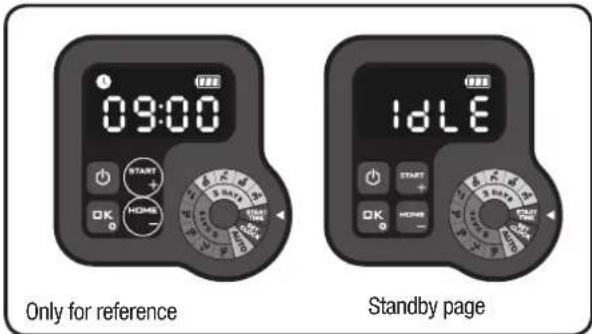
text_image
09:00 Only for reference IdLE Standby page[4] Set working schedule
Option 1: AUTO (Recommended working schedule according to area setting)
Rotate knob to AUTO. For example, the number will be blinking. Use START or HL/2 select the lawn area you want, and press to confirm.
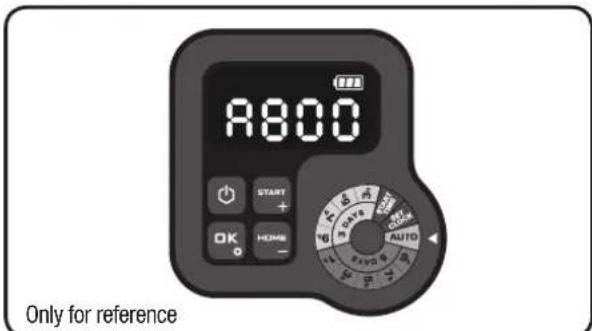
text_image
R800 START + OK HOME - Only for referenceThe default working time of Landxcape™ can be found in following table:
| Schedule | |||||||
| Area (m2) | Sunday | Monday | Tuesday | Wednesday | Thursday | Friday | Saturday |
| 50 / / | work* | / | / work* / | ||||
| 100 | / | work* | / | work | / | work* | / |
| 150 | / | work* | / | work | / | work* | / |
| 200 ~ 800** | / | work* | work | work | work work* / | ||
* Border cut will be done on initial mowing of the day. ** In this case, the work time from Monday to Friday is different according to area you set.
Option 2: Set working schedule manually
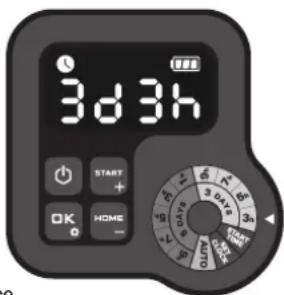
You can adjust the work time easily by rotating the knob. Rotate knob to select the working time you want. For example "3d3h", which means your Landscape™ will work on 3 days (Monday, Wednesday and Friday) and lasts for 3 hours on each day.
Note: Keep the work time you have set on the knob, your Landscape™ will work based on it circularly.
For example, when you set the start time at 10 am and work time on 3d3h, then your Landscape™ will mow circularly from 10 am to 1 pm on Monday, Wednesday and Friday. If you start your Landscape™ at 2pm on Tuesday, your Landscape™ will mow once only.
The following two tables are detailed information:
TABLE 1
| Schedule of 3 days | |||||||
| Time/per day | Sunday | Monday Tuesday | Wednesday | Thursday | Friday Saturday | ||
| 3 h / | work* / | work / | work* / | ||||
| 5 h / | work* / | work / | work* / | ||||
| 7 h / | work* / | work / | work* / | ||||
| 9 h / | work* / | work / | work* / | ||||
text_image
3d3h START + OK HOME - 3 d4s 3 d5s 3s 10 20 30 40 50 60 70 80 90 100 110 120 130 140 150 160 170 180 190 200 210 220 230 240 250 260 270 280 290 300Only for reference
TABLE 2
| Schedule of 5 days | |||||||
| Time/per day | Sunday | Monday | Tuesday | Wednesday | Thursday | Friday | Saturday |
| 1 h / | work* | work | work | work* / | |||
| 3 h / | work* | work | work | work* / | |||
| 5 h / | work* | work | work | work* / | |||
| 7 h / | work* | work | work | work* / | |||
| 9 h / | work* | work | work | work* / | |||
* Border cut will be done on initial mowing of the day.
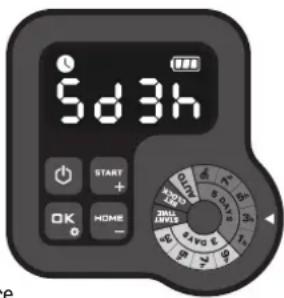
text_image
5d3h START + OK HOME - SUNI SURVEEOnly for reference
Note: During the operation according to the working schedule, press and OK, Landscape™ can be forced to end work of the day.
4.4 How efficiently will my Landxcape™ mow the grass?
Mowing times are different for every lawn depending on the factors mentioned below. Gradually adjust the time you allow Landscape™ to mow each day until you find the most suitable setting.
Your Landscape ^™ is capable of mowing areas of different sizes, although this depends on various factors, such as:
• Species of grass in your lawn and its growth rate
- Sharpness of the cutting blades
- Humidity
- Surrounding temperature
• Amount of obstacles in your Lawn
Unlike most other mowers, Landscape ^™ uses a side charging system, which is able to cut the surrounding grass as much as possible. The holes on the bottom of the charging base allow the grass to grow through the base to help disguise it and create an elegant appearance.
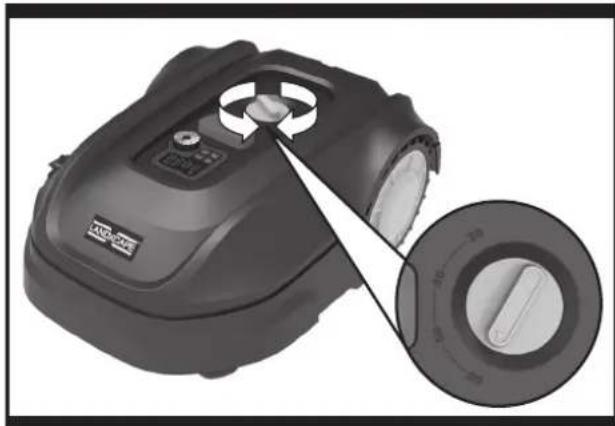
Landxcape ^™ 's cutting height can be adjusted. Before starting your Landxcape ^™ for the first time, you should cut the grass to the height no more than 6 cm with your manual lawnmower. Then, set the cutting height of your Landxcape ^™ to its maximum setting (6 cm) for its first time mowing. (See Fig. F)
Your Landscape™ will cut best in dry weather. It is also feasible to let your Landscape™ work on rainy days as long as the lawn is solid. Check and clean your mower regularly.
Your Landxcape ^™ is afraid of lightning storms. In case of a lightning storm, protect Landxcape ^™ by unplugging the charging station, disconnecting the boundary wire, and making sure Landxcape ^™ is not allowed to charge.
Your Landscape ^™ loves mowing grass and requires the cutting blades to be kept in good condition to cut at its best. Landscape ^™ can do most things by itself, but will sometimes need your help to prevent damage to itself.
- Never let Landxcape ^TM travel over gravel.
- Remove or prevent access to obstacles that Landxcape ^TM could accidentally climb on and damage its blade turning disc.
- Remove all debris and foreign objects from your lawn.
5. Boundary Wire Basics
5.1. Pegging the Boundary Wire
Use the boundary wire distance gauge to set the correct distance between the wire and the border of your lawn (more than 26cm). This is the recommended distance. The provided distance gauge ensures proper installation.
If your neighbor also uses a Landscape ^™ , keep a spacing of at least 1 metre between your boundary wire and your neighbor's.
The boundary wire must outline the intended mowing area
exactly. Your Landscape™ will become confused by extra bends or coils of boundary wire that are not part of its mowing area (See Fig. G). If there is excess boundary wire after the mowing area has been outlined, cut it off and store this additional wire in a separate location. It is important to leave the necessary length where it connects to the charging station so it can be connected and still remain buried.
5.2 Burying the Boundary Wire
If you are planning to bury the boundary wire, it is recommended to first peg it down. This allows you to easily change the layout if necessary before burying the wire. When the boundary wire installation is complete, have Landxcape™ follow and check the path by pressing 📋 and OK. This allows your Landxcape™ to adjust to its new environment.
While observing Landxcape ^™ you can easily make alterations to the boundary wire to ensure Landxcape ^™* s trouble-free tracking when locating the charging station. Confirm that Landxcape ^™ docks in the charging station successfully, and bury the wire if desired.
5.3 Joining the boundary wire
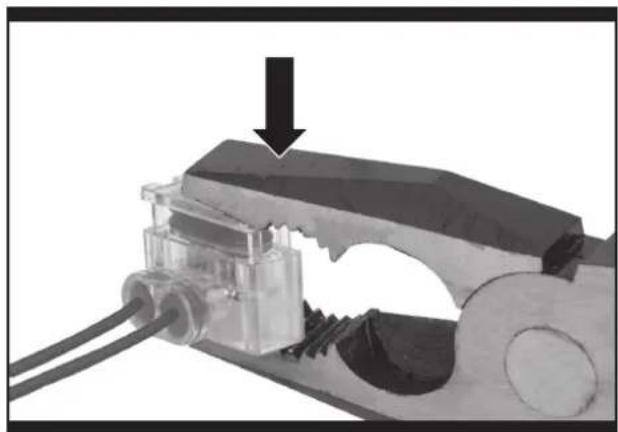
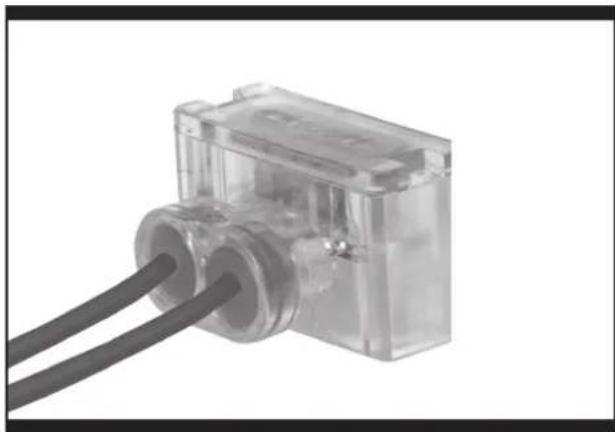
If you want to extend and splice the boundary wire, use a connector. The connector is waterproof and provides optimal connection. Insert both wire ends in any two of the three holes of the connector. Insert the wires fully until both wire ends are visible on the other side of the connector. (See Fig. H) Press the connector together by using a pair of pliers. (See Fig. I1, I2)
WARNING! It is not recommended to simply splice the boundary wire with insulating tape or use a screw terminal block for connection. A broken circuit may occur after a period of time as soil moisture can oxidize the wire.
6. Software update
The software can be updated when new versions become available. The latest software can be downloaded from our website www.landxcape-robotics.com.
Update via USB. See below for download and installation instructions:
(1) Locate the latest software version at: www.landxcape-robotics.com. Save the file to an empty FAT32 formatted USB (flash drive). Delete any other files on the drive and check the format. If the drive is not formatted in FAT32, please reformat the drive.
NOTE: the software update is downloaded as a zipped file. You will need to unzip or extract it before proceeding.
(2) Place Landxcape ^TM on a secure and level surface. Press turn off your Landxcape ^TM .
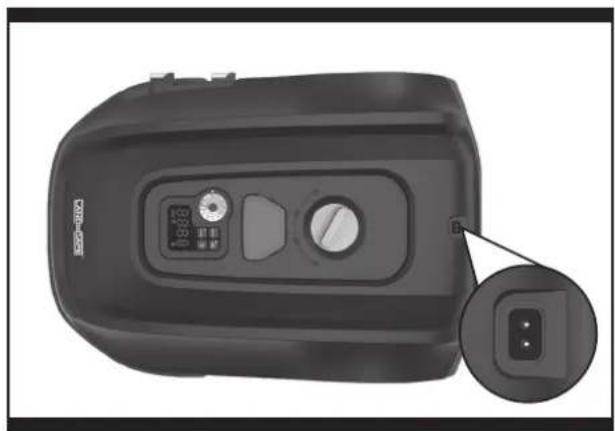
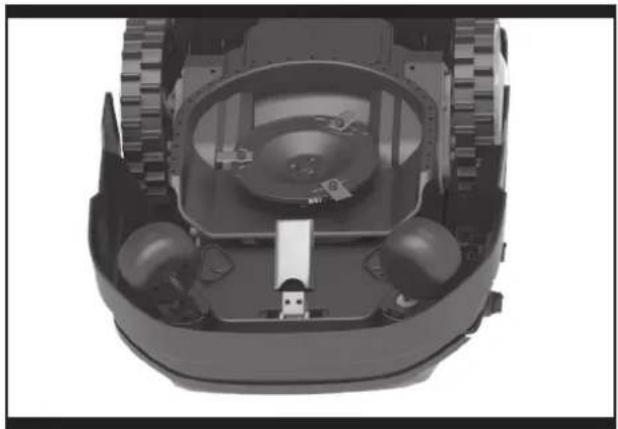
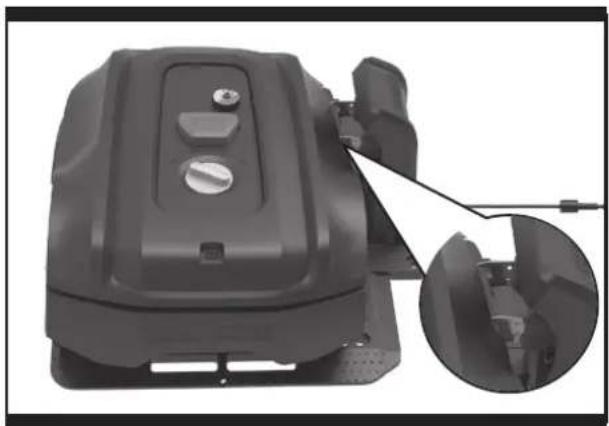
(3) Insert the USB drive (flash drive) in the port. (See Fig. J1)
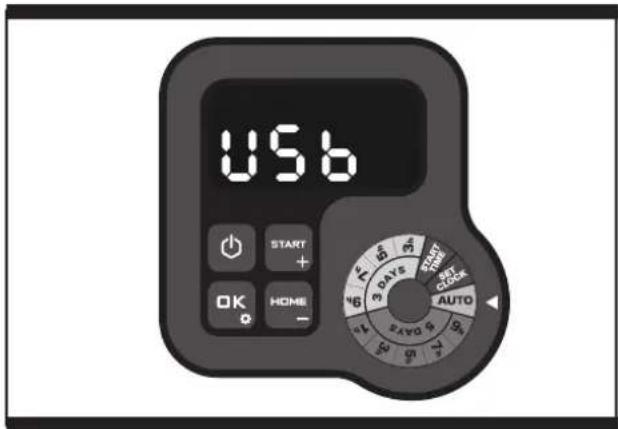
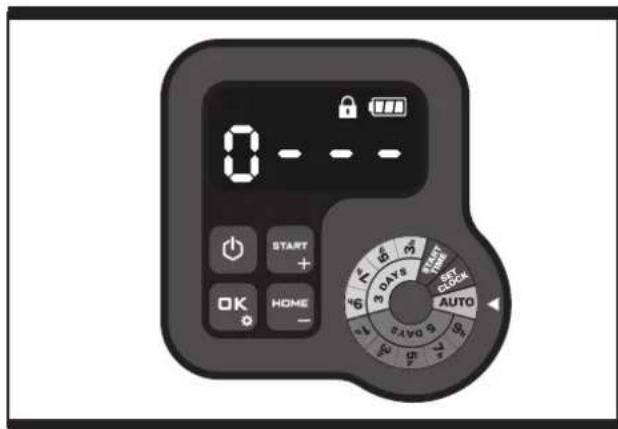
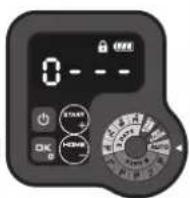
(4) Turn Landscape™ on. The update will begin automatically. Wait until the display shows "USB" (See Fig. J2), then remove the USB drive (flash drive) and tightly close the protective cover. When the display shows "0 - - -", the update is complete and Landscape™ will enter the PIN page.
The manual included with your Landxcape ^™ is based on the default software at the time of production. Some new features/functions in the new version may not exist in the manual. If you found some settings not in the manual, please visit www.landxcape-robotics.com to download the latest manual.
7. Maintenance
Your Landscape™ works hard and needs to be cleaned and checked from time to time. Some parts will require replacement as they become worn. Never use your Landscape™ with defective main switch. Switch off the machine before carrying out any service or maintenance. Here's how to take care of your Landscape™.
7.1 Keep it sharp
WARNING: Before cleaning, adjusting, or replacing the blades, turn your Landscape™ OFF and put on protective
gloves.
WARNING: When fitting new blades, make sure you replace ALL the blades. Always use new screws when fitting blades. This is important to ensure blade retention and
balance the blade turning disc. Failure to use new screws could cause serious injury.
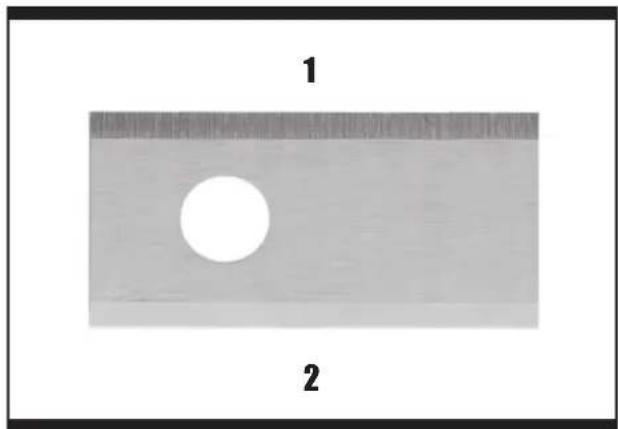
Landxcape™ does not cut grass like other mowers. Its cutting blades are razor sharp on 2 edges and rotate in both directions for maximum cutting capacity (See Fig. K). Each blade of your Landxcape™ has 2 cutting edges. The blade turning disc will make forward and reverse rotation at random to use both cutting edges and minimize the frequency of replacing the blades. Each cutting blade will last up to 2 months when it is programmed to mow everyday. Always check to see if the blades are chipped or damaged and replace them if they are. When the cutting blades are dull and worn out, they should be replaced with the spare blades provided with your Landxcape™. Spare blades are also available at your nearest Landxcape™ retailer.
A. Replace the Blades
After some time, usually every season, your Landscape™'s Blades will need to be replaced. When replacing the blades, make sure to replace ALL of them at the same time. You can replace them with one of the spare blade kits and extra blade screws supplied with your Landscape™.
Before attempting to replace your Landxcape™'s blades, turn the power off and put on protective gloves and follow these steps:
- Gently flip Landxcape ^TM over.
- Remove the battery cover and remove the battery.
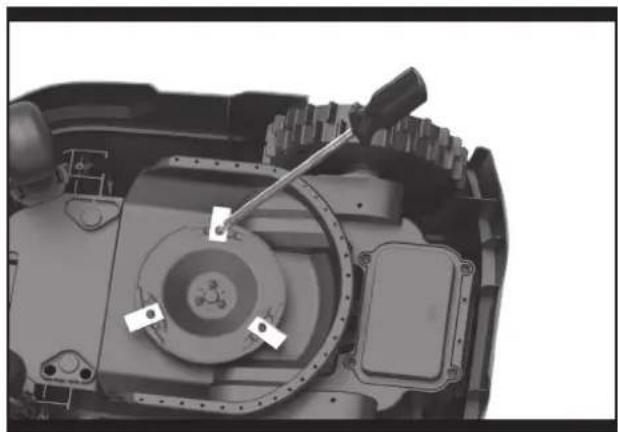
- Take the screws off the blades with a screwdriver. (See Fig. L)
- Firmly screw on the new blades.
- Refit the battery and the battery cover.
IMPORTANT: After screwing the blade to the blade disc, make sure the blade is able to spin freely.
7.2 Keep it clean
WARNING: Before cleaning, turn your Landscape™ OFF. Put on protective gloves before cleaning the blade turning disc and do not rinse or flush with water.
A. Cleaning the body
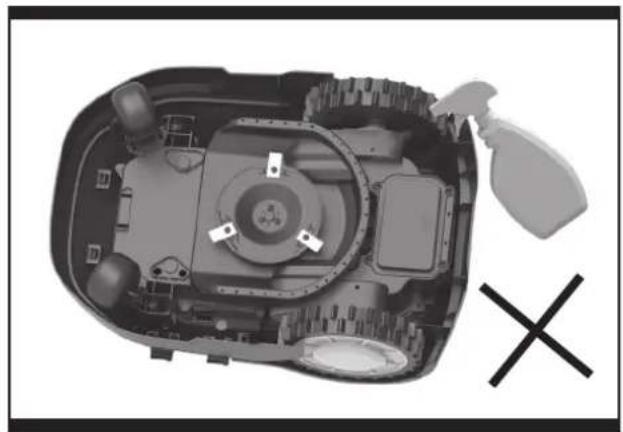
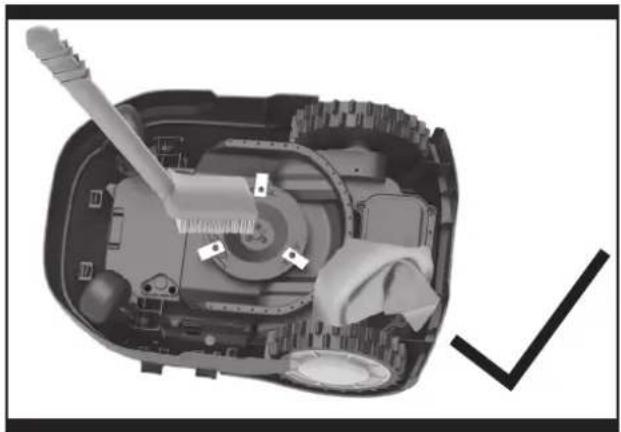
Your Landscape™ will live a much happier and longer life if it is cleaned regularly. Although, since your Landscape™ is an electric machine, you will need to take care when cleaning. DO NOT use a hose, high pressure washers and do not pour running water on your Landscape™. It is best to use a spray bottle filled with water.
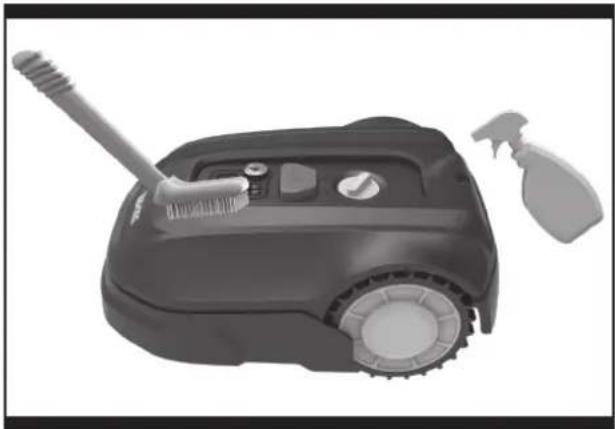
When cleaning the machine body, use a soft brush or clean cloth and avoid using solvents or polishes (See Fig. M). Lastly, remove all build up of grass clippings and debris.
B. Cleaning the Underside
Again, it is important that you power Landxcape™ OFF and wear protective gloves before touching the blade turning disc.
First, flip your Landscape™ upside down to expose its underside. Here you will see the blade disc, the chassis, and the front wheel and driving wheels. Clean everything thoroughly with a soft brush or moist rag.
WARNING: NEVER clean the underside of Landscape™ with running water. Component damage can occur. (See Fig. N1, N2)
Rotate the blade disc to ensure it rotates freely. Check the blades spin freely around the fixing screws. Remove any obstructions.
IMPORTANT: Remove any lodged debris so that it does not cause a crack in the blade disc. Even the tiniest crack can decrease your Landxcape ^™ 's mowing output.
C. Clean the contact pins and the charging strips
Clean the contact pins located on the charging station and the charging strips located on Landxcape ^™ using a cloth. Remove any built up grass clippings or debris around the contact pins and charge strips periodically to ensure Landxcape ^™ successfully charges each time.
7.3 Battery life
The heart of Landxcape ^™ is its 20V Li-Ion battery. For proper storage of the battery, make sure it is fully charged and kept in a cool dry place.
NOTE: The recommended Landscape ^™ operation temperature is between 0-55°C.
The life-span of Landxcape ^™ 's battery depends on various factors, such as:
- The length of the mowing season in your region
• Amount of hours Landxcape ™ mows per day - Battery maintenance during storage
Landxcape™ can be charged manually without the boundary wire.
- Connect the charging station to a suitable power supply. The green light on the charging station will turn on.
- Manually dock Landxcape ^TM into the charging station while Landxcape ^TM is powered off. (See Fig. 0)
- The green light on the charging station will be flashing. Landxcape™ will begin to charge.
7.4 Winter hibernation
Your Landscape™ will live longer and healthier if it is allowed to hibernate. So even though it is troublesome, we recommend storing your Landscape™ in your shed or garage during the winter.
Before you prepare your Landscape™ for winter hibernation, we recommend you:
• Thoroughly clean your Landxcape ™
- Fully charge the battery and remove it from Landscape ^TM
- Turn power off
To maximize the battery life, fully charge the battery and remove it from Landscape ^™ before storage during winter.

WARNING: Protect the underside of Landxcape™ from water. NEVER store Landxcape™ upside down outdoors.
The boundary wire can be left in the ground but its ends should be protected, such as placed in a tin can with grease. If the charging station is left outside for the winter, leave the boundary wire connected.
NOTE: When bringing Landscape™ back to work after winter hibernation, make sure the charging strips and contact pins are clean. We recommend using a fine grade emery cloth to clean the contacts.
7.5 Replacing the battery

WARNING: Power off before attempting any adjustment, replacement or repair.
Before replacing the blades, turn your Landscape™ OFF and put on protective gloves.
If you need to replace the battery, follow these steps:
- Gently turn your Landxcape ^TM upside down.
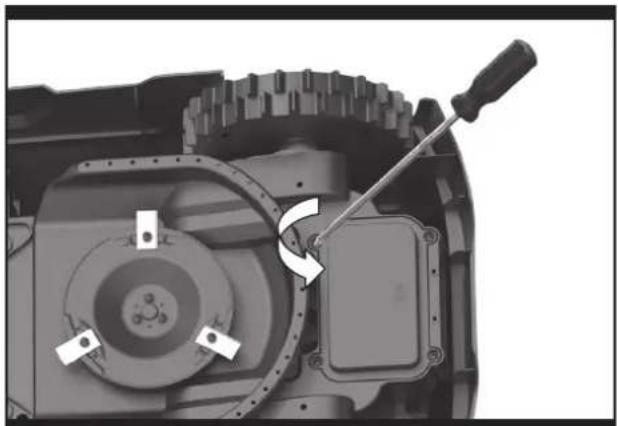
- Remove the screws on the battery cover. Remove the battery cover. (See Fig. P1)
- Lift out the old battery carefully. Press the latch and release the connectors. (See Fig. P2)
NOTE: Do not pull by the cables. Hold the connectors and release the latch. -
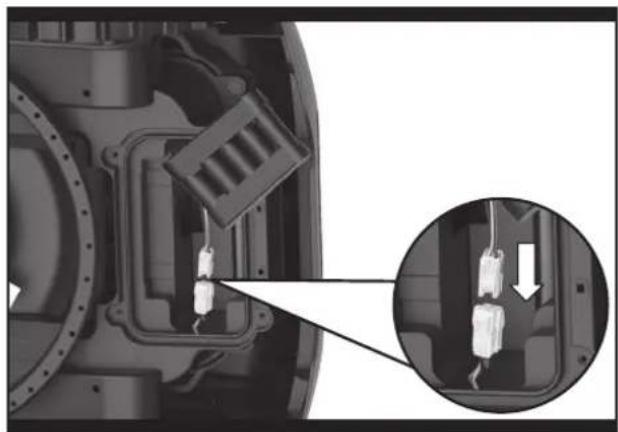
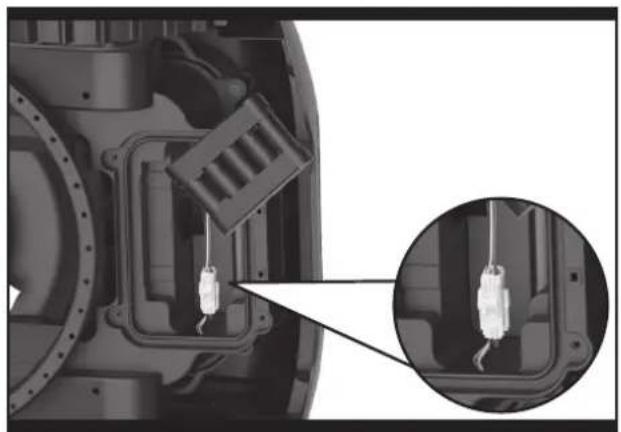
Connect a new original battery by attaching the connectors until they click into position. (See Fig. P3, P4)
-
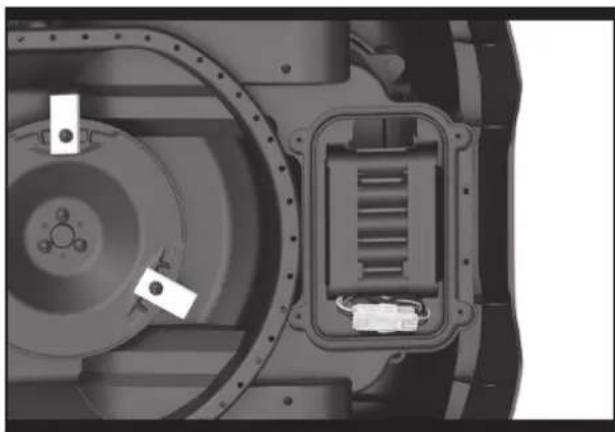
Fit the battery as shown. (See Fig. P5) Place the cover back in its position and tighten the screws.
8. Function Messages
| Display Message | Action | |
| -F 1- | Rain delay activated. No action is required. |
9. Error Messages
| Display Cause Action | ||
 | Landxcape^TM is outsideworking area. | 1. If Landxcape^TM is actually outside its territory: turn Landxcape^TM off, take Landxcape^TM inside its territory. Turn Landxcape^TM on. Press..on . OK2. If Landxcape^TM is inside its territory, check if the LED on the charging station is green. If not, verify that the charging station is properly connected to the charger and that the charger is connected to a suitable power supply. If they are properly connected, the boundary wires are clamped incorrectly and must be reversed.3. If the LED light on the charging station turns on red, confirm that the boundary wire is well connected to the clamps on the charging station. If the problem persists, check that the boundary wire hasn't been cut. |
 | Wheel motor blocked | 1. Turn Landxcape^TM off; take Landxcape^TM to an area free of obstacles.2. Turn Landxcape^TM on. Press..en . OK3. If the error message is still displayed, turn power off; turn Landxcape^TM upside-down and check if there's anything preventing the wheels from rotating.4. Remove any obstruction, turn Landxcape^TM upright, turn power on. Press..en . OK |
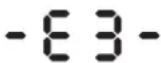 | Blade disc blocked | 1. Turn Landxcape^TM off.2. Turn Landxcape^TM upside down and check if there's anything preventing the blade disc to rotate.3. Remove any obstruction.4. Turn Landxcape^TM upright and take it to an area with short grass or adjust the cutting height;5. Turn Landxcape^TM on. Press..en . OK |
 | Landxcape^TM is trapped. | 1. Turn Landxcape^TM off;2. Take Landxcape^TM to an area in your lawn free of obstacles obstacles.3. Turn Landxcape^TM on. Press..en . OK4. If the error message is still displayed; turn power off; turn Landxcape^TM upside-down. Check if there is anything preventing the wheels from rotating.5. Remove any obstruction, turn Landxcape^TM upright, turn power on. Press..en . OK |
 | Landxcape^TM is lifted up. | 1. Turn Landxcape^TM off.2. Take Landxcape^TM to a lawn area clear of obstacles, turn Landxcape^TM on. Press..then OK.3. If the error message is still displayed: turn Landxcape^TM off, turn Landxcape^TM upside-down and check if there's anything preventing the front wheels from rotating.4. Remove any possible object, turn Landxcape^TM upright, turn Landxcape^TM on. Press..then OK. |
 | Landxcape^TM is upsidedown. | Turn Landxcape^TM upright. Press..en . OK |
 | Battery error | 1. Check the battery temperature. If the temperature is too high, wait until the temperature has cooled down. Press..then OK2. If the error message is still displayed, replace a new battery. Restart Landxcape^TM .Press..then OK3. If the error repeatedly occurs, try to change the working schedule. |
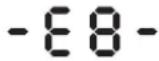 | It takes too long for LandxcapeTM to go back to the charging station. | Manually dock LandxcapeTM in the charging station for charging. After LandxcapeTM is fully charged, PressSTARTthenOKRefer to the installation manual. |
 | Error unknown. | Restart LandxcapeTM. PressSTeen. die error message is still displayed, contact a service agent for help. |
NOTES
- Before turning power on, always return Landxcape ^TM to its territory. If not, “-” will be displayed. This message is also displayed when Landxcape ^TM is sitting over the boundary wire when turned on.
- If for any reason—i.e. a party, children playing...—you want to park your Landxcape™ in the charging station: Press 📄 en . 🌐 dxcape™ will go to its charging station and stay there. Or press 🔒 to turn Landxcape™ off.
- If an error repeatedly occurs in the same area of your lawn, you might have a problem with the boundary wire. Please refer to the Installation Guide and check your set up with its help.
- If your lawn is divided in two separate areas connected by a corridor less than 1m, one of which is not provided with the charging station: when Landxcape™ runs out of charge, take it manually to the charging station, the charge process will start.
- If Landxcape ^TM runs abnormally once in a while, please try to restart it. If the problem is not resolved, try to removing and reinstalling the battery. If the problem is still not resolved, please contact a Landxcape ^TM service agent for help.
- Do not wash your Landscape ^TM with a high pressure washer. This could cause damage to the battery or the machine.
10. Troubleshooting
If your Landxcape ^™ does not work correctly, follow the troubleshooting guide below. If the issue persists, contact your Dealer.
| Symptom Cause Action | ||||
| The LED light on the charging station does not turn on. | There is no power. | Check the charging station is connected properly to the charger and the charger is connected to a suitable power supply. | ||
| Red light turns on the charging station. The boundary wire isn't connected. | Check that the boundary wire has been connected correctly to the charging station.Check there are no breaks in the boundary wire, especially in the wire ends. | |||
| Landxcape^TM turns on, but the blade disc does not move. | Landxcape^TM is searching for the charging station (unless you press then button to make it go to the charging base) | This is normal. Landxcape^TM needs to recharge, the blade disc does not rotate while it is searching for the charging station automatically. | ||
| Landxcape^TM vibrates. | Blades may be damaged. Check condition of the blade disc. | Check the blades, and replace them if damaged.Remove debris and foreign objects from the blades and blade disc. | ||
| Grass is being cut unevenly. | Landxcape^TM does not work enough hours per day. | Add more hours to the scheduled mowing time. | ||
| Mowing area is too big. | Try decreasing the size of the mowing area or adding more hours to the mowing time. | |||
| Blades are dull. | Change all the blades and screws in order to balance the blade disc. | |||
| The cutting height is too low for the length of the grass. | Raise the cutting height and then gradually lower. | |||
| Grass or other object has wrapped around the blade disc. | Check the blade disc and remove the grass or other object. | |||
| There is a build-up of grass in the blade disc or motor frame box. | Make sure the blade disc rotates easily. If need be, you may take off the blade disc and remove the debris. | |||
| Your Landxcape^TM is inside its territory and the boundary wire is connected.And “- ∈ :-” is displayed. | The boundary wire ends are clamped incorrectly. | Reverse the boundary wire ends. | ||
| The boundary wire is broken. Repair damaged | boundary wire with connectors. | |||
| The charging time is far more than the rated charging time. | Poor connection caused by debris on the charging strip. | Clean the contact pins located on the charging station and the charging strip on LandxcapeTM using a cloth. | ||
| The charging protection program has activated due to high temperature. | Place the charging station in a shady area or wait until the temperature has cooled down. | |||
| The mower does not charge. | There is no power. | Check the power cord is connected properly to the charger and the charger is connected to a suitable power supply. | ||
| LandxcapeTM does not operate correctly while manually charging. | Refer to manual charging in Section 7.3. | |||
| LandxcapeTM is starting to have shorter run-times between charges. | Something is clogging in the blade disc. Take off the blade disc and clean it. | |||
| LandxcapeTM is shaking heavily. | Check the blade disc and blades, remove debris and foreign objects from the blades and blade disc. | |||
| The battery may be exhausted or old. Replace battery. | battery. | |||
| LandxcapeTM is not operating at the correct time. | The clock is not set to the correct time. Set the | clock to the correct time, refer to Section 4.3. | ||
| Programmed cutting times for LandxcapeTM are not correct. | Change the time settings for the mower to start and stop. | |||
| LandxcapeTM is manually docked in the charging station. | Press then OK | |||
| The battery does not charge as its temperature rises above 55°C in hot weather. | Wait until the battery has cooled down. | |||
| LandxcapeTM cannot correctly dock with the charging station. | Environmental influences. Restart Landxcape | TM. | ||
| Poor connection caused by debris on the charging strip. | Clean the contact pins located on the charging station and the charging strip on LandxcapeTM using a cloth. | |||
| The green light on the charging station turns on before charging is complete. | The charging station is overheated. | Place the charging station in a shady area or wait until the temperature has cooled down. | ||
| LandxcapeTM runs outside the boundary wire. | The boundary wire has been installed with tight corners. | Check the boundary wire to ensure the corners are smooth. | ||
| LandxcapeTM does not mow an area within a boundary wire zone. | The cutting area is larger than the allowable cutting area for LandxcapeTM. | Reduce the cutting area or use LandxcapeTM with a larger allowable cutting area. | ||
| LandxcapeTM reverses or rotates erratically near the boundary wire. | The boundary wire of another LandxcapeTM or another robotic mower is positioned too closely. | Ensure your LandxcapeTM boundary wire has at least 1m of space between the neighboring boundary wire. | ||
| In wet conditions, the boundary wire electric signal may leak were wire has been joined or repaired. | Check boundary wire joints. Insulate to provide a fully waterproof connection. | |||
| There is boundary wire electric signal leakage due to broken insulation. | Repair damaged boundary wire insulation with connectors. | |||
| LandxcapeTM wheels skid or damage lawn. | Foreign obstacles, such as twigs and branches may be lodged under LandxcapeTM. | Remove foreign objects from underside of LandxcapeTM. | ||
| The lawn is too wet. Wait until lawn has dried. | ||||
| LandxcapeTM exits the boundary wire due to high speed when going down a hill. | The boundary wire is placed on a slope steeper than 17% (10°). | Reposition the boundary wire away from slopes that are steeper than 17% (10°). Please refer Installation Guide for details. | ||
 | Software update failure occurs. | Try again according to section "Software update". | ||
| LandxcapeTM runs in circles; turns right or left even there is no obstacle in front of it. | The boundary wire of another LandxcapeTM or another robotic mower is positioned too closely. | check and ensure your LandxcapeTM boundary wire has at least 1m of spacing between the neighboring boundary wire. If the problem cannot be solved, please contact LandxcapeTM service agent for help. | ||
| Keyboard of the mower fails to work. | Keyboard is damaged. | Restart LandxcapeTM. If the problem persists, keep pressing the on/off key for 10 seconds and then restart LandxcapeTM. If the problem cannot be solved, please contact LandxcapeTM service agent for help. | ||
| Poor connection for the cable between the control panel and the mainboard or the cable is damaged. | ||||
| Keyboard needs to be reset. | ||||
| Mower fails to avoid obstacles. | The boundary wire of another LandxcapeTM or another robotic mower is positioned too closely. | check and ensure your LandxcapeTM boundary wire has at least 1m of spacing between the neighboring boundary wire. If the problem cannot be solved, please contact LandxcapeTM service agent for help. | ||
| The obstacle is lower than 10cm. | This is normal. | |||
Environmental Protection

Waste electrical products should not be disposed of with household waste. Please recycle where facilities exist. Check with your Local Authority or retailer for recycling advice.
Technical data
Type LX835 (8 - designation of machinery, representative of Robotic Lawn Mower)
| LX835 | |
| Rated voltage 20V | --- Max.* |
| No load speed (/min) 2800 | |
| Cutting area (m2) 800 | |
| Cutting diameter (cm) 18 | |
| Cutting height (mm) 30-60 | |
| Cutting height positions 4 | |
| Max. slope 35% (20°) | |
| Battery type Lithium-ion | |
| Battery model LA0002 | |
| Charging time approx. (hr) 2 | |
| Charger model LA8001 / LA8002 | |
| Charger rating | Input: 100-240V~50/60Hz, 38W,Output: 20V---, 1.5A |
| Machinery weight (kg) 8.3 | |
| Rain sensor Y | |
| Protection degree III | |
| Frequency band of inductive loop systems | 77 Hz |
| Max. radio-frequency power of inductive loop systems | 82 dBμA/m |
*Voltage measured at no load. Initial battery voltage reaches maximum of 20 volts. Nominal voltage is 18 volts.
Noise data
| A weighted sound pressure | L_pA = 40.6 dB( A) K_pA = 3.0 dB( A) |
| A weighted sound power | L_wA = 60.6 dB( A) K_wA = 3.0 dB( A) |
| Wear ear protection when sound pressure is over 80dB(A) |
A degree of noise from the machine is not avoidable. Route noisy work is to be licensed and limits for certain periods. Keep rest periods and they may need to restrict the working hours to a minimum. For their personal protection and protection of people working nearby, an appropriate hearing protection shall be worn.
Accessories
| LX835 | |
| Screw | 9 |
| Charging station | 1 |
| Charging base fixing nails | 8 |
| Boundary wire | 180m |
| Wire pegs | 250 |
| Hex key | 1 |
| Boundary wire distance gauge 2 | |
| Blade | 9 |
| Connector | 2 |
| Battery pack (LA0002) | 1 |
| Charger (LA8001 / LA8002) | 1 |
We recommend that you purchase genuine accessories listed in the above list from the same store that sold you the tool. Refer to the accessory packaging for further details. Store personnel can assist you and offer advice.
Declaration of Conformity
We,
Positec Germany GmbH
Grüner Weg 10, 50825 Cologne, Germany
Declare that the product,
Description Robotic Lawn mower
Type LX835 (8 - designation of machinery, representative of Robotic Lawnmower) (Serial number is placed on the back page) with battery charger LA8001 / LA8002 and charging station LA3001
Function Cutting grass
Complies with the following Directives,
2006/42/EC, 2014/30/EU, 2014/35/EU, 2011/65/EU&(EU)2015/863, 2000/14/EC amended by 2005/88/EC, 2014/53/EU
2000/14/EC amended by 2005/88/EC
- Conformity Assessment Procedure as per Annex V
- Measured Sound Power Level 60.6 dB (A)
- Declared Guaranteed Sound Power Level 63 dB (A)
The notified body involved
Name: ISET Srl Unipersonale
Address: Via Donatori del Sangue,9 46024-Moglia(MN), Italy 0865
Certification No.: ISETC.001920201117
Standards conform to,
EN 60335-1:2012+A11:2014+A13:2017+A1:2019+A14:2019+A2:2019,
EN 50636-2-107:2015+A1:2018+A2:2020, EN 62233:2008
EN 60335-2-29:2004+A2:2010+A11:2018
EN 62233:2008
EN ISO 3744: 2010, ISO 11094: 1991,
EN 55014-1:2017,
EN 55014-2:2015
EN 61000-3-2:2014
EN 61000-3-3:2013+A1:2019,
EN 61558-1:2005+A1:2009,
EN 61558-2-16:2009+A1:2013,
EN 303 447 V1.1.1
The person authorized to compile the technical file,
Name Marcel Filz
Address Positec Germany GmbH, Grüner Weg 10, 50825 Cologne, Germany

text_image
M A
2020/12/31
Allen Ding
Deputy Chief Engineer, Testing & Certification
Positec Technology (China) Co., Ltd.
18, Dongwang Road, Suzhou Industrial
Park, Jiangsu 215123, P. R. China
natural_image
Architectural layout diagram showing a small house surrounded by garden plots and trees (no text or symbols)18, Dongwang Road, Suzhou Industrial
Park, Jiangsu 215123, P. R. China
natural_image
Architectural layout diagram showing a central house surrounded by landscaped gardens and trees (no text or symbols)No de certification: ISETC.001920201117
Et conforme aux normes,
EN 60335-1:2012+A11:2014+A13:2017+A1:2019+A14:2019+A2:2019,
EN 50636-2-107:2015+A1:2018+A2:2020, EN 62233:2008
EN 60335-2-29:2004+A2:2010+A11:2018
EN 62233: 2008
EN ISO 3744: 2010, ISO 11094: 1991,
EN 55014-1:2017,
EN 55014-2:2015.
EN 61000-3-2:2014
EN 61000-3-3:2013+A1:2019,
EN 61558-1:2005+A1:2009,
EN 61558-2-16:2009+A1:2013,
EN 303 447 V1.1.1
18, Dongwang Road, Suzhou Industrial
Park, Jiangsu 215123, P. R. China
natural_image
Architectural layout diagram showing a single house surrounded by garden areas and trees (no text or symbols)text_image
5d3h START + OK HOME - DUTY MINI MINI MINI MINI MINI MINI MINI MINI MINI MINI MINI MINI MINI MINI MINI MINI MINI MINI MINI MINI MINI MINI MINI MINI MINI MINI MINI MINI MINI MINI MINI MINI MINI MINI18, Dongwang Road, Suzhou Industrial
Park, Jiangsu 215123, P. R. China
natural_image
Architectural layout diagram showing a central house surrounded by landscaped gardens and trees (no text or symbols)text_image
Idle P In 0 ---text_image
IDLE START OK 0 50% 50%text_image
IDLE START OK H2448 3.04% 1.04%Página de espera
text_image
3d3h START + OK HOME - 3 days 6 days 6 days 6 days 6 days 6 days 6 days 6 days 6 days 6 days 6 days 6 days 6 days 6 days 6 days 6 days 6 days 6 days 6 days 6 days 6 days 6 days 6 days 6 days 6 days 6 days 6 days 6 days 6 days 6 days 6 days 6 days 6 days 6 days 6 hours 6 hours 6 hours 6 hours 6 hours 6 hours 6 hours 6 hours 6 hours 6 hours 6 hours 6 hours 6 hours 6 hours 6 hours 6 hours 6 hours 6 hours 6 hours 6 hours 6 hours 6 hours 6 hours 6 hours 6 hours 6 hours 6 hours 6 hours 6 hours 6 hours 6 hours 6 hours 6 hours 6 hourstext_image
5d3h START + OK HOME - OUTW 9.0 10.0 11.0 12.0 13.0 14.0 15.0 16.0 17.0 18.0 19.0 20.0 21.0 22.0 23.0 24.0 25.0 26.0 27.0 28.0 29.0 30.0 31.0 32.0 33.0 34.0 35.0 36.0 37.0 38.0 39.0 40.0 41.0 42.0 43.0 44.0 45.0 46.0 47.0 48.0 49.0 50.0 51.0 52.0 53.0 54.0 55.0 56.0 57.0 58.0 59.0 60.0 61.0 62.0 63.0 64.0 65.0 66.0 67.0 68.0 69.0 70.0 71.0 72.0 73.0 74.0 75.0 76.0 77.0 78.0 79.0 80.0 81.0 82.0 83.0 84.0 85.0 86.0 87.0 88.0 89.0 90.0 91.0 92.0 93.0 94.0 95.0 96.0 97.0 98.0 99.0 100.0Your Landxcape ^™ will live longer and healthier if it is allowed to hibernate. So even though it is troublesome, we recommend storing your Landxcape ^™ in your shed or garage during the winter.
Before you prepare your Landscape™ for winter hibernation, we recommend you:
18, Dongwang Road, Suzhou Industrial
Park, Jiangsu 215123, P. R. China
natural_image
Top-down architectural rendering of a simple outdoor garden layout with a central house, pathways, and surrounding greenery (no text or symbols)Deputy Chief Engineer, Testing & Certification
Positec Technology (China) Co., Ltd.
18, Dongwang Road, Suzhou Industrial
Park, Jiangsu 215123, P. R. China
natural_image
Top-down architectural rendering of a simple house surrounded by garden layout and trees (no text or symbols)text_image
IDLE P In 0 ---text_image
IDLE START + OK HOME - 3.5 3.5 3.5 3.5 3.5 3.5 3.5 3.5 3.5 3.5Strona gotowości
18, Dongwang Road, Suzhou Industrial
Park, Jiangsu 215123, P. R. China
natural_image
3D architectural rendering of a simple house surrounded by landscaped gardens and trees (no text or symbols)18, Dongwang Road, Suzhou Industrial
Park, Jiangsu 215123, P. R. China
natural_image
Top-down architectural rendering of a simple garden layout with a central house, surrounding pathways, and surrounding trees (no text or symbols)Adresă Positec Germany GmbH, Grüner Weg 10, 50825 Cologne, Germany

text_image
M A
2020/12/31
Allen Ding
Adjunct Inginer Şef, Testare si certificare
Positec Technology (China) Co., Ltd.
18, Dongwang Road, Suzhou Industrial
Park, Jiangsu 215123, P. R. China
natural_image
3D architectural rendering of a simple house surrounded by landscaped gardens and trees (no text or symbols)4.1 Jak moje sekačka Landxcape™ pozná, co má sekat?
18, Dongwang Road, Suzhou Industrial
Park, Jiangsu 215123, P. R. China
natural_image
3D architectural rendering of a simple courtyard with a central house, surrounding greenery, and pathways (no text or symbols)Complies with the following Directives,
2006/42/EC, 2014/30/EÜ, 2014/35/EU, 2011/65/EU&(EU)2015/863, 2000/14/EC v novelizácii2 005/88/EC, 2014/53/EU
2000/14/EC v novelizácii2 005/88/EC
18, Dongwang Road, Suzhou Industrial
Park, Jiangsu 215123, P. R. China
natural_image
3D architectural rendering of a simple garden layout with a central house, pathways, and surrounding greenery (no text or symbols)text_image
IDLE P In 0 ---text_image
14:08 START + OK NONE - START + HOLD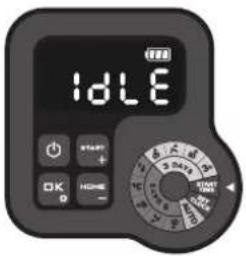
text_image
IDLEtext_image
5d3h START + OK HOME - OUTDO ON ON ON ON ON ON ON ON ON ON ON ON ON ON ON ON ON ON ON ON ON ON ON ON ON ON ON ON ON ON ON ON ON ON ON ON ON ON ON ON ON ON ON ON ON ON ON ON ON ON OR OR OR OR OR OR OR OR OR OR OR OR OR OR OR OR OR OR OR OR OR OR OR OR OR OR OR OR OR OR OR OR OR OR OR18, Dongwang Road, Suzhou Industrial
Park, Jiangsu 215123, P. R. China
1. Sigurnost proizvoda
natural_image
3D architectural rendering of a simple garden layout with a central house, surrounding pathways, and small shrubs (no text or symbols)text_image
IDLE P In 0 - - -Samo kao referenca
(4) Razviti raspored rada
18, Dongwang Road, Suzhou Industrial
Park, Jiangsu 215123, P. R. China
1. Varnost izdelka
natural_image
Architectural layout diagram showing a central house surrounded by garden plots and trees (no text or symbols)text_image
8:00:24 AUTOSamo za referenco
Kot je prikazano na zgornji sliki, lahko gumb vrtite v smeri urnega kazalca in v nasprotni smeri urnega kazalca.
18, Dongwang Road, Suzhou Industrial
Park, Jiangsu 215123, P. R. China
natural_image
Architectural layout diagram of a garden with a central house, surrounding pathways, and surrounding greenery (no text or symbols)text_image
5d3h START + OK HOME - 3MILL MPPSKun for reference
18, Dongwang Road, Suzhou Industrial
Park, Jiangsu 215123, P. R. China
natural_image
Top-down architectural rendering of a simple outdoor garden layout with a central house, surrounding pathways, and surrounding greenery (no text or symbols)text_image
3d3h START + OK HOC 0 -Viitteeksi
TAULUKKO 2
18, Dongwang Road, Suzhou Industrial
Park, Jiangsu 215123, P. R. China
1. Produktsikkerhet
VEDLIKEHOLD OG LAGRING
natural_image
3D architectural rendering of a simple garden layout with a central house, surrounding pathways, and surrounding greenery (no text or symbols)text_image
5d3h START + OK HOME - HOLD ENGLISH HOLD ENGLISH HOLD ENGLISH18, Dongwang Road, Suzhou Industrial
Park, Jiangsu 215123, P. R. China
1. Produktsäkerhet
natural_image
3D architectural rendering of a simple garden layout with a central house, surrounding pathways, and small shrubs (no text or symbols)18, Dongwang Road, Suzhou Industrial
Park, Jiangsu 215123, P. R. China

text_image
LANDXCAPE™Copyright © 2021, Positec. All Rights Reserved.
AR01562401