
Xelento remote 2nd generation - Earphones BEYERDYNAMIC - Free user manual and instructions
Find the device manual for free Xelento remote 2nd generation BEYERDYNAMIC in PDF.


User questions about Xelento remote 2nd generation BEYERDYNAMIC
0 question about this device. Answer the ones you know or ask your own.
Ask a new question about this device
Download the instructions for your Earphones in PDF format for free! Find your manual Xelento remote 2nd generation - BEYERDYNAMIC and take your electronic device back in hand. On this page are published all the documents necessary for the use of your device. Xelento remote 2nd generation by BEYERDYNAMIC.
USER MANUAL Xelento remote 2nd generation BEYERDYNAMIC
Operating instructions
CONTENTS
SAFETY INSTRUCTIONS....3
Intended use....3
Adjusting the volume....3
Reducing perception of ambient noise....4
Risk of injury 4
Changed acoustic perception....4
Cleaning dirty eartips....4
Damage from liquids 4
Risk of swallowing....4
Power and connecting cable....4
Environmental conditions....4
ABOUT THIS MANUAL....5
SCOPE OF DELIVERY 5
PRODUCT OVERVIEW......6
FIRST STEPS....6
Using and fitting the eartips....6
Replacing eartips....8
Maintaining eartips....9
INSERTING AND WEARING XELENTO REMOTE....9
Cable clip 9
ATTACHING AND CHANGING THE CABLE....10
OPERATION 11
Remote control....11
Playing media....11
Adjusting the volume....12
Making a call 12
HELP WITH PROBLEMS / FAQ....12
CLEANING....13
DISPOSAL....13
EU DECLARATION OF CONFORMITY 13
TECHNICAL SPECIFICATIONS....13
SERVICE 14
SPARE PARTS....14
PRODUCT REGISTRATION 14
WARRANTY CONDITIONS....14
REGISTERED TRADEMARKS......14
Thank you for choosing Xelento remote (2nd generation) in-ear headphones.
SAFETY INSTRUCTIONS
▶ Please read these instructions carefully and completely before using the product.
▶ Please observe all instructions given, especially those concerning the safe use of the product.
▶ Do not use the product if it is defective.
The company beyerdynamic GmbH & Co. KG accepts no liability for damage to the product or injury to persons caused by careless, improper or incorrect use of the product, or by use for purposes not specified by the manufacturer.
Intended use
Only use the product as described in this product manual. beyerdynamic accepts no liability for damage to the product or injury to persons caused by careless, improper or incorrect use of the product, or by use for purposes not specified by the manufacturer.
beyerdynamic is not liable for damage to USB devices that do not comply with the USB specifications.
Please also observe the relevant country-specific regulations before using the product.
Adjusting the volume
High volumes and long listening times can permanently damage your hearing. Because in-ear headphones sit directly in the ear canal, there is an increased risk of hearing damage.
Before inserting the earphones, set the volume to minimum. Only increase the volume after inserting the earphones.
▶ Do not use the in-ear headphones at high volume for a long time. When listening and speaking normally with in-ear headphones, your own voice should still be perceptible.
▶ In case of tinnitus, decrease the volume. If necessary, consult a doctor.
▶ Please note that excessively high volumes and long listening times may cause hearing damage. Hearing impairments are irreversible, so always make sure that the volume is appropriate. It is advisable to keep listening times at high volumes as short as possible.
The headphones are not suitable for children under 12 years of age due to the possible high sound pressure level.
▶ Do not use the headphones at full volume for more than three hours a week.
Reducing perception of ambient noise
In-ear headphones drastically reduce perception of ambient noise. Using in-ear headphones in road traffic can be potentially dangerous. The user's hearing must not be impaired to the extent that it causes road safety risks.
▶ Do not use the in-ear headphones within the action area of potentially dangerous machines and tools.
- Avoid using in-ear headphones in situations where hearing must not be impaired – particularly in road traffic, when crossing a level crossing or on a construction site.
Risk of injury
Avoid sudden movements when using wired in-ear headphones. You might seriously hurt yourself especially if you wear piercings, earrings, glasses, etc., where the wire can get caught.
Changed acoustic perception
For many people, wearing in-ear headphones takes some getting used to because the acoustic perception of their own voice and body as well as the inner ear sounds that occur while walking is different from the “normal” situation without in-ear headphones. However, this initially strange sensation usually diminishes after wearing them for a while.
Cleaning dirty eartips
Dirt on the eartips and the formation of a warm and humid climate in the ear canal can cause germs to multiply, which can increase the risk of an ear canal infection.
▶ Regularly clean the eartips.
Damage from liquids
Liquid penetration can damage the earphones.
▶ Make sure that no liquids penetrate the earphones (e.g. when cleaning).
Solvent-based or aggressive cleaning agents can damage the surfaces of the earphones or the cable.
▶ Do not use solvent-based or aggressive cleaning agents.
Risk of swallowing
▶ Keep small parts, such as product, packaging and accessories, away from children and pets. They constitute a choking hazard if swallowed.
Power and connecting cable
Use only the cable we supply to connect the in-ear headphones to a playback device.
Environmental conditions
▶ Do not expose the product to rain, snow, liquids or moisture.
ABOUT THIS MANUAL
This manual describes the product's most important functions.
SCOPE OF DELIVERY
- Xelento in-ear headphones (2nd generation), left and right earphones
- Connecting cable with remote control, 3.5 mm 4-pole jack
- Connecting cable (symmetrical), 4,4 mm 5-pole jack (Pentaconn)
- Seven pairs of silicone eartips
- Three pairs of foam eartips (type Comply™ Tx-500)
- Two cable clips
- Storage case
- Spare wax guard
- Microfibre cleaning cloth
- Quick Start Guide and Compliance Booklet
PRODUCT OVERVIEW
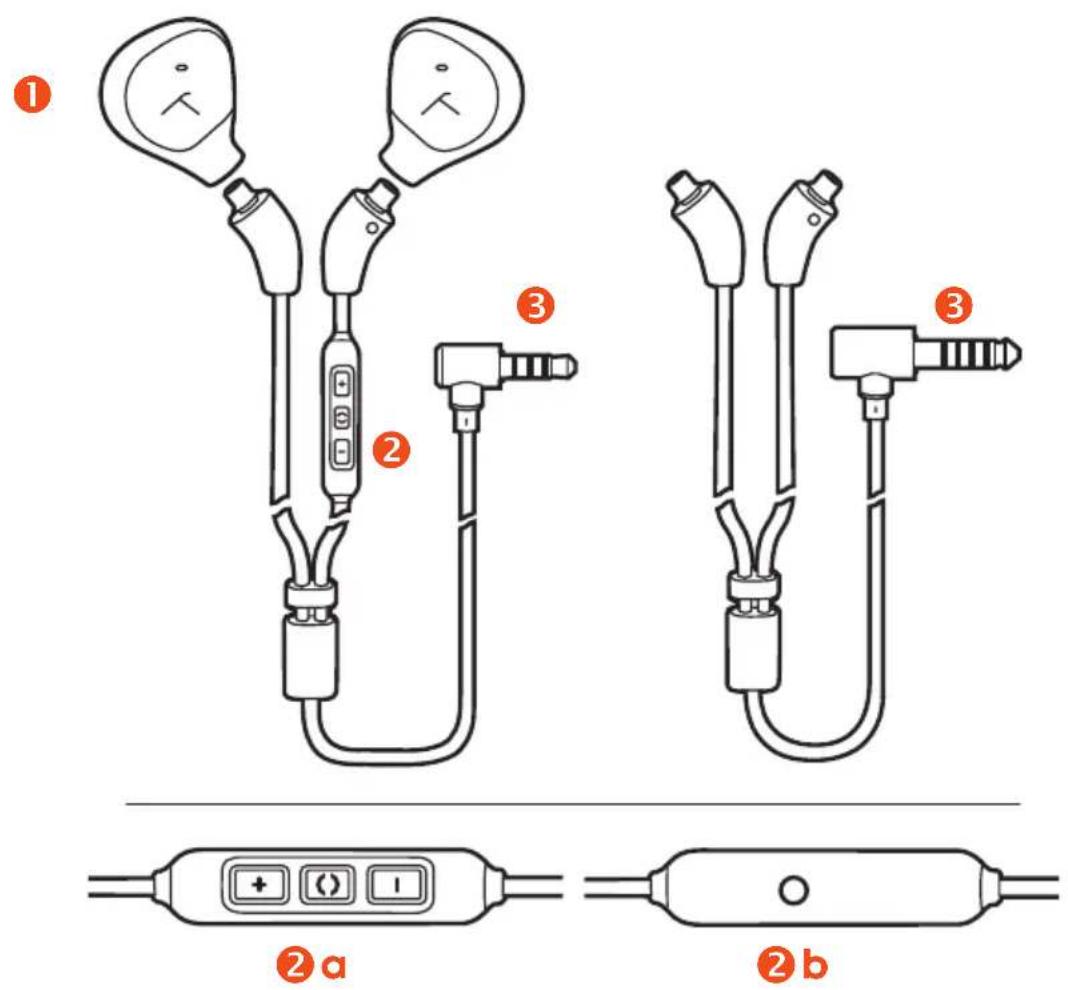
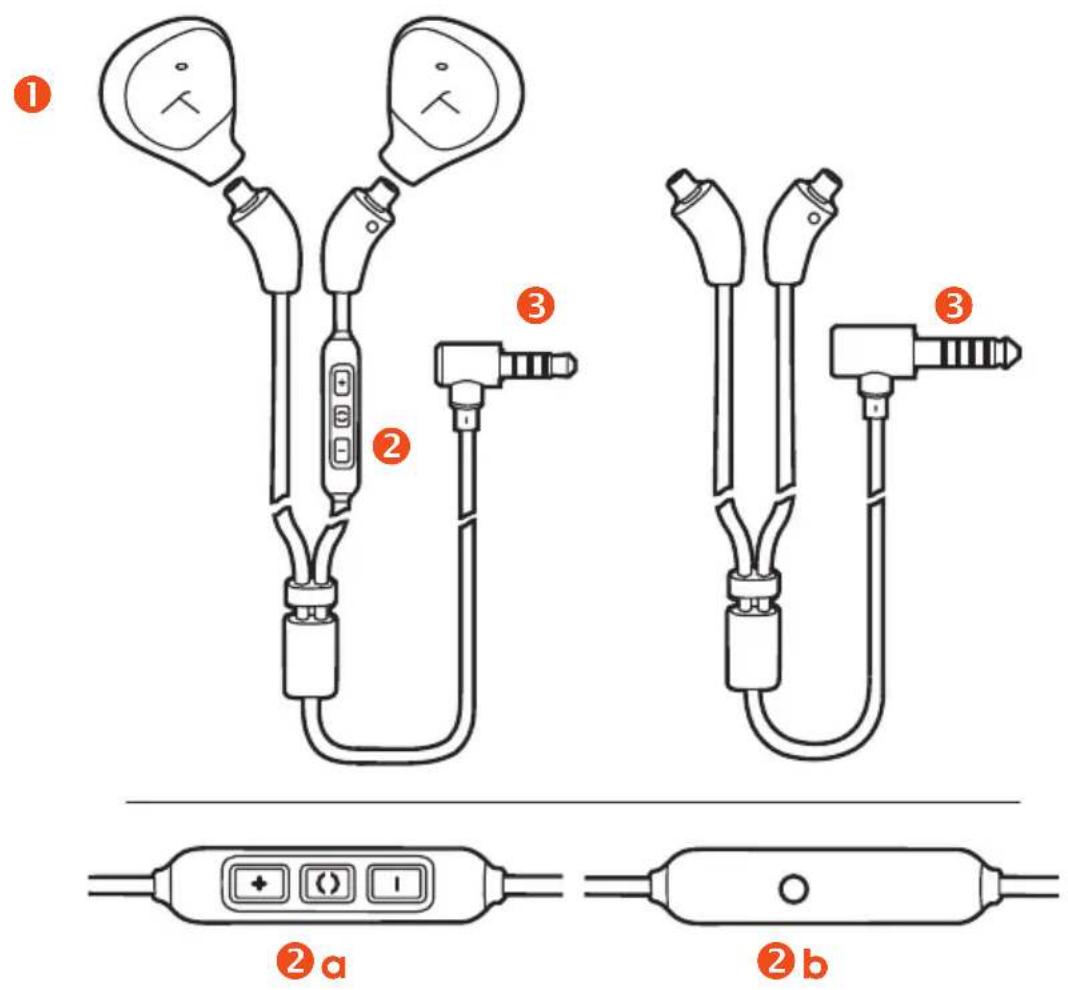
1 Earphones with replaceable eartips
2 Remote control
2a [+] / [-] Volume up / volume down
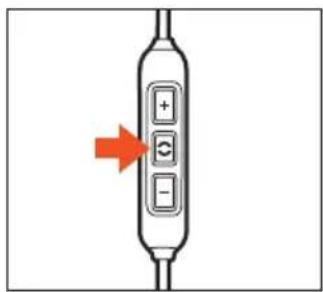
() Multifunction button (middle button)
2b Microphone on the back
3 Jack plug for connection to playback device
FIRST STEPS
Using and fitting the eartips
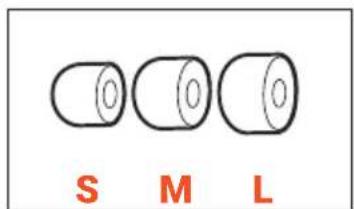
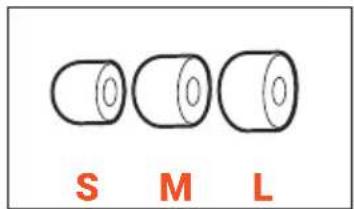
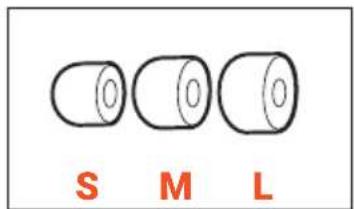
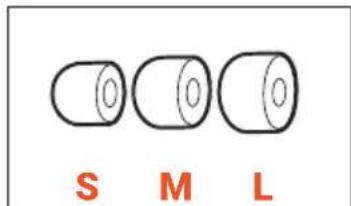
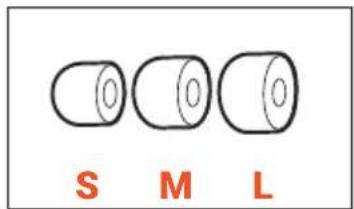
So that you can choose the best possible fit and comfort, your Xelento in-ear headphones come with eartips in ten different sizes and two different materials.
Every ear is unique, and the size of the eartip required may vary from one ear to another.
Please take the time to try out different sizes and pick the most suitable one – it's worth the effort!
Silicone eartips
2x each:
Size:
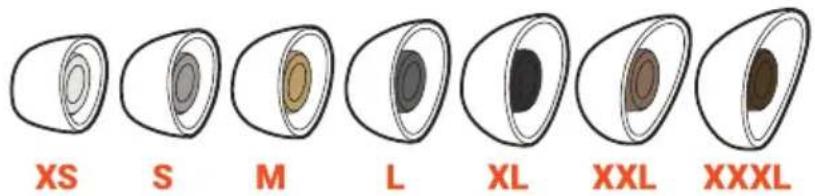
The sizes XS to XXXL are marked on the shaft of the silicone eartips.
natural_image
Diagram of a pulley system with two circular components and a downward arrow indicating motion (no text or symbols)Comply™ foam eartips
2x each:
Size:
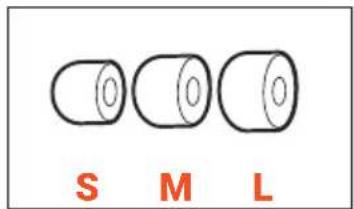
text_image
S M LFitting the silicone eartips
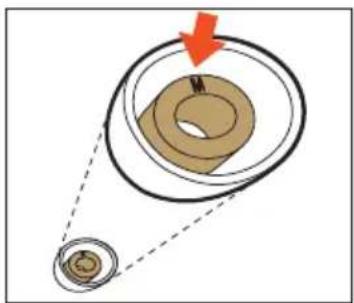
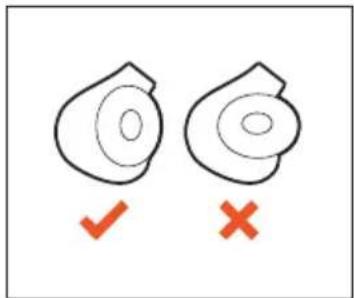
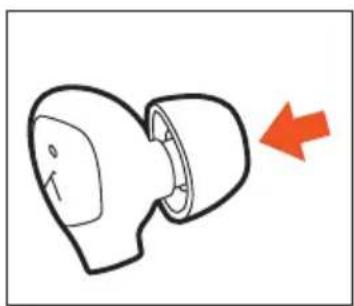
Carefully place the silicone eartips on the housings.
The oval opening of the eartip follows the oval shape of the housing.
text_image
Diagram showing two leaf-shaped shapes with checkmark and cross symbols below, likely indicating approval or rejection status.Adjusting and fitting Comply™ eartips
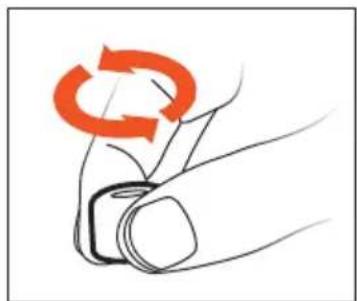
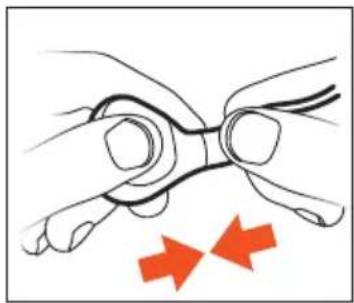
Before inserting, roll the eartip attached to the earphone tightly lengthwise between your fingers.
After insertion, the eartips expand again and provide good support for the earphone, even when you are moving.
natural_image
Illustration of a hand holding a circular object with an orange circular arrow symbol (no text or labels)Removing Comply™ eartips
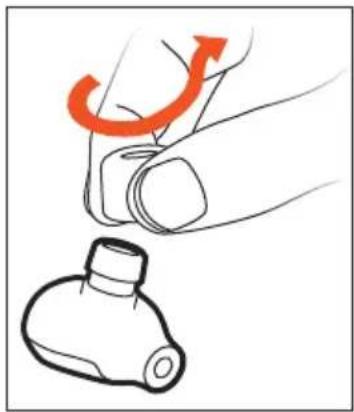
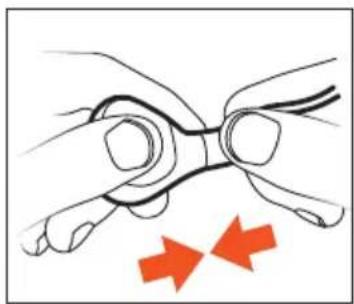
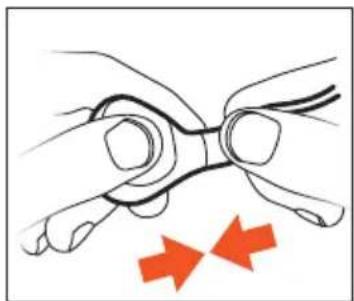
To remove Comply™ eartips, squeeze them firmly and pull them off the housing with a slight twisting motion.
natural_image
Illustration of a hand holding a tool with an orange arrow indicating rotation (no text or symbols)Replacing eartips
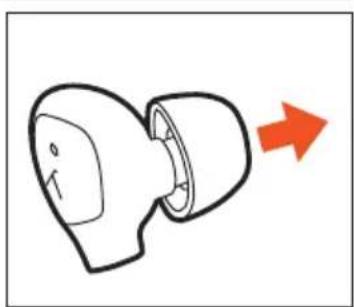
If you are using them regularly, we recommend changing the eartips every three months. Replacement silicone eartips can be ordered from the beyerdynamic spare parts shop: www.beyerdynamic.com/service/spare-parts
Replacement Comply™ foam eartips, together with dealers where you can order the eartips, can be found online at: www.complyfoam.com
Eartip types used: Tx-500
- Carefully remove the eartip from the earphone.
natural_image
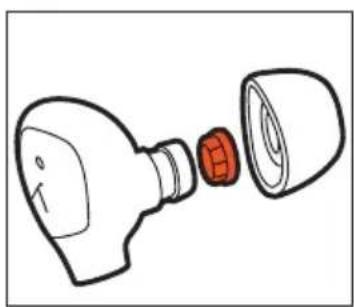
Simple line drawing of a showerhead with a red arrow pointing to it (no text or symbols)Dirty sound outlets can be cleaned by replacing the small wax guard grilles.
▶ Use the enclosed microfibre cleaning cloth to clean the earphone's sound outlet of residues.
▶ Make sure that no liquid flows into the outlet.
natural_image
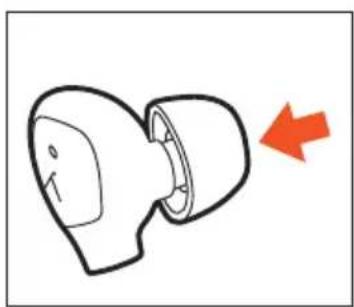
Line drawing of a light bulb with a red internal component, showing internal structure (no text or symbols)- Put the new eartip on the earphone.
natural_image
Simple line drawing of a mechanical component with a red arrow pointing to it (no text or symbols)Maintaining eartips
The eartips on your in-ear headphones should be cleaned regularly and then dried with the microfibre cleaning cloth provided.
For cleaning instructions, see "Cleaning" on page 17.
INSERTING AND WEARING XELENTO REMOTE
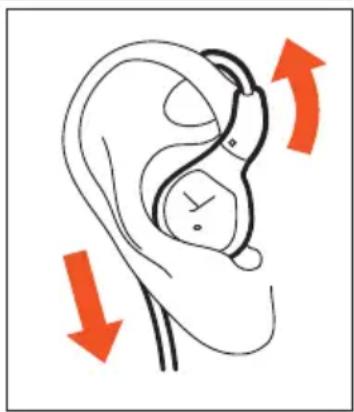
Due to the anatomical shape of the earphone housing, the cable of the Xelento remote is routed behind the ear. This way of wearing the earphones effectively suppresses cable noise, and the earphones sit firmly in the ear even when the cable is pulled.
▶ Insert the earphones into your ears and guide the cable upwards behind your ears.
The right-hand cable end has a small, raised dot to mark the right-hand side.
natural_image
Diagram of a human ear with two red arrows indicating clockwise motion (no text or symbols)Cable clip
You can use the cable clip supplied to secure the jack lead of your Xelento remote in-ear headphones.
This prevents the cable from getting tangled and avoids unwanted noise when using the microphone, for example, while talking on the phone.
ATTACHING AND CHANGING THE CABLE
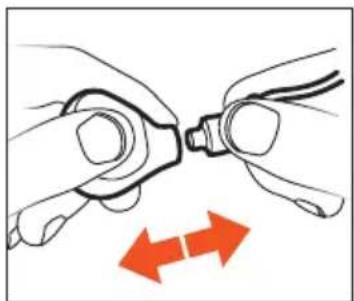
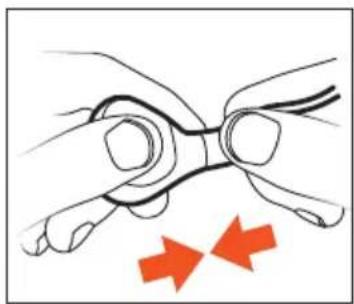
Xelento remote in-ear headphones have plug-in cables on the earphone housings with standard MMCX connectors with locking mechanisms.
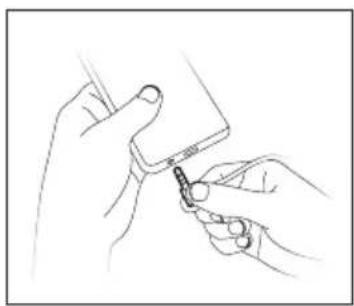
When detaching or attaching the cable on the Xelento remote earphones or the playback device, always hold the cable by the connector to avoid damaging the cable or earphones. Do not pull directly on the cable!
Detaching / attaching the cable on the earphone
- To detach or attach the cable, hold the in-ear headphones by the earphone housing and the connector.
Never pull directly on the cable! The cable or the earphone may be damaged if you do!
- Detach the cable.
natural_image
Illustration of hands connecting a mechanical component to a cable with two red arrows indicating direction (no text or symbols)- Attach the cable.
natural_image
Illustration of hands holding a tool with two red arrows indicating direction (no text or symbols)Detaching / attaching the jack lead on the playback device
▶ Hold the lead by the jack plug and detach or attach.
natural_image
Line drawing of hands holding a small object with a tool, no text or symbols presentOPERATION
Remote control
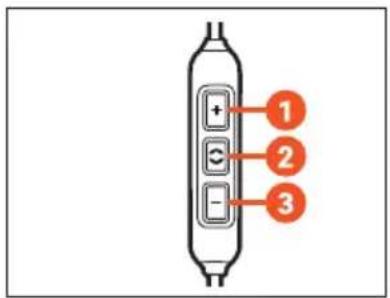
The enclosed connecting cable with the jack plug (cable for remote operation) contains a remote control with three buttons and a microphone.
Buttons on the remote control
- Increase volume (volume-up button)
- Multifunction button (middle button)
- Decrease volume (volume-down button)
text_image
Diagram of a vertical device with three labeled buttons (1, 2, 3) and a plus/minus signs inside the panel.Compatibility with playback devices
On compatible smartphones and tablets, you can use this remote control to control calls, media playback and volume.
Please note that not every playback device supports all remote control functions.
This requires the pin assignment on the headphone jack to correspond to the CTIA standard.
Only in this case are the functions described below possible.
The symmetrical Pentaconn cable can only be used with compatible playback devices.
▶ Please contact the relevant manufacturer for further details.
▶ Refer to the operating instructions of the device to which the product is to be connected.
Playing media
To start / pause playback:
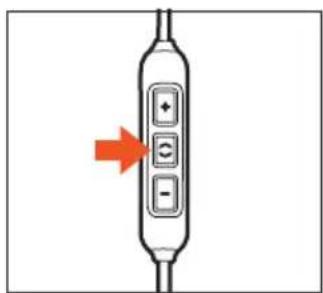
▶ Briefly press the middle button to start or stop the media playback.
text_image
Diagram of a device control panel with directional arrow indicating action or movementDepending on the playback device and the operating system and/or firmware version, there may be further media playback functions that can be controlled by the middle button.
Please contact the relevant manufacturer for further details.
Adjusting the volume
To increase volume
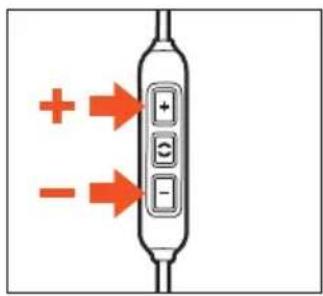
In stages: briefly press the volume-up button (
▶ Continuously: press and hold the volume-up button (☐).
To decrease volume
In stages: briefly press the volume-down button (
▶ Continuously: press and hold the volume-down button (☐).
text_image
Diagram showing a device with positive and negative directional arrows pointing to three labeled buttons or indicators.Please note that not every playback device has this function.
On smartphones and tablets with an Android system, it is necessary for the playback device to support the Wired Audio Headset Specification: source.android.com/devices/accessories/headset/plug-headset-spec
For more details, please contact the manufacturer of the playback device.
Making a call
Accept / finish a call
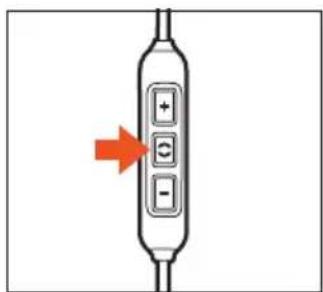
▶ Briefly press the middle button to accept an incoming call or to hang up.
text_image
Diagram of a device control panel with directional arrow indicating action or movementDuring the call, make sure you do not cover the opening for the microphone on the back of the remote control.
Depending on the playback device and the operating system and/or firmware version, there may be further call control functions that can be controlled by the middle button. For example, it is probably possible to call up a virtual assistant (e.g. Siri or Google Assistant) with the middle button.
Please contact the relevant manufacturer for further details.
HELP WITH PROBLEMS / FAQ
Answers to the most common problems and questions can be found online here: support.beyerdynamic.com
CLEANING
▶ To clean the earphones and cables, simply rub them with a dry cloth. Ideally, you should use the enclosed microfibre cleaning cloth. For more stubborn soiling, we recommend using an alcohol-based cleaning agent.
▶ Do not use water to clean the earphones.
▶ Make sure that no liquid enters the housing or the transducer.
▶ Do not use any other solvent-based or aggressive cleaners, as these may damage the surface.
- Dirty sound outlets can be cleaned by removing the small wax guard grilles. The wax guard grilles can be removed and cleaned in lukewarm water with a mild detergent (e.g. soap) or replaced with the spare metal grilles supplied if necessary.
Before reassembling the earphones, make sure that there is no liquid or dirt on the individual components, particularly in the earphones.
If the eartips are very dirty, remove them and clean them in lukewarm water with a mild detergent (e.g. soap).
▶ Store the in-ear headphones in the enclosed case when not in use.
DISPOSAL
This symbol on the product, in the operating instructions or on the packaging means that the electrical and electronic devices must be disposed of separately from household waste at the end of their life cycle.
▶ Always dispose of used devices in accordance with the regulations in force.
For further information, please contact your local authority or the dealer from whom the product was purchased.
natural_image
Symbol of a trash bin crossed with no text or numbers, representing waste sorting or disposal (no text present)EU DECLARATION OF CONFORMITY
beyerdynamic hereby declares that this product complies with the EU Directives 2014/30/EU and 2011/65/EU.
The full text of the EU Declaration of Conformity can be found online at: www.beyerdynamic.com/cod.
TECHNICAL SPECIFICATIONS
▶ More detailed information on the technical data can be found online at: www.beyerdynamic.com/xelento-remote.
SERVICE
If service is required, please contact an authorised specialist or:
beyerdynamic service and logistics centre
Email: service@beyerdynamic.de
Never open the in-ear headphones yourself, otherwise you might lose all warranty claims.
SPARE PARTS
Additional, optional accessories and spare parts can be found at: www.beyerdynamic.com/service
Comply™ eartips Tx-500 can be found at: www.complyfoam.com
PRODUCT REGISTRATION
You can register your Xelento remote in-ear headphones online at global.beyerdynamic.com/service/registration.
WARRANTY CONDITIONS
beyerdynamic provides a limited guarantee for the original beyerdynamic product you have purchased.
Detailed information about beyerdynamic's warranty conditions can be found online: global.beyerdynamic.com/service/warranty.
REGISTERED TRADEMARKS
Trademarks and trade names such as Comply ^™ belong to their respective owners.
beyerdynamic
Xelento remote
- Generation
Bedienungsanleitung
INHALT
text_image
Diagram of a medical or diagnostic device with labeled parts including two gauges, a central device, and a connector.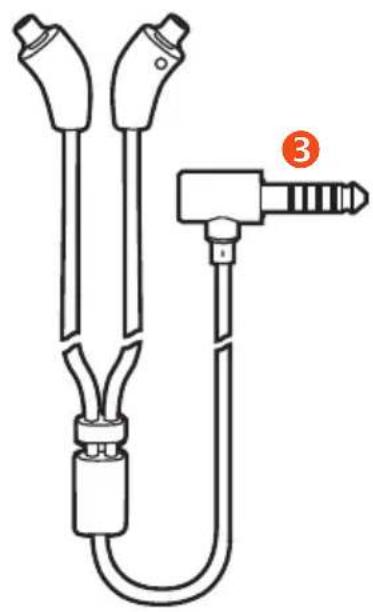
natural_image
Technical line drawing of a medical or laboratory device with two connectors and a labeled connector (no text or symbols present)
text_image
+ () 12a

natural_image
Simple line drawing of a cylindrical electronic component with two leads and a central hole (no text or symbols)2b
natural_image
Diagram of a pulley system with two circular components and a downward arrow indicating motion (no text or symbols)text_image
Diagram showing two labeled shapes with checkmark and cross symbols, likely indicating approval or rejection status.natural_image
Illustration of a hand holding a circular object with an orange circular arrow symbol (no text or labels)natural_image
Illustration of a hand holding a cylindrical object with an orange arrow indicating rotation (no text or symbols)natural_image
Simple line drawing of a device with a red arrow pointing to its tip (no text or symbols)natural_image
Line drawing of a light bulb with internal components, showing no text or symbolsnatural_image
Simple line drawing of a device with a red arrow pointing to its side (no text or symbols)natural_image
Diagram of a human ear with two red arrows indicating clockwise motion (no text or symbols)Kabelklammer
natural_image
Illustration of hands connecting a mechanical component to a cable with two red arrows indicating direction (no text or symbols)- Kabel anschließen.
natural_image
Illustration of hands holding a tool with two red arrows indicating direction (no text or symbols)natural_image
Line drawing of hands holding a small object with a tool, no text or symbols presentBEDIENUNG
Fernbedienung
text_image
Diagram of a vertical device with three labeled buttons (1, 2, 3) and a plus/minus signs inside the panel.text_image
Diagram of a device control panel with directional arrow indicating actiontext_image
Diagram showing a device with positive and negative directional arrows indicating movement or polarity.natural_image
Diagram of a handheld device with three buttons and an arrow pointing to it (no text or symbols present)natural_image
Symbol of a trash bin crossed with no text or numbers, representing waste sorting or disposal (no text present)www.beyerdynamic.com/service
VUE D'ENSEMBLE DU PRODUIT....38
PREMIÈRES ÉTAPES ....38
XELENTO REMOTE : MISE EN PLACE ET PORT ....41
Pince-câble....41
RACCORDEMENT ET REMPLACEMENT DU CÂBLE....42
COMMANDE......43
Télécommande....43
Lecture de médias....43
Régler le volume sonore....44
Téléphoner....44
AIDE EN CAS DE PROBLÈMES / FOIRE AUX QUESTIONS....45
NETTOYAGE 45
MISE AU REBUT ....46
DÉCLARATION DE CONFORMITÉ UE....46
CARACTÉRISTIQUES TECHNIQUES ....46
SERVICE APRÈS-VENTE......46
PIÈCES DE RECHANGE 47
ENREGISTREMENT DU PRODUIT....47
CONDITIONS DE GARANTIE....47
MARQUES....47
VUE D'ENSEMBLE DU PRODUIT
natural_image
Diagram of a pulley system with a belt and rope, showing motion direction (no text or symbols)Embouts en mousse Comply™
2 de chaque :
Taille :
text_image
S M Ltext_image
Diagram showing two labeled shapes with checkmark and cross symbols, likely indicating approval or rejection status.natural_image
Illustration of a hand holding a circular object with an orange circular arrow symbol (no text or labels)Retirer les embouts Comply™
natural_image
Illustration of a hand holding a small object with an orange curved arrow indicating rotation (no text or symbols)www.beyerdynamic.com/service/spare-parts
natural_image
Simple line drawing of a showerhead with a red arrow indicating direction (no text or symbols)natural_image
Line drawing of a light bulb with internal components and a red plastic clip (no text or symbols)natural_image
Simple line drawing of a mechanical component with a red arrow pointing to it (no text or symbols)Entretien des embouts
XELENTO REMOTE : MISE EN PLACE ET PORT
natural_image
Diagram of a human ear with earphones and red directional arrows indicating motion or movement (no text or symbols)Pince-câble
natural_image
Illustration of hands connecting a pipe fitting to a connector with two red arrows indicating direction (no text or symbols)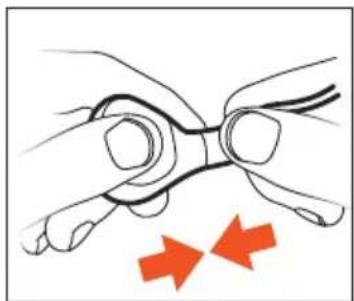
natural_image
Illustration of hands holding a tool with two red arrows indicating movement or force (no text or symbols)natural_image
Line drawing of hands holding a smartphone with a small object inserted (no text or symbols)COMMANDE
Télécommande
text_image
Diagram of a vertical device with three labeled buttons (1, 2, 3) and directional indicators (+, -, etc.)text_image
Diagram of a device with labeled buttons and an arrow indicating direction, likely for digital or audio control.source.android.com/devices/accessories/headset/plug-headset-spec
text_image
Diagram of a device control panel with directional arrow indicating actionnatural_image
Symbol of a trash bin crossed with a diagonal line, no text or numbers presentDÉCLARATION DE CONFORMITÉ UE
CONDITIONS DE GARANTIE
COLOCAR Y LLEVAR XELENTO REMOTE....57
CÓMO DESECHARLOS....61
natural_image
Diagram of a pulley system with a belt and rope, showing motion direction (no text or symbols)text_image
Diagram showing two labeled shapes with checkmark and cross symbols, likely indicating approval or rejection status.Comprimir la almohadilla Comply™ y colocarla
natural_image
Illustration of a hand holding a circular object with an orange circular arrow symbol (no text or labels)natural_image
Illustration of a hand holding a tool with an orange arrow indicating rotation (no text or symbols)natural_image
Simple line drawing of a showerhead with a red arrow indicating direction (no text or symbols)natural_image
Line drawing of a light bulb with a red component inserted into its tip (no text or symbols)natural_image
Simple line drawing of a mechanical component with a red arrow pointing to it (no text or symbols)COLOCAR Y LLEVAR XELENTO REMOTE
natural_image
Diagram of a human ear with two red arrows indicating clockwise motion (no text or symbols)Pinza para el cable
natural_image
Illustration of hands connecting a mechanical component to a cable with two red arrows indicating direction (no text or symbols)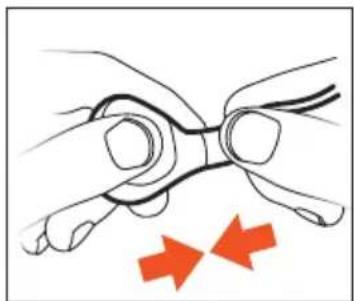
natural_image
Illustration of hands holding a tool with two red arrows indicating movement or force (no text or symbols)natural_image
Line drawing of hands holding a small object with a clip, no text or symbols presentMANEJO
Control remoto
text_image
Diagram of a device with four buttons and an arrow indicating direction, likely for navigation or control.text_image
Diagram showing a device with positive and negative directional arrows pointing to three labeled buttons or indicators.text_image
Diagram of a device with directional arrows indicating movement or change, featuring a plus, minus, and control buttons.natural_image
Symbol of a trash bin crossed with no text or numbers, representing waste sorting or disposal (no text present)text_image
Diagram of a medical or diagnostic device with labeled parts including two main devices and a connector.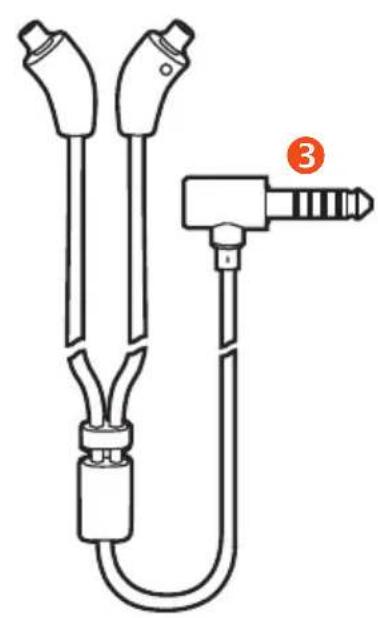
natural_image
Technical line drawing of a medical or laboratory device with two connectors and a labeled connector (no text or symbols present)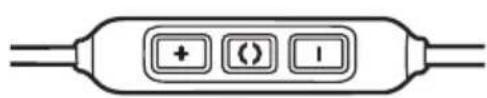
text_image
+ () 12a

natural_image
Simple line drawing of a cylindrical object with two side leads and a central hole (no text or symbols)②b
natural_image
Diagram of a pulley system with a belt and rope, showing motion direction (no text or symbols)Inserti Comply™ in schiuma espansa
2 per ogni set:
Misura:
text_image
S M Ltext_image
Diagram showing two leaf-shaped shapes with checkmark and cross symbols below, likely indicating approval or rejection status.natural_image
Illustration of a hand holding a USB flash drive with an orange circular refresh symbol (no text or labels)natural_image
Illustration of a hand holding a tool with an orange arrow indicating rotation (no text or symbols)natural_image
Simple line drawing of a showerhead with a red arrow indicating direction (no text or symbols)natural_image
Line drawing of a light bulb with internal components and a red seal-like object (no text or symbols)natural_image
Simple line drawing of a mechanical component with a red arrow pointing to it (no text or symbols)natural_image
Line drawing of a human ear with two red arrows indicating clockwise motion (no text or symbols)Clip raccogli-cavo
natural_image
Illustration of hands connecting a pipe fitting to a connector with two red arrows indicating direction (no text or symbols)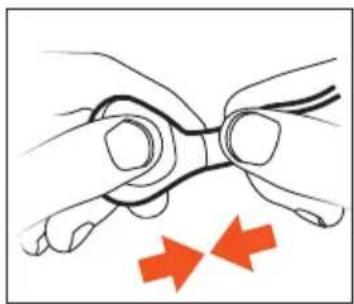
natural_image
Illustration of hands holding a tool with two red arrows indicating direction (no text or symbols)natural_image
Line drawing of hands holding a small object with a tool, no text or symbols presentCOMANDI
Telecomando
text_image
Diagram of a vertical device with three labeled buttons (1, 2, 3) and internal indicators (+, -, -)text_image
Diagram of a digital device with four buttons and an arrow indicating direction, likely for UI control or display.text_image
Diagram showing a device with positive and negative charges pointing to its internal control panel, labeled with + and - indicators.source.android.com/devices/accessories/headset/plug-headset-spec
text_image
Diagram of a device with labeled buttons and an arrow indicating direction, likely for UI control or display.natural_image
Symbol of a trash bin crossed out by two crossed lines, with a solid black rectangle below (no text or labels)GARANTIVILLKOR....90
VARUMÄRKEN....90
text_image
Diagram of a medical or diagnostic device with labeled parts including two gauges, a central device, and a connector.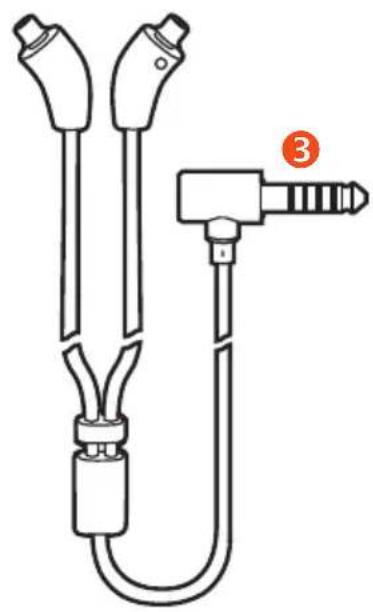
natural_image
Technical line drawing of a medical or laboratory device with two connectors and a labeled connector (no text or symbols present)
text_image
+ () 12a

natural_image
Simple line drawing of a cylindrical electronic component with two leads and a central hole (no text or symbols)②b
natural_image
Diagram of a pulley system with a central rotating component and two smaller circular components, no text or symbols present.text_image
Diagram showing two leaf-shaped shapes with red checkmark and cross symbols below, likely indicating correct and incorrect classification.natural_image
Illustration of a hand holding a circular object with an orange circular arrow symbol (no text or labels)natural_image
Illustration of a hand holding a tool with an orange arrow indicating rotation (no text or symbols)natural_image
Simple line drawing of a mechanical component with an arrow indicating direction (no text or symbols)natural_image
Line drawing of a bulb with internal components and a red seal mark (no text or symbols)natural_image
Simple line drawing of a device with a red arrow pointing to its side (no text or symbols)natural_image
Diagram of a human ear with two red arrows indicating clockwise motion (no text or symbols)Kabelklämma
natural_image
Illustration of hands connecting a pipe fitting to a connector with two red arrows indicating direction (no text or symbols)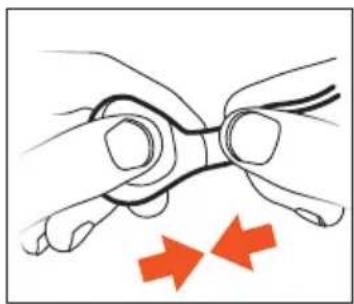
natural_image
Illustration of hands holding a tool with two red arrows indicating direction (no text or symbols)natural_image
Line drawing of hands holding a smartphone with a cable (no text or symbols)ANVÄNDNING
Fjärrkontroll
text_image
Diagram of a device control panel with directional arrow indicating actiontext_image
Diagram showing a device with positive and negative directional arrows pointing to three labeled buttons or ports.natural_image
Diagram of a handheld device with three buttons and an arrow pointing to it (no text or symbols present)natural_image
Symbol of a trash bin crossed with no text or numbers, representing waste sorting or disposal (no text present)EU-FÖRSÄKRAN OM ÖVERENSSTÄMMELSE
natural_image
Illustration of a hand holding a small object with an orange curved arrow indicating rotation (no text or symbols)Замена вкладышей
natural_image
Simple line drawing of a mechanical component with an arrow indicating direction (no text or symbols)natural_image
Line drawing of a light bulb with internal components (no text or symbols)natural_image
Simple line drawing of a mechanical component with a red arrow pointing to it (no text or symbols)Уход за вкладышами
natural_image
Diagram of a human ear with two red arrows indicating clockwise motion (no text or symbols)natural_image
Illustration of hands connecting a mechanical component to a cable with two red arrows indicating direction (no text or symbols)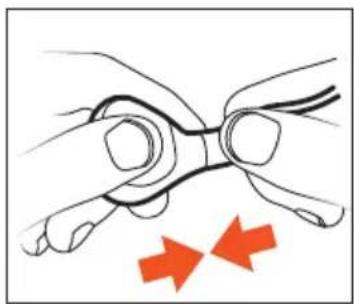
natural_image
Illustration of hands holding a tool with two red arrows indicating direction (no text or symbols)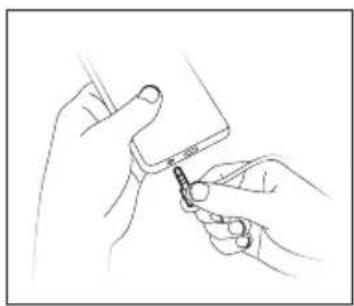
natural_image
Line drawing of hands holding a small object with a tool, no text or symbols presentУПРАВЛЕНИЕ
text_image
Diagram of a device with labeled ports and indicators, showing numbered labels 1, 2, and 3 pointing to specific ports.natural_image
Diagram of a handheld device with three buttons and an arrow pointing to it (no text or symbols present)text_image
Diagram showing a device with three labeled buttons (+, +, -) and directional arrows indicating positive and negative inputs.natural_image
Symbol of a trash bin crossed with no text or numbers, representing waste sorting or disposal (no text present)natural_image
Diagram showing a pulley system with a belt and rope, no text or symbols presentComply™ 품 이어팀
각 2개:
크기:
text_image
S M L실리콘 이어팀 장착
text_image
Diagram showing two leaf-shaped shapes with checkmark and cross symbols below, likely indicating selection or validation status.Comply™ 이어탑 조절 및 장착
natural_image
Illustration of a hand holding a circular object with an orange circular arrow symbol (no text or labels)Comply™ 이어팀 제거
natural_image
Illustration of a hand holding a tool with an orange arrow indicating rotational motion (no text or symbols)이어팀 교체
www.beyerdynamic.com/service/spare-parts
natural_image
Simple line drawing of a mechanical component with an arrow indicating direction (no text or symbols)natural_image
Line drawing of a bulb with internal components and a red seal-like object (no text or symbols)natural_image
Simple line drawing of a mechanical component with a red arrow pointing to it (no text or symbols)이어팀 관리
natural_image
Diagram of a human ear with needle insertion and red arrows indicating motion or pressure (no text or symbols)케이블 클램프
natural_image
Illustration of hands connecting a pipe fitting to a terminal block, with two red arrows indicating direction (no text or symbols)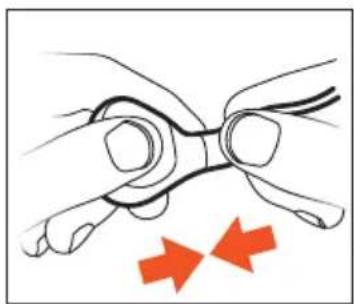
natural_image
Illustration of hands holding a tool with two red arrows indicating movement or force (no text or symbols)재생 장치에서 케이블 분리/연결
natural_image
Line drawing of hands holding a small object with a pen inserted (no text or symbols)조작
리모컨
text_image
Diagram of a device with three labeled ports: +, -, and -, marked with numbered annotations.재생 장치 호환성
text_image
Diagram of a digital device with labeled buttons and an arrow indicating directiontext_image
Diagram showing a device with positive and negative directional arrows pointing to three labeled buttons or indicators.source.android.com/devices/accessories/headset/plug-headset-spec
text_image
Diagram of a device with labeled buttons and an arrow indicating direction, likely for UI control or display.XELENTO REMOTE の装着と着用....129
ケーブルクランプ 129
接続およびケーブル交換....130
操作 131
リモコン 131
メディアの再生....131
音量設定 132
通話 132
text_image
Diagram of a medical or diagnostic device with labeled parts including two main devices and a connector, marked with numbers 2 and 3.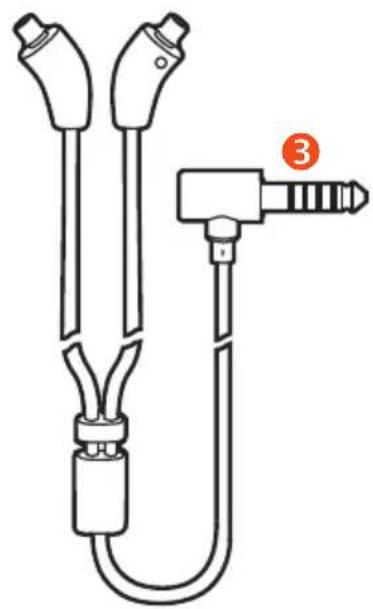
natural_image
Technical line drawing of a medical or laboratory device with two connectors and a labeled connector (no text or symbols present)
text_image
+ () -2a

natural_image
Simple line drawing of a cylindrical object with two side leads and a central hole (no text or symbols)2b
text_image
Diagram showing a mechanical or electrical component with a downward arrow and labeled parts, likely illustrating a motion or assembly.Comply™ スポンジ製イヤーピース
2個ずつ:
サイズ:
text_image
S M Lシリコン製イヤーピースの装着
text_image
Diagram showing two labeled shapes with checkmark and cross symbols, likely indicating approval or rejection status.Comply™イヤーピースの適合と装着
natural_image
Illustration of a hand holding a circular object with an orange circular arrow symbol (no text or labels)Comply™イヤーピースの取り外し
natural_image
Illustration of a hand holding a tool with an orange arrow indicating rotational motion (no text or symbols)イヤーピースの交換
www.beyerdynamic.com/service/spare-parts
natural_image
Simple line drawing of a mechanical component with an arrow indicating direction (no text or symbols)natural_image
Line drawing of a light bulb with internal components and a red connector (no text or symbols)natural_image
Simple line drawing of a connector with a red arrow pointing to it (no text or symbols)イヤーピースのお手入れ
natural_image
Diagram of an ear with a medical device and red arrows indicating clockwise motion (no text or symbols)ケーブルクランプ
natural_image
Illustration of hands connecting a mechanical component to a cable with two red arrows indicating direction (no text or symbols)- ケーブルを接続します。
natural_image
Illustration of hands holding a tool with two red arrows indicating direction (no text or symbols)natural_image
Line drawing of hands holding a small object with a pen inserted (no text or symbols)操作
リモコン
text_image
Diagram showing a device with positive and negative terminals and directional arrows indicating signal flow or polarity.source.android.com/devices/accessories/headset/plug-headset-spec
natural_image
Symbol of a trash bin crossed with no text or labels, accompanied by a black rectangular block below (no text or symbols present)www.beyerdynamic.com/service
text_image
Diagram of a medical or diagnostic device with labeled parts including two circular gauges and a connector, marked with numbers ② and ③.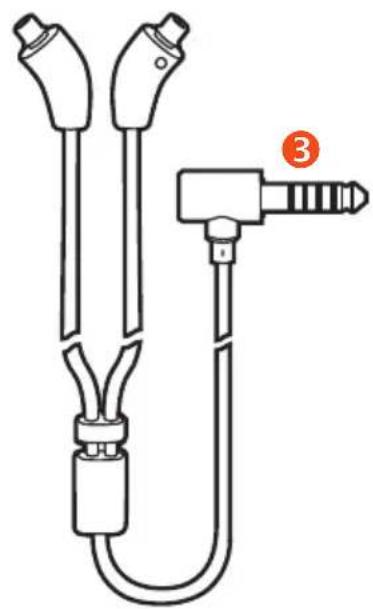
natural_image
Technical line drawing of a medical or laboratory device with two connectors and a labeled connector (no text or symbols present)
text_image
+ () 12a

natural_image
Simple line drawing of a cylindrical electronic component with two leads and a central hole (no text or symbols)②b
1 耳机(带可更换耳筒套)
2b 麦克风位于背面
2 线控操作装置
3 用于连接播放设备的插头
2a [+] / [-][+] / [-] 音量增大键/音量减小键
()() 多功能按键(中间按键)
首要事项首要事项
佩戴和调节耳筒套佩戴和调节耳筒套
natural_image
Diagram of a pulley system with a belt and rope, showing motion direction (no text or symbols)Comply™—泡沫耳筒套 泡沫耳筒套
每组 2 个:
尺寸:
text_image
S M L使用硅胶耳筒套使用硅胶耳筒套
▶ 小心地将硅胶耳筒套套在耳机外壳上。
text_image
Diagram showing two leaf-shaped shapes with red checkmark and cross symbols below, likely indicating correct and incorrect labeling.调整与佩戴 Comply™ 耳筒套
natural_image
Illustration of a hand holding a circular object with an orange circular arrow symbol (no text or labels)去除 Comply™ 耳筒套
natural_image
Illustration of a hand holding a cylindrical object with an orange arrow indicating rotation (no text or symbols)更换耳筒套更换耳筒套
www.beyerdynamic.com/service/spare-parts
natural_image
Simple line drawing of a mechanical component with an arrow indicating direction (no text or symbols)natural_image
Line drawing of a light bulb with internal components and a red seal-like object (no text or symbols)- 将新耳筒套套在耳机上。
natural_image
Simple line drawing of a device with a red arrow pointing to its tip (no text or symbols)耳筒套的保养耳筒套的保养
natural_image
Diagram of a human ear with two arrows indicating clockwise motion (no text or symbols)耳机线夹耳机线夹
natural_image
Illustration of hands connecting a mechanical component to a cable with two red arrows indicating direction (no text or symbols)- 连接耳机线。
natural_image
Illustration of hands holding a tool with two red arrows indicating movement or force (no text or symbols)natural_image
Line drawing of hands holding a small object with a tool, no text or symbols present操作操作
线控操作装置线控操作装置
text_image
Diagram of a digital device with directional arrows indicating action or signal flowtext_image
Diagram showing a device with positive and negative directional arrows pointing to internal components labeled with plus, minus, and minus signs.source.android.com/devices/accessories/headset/plug-headset-spec
更多详细信息请咨询播放设备生产商。
通话通话
接受/结束呼叫接受/结束呼叫
▶ 短按中间按键,(以接听或结束通话。
text_image
Diagram of a device with labeled buttons and an arrow indicating direction, likely for UI control or display.natural_image
Symbol of a trash bin crossed with a diagonal line, no text or numbers present欧盟一致性声明欧盟一致性声明
text_image
Diagram of a medical or diagnostic device with labeled parts including two circular gauges and a connector pin.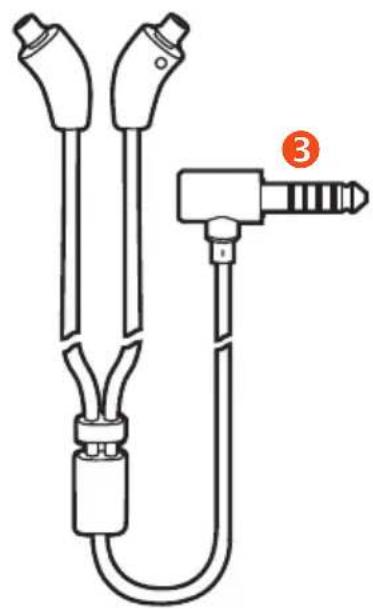
natural_image
Technical line drawing of a medical or laboratory device with two connectors and a labeled connector (no text or symbols present)
text_image
+ () 12a

natural_image
Simple line drawing of a cylindrical object with two side leads and a central hole (no text or symbols)2b
natural_image
Diagram of a pulley system with a belt and rope, showing a red arrow indicating direction (no text or symbols)natural_image
Illustration of a hand holding a circular object with an orange circular arrow symbol (no text or labels)www.beyerdynamic.com/service/spare-parts
natural_image
Simple line drawing of a showerhead with a red arrow pointing to it (no text or symbols)natural_image
Simple line drawing of a device with a red arrow pointing to its side (no text or symbols)natural_image
Diagram of a human ear with red arrows indicating direction of movement or pressure (no text or symbols)source.android.com/devices/accessories/headset/plug-headset-spec
www.beyerdynamic.com/service
www.complyfoam.com : -Tx قطع مواعمة AZDN-™ Comply لل正常使用 على
تسجيل المنتج
For further distributors worldwide, please go to www.beyerdynamic.com
Non-contractual illustrations. Subject to change without notice.
Xelento remote (2nd generation) · (09.22)
text_image
0-11 10 CE UK CA 10 CUTTER BE ROLL BAC DE TRI +CREATE THE AMAZING