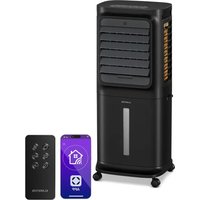
Windsurfer - Air Conditioning Klarstein - Free user manual and instructions
Find the device manual for free Windsurfer Klarstein in PDF.


User questions about Windsurfer Klarstein
0 question about this device. Answer the ones you know or ask your own.
Ask a new question about this device
Download the instructions for your Air Conditioning in PDF format for free! Find your manual Windsurfer - Klarstein and take your electronic device back in hand. On this page are published all the documents necessary for the use of your device. Windsurfer by Klarstein.
USER MANUAL Windsurfer Klarstein
bar
| Category | Value | |---|---| | Category 1 | 100 | | Category 2 | 100 | | Category 3 | 100 | | Category 4 | 100 | | Category 5 | 100 | | Category 6 | 100 | | Category 7 | 100 | | Category 8 | 100 | | Category 9 | 100 | | Category 10 | 100 | | Category 11 | 100 | | Category 12 | 100 | | Category 13 | 100 | | Category 14 | 100 | | Category 15 | 100 | | Category 16 | 100 | | Category 17 | 100 | | Category 18 | 100 | | Category 19 | 100 | | Category 20 | 100 | | Category 21 | 100 | | Category 22 | 100 | | Category 23 | 100 | | Category 24 | 100 | | Category 25 | 100 | | Category 26 | 100 | | Category 27 | 100 | | Category 28 | 100 | | Category 29 | 100 | | Category 30 | 100 | | Category 31 | 100 | | Category 32 | 100 | | Category 33 | 100 | | Category 34 | 100 | | Category 35 | 100 | | Category 36 | 100 | | Category 37 | 100 | | Category 38 | 100 | | Category 39 | 100 | | Category 40 | 100 | | Category 41 | 100 | | Category 42 | 100 | | Category 43 | 100 | | Category 44 | 100 | | Category 45 | 100 | | Category 46 | 100 | | Category 47 | 100 | | Category 48 | 100 | | Category 49 | 100 | | Category 50 | 100 | | Category 51 | 100 | | Category 52 | 100 | | Category 53 | 100 | | Category 54 | 100 | | Category 55 | 100 | | Category 56 | 100 | | Category 57 | 100 | | Category 58 | 100 | | Category 59 | 100 | | Category 60 | 100 | | Category 61 | 100 | | Category 62 | 100 | | Category 63 | 100 | | Category 64 | 100 | | Category 65 | 100 | | Category 66 | 100 | | Category 67 | 100 | | Category 68 | 100 | | Category 69 | 100 | | Category 70 | 100 | | Category 71 | 100 | | Category 72 | 100 | | Category 73 | 100 | | Category 74 | 100 | | Category 75 | 100 | | Category 76 | 100 | | Category 77 | 100 | | Category 78 | 100 | | Category 79 | 100 | | Category 80 | 100 | | Category 81 | 100 | | Category 82 | 100 | | Category 83 | 100 | | Category 84 | 100 | | Category 85 | 100 | | Category 86 | 100 | | Category 87 | 100 | | Category 88 | 100 | | Category 89 | 100 | | Category 90 | 100 | | Category 91 | 100 | | Category 92 | 100 | | Category 93 | 100 | | Category 94 | 100 | | Category 95 | 100 | | Category 96 | 100 | | Category 97 | 100 | | Category 98 | 100 | | Category 99 | 100 | | Total (Total) = [sum of bars] / [values] * (sum of bars + bars) * (sum of bars + bars) * (sum of bars + bars) * (sum of bars + bars) * (sum of bars + bars) * (sum of bars + bars) * (sum of bars + bars) * (sum of bars + bars) * (sum of bars + bars) * (sum of bars + bars) * (sum of bars + bars) * (sum of bars + bars) * (sum of bars + bars) * (sum in brackets) * (sum in brackets) * (sum in brackets) * (sum in brackets) * (sum in brackets) * (sum in brackets) * (sum in brackets) * (sum in brackets) * (sum in brackets) * (sum in brackets) * (sum in brackets) * (sum in brackets) * (sum in brackets) * (sum in brackets) * (sum in brackets) * (sum in brackets) * (sum in brackets) * (total).* (sum in brackets) * (sum in brackets) * (sum in brackets) * (sum in brackets) * (sum in brackets) * (sum in brackets) * (sum in brackets) * (sum in brackets) * (sum in brackets) * (sum in brackets) * (sum in brackets) * (sum in brackets) * (total).* (sum in brackets) * (sum in brackets) * (sum in brackets) * (sum in brackets)text_image
QR code image containing encoded data, no visible human-readable textINHALTSVERZEICHNIS
text_image
Technical diagram of a device with numbered components and directional arrows indicating assembly or movement.Abbildung 1
text_image
Technical diagram of a device with numbered components and directional arrows indicating assembly or movement.Abbildung 4
Aufbewahrung
Member of Berlin Brands Group
Handwerkerstr. 11
15366 Dahlwitz-Hoppegarten
Deutschland
natural_image
Symbol of a trash bin crossed with a diagonal line, no text or numbers presentBerlin Brands Group UK Ltd
PO Box 1145
Oxford, OX1 9UW
United Kingdom
Dear Customer,
Congratulations on purchasing this device. Please read the following instructions carefully and follow them to prevent possible damages. We assume no liability for damage caused by disregard of the instructions and improper use. Scan the QR code to get access to the latest user manual and more product information.

text_image
QR code image containing encoded data, no visible human-readable textCONTENT
Safety Instructions 18
Commissioning and Operation 20
Control Panel and Remote Control 22
Button Functions 23
Cleaning and Maintenance 24
Troubleshooting 27
Disposal Considerations 28
Manufacturer & Importer (UK) 28
TECHNICAL DATA
| Item number 10034627 | |
| Power supply 220-240 V ~ 50 Hz | |
| Power consumption (watts) 80 W | |
| Maximum water volume (litre) 4 L |
SAFETY INSTRUCTIONS
- Check the voltage on the rating plate before use. Only connect the appliance to sockets which correspond to the voltage of the appliance.
- Keep the appliance and cable away from sources of heat, sharp objects or anything that may cause damage.
- Do not place the cord under carpets. Do not cover the cord with small clothes, shirts or other similar elements. Place the cord away from traffic areas in order to avoid any risk of tripping over.
- Do not operate the appliance if the cable or plug is damaged.
- If the supply cord or plug is damaged, it must be replaced by the manufacturer, its service agent or similarly qualified persons in order to avoid a hazard.
- Indoor use only.
- Do not cover the machine during using.
- Place the appliance on a stable at horizontal surface. Make sure the appliance is in an upright position during use.
- Ensure the appliance is switched OFF before connecting to the mains power supply.
- Always ensure that hands are dry before operating or adjusting any switch on the product or touching the plug and mains supply connections.
- Do not leave this appliance unattended when it's in use. Turn off and disconnect the appliance when you leave the room for an extended period.
- Switch off the appliance and unplug from the mains socket when not in use, before llling, cleaning or other maintain.
- To disconnect the appliance, switch it "OFF", and then remove the plug from outlet. Do not pull the cord to disconnect the plug.
- This device may be only used by children 8 years old or older and persons with limited physical, sensory and mental capabilities and / or lack of experience and knowledge, provided that they have been instructed in use of the device by a responsible person who understands the associated risks.
- Use the appliance only as described in this manual.
- Do not insert your ngers in the openings of the guard.
- Do not leave hair, tissue, tablecloths, clothes or curtains near all openings of the fan, they could be sucked into the fan and be taken within the internal moving parts that could cause injury or damage.
- Do not use the appliance in wet or damp locations such as bathrooms.
- Do not operate the appliance when it's not mounted on its wheels or if it's lying on the side.
• Make sure the cord is completely extended before use.
- When in operation, evaporative coolers moisturize the ambient air. Over-humidification of residential rooms should be avoided. Recommendation: 40-50 % relative humidity. Excessive humidity of the air can damage the home and cause health problems.
- The appliance may only be set up on water- and moisture-proof ooring materials (spilling some drops of water is unavoidable when the content of the tank is changed).
- With each and every change of tank content, completely remove residual water from the equipment. To prevent nucleation, remove residual water from the equipment and water tank every time after three days of use.
Note on using the water tank (not with all models)
In principle, you can use your air cooler at any time without water in the tank. It will then work like a normal fan. Water in the tank is only needed for the cooling function. The air cooler evaporates this through the nebulizer flow, removing heat from the air and reducing the air temperature of the fan by up to 3 °C, depending on the coldness of the water used. We advise against using the cooling function on days with particularly high humidity, as it increases this further and can thus contribute to circulatory problems.
PRODUCT FEATURES
- Cooling:
In the appliance the water cycles to blow cool air. It can lower the surrounding temperature and provide you a comfortable environment in hot summer.
• Detachable filtration mesh:
It is easy to clean. Filter removes harmful tiny substances, such as dust and pollen. - Wide range of air output:
100° wide angle range of air output, 4 fan speeds: STRONG-HIGH-MID-LOW. - Remote Control:
6 meters remote control, 120° wide angle range receiver. - Beep sound reminder:
It has beep sound reminder function, convenient to use.
• Memory function:
It can memorize the current working status. The memory is not cleaned until the power supply is off.
• More comfortable and convenient control system
COMMISSIONING AND OPERATION
Start-up
- Pull the unit outwards from the carton and place it on a solid hot-proof horizontal surface.
- Check if the accessories are complete (air cooler, instruction manual, remote control).
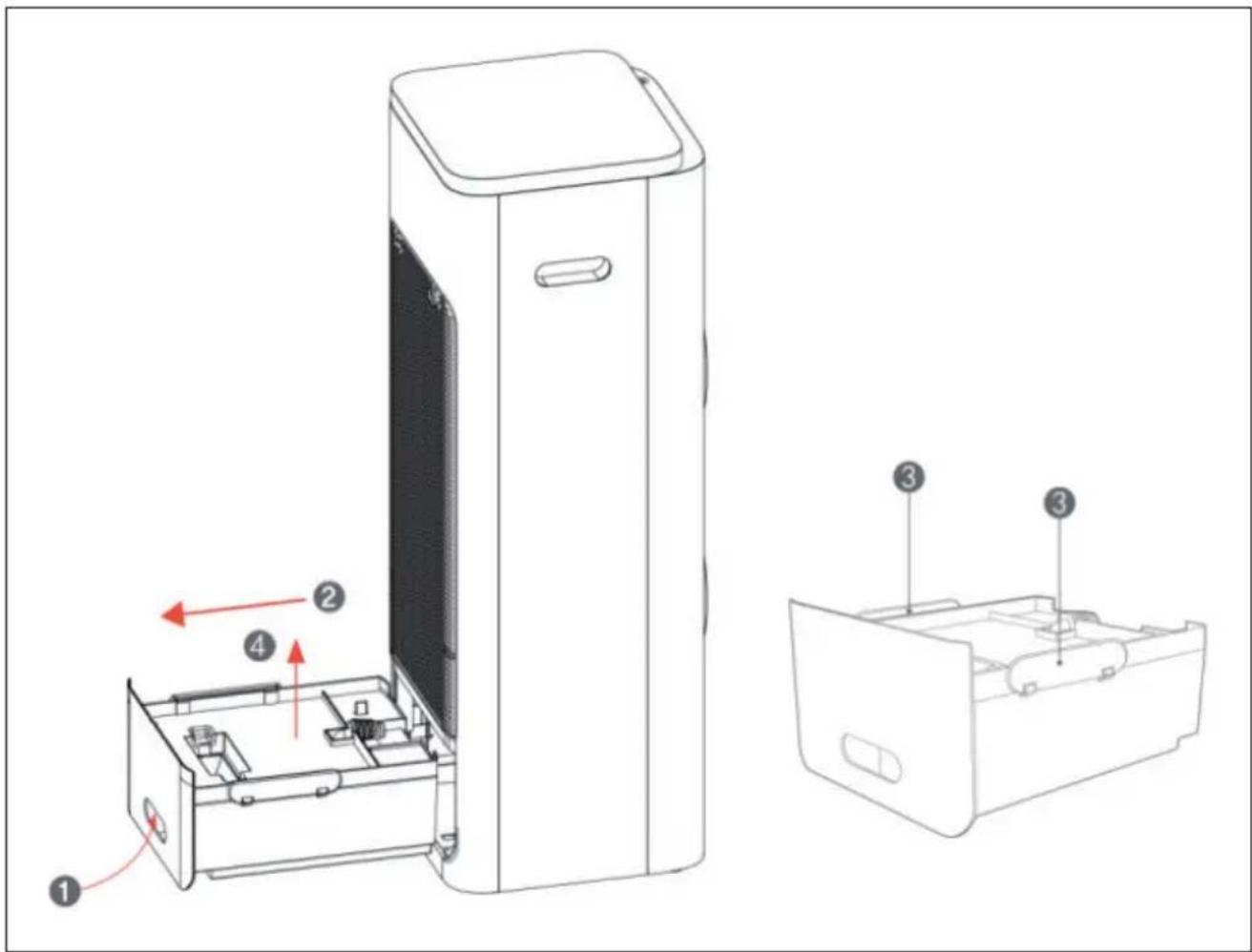
Add water (see figure 1)
- Push against the top in the handle of the water tank (1).
- Pull out the water tank (2).
- Loosen the clasps on both sides of the cover of the water tank (3).
- Remove the cover of the water tank (4).
- Fill water into the water tank (up to the MAX mark).
- Replace the water tank cover and close the clasps on both sides of the water tank cover. Slide the water tank back into the appliance.
text_image
Technical diagram of a device with numbered components and directional arrows indicating assembly or movement.Figure 1
Notes on filling the water tank
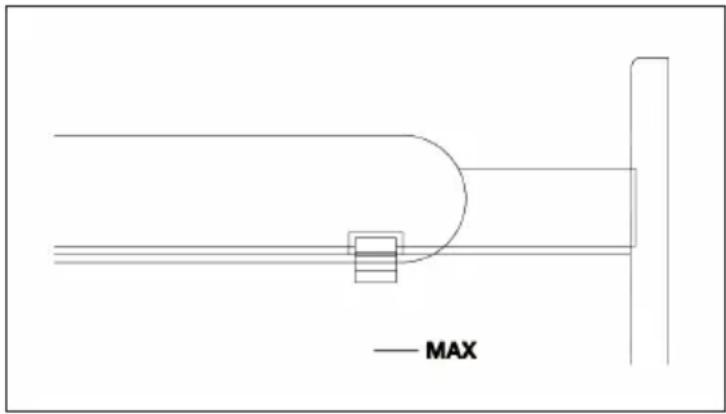
- The water level must be lower than the MAX mark (see figure 2). Make sure the floater is high enough to activate the pump.
text_image
— MAXFigure 2
- After some time of operation, dust and dirt may occur in the water tank. It is recommended to change the water filter and to clean the water tank frequently.
Switch on the appliance
- Plug the mains plug into the socket.
- Turn on the power switch which is at the side of the unit. A small beep sound can be heard and the power indicator will be on.
WARNING
Risk of electric shock! Make sure that the mains plug is plugged into the socket correctly. Unplug the appliance from the wall outlet before moving it. Do not touch the power plug with wet hands.
Operation
- ON/OFF: Press this button once to make the unit ready for working. Press this button again to turn the unit OFF.
- SPEED: Press this button to select desired fan speed, the LED light on the display will be on in turn. The numbers next to the lights indicate the speed (1, 2, 3).
- MODE: Press this button to select the desired fan mode, it operates according to the preset program, alternating between different fan speeds. The LED will be on with the according mode in turn: Sleep > Natural > Normal.
CONTROL PANEL AND REMOTE CONTROL
Control Panel
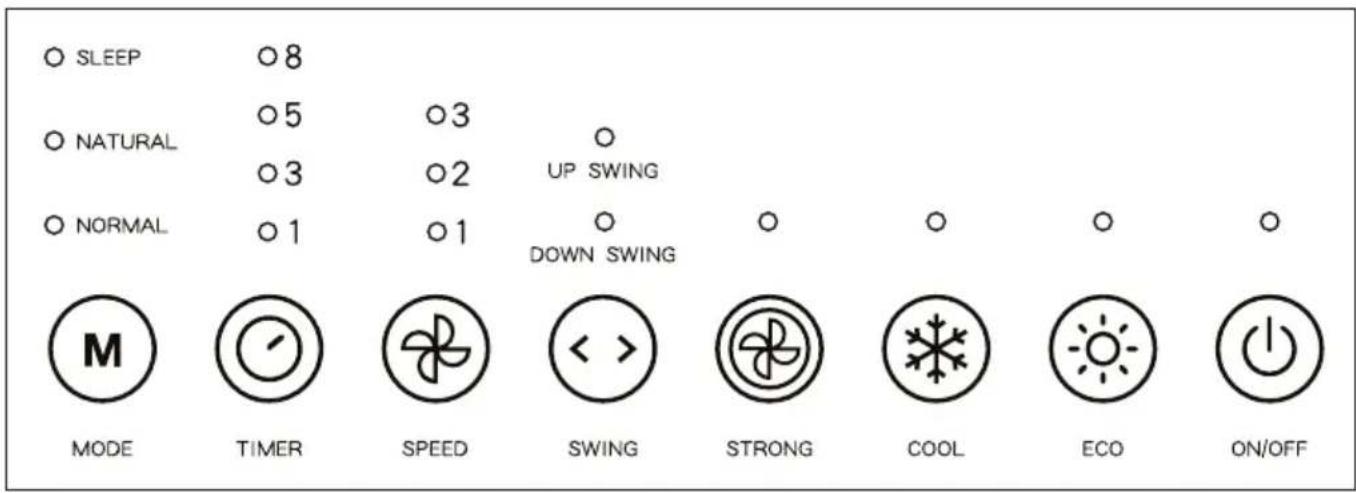
text_image
SLEEP NATURAL NORMAL MODE TIMER SPEED UP SWING DOWN SWING STRONG COOL ECO ON/OFFModes:
Sleep,
Natural,
Normal
Hours:
1-3-5-8
Levels:
1-2-3
Modes:
Up/Down

Deactivate
indicator
lights
Remote Control
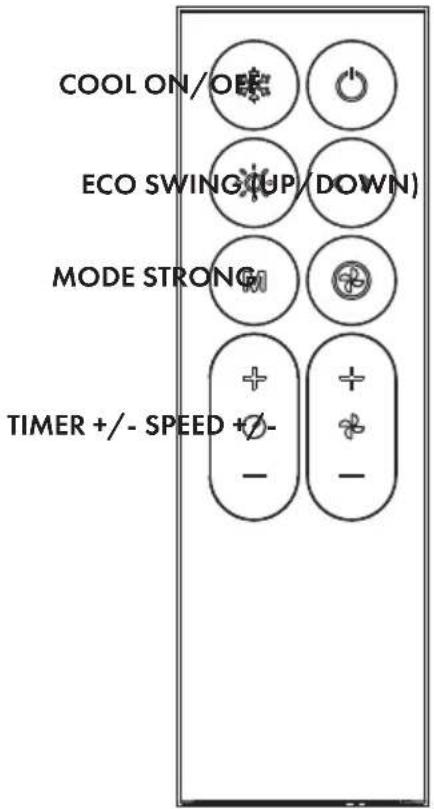
text_image
COOL ON/OE ECO SWING/UP/DOWN) MODE STRONG TIMER +/- SPEED +/-BUTTON FUNCTIONS
 | ON/OFF | Press this button once to make the unit ready for working. Press this button again to turn the unit OFF. | |
 | SPEED | Press this button to select the desired fan speed, the LED light on the display will be on in turn. The numbers next to the lights indicate the speed (1, 2, 3). | |
 | MODE | Press this button to select the desired fan mode, it operates according to the preset program, alternating between different fan speeds. The LED will be on with the according mode in turn: Sleep > Natural > Normal. | |
| Sleep | The fan speed will be switched between level 1 and 0 (Off) in cycle automatic, and will be turned off in 8 hours. | ||
| Natural | The fan speed will be switched between 1-2-3 in cycle automatic. | ||
| Normal | The fan will be switched to steady speed. | ||
 | SWING | Press this button once to swing both fans from left to right. If you press the button a second time, the upper fan will start to swing. If you press the button a third time, the lower fan will swing. If you press this button a fourth time, the swing function is deactivated. | |
 | COOL | Press this button once to start the evaporative cooling function. Press this button again to cancel. (If there is too little water in the water tank, a beep sounds. Fill the water tank and press the button again.) | |
 | TIMER | Press this button to select the desired timer. It can be set for 1,3,5, 8 hours. Press this button again to cancel. | |
 | ECO | Press this button once to turn off the indicator lights on the display. Press the button again to turn the indicator lights back on. | |
 | STRONG | Press this button the fan speed will be switched to very high speed, it can circulate the room air rapidly. This setting will make a louder noise. Press this button again, the fan speed will be switched to normal fan speed again. | |
CLEANING AND MAINTENANCE
Before cleaning
- Turn off the appliance and unplug it form the wall outlet to avoid electric shock or mechanical damage.
- Use a commercially available cleaning agent and a soft brush for cleaning. Do not use chemical cleaners.
• Make sure that no water gets onto the control panel.
Cleaning the surface
- For slight dirt on the surface, wipe it off with a soft damp cloth. For greasy dirt, add a little mild detergent to the cloth, and then wipe the dirt off.
- Do not use water, as it could penetrate the unit and damage the electronics.
- Do not use corrosive cleaning agents or solvents.
- Let the appliance dry completely before putting it back into operation.
Cleaning the filtration mesh
- Remove plug from wall outlet.
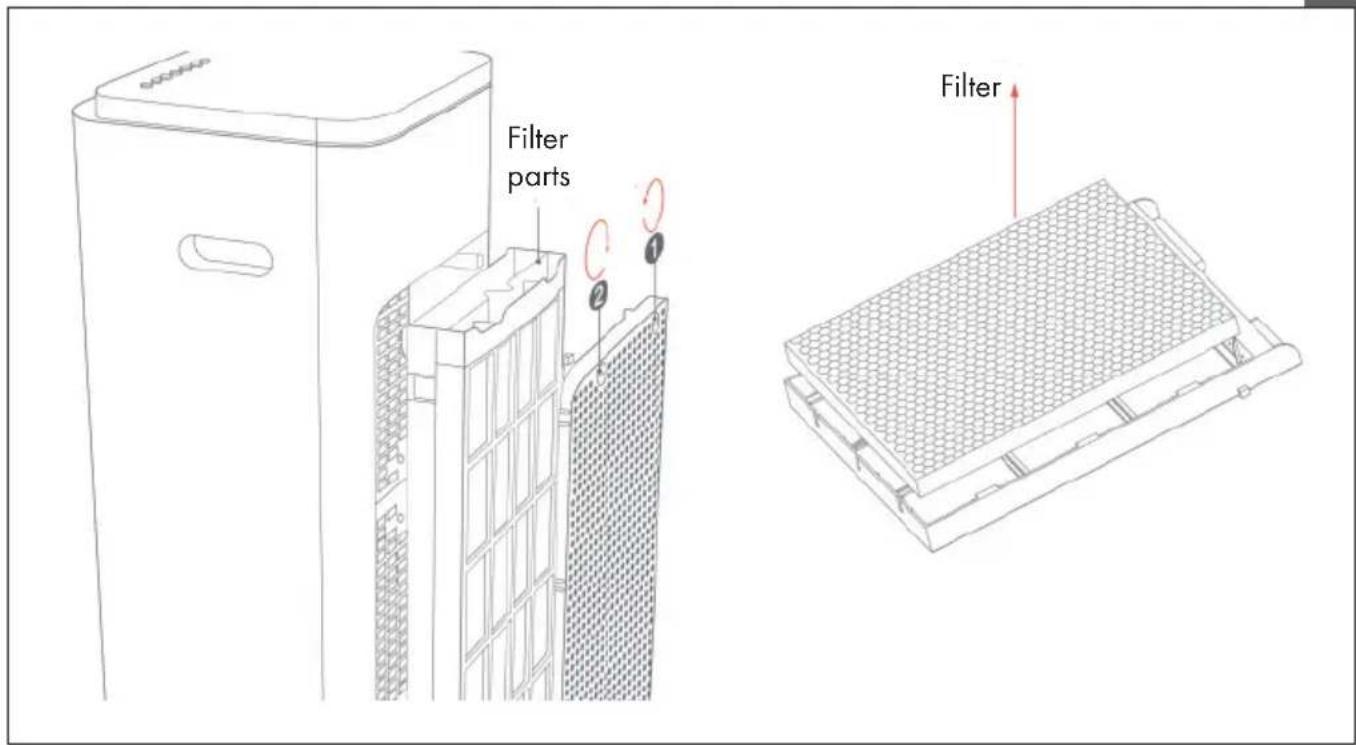
- Catch the filtration mesh handle and pull upwards (see figure 3).
- Clean the filtration mesh with a mild detergent and a soft brush.
- Make sure the filtration mesh is completely dry before installing.
Note: After long time operation, the filtration mesh becomes clogged with dust and dirt, which will greatly affect the unit's performance. It is recommended to clean the filtration mesh frequently.
text_image
Filter parts FilterFigure 3
Cleaning the water tank
- Remove the plug from the wall outlet.
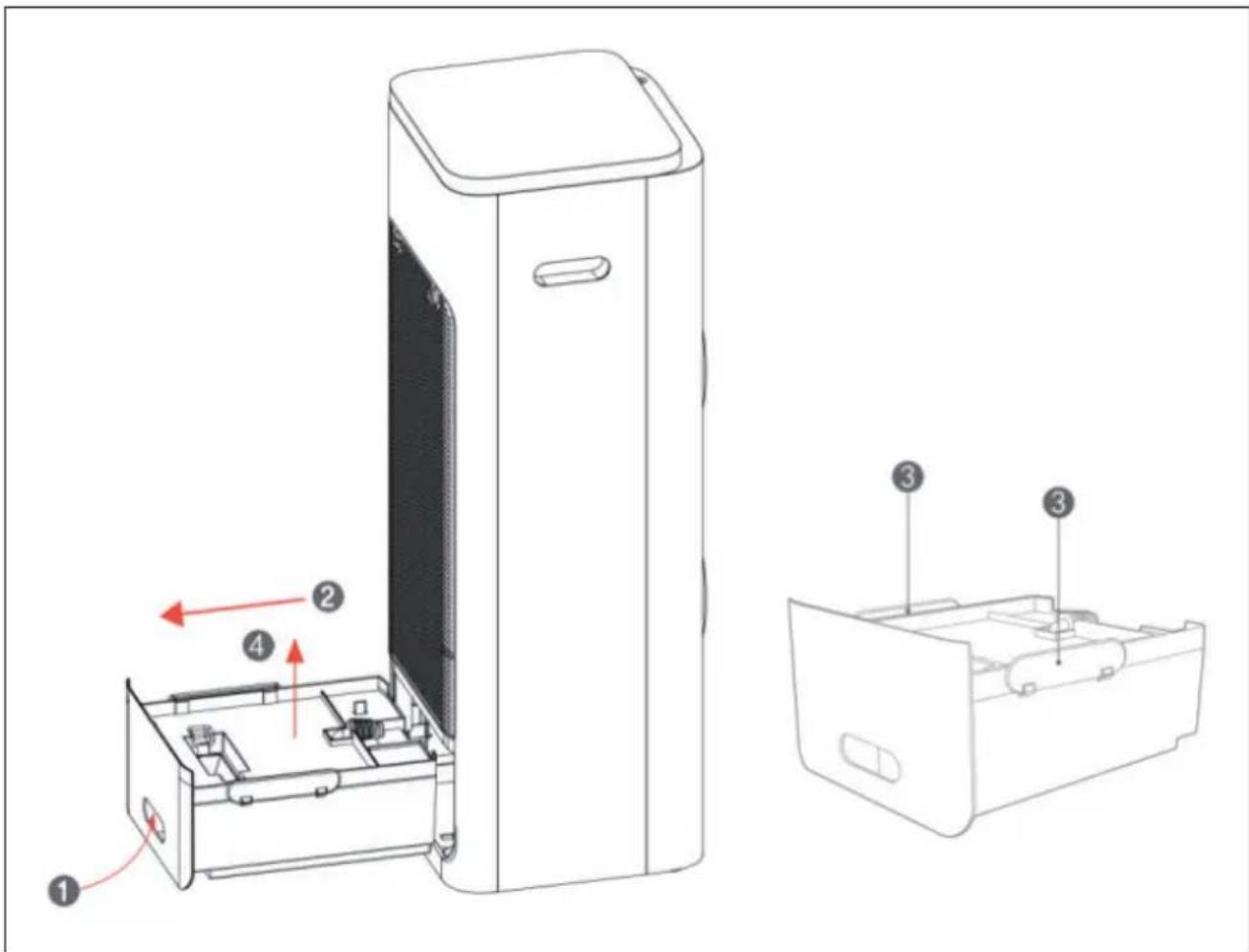
- Pull out the water tank (see figure 4):
a. Push against the top in the handle of the water tank (1).
b. Pull out the water tank (2).
c. Loosen the clasps on both sides of the cover of the water tank (3).
d. Remove the cover of the water tank (4).
-
Clean the water tank with a little mild detergent on a cloth and then rinse in water.
-
After cleaning, replace the water tank cover and close the clasps on both sides of the water tank cover. Slide the water tank back into the appliance.
text_image
Technical diagram of a device with numbered components and directional arrows indicating assembly or movement.Figure 4
Storage
- If the product is not going to be in use for a long time, unplug the power cord and pack it away to prevent dust from entering the case.
• After packing, store it in a dry, ventilated place.
TROUBLESHOOTING
Note: If problems occur, check the information in the following table before returning the appliance for repair.
| Problem Possible Cause | Possible Solution | |
| The appliance does not work. | The plug is not securely inserted into the socket or not connected well. | Insert the plug into the wall socket and make sure it is connected well. |
| The ON/OFF button is not pressed. | Press ON/OFF button after plugged. | |
| Dedust effect is not good. The filtration mesh is clogged with dust and dirt, which affects the performance of the appliance. | Clean the filtration mesh. | |
| The air vent is obstructed. Remove the foreign objects from the air vent. | ||
Note: If the problem cannot be found in the list or it persists, please contact costumer service or a qualified technician for further inspection. Do NOT open and repair the appliance by yourself.
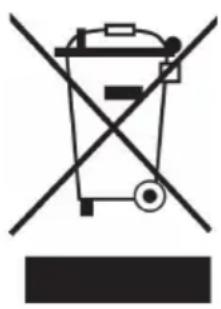
DISPOSAL CONSIDERATIONS
natural_image
Symbol of a trash bin crossed with a diagonal line, no text or numbers presentIf there is a legal regulation for the disposal of electrical and electronic devices in your country, this symbol on the product or on the packaging indicates that this product must not be disposed of with household waste. Instead, it must be taken to a collection point for the recycling of electrical and electronic equipment. By disposing of it in accordance with the rules, you are protecting the environment and the health of your fellow human beings from negative consequences. For information about the recycling and disposal of this product, please contact your local authority or your household waste disposal service.
This product contains batteries. If there is a legal regulation for the disposal of batteries in your country, the batteries must not be disposed of with household waste. Find out about local regulations for disposing of batteries. By disposing of them in accordance with the rules, you are protecting the environment and the health of your fellow human beings from negative consequences.
MANUFACTURER & IMPORTER (UK)
Manufacturer:
Chal-Tec GmbH, Wallstrasse 16, 10179 Berlin, Germany.
Importer for Great Britain:
Berlin Brands Group UK Ltd
PO Box 1145
Oxford, OX1 9UW
United Kingdom
Estimado cliente:
text_image
QR code image containing encoded data, no visible human-readable textÍNDICE
text_image
Technical diagram of a refrigerator with labeled parts and directional arrows indicating internal componentsIlustración 1
text_image
Technical diagram of a device with numbered components and directional arrows indicating assembly or movement.Ilustración 4
Almacenamiento
natural_image
Symbol of a trash bin crossed with a diagonal line, no text or numbers presentBerlin Brands Group UK Ltd
PO Box 1145
Oxford, OX1 9UW
United Kingdom
Cher client, chère cliente,
text_image
QR code image containing encoded data, no visible human-readable textSOMMAIRE
text_image
Technical diagram of a device with numbered parts and directional arrows indicating assembly or component layout.Figure 1
text_image
Technical diagram of a device with numbered components and directional arrows indicating assembly or movement.Figure 4
Rangement
natural_image
Symbol of a trash bin crossed with a diagonal line, no text or numbers presentBerlin Brands Group UK Ltd
PO Box 1145
Oxford, OX1 9UW
United Kingdom
Gentile cliente,
text_image
QR code image containing encoded data, no visible human-readable textINDICE
text_image
Technical diagram of a device with numbered components and directional arrows indicating assembly or movement.Immagine 1
text_image
Technical diagram of a device with numbered components and directional arrows indicating assembly or movement.Immagine 4
Stoccaggio
natural_image
Symbol of a trash bin crossed with a diagonal line, no text or numbers presentPRODUTTORE E IMPORTATORE (UK)
Produttore:
Chal-Tec GmbH, Wallstraße 16, 10179 Berlino, Germania.
Berlin Brands Group UK Ltd
PO Box 1145
Oxford, OX1 9UW
United Kingdom

bar
| Category | Value | |---|---| | Category 1 | 100 | | Category 2 | 100 | | Category 3 | 100 | | Category 4 | 100 | | Category 5 | 100 | | Category 6 | 100 | | Category 7 | 100 | | Category 8 | 100 | | Category 9 | 100 | | Category 10 | 100 | | Category 11 | 100 | | Category 12 | 100 | | Category 13 | 100 | | Category 14 | 100 | | Category 15 | 100 | | Category 16 | 100 | | Category 17 | 100 | | Category 18 | 100 | | Category 19 | 100 | | Category 20 | 100 | | Category 21 | 100 | | Category 22 | 100 | | Category 23 | 100 | | Category 24 | 100 | | Category 25 | 100 | | Category 26 | 100 | | Category 27 | 100 | | Category 28 | 100 | | Category 29 | 100 | | Category 30 | 100 | | Category 31 | 100 | | Category 32 | 100 | | Category 33 | 100 | | Category 34 | 100 | | Category 35 | 100 | | Category 36 | 100 | | Category 37 | 100 | | Category 38 | 100 | | Category 39 | 100 | | Category 40 | 100 | | Category 41 | 100 | | Category 42 | 100 | | Category 43 | 100 | | Category 44 | 100 | | Category 45 | 100 | | Category 46 | 100 | | Category 47 | 100 | | Category 48 | 100 | | Category 49 | 100 | | Category 50 | 100 | | Category 51 | 100 | | Category 52 | 100 | | Category 53 | 100 | | Category 54 | 100 | | Category 55 | 100 | | Category 56 | 100 | | Category 57 | 100 | | Category 58 | 100 | | Category 59 | 100 | | Category 60 | 100 | | Category 61 | 100 | | Category 62 | 100 | | Category 63 | 100 | | Category 64 | 100 | | Category 65 | 100 | | Category 66 | 100 | | Category 67 | 100 | | Category 68 | 100 | | Category 69 | 100 | | Category 70 | 100 | | Category 71 | 100 | | Category 72 | 100 | | Category 73 | 100 | | Category 74 | 100 | | Category 75 | 100 | | Category 76 | 100 | | Category 77 | 100 | | Category 78 | 100 | | Category 79 | 100 | | Category 80 | 100 | | Category 81 | 100 | | Category 82 | 100 | | Category 83 | 100 | | Category 84 | 100 | | Category 85 | 100 | | Category 86 | 100 | | Category 87 | 100 | | Category 88 | 100 | | Category 89 | 100 | | Category 90 | 100 | | Category 91 | 100 | | Category 92 | 100 | | Category 93 | 100 | | Category 94 | 100 | | Category 95 | 100 | | Category 96 | 100 | | Category 97 | 100 | | Category 98 | 100 | | Category 99 | 100 | | Total (Total) = [sum of bars] / [values] * (sum of bars + bars) * (sum of bars + bars) * (sum of bars + bars). The values in the table represent the sum of the bars and the corresponding sum of the bars. There is no additional data series or categories specified in the code.