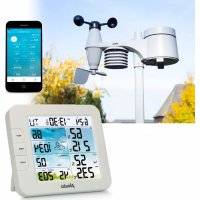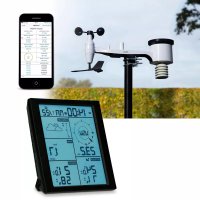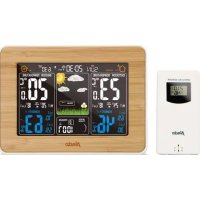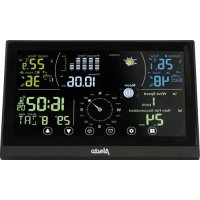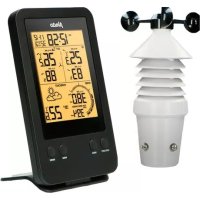
WS3400 - Weather Station ALECTO - Free user manual and instructions
Find the device manual for free WS3400 ALECTO in PDF.


User questions about WS3400 ALECTO
0 question about this device. Answer the ones you know or ask your own.
Ask a new question about this device
Download the instructions for your Weather Station in PDF format for free! Find your manual WS3400 - ALECTO and take your electronic device back in hand. On this page are published all the documents necessary for the use of your device. WS3400 by ALECTO.
USER MANUAL WS3400 ALECTO
natural_image
Technical line drawing of an insulator assembly with a labeled component 'Alecto' (no other text or symbols)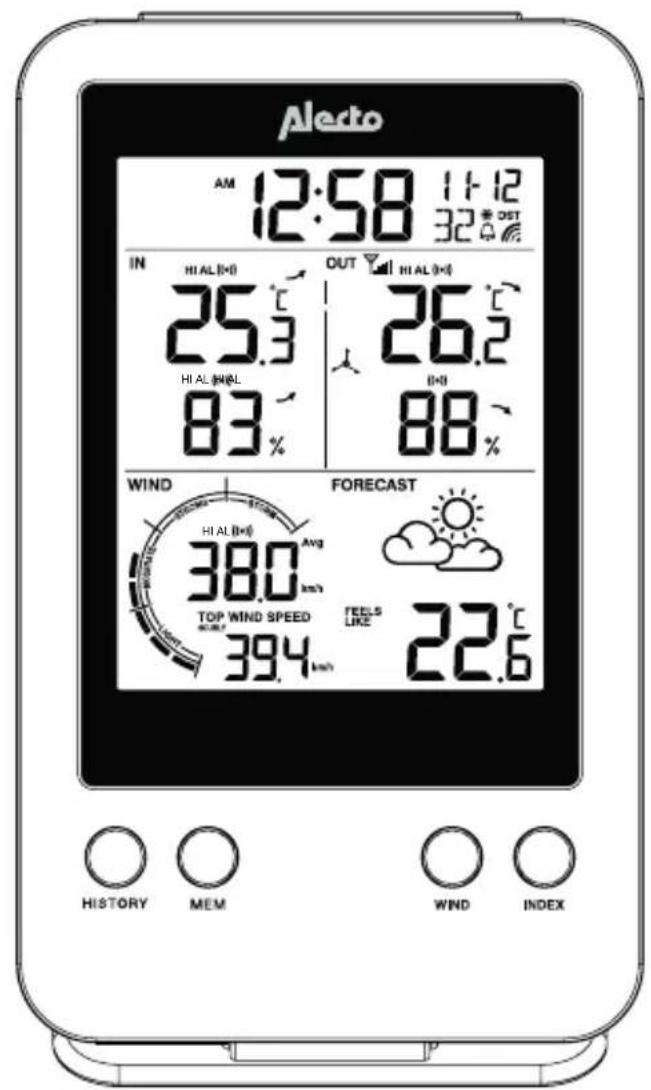
text_image
Aledo AM 12:58 11:12 32° EST IN HI AL (°C) OUT HI AL (°C) 25.3 26.2 HI AL (mm/L) DHI 83 88 WIND FORECAST 380 Avg TOP WIND SPEED FEELS 394 LIKE 22.6 HISTORY MEM WIND INDEXWeerstation met draadloze buitensensor Station météo avec unité extérieure sans fil Wetterstation mit kabelloser Außeneinheit Weather station with wireless outdoor unit
VERKLARING VAN CONFORMITEIT
natural_image
Close-up of a battery holder with two cylindrical cells and two labeled terminals (no text or symbols visible)Buitenunit:
text_image
Technical diagram illustrating the assembly of a mechanical device with labeled components and motion arrowsnatural_image
Two diagrams showing a mechanical component with an arrow indicating motion, no text or symbols present.Buitenunit:
text_image
Weather forecast icons showing sun, cloud, rain, and cloud with weather symbolszonnig licht
bewolkt
bewolkt regen-
achtig
natural_image
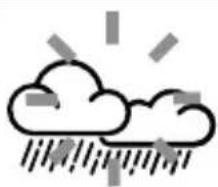
Simple line drawing of a cloud with raindrops and lightning bolts (no text or symbols)storm (knippert)
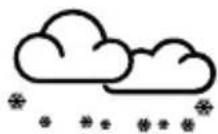
sneeuw
Opmerkingen:
text_image
FEELS LIKE HEAT INDEX DEW POINT WIND CHILL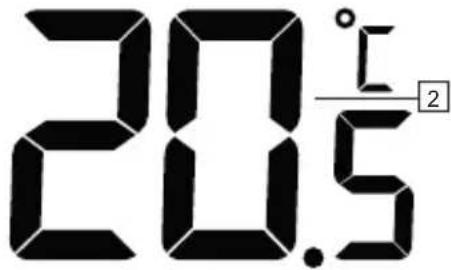
text_image
20.5 ° 1 25.1 Introduction....26
6.1 Introduction....26
7.1 Introduction....27
8.1 Introduction....27
natural_image
Close-up of a battery pack with two cylindrical cells and two battery terminals (no text or symbols visible)Unité extérieure :
other
| Label | Value | |---|---| | IN | 23.5°C | | 1 | 23.5°C | | 2 | 23.5°C | | 3 | 23.5°C | | 4 | 49% | | 2 (HIALL(A)) | 49% | | 3 (HIALL(A)) | 49% |text_image
Weather forecast icons showing sun, cloud, rain, and cloud with weather symbolsnatural_image
Close-up of a battery holder with two cylindrical cells and two plus signs, no visible text or symbolsAußeneinheit:
natural_image
Simple line drawing of a vertical panel with an arrow pointing to the left side (no text or symbols)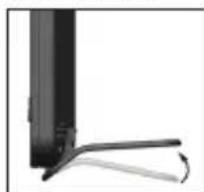
natural_image
Close-up of a black rectangular object with a curved handle and a small curved extension, against a white background (no text or symbols visible)text_image
IN 23.5°C HIALLOW 1 2 3 49% → 2 3text_image
Weather forecast icons showing sun, cloud, rain, and cloud with weather symbolssonnig teilweise
bewölkt
natural_image
Simple line drawing of two clouds (no text or symbols)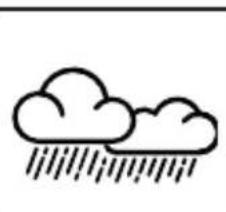
natural_image
Simple line drawing of two clouds with raindrops (no text or symbols)
natural_image
Simple line drawing of a cloud with raindrops and lightning bolts (no text or symbols)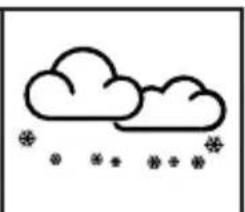
natural_image
Simple line drawing of a cloud with snow symbols below (no text or labels)(blinkend)
Anmerkungen:
DECLARATION OF CONFORMITY
Hereby, Hesdo declares that the radio equipment type Alecto WS-3400 is in compliance with directive 2014/53/EU. The full text of the EU declaration of conformity is available at the following internet address: http://DOC.hesdo.com/ WS-3400-DOC.pdf
ENVIRONMENT
This product may not be discarded as normal household waste at the end of its life span, you must bring it to a collection point for the recycling of electric and electronic devices.
Don't throw away exhausted batteries, but bring them to your local depot for Small Chemical Waste (SCW).
SYSTEM FAULTS
In the case of a suspected system error, you should remove the batteries from the indoor and outdoor unit. Now wait several minutes and replace the batteries or use a paper clip to press and hold the reset button on the outdoor and indoor unit for several seconds. If this doesn't resolve the problem, please contact Alecto Customer Service via internet www.alecto.nl
1. TABLE OF CONTENTS
2. OVERVIEW
2.1 Indoor unit....46
2.2 Outdoor unit 47
3. INSTALLATION
3.1 Power supply 47
3.2 Paring the indoor unit / outdoor unit 48
3.3 Location 48
3.4 Clock....49
3.5 To reset measured data....50
4. USE
4.1 General functions....50
4.2 Contrast setup ....50
4.3 Indoor temperature and humidity 51
4.4 Outdoor temperature and humidity 51
4.5 Weather forecast 51
4.6 Wind speed....52
4.7 Beaufort scale....52
4.8 Physiological temperature, heat index, dew point temperature and wind chill....53
4.9 Display lighting....53
5. ALARM CLOCK
5.1 Introduction....54
5.2 Alarm time setup....54
5.3 Alarm function setup....54
5.4 Operation....54
6. MINIMUM AND MAXIMUM MEASURED VALUES
6.1 Introduction....54
6.2 To view all maximum and minimum values....54
6.3 To reset the maximum and minimum values....54
7. HISTORY
7.1 Introduction....55
7.2 History check....55
7.3 To delete the history....55
8. HIGH-LOW ALERT
8.1 Introduction....55
8.2 To set and activate/deactivate Hi-Lo limits 55
8.3 Operation....55
9. CALIBRATION
9.1 General 56
9.2 To calibrate....56
9.3 Offset settings....56
- PROBLEMS AND SOLUTIONS ....56
11. MAINTENANCE
11.1 Outdoor temperature and humidity sensor ....56
- SPECIFICATIONS....56
2. OVERVIEW
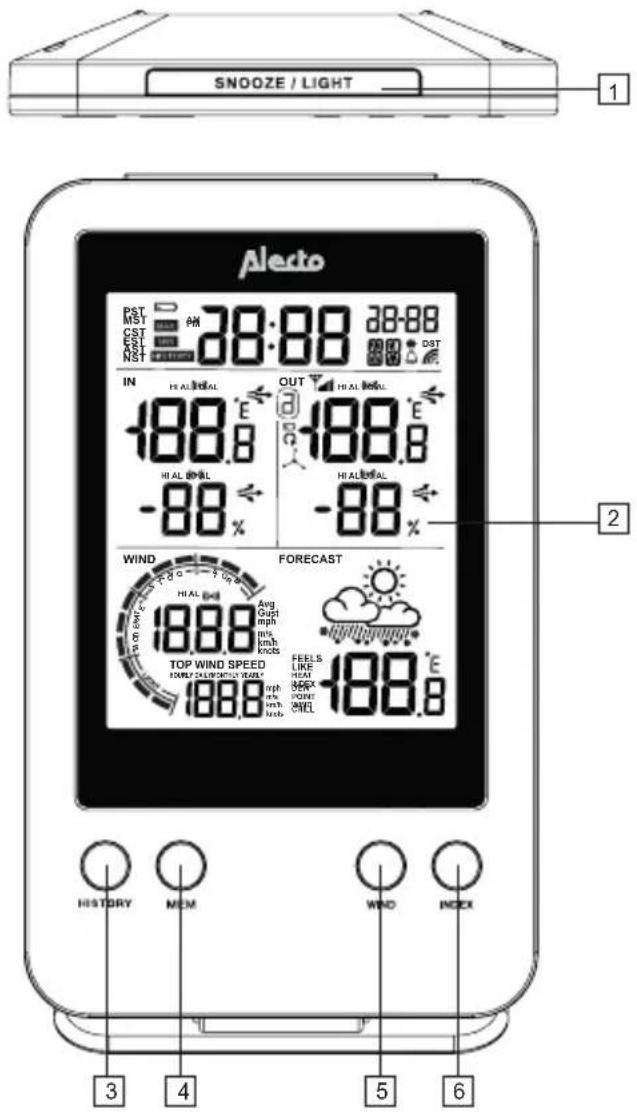
2.1 Indoor unit:
text_image
SNOOZE / LIGHT 1 Aledo DST DST CST EAST NIST 38:88 38-88 38:88 PM OUT HIAL BOWL -188.8 E -88% HI AL BOWL -188.8 E -88% HI AL BOWL WIND FROCAST Avg Opti mph m/s km/h kncks 188.8 TOP WIND SPEED 188.8 AIRLY CALIFLOWER TURUAL 188.8 AIRLY CALIFLOWER TURUAL 188.8 AIRLY CALIFLOWER TURUAL FEELS LIKE HEAL MEX POINT MHEL -188.8 E -88% 2 3 4 5 6 HISTORY MCM WIND INDEX- SNOOZE / LIGHT button: snooze button for the alarm clock function and for switching on the display lighting
- Display (everything shown in the display is described on the next page)
- HISTORY button: shows the data of the past 24 hours (increments of -1 hour)
- MEM button: shows the minimum and maximum values measured, including the time and date of that measurement
- WIND button: wind speed display per: hour, day, month or year
- INDEX button: wind temperature: physiological temperature, heat index, dew point, wind chill
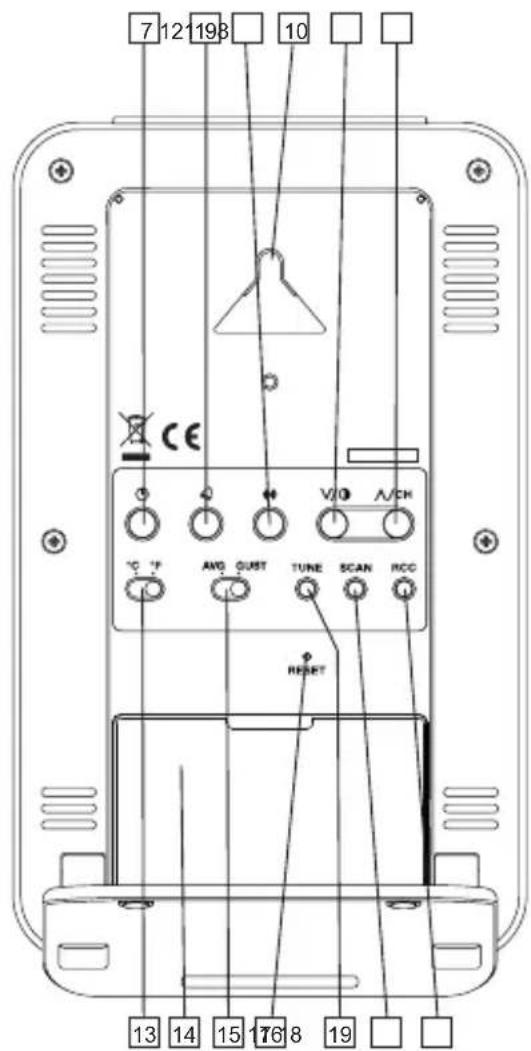
- Button ☺: clock setup button
- Button 🔒: alarm clock setup button
text_image
7 12 198 10 CE V/O A/CH °C °F AWG QUST TUNE SCAN RCC RESET 13 14 15 16 8 19- Button (●): alarm setup button
- Suspension eye for wall-mounting.
- Button V/O: down/contrast
- Button ∧/CH: up/channel
- Switch °C / °F: to switch the temperature display between degrees Celsius and degrees Fahrenheit
- Battery compartment
- Switch AVG and GUST to set the wind function (average wind speed or wind gust)
- RESET button: to restart the indoor unit in case of a (possible) error
- TUNE button: to calibrate the weather station
- SCAN button: to make the indoor unit search for the outdoor unit
- RCC button: to switch the DCF receiver on or off
2.2 Outdoor unit:
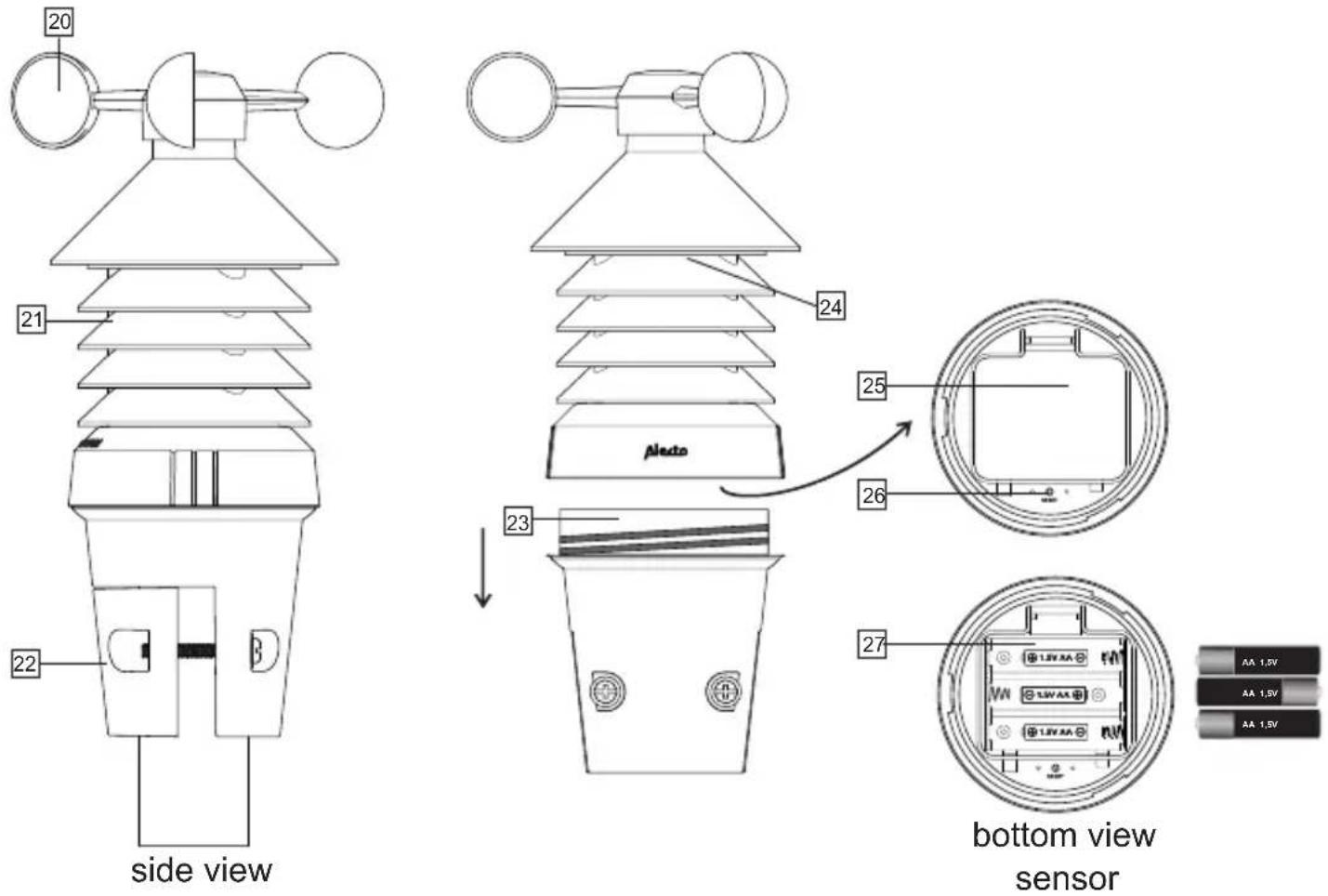
text_image
20 21 22 side view 23 Aledo 24 25 26 27 bottom view sensor AA 1.5V AA 1.5V AA 1.5V- Wind speed meter
- Temperature + humidity sensor
- Mounting bracket
-
Loosen the mounting base for access to the battery compartment
-
LED (transmission indicator)
- Battery cover
- RESET button
- Battery compartment
3. INSTALLATION
Attention: after the installation, it may take several hours up to a day before the correct values are displayed. Additionally, after replacing exhausted batteries in the weather station, all measured data in the weather station will be erased.
3.1 Power supply:
Advice regarding batteries:
We advise you to use alkaline batteries in the indoor unit. Alkaline batteries with a capacity of 2000mAh have a lifespan of over one year. Rechargeable batteries are not recommended because of their lower supply voltage.
The outdoor unit is also powered by 3 AA 1.5 Volts batteries, but we recommend not using Alkaline batteries in the outdoor unit, because the performance of Alkaline batteries degrades at temperatures around of below 0^ .
For that reason, we advise you to use Lithium batteries for the outdoor unit that are designed to function well within a temperature range of -20^ to 60^ . These batteries can be ordered via the service department of Alecto via internet: www.alecto.nl
Lithium batteries with a capacity of 2900mAh have a lifespan of over one year.
Indoor unit:
Slide the battery cover at the rear downwards, insert 2 AA 1.5V batteries as indicated inside the battery compartment and replace the battery cover on the indoor unit. (Batteries are not included)
The indoor unit now starts searching for the outdoor unit for 1 minute. Insert the batteries into the outdoor unit within this minute.
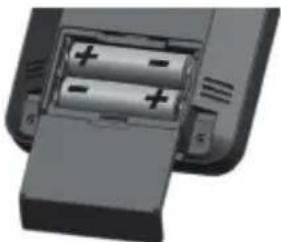
natural_image
Close-up of a battery pack with two cylindrical cells and an open casing (no visible text or symbols)Outdoor unit:
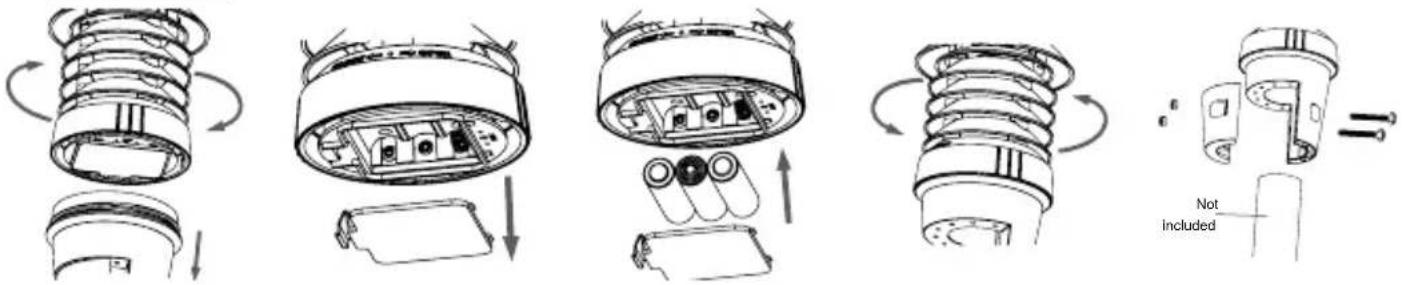
text_image
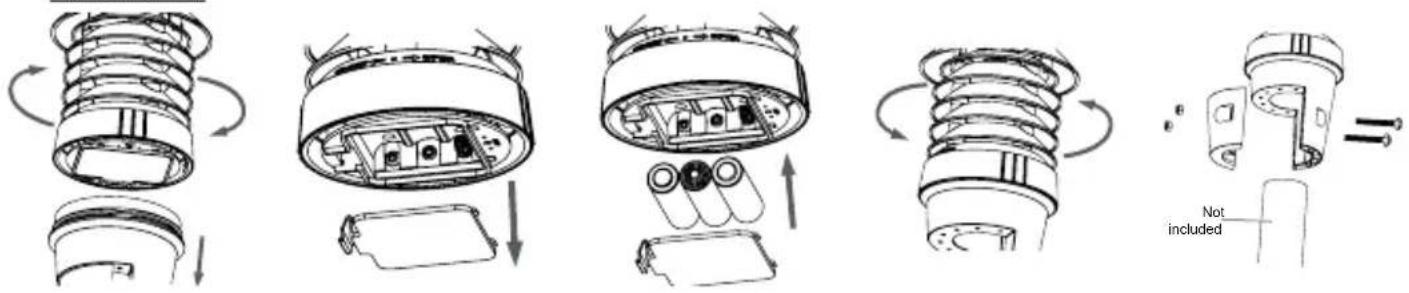
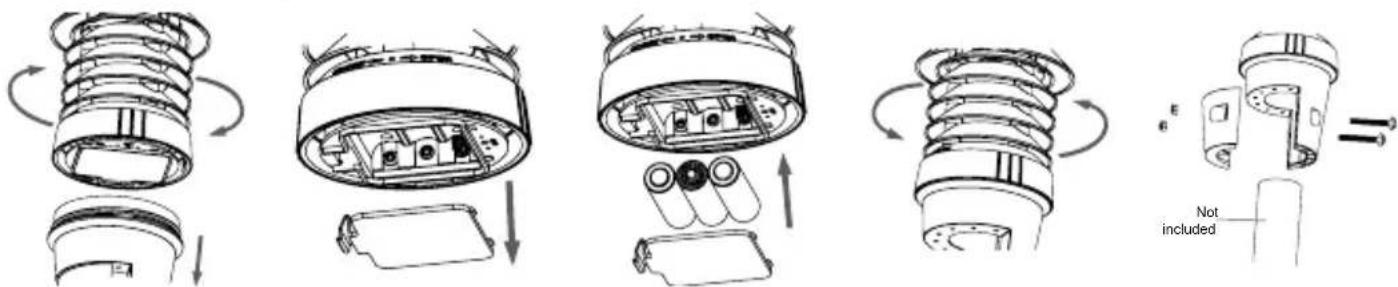
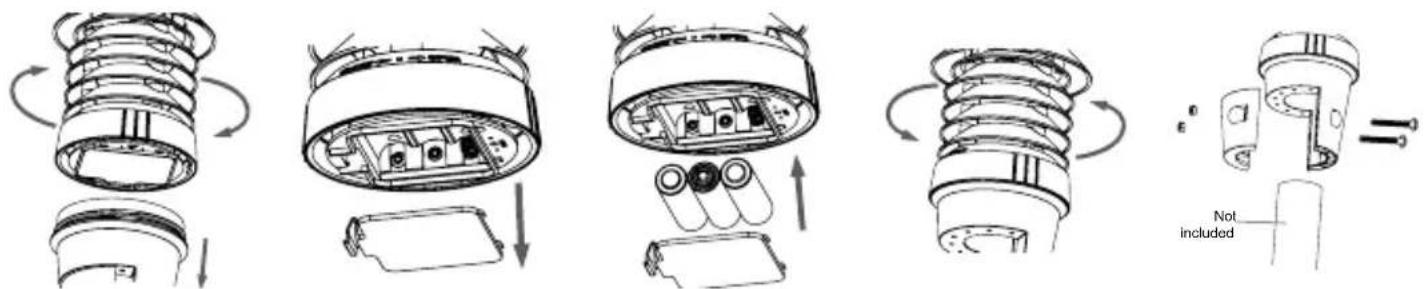
Technical diagram illustrating the assembly of a mechanical device with labeled components and motion arrowsOpen the battery compartment by loosening the top of the outdoor unit. Open the battery compartment by removing the cover. Insert 3 AA 1.5V batteries according to the image above. Pay attention to the polarity (+ and -) while doing so. Replace the cover and secure the top back onto the base (batteries are not included). Mount the sensor onto a pole (28\~40 mm) using the clips with the large screws and bolts.
Preferably, install the outdoor unit at least 1.5m above ground level in an open space within the transmitting range of the outdoor unit to the indoor unit, making sure it can freely catch the wind.
Remarks:
- After replacing the batteries of the outdoor unit or after an interruption of the connection with the outdoor unit, press the "SCAN" button on the indoor unit to reconnect the outdoor and indoor unit.
- Avoid placing the unit in direct sunlight, rain or snow.
- Try multiple locations to obtain the best possible reception between the outdoor unit (transmitter) and indoor unit (receiver).
3.2 Paring the indoor unit / outdoor unit:
Automatically:
As soon as the batteries are inserted into the indoor unit, the indoor unit starts searching a signal from the outdoor unit for 1 minute. So, when you insert batteries into the outdoor unit within this minute and the units 'find' each other, these units will be paired automatically. The display of the indoor unit shows the temperature, humidity and wind speed as transmitted by the outdoor unit.
Manually:
If the units cannot automatically find each other, or after replacing the batteries, you may pair the outdoor unit with the indoor unit (again) as follows:
- Press and hold the SCAN button for 2 seconds, the antenna symbol 🎨 in the display starts flashing
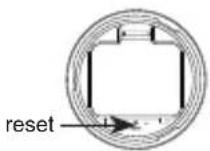
- Or alternatively briefly press the RESET button at the bottom of the outdoor unit
- After several seconds the units will find each other (again)
3.3 Location:
Indoor unit:
You may choose to suspend the indoor unit from a wall with a simple screw or to use it as a desk model with the supplied stand. In any case, never place the indoor unit in direct sunlight or next to a heat generating light or stove.
Outdoor unit:
You may install the outdoor unit on a pole (excluded). In any case, make sure to place the unit preferably 1.5 metres above ground level where it can freely catch the wind.
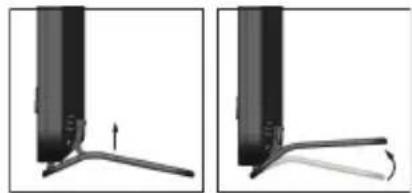
natural_image
Two diagrams showing a mechanical component with an arrow indicating direction, no text or symbols present.Outdoor unit placement tips:
Make sure that the distance between the outdoor and indoor unit is no more than 50 metres.
3.4 Clock:
Introduction:
The WS-3400 is equipped with a built-in DCF receiver in the indoor unit. This receiver is used for receiving the DCF time signal from Frankfurt. This signal ensures that the clock displays an extremely accurate time, provided that the signal is being received properly.
Automatically:
As soon as you insert the batteries into the indoor unit, after 1 minute and during 5 minutes, the clock starts searching for the DCF radio signal to set the time and date while the antenna symbol flashes. After several seconds or minutes the WS-3400 shows the correct time. In extreme cases it may take longer than a day until the DCF time is displayed. The best reception of the DCF signal occurs at night and it's automatically refreshed at: 2:00 am, 3:00 am, 4:00 am and 5:00 pm.
Manually:
If the clock is not or not correctly receiving the radio signal, you may manually set the clock as follows:
- Press and hold the Ⓤ button for 2 seconds, 12Hr or 24Hr appears in the display
- Use V/O/A/CH to set the time format, briefly press the button
- Use V/O/A/ to set the hours, briefly press the button
- Use V/O/ to set the minutes, briefly press the button
- Use V/1/A/GH to set the seconds to 0, (this allows you to make the clock run simultaneously with your own clock), briefly press the button Ⓤ
- Use V/O/A/CH to set the year, briefly press the button
- Use V/O/A/CH to set the month/day or day/month display, briefly press the button
- Use V/O/ to set the month, briefly press the button
-
Use V/O A/CH to set the date, briefly press the button
-
Use V/O/A/CH to set the difference in hours compared to the DCF time. For use in the Benelux, select '0' and briefly press the button Ⓜ
-
Use V/0/ to set the language for displaying the date, you may choose from: EN (English), FR (French), DE (German), ES (Spanish), IT (Italian), NL (Dutch) and RU (Russian), briefly press the button Ⓤ
-
Use V/O/A/CH to determine whether the clock must automatically switch to Daylight Saving Time (AUTO) or to do this yourself (OFF), briefly press the button
The clock is now set manually.
When the DCF receiver is enabled and a strong signal is being received, the receiver will overwrite the clock display.
To switch the DCF receiver on/off:
You may switch off the DCF receiver as follows to only display the time and date as programmed by you:
- To switch off: press and hold the RCC button on the indoor unit for 8 seconds until OFF appears and the antenna symbol disappears
You may switch the receiver back on again as follows:
- To switch on: press and hold the RCC button on the indoor unit for 8 seconds until ON appears and the antenna symbol 📋 starts flashing
The symbol in the upper middle part of the display shows the status of the DCF clock:
No symbol: the DCF receiver is disabled; the time shown is determined by the internal clock of the WS-3400.
- Flashing: the DCF receiver is enabled and is searching for the DCF signal; the time shown is determined by the internal clock of the WS-3400.
Constantly lit: the DCF receiver is enabled and is receiving the DCF signal; the time and date shown are determined by the atomic DCF clock in Frankfurt.
3.5 To reset measured data:
After completing the installation, press and hold the "HISTORY" button for 10 seconds to delete all data measured up to that point. This avoids looking at measurements at a later time that were caused by movements during installation.
4. USE
4.1 General functions:
The display shows the following basic functions / data:
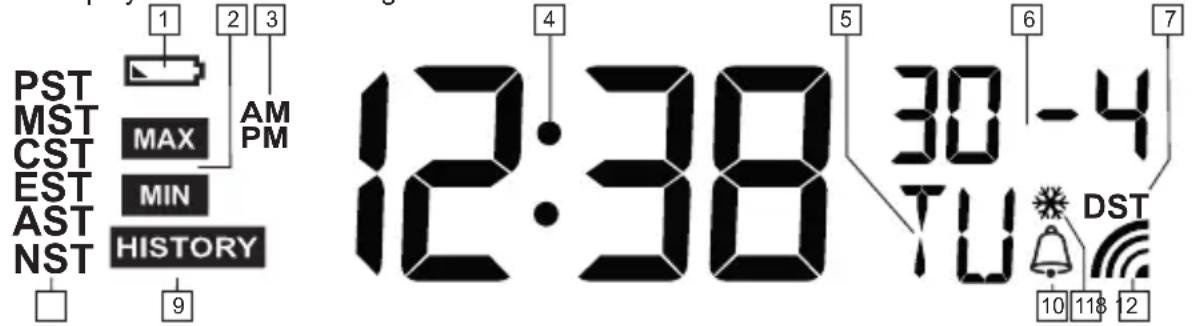
text_image
PST MST CST EST AST NST 1 2 3 AM PM 9 12:38 5 30 -4 TU 6 7 DST 10 118 12- Appears when the battery of the indoor unit is nearly empty
- Appears when pressing the MEM button to show the maximum or minimum value in the display (*1)
- AM/PM (morning or afternoon) display in 12-hour format.
- Display of the actual time
- Display of the day of the week (*2)
- Display of the month and date
- Appears when the summertime is set (DST - Day Saving Time) (only when the DCF-77 is switched on and being received correctly)
- No operation
- Appears with the display of the history
- Appears when the alarm clock is set and activated
- Appears in case of the frost alert (see chapter 5)
- Appears when the DCF clock radio signal is being received
*1: By repeatedly pressing the "MEM" button, the following data are shown on the display in the order of:
- Maximum indoor temperature 10. Minimum physiological temperature
- Minimum indoor temperature 11. Maximum heat index
- Maximum humidity indoors 12. Minimum heat index
- Minimum humidity indoors 13. Maximum dew point temperature
- Maximum outdoor temperature 14. Minimum dew point temperature
- Minimum outdoor temperature 15. Maximum wind chill
- Maximum humidity outdoors 16. Minimum wind chill
- Minimum humidity outdoors 17. Maximum average wind speed
- Maximum physiological temperature 18. Maximum speed wind gust
The upper part of the display shows on which day and at what time the concerned minimum of maximum value was measured.
Press and hold the MEM button for 2 seconds to delete the displayed memory.
*2: By pressing the Ⓤ button you may switch the display of the clock between “seconds” display and “day” display.
4.2 Contrast setup:
Repeatedly press the V/O button to adjust the display contrast of the indoor unit. Each time you press the button, the contrast is decreased in increments of 8. After the lowest setting the contrast is switched back to the highest setting.
4.3 Indoor temperature and humidity:
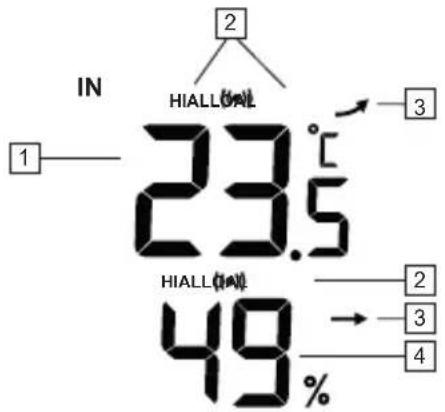
text_image
IN 23.5°C HIALL 1 2 3 49% HIALL 2 3- Temperature indoors
- Appears when the max. or min. alert is set
- Trend indicator (higher/equal/lower
- Relative humidity indoors

4.4 Outdoor temperature and humidity:
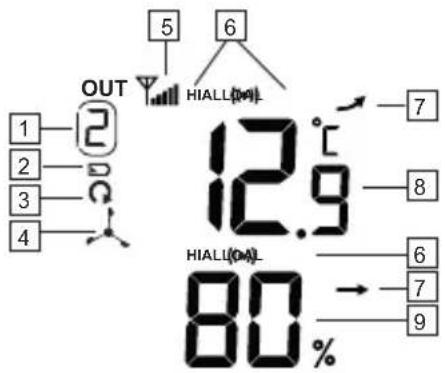
text_image
OUT 1 2 3 4 HIALU(04) 12.9°C HIALU(04) 80% → 7 8 6 7 9- Channel setting (when using multiple external Thermo /Hygro sensors (not available))
- Low battery indicator outdoor unit
- Scan indicator (only when using multiple external sensors)
- Indication that the 3 in 1 outdoor sensor is displayed. (Press the A/CH button to switch between 1, 2, 3 and the outdoor unit.)
- Reception strength indicator outdoor unit
- Appears when the max. or min. alert is set
- Trend indicator (higher/equal/lower
- Temperature display outdoors
- Relative humidity outdoors

 | 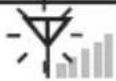 |  |  |  |
no sensor searching for con-
good reception average reception no reception
tact with sensor
- When the signal from the outdoor unit is lost for 15 minutes, the measurement values -- are displayed.
- If the signal from the outdoor unit is not restored within 1 hour, "Er" appears in the display.
- After 48 hours the indoor unit must be re-registered by removing and replacing the batteries or by pressing the "SCAN" button.
4.5 Weather forecast:
 |  |  | 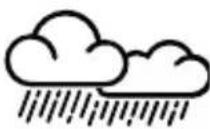 | 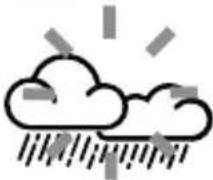 | 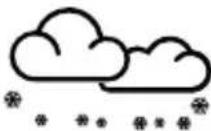 |
sunny
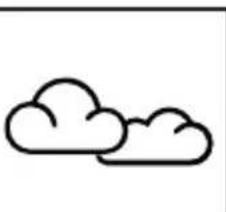
partly cloudy
cloudy
rainy
storm (flashing)
snow
Remarks:
- The accuracy of a weather forecast based on air pressure is 70% to 75%; attention, a correct weather forecast cannot be guaranteed.
- The weather forecast is based on the coming 24 \~72 hours and does not necessarily represent the actual situation.
- The prediction ‘snow’ is based on air pressure combined with the temperature; when the forecast is in fact ‘rain’ but the outdoor temperature is below -3^ ( 26^ ), then ‘snow’ will be expected.
4.6 Wind speed:
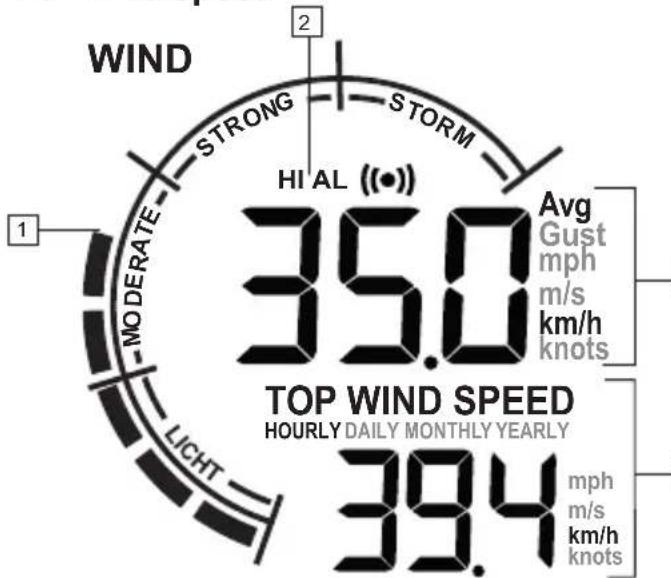
gauge
| Metric | Value | |--------|-------| | Avg Gust mph | 35.0 | | m/s km/h knots | 35.0 | | mph m/s km/h knots | 39.4 | | HI AL (●) | 35.0 | | MODERATE | 1 | | WIND | 2 |*2: AVERAGE = average speed
GUST = windvlaag
You switch between these indications by adjusting the selector switch
- Wind speed, according to the Beaufort scale
- Appears when the max. wind speed alert is set.
- Actual wind speed in the desired measurement value.
• Avg means average.
• Gust means wind gust (*2).
- Maximum wind speed per unit of time.
Indication of the wind speed in mph (miles per hour), in m/s (metres per second), in km/h (kilometre per hour) or in Knots (1 KNOTS = 1.852 km/h (1.151 mph)) (*3)

\*3: Measurement unit setup:
- In the normal display mode, press and hold the "WIND" button for 2 seconds.
- Use V/O/A/CH to set the desired wind indication: mph, m/s, km/h or Knots.
- Press the "WIND" button again to save your setting.
4.7 Beaufort scale:
Description of wind force 0 through 12.
| WIND |
| 0 |
| still |
| 0-1 km/h |
| 0-1mph |
| 0-1 knot |
| 0-0,2 m/s |
| Smoke rises straight up ornearly straight up. |
| WIND | WIND | WIND | WIND | WIND | WIND |
| 1 | 2 | 3 | 4 | 5 | 6 |
| very weak | weak | quite moderate | moderate | quite powerful | powerful |
| 1-5 km/h | 6-11 km/h | 12-19 km/h | 20-28 km/h | 29-38 km/h | 39-49 km/h |
| 1-3 mph | 4-7 mph | 8-12 mph | 13-17 mph | 18-24 mph | 18-24 mph |
| 1-3 knot | 4-6 knot | 7-10 knot | 11-16 knot | 17-21 knot | 22-27 knot |
| 0,3-1,5 m/s | 1,6-3,3 m/s | 3,4-5,4 m/s | 5,5-7,9 m/s | 8,0-10,7 m/s | 10,8-13,8 m/s |
| Wind direction easily determined by smoke clouds | Wind perceptible on face, weathercock now show correct direction, leaf rustles, flag moves | Blowing dust, flags fluttering, leaves constantly rustling | Paper is blowing up, branches are moving, hair is getting tangled, clothing is flapping, no more annoyance from mosquitoes. | Leaves of trees rustle, small trees move, crested waves on lakes and canals, garbage bins blow over, containers cannot be dropped off at terminals | Thick branches move, problems with umbrellas, hats blow off. |
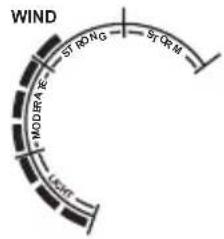 | 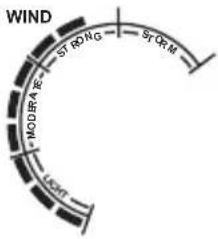 | 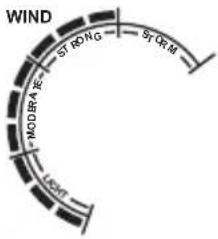 | 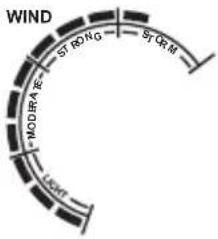 | 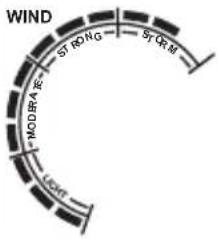 | 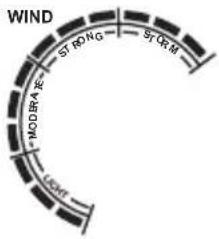 |
| 7 8 9 | 10 11 12 | ||||
| hard storm | my storm heavy | y storm very heavy | storm/hurri-cane-like | hurricane | |
| 50-61 km/h 62-74 | km/h 75-88 km/h 89- | 102 km/h 103-117 km/h > 117 km/h | |||
| 31-38 mph 39-46 | mph 47-54 mph 55-63 | mph 64-73 mph > 73 mph | |||
| 28-33 knot 34-40 | knot 41-47 knot 48-55 | knot 56-63 knot > 63 knot | |||
| 13,9-17,1 m/s 17,2 | -20,7 m/s 20,8-24,4 m/s | /24,5-28,4 m/s 28,5-32,6 m/s | > 32,6 m/s | ||
| Whole trees move, flags are tight, it is difficult to walk or cycle against the wind. | Twigs breaking off trees, movement is very difficult. | Chimney caps, antennas and roof tiles blow away, children have to make an effort to stand still, branches break off, only swallows and ducks are still flying. | Significant damage to buildings, adults have a hard time standing still, trees are uprooted, birds stay on the ground. | Serious damage to forest | Much is destroyed.Fences blow over, many roof tiles blow from the roof, roads are full of leaves. Lampposts are shaking. |
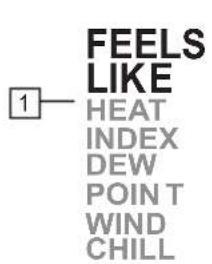
4.8 Physiological temperature, heat index, dew point temperature and wind chill:
text_image
FEELS LIKE HEAT INDEX DEW POINT WIND CHILL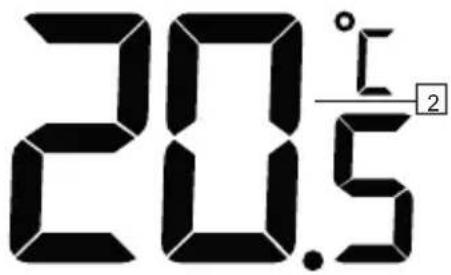
text_image
20.5 l 2-
Indication of the displayed temperature the Feels like (physiological temperature), the Heat Index (warmth index), the Dew point (dew point temperature) and Wind chill (physiological temperature) is (*4)
-
Temperature according to the indication shown under 1 (*5)
*4: Feels like: temperature index is the outdoor temperature most people actually experience
Heat index: combination of the measured temperature and humidity Dew point: the temperature at which water vapours are transformed into water (fog, dew or frost). This temperature depends on the outdoor temperature, humidity and air pressure.
Wind chill: combination of the measured outdoor temperature and the wind speed You switch between these indications by briefly pressing the "INDEX" button.
*5: At HEAT INDEX:
The alert level is:
< 27°C (display 'LO') no risk (below 27°C the display shows LO)
27^ - 32^ (80°F - 90°F) attention (risk of exhaustion due to heat)
33°C - 40°C (91°F - 105°F) be extra careful (risk of dehydration due to heat)
41°C - 54°C (106°F - 129°F) danger (increased risk of exhaustion due to heat)
≥55°C (≥130°F) very dangerous (increased risk of dehydration / stroke)
4.9 Display lighting:
Press the SNOOZE button on top of the indoor unit to enable the display lighting. This lighting switches off 5 seconds after pressing the button.
5. ALARM CLOCK
5.1 Introduction:
You may program an alarm (wake-up) time in the WS-3400.
In addition, you may add a frost alert (💡): when it's colder than -3°C outside, the alarm will sound 30 minutes earlier than the time you've set.
5.2 Alarm time setup:
- Press and hold the 🔒 button at the rear of the indoor unit until the hour display starts flashing and AL appears in the display.
- Use V/O/ to set the hours, briefly press and the minute display starts flashing.
- Use V/O/A/CH to set the minutes and briefly press 🔒 to save the alarm time.
5.3 Alarm function setup:
- Briefly press once or multiple times the button to check or enable/disable the alarm
Only "AL" appears: the time that is shown is the set alarm time but the alarm itself is switched off "AL" + "💡" appears: the alarm is enabled and the alarm signal will sound at the set alarm time "AL" + "💡" appears: the frost alarm is set
- Release the 🔒 button, after several seconds the actual time is displayed again and the alarm status remains as described above, visible
5.4 Operation:
- At the set time the alarm will sound for up to 120 seconds
- Press the 🔒 button to stop the alarm sound beforehand OR press the SNOOZE/LIGHT button on top of the indoor unit to switch on the snooze functioning; the wake-up alarm will then sound again after 5 minutes.
- The alarm is repeated every day until you disable is according to the above instructions.
- If you've enabled the frost alert and it's colder than -3^ outside, the alarm will sound 30 minutes earlier than the time you've set. If outside it's warmer than -3^ , the alarm will sound at the set time.
6. MINIMUM AND MAXIMUM MEASURED VALUES
6.1 Introduction:
The measured minimum and maximum values of the following items are saved.
Indoor and outdoor temperature, humidity indoors and outdoors, feels like temperature, heat index, dew point and wind chill. And additionally the maximum wind speed and gust.
6.2 To view all maximum and minimum values:
Press in the normal mode on the "MEM" button to view all maximum and minimum values. The maximum indoor temperature appears. Repeatedly press the "MEM" button for the other items.
6.3 To reset the maximum and minimum values:
While the maximum or minimum value is being displayed, press and hold the "MEM" button for 2 seconds to delete the saved maximum or minimum value. Repeat this for every item to delete all maximum and minimum values.
7. HISTORY
7.1 Introduction:
The indoor unit of the WS-3400 automatically stores all measurement data of the past 24 hours, allowing you to view the course over the last 24 hours at any time. Set “Top Wind Speed” with button “WIND” on hourly
7.2 History check:
- Press the HISTORY button, the last saved measurement data are shown on the display while the upper part of the display shows the time of the concerned measurement
- Repeatedly press the HISTORY button to scroll the memory
The history memory saves the data of the indoor and outdoor temperature and humidity, wind speed and feel like temperature.
7.3 To delete the history:
Press and hold the HISTORY button to delete all data measured up to that point.
7.4 Top Wind Speed history:
To check the Daily, Montly and Yearly top wind speed select first by button “WIND” Daily, Monthly or Yearly and then button ‘HISTORY’ (all other items will be blanc).
8. HIGH-LOW ALERT
8.1 Introduction:
You may set an alert for the following measurements for when a high or low value is being exceeded:
Indoor temperature high alert Outdoor temperature low alert Humidity indoors high alert Humidity indoors low alert
Outdoor temperature high alert Outdoor temperature low alert Humidity outdoors high alert Humidity outdoors low alert Wind speed high alert
8.2 To set and activate/deactivate Hi-Lo limits:
- Press the button to activate the Hi-Lo limit setting.
- Use the V/O/A/CH buttons to select "IN" for the indoor temperature or "OUT" for the outdoor temperature. Choosing OUT 1, OUT2 or OUT3 has no function.
- Press once or multiple times the ⏻ button until the desired display starts flashing, followed by 'HI AL' or 'LO AL' (where applicable)
- Use V/O/ to set the limit
- Briefly press the 🔔 button to activate the alert and press the 🔔 button again to deactivate
- Press the ⏻ button again to go to the next function or wait several seconds to automatically end the setup
8.3 Operation:
As soon as the set limit is exceeded, every 2 seconds a beep tone is emitted for up to 2 minutes. Additionally the concerned display starts flashing. You may stop the alert signal by briefly pressing the (**) or "SNOOZE/LIGHT" button. The display stops flashing automatically as soon as the concerned measurement value falls within the set limit again (or as soon as you change the limit of disable the alert function for this measurement).
9. CALIBRATION
9.1 General:
If the weather station shows deviating values, it's possible to calibrate the values. To correctly calibrate the weather station, you'll need an accurate reference showing the correct value. If you have no reference available, it's of no use to calibrate the weather station.
9.2 To calibrate:
In the normal mode, press the "TUNE" button. CALL appears in the display and IN starts flashing, press the "TUNE" button again. The indoor temperature starts flashing with 0. Use the V/O/A buttons to adjust the temperature display. For example 1.0 to indicate the indoor temperature with 1 degree higher. Press "TUNE" again to continue with the humidity indoors.
If "IN" flashes, it's possible to use the V/O buttons to continue with "OUT", OUT 1, OUT2 and OUT3. At the correct option, press "TUNE" to adjust the outdoor temperature, humidity or wind speed. For the wind speed the icon , starts flashing. While flashing, press the V/O button set. Press and hold the "TUNE" button a little longer to return to the normal display mode.
9.3 Offset settings:
Temperature: Displayed value (e.g. 25.2 °C) + offset value e.g. 2.1 = calibrated value 27.3 °C Humidity: display value (e.g. 55%) + offset value e.g. 5 = calibrated value 60% Wind speed: display value (e.g. 10.5km/h) x offset value e.g. 1,2 = calibrated value 12.6km/u
10. PROBLEMS AND SOLUTIONS
| Problems Solutions | |
| No or strange measurement values of the outdoor temperature and/or humidity. | Check whether the air slots of the outdoor unit are open.Check the outdoor unit housing. |
| No or strange measurement values of the wind speed. | Check the wind cups of the wind speed meter. |
 and --- (receptionsignal lost for 15 minutes) and --- (receptionsignal lost for 15 minutes) | Move the indoor unit closer to the outdoor unit.Make sure the indoor unit is not placed near other electronic devices that may cause interference due to wireless communication. (TVs, PCs, microwaves)If the problems remain, reset both the indoor and outdoor unit. |
 and [−] (reception signal lost for 1 hour) and [−] (reception signal lost for 1 hour) |
11. MAINTENANCE
11.1 Outdoor temperature and humidity sensor:
- Blow into the holder that houses the temperature and humidity sensor until clean.
- Use a long-haired soft brush to clean the wind deflectors and sun shields.
- DON'T use WATER.
12. SPECIFICATIONS
Indoor unit:
Dimensions 155 x 95 x 23mm
Weight 265g (excluding batteries)
Power supply 2 x 1.5V AA battery
Frequency 868MHz
Outdoor unit:
Dimensions 249 x 136 x 136mm
Weight 332g (excluding batteries)
Power supply 3 x 1.5V AA battery preferably use Lithium batteries for an environment with low temperatures
Frequency 868MHz / > 0 dBm.
Transmission every 12 seconds
Indoor temperature:
Units of measurement: °C, °F
Display range: -40°C to 70°C (-40°F to 158°F) ('LO' at <-40°C, 'Hi' at >70°C)
Functional range: -5^ to 50^ ( 23^ to 122^ )
Resolution: 0.1°C or 0.1°F
Memory display: history of the last 24 hours, MIN/MAX temperature
Alert: HI/LO alert
Outdoor temperature:
Units of measurement: °C, °F
Display range: -40°C to 70°C (-40°F to 158°F) ('LO' at <-40°C, 'Hi' at >70°C)
Functional range: -40°C to 60°C (-40°F to 140°F)
Resolution: 0.1°C or 0.1°F
Memory display: history of the last 24 hours, MIN/MAX temperature
Alert: HI/LO alert
Indoor humidity:
Display range: 1% to 99% (at temperatures between 0°C and 60°C)
Resolution: 1%
Memory display: history of the last 24 hours, MIN/MAX humidity
Alert: HI/LO alert
Outdoor humidity:
Display range: 1% to 99%
Functional range: 1% to 99% relative humidity
Resolution: 1%
Memory display: history of the last 24 hours, MIN/MAX humidity
Alert: HI/LO alert
Wind speed:
Units of measurement: mph, m/s, km/u, knots and Beaufort
Display range: 0\~112mph, 50m/s, 180km/h, 97knots and 12 Beaufort
Resolution: 0.1mph or 0.1knot or 0.1m/s or 1 Beaufort
Display units: average, wind gust
Memory display: history of the last 24 hours, MAX gust
Alert: HI alert (for average and for wind gust)
High/low alert settings:
Indoor temperature high alert: -39.9°C or 70°C standard 40°C
Indoor temperature low alert: -40^ or 69.9^ standard 0^
Outdoor temperature high alert: -39.9°C or 80°C standard 40°C
Outdoor temperature low alert: -40^ or 79.9^ standard 0^
Humidity high alert: 2% to 99% standard 80%
Humidity low alert: 1% to 98% standard 40%
Average wind speed: 0.1m/s \~ 50m/s standard 17.2m/s
DFC radio controlled clock:
Synchronization automatically or off
Display HH:MM:SS / day and date / DST
Hour format 12hr AM/PM or 24hr

text_image
Aledo®ServiceHelp


WWW.ALECTO.NL
SERVICE@ALECTO.NL