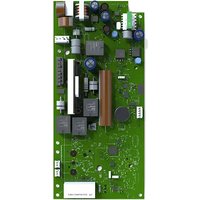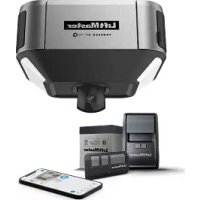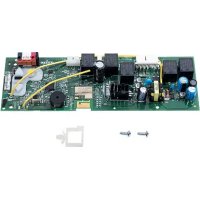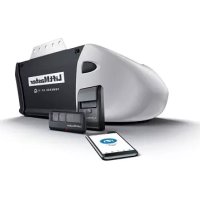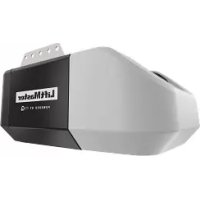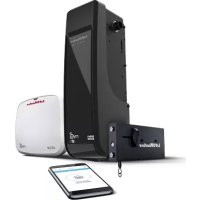
98022 - Garage door LIFT-MASTER - Free user manual and instructions
Find the device manual for free 98022 LIFT-MASTER in PDF.


| Technical Features | Compatible with sectional and single-panel garage doors, 1/2 HP motor, MyQ security technology. |
|---|---|
| Usage | Designed for residential use, allows remote opening and closing via smartphone. |
| Maintenance and Repair | Regularly check the operation of safety sensors, lubricate rails and rollers every 6 months. |
| Safety | Equipped with an obstacle detection system, changing security code, and built-in alarm in case of intrusion. |
| General Information | 5-year warranty on the motor, professional installation recommended to ensure compliance and safety. |
Frequently Asked Questions - 98022 LIFT-MASTER
User questions about 98022 LIFT-MASTER
0 question about this device. Answer the ones you know or ask your own.
Ask a new question about this device
Download the instructions for your Garage door in PDF format for free! Find your manual 98022 - LIFT-MASTER and take your electronic device back in hand. On this page are published all the documents necessary for the use of your device. 98022 by LIFT-MASTER.
USER MANUAL 98022 LIFT-MASTER
natural_image
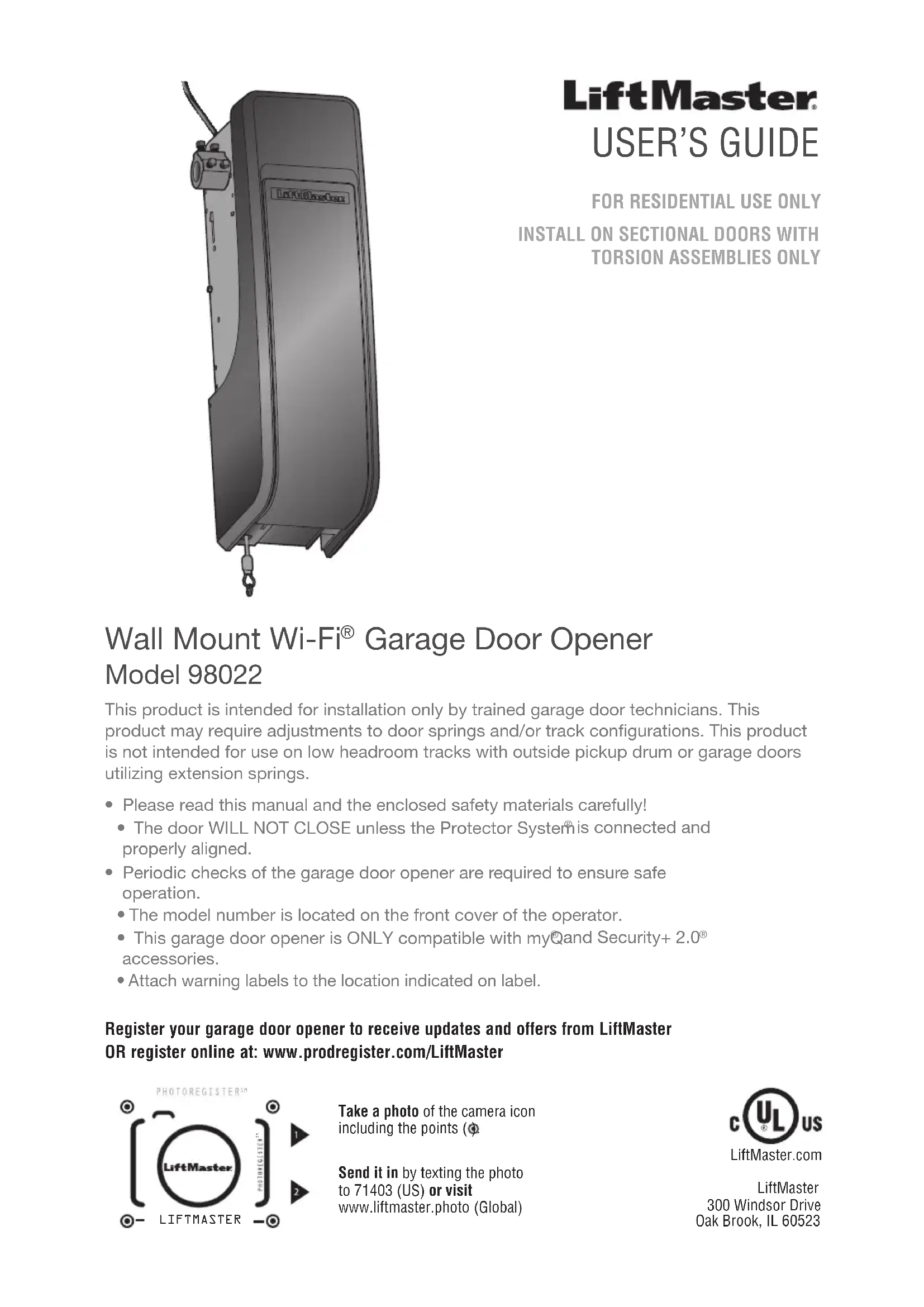
3D rendering of a mechanical device with attached components and hooks (no visible text or symbols)LiftMaster®
USER'S GUIDE
This product is intended for installation only by trained garage door technicians. This product may require adjustments to door springs and/or track configurations. This product is not intended for use on low headroom tracks with outside pickup drum or garage doors utilizing extension springs.
- Please read this manual and the enclosed safety materials carefully!
- The door WILL NOT CLOSE unless the Protector System® is connected and properly aligned.
- Periodic checks of the garage door opener are required to ensure safe operation.
- The model number is located on the front cover of the operator.
- This garage door opener is ONLY compatible with myQand Security+ 2.0® accessories.
- Attach warning labels to the location indicated on label.
Register your garage door opener to receive updates and offers from LiftMaster OR register online at: www.prodregister.com/LiftMaster
text_image
PHOTOREGISTER® LiftMaster PHOTOREGISTER® 1 2 LIFTMASTERTake a photo of the camera icon including the points (¢)
Send it in by texting the photo to 71403 (US) or visit www.liftmaster.photo (Global)

LiftMaster 300 Windsor Drive Oak Brook, IL 60523
Important Safety Instructions ....3-4
Power....5
Connect With Your Smartphone 6-7
Before You Begin....6
Test the Wi-Fi Signal Strength 6
Download the myQ App to Set Up an Account and Connect 7
Programming 8-9
893MAX Remote Control 8
Wireless Keypad....8
To Erase the Memory 8
Program the myQ LED Remote Light....9 HomeLink....9
Operation....10-12
To Open the Door Manually....10
Door Control....11
Battery Backup....11
The Protector System (Safety Reversing Sensors)....12
Adjustments ......13-16
Introduction ......13
Identify the Door Profile ....14
Set Door Profile....15
Program the Travel....16
Test the Safety Reversal System....17
Test the Protector System....17
Maintenance....18
Troubleshooting....19-20
Automatic Garage Door Opener Safety & Maintenance Guide....21-22
Repair Parts ......23
Warranty 23
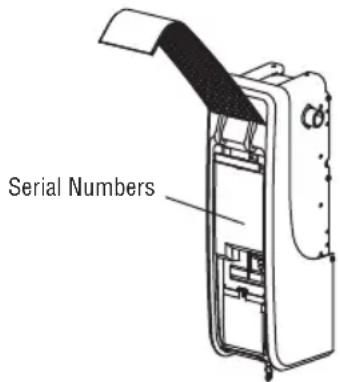
my Q Serial Number:
Write down the following information for future reference: myQ Serial Number:
Product S/N:
Date of Purchase:
/ /
text_image
Serial NumbersSafety Symbol and Signal Word Review
This garage door opener has been designed and tested to offer safe service provided it is installed, operated, maintained and tested in strict accordance with the instructions and warnings contained in this manual.
When you see these Safety Symbols and Signal Words on the following pages, they will alert you to the possibility of serious injury or death if you do not comply with the warnings that accompany them. The hazard may come from something mechanical or from electric shock. Read the warnings carefully.
WARNING
Mechanical
WARNING
Electrical
When you see this Signal Word on the following pages, it will alert you to the possibility of damage to your garage door and/or the garage door opener if you do not comply with the cautionary statements that accompany it. Read them carefully.
CAUTION

WARNING: This product can expose you to chemicals including lead, which are known to the State of California to cause cancer or birth defects or other reproductive harm. For more information go to www.P65Warnings.ca.gov.
Unattended Operation
The Timer-to-Close (TTC) feature, the myQ Smartphone Control app, and myQ Garage Door and Gate Monitor are examples of unattended close and are to be used ONLY with sectional doors. Any device or feature that allows the door to close without being in the line of sight of the door is considered unattended close. The Timer-to-Close (TTC) feature, the myQ Smartphone Control, and any other myQ devices are to be used ONLY with sectional doors.
myQ Remote LED Light must be installed to enable use of Timer To Close or myQ Smartphone Control of the door.
IMPORTANT INSTALLATION INSTRUCTIONS
WARNING
To reduce the risk of SEVERE INJURY or DEATH:
- READ AND FOLLOW ALL WARNINGS AND INSTRUCTIONS.
- Install garage door opener ONLY on properly balanced and lubricated garage door. An improperly balanced door may NOT reverse when required and could result in SEVERE INJURY or DEATH.
- ALL repairs to cables, spring assemblies and other hardware MUST be made by a trained door systems technician BEFORE installing opener.
- Disable ALL locks and remove ALL ropes connected to garage door BEFORE installing opener to avoid entanglement.
- Where possible, install the door operator 7 feet (2.13 m) or more above the floor.
- Mount the emergency release within reach, but at least 6 feet (1.83 m) above the floor and avoiding contact with vehicles to avoid accidental release.
- NEVER connect garage door opener to power source until instructed to do so.
-
NEVER wear watches, rings or loose clothing while installing or servicing opener. They could be caught in garage door or opener mechanisms.
-
Install wall-mounted garage door control:
• within sight of the garage door. - out of reach of small children at a minimum height of 5 feet (1.53 m) above floors, landings, steps or any other adjacent walking surface.
-
away from ALL moving parts of the door.
-
Install the emergency release marking. Attach the marking on or next to the emergency release. Install the entrapment warning placard next to the door control in a prominent location.
-
Place emergency release/safety reverse test label in plain view on inside of garage door.
-
Upon completion of installation, test safety reversal system. Door MUST reverse on contact with a 1-1/2" (3.8 cm) high object (or a 2x4 laid flat) on the floor.
-
To avoid SERIOUS PERSONAL INJURY or DEATH from electrocution, disconnect ALL electric and battery power BEFORE performing ANY service or maintenance.
14. SAVETHESE INSTRUCTIONS.
IMPORTANT SAFETY INSTRUCTIONS
WARNING
To reduce the risk of SEVERE INJURY or DEATH:
- READ AND FOLLOW ALL WARNINGS AND INSTRUCTIONS.
- ALWAYS keep remote controls out of reach of children. NEVER permit children to operate or play with garage door control push buttons or remote controls.
- ONLY activate garage door when it can be seen clearly, it is properly adjusted, and there are no obstructions to door travel.
- ALWAYS keep garage door in sight and away from people and objects until completely closed. NO ONE SHOULD CROSS THE PATH OF THE MOVING DOOR.
- NO ONE SHOULD GO UNDER A STOPPED, PARTIALLY OPENED DOOR.
- If possible, use emergency release handle to disengage trolley ONLY when garage door is CLOSED. Use caution when using this release with the door open. Weak or broken springs or unbalanced door could result in an open door falling rapidly and/or unexpectedly and increasing the risk of SEVERE INJURY or DEATH.
- NEVER use emergency release handle unless garage doorway is clear of persons and obstructions.
-
NEVER use emergency release handle to pull garage door open or closed. If rope knot becomes untied, you could fall.
-
After ANY adjustments are made, the safety reversal system MUST be tested.
- Safety reversal system MUST be tested every month. Garage door MUST reverse on contact with 1-1/2" high (3.8 cm) object (or a 2x4 laid flat) on the floor. Failure to adjust the garage door opener properly increases the risk of SEVERE INJURY or DEATH.
- ALWAYS KEEP GARAGE DOOR PROPERLY BALANCED. An improperly balanced door may NOT reverse when required and could result in SEVERE INJURY or DEATH.
- ALL repairs to cables, spring assemblies and other hardware, ALL of which are under EXTREME tension, MUST be made by a trained door systems technician.
- ALWAYS disconnect electric power to garage door opener BEFORE making ANY repairs or removing covers.
- This operator system is equipped with an unattended operation feature. The door could move unexpectedly. NO ONE SHOULD CROSS THE PATH OF THE MOVING DOOR.
15. SAVETHESE INSTRUCTIONS.
To reduce the risk of electric shock, your garage door opener has a grounding type plug with a third grounding pin. This plug will only fit into a grounding type outlet. If the plug doesn't fit into the outlet you have, contact a qualified electrician to install the proper outlet.
OPTION A: TYPICAL WIRING
- Plug in the garage door opener into a grounded outlet.
- DO NOT run garage door opener at this time.
OPTION B: PERMANENT WIRING CONNECTION
If permanent wiring is required by your local code, refer to the following procedure.
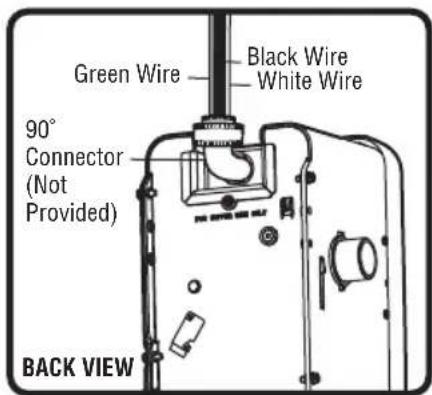
To make a permanent connection through the 7/8 inch hole in the back of the garage door opener (according to local code):
- Be sure power is NOT connected to the opener, and disconnect power to circuit.
- Remove the garage door opener from the torsion bar, remove cover screws and set the cover aside.
- Cut the line cord 6" (15.2 cm) above the strain relief.
- Squeeze the strain relief and push into motor unit, then remove the strain relief from the line cord.
- Install a 90° conduit (not provided) or flex cable adapter (not provided) to the 7/8" hole. Reinstall garage door opener to torsion bar.
- Run wires through conduit, cut to proper length and strip insulation.
- Strip 1/2" (1.3 cm) of insulation from the existing black, white and green wires.
- Connect the line to the black wire and neutral to the white wire with wire nuts (not provided). Connect ground wire to the green ground screw.
- Properly secure wires under plastic ties so that they do not come into contact with moving parts.
- Reinstall cover.

WARNING
To prevent possible SERIOUS INJURY or DEATH from electrocution or fire:
- Be sure power is NOT connected to the opener, and disconnect power to circuit BEFORE removing cover to establish permanent wiring connection.
- Garage door installation and wiring MUST be in compliance with ALL local electrical and building codes.
- NEVER use an extension cord, 2-wire adapter or change plug in ANY way to make it fit outlet. Be sure the opener is grounded.
text_image
Green Wire Black Wire White Wire 90° Connector (Not Provided) BACK VIEW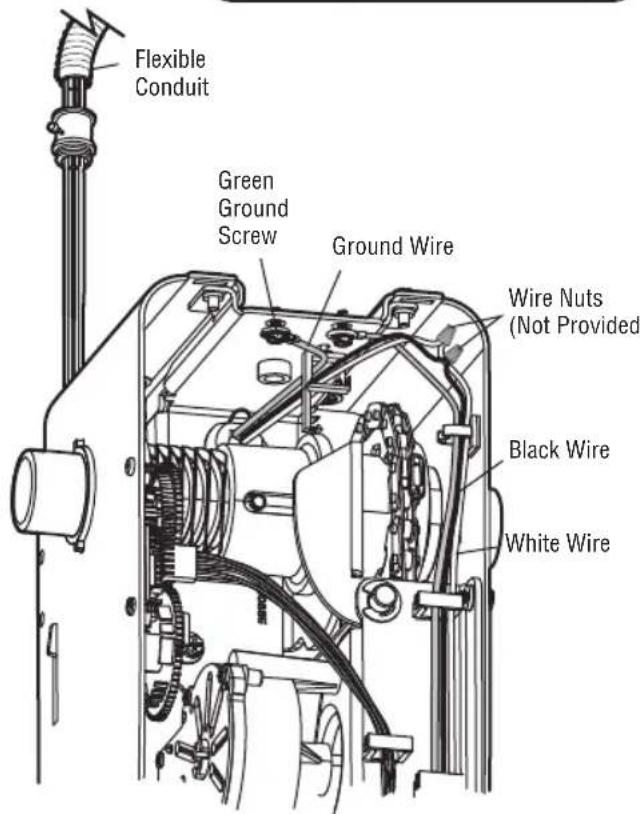
text_image
Flexible Conduit Green Ground Screw Ground Wire Wire Nuts (Not Provided) Black Wire White WireConnect With Your Smartphone
Before You Begin
You will need:
• Wi-Fi enabled smartphone, tablet or laptop
- Broadband Internet Connection
• Wi-Fi signal in the garage (2.4 Ghz, 802.11b/g/n required)
- Password for your Wi-Fi network (main network, not a guest network)

Test the Wi-Fi Signal Strength
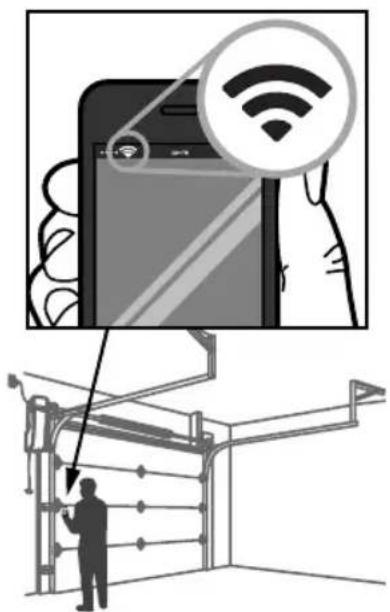
Make sure your mobile device is connected to your Wi-Fi network. Hold your mobile device in the place where your garage door opener is installed and check the Wi-Fi signal strength.
text_image
Diagram illustrating smart home connectivity with a smartphone displaying Wi-Fi icons and a person interacting with a wall-mounted device.Check Signal Strength. If you see:


Wi-Fi signal is strong.
The garage door opener will connect to your Wi-Fi network.
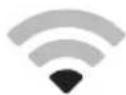
Wi-Fi signal is weak.
The garage door opener may connect to your Wi-Fi network. If not, try one of the options below to improve the Wi-Fi signal.

No Wi-Fi signal.
The garage door opener will not be able to connect to your Wi-Fi network. Try one of the options below to improve the Wi-Fi signal:
- Move your router closer to the garage door opener to minimize interference from walls and other objects
• Buy a Wi-Fi range extender
For compatible router specifications and help, visit LiftMaster.com/Customer-Support.
Proceed to page 7.
Connect With Your Smartphone
Download the myQ App to Set Up an Account and Connect
Open and close your door, get alerts and set schedules from anywhere. Connected smart garage door openers also receive software updates to ensure the opener has the latest operational features.
- Download the myQ App.
- Set up an account and connect.
For more information on connecting your garage door opener, visit Liftmaster.com/Customer-Support.
| Wi-Fi Status | |
| LED Definition | |
| Blue Off - Wi-Fi is not turned | on.Blinking - Garage door opener is in Wi-Fi learn mode.Solid - Mobile device connected to the garage door opener. |
| Blue and Green Blinking - Attempting to connect to router. | |
| Green Blinking - Attempting | to connect to the Internet server.Solid - Wi-Fi has been set up and garage door opener is connected to the Internet. |
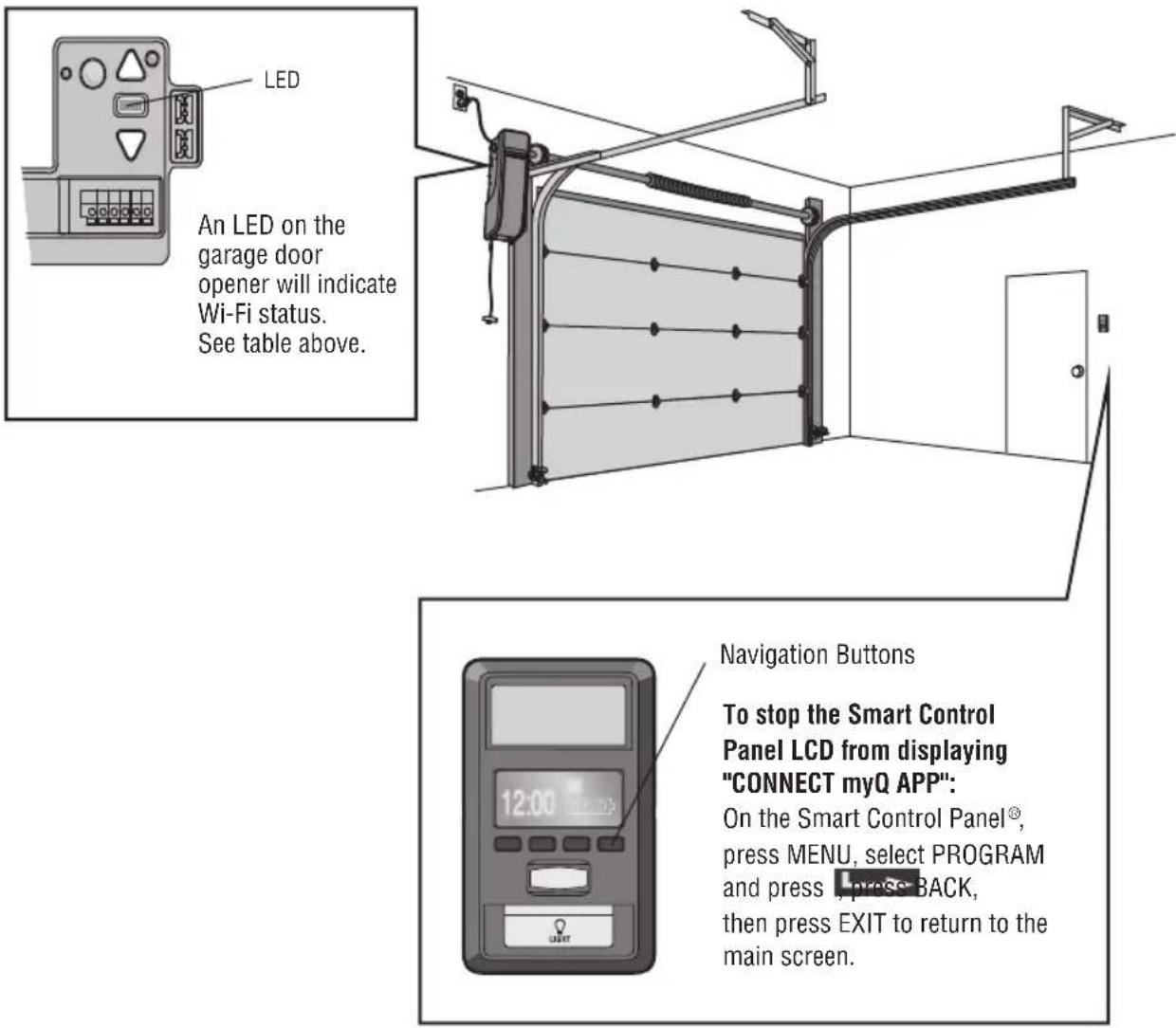
text_image
LED An LED on the garage door opener will indicate Wi-Fi status. See table above. Navigation Buttons To stop the Smart Control Panel LCD from displaying "CONNECT myQ APP": On the Smart Control Panel®, press MENU, select PROGRAM and press , press BACK, then press EXIT to return to the main screen.893MAX Remote Control
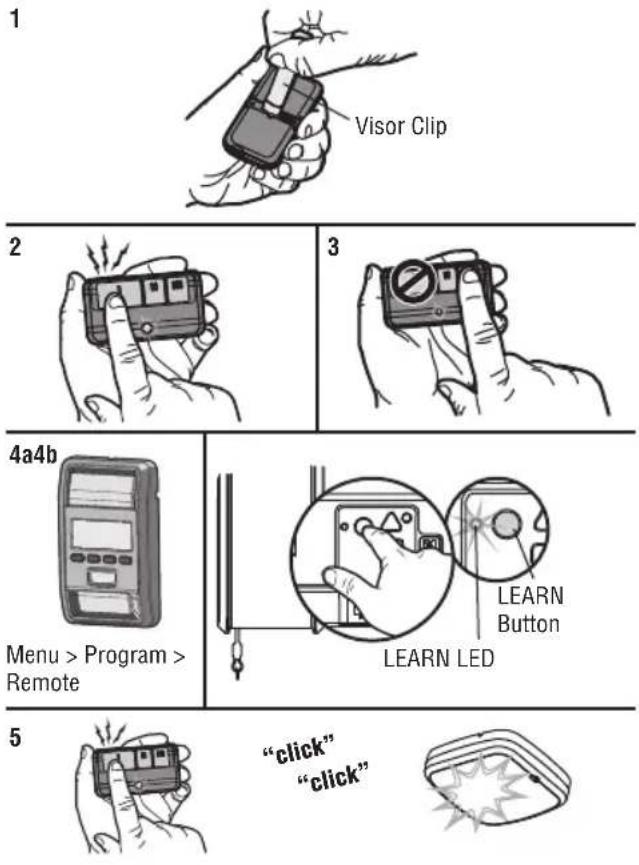
Below are the steps to program a new or existing remote control. Test remote control before reprogramming.
- Press and hold the program button on the remote control until the LED on the front of the remote control turns on.
- Press and release the remote control button you wish to use.
- Press any remote control button except the button that was just programmed.
4a. Select Menu > Program > Remote and follow the on screen prompts. OR
4b. Press and release the LEARN button on the garage door opener. The Learn LED will light. Within 30 seconds...
- Press the remote control button programmed in step 2 until the garage door opener light flashes or two clicks are heard.
To program other types of remote controls or keyless entries see the instructions included with the device or visit LiftMaster.com.
Wireless Keypad
Refer to the instructions provided with your keyless entry or go to LiftMaster.com to download instructions.
To Erase the Memory
Erase ALL Remote Controls and Keyless Entries
Press and hold the LEARN button until the LED goes out (approximately 6 seconds).
All remote controls and keyless entries are now erased.
Erase ALL Devices (Including myQ enabled accessories)
- Press and hold the LEARN button until the LED goes out (approximately 6 seconds).
- Immediately press and hold the LEARN button until the LED goes out. All codes are now erased.
Erase the Wi-Fi Network from the Garage Door Opener
Press and hold the adjustment button until 3 beeps are heard (approximately 6 seconds).
Erase a myQ Account
Go to myLiftMaster.com to delete your myQ account.
text_image
1 Visor Clip 2 3 4a4b Menu > Program > Remote LEARN LED 5 "click" "click"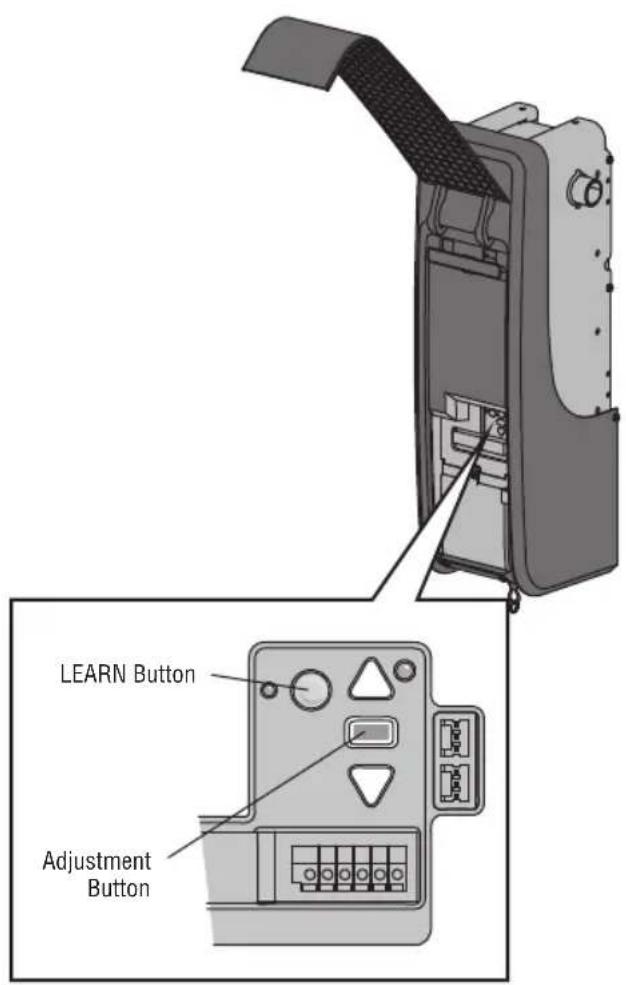
text_image
LEARN Button Adjustment ButtonProgram the myQ LED Remote Light
myQ Remote LED Light must be installed to enable use of Timer To Close or myQ Smartphone Control of the door.
Your garage door opener remote light has already been programmed at the factory to operate with your opener. Any additional or replacement remote lights will need to be programmed.
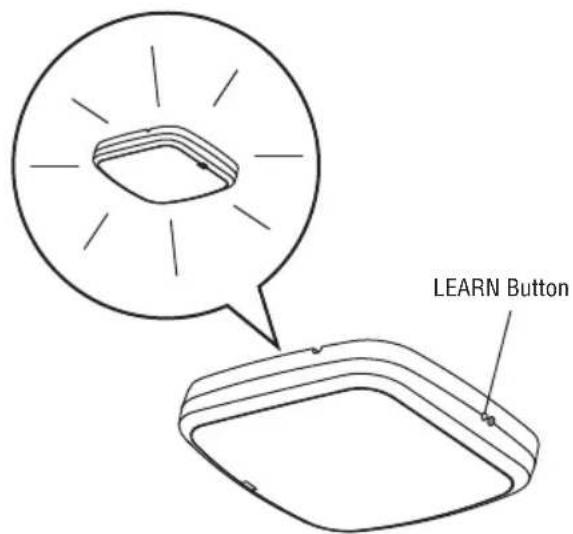
- Press the LEARN button on the light until the green LED comes ON.
- Press the LEARN button on the garage door opener. OR
On the Smart Control Panel, go to Menu > Program > myQ Device.
- The code has been programmed when the remote light blinks once.
NOTE: The LED light is very bright and will blink while programming. DO NOT stare at the light while on a ladder.
text_image
LEARN Button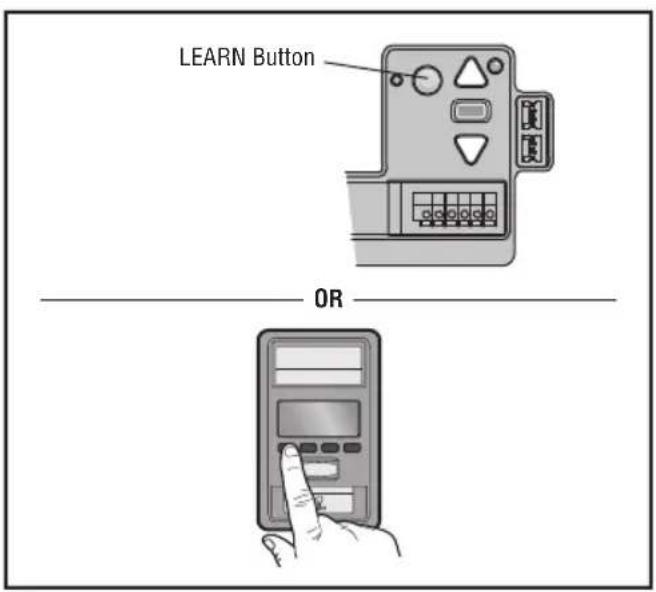
text_image
LEARN Button ORHomeLink®
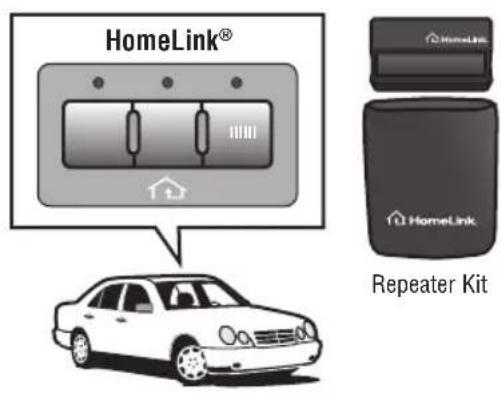
In the rare case the HomeLink system does not program with the Security+ 2.0 Garage door opener, install a repeater kit. Refer to HomeLink Instructions Below.
HomeLink is the in-vehicle system. The image used is for reference only and your product may look different.
WHEN TO INSTALL A HOMELINK REPEATER KIT
All 2006 and Older vehicles – A repeater kit is required and must be purchased by the homeowner.
All 2007 and Newer vehicles – Program the HomeLink according to the vehicle instructions. If after ONE attempt to program the HomeLink to the garage door opener and you are unsuccessful, install a repeater.
HOW TO ORDER
Order the HomeLink repeater kit from an installer or call 1-800-355-3515. To program the HomeLink repeater kit, refer to the instructions provided in the kit or visit: http://www.homelink.com/program.
INSTALLATION QUICK FACTS
- Only one repeater kit is required per home.
- Use different HomeLink buttons in vehicle if programming multiple cars, button 1 first car, button 2 second car... etc.
• HomeLink remote is NOT a garage door opener. - If you are using the HomeLink repeater with a garage door opener that has a battery backup system, ensure your original garage door opener remote control is programmed to the garage door opener and place it in your glove box for use in the event of a power outage.
- The remote included in this repeater kit MUST be kept for future programming (new vehicle, new garage door opener etc).
text_image
HomeLink® HomeLink HomeLink Repeater KitWARNING
To prevent possible SERIOUS INJURY or DEATH from a falling garage door:
- If possible, use emergency release handle to disengage trolley ONLY when garage door is CLOSED. Weak or broken springs or unbalanced door could result in an open door falling rapidly and/or unexpectedly.
- NEVER use emergency release handle unless garage doorway is clear of persons and obstructions.
- NEVER use emergency release handle to pull door open or closed. If rope knot becomes untied, you could fall.
To Open the Door Manually
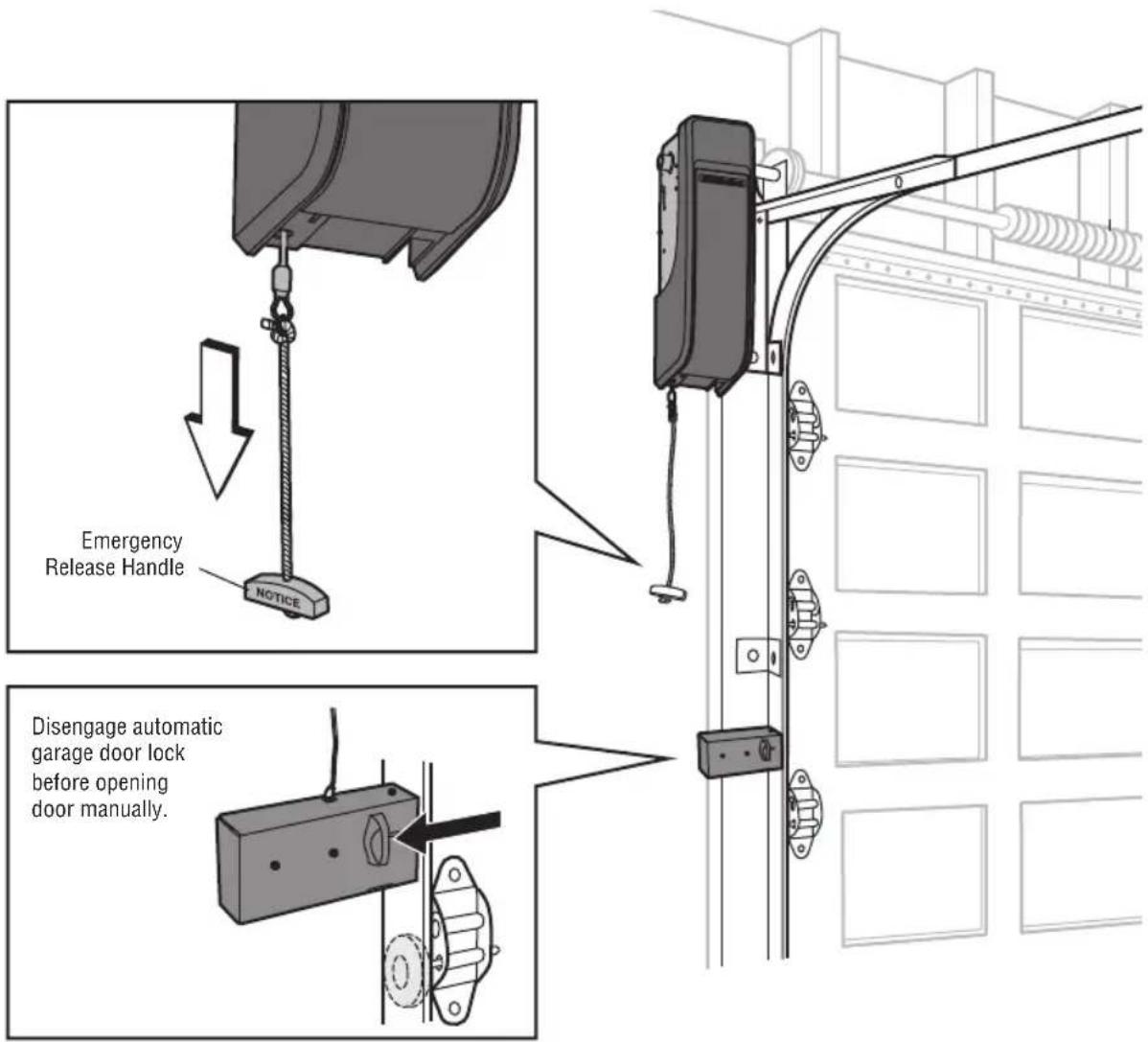
Disengage door lock before proceeding.
- The door should be fully closed if possible.
- Pull down on the emergency release handle until a click noise is heard.
- To reconnect the door to the garage door opener, pull the emergency release handle straight down a second time until a click noise is heard.
The door will reconnect on the next UP or DOWN operation.
text_image
Emergency Release Handle NOTICE Disengage automatic garage door lock before opening door manually.Door Control
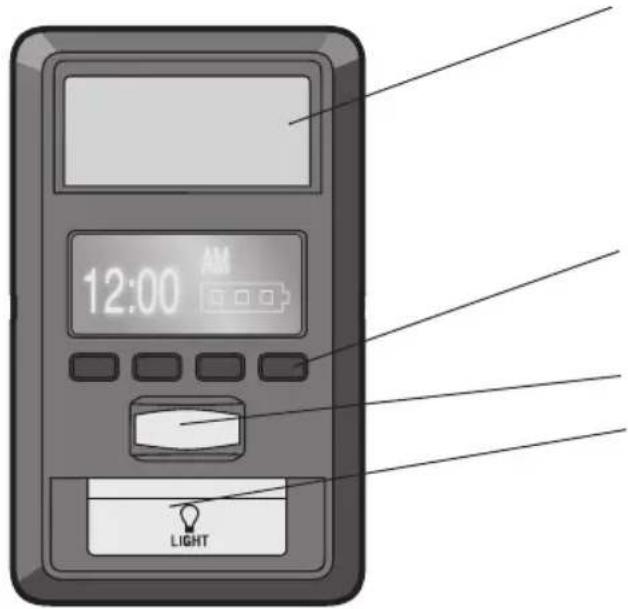
text_image
12:00 AM LIGHTBattery Backup
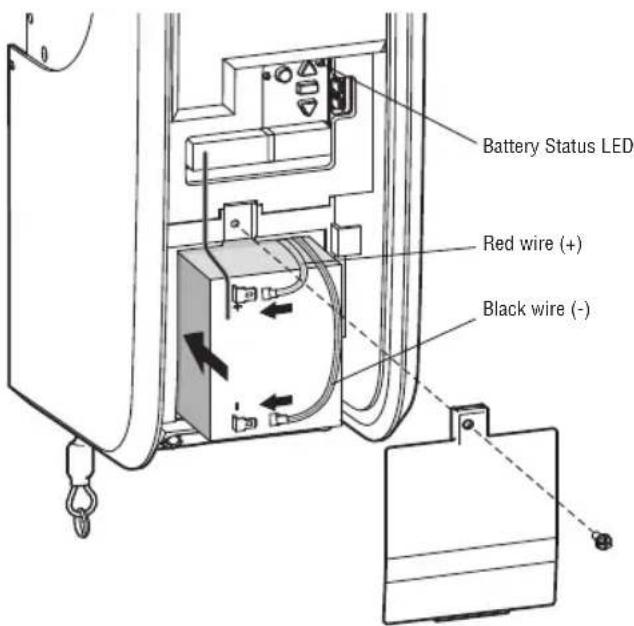
The battery backup allows access in and out of your garage when the power is out. When the garage door opener is operating on battery power, the garage door opener will run slower and the lights, Timer-to-Close, and remote close features (myQ App) are disabled. In battery backup mode, the Automatic Garage Door Lock will unlock when the garage door is opened, and will remain disabled until power is restored. During a power outage the battery supplies power for up to 24 hours of operation. For maximum battery life and prevent damage, disconnect the battery when the garage door opener is unplugged for an extended period of time.
• Solid green LED - Charged battery
- Blinking green LED - Charging battery
• Solid orange LED with beep - Operating on battery power
- Blinking orange LED with beep - Low battery
• Solid red LED with beep - Replace battery
NOTE: Be sure the short antenna is not pinched by the battery door and held in place as shown.
Push Bar:
Open/Close garage door.
Navigation Buttons:
Access menu:
Clock Setup, Timer-to-Close, Lock, Program, Temperature, Language, Light Settings, Contrast Adjust, Maintenance Alert System, and Wi-Fi Setup.
Motion Sensor
Light Button
Tip: To stop the Smart Control Panel LCD from displaying "CONNECT myQ APP":
On the Smart Control Panel ^® , press MENU, select PROGRAM and , press BACK, then press EXIT to return to the main screen.
text_image
Battery Status LED Red wire (+) Black wire (-)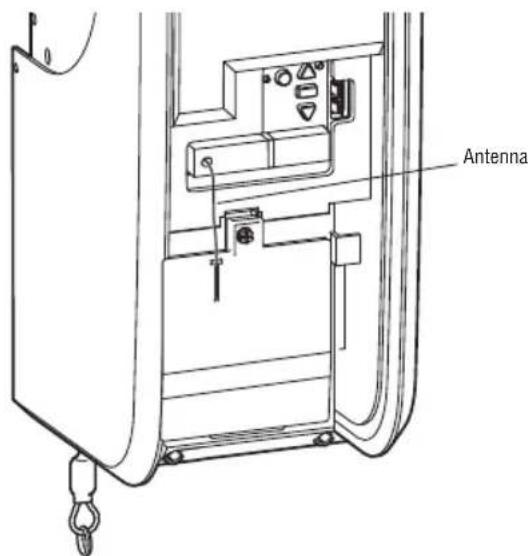
text_image
AntennaThe Protector System® (Safety Reversing Sensors)
WARNING
Be sure power is NOT connected to the garage door opener BEFORE installing the safety reversing sensor. To prevent SERIOUS INJURY or DEATH from closing garage door:
- Correctly connect and align the safety reversing sensor. This required safety device MUST NOT be disabled.
- Install the safety reversing sensor so beam is NO HIGHER than 6" (15 cm) above garage floor.
The door will not close if the sensors have not been installed and aligned correctly.
When the light beam is obstructed or misaligned while the door is closing, the door will reverse. If the door is already open, it will not close.
The sensors can be aligned by loosening the wing nuts, aligning the sensors, and tightening the wing nuts. Check to make sure the LEDs in both sensors are glowing steadily. The LEDs in both sensors will glow steadily if they are aligned and wired correctly.
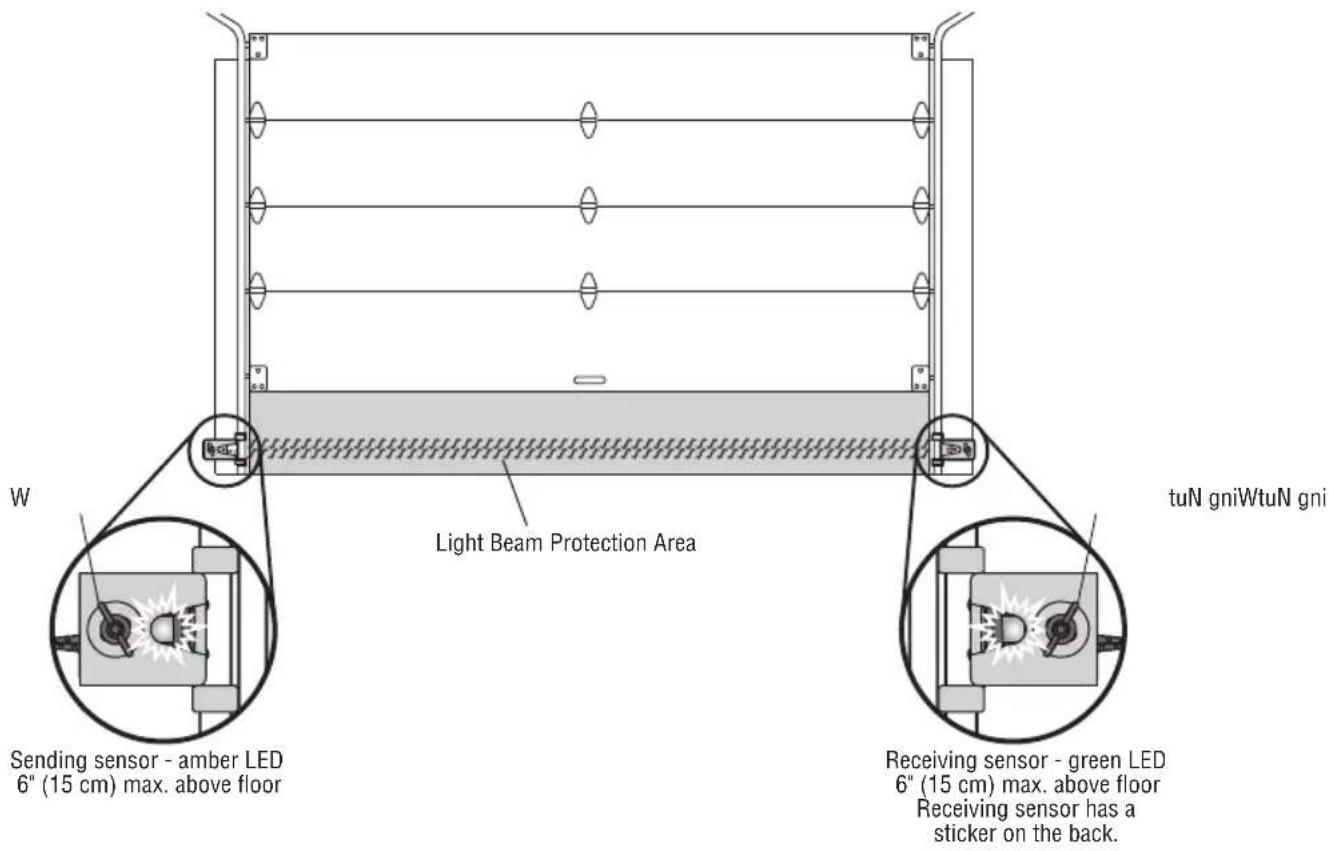
text_image
W Light Beam Protection Area tuN gniWtuN gni Sending sensor - amber LED 6" (15 cm) max. above floor Receiving sensor - green LED 6" (15 cm) max. above floor Receiving sensor has a sticker on the back.If either of the sensor LEDs are off, there is no power to the sensor:
- Check that you have power to the garage door opener.
- Check the sensor wire is not shorted or broken.
- Check that the sensors are wired correctly; white wires to white terminal and white/black wires to grey terminal.
If the green receiving sensor LED is blinking, the sensors are obstructed or misaligned:
-
Check for obstructions in the sensor light beam.
-
Align the sensors.
-
If the receiving sensor (green LED) faces direct sunlight, switch the sensors to opposite sides of the door to assure proper operation.
Introduction
WARNING
Without a properly installed safety reversal system, persons (particularly small children) could be SERIOUSLY INJURED or KILLED by a closing garage door.
- Incorrect adjustment of garage door travel limits will interfere with proper operation of safety reversal system.
- After ANY adjustments are made, the safety reversal system MUST be tested. Door MUST reverse on contact with 1-1/2" (3.8 cm) high object (or 2x4 laid flat) on floor.
WARNING
To prevent damage to vehicles, be sure fully open door provides adequate clearance.
Your garage door opener is designed with electronic controls to make setup and adjustments easy. The adjustments allow you to program where the door will stop in the open (UP) and close (DOWN) position. The electronic controls sense the amount of force required to open and close the door.
NOTE: If anything interferes with the door's upward travel it will stop. If anything interferes with the door's downward travel, it will reverse.
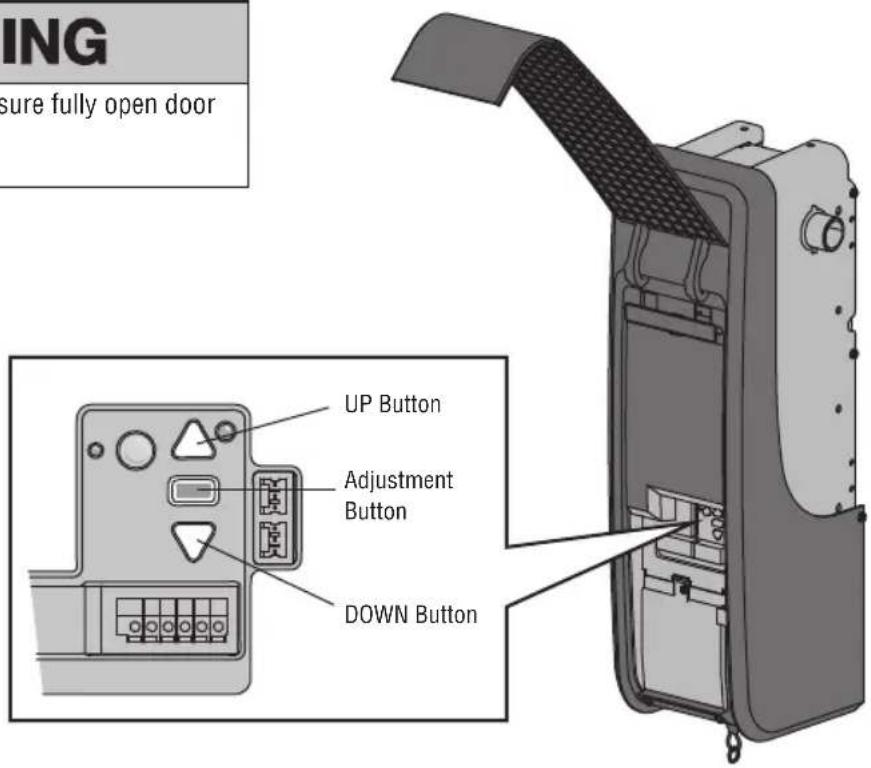
text_image
ING sure fully open door UP Button Adjustment Button DOWN ButtonAdjustment
1 Identify Door Profile
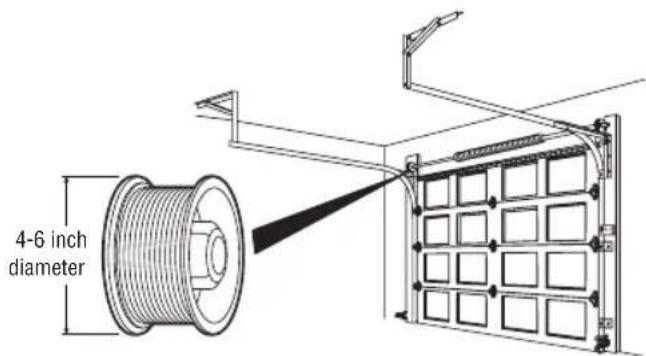
To identify the door profile number, measure the full drum diameter based on the images below.
NOTE: This step is important to ensure the proper operation of the unit.
To view a video demonstration of how to identify and set the door profile, scan the QR code.
WARNING
To prevent possible SERIOUS INJURY or DEATH, follow instructions to select and set door profile for safe and proper operation.
Standard Lift Sectional Door
- Door Profile 1 = Standard to Heavy Weight Door* with a 4" drum (Recommended).
- Door Profile 2 = Light Weight Door with a 4" drum.
- Door Profile 3 = Heavy Weight Door* with a 6" drum.
- Door Profile 4 = Light Weight Door with a 6" drum.
* NOTE: Drum sizes may vary by manufacturer.
For Standard Lift Section Doors:
- Drums less than or equal to 5", use 4" drum.
- Drums more than 5", use 6" drum.
Standard to Heavy Weight doors are those with solid wood interiors, wood veneer exteriors, glass windows, insulation, and/or decorations.
text_image
4-6 inch diameterHigh Lift Door
- Door Profile 5 = Tapered drum with rails that raise to a higher elevation
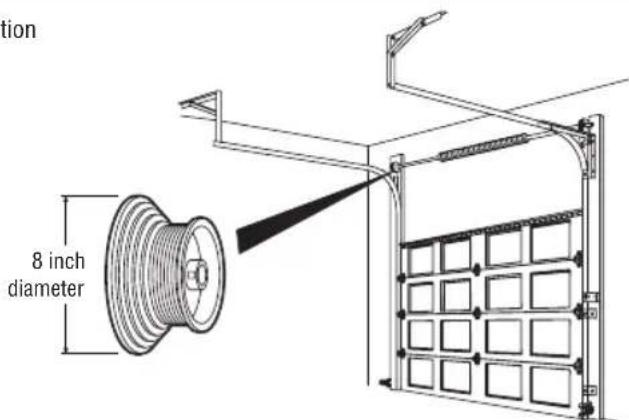
text_image
tion 8 inch diameterVertical Lift Sectional Door
- Door Profile 5 = Tapered Drum with rails raising vertically above the opening.
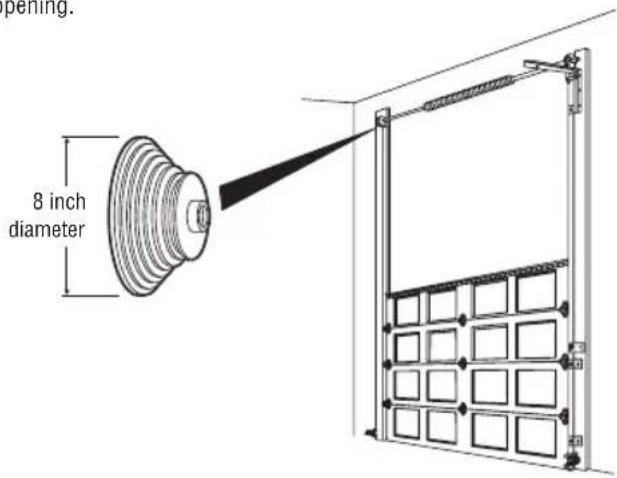
text_image
penning. 8 inch diameterAdjustment
2 Set Door Profile
- To enter Set Door Profile mode, press and hold the black button for one second. The UP and DOWN buttons turn a solid color.
- To set Door Profile, press the UP and DOWN buttons. The Learn LED button blinks and beeps as you change the setting.
- The number of Learn LED button blinks indicates which profile you have selected. There is no preset door profile setting.
| Blinks Drum Size Door Type Unbalanced Door Weight | |
| 1 4" Sectional > 180 lbs. | |
| 2 4" Sectional < 180 lbs. | |
| 3 6" Sectional > 400 lbs. | |
| 4 6" Sectional < 400 lbs. | |
| 5 8" High lift or vertical | N/A |
- Press and release the Black button to set the Door Profile. This process is now complete. Proceed to the Travel Learn mode.
EXITING DOOR PROFILE NUMBER SETTING
If there is no selection within 4.5 minutes, the Door Profile selection mode will be cancelled with a long beep.
WARNING
To prevent possible SERIOUS INJURY or DEATH, after ANY changes to the door profile, reprogram limits.
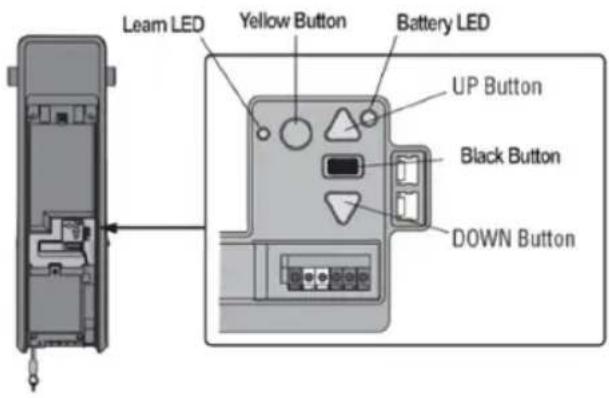
text_image
Leam LED Yellow Button Battery LED UP Button Black Button DOWN ButtonAdjustment
3 Program the Travel
WARNING
Without a properly installed safety reversal system, persons (particularly small children) could be SERIOUSLY INJURED or KILLED by a closing garage door.
- Incorrect adjustment of garage door travel limits will interfere with proper operation of safety reversal system.
- After ANY adjustments are made, the safety reversal system MUST be tested. Door MUST reverse on contact with 1-1/2" (3.8 cm) high object (or 2x4 laid flat) on floor.
Note: While programming the travel, the UP and DOWN buttons can be used to move the door as needed. During the Automatic Force Setup, the door will automatically open and close.
1 Press and hold the UP Button until the door is in the desired UP position.
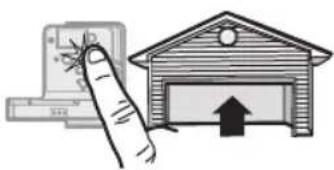
natural_image
Illustration of a hand holding a computer and a garage with an upward arrow (no text or symbols)2 Once the door is in the desired UP position press and release the Adjustment Button. The garage door opener lights will flash twice and the DOWN Button will begin to flash.
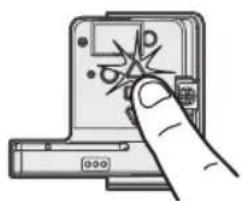
natural_image
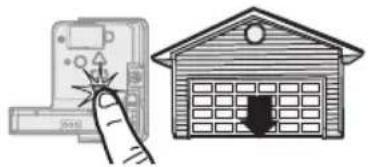
Hand inserting a device into a memory compartment, showing a starburst pattern (no text or symbols)3 Press and hold the DOWN Button until the door is in the desired DOWN position.
natural_image
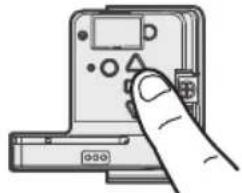
Illustration of a hand pressing a button next to a house with a door (no text or symbols)4 Once the door is in the desired DOWN position press and release the Adjustment Button. The garage door opener lights will flash twice. Program the Travel is now complete. If the garage door opener lights flash 5 times, then programming has timed out and the Travel Limits have not been set. Please restart the Program the Travel process.
natural_image
Hand inserting a device into a control panel (no text or symbols visible)4 Automatic Force Set Up
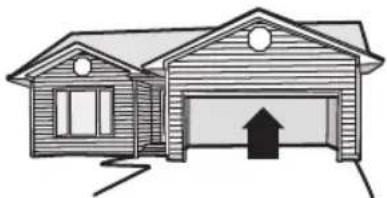
Once both the up and down positions have been manually set, the Safety Reversing Sensors will reconnect and become operational. Then, the opener will enter a force-sensing operation by automatically moving the door open and close. The garage door opener will sound an audible and visual alert before automatically opening and closing the door. The garage door opener will beep three times, confirming that the Automatic Force Setup completed successfully. Adjustment is complete.
If you hear one long beep after the door attempts to move, then the Automatic Force Set Up has not completed successfully. Please start over at step 1 of Program the Travel.
natural_image
Simple line drawing of a two-story house with a garage and up arrow (no text or symbols)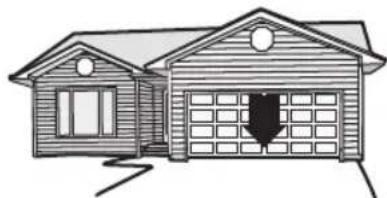
natural_image
Simple line drawing of a two-story house with a garage and chimney (no text or symbols)Adjustment
5 Test the Safety Reversal System
WARNING
Without a properly installed safety reversal system, persons (particularly small children) could be SERIOUSLY INJURED or KILLED by a closing garage door.
- Safety reversal system MUST be tested every month.
- After ANY adjustments are made, the safety reversal system MUST be tested. Door MUST reverse on contact with 1-1/2" high (3.8 cm) high object (or 2x4 laid flat) on the floor.
1 With the door fully open, place a 1-1/2 inch (3.8 cm) board (or a 2x4 laid flat) on the floor, centered under the garage door.
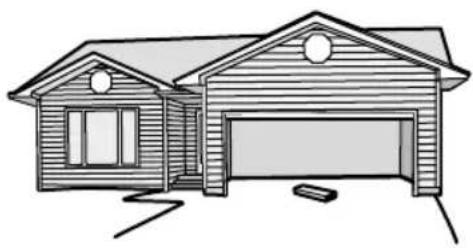
natural_image
Line drawing of a two-story house with a garage and open door (no text or symbols)2 Press the remote control push button to close the door. The door MUST reverse when it makes contact with the board.
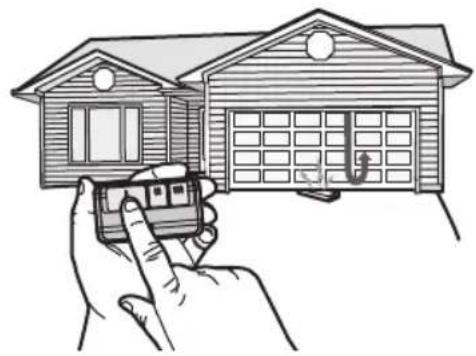
natural_image
Illustration of a hand holding a small car with a door, next to a two-story house (no text or symbols)If the door stops but does not reverse:
- Repeat Program the Travel (see Adjustment Step 3);
- Repeat the Safety Reversal test.
If the test continues to fail, call a trained door systems technician.
6 Test the Protector System®
WARNING
Without a properly installed safety reversing sensor, persons (particularly small children) could be SERIOUSLY INJURED or KILLED by a closing garage door.
1 Open the door. Place an obstruction in the path of the door.
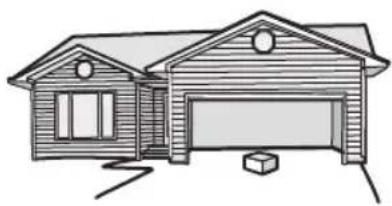
natural_image
Line drawing of a two-story house with a garage and chimney (no text or symbols)2 Press the remote control push button to close the door. The door will not move more than an inch (2.5 cm).
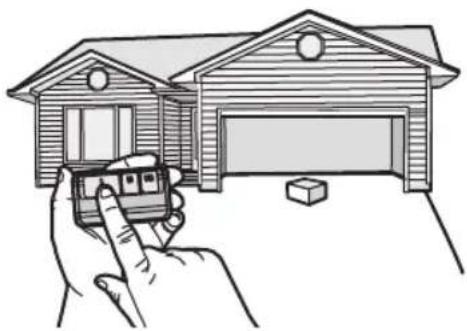
natural_image
Illustration of a hand holding a toy car near a wooden garage (no text or symbols)The garage door opener will not close from a remote control if the LED in either safety reversing sensor is off (alerting you to the fact that the sensor is misaligned or obstructed).
If the garage door opener closes the door when the safety reversing sensor is obstructed (and the sensors are no more than 6 inches [15 cm] above the floor), call for a trained door systems technician.
Maintenance Schedule
EVERY MONTH
- Manually operate door. If it is unbalanced or binding, call a trained door systems technician.
- Check to be sure door opens and closes fully. Adjust if necessary, see page 16.
- Test the safety reversal system. Adjust if necessary, page 17.
EVERY YEAR
- Oil door rollers, bearings and hinges. The garage door opener does not require additional lubrication. Do not grease the door tracks.
- Test the battery backup and consider replacing the battery to ensure the garage door opener will operate during an electrical power outage.
Testing the Battery Backup:
- Unplug the garage door opener from AC power. The battery status LED will glow solid orange (opener is operating on battery power) or will flash (low battery power).
- Open and close the door using the remote control or door control.
- In battery backup mode, the Automatic Garage Door Lock will unlock when the garage door is opened, and will remain disabled until power is restored.
- Plug in the garage door opener. Verify the battery status LED is blinking green (battery is charging).
myQ LED REMOTE LIGHT
- Unplug the light before cleaning.
- Use a lightly dampened cloth for cleaning.
- DO NOT use liquid cleaners on the light lens.
The Remote Control Battery
WARNING
To prevent possible SERIOUS INJURY or DEATH:
- NEVER allow small children near batteries.
- If battery is swallowed, immediately notify doctor. To reduce risk of fire, explosion or chemical burn:
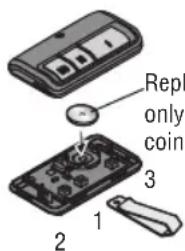
- Replace ONLY with 3V CR2032 coin batteries.
- DO NOT recharge, disassemble, heat above 212°F (100°C) or incinerate.
Pry open the case first in the middle (1), then at each side (2 and 3) with visor clip.
text_image
Repl only coin 1 2 3Replace with only 3V CR2032 coin cell battery.
NOTICE: This device complies with Part 15 of the FCC rules and Industry Canada's license-exempt RSSs. Operation is subject to the following two conditions: (1) this device may not cause harmful interference, and (2) this device must accept any interference received, including interference that may cause undesired operation.
Any changes or modifications not expressly approved by the party responsible for compliance could void the user's authority to operate the equipment. This device must be installed to ensure a minimum 20cm (8 in.) distance is maintained between users/bystanders and device.
This device has been tested and found to comply with the limits for a Class B digital device, pursuant to part 15 of the FCC rules and Industry Canada ICES standard. These limits are designed to provide reasonable protection against harmful interference in a residential installation. This equipment generates, uses and can radiate radio frequency energy and, if not installed and used in accordance with the instructions, may cause harmful interference to radio communications. However, there is no guarantee that interference will not occur in a particular installation. If this equipment does cause harmful interference to radio or television reception, which can be determined by turning the equipment off and on, the user is encouraged to try to correct the interference by one or more of the following measures:
- Reorient or relocate the receiving antenna.
- Increase the separation between the equipment and receiver.
- Connect the equipment into an outlet on a circuit different from that to which the receiver is connected.
- Consult the dealer or an experienced radio/TV technician for help.
Troubleshooting
Diagnostic Chart
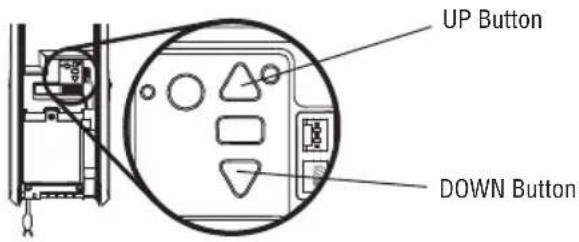
Your garage door opener is programmed with self-diagnostic capabilities. The UP and DOWN arrows on the garage door opener flash the diagnostic codes.
text_image
UP Button DOWN Button| DIAGNOSTIC CODE SYMPTOM SOLUTIONUp Arrow Down ArrowFlash(es) Flash(es) | |
| 1 1 The garage door openerwill not close. | Safety sensors are not installed, connected or wires may be cut. Inspect sensor wires for a disconnected or cut wire. |
| 1 2 The garage door openerwill not close. | There is a short or reversed wire for the safety sensors. Inspect safety sensor wire at all staple points and connection points and replace wire or correct as needed. |
| 1 3 The door control will not function. | The wires for the door control are shorted or the door control is faulty. Inspect door control wires at all staple points and connection points and replace wire or correct as needed. |
| 1 4 The garage door openerwill not close, and the lights flash. | Safety sensors are misaligned or were momentarily obstructed. Realign both sensors to ensure both LEDs are steady and not flickering. Make sure nothing is hanging or mounted on the door that would interrupt the sensors path while closing. |
| 1 5 Door moves 6-8"(15-20 cm) stops or reverses. | Manually open and close the door. Check for binding or obstructions, such as a broken spring or door lock, correct as needed. Check wiring connections at travel module and at the logic board. Replace travel module if necessary. |
| No movement, only a single click. | Manually open and close the door. Check for binding or obstructions, such as a broken spring or door lock, correct as needed. Replace logic board if necessary. |
| Opener hums for 1-2 seconds no movement. | Manually open and close the door. Check for binding or obstructions, such as a broken spring or door lock, correct as needed. Replace motor if necessary. |
| 1 6 Door coast after it hascome to a complete stop. | Program travel to coasting position or have door balanced by a trained technician. |
| 2 1-5 No movement or sound. Replace logic board. | |
| 3 1 The garage door openermoves slightly, then stops | Activate the garage door opener again. If problem persists, replace logic board. |
| 3 3 The battery status LED is constantly blinking green. | Battery backup charging circuit error, replace logic board. |
| 3 5 The garage door will notclose. Door reverses during close travel direction only. | Check that the CTM Learn is appropriate to the installation.Check for possible door obstructions and remove.Replace defective CTMs with good CTMs to clear the error code (see optional CTM accessory). |
| 4 1-4 Door is moving, stops or reverses. Opener beeps and lights flash. | Manually open and close the door. Check for binding or obstructions, such as a broken spring or door lock, correct as needed. If the door is binding or sticking contact a trained door systems technician. If door is not binding or sticking attempt to reprogram travel. |
| 4 5 Opener runs approximately6-8" (15-20 cm), stops and reverses. | Communication error to travel module. Check travel module connections, replace module if necessary. |
| 4 6 The garage door openerwill not close, and the lights flash. | Safety sensors are misaligned or were momentarily obstructed. Realign both sensors to ensure both LEDs are steady and not flickering. Make sure nothing is hanging or mounted on the door that would interrupt the sensor's path while closing. |
| 5 5 The door will not closewhen using Timer-to-Close or myQ Smartphone Control | myQ Remote LED Light must be installed to use TTC or myQ to control the door. Plug in the myQ Remote LED Light and make sure it is programmed to the garage door opener. |
Additional Troubleshooting
The garage door opener doesn't operate from either the door control or the remote control:
- Does the garage door opener have electric power? Plug a lamp into the outlet. If it doesn't light, check the fuse box or the circuit breaker. (Some outlets are controlled by a wall switch.)
- Have you disabled all door locks? Review installation instruction warnings on page 8.
- Are the wiring connections correct? Review Installation Step 5.
• Is there a build-up of ice or snow under the door? The door may be frozen to the ground. Remove any restriction. - The garage door spring may be broken. Have it replaced (see page 3 for reference).
The door opener operates from the single button control station, but not from a remote control:
- Reprogram the remote control and replace the battery if necessary. Repeat with all remote controls.
The door opens and closes by itself:
- Be sure that all remote control push buttons are off.
- Remove the bell wire from the single button control station terminals and operate from the remote only. If this solves the problem, the single button control station is faulty, or there is an intermittent short in the wire. Replace the control station.
- Erase the memory and reprogram all remote controls (refer to the instructions provided with the remote control or visit LiftMaster.com/Customer-Support).
My remote control will not activate the garage door:
- Verify the lock feature is not activated on the door control.
• Reprogram the remote control.
- If the remote control will still not activate the door check the diagnostic codes to ensure the garage door opener is working properly.
The remote control has short range:
- Change the location of the remote control in your car.
- Some installations may have shorter range due to a metal door, foil backed insulation, or metal garage siding.
The door stops or reverses to open limit and the opener beeps and lights flash 5 times:
- Is something obstructing the door? Is it out of balance, or are the springs broken? Remove the obstruction or call a trained door system technician to repair the door.
The door doesn't open completely:
- Check power door lock.
The door opens but won't close:
- The safety reversing sensor must be connected and aligned correctly before the door opener will move in the down direction. If you are able to close the door using constant pressure, verify the safety reversing sensors are properly installed, aligned and free of any obstructions (see page 13).
The door reverses for no apparent reason:
- Clear any ice or snow from the garage floor area where the door closes.
• Review Adjustment Step 3.
Repeat safety reverse test after adjustments.
My door will not close:
- The safety reversing sensor must be connected and aligned correctly before the garage door opener will move in the down direction.
- Verify the safety reversing sensors are properly installed, aligned and free of any obstructions.
The garage door opener strains to operate door:
- The door may be out of balance or the springs may be broken. Close the door and use the emergency release handle to disconnect the door. Open and close the door manually. A properly balanced door will stay in any point of travel while being supported entirely by its springs. If it does not, disconnect the garage door opener and call a trained door systems technician.
The garage door opener motor hums briefly, then won't work:
- The garage door springs may be broken. See above.
• If the problem occurs on the first operation of the garage door opener, door may be locked. Disable the power door lock.
The garage door opener won't operate due to power failure:
- Manually open the power door lock.
Cable unspooling upon obstruction near top limit:
- If cable unspools, please contacta Professional Door Dealer for service.
Automatic Garage Door Opener Safety & Maintenance Guide
Garage Door Opener Safety - An Automatic Decision
A garage door is the largest moving object in the home. An improperly adjusted garage door and opener can exert deadly force when the door closes – which could lead to entrapment of children or adults and subsequent injury or death.
Proper installation, operation, maintenance, and testing of the garage door and automatic opener are necessary to provide a safe, trouble-free system.
Careless operation or allowing children to play with or use garage door opener controls are also dangerous situations that can lead to tragic results. A few simple precautions can protect your family and friends from potential harm.
Please review the safety and maintenance tips in this guide carefully and keep it for reference. Check the operation of your garage door and opener to ensure they function in a safe and trouble-free manner.
Be sure to read all Important Safety Information found in your garage door opener's manual as it provides more details and safety considerations than can be supplied with this guide.
Garage Door Openers are Not Toys
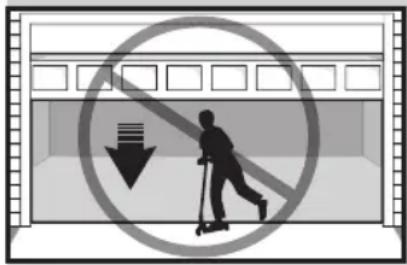
Discuss garage door and opener safety with your children. Explain the danger of being trapped under the door.
text_image
Prohibition sign showing a person on a scooter with a downward arrow, enclosed in a circle with a minus sign.Stay away from a moving door.
natural_image
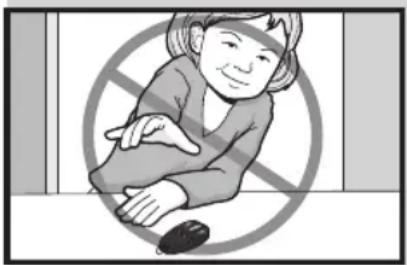
Illustration of a person sitting with a computer mouse, crossed by a diagonal line symbol (no text or symbols present)Keep transmitters and remote controls out of reach of children. Do not let children play with or use transmitters or other remote control devices.
natural_image
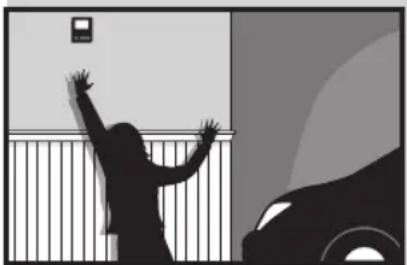
Silhouette of a person reaching toward a wall with a small device, next to a car (no text or symbols visible)The wall-mounted push button should be out of reach of children, at least 5 feet from the nearest standing surface and away from all moving parts. Mount and use the button where you can clearly see the closing garage door.
text_image
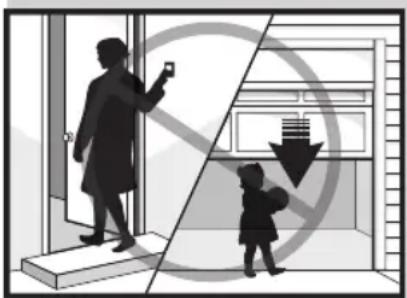
Diagram illustrating a social interaction with a child, showing a person taking a photo and another child holding a phone, separated by a crossed-out arrow symbolizing prohibition.Keep the door in sight until it completely closes when using the wall-mounted push button or transmitter.
Routine Maintenance Can Prevent Tragedies
Make monthly inspection and testing of your garage door and opener system a part of your regular routine. Review your owner's manual for both the door and door opener. If you don't have the owner's manuals, contact the manufacturer(s) and request a copy for your specific model(s). Look for the opener model number on the back of the power unit.

WARNING – Springs are under high tension. Only qualified individuals should adjust them.
Visually check the door and installation:
natural_image
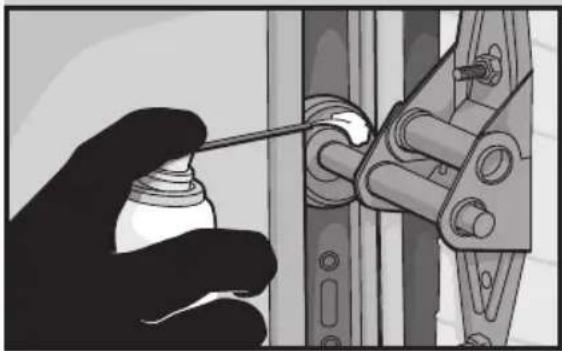
Hand holding a spray bottle next to a mechanical component (no text or symbols visible)- Starting with the door in the closed position, use the manual disconnect on the opener to disconnect the door.
- Look for signs of wear or damage on hinges, rollers, springs, and door panels.
- These parts may require periodic lubrication. Check the owner's manual for suggested maintenance.
- If any signs of damage are evident, contact a trained door systems technician for assistance.
- Verify the photoeye height is no higher than 6" from the garage floor.
Test the door for proper operation:
natural_image
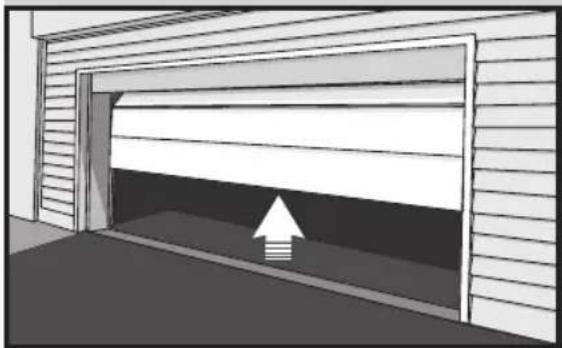
Diagram of a garage with an upward arrow indicating loading or clearance (no text or symbols present)- Open and close the door manually using handles or suitable gripping points.
- The door should move freely and without difficulty.
- The door should balance and stay partially open 3–4 feet above the floor.
- If you detect any signs of improper operation, contact a trained door systems technician for assistance.
Test the opener safety features:
text_image
Diagram showing a person holding a labeled object inside a warehouse with numbered annotations and directional arrows.- Reconnect the opener to the door using the manual disconnect and open the door.
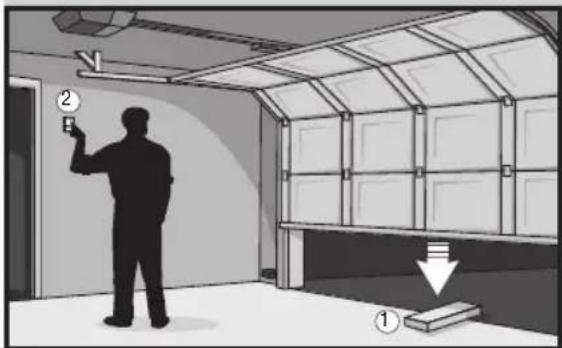
- Place a 2x4 board flat in the path of the door (1) and try to close it (2). The door should stop when it comes in contact with the 2x4 and then reverse direction.
- Block the photoelectric sensor by waving an object in front of the sensor and attempt to close the door. The door should not close unless the wall-mounted push button is manually held during operation.
- If the opener does not perform as described, contact a trained door systems technician for assistance.
To see repair parts for your garage door opener, identify the model number on the end panel of the opener and visit LiftMaster.com/Customer-Support to download or print the installation manual.
Warranty
LIFTMASTER® LIMITED WARRANTY
LiftMaster (“Seller”) warrants to the first retail purchaser of this product, for the residence in which this product is originally installed, that it is free from defects in materials and/or workmanship for a specific period of time as defined below (the “Warranty Period”). The warranty period commences from the date of purchase.
| WARRANTY PERIOD | |||
| Parts Motor Accessories | Battery Backup | ||
| 5 Years Lifetime 1 year 1 year | |||
The proper operation of this product is dependent on your compliance with the instructions regarding installation, operation, and maintenance and testing. Failure to comply strictly with those instructions will void this limited warranty in its entirety.
If, during the limited warranty period, this product appears to contain a defect covered by this limited warranty, call 1-800-528-9131, toll free, before dismantling this product. You will be advised of disassembly and shipping instructions when you call. Then send the product or component, pre-paid and insured, as directed to our service center for warranty repair. Please include a brief description of the problem and a dated proof-of-purchase receipt with any product returned for warranty repair. Products returned to Seller for warranty repair, which upon receipt by Seller are confirmed to be defective and covered by this limited warranty, will be repaired or replaced (at Seller's sole option) at no cost to you and returned pre-paid. Defective parts will be repaired or replaced with new or factory-rebuilt parts at Seller's sole option. [You are responsible for any costs incurred in removing and/or reinstalling the product or any component].
ALL IMPLIED WARRANTIES FOR THE PRODUCT, INCLUDING BUT NOT LIMITED TO ANY IMPLIED WARRANTIES OF MERCHANTABILITY AND FITNESS FOR A PARTICULAR PURPOSE, ARE LIMITED IN DURATION TO THE APPLICABLE LIMITED WARRANTY PERIOD SET FORTH ABOVE FOR THE RELATED COMPONENT(S), AND NO IMPLIED WARRANTIES WILL EXIST OR APPLY AFTER SUCH PERIOD. Some States and Provinces do not allow limitations on how long an implied warranty lasts, so the above limitation may not apply to you. THIS LIMITED WARRANTY DOES NOT COVER NON-DEFECT DAMAGE, DAMAGE CAUSED BY IMPROPER INSTALLATION, OPERATION OR CARE (INCLUDING, BUT NOT LIMITED TO ABUSE, MISUSE, FAILURE TO PROVIDE REASONABLE AND NECESSARY MAINTENANCE, UNAUTHORIZED REPAIRS OR ANY ALTERATIONS TO THIS PRODUCT), LABOR CHARGES FOR REINSTALLING A REPAIRED OR REPLACED UNIT, REPLACEMENT OF CONSUMABLE ITEMS (E.G., BATTERIES IN REMOTE CONTROL TRANSMITTERS AND LIGHT BULBS), OR UNITS INSTALLED FOR NON-RESIDENTIAL USE. THIS LIMITED WARRANTY DOES NOT COVER ANY PROBLEMS WITH, OR RELATING TO, THE GARAGE DOOR OR GARAGE DOOR HARDWARE, INCLUDING BUT NOT LIMITED TO THE DOOR SPRINGS, DOOR ROLLERS, DOOR ALIGNMENT OR HINGES. THIS LIMITED WARRANTY ALSO DOES NOT COVER ANY PROBLEMS CAUSED BY INTERFERENCE. UNDER NO CIRCUMSTANCES SHALL SELLER BE LIABLE FOR CONSEQUENTIAL, INCIDENTAL OR SPECIAL DAMAGES ARISING IN CONNECTION WITH USE, OR INABILITY TO USE, THIS PRODUCT. IN NO EVENT SHALL SELLER'S LIABILITY FOR BREACH OF WARRANTY, BREACH OF CONTRACT, NEGLIGENCE OR STRICT LIABILITY EXCEED THE COST OF THE PRODUCT COVERED HEREBY. NO PERSON IS AUTHORIZED TO ASSUME FOR US ANY OTHER LIABILITY IN CONNECTION WITH THE SALE OF THIS PRODUCT.
Some states and provinces do not allow the exclusion or limitation of consequential, incidental or special damages, so the above limitation or exclusion may not apply to you. This limited warranty gives you specific legal rights, and you may also have other rights, which vary from state to state and province to province.
natural_image
3D rendering of a mechanical device with attached components and mounting bracket (no visible text or symbols)LiftMaster®
GUIDE DE L'UTILISATEUR
POUR USAGE RÉSIDENTIEL UNIQUEMENT
INSTALLEZ SUR LES PORTES SECTIONNELLES AVEC ASSEMBLAGES DE TORSION UNIQUEMENT
Programmation....32-33
text_image
Diagram illustrating smart home connectivity with a smartphone displaying Wi-Fi icons and a person interacting with a device.natural_image
Technical line drawing of a mechanical lifting device with a door and frame (no text or symbols)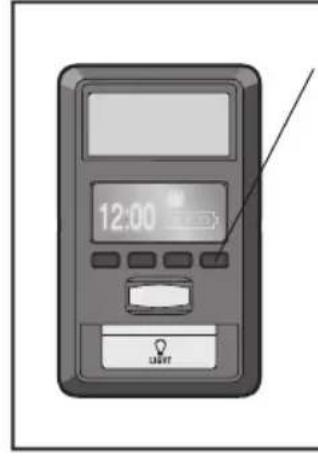
text_image
12:00 STARTtext_image
12:00 AM LIGHTBatterie de secours
To prevent damage to vehicles, be sure fully open door provides adequate clearance.
natural_image
Illustration of a hand pointing at a computer screen and a house with an upward arrow (no text or symbols)natural_image
Illustration of a hand pressing a button on a device (no text or symbols visible)natural_image
Illustration of a hand pressing a button next to a small house with a door (no text or symbols)natural_image
Hand inserting a device into a device casing (no text or symbols visible)natural_image
Simple line drawing of a two-story house with a garage and an upward arrow (no text or symbols)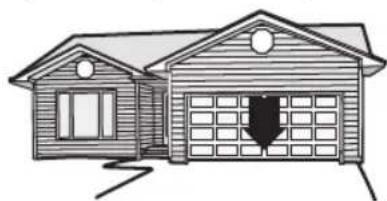
natural_image
Simple line drawing of a two-story house with a garage and door (no text or symbols)Ajustements
natural_image
Line drawing of a two-story house with a garage and windows (no text or symbols)natural_image
Illustration of a hand holding a small toy car next to a two-story house with a door (no text or symbols)natural_image
Simple line drawing of a two-story house with a garage and parked space (no text or symbols)natural_image
Illustration of a hand holding a small car with a parking garage in front (no text or symbols)text_image
Prohibition sign showing a scooter with a 'No' symbol and downward arrow, indicating no change or restriction in the parking garage.natural_image
Illustration of a person sitting with a computer mouse, crossed out by a diagonal line (no text or symbols)natural_image
Silhouette of a person reaching for up at a wall, next to a car and fence (no text or symbols)text_image
Diagram illustrating a social interaction with a child and an adult, showing a hand gesture and a downward arrow symbolizing decline.natural_image
Illustration of a hand using a tool to adjust or install a mechanical component (no text or symbols visible)natural_image
Diagram of a garage with an upward arrow indicating clearance or storage (no text or symbols present)natural_image
Interior view of a room with a person standing near a ceiling-mounted fixture and a wall-mounted shelf (no text or symbols visible)Door & Access Systems Manufacturers Association International